JavaScript is disabled. For a better experience, please enable JavaScript in your browser before proceeding.
You are using an out of date browser. It may not display this or other websites correctly.
You should upgrade or use an
alternative browser .
Solved On builds 26100.3321 and 26100.3323, Installation Fails at 10% When Copying Files to HDD
Well-known member
Pro User
VIP
Last edited: Feb 28, 2025
Win7,Win11 i7-9700 2x16gb 3600mhz Win7,Win11 PC/Desktop i7-9700 gigabyte b365m ds3h 2x16gb 3600mhz benq gw2480 bequiet pure power 11 400CM cryorig m9i
win7,win11 i5-8400 2x8gb 3200 win7,win11 PC/Desktop i5-8400 gigabyte b365m ds3h 2x8gb 3200 xfx pro 450
Thank you very much
@SIW2 for ADD-TO-WIM v 16.zip.
Every tab works well except macrium. In my case it is free v8.0.7783, but does not work when clicked in PEcmd menu. There are two application files namely reflect and ReflectBin in ADD-TO-WIM v16 \BIN \Program Files\macrium. Both of them work in Windows 10 \ Windows 11 when run as administrator, independently. In BIN folder of extracted zip folder of ADD-TO-WIM v 16, get-macrium.cmd has mentioned both the files when opened with notepad.
Last edited: Feb 28, 2025
Window 11 v24H2 Build 26100.2033 Intel(R) Core(TM) i3-2100 CPU @ 3.10GHz 3.10 GHz 4.00 GB (3.89 GB usable) Onboard Window 11 v24H2 Build 26100.2033 PC/Desktop ASSEMMBLED Intel(R) Core(TM) i3-2100 CPU @ 3.10GHz 3.10 GHz ZEBRONICS 4.00 GB (3.89 GB usable) Onboard Onboard LG 1366x768 Toshiba HDD 1 TB Mechanical Mechanical 700 kb/s Microsoft EDGE, CHROME Microsoft Defender
Well-known member
Pro User
VIP
does it look like this?
check the wim windows\system32 and see if oledlg.dll is there
Win7,Win11 i7-9700 2x16gb 3600mhz Win7,Win11 PC/Desktop i7-9700 gigabyte b365m ds3h 2x16gb 3600mhz benq gw2480 bequiet pure power 11 400CM cryorig m9i
win7,win11 i5-8400 2x8gb 3200 win7,win11 PC/Desktop i5-8400 gigabyte b365m ds3h 2x8gb 3200 xfx pro 450
Well-known member
Pro User
VIP
Win7,Win11 i7-9700 2x16gb 3600mhz Win7,Win11 PC/Desktop i7-9700 gigabyte b365m ds3h 2x16gb 3600mhz benq gw2480 bequiet pure power 11 400CM cryorig m9i
win7,win11 i5-8400 2x8gb 3200 win7,win11 PC/Desktop i5-8400 gigabyte b365m ds3h 2x8gb 3200 xfx pro 450
Thanks
.
One more thing to add, shutdown button works but menu remains on the screen even after shutdown. Is any issue in my windows 11 or 10 power supply options?
This was about about v 16.
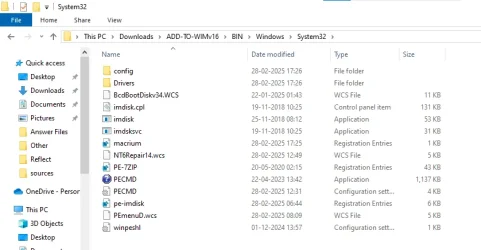
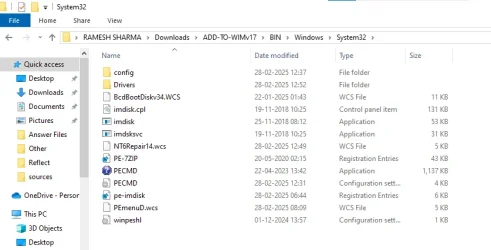
I am checking as per your post #23. There is no oledlg.dll file
in v16 as well as in v17 . {Windows 10 os presently working.} Please have a look at images {screenshots} attached herewith.
Edition Windows 10 Pro
Version 22H2
Installed on 27-08-2024
OS build 19045.5487
Experience Windows Feature Experience Pack 1000.19061.1000.0
Screenshot 2025-03-01 063048.webp
29 KB
· Views: 7
Screenshot 2025-03-01 063533.webp
40.4 KB
· Views: 5
Screenshot 2025-03-01 064226.webp
38.4 KB
· Views: 8
Last edited: Feb 28, 2025
Window 11 v24H2 Build 26100.2033 Intel(R) Core(TM) i3-2100 CPU @ 3.10GHz 3.10 GHz 4.00 GB (3.89 GB usable) Onboard Window 11 v24H2 Build 26100.2033 PC/Desktop ASSEMMBLED Intel(R) Core(TM) i3-2100 CPU @ 3.10GHz 3.10 GHz ZEBRONICS 4.00 GB (3.89 GB usable) Onboard Onboard LG 1366x768 Toshiba HDD 1 TB Mechanical Mechanical 700 kb/s Microsoft EDGE, CHROME Microsoft Defender
Well-known member
Pro User
VIP
v17 there should be oledlg.dll in macrium folder so it should work fine.
The script should add oledlg.dll to boot.wim windows\system32 image 2 as well for builds below 20000.
It is added to macrium folder in v17 if macrium is copied from %programfiles%\macrium ( which does not contain oledlg.dll )
instead of from %systemdrive%\boot\macrium ( which does contain oledlg.dll )
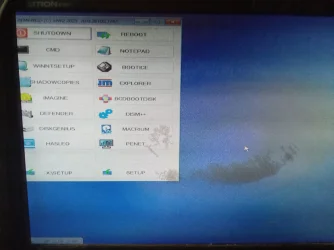
menu remains on the screen even after shutdown
I dont understand what you are trying to say.
Last edited: Feb 28, 2025
Win7,Win11 i7-9700 2x16gb 3600mhz Win7,Win11 PC/Desktop i7-9700 gigabyte b365m ds3h 2x16gb 3600mhz benq gw2480 bequiet pure power 11 400CM cryorig m9i
win7,win11 i5-8400 2x8gb 3200 win7,win11 PC/Desktop i5-8400 gigabyte b365m ds3h 2x8gb 3200 xfx pro 450
Update
IMG_20250301_083850_537~2.webp
347.8 KB
· Views: 7
IMG_20250301_084232_402.webp
427.1 KB
· Views: 6
IMG_20250301_084121_311~2.webp
516.9 KB
· Views: 6
Window 11 v24H2 Build 26100.2033 Intel(R) Core(TM) i3-2100 CPU @ 3.10GHz 3.10 GHz 4.00 GB (3.89 GB usable) Onboard Window 11 v24H2 Build 26100.2033 PC/Desktop ASSEMMBLED Intel(R) Core(TM) i3-2100 CPU @ 3.10GHz 3.10 GHz ZEBRONICS 4.00 GB (3.89 GB usable) Onboard Onboard LG 1366x768 Toshiba HDD 1 TB Mechanical Mechanical 700 kb/s Microsoft EDGE, CHROME Microsoft Defender
Well-known member
Pro User
VIP
Yes it should. defender should also work, to download definition updates needs net connection.
You can take screenshots with Imagine and save them to disk or usb stick
Tools>Capture Screen
Win7,Win11 i7-9700 2x16gb 3600mhz Win7,Win11 PC/Desktop i7-9700 gigabyte b365m ds3h 2x16gb 3600mhz benq gw2480 bequiet pure power 11 400CM cryorig m9i
win7,win11 i5-8400 2x8gb 3200 win7,win11 PC/Desktop i5-8400 gigabyte b365m ds3h 2x8gb 3200 xfx pro 450
Thanks
@SIW2 for quick responses.
1. Where are screenshots saved when Imagine is used?
2.Does PENET work on mobile wifi hotspot ? Which tab should I use for downloading updates?
Window 11 v24H2 Build 26100.2033 Intel(R) Core(TM) i3-2100 CPU @ 3.10GHz 3.10 GHz 4.00 GB (3.89 GB usable) Onboard Window 11 v24H2 Build 26100.2033 PC/Desktop ASSEMMBLED Intel(R) Core(TM) i3-2100 CPU @ 3.10GHz 3.10 GHz ZEBRONICS 4.00 GB (3.89 GB usable) Onboard Onboard LG 1366x768 Toshiba HDD 1 TB Mechanical Mechanical 700 kb/s Microsoft EDGE, CHROME Microsoft Defender
Well-known member
Pro User
VIP
In additition:
Win7,Win11 i7-9700 2x16gb 3600mhz Win7,Win11 PC/Desktop i7-9700 gigabyte b365m ds3h 2x16gb 3600mhz benq gw2480 bequiet pure power 11 400CM cryorig m9i
win7,win11 i5-8400 2x8gb 3200 win7,win11 PC/Desktop i5-8400 gigabyte b365m ds3h 2x8gb 3200 xfx pro 450
Well-known member
Pro User
VIP
Where are screenshots saved when Imagine is used?
wherever you tell it to save
Does PENET work on mobile wifi hotspot ?
winre.wim has wireless.
[EXEC !X:\Windows\System32\wpeutil.exe InitializeNetwork] <0> :The operation completed successfully.
[SERV Wlansvc] <0> :The operation completed successfully.
I cant help with set up for moblie hotspot. I only use wired and I dont own a laptop. You will have to play with penetwork and figure it out.
Last edited: Feb 28, 2025
Win7,Win11 i7-9700 2x16gb 3600mhz Win7,Win11 PC/Desktop i7-9700 gigabyte b365m ds3h 2x16gb 3600mhz benq gw2480 bequiet pure power 11 400CM cryorig m9i
win7,win11 i5-8400 2x8gb 3200 win7,win11 PC/Desktop i5-8400 gigabyte b365m ds3h 2x8gb 3200 xfx pro 450
In additition:
Yes , it goes back to Troubleshoot and when clicked again opens PECMD-TOOLS WinPE Commander. Next click opens dashboard of PEMENUD (C) SIW2 2025 10.0. 26100.1742.
Last edited: Feb 28, 2025
Window 11 v24H2 Build 26100.2033 Intel(R) Core(TM) i3-2100 CPU @ 3.10GHz 3.10 GHz 4.00 GB (3.89 GB usable) Onboard Window 11 v24H2 Build 26100.2033 PC/Desktop ASSEMMBLED Intel(R) Core(TM) i3-2100 CPU @ 3.10GHz 3.10 GHz ZEBRONICS 4.00 GB (3.89 GB usable) Onboard Onboard LG 1366x768 Toshiba HDD 1 TB Mechanical Mechanical 700 kb/s Microsoft EDGE, CHROME Microsoft Defender
wherever you tell it to save
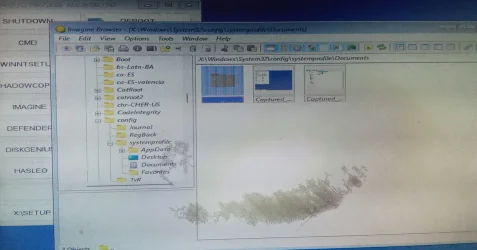
It is saved in THIS PC . Make new folder does not work.
PATH IS X:\Windows\System32\config\systemprofile\Documents as shown in screenshot. I regret for dark spot on monitor.
From this location we can save, cut, send to our desired locations.
IMG_20250301_092141_336~2.webp
524.9 KB
· Views: 7
IMG_20250301_092700_511~2.webp
521.2 KB
· Views: 6
Last edited: Feb 28, 2025
Window 11 v24H2 Build 26100.2033 Intel(R) Core(TM) i3-2100 CPU @ 3.10GHz 3.10 GHz 4.00 GB (3.89 GB usable) Onboard Window 11 v24H2 Build 26100.2033 PC/Desktop ASSEMMBLED Intel(R) Core(TM) i3-2100 CPU @ 3.10GHz 3.10 GHz ZEBRONICS 4.00 GB (3.89 GB usable) Onboard Onboard LG 1366x768 Toshiba HDD 1 TB Mechanical Mechanical 700 kb/s Microsoft EDGE, CHROME Microsoft Defender
Well-known member
Pro User
VIP
tick Show in viewer window
click Start
when ready to take screenie press ctrl+F11
it will display the screenshot in viewer window
then at top left of viewer window click File > Save As and browse to wherever you want
That should work without explorerframe.
You wont have explorerframe if you made the win11 wim while you were in win10
Last edited: Mar 1, 2025
Win7,Win11 i7-9700 2x16gb 3600mhz Win7,Win11 PC/Desktop i7-9700 gigabyte b365m ds3h 2x16gb 3600mhz benq gw2480 bequiet pure power 11 400CM cryorig m9i
win7,win11 i5-8400 2x8gb 3200 win7,win11 PC/Desktop i5-8400 gigabyte b365m ds3h 2x8gb 3200 xfx pro 450



 .
.