On Manually updating UEFI CA2023 security keys


Thanks @DarkShadowMD for your inputs.
1.The last Bios update for my Dell Inspiron 3280 AIO was 0.1.17.5 dated 03 Jul 2023. That I had updated then and there.
2. Dell has categorically stated they will not be issusing any new BIOS update for mitigating the CA2023 update
3. I had already run garlin's Check-SecureBootCerts.ps1. Will post the screenshot in my next post specifically addressed to garlin.
4. I am not in a hurry to do anything on this until I am sure that I will be doing the right thing.

The whole topic is so confusing for a novice like me :-) - you know I didn't know how to run the *.ps powershell script. Shame on me I had to educate myself and finally succeeded in running it :-)
 
Last edited:

My Computers

System One System Two

  • OS
    Windows 11 Pro Version:25H2 OS Build: 26200.8524
    Computer type
    PC/Desktop
    Manufacturer/Model
    Beelink Mini PC Model: SEi12
    CPU
    12th Gen Intel core i5-1235U(Alder
    Motherboard
    SEi (manufactured by AZW)
    Memory
    16*2 (32 GB) DDR 4-3200(1600MHz) Crucial Technology
    Graphics Card(s)
    Intel Iris Xe Graphics (Internal)
    Sound Card
    Internal
    Monitor(s) Displays
    BenQ GW2283
    Screen Resolution
    1920*1080
    Hard Drives
    500GB NVME (Kingston SNV2S500G)
    1TB (Crucial CT1000BX500SSD1)
    PSU
    Power Brick 19V-6.32A , 120.08W
    Keyboard
    Dell KB3322Wi (Wireless)
    Mouse
    Dell WM118t (Wireless)
    Internet Speed
    4G/5G
    Browser
    MS Edge, Chrome
    Antivirus
    Malwarebytes Premium - Subscription
  • Operating System
    Windows 11 Home Version 25H2 Build 26200.8524
    Computer type
    PC/Desktop
    Manufacturer/Model
    Dell Inspiron 3280 AIO 22"
    CPU
    Intel Core i3 8145U
    Motherboard
    Dell inc. 027W48
    Memory
    Intel Optane 16GB module + DDR 4 16GB (Optane disabled.)
    Graphics card(s)
    Intel UHD Graphics 620
    Sound Card
    Internal
    Monitor(s) Displays
    Dell Monitor 22"
    Screen Resolution
    1920x1080
    Hard Drives
    Crucial CT1000BX500SSD1 ; 1000,2 GB
    PSU
    Power Brick
    Case
    All-in one
    Keyboard
    Dell Wireless KM636
    Mouse
    Dell Wireless KM 636
    Internet Speed
    4G
    Browser
    Edge, Chrome
    Antivirus
    Malwarebytes
    Other Info
    Upgraded from Windows 10 Home to Windows 11 Home on 28 Oct 2023
3 chuwa laptops my grandchildren use wouldn't update secure boot.
it was only after i added the certs to the data base did the TPM/BIOS secure boot update
i have no explanation why or why not but that was the only way they would update.

the 2 HP all in ones in use updated their secure boot certs without the need to update the data base
again i can give no explanation why or why not, that was just the way it happened.

needless to say this whole affair to update systems has been time consuming.
best of luck Steve ..
Hi.

I will try to explain why placing Windows UEFI CA 2023 certificate in Windows certificate store is useless.

Security measure of Secure Boot is an intermediary process that takes place in UEFI firmware between "the time after BIOS nears completion of post" and "the time just after Windows starts loading" to counteract against bootkits, rootkits, whatnot.

The short name UEFI in "Windows UEFI CA 2023 certificate" implies that it should be an UEFI constituent and placed in UEFI firmware NVRAM. For this reason, there is no logic in my opinion to installing "Windows UEFI CA 2023 certificate" in Windows certificate store.

"Windows UEFI CA 2023 certificate" in Windows certificate store may become active, if it ever does, after Windows completes loading and does no good for boot-time protection. Windows Security, a.k.a. Windows Defender, or other 3rd-party security software, if installed, takes control when Windows is loaded.

You have PCA 2011 certificate in UEFI firmware and it is still active and in effect. The new certificates will be in effect sometime in June 2026 and PCA 2011 will be void in October 2026. Therefore, I think this is the reason why you see a green checkmark in Device Security of Windows Security if secure boot is on.
 

My Computers

System One System Two

  • OS
    Windows 11 Pro build 26200.8524
    Computer type
    PC/Desktop
    Manufacturer/Model
    Home Built
    CPU
    Intel i7-4790
    Motherboard
    Asus H97 Pro Gamer with add-on TPM1.2 module
    Memory
    Teams DDR3-1600 4x4 GB
    Graphics Card(s)
    MSI Nvidia GeForce GTX 1050Ti
    Sound Card
    Realtek ALC1150
    Monitor(s) Displays
    Dell P2425D
    Screen Resolution
    2560 by 1440 pixels
    Hard Drives
    Corsair NVMe M.2 Core XT 1000 GB (Windows 11 v.25H2); Samsung SATA Evo 870 500 GB (Windows 11 v.25H2);
    PSU
    Corsair HX850
    Case
    Gigabyte Solo 210
    Cooling
    Zalman CNPS7X Tower
    Keyboard
    Microsoft AIO Wireless (includes touchpad)
    Mouse
    HP S1000 Plus Wireless
    Internet Speed
    500 Mb fiber optic
    Browser
    Chrome; MS Edge
    Antivirus
    Windows Defender
  • Operating System
    MacOS 12 Monterey
    Computer type
    Laptop
    Manufacturer/Model
    Apple Macbook Air
    CPU
    Intel Core i5
    Memory
    8 GB
    Graphics card(s)
    Intel integrated
    Screen Resolution
    1440 by 900 pixels
    Hard Drives
    128 GB
    Keyboard
    Built-in
    Mouse
    Microsoft Wireless
    Internet Speed
    802.11 ac
    Browser
    Chrome; Safari
    Antivirus
    N/A
Hi @garlin

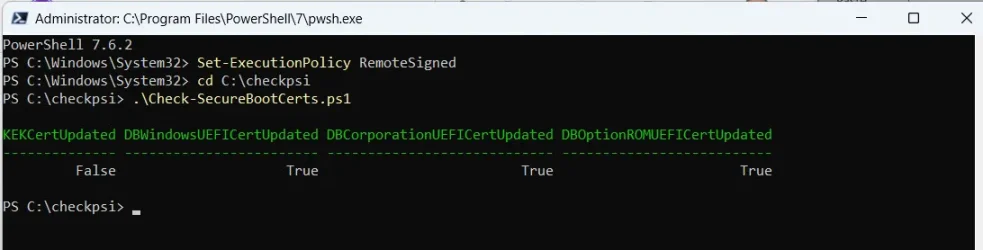
1. The screenshot below shows the results of "Check-SecureBootCerts.ps1"

01-06-2026 16-44-30.webp

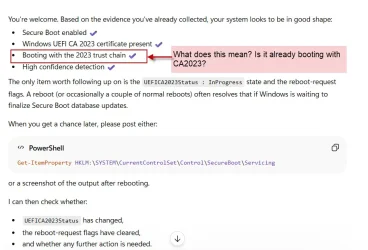
2. And here is what ChatGPT says

01-06-2026 12-29-35.webp

"Booting with the 2023 trust chain"'- What does it mean?

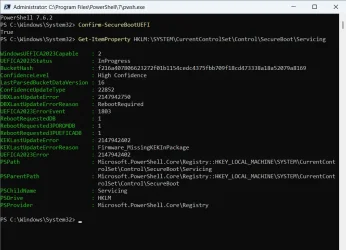
3. "Confirm--SecureBootUEFI" cmdlet shows the following screen

01-06-2026 11-14-24.webp

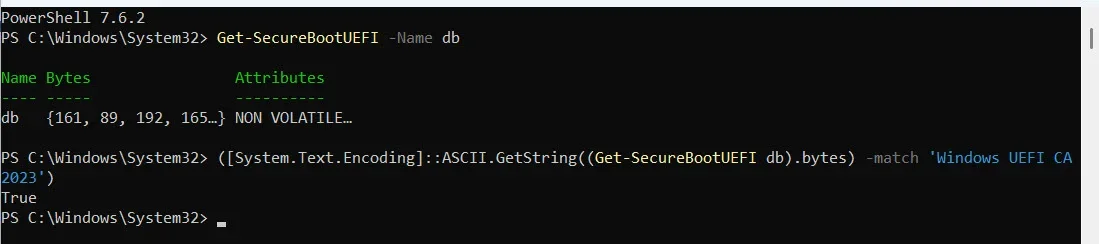
4.."Get-SecureBootUEFI" shows the following screen

01-06-2026 11-02-34.webp

Your expert opinion is solicited. Thanks.
 
Last edited:

My Computers

System One System Two

  • OS
    Windows 11 Pro Version:25H2 OS Build: 26200.8524
    Computer type
    PC/Desktop
    Manufacturer/Model
    Beelink Mini PC Model: SEi12
    CPU
    12th Gen Intel core i5-1235U(Alder
    Motherboard
    SEi (manufactured by AZW)
    Memory
    16*2 (32 GB) DDR 4-3200(1600MHz) Crucial Technology
    Graphics Card(s)
    Intel Iris Xe Graphics (Internal)
    Sound Card
    Internal
    Monitor(s) Displays
    BenQ GW2283
    Screen Resolution
    1920*1080
    Hard Drives
    500GB NVME (Kingston SNV2S500G)
    1TB (Crucial CT1000BX500SSD1)
    PSU
    Power Brick 19V-6.32A , 120.08W
    Keyboard
    Dell KB3322Wi (Wireless)
    Mouse
    Dell WM118t (Wireless)
    Internet Speed
    4G/5G
    Browser
    MS Edge, Chrome
    Antivirus
    Malwarebytes Premium - Subscription
  • Operating System
    Windows 11 Home Version 25H2 Build 26200.8524
    Computer type
    PC/Desktop
    Manufacturer/Model
    Dell Inspiron 3280 AIO 22"
    CPU
    Intel Core i3 8145U
    Motherboard
    Dell inc. 027W48
    Memory
    Intel Optane 16GB module + DDR 4 16GB (Optane disabled.)
    Graphics card(s)
    Intel UHD Graphics 620
    Sound Card
    Internal
    Monitor(s) Displays
    Dell Monitor 22"
    Screen Resolution
    1920x1080
    Hard Drives
    Crucial CT1000BX500SSD1 ; 1000,2 GB
    PSU
    Power Brick
    Case
    All-in one
    Keyboard
    Dell Wireless KM636
    Mouse
    Dell Wireless KM 636
    Internet Speed
    4G
    Browser
    Edge, Chrome
    Antivirus
    Malwarebytes
    Other Info
    Upgraded from Windows 10 Home to Windows 11 Home on 28 Oct 2023
Hi @garlin

1. The screenshot below shows the results of "Check-SecureBootCerts.ps1"
This isn't my script, please download it from here:
garlin's PowerShell scripts for updating Secure Boot CA 2023

You will find the real script is more informative, please run it with the -Verbose option:
Code:
Check_UEFI-CA2023.ps1 -Verbose

Therefore, I think this is the reason why you see a green checkmark in Device Security of Windows Security if secure boot is on.
Correct. Security Center gives you a green checkmark for simply having Secure Boot enabled. But the detailed message will be different, depending on whether you have the CA 2023 certs fully installed.
 

My Computer

System One

  • OS
    Windows 7
This isn't my script, please download it from here:
garlin's PowerShell scripts for updating Secure Boot CA 2023

You will find the real script is more informative, please run it with the -Verbose option:
Code:
Check_UEFI-CA2023.ps1 -Verbose
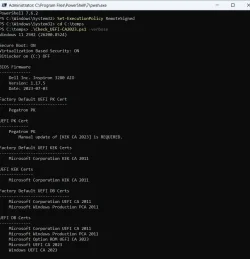
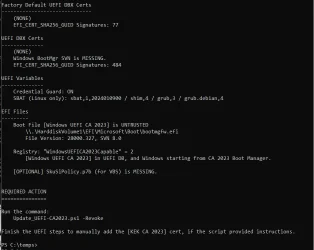
That was your script only but in non-verbose mode. Sorry for that. The verbose mode screenshots below -split into two since it was too
long
.01-06-2026 21-26-17.webp
01-06-2026 21-32-23.webp

You may read it alongwith the other screenshots in my previous post and give your opinion.
 

My Computers

System One System Two

  • OS
    Windows 11 Pro Version:25H2 OS Build: 26200.8524
    Computer type
    PC/Desktop
    Manufacturer/Model
    Beelink Mini PC Model: SEi12
    CPU
    12th Gen Intel core i5-1235U(Alder
    Motherboard
    SEi (manufactured by AZW)
    Memory
    16*2 (32 GB) DDR 4-3200(1600MHz) Crucial Technology
    Graphics Card(s)
    Intel Iris Xe Graphics (Internal)
    Sound Card
    Internal
    Monitor(s) Displays
    BenQ GW2283
    Screen Resolution
    1920*1080
    Hard Drives
    500GB NVME (Kingston SNV2S500G)
    1TB (Crucial CT1000BX500SSD1)
    PSU
    Power Brick 19V-6.32A , 120.08W
    Keyboard
    Dell KB3322Wi (Wireless)
    Mouse
    Dell WM118t (Wireless)
    Internet Speed
    4G/5G
    Browser
    MS Edge, Chrome
    Antivirus
    Malwarebytes Premium - Subscription
  • Operating System
    Windows 11 Home Version 25H2 Build 26200.8524
    Computer type
    PC/Desktop
    Manufacturer/Model
    Dell Inspiron 3280 AIO 22"
    CPU
    Intel Core i3 8145U
    Motherboard
    Dell inc. 027W48
    Memory
    Intel Optane 16GB module + DDR 4 16GB (Optane disabled.)
    Graphics card(s)
    Intel UHD Graphics 620
    Sound Card
    Internal
    Monitor(s) Displays
    Dell Monitor 22"
    Screen Resolution
    1920x1080
    Hard Drives
    Crucial CT1000BX500SSD1 ; 1000,2 GB
    PSU
    Power Brick
    Case
    All-in one
    Keyboard
    Dell Wireless KM636
    Mouse
    Dell Wireless KM 636
    Internet Speed
    4G
    Browser
    Edge, Chrome
    Antivirus
    Malwarebytes
    Other Info
    Upgraded from Windows 10 Home to Windows 11 Home on 28 Oct 2023
The problem is your BIOS has all of the other CA 2023 certs installed, except for the most important: KEK CA 2023. Without the KEK, the newer CA 2023 certs aren't validated in the UEFI security model.

Dell models don't really handle manual key enrollment, because they decided to only support a different encoded file format. You will have to delete the existing cert keys, and replace them. This is a non-destructive action, since the original CA 2011 certs are always in the factory defaults and you can reset back to factory mode.

1. BitLocker is disabled, which is good. Disable Windows Hello PIN if you're using it. When UEFI detects changes like certain cert updates, it invalidates BitLocker and Hello PIN codes stored in the TPM (as a security measure) and asks you to provide other means like a recovery key.

Therefore, we always ask users to check if they're using BitLocker or Hello PIN's.

2. Shutdown Windows. Enter the BIOS menus. Look for the Secure Boot settings. What you will see will depend on the exact model (because Dell uses at least 5 generations of BIOS code over the years).

3. If there is an option to switch from Standard Mode to Custom Mode, enable it.

4. Look for the option to Delete All Keys or Enter Setup Mode. Setup Mode wipes the current keys, and allows a new set of certs to be installed. Confirm Secure Boot mode is disabled.

5. Restart Windows. Run the check script again. It should recognize you're in Setup Mode (no certs present).

6. Run the update script, it should recognize you're in Setup Mode and download a new set of certs from MS's GitHub repo. It will install the Windows OEM Devices PK to replace the current Pegatron PK, and all of the CA 2011 + CA 2023 certs. If the script was successful (no errors), then shutdown Windows.
Code:
Update-UEFI.bat

7. Enable Secure Boot mode. Restart Windows and run the check script again. You should have a KEK CA 2023 and the 5 DB certs from before. At this point, CA 2011 revocation has not happened. You can wait for Windows to perform this later (this summer?).

One possible reason for delaying revocation is you would need to rebuild any bootable Windows ISO or Macrium-type recovery drives to use the newer CA 2023 boot manager file. There is no announced timeline when Windows will force a mandatory CA 2011 revocation, so we're in no hurry.
 

My Computer

System One

  • OS
    Windows 7
This isn't my script, please download it from here:
garlin's PowerShell scripts for updating Secure Boot CA 2023

You will find the real script is more informative, please run it with the -Verbose option:
Code:
Check_UEFI-CA2023.ps1 -Verbose


Correct. Security Center gives you a green checkmark for simply having Secure Boot enabled. But the detailed message will be different, depending on whether you have the CA 2023 certs fully installed.

There is a GUI to check if the 2023 secure boot certificates are present and installed. Launch the O&O Shutup 10 Free portable application. Click on the secure boot tab. It will display the status and whether its ready to boot in the future.
 

My Computers

System One System Two

  • OS
    Windows 11 Education For 25H2
    Computer type
    Laptop
    Manufacturer/Model
    HP ZBook G2
    CPU
    Intel® Core i7 5500u
    Motherboard
    HP
    Memory
    8 GB
    Graphics Card(s)
    Intel HD Family Graphics 5500 AMD Firepro 4150M
    Sound Card
    Realtek High Audio
    Hard Drives
    1 TB SSD
    Mouse
    HP USB Mouse
    Antivirus
    Windows Defender
  • Operating System
    Windows 11 Pro For Workstations 25H2
    Computer type
    Laptop
    Manufacturer/Model
    HP Zbook G4
    CPU
    Xeon 1535m v6
    Motherboard
    HP
    Memory
    32 GB
    Graphics card(s)
    AMD Quadro Pro 4100
    Sound Card
    Bang and Olufson Audio
    Hard Drives
    1TB SSD
    Mouse
    HP USB Mouse
    Antivirus
    Windows Defender
There is a GUI to check if the 2023 secure boot certificates are present and installed. Launch the O&O Shutup 10 Free portable application. Click on the secure boot tab. It will display the status and whether its ready to boot in the future.

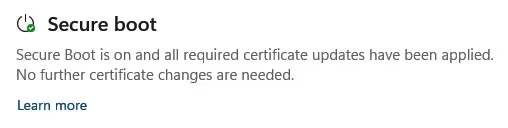
Now in security center of Windows.

Screenshot 2026-06-02 134205.webp
 

My Computer

System One

  • OS
    Windows 11 Pro
Not displayed in my main workstation security centre. The O&O shutup 10 Free secure boot tab reports its installed and present.
 

My Computers

System One System Two

  • OS
    Windows 11 Education For 25H2
    Computer type
    Laptop
    Manufacturer/Model
    HP ZBook G2
    CPU
    Intel® Core i7 5500u
    Motherboard
    HP
    Memory
    8 GB
    Graphics Card(s)
    Intel HD Family Graphics 5500 AMD Firepro 4150M
    Sound Card
    Realtek High Audio
    Hard Drives
    1 TB SSD
    Mouse
    HP USB Mouse
    Antivirus
    Windows Defender
  • Operating System
    Windows 11 Pro For Workstations 25H2
    Computer type
    Laptop
    Manufacturer/Model
    HP Zbook G4
    CPU
    Xeon 1535m v6
    Motherboard
    HP
    Memory
    32 GB
    Graphics card(s)
    AMD Quadro Pro 4100
    Sound Card
    Bang and Olufson Audio
    Hard Drives
    1TB SSD
    Mouse
    HP USB Mouse
    Antivirus
    Windows Defender
I don't know if this will help or not, but I had the same issue with the "more data needed." as well as the cert not being recognized,

I used the garlin script to d/l the new cert and even though it was installed & I rebooted several times I kept getting the same message that it needed updating.

I used one of the scripts to revoke the permissions of the old file manually & once I did that & rebooted, all was fine.

 
Last edited:

My Computer

System One

  • OS
    Win 11 Pro, Win 10 pro, Win 13.7 Pro Chinese Ver
    Computer type
    PC/Desktop
    Manufacturer/Model
    It's a Dell Dude
    CPU
    12th Gen Intel(R) Core(TM) i9-12900 2.40 GHz
    Motherboard
    Father is bored too...
    Memory
    64.0 GB of transcendental dimensional RAM
    Graphics Card(s)
    NVIDIA GeForce RTX 3070 Ti
    Sound Card
    N/A
    Monitor(s) Displays
    27" Samsung Monitor/Alternative Dimensional Viewing Portal
    Screen Resolution
    Fuzzy after a couple drinks
    Hard Drives
    2 or 3, depending on if it's a night they're arguing about having a "split personality crisis" because I partitioned the drive.
    PSU
    Shockingly active
    Case
    Don't get on my case....man
    Cooling
    Scotch on the rocks on the weekends.
    Keyboard
    Steel Series Lighted Glow in the dark something or another
    Mouse
    Currently being stalked by the cat...
    Internet Speed
    DSL
    Browser
    Defeated by Mario...wait...OH...BRowser...
    Antivirus
    Yep
The problem is your BIOS has all of the other CA 2023 certs installed, except for the most important: KEK CA 2023. Without the KEK, the newer CA 2023 certs aren't validated in the UEFI security model...........

Dell models don't really handle manual key enrollment, because they decided to only support a different encoded file format. You will have to delete the existing cert keys, and replace them. This is a non-destructive action, since the original CA 2011 certs are always in the factory defaults and you can reset back to factory mode.

1. BitLocker is disabled, which is good. Disable Windows Hello PIN if you're using it. When UEFI detects changes like certain cert updates, it invalidates BitLocker and Hello PIN codes stored in the TPM (as a security measure) and asks you to provide other means like a recovery key.

Therefore, we always ask users to check if they're using BitLocker or Hello PIN's.

2. Shutdown Windows. Enter the BIOS menus. Look for the Secure Boot settings. What you will see will depend on the exact model (because Dell uses at least 5 generations of BIOS code over the years).

3. If there is an option to switch from Standard Mode to Custom Mode, enable it.

4. Look for the option to Delete All Keys or Enter Setup Mode. Setup Mode wipes the current keys, and allows a new set of certs to be installed. Confirm Secure Boot mode is disabled.

5. Restart Windows. Run the check script again. It should recognize you're in Setup Mode (no certs present).

6. Run the update script, it should recognize you're in Setup Mode and download a new set of certs from MS's GitHub repo. It will install the Windows OEM Devices PK to replace the current Pegatron PK, and all of the CA 2011 + CA 2023 certs. If the script was successful (no errors), then shutdown Windows.
Code:
Update-UEFI.bat

7. Enable Secure Boot mode. Restart Windows and run the check script again. You should have a KEK CA 2023 and the 5 DB certs from before. At this point, CA 2011 revocation has not happened. You can wait for Windows to perform this later (this summer?).

One possible reason for delaying revocation is you would need to rebuild any bootable Windows ISO or Macrium-type recovery drives to use the newer CA 2023 boot manager file. There is no announced timeline when Windows will force a mandatory CA 2011 revocation, so we're in no hurry.
Thanks for your detailed write- up and your untiring effort in helping forum members.
Since I have so many other things to do, I am going slow on this. In the meanwhile I need a few clarifications.

"3. If there is an option to switch from Standard Mode to Custom Mode, enable it." The Dell BIOS is already in Custom Mode. So I believe I am good to go further.

"4. Look for the option to Delete All Keys or Enter Setup Mode. Setup Mode wipes the current keys, and allows a new set of certs to be installed. Confirm Secure Boot mode is disabled."
Do you mean Confirm Secure Boot is Off/disabled ?
 

My Computers

System One System Two

  • OS
    Windows 11 Pro Version:25H2 OS Build: 26200.8524
    Computer type
    PC/Desktop
    Manufacturer/Model
    Beelink Mini PC Model: SEi12
    CPU
    12th Gen Intel core i5-1235U(Alder
    Motherboard
    SEi (manufactured by AZW)
    Memory
    16*2 (32 GB) DDR 4-3200(1600MHz) Crucial Technology
    Graphics Card(s)
    Intel Iris Xe Graphics (Internal)
    Sound Card
    Internal
    Monitor(s) Displays
    BenQ GW2283
    Screen Resolution
    1920*1080
    Hard Drives
    500GB NVME (Kingston SNV2S500G)
    1TB (Crucial CT1000BX500SSD1)
    PSU
    Power Brick 19V-6.32A , 120.08W
    Keyboard
    Dell KB3322Wi (Wireless)
    Mouse
    Dell WM118t (Wireless)
    Internet Speed
    4G/5G
    Browser
    MS Edge, Chrome
    Antivirus
    Malwarebytes Premium - Subscription
  • Operating System
    Windows 11 Home Version 25H2 Build 26200.8524
    Computer type
    PC/Desktop
    Manufacturer/Model
    Dell Inspiron 3280 AIO 22"
    CPU
    Intel Core i3 8145U
    Motherboard
    Dell inc. 027W48
    Memory
    Intel Optane 16GB module + DDR 4 16GB (Optane disabled.)
    Graphics card(s)
    Intel UHD Graphics 620
    Sound Card
    Internal
    Monitor(s) Displays
    Dell Monitor 22"
    Screen Resolution
    1920x1080
    Hard Drives
    Crucial CT1000BX500SSD1 ; 1000,2 GB
    PSU
    Power Brick
    Case
    All-in one
    Keyboard
    Dell Wireless KM636
    Mouse
    Dell Wireless KM 636
    Internet Speed
    4G
    Browser
    Edge, Chrome
    Antivirus
    Malwarebytes
    Other Info
    Upgraded from Windows 10 Home to Windows 11 Home on 28 Oct 2023
"4. Look for the option to Delete All Keys or Enter Setup Mode. Setup Mode wipes the current keys, and allows a new set of certs to be installed. Confirm Secure Boot mode is disabled."
Do you mean Confirm Secure Boot is Off ?
Yes. In case you boot, and have a Windows boot manager which doesn't match the current key configs. By turning off Secure Boot, you're allowed to boot anything. Afterwards, the script can update the boot file as needed.
 

My Computer

System One

  • OS
    Windows 7
Back
Top Bottom