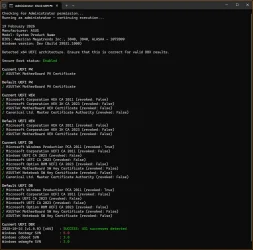
Did you manually update your Secure Boot Keys ?


except complain to ASUS.

I think you mean ASRock, as that's what 666pierog has.

ASUS seems to be on the ball. They recently released a new BIOS for my old Tuf Z590 board (System 2).

I know you don't like this script, but here it is.
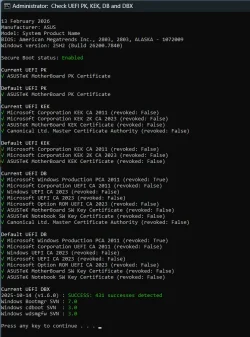
1771047946836.webp
 

My Computers

System One System Two

  • OS
    Win 11 Pro 25H2 26200.8524
    Computer type
    PC/Desktop
    Manufacturer/Model
    Self Built
    CPU
    Intel® Core™ i7-14700K
    Motherboard
    ASUS TUF Z690-PLUS WIFI BIOS 4505 11/29/25
    Memory
    G.SKILL Ripjaws S5 Series 64GB (2 x 32GB) DDR5
    Graphics Card(s)
    ASUS GeForce RTX 4070 Super 12GB
    Sound Card
    Sound Blaster AE-5 Plus
    Monitor(s) Displays
    ASUS TUF Gaming 27" 2K HDR Gaming
    Screen Resolution
    2560 x 1440
    Hard Drives
    Samsung 990 Pro 1TB NVMe (Win 11 25H2)
    SK hynix P41 500GB NVMe 25H2 DEV/Games
    SK hynix P41 2TB NVMe (x3)
    Crucial P3 Plus 4TB
    PSU
    Corsair RM850x Shift
    Case
    Antec Dark Phantom DP502 FLUX
    Cooling
    Corsair Nautilus 360 RS AIO
    Keyboard
    Logitech MK 320
    Mouse
    Razer Basilisk V3
    Internet Speed
    350Mbs
    Browser
    Firefox
    Antivirus
    Winows Security
    Other Info
    MR 8.1 Home

    System 3 Specs
    Win 11 Pro 25H2 26200.8524
    ASUS PRIME Z370-P II BIOS 3004 7/12/21
    Intel Core i7-8700 CPU @ 3.20GHz
    32GB DDR4 RAM (4x8)
    iGPU Intel UHD Graphics 630
  • Operating System
    Win 11 Pro 25H2 26200.8524
    Computer type
    PC/Desktop
    Manufacturer/Model
    Self Built
    CPU
    Intel Core i7-11700F
    Motherboard
    Asus TUF Gaming Z590 Plus WiFi (BIOS 2803)
    Memory
    64 GB DDR4
    Graphics card(s)
    MSI GeForce RTX 3060 Ventus 2X 12GB
    Sound Card
    SoundBlaster Audigy Fx V2
    Monitor(s) Displays
    Samsung F27T350
    Screen Resolution
    1920x1080
    Hard Drives
    Samsung 980 Pro 1TB
    Samsung 970 EVO Plus 2TB
    Samsung 870 EVO 500GB SSD
    PSU
    Corsair HX750
    Case
    Cougar MX330-G Window
    Cooling
    Thermalright Frozen Edge 240 Black AIO
    Internet Speed
    350Mbps
    Browser
    Firefox
    Antivirus
    Windows Security

My Computer

System One

  • OS
    Windows 11 25H2
    Computer type
    PC/Desktop
    Manufacturer/Model
    EVGA home brew
    CPU
    Broadwell-e 6850K 4.5ghz @1.36v
    Motherboard
    EVGA X99 FTW K
    Memory
    32GB Corsair LPM 3600 C16
    Graphics Card(s)
    EVGA RTX 3080Ti FTW
    Sound Card
    Asus Centurion true 7.1 headset. (5 speakers in each earpeice)
    Monitor(s) Displays
    LG C4 55"
    Screen Resolution
    4K 144hz
    Hard Drives
    Various models of SSDs ~10TB No HDDs installed.
    PSU
    be quiet! BN516 Straight Power 12-1000w 80 Plus Platinum
    Case
    Corsair 780T modified to dual 200mm intake fans
    Cooling
    Corsair H110i
    Keyboard
    Corsair K95 Platinum
    Mouse
    Corsair M65 RGB Elite
    Internet Speed
    50Mbs
so now if I have it added via script, I shouldn't have a problem when the 2011 certificates expire?
 

My Computer

System One

  • OS
    Windows 11
    Computer type
    PC/Desktop
    Manufacturer/Model
    Asrock b760 pro rs
Listed under the Feb. 2026 Monthly Update:
[Secure Boot] This release for Windows 11, version 24H2 will execute updates in the Boot Manager on devices that already have the Windows UEFI CA 2023 certificate in their Secure Boot Signature Database (DB). It replaces the 2011 signed bootmgfw.efi with the 2023 signed bootmgfw.efi. Be advised of the consequences of resetting the DB or turning Secure Boot on or off, as this can cause a "Secure Boot violation" issue. In those rare cases, the solution is to create the Secure Boot recovery media.

If your UEFI has the CA 2023 certs installed, Windows will try switching to the new CA 2023 boot file for you. Anyone who forced the Secure Boot updates before this month's update will not see any changes (you already switched the boot file).
 

My Computer

System One

  • OS
    Windows 7
Any way of manually updating/fixing the Windows Bootmgr SVN?
 

Attachments

  • Screenshot 2026-02-19 034352.webp
    Screenshot 2026-02-19 034352.webp
    98 KB · Views: 7

My Computer

System One

  • OS
    Windows 11 Insider
    Computer type
    PC/Desktop
    CPU
    AMD R7-7800x3D
    Motherboard
    Asus
    Memory
    32gig
    Graphics Card(s)
    RX 9070XT
Any way of manually updating/fixing the Windows Bootmgr SVN?

1. Make sure Windows has the October 2025 (or later) Monthly Update. SVN 5.0 indicates an older version of Windows.

2. Run the commands:
Code:
reg add HKEY_LOCAL_MACHINE\SYSTEM\CurrentControlSet\Control\Secureboot /v AvailableUpdates /t REG_DWORD /d 0x200 /f
powershell Start-ScheduledTask -TaskName "\Microsoft\Windows\PI\Secure-Boot-Update"
 

My Computer

System One

  • OS
    Windows 7
1. Make sure Windows has the October 2025 (or later) Monthly Update. SVN 5.0 indicates an older version of Windows.

2. Run the commands:
Code:
reg add HKEY_LOCAL_MACHINE\SYSTEM\CurrentControlSet\Control\Secureboot /v AvailableUpdates /t REG_DWORD /d 0x200 /f
powershell Start-ScheduledTask -TaskName "\Microsoft\Windows\PI\Secure-Boot-Update"
well thats the thing.. I'm running the latest Windows Insider Canary.. updated today..
 

My Computer

System One

  • OS
    Windows 11 Insider
    Computer type
    PC/Desktop
    CPU
    AMD R7-7800x3D
    Motherboard
    Asus
    Memory
    32gig
    Graphics Card(s)
    RX 9070XT

My Computer

System One

  • OS
    Windows 7
Forgot to mention, my update script has an option to use the latest DBXupdate.bin and DBXupdateSVN.bin files from the MS GitHub.
If the GitHub files are not a higher version of the files, no change is made.

garlin's PowerShell scripts for updating Secure Boot CA 2023

Run this command as Admin:
Code:
powershell -ep bypass -f .\Update_UEFI-CA2023.ps1 -Revoke -Latest
 

My Computer

System One

  • OS
    Windows 7
Hello everyone,

I have a question for everyone that got a new BIOS update,
Was this included in the BIOS update?

I mean the (v1.6.0) DBX.
I suppose all the Windows SVN is something that will be from microsoft and not from a BIOS update?

1771916586722.webp
 

My Computer

System One

  • OS
    Windows 11
    Computer type
    PC/Desktop
I have a question for everyone that got a new BIOS update,
Was this included in the BIOS update?

I mean the (v1.6.0) DBX.
I suppose all the Windows SVN is something that will be from microsoft and not from a BIOS update?
Every BIOS firmware will include some factory default DBX signatures; but since the list can change too quickly, it's up to MS to provide an updated list.

The main goal of installing a new BIOS is adding the CA 2023 certs to KEK and DB, but not to automatically revoke any certs in DBX. After you follow the all manual (or scripted) steps to revoke the CA 2011 cert, the missing DBX signatures and SVN numbers will be populated.
 

My Computer

System One

  • OS
    Windows 7
Every BIOS firmware will include some factory default DBX signatures; but since the list can change too quickly, it's up to MS to provide an updated list.

The main goal of installing a new BIOS is adding the CA 2023 certs to KEK and DB, but not to automatically revoke any certs in DBX. After you follow the all manual (or scripted) steps to revoke the CA 2011 cert, the missing DBX signatures and SVN numbers will be populated.
Thanks, I’m asking because the latest BIOS update seems to be missing some things. The blacklist (DBX) wasn't updated, the new Microsoft Option ROM UEFI CA 2023 key is missing,

and the KEK key is also showing up in the DB list but not sure if that's fine as long as it's also in KEK list?
 

My Computer

System One

  • OS
    Windows 11
    Computer type
    PC/Desktop
Thanks, I’m asking because the latest BIOS update seems to be missing some things. The blacklist (DBX) wasn't updated, the new Microsoft Option ROM UEFI CA 2023 key is missing,
By default, no vendor will update the DBX with certs because that would block systems which are not ready, from booting. Not every vendor will include the Option ROM cert as a default, but it can be added from Windows after KEK CA 2023 has been installed.

and the KEK key is also showing up in the DB list but not sure if that's fine as long as it's also in KEK list?
KEK CA 2023 should not be listed in DB, but it won't harm the PC.

You can have extra certs in DB or DBX, which are ignored if they don't follow the "web of trust". Every DB or DBX cert needs to have a KEK to authenticate it. Since only a PK can only authenticate a KEK cert, having KEK CA 2023 in the wrong place means this duplicate entry is not enforceable (ignored).

But if your BIOS has manual key management, I would clean it up if possible.
 

My Computer

System One

  • OS
    Windows 7
I have a MoBo that had it's last eol firmware update in 2022. Needless to say, I had the old secure boot certificate version. I followed suatcini54's directions, and everything shows as true when I run Confirm-SecureBootUEFI and [System.Text.Encoding]::ASCII.GetString((Get-SecureBootUEFI db).bytes) -match ‘Windows UEFI CA 2023’

Thank you so much, suatcini54!
 

My Computer

System One

  • OS
    Windows 11
I followed suatcini54's directions
Where are those directions?
If they are in this thread, what is their post number [shown on the right-hand side of each post]?


Denis
 

My Computer

System One

  • OS
    Windows 11 Home x64 Version 25H2 Build 26200.8037

My Computers

System One System Two

  • OS
    Win 11 Pro 25H2 26200.8524
    Computer type
    PC/Desktop
    Manufacturer/Model
    Self Built
    CPU
    Intel® Core™ i7-14700K
    Motherboard
    ASUS TUF Z690-PLUS WIFI BIOS 4505 11/29/25
    Memory
    G.SKILL Ripjaws S5 Series 64GB (2 x 32GB) DDR5
    Graphics Card(s)
    ASUS GeForce RTX 4070 Super 12GB
    Sound Card
    Sound Blaster AE-5 Plus
    Monitor(s) Displays
    ASUS TUF Gaming 27" 2K HDR Gaming
    Screen Resolution
    2560 x 1440
    Hard Drives
    Samsung 990 Pro 1TB NVMe (Win 11 25H2)
    SK hynix P41 500GB NVMe 25H2 DEV/Games
    SK hynix P41 2TB NVMe (x3)
    Crucial P3 Plus 4TB
    PSU
    Corsair RM850x Shift
    Case
    Antec Dark Phantom DP502 FLUX
    Cooling
    Corsair Nautilus 360 RS AIO
    Keyboard
    Logitech MK 320
    Mouse
    Razer Basilisk V3
    Internet Speed
    350Mbs
    Browser
    Firefox
    Antivirus
    Winows Security
    Other Info
    MR 8.1 Home

    System 3 Specs
    Win 11 Pro 25H2 26200.8524
    ASUS PRIME Z370-P II BIOS 3004 7/12/21
    Intel Core i7-8700 CPU @ 3.20GHz
    32GB DDR4 RAM (4x8)
    iGPU Intel UHD Graphics 630
  • Operating System
    Win 11 Pro 25H2 26200.8524
    Computer type
    PC/Desktop
    Manufacturer/Model
    Self Built
    CPU
    Intel Core i7-11700F
    Motherboard
    Asus TUF Gaming Z590 Plus WiFi (BIOS 2803)
    Memory
    64 GB DDR4
    Graphics card(s)
    MSI GeForce RTX 3060 Ventus 2X 12GB
    Sound Card
    SoundBlaster Audigy Fx V2
    Monitor(s) Displays
    Samsung F27T350
    Screen Resolution
    1920x1080
    Hard Drives
    Samsung 980 Pro 1TB
    Samsung 970 EVO Plus 2TB
    Samsung 870 EVO 500GB SSD
    PSU
    Corsair HX750
    Case
    Cougar MX330-G Window
    Cooling
    Thermalright Frozen Edge 240 Black AIO
    Internet Speed
    350Mbps
    Browser
    Firefox
    Antivirus
    Windows Security
Folks:

Guide me!

If I run the suggested EFIBootFile.ps1, here's the output.

Code:
PS C:\Users\xxx> Check_EFIBootFile.ps1
Secure Boot: ENABLED

EFI DB Certificates
-------------------
    Microsoft Windows Production PCA 2011
    Windows UEFI CA 2023
    Microsoft Corporation UEFI CA 2011
    Microsoft UEFI CA 2023

EFI DBX Certificates
--------------------
AvailableUpdates: 0x400
-----------------------
EFI Files
---------
Boot Manager [Microsoft UEFI CA 2023] on Disk 0 is allowed.

And if I check in Privacy and Security > Windows Security > Device Security > Secure Boot, I find ""Secure Boot is on, but your device is using an older boot trust configuration that should be updated."

I have MS updates through the latest 2026-04 Preview Update (KB5083631) (26200.8328) installed.

So where do I stand? Am I running off the 2023 certificates now?
 

My Computer

System One

  • OS
    Windows 11 Pro 24H2
    Computer type
    Laptop
    Manufacturer/Model
    HP
    CPU
    Intel Ultra 7 155H
    Memory
    16gb
    Graphics Card(s)
    Intel Arc integrated
    Hard Drives
    SSD

Latest Support Threads

Back
Top Bottom