Outlook classic best way to back up/restore files to avoid sync problems?


AndreIsComputn

Well-known member
Local time
4:54 PM
Posts
32
OS
Windows 10, Windows 11
Hi everyone! Apologies if this has been answered elsewhere, I tried looking for the answer myself in the posts already created re: outlook but honestly I'm pretty awful about finding stuff that's right underneath my nose (my search skills suck :P )

I ran into a problem with Outlook Classic (technically I have Office 2021 running on Windows 11 on my computer but I just use Outlook Classic) ... back when I set up Outlook on Win 11 I successfully imported my rather ancient (I think it was back from the Office/Outlook year 2003 version days!) pst file far as being able to view the events on there (honestly that's all I really care about the calendar function, not worried about emails or anything else ) ...

I'm not sure how the two were related.. maybe it was because I imported the pst file from my secondary "D" drive when I first installed Office 2021, maybe it was because I routinely back up the pst file to the D drive.. but when I accidentally disconnected the sata cable for the "D" hard drive while troubleshooting an issue (trying to find out where a humming sound was coming from) inside my computer and then booted Windows up without realizing Windows essentially would now see the D drive as not being there, Outlook threw a fit and started hollering about sync issues, I believe it was upset about not being able to sync the email address that Outlook demands you associate with it during the set up process. All my tasks vanished from Outlook Classic's calendar.

I tried importing the backed up pst file I'd created earlier on the now-reconnected "D" drive then tried importing the same backed up pst file on the other "E" drive that I also back it up to, no luck tasks still not showing in the calendar.

I got lucky in that after uninstalling and reinstalling Office 2021 a few times, Outlook Classic declared that the sync was successful ... under "my calendars" on the left hand side I was able to click the "calendar - personal folders" checkbox which restored all my tasks in the calendar.. that in turn seemed to trigger the "calendar (insert email address associated with outlook" option which I was able to check in it's checkbox .. but over a year's worth of tasks I had dismissed reappeared so had to spend a few hours going through and dismissing those tasks one by one again.

Desperately trying to avoid this happening in the future :) .. I came across this


which mentioned

"Locate Your PST Files: First, you need to find where your PST files are stored. They are typically located in:

C:\Users\<YourUsername>\Documents\Outlook Files\

C:\Users\<YourUsername>\AppData\Local\Microsoft\Outlook\ "

So I copied both of those folders after existing out of outlook to other drives (the D and E drive again.. as you can probably guess C drive has Windows installed on it but not my files) and I noticed the appdata folder has an " (email address) . ost" file whereupon the "outlook files" folder has a pst file

I'm wondering if anyone thinks just copying and pasting these backed up files to overwrite the existing files in the C drive where they came from would work if I come across this syncing problem in the future and importing my backed up pst file doesn't solve the issue? Also should I routinely back up these C drive files every time I back up the PST file the normal way (the file import/export function in outlook classic)?

(honestly I wish this whole syncing thing wasn't necessary and that outlook didn't demand an email address, I really miss the outlook 2003 days where it was just a simple matter of manually backing up the pst file and copying and pasting it back into the appropriate location in the C drive to solve issues like this).

Thanks in advance to anyone who reads this long wall of text (sorry about that!) and responds I appreciate it :)
 

My Computer

System One

  • OS
    Windows 10, Windows 11
    Computer type
    PC/Desktop
    Manufacturer/Model
    Built the PC myself :)
    CPU
    AMD Ryzen 7, 5700x
    Motherboard
    Asus Tuf Gaming B550
    Memory
    32 GB corsair vengeance
    Graphics Card(s)
    Nvidia Geoforce GTX 1060, 6 GB
    Sound Card
    using sound built into motherboard
    Screen Resolution
    1080
    Hard Drives
    Samsung 970 Evo Plus, Crucial MX500 1 TB drive x 2
    PSU
    Thermaltake Toughpower RGB 850 watt
    Case
    Phanteks Pro M
    Cooling
    two 140 mm case fans front, one 120 mm case fan back, one 140 mm case fan top
    Browser
    Chrome, Edge sometimes
    Antivirus
    Norton Security
Sorry one more bit of info I forgot to mention! I did perform a successful restore of Windows from Macrium Reflect back when Outlook classic was working properly.. and disturbingly enough Outlook classic still continued to complain about sync issues and refused to display my tasks in Calendar. So I'm guessing Outlook Classic must have gotten messed up somehow from the Microsoft server's point of view to the point where Calendar started having issues.
 

My Computer

System One

  • OS
    Windows 10, Windows 11
    Computer type
    PC/Desktop
    Manufacturer/Model
    Built the PC myself :)
    CPU
    AMD Ryzen 7, 5700x
    Motherboard
    Asus Tuf Gaming B550
    Memory
    32 GB corsair vengeance
    Graphics Card(s)
    Nvidia Geoforce GTX 1060, 6 GB
    Sound Card
    using sound built into motherboard
    Screen Resolution
    1080
    Hard Drives
    Samsung 970 Evo Plus, Crucial MX500 1 TB drive x 2
    PSU
    Thermaltake Toughpower RGB 850 watt
    Case
    Phanteks Pro M
    Cooling
    two 140 mm case fans front, one 120 mm case fan back, one 140 mm case fan top
    Browser
    Chrome, Edge sometimes
    Antivirus
    Norton Security
Not sure I follow all the twist and turns, but in general:

The OST file is an Outlook Cache file for the email account data. Unless you have any "This Computer Only" folders under your email account, or you are using a POP email connection, Outlook will recreate the OST file from your email server if it's gone. There are a couple of ways to ensure that you never lose any data from any local "This Computer Only" folders. See Don't risk losing your Contacts and Calendar when using IMAP with Classic Outlook - Robert 365

The PST files can be backed up and restored to their original or a new location. You do not want to Import the data from the PST only re-connect it by doing an Open Outlook Data file. See Open and close Outlook Data Files (.pst) - Microsoft Support
 

My Computer

System One

  • OS
    Windows 10, Windows 11
    Computer type
    PC/Desktop
Not sure I follow all the twist and turns, but in general:

The OST file is an Outlook Cache file for the email account data. Unless you have any "This Computer Only" folders under your email account, or you are using a POP email connection, Outlook will recreate the OST file from your email server if it's gone. There are a couple of ways to ensure that you never lose any data from any local "This Computer Only" folders. See Don't risk losing your Contacts and Calendar when using IMAP with Classic Outlook - Robert 365

The PST files can be backed up and restored to their original or a new location. You do not want to Import the data from the PST only re-connect it by doing an Open Outlook Data file. See Open and close Outlook Data Files (.pst) - Microsoft Support

Thanks for the Robert365 article very educational! Honestly while I'm tempted to follow the Method 1 steps I'm a bit scared of messing with Outlook Classic now that I finally have it up and working again :) ... this quote from the article was encouraging though!

"If you decide to make backup copies of your IMAP ost-file, note that this only can be used on that computer with that specific mail account in that specific mail profile."

So I'm guessing (hoping?) that copying the pst and ost files and restoring them to the appropriate locations in the C drive later on might solve the problem far as outlook not syncing if it happens again? I plan on using this computer for hopefully a long time :) and don't plan on changing the email address associated with outlook.
 

My Computer

System One

  • OS
    Windows 10, Windows 11
    Computer type
    PC/Desktop
    Manufacturer/Model
    Built the PC myself :)
    CPU
    AMD Ryzen 7, 5700x
    Motherboard
    Asus Tuf Gaming B550
    Memory
    32 GB corsair vengeance
    Graphics Card(s)
    Nvidia Geoforce GTX 1060, 6 GB
    Sound Card
    using sound built into motherboard
    Screen Resolution
    1080
    Hard Drives
    Samsung 970 Evo Plus, Crucial MX500 1 TB drive x 2
    PSU
    Thermaltake Toughpower RGB 850 watt
    Case
    Phanteks Pro M
    Cooling
    two 140 mm case fans front, one 120 mm case fan back, one 140 mm case fan top
    Browser
    Chrome, Edge sometimes
    Antivirus
    Norton Security
copying the pst and ost files and restoring them to the appropriate locations in the C drive later on might solve the problem far as outlook not syncing if it happens again?
Yes. That should make you whole again. After you restore an OST file, the next time you sync, Outlook will update the OST to the latest data from the mail server.

But you probably don't want to restore the PST files unless absolutely necessary since you would loose anything that was added/changed in the folders contained in the PST since you made the backup.
 

My Computer

System One

  • OS
    Windows 10, Windows 11
    Computer type
    PC/Desktop
Yes. That should make you whole again. After you restore an OST file, the next time you sync, Outlook will update the OST to the latest data from the mail server.

But you probably don't want to restore the PST files unless absolutely necessary since you would loose anything that was added/changed in the folders contained in the PST since you made the backup.
Thank you :) .. and sorry for the late reply! Normally I get an email notification saying someone replied but for some reason I didn't this time...
 

My Computer

System One

  • OS
    Windows 10, Windows 11
    Computer type
    PC/Desktop
    Manufacturer/Model
    Built the PC myself :)
    CPU
    AMD Ryzen 7, 5700x
    Motherboard
    Asus Tuf Gaming B550
    Memory
    32 GB corsair vengeance
    Graphics Card(s)
    Nvidia Geoforce GTX 1060, 6 GB
    Sound Card
    using sound built into motherboard
    Screen Resolution
    1080
    Hard Drives
    Samsung 970 Evo Plus, Crucial MX500 1 TB drive x 2
    PSU
    Thermaltake Toughpower RGB 850 watt
    Case
    Phanteks Pro M
    Cooling
    two 140 mm case fans front, one 120 mm case fan back, one 140 mm case fan top
    Browser
    Chrome, Edge sometimes
    Antivirus
    Norton Security
Last edited:

My Computers

System One System Two

  • OS
    Windows 11 Pro 25H2 Build 26200.8655
    Computer type
    PC/Desktop
    Manufacturer/Model
    Sin-built 2013
    CPU
    Intel(R) Core(TM) i7-4770K CPU @ 3.50GHz
    Motherboard
    ASUS ROG Maximus VI Formula
    Memory
    32.0 GB of I forget and the box is in storage.
    Graphics Card(s)
    Gigabyte nVidia GeForce GTX 1660 Super OC 6GB
    Sound Card
    Onboard thingy
    Monitor(s) Displays
    5 x LG 25MS500-B - 1 x 24MK430H-B - 1 x Wacom Pro 22" Touch Screen Tablet
    Screen Resolution
    All over the place
    Hard Drives
    Too many to list.
    OS on Samsung 1TB 870 QVO SATA
    PSU
    Silverstone 1500
    Case
    NZXT Phantom 820 Full-Tower Case
    Cooling
    Noctua NH-D15 Elite Class Dual Tower CPU Cooler / 6 x EziDIY 120mm / 2 x Corsair 140mm somethings / 1 x 140mm Thermaltake something / 2 x 200mm Corsair.
    Keyboard
    Corsair K95 / Logitech diNovo Edge Wireless
    Mouse
    Logitech: G402 / G502 / Mx Masters / Mx Air Cordless
    Internet Speed
    2000/500Mbps
    Browser
    All sorts
    Antivirus
    Kaspersky Premium
    Other Info
    ㅤㅤㅤㅤㅤㅤㅤㅤㅤㅤㅤㅤㅤㅤㅤㅤㅤㅤㅤㅤㅤㅤㅤㅤㅤㅤㅤㅤㅤㅤㅤㅤㅤㅤㅤㅤㅤㅤㅤㅤ⠀⠀⠀⠀⠀⠀⠀⠀⠀⠀
    TP-Link BE9300 WiFi 7 Bluetooth 5.4 (Archer TBE550E)
    TP-Link TX201 V1 2.5GB Lan

    Grandstream HT812 - VoIP
    ASUS DSL-AX82U - Mesh
    ASUS RT-AC68U - Mesh
    ASUS RT-BE88U Router

    Brother MFC-L2880DW Printer

    I’m on a horse.
  • Operating System
    Windows 11 Pro 25H2 Build 26200.8655
    Computer type
    Laptop
    Manufacturer/Model
    LENOVO Yoga 7 14IRL8 - 7i EVO OLED 14" Touchscreen i5 12 Core 16GB/512GB
    CPU
    Intel Core 12th Gen i5-1240P Processor (1.7 - 4.4GHz)
    Memory
    16GB LPDDR5 RAM
    Graphics card(s)
    Intel Iris Xe Graphics Processor
    Sound Card
    Optimized with Dolby Atmos®
    Screen Resolution
    QHD 2880 x 1800 OLED
    Hard Drives
    M.2 512GB
    Antivirus
    Defender / Malwarebytes
    Other Info
    …still on a horse.
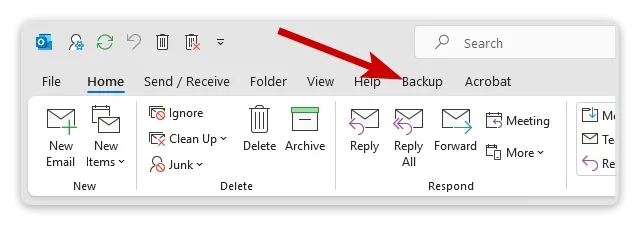
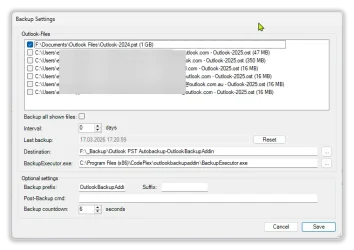
Just for an FYI, I use this. Latest release was 2023 but there isn't a single thing wrong with it.


Select "Latest Release" right hand side of the Github page.
Install and a menu item will be added to Outlook.

View attachment 172374


View attachment 172376
Thank you so much :)
 

My Computer

System One

  • OS
    Windows 10, Windows 11
    Computer type
    PC/Desktop
    Manufacturer/Model
    Built the PC myself :)
    CPU
    AMD Ryzen 7, 5700x
    Motherboard
    Asus Tuf Gaming B550
    Memory
    32 GB corsair vengeance
    Graphics Card(s)
    Nvidia Geoforce GTX 1060, 6 GB
    Sound Card
    using sound built into motherboard
    Screen Resolution
    1080
    Hard Drives
    Samsung 970 Evo Plus, Crucial MX500 1 TB drive x 2
    PSU
    Thermaltake Toughpower RGB 850 watt
    Case
    Phanteks Pro M
    Cooling
    two 140 mm case fans front, one 120 mm case fan back, one 140 mm case fan top
    Browser
    Chrome, Edge sometimes
    Antivirus
    Norton Security

My Computers

System One System Two

  • OS
    Windows 11 Pro 25H2 Build 26200.8655
    Computer type
    PC/Desktop
    Manufacturer/Model
    Sin-built 2013
    CPU
    Intel(R) Core(TM) i7-4770K CPU @ 3.50GHz
    Motherboard
    ASUS ROG Maximus VI Formula
    Memory
    32.0 GB of I forget and the box is in storage.
    Graphics Card(s)
    Gigabyte nVidia GeForce GTX 1660 Super OC 6GB
    Sound Card
    Onboard thingy
    Monitor(s) Displays
    5 x LG 25MS500-B - 1 x 24MK430H-B - 1 x Wacom Pro 22" Touch Screen Tablet
    Screen Resolution
    All over the place
    Hard Drives
    Too many to list.
    OS on Samsung 1TB 870 QVO SATA
    PSU
    Silverstone 1500
    Case
    NZXT Phantom 820 Full-Tower Case
    Cooling
    Noctua NH-D15 Elite Class Dual Tower CPU Cooler / 6 x EziDIY 120mm / 2 x Corsair 140mm somethings / 1 x 140mm Thermaltake something / 2 x 200mm Corsair.
    Keyboard
    Corsair K95 / Logitech diNovo Edge Wireless
    Mouse
    Logitech: G402 / G502 / Mx Masters / Mx Air Cordless
    Internet Speed
    2000/500Mbps
    Browser
    All sorts
    Antivirus
    Kaspersky Premium
    Other Info
    ㅤㅤㅤㅤㅤㅤㅤㅤㅤㅤㅤㅤㅤㅤㅤㅤㅤㅤㅤㅤㅤㅤㅤㅤㅤㅤㅤㅤㅤㅤㅤㅤㅤㅤㅤㅤㅤㅤㅤㅤ⠀⠀⠀⠀⠀⠀⠀⠀⠀⠀
    TP-Link BE9300 WiFi 7 Bluetooth 5.4 (Archer TBE550E)
    TP-Link TX201 V1 2.5GB Lan

    Grandstream HT812 - VoIP
    ASUS DSL-AX82U - Mesh
    ASUS RT-AC68U - Mesh
    ASUS RT-BE88U Router

    Brother MFC-L2880DW Printer

    I’m on a horse.
  • Operating System
    Windows 11 Pro 25H2 Build 26200.8655
    Computer type
    Laptop
    Manufacturer/Model
    LENOVO Yoga 7 14IRL8 - 7i EVO OLED 14" Touchscreen i5 12 Core 16GB/512GB
    CPU
    Intel Core 12th Gen i5-1240P Processor (1.7 - 4.4GHz)
    Memory
    16GB LPDDR5 RAM
    Graphics card(s)
    Intel Iris Xe Graphics Processor
    Sound Card
    Optimized with Dolby Atmos®
    Screen Resolution
    QHD 2880 x 1800 OLED
    Hard Drives
    M.2 512GB
    Antivirus
    Defender / Malwarebytes
    Other Info
    …still on a horse.
I should mention that I have never backed up OST files so I have no info on that. They show as a choice (image) but never tried.
I am more interested in my PST file.
 

My Computers

System One System Two

  • OS
    Windows 11 Pro 25H2 Build 26200.8655
    Computer type
    PC/Desktop
    Manufacturer/Model
    Sin-built 2013
    CPU
    Intel(R) Core(TM) i7-4770K CPU @ 3.50GHz
    Motherboard
    ASUS ROG Maximus VI Formula
    Memory
    32.0 GB of I forget and the box is in storage.
    Graphics Card(s)
    Gigabyte nVidia GeForce GTX 1660 Super OC 6GB
    Sound Card
    Onboard thingy
    Monitor(s) Displays
    5 x LG 25MS500-B - 1 x 24MK430H-B - 1 x Wacom Pro 22" Touch Screen Tablet
    Screen Resolution
    All over the place
    Hard Drives
    Too many to list.
    OS on Samsung 1TB 870 QVO SATA
    PSU
    Silverstone 1500
    Case
    NZXT Phantom 820 Full-Tower Case
    Cooling
    Noctua NH-D15 Elite Class Dual Tower CPU Cooler / 6 x EziDIY 120mm / 2 x Corsair 140mm somethings / 1 x 140mm Thermaltake something / 2 x 200mm Corsair.
    Keyboard
    Corsair K95 / Logitech diNovo Edge Wireless
    Mouse
    Logitech: G402 / G502 / Mx Masters / Mx Air Cordless
    Internet Speed
    2000/500Mbps
    Browser
    All sorts
    Antivirus
    Kaspersky Premium
    Other Info
    ㅤㅤㅤㅤㅤㅤㅤㅤㅤㅤㅤㅤㅤㅤㅤㅤㅤㅤㅤㅤㅤㅤㅤㅤㅤㅤㅤㅤㅤㅤㅤㅤㅤㅤㅤㅤㅤㅤㅤㅤ⠀⠀⠀⠀⠀⠀⠀⠀⠀⠀
    TP-Link BE9300 WiFi 7 Bluetooth 5.4 (Archer TBE550E)
    TP-Link TX201 V1 2.5GB Lan

    Grandstream HT812 - VoIP
    ASUS DSL-AX82U - Mesh
    ASUS RT-AC68U - Mesh
    ASUS RT-BE88U Router

    Brother MFC-L2880DW Printer

    I’m on a horse.
  • Operating System
    Windows 11 Pro 25H2 Build 26200.8655
    Computer type
    Laptop
    Manufacturer/Model
    LENOVO Yoga 7 14IRL8 - 7i EVO OLED 14" Touchscreen i5 12 Core 16GB/512GB
    CPU
    Intel Core 12th Gen i5-1240P Processor (1.7 - 4.4GHz)
    Memory
    16GB LPDDR5 RAM
    Graphics card(s)
    Intel Iris Xe Graphics Processor
    Sound Card
    Optimized with Dolby Atmos®
    Screen Resolution
    QHD 2880 x 1800 OLED
    Hard Drives
    M.2 512GB
    Antivirus
    Defender / Malwarebytes
    Other Info
    …still on a horse.

Latest Support Threads

Back
Top Bottom