Overprovisioning Recommendation


mccmw

Well-known member
Member
VIP
Local time
2:31 PM
Posts
509
OS
Windows 11
I just upgraded the SSD from PCIE3 to PCIE4 in my XPS 9510. I've always over-provisioned my drives for longevity and performance. How important is that in modern drives. The new drive is a SK Hynix P41 2TB. I believe the original capacity of 1.86TB (down from 2 TB due to 1024 vs. 1000 MB/GB) and then down more to 1.82TB is due to Windows Recovery partition. I believe most drives now have internal overprovisioning but not sure how to find that for my drive. Right now I carved otu 182 GB (10%) and left unallocated as overprovisioned. Recommendations on whether this is good/worth it, or something else?
 

My Computers My Computers

  • At a glance

    Windows 11Intel i7-7700K32GB 2666Mhz (Kingston Hyper X Fury)Asus Nvidia 1050Ti
    OS
    Windows 11
    Computer type
    PC/Desktop
    Manufacturer/Model
    Custom
    CPU
    Intel i7-7700K
    Motherboard
    Asus Prime Z-270A
    Memory
    32GB 2666Mhz (Kingston Hyper X Fury)
    Graphics Card(s)
    Asus Nvidia 1050Ti
    Sound Card
    N/A
    Monitor(s) Displays
    Samsung C27F390
    Screen Resolution
    1920 x 1080
    Hard Drives
    1TB Western Digital SN770 (System) and 2TB Western Digital SN770 (Storage)
    Antivirus
    Windows Security
  • At a glance

    Windows 11 Homei9-11900H32GBIntegrated Intel and Nvidia 3050Ti
    Operating System
    Windows 11 Home
    Computer type
    Laptop
    Manufacturer/Model
    Dell/XPS 15 9510
    CPU
    i9-11900H
    Motherboard
    Unknown
    Memory
    32GB
    Graphics card(s)
    Integrated Intel and Nvidia 3050Ti
    Sound Card
    Integrated (Realtek)
    Monitor(s) Displays
    None
    Screen Resolution
    1920 x 1200 (non-Touch)
    Hard Drives
    2TB SK Hynix P41 Platinum
    Antivirus
    Windows Security
The point about over-provisioning is to leave enough unused cells for the SSD's internal controller to run its wear levelling algorithms efficiently. 10% is often cited as being sufficient.

What is not so often mentioned is that the unused cells do not have to be in unallocated space. The wear levelling algorithm doesn't care where they are. As long as you leave plenty of free space in your partitions, and leave the default setting for optimisation to trim the SSD regularly, then the wear levelling will work efficiently.

Over-provisioning is only really needed if you can't trust yourself not to fill the partitions to the brim - it makes sure there's some unallocated space you can't be tempted to use :wink:
 

My Computers My Computers

  • At a glance

    Windows 11 HomeAMD Athlon Silver 3050U8GBRadeon Graphics
    OS
    Windows 11 Home
    Computer type
    Laptop
    Manufacturer/Model
    Acer Aspire 3 A315-23-R9VY
    CPU
    AMD Athlon Silver 3050U
    Memory
    8GB
    Graphics Card(s)
    Radeon Graphics
    Monitor(s) Displays
    laptop screen
    Screen Resolution
    1366x768 native resolution, up to 2560x1440 with Radeon Virtual Super Resolution
    Hard Drives
    1TB Samsung EVO 870 SSD (from April 2026: 250GB EVO 850)
    Internet Speed
    150 Mbps
    Browser
    Edge, Firefox
    Antivirus
    Defender
    Other Info
    UPDATE - 11 April 2026: due to lid hinges starting to break up this laptop has been retired from active duty. The OS with all software and files has been migrated to my System Seven in 'Other systems' to carry on as my general purpose 'main machine'.

    I've now clean installed 25H2 and used Garlin's scripts to update Secure Boot to CA 2023 and revoke the PCA 2011 certificates. It's new role is to test secure boot issues.

    Info for 2021-2026:
    fully 'Windows 11 ready' laptop. Windows 10 C: partition migrated from my old unsupported 'main machine' then upgraded to 11. A test migration ran Insider builds for 2 months. When 11 was released on 5th October 2021 it was re-imaged back to 10 and was offered the upgrade in Windows Update on 20th October. Windows Update offered the 22H2 Feature Update on 20th September 2022. It got the 23H2 Feature Update on 4th November 2023 through Windows Update, 24H2 on 3rd October 2024 through Windows Update by setting the Target Release Version for 24H2, and 25H2 on 30th September 2025 through Windows Update by setting the Target Release Version for 25H2.
  • At a glance

    Windows 11 ProIntel® Core™ i5-520M8GB(integrated graphics) Intel HD Graphics
    Operating System
    Windows 11 Pro
    Computer type
    Laptop
    Manufacturer/Model
    Dell Latitude E4310
    CPU
    Intel® Core™ i5-520M
    Motherboard
    0T6M8G
    Memory
    8GB
    Graphics card(s)
    (integrated graphics) Intel HD Graphics
    Screen Resolution
    1366x768
    Hard Drives
    500GB Crucial MX500 SSD
    Browser
    Firefox, Edge
    Antivirus
    Defender
    Other Info
    unsupported machine: Legacy bios, MBR, TPM 1.2, upgraded from W10 to W11 using W10/W11 hybrid install media workaround.

    In-place upgrade to 22H2 using ISO and a workaround.
    Feature Update to 23H2 by manually installing the Enablement Package.
    In-place upgrade to 24H2 using hybrid 23H2/24H2 install media.
    Upgraded to 25H2 by Enablement Package.

    Also running Insider Experimental 263xx and 29xxx builds and Windows 10 as native boot .vhdx.
  • My SYSTEM THREE is a Dell Latitude 5410, i7-10610U, 32GB RAM, 512GB NVMe ssd, supported device running Windows 11 Pro.

    My SYSTEM FOUR was a 2-in-1 convertible Lenovo Yoga 11e (1st gen) type 20DA, Celeron N2930, 8GB RAM, 256GB ssd. Unsupported device. This has now been sold. It has been replaced by my System Eight.

    My SYSTEM FIVE is a Dell Latitude 3190 2-in-1, Pentium Silver N5030, 8GB RAM, 1TB NVMe ssd, supported device running Windows 11 Pro, plus Insider Beta, Experimental 263xx and 29xxx builds (and a few others) as a native boot .vhdx.

    My SYSTEM SIX is a Dell Latitude 5550, Core Ultra 7 165H, 64GB RAM, 1TB NVMe SSD, supported device, Windows 11 Pro, Hyper-V host machine. Updated to 25H2 on 30th September 2025.

    My SYSTEM SEVEN is a Lenovo Thinkpad T580, 1920x1080 touchscreen, Intel Core i7-8650U, 16GB RAM, 512GB NVMe SSD + 2nd 512GB NVMe SSD, a supported device for Windows 11. This is my current general purpose 'main machine'. The installed Windows 11 Home from my System One has been migrated to this machine. As its new home has an existing digital licence for Pro I've been able to upgrade the migrated OS from Home to Pro.

    My SYSTEM EIGHT is a 2-in-1 convertible Lenovo Yoga 11e (5th gen) type 20LN, Celeron N4120, 8GB RAM, 512GB NVMe ssd, a supported device for Windows 11. Currently running Windows 11 Pro, plus Insider Beta, Experimental 263xx and 29xxx builds as native boot vhdx.
Does the hynix software make a recommendation? I think it only has update firmware, diagnostics and secure erase.

You could try the solidigm synergy software and see what that says. Though it cant use the solidigm driver, Hynix p41 is the same hardware as solidigm p44.

I have just checked. Lots of pretty pictures and graphs, but no it doesn't give any hints about your question.

The driver supposedly makes a difference in some benchmarks, but that is academic. Humans wont experience any differences unless they have super powers.

I suggest get whichever is the cheapest
 
Last edited:

My Computers My Computers

  • At a glance

    Win7,Win11i7-97002x16gb 3600mhz
    OS
    Win7,Win11
    Computer type
    PC/Desktop
    CPU
    i7-9700
    Motherboard
    gigabyte b365m ds3h
    Memory
    2x16gb 3600mhz
    Monitor(s) Displays
    benq gw2480
    PSU
    bequiet pure power 11 400CM
    Cooling
    cryorig m9i
  • At a glance

    win7,win11i5-84002x8gb 3200
    Operating System
    win7,win11
    Computer type
    PC/Desktop
    CPU
    i5-8400
    Motherboard
    gigabyte b365m ds3h
    Memory
    2x8gb 3200
    PSU
    xfx pro 450
Thanks...looks like I have it set right then. As for the SK Hynix software...it is bare bones and doesn't provide much beyond some basic data.
 

My Computers My Computers

  • At a glance

    Windows 11Intel i7-7700K32GB 2666Mhz (Kingston Hyper X Fury)Asus Nvidia 1050Ti
    OS
    Windows 11
    Computer type
    PC/Desktop
    Manufacturer/Model
    Custom
    CPU
    Intel i7-7700K
    Motherboard
    Asus Prime Z-270A
    Memory
    32GB 2666Mhz (Kingston Hyper X Fury)
    Graphics Card(s)
    Asus Nvidia 1050Ti
    Sound Card
    N/A
    Monitor(s) Displays
    Samsung C27F390
    Screen Resolution
    1920 x 1080
    Hard Drives
    1TB Western Digital SN770 (System) and 2TB Western Digital SN770 (Storage)
    Antivirus
    Windows Security
  • At a glance

    Windows 11 Homei9-11900H32GBIntegrated Intel and Nvidia 3050Ti
    Operating System
    Windows 11 Home
    Computer type
    Laptop
    Manufacturer/Model
    Dell/XPS 15 9510
    CPU
    i9-11900H
    Motherboard
    Unknown
    Memory
    32GB
    Graphics card(s)
    Integrated Intel and Nvidia 3050Ti
    Sound Card
    Integrated (Realtek)
    Monitor(s) Displays
    None
    Screen Resolution
    1920 x 1200 (non-Touch)
    Hard Drives
    2TB SK Hynix P41 Platinum
    Antivirus
    Windows Security
solidigm synergy software is nice if you like the graphs and so on. Seems to work for all disks ( but obviously can only update firmware and driver for own brand).
 

My Computers My Computers

  • At a glance

    Win7,Win11i7-97002x16gb 3600mhz
    OS
    Win7,Win11
    Computer type
    PC/Desktop
    CPU
    i7-9700
    Motherboard
    gigabyte b365m ds3h
    Memory
    2x16gb 3600mhz
    Monitor(s) Displays
    benq gw2480
    PSU
    bequiet pure power 11 400CM
    Cooling
    cryorig m9i
  • At a glance

    win7,win11i5-84002x8gb 3200
    Operating System
    win7,win11
    Computer type
    PC/Desktop
    CPU
    i5-8400
    Motherboard
    gigabyte b365m ds3h
    Memory
    2x8gb 3200
    PSU
    xfx pro 450
Samsung Magician (for ssd manufactured by Samsung) recommends 10-15% as overpositioning and often automates the process. But it can take care of only the last partition cereated on ssd.
 

My Computer My Computer

At a glance

Windows 11 ProIntel i9 13900H24GBIntel Iris Xe, Nvidia GeForce RTX 4050
OS
Windows 11 Pro
Computer type
Laptop
Manufacturer/Model
Asus Vivobook K6502VU
CPU
Intel i9 13900H
Memory
24GB
Graphics Card(s)
Intel Iris Xe, Nvidia GeForce RTX 4050
Sound Card
Realtek
Monitor(s) Displays
Asus Splendid OLED
Screen Resolution
2880x1620 HDR
Hard Drives
Samsung 990 Pro NVMe MZ-V9P1T0B/AM,
Samsung 990 Pro NVMe MZ-V9P2T0B/AM
Internet Speed
5G ~ 1Gbps, Wifi 150Mbps
Browser
Chrome/Edge
Antivirus
McAfee LiveSafe
Samsung Magician (for ssd manufactured by Samsung) recommends 10-15% as overpositioning and often automates the process. But it can take care of only the last partition cereated on ssd.
crucial does similar.
 

My Computers My Computers

  • At a glance

    Win7,Win11i7-97002x16gb 3600mhz
    OS
    Win7,Win11
    Computer type
    PC/Desktop
    CPU
    i7-9700
    Motherboard
    gigabyte b365m ds3h
    Memory
    2x16gb 3600mhz
    Monitor(s) Displays
    benq gw2480
    PSU
    bequiet pure power 11 400CM
    Cooling
    cryorig m9i
  • At a glance

    win7,win11i5-84002x8gb 3200
    Operating System
    win7,win11
    Computer type
    PC/Desktop
    CPU
    i5-8400
    Motherboard
    gigabyte b365m ds3h
    Memory
    2x8gb 3200
    PSU
    xfx pro 450
I've never bothered with over provisioning. Is it really needed?
 

My Computer My Computer

At a glance

Windows 11 ProCore i7-13700K64 GB Kingston Fury Beast DDR5Gigabyte GeForce RTX 2060 Super Gaming OC 8G
OS
Windows 11 Pro
Computer type
PC/Desktop
Manufacturer/Model
Self build
CPU
Core i7-13700K
Motherboard
Asus TUF Gaming Plus WiFi Z790
Memory
64 GB Kingston Fury Beast DDR5
Graphics Card(s)
Gigabyte GeForce RTX 2060 Super Gaming OC 8G
Sound Card
Realtek S1200A
Monitor(s) Displays
Viewsonic VP2770 & Dell (secondary)
Screen Resolution
2560 x 1440
Hard Drives
Kingston KC3000 2TB NVME SSD & SATA HDDs & SSD
PSU
EVGA SuperNova G2 850W
Case
Nanoxia Deep Silence 1
Cooling
Noctua NH-D14
Keyboard
Microsoft Digital Media Pro
Mouse
Logitech Wireless
Internet Speed
80 Mb / s
Browser
Chrome
Antivirus
Defender, Malwarebytes Free & AdwCleaner
The point about over-provisioning is to leave enough unused cells for the SSD's internal controller to run its wear levelling algorithms efficiently. 10% is often cited as being sufficient.

What is not so often mentioned is that the unused cells do not have to be in unallocated space. The wear levelling algorithm doesn't care where they are. As long as you leave plenty of free space in your partitions, and leave the default setting for optimisation to trim the SSD regularly, then the wear levelling will work efficiently.

Over-provisioning is only really needed if you can't trust yourself not to fill the partitions to the brim - it makes sure there's some unallocated space you can't be tempted to use :wink:
This is the correct solution - the rest are a waste of time.

If you reach the point where partitions are over 90% in use, it is time to either resize partitions or buy a larger drive.
 

My Computer My Computer

At a glance

Windows 11 Pro + Win11 Canary VM.I9 13th gen i9-13900H 2.60 GHZ16 GB solderedIntegrated Intel Iris XE
OS
Windows 11 Pro + Win11 Canary VM.
Computer type
Laptop
Manufacturer/Model
ASUS Zenbook 14
CPU
I9 13th gen i9-13900H 2.60 GHZ
Motherboard
Yep, Laptop has one.
Memory
16 GB soldered
Graphics Card(s)
Integrated Intel Iris XE
Sound Card
Realtek built in
Monitor(s) Displays
laptop OLED screen
Screen Resolution
2880x1800 touchscreen
Hard Drives
1 TB NVME SSD (only weakness is only one slot)
PSU
Internal + 65W thunderbolt USB4 charger
Case
Yep, got one
Cooling
Stella Artois (UK pint cans - 568 ml) - extra cost.
Keyboard
Built in UK keybd
Mouse
Bluetooth , wireless dongled, wired
Internet Speed
900 mbs (ethernet), wifi 6 typical 350-450 mb/s both up and down
Browser
Edge
Antivirus
Defender
Other Info
TPM 2.0, 2xUSB4 thunderbolt, 1xUsb3 (usb a), 1xUsb-c, hdmi out, 3.5 mm audio out/in combo, ASUS backlit trackpad (inc. switchable number pad)

Macrium Reflect Home V8
Office 365 Family (6 users each 1TB onedrive space)
Hyper-V (a vm runs almost as fast as my older laptop)

My Computers My Computers

  • At a glance

    11 Homei7 13650HX16GB DDR5GeForce RTX 4060 Mobile
    OS
    11 Home
    Computer type
    Laptop
    Manufacturer/Model
    Asus TUF Gaming F16 (2024)
    CPU
    i7 13650HX
    Memory
    16GB DDR5
    Graphics Card(s)
    GeForce RTX 4060 Mobile
    Sound Card
    Eastern Electric MiniMax DAC Supreme; Emotiva UMC-200; Astell & Kern AK240
    Monitor(s) Displays
    Sony Bravia XR-55X90J
    Screen Resolution
    3840×2160
    Hard Drives
    512GB SSD internal
    37TB external
    PSU
    Li-ion
    Cooling
    2× Arc Flow Fans, 4× exhaust vents, 5× heatpipes
    Keyboard
    Logitech K800
    Mouse
    Logitech G402
    Internet Speed
    30Mbit/s up, 500Mbit/s down
    Browser
    FF
    Antivirus
    What's an antivirus?
  • At a glance

    11 Homei5 1135G716GB DDR4Intel Iris Xe
    Operating System
    11 Home
    Computer type
    Laptop
    Manufacturer/Model
    Medion S15450
    CPU
    i5 1135G7
    Memory
    16GB DDR4
    Graphics card(s)
    Intel Iris Xe
    Sound Card
    Eastern Electric MiniMax DAC Supreme; Emotiva UMC-200; Astell & Kern AK240
    Monitor(s) Displays
    Sony Bravia XR-55X90J
    Screen Resolution
    3840×2160
    Hard Drives
    2TB SSD internal
    37TB external
    PSU
    Li-ion
    Keyboard
    Logitech K800
    Mouse
    Logitech G402
    Internet Speed
    30Mbit/s up, 500Mbit/s down
    Browser
    FF
I've never bothered with over provisioning. Is it really needed?
I've never done it. I've also never filled up an SSD to 90%+ Never had an SSD die.
 

My Computers My Computers

  • At a glance

    Windows 11 ProIntel Core i5-8279u32GB DDR4 2666MhzIntel Iris Plus 655
    OS
    Windows 11 Pro
    Computer type
    PC/Desktop
    Manufacturer/Model
    Beelink SEI8
    CPU
    Intel Core i5-8279u
    Motherboard
    AZW SEI
    Memory
    32GB DDR4 2666Mhz
    Graphics Card(s)
    Intel Iris Plus 655
    Sound Card
    Intel SST
    Monitor(s) Displays
    Asus ProArt PA278QV
    Screen Resolution
    2560x1440
    Hard Drives
    512GB NVMe
    PSU
    NA
    Case
    NA
    Cooling
    NA
    Keyboard
    NA
    Mouse
    NA
    Internet Speed
    500/50
    Browser
    Edge
    Antivirus
    Defender
    Other Info
    Mini PC used for testing Windows 11.
  • At a glance

    Windows 10 ProRyzen 9 5900x64GB DDR4-3600EVGA GeForce 3080 FT3 Ultra
    Operating System
    Windows 10 Pro
    Computer type
    PC/Desktop
    Manufacturer/Model
    Custom
    CPU
    Ryzen 9 5900x
    Motherboard
    Asus Rog Strix X570-E Gaming
    Memory
    64GB DDR4-3600
    Graphics card(s)
    EVGA GeForce 3080 FT3 Ultra
    Sound Card
    Onboard
    Monitor(s) Displays
    ASUS TUF Gaming VG27AQ. ASUS ProArt Display PA278QV 27” WQHD
    Screen Resolution
    2560x1440
    Hard Drives
    2TB WD SN850 PCI-E Gen 4 NVMe
    2TB Sandisk Ultra 2.5" SATA SSD
    PSU
    Seasonic Focus 850
    Case
    Fractal Meshify S2 in White
    Cooling
    Dark Rock Pro CPU cooler, 3 x 140mm case fans
    Keyboard
    Corsiar K65 RGB Lux
    Mouse
    Logitech G9 Laser Mouse
    Internet Speed
    500/50
    Browser
    Chrome
    Antivirus
    Defender.
AFAIK the vast majority (or all) modern SSDs use an internal controller chip that incorporates some kind of proprietary datacompression technology (e.g. DuraWrite, which already dates back more than a whole decade). Below are a bunch of links to (hopefully) explain in some reasonable detail how this also has an impact on endurance and performance (to a certain degree, under some specific circumstances). I.e., low entropy of the data stored, in conjunction with neither having much available free space on any of the partitions that are present on the SSD nor having much unallocated (non-partitioned) space anywhere on the SSD─also in conjunction with the total amount of over-provisioning being too small for it to be able to sustain adequate efficiency levels enough to remain in proper balance with the intended characteristics of the workload/demands.

Especially in write intensive scenarios where TRIM can not be supported, e.g. as a result of the OS (or host) being unaware of the filesystem used, the long term differences can tend to grow more significant under those circumstances. That is, depending how you use it. But in these specific heavy workstation/server type workload scenarios, SSD optimization software (DymaxIO) also very often becomes an important part of the equation. For the type of work I like to do on my grocery store laptop that already is more than 2.5 years old right now, DymaxIO is nowhere near worth the added cost. In my Samsung Magician I have set the over-provisioning to 30%, though. That's just because currently I don't need any additional free storage space, and reducing the over-provisioning in Samsung Magician takes less than half a fraction of a split second, anyway to begin with.


My Computers My Computers

  • At a glance

    11 Homei7 13650HX16GB DDR5GeForce RTX 4060 Mobile
    OS
    11 Home
    Computer type
    Laptop
    Manufacturer/Model
    Asus TUF Gaming F16 (2024)
    CPU
    i7 13650HX
    Memory
    16GB DDR5
    Graphics Card(s)
    GeForce RTX 4060 Mobile
    Sound Card
    Eastern Electric MiniMax DAC Supreme; Emotiva UMC-200; Astell & Kern AK240
    Monitor(s) Displays
    Sony Bravia XR-55X90J
    Screen Resolution
    3840×2160
    Hard Drives
    512GB SSD internal
    37TB external
    PSU
    Li-ion
    Cooling
    2× Arc Flow Fans, 4× exhaust vents, 5× heatpipes
    Keyboard
    Logitech K800
    Mouse
    Logitech G402
    Internet Speed
    30Mbit/s up, 500Mbit/s down
    Browser
    FF
    Antivirus
    What's an antivirus?
  • At a glance

    11 Homei5 1135G716GB DDR4Intel Iris Xe
    Operating System
    11 Home
    Computer type
    Laptop
    Manufacturer/Model
    Medion S15450
    CPU
    i5 1135G7
    Memory
    16GB DDR4
    Graphics card(s)
    Intel Iris Xe
    Sound Card
    Eastern Electric MiniMax DAC Supreme; Emotiva UMC-200; Astell & Kern AK240
    Monitor(s) Displays
    Sony Bravia XR-55X90J
    Screen Resolution
    3840×2160
    Hard Drives
    2TB SSD internal
    37TB external
    PSU
    Li-ion
    Keyboard
    Logitech K800
    Mouse
    Logitech G402
    Internet Speed
    30Mbit/s up, 500Mbit/s down
    Browser
    FF
Thanks to all...this helps. I'll leave the 10% I currently have set as unallocated space to go along with whatever is already applied by the drive internally. Unfortunately, while only a few manufacturers software (Samsung and Crucial is what I've had in the past) that make it simple to turn OP on and off, SK Hynix does not (neither does WD I think). If I ever needed that space it would likely mean new drive anyways, but if something were ever to be communicated that all required OP is included already, I could use a partition tool to extend my C: partition to take it back...and hopefully not mess up the recovery partition that is between C: and unallocated space.
 

My Computers My Computers

  • At a glance

    Windows 11Intel i7-7700K32GB 2666Mhz (Kingston Hyper X Fury)Asus Nvidia 1050Ti
    OS
    Windows 11
    Computer type
    PC/Desktop
    Manufacturer/Model
    Custom
    CPU
    Intel i7-7700K
    Motherboard
    Asus Prime Z-270A
    Memory
    32GB 2666Mhz (Kingston Hyper X Fury)
    Graphics Card(s)
    Asus Nvidia 1050Ti
    Sound Card
    N/A
    Monitor(s) Displays
    Samsung C27F390
    Screen Resolution
    1920 x 1080
    Hard Drives
    1TB Western Digital SN770 (System) and 2TB Western Digital SN770 (Storage)
    Antivirus
    Windows Security
  • At a glance

    Windows 11 Homei9-11900H32GBIntegrated Intel and Nvidia 3050Ti
    Operating System
    Windows 11 Home
    Computer type
    Laptop
    Manufacturer/Model
    Dell/XPS 15 9510
    CPU
    i9-11900H
    Motherboard
    Unknown
    Memory
    32GB
    Graphics card(s)
    Integrated Intel and Nvidia 3050Ti
    Sound Card
    Integrated (Realtek)
    Monitor(s) Displays
    None
    Screen Resolution
    1920 x 1200 (non-Touch)
    Hard Drives
    2TB SK Hynix P41 Platinum
    Antivirus
    Windows Security
Thanks to all...this helps. I'll leave the 10% I currently have set as unallocated space to go along with whatever is already applied by the drive internally. Unfortunately, while only a few manufacturers software (Samsung and Crucial is what I've had in the past) that make it simple to turn OP on and off, SK Hynix does not (neither does WD I think). If I ever needed that space it would likely mean new drive anyways, but if something were ever to be communicated that all required OP is included already, I could use a partition tool to extend my C: partition to take it back...and hopefully not mess up the recovery partition that is between C: and unallocated space.
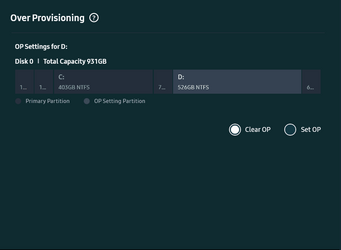
With Samsung Magician all you need to do is to Clear OP and it will return the drive to initial setup.

UmMtqSkBsV.pngWqJGdz6MlF.png
 

My Computers My Computers

  • At a glance

    Win 11 ProAMD Ryzen™ 7 7730U24GB Dual-Channel DDR4 @ 1596MHz (22-22-22-52)512MB ATI AMD Radeon Graphics (ASUStek Comput...
    OS
    Win 11 Pro
    Computer type
    Laptop
    Manufacturer/Model
    ASUS Vivobook
    CPU
    AMD Ryzen™ 7 7730U
    Motherboard
    M1605YA
    Memory
    24GB Dual-Channel DDR4 @ 1596MHz (22-22-22-52)
    Graphics Card(s)
    512MB ATI AMD Radeon Graphics (ASUStek Computer Inc)
    Monitor(s) Displays
    Generic PnP Monitor (1920x1200@60Hz) - P1 PLUS (1920x1080@59Hz)
    Screen Resolution
    1920 X 1200
    Hard Drives
    953GB Western Digital WD
    PSU
    45 Watts
    Mouse
    Lenovo Bluetooth.
    Internet Speed
    500 Mbps
    Browser
    Edge
    Antivirus
    Defender
  • At a glance

    Windows 11AMD Ryzen 7 5800H / 3.2 GHz32 GB DDR4 SDRAM 3200 MHzNVIDIA GeForce RTX 3060 6 GB GDDR6 SDRAM
    Operating System
    Windows 11
    Computer type
    Laptop
    Manufacturer/Model
    ACER NITRO
    CPU
    AMD Ryzen 7 5800H / 3.2 GHz
    Motherboard
    CZ Scala_CAS (FP6)
    Memory
    32 GB DDR4 SDRAM 3200 MHz
    Graphics card(s)
    NVIDIA GeForce RTX 3060 6 GB GDDR6 SDRAM
    Sound Card
    Realtek Audio. NVIDIA High Definition Audio
    Monitor(s) Displays
    15.6" LED backlight 1920 x 1080 (Full HD) 144 Hz
    Screen Resolution
    1920 x 1080 (Full HD)
    Hard Drives
    Samsung 970 Evo Plus 2TB NVMe M.2
    PSU
    180 Watt, 19.5 V
    Mouse
    Lenovo Bluetooth
    Internet Speed
    500 Mbps
    Browser
    Edge
    Antivirus
    Defender
Back
Top Bottom