Page file size jumped to 32GB instead of the recommended 4GB


Brose

Member
Local time
5:05 AM
Posts
5
OS
Windows 11 Pro 23H2 (Build 22631.5624)
Screenshot 2025-09-29 150138.webp

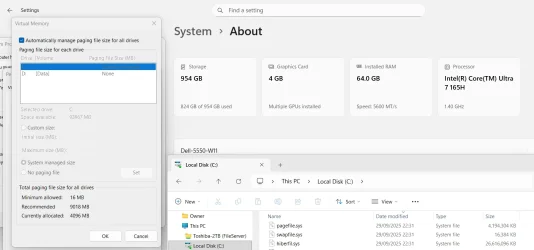
Been running this system since Nov and for most of the time the page file was the recommended size. I don't know when or why it changed but I just noticed this.

I would like to set it back to 4GB but when I uncheck the Automatically manage size box, System managed size is already checked. I have 32GB RAM and a 2TB drive.

Figured I would ask here before making any ill-advised changes.
 
Windows Build/Version
22631.5624

My Computer

System One

  • OS
    Windows 11 Pro 23H2 (Build 22631.5624)
    Computer type
    PC/Desktop
    Manufacturer/Model
    Custom
    CPU
    AMD Ryzen 7 7800X3D
    Motherboard
    MSI B650 GAMING PLUS WIFI
    Memory
    G.Skill Trident Z5 Neo RGB 32 GB (2 x 16 GB) DDR5-6000 CL30
    Graphics Card(s)
    Gigabyte WINDFORCE OC GeForce RTX 4070 Ti SUPER 16 GB
    Monitor(s) Displays
    AOC Q27G3XMN 27" Mini LED Gaming Monitor 2K QHD
    Screen Resolution
    2560x1440 180Hz
    Hard Drives
    Crucial P3 Plus 2 TB M.2-2280 PCIe 4.0 X4 NVME
    PSU
    Thermaltake Toughpower GF A3 - TT Premium Edition 1050 W
    Case
    Antec NX416L ATX Mid Tower Case
    Cooling
    Thermalright Phantom Spirit 120 SE ARGB 66.17 CFM
    Keyboard
    Corsair K55 PRO LITE RGB Wired Membrane Gaming Keyboard
    Mouse
    Logitech G305 LIGHTSPEED Wireless Gaming Mouse
    Internet Speed
    40 Mbps
    Browser
    Firefox
    Antivirus
    Windows Defender
I would like to set it back to 4GB but when I uncheck the Automatically manage size box, System managed size is already checked.
Welcome to Eleven Forum.

Automatic management will readily enlarge the page file when there is a demand for more virtual memory. It seems reluctant to shrink it again when no longer needed.

To reset it's a two step process. First set 'No paging file', this will require a restart to take effect. Then turn 'Automatically manage..' back on. This should return you to the recommended defaults.

The next question you need to ask yourself is what was it that you were running that had asked for that much memory to be used?
 

My Computers

System One System Two

  • OS
    Windows 11 Home
    Computer type
    Laptop
    Manufacturer/Model
    Acer Aspire 3 A315-23-R9VY
    CPU
    AMD Athlon Silver 3050U
    Memory
    8GB
    Graphics Card(s)
    Radeon Graphics
    Monitor(s) Displays
    laptop screen
    Screen Resolution
    1366x768 native resolution, up to 2560x1440 with Radeon Virtual Super Resolution
    Hard Drives
    1TB Samsung EVO 870 SSD (from April 2026: 250GB EVO 850)
    Internet Speed
    150 Mbps
    Browser
    Edge, Firefox
    Antivirus
    Defender
    Other Info
    fully 'Windows 11 ready' laptop. Windows 10 C: partition migrated from my old unsupported 'main machine' then upgraded to 11. A test migration ran Insider builds for 2 months. When 11 was released on 5th October 2021 it was re-imaged back to 10 and was offered the upgrade in Windows Update on 20th October. Windows Update offered the 22H2 Feature Update on 20th September 2022. It got the 23H2 Feature Update on 4th November 2023 through Windows Update, 24H2 on 3rd October 2024 through Windows Update by setting the Target Release Version for 24H2, and 25H2 on 30th September 2025 through Windows Update by setting the Target Release Version for 25H2.

    UPDATE - 11 April 2026: due to mechanical deterioration this PC has been retired from active duty. The OS with all software and files has been migrated to my System Seven below to carry on as my general purpose 'main machine'.

    My SYSTEM THREE is a Dell Latitude 5410, i7-10610U, 32GB RAM, 512GB NVMe ssd, supported device running Windows 11 Pro.

    My SYSTEM FOUR is a 2-in-1 convertible Lenovo Yoga 11e 20DA, Celeron N2930, 8GB RAM, 256GB ssd. Unsupported device: currently running Win10 Pro, plus Win11 Pro RTM and Insider Dev, Beta, and RP 24H2 as native boot vhdx.

    My SYSTEM FIVE is a Dell Latitude 3190 2-in-1, Pentium Silver N5030, 8GB RAM, 1TB NVMe ssd, supported device running Windows 11 Pro, plus Insider Beta, Dev, and Canary builds (and a few others) as a native boot .vhdx.

    My SYSTEM SIX is a Dell Latitude 5550, Core Ultra 7 165H, 64GB RAM, 1TB NVMe SSD, supported device, Windows 11 Pro 24H2, Hyper-V host machine. Updated to 25H2 on 30th September 2025.

    My SYSTEM SEVEN is a Lenovo Thinkpad T580, Intel Core i7-8650U, 16GB RAM, 512GB NVMe SSD + 2nd 512GB NVMe SSD, a supported device for Windows 11. This is my current general purpose 'main machine'. The installed Windows 11 Home from my System One has been migrated to this machine.
  • Operating System
    Windows 11 Pro
    Computer type
    Laptop
    Manufacturer/Model
    Dell Latitude E4310
    CPU
    Intel® Core™ i5-520M
    Motherboard
    0T6M8G
    Memory
    8GB
    Graphics card(s)
    (integrated graphics) Intel HD Graphics
    Screen Resolution
    1366x768
    Hard Drives
    500GB Crucial MX500 SSD
    Browser
    Firefox, Edge
    Antivirus
    Defender
    Other Info
    unsupported machine: Legacy bios, MBR, TPM 1.2, upgraded from W10 to W11 using W10/W11 hybrid install media workaround. In-place upgrade to 22H2 using ISO and a workaround. Feature Update to 23H2 by manually installing the Enablement Package. In-place upgrade to 24H2 using hybrid 23H2/24H2 install media. Upgraded to 25H2 by Enablement Package. Also running Insider Dev, and Canary builds and Windows 10 as native boot .vhdx.

    My SYSTEM THREE is a Dell Latitude 5410, i7-10610U, 32GB RAM, 512GB NVMe ssd, supported device running Windows 11 Pro.

    My SYSTEM FOUR is a 2-in-1 convertible Lenovo Yoga 11e 20DA, Celeron N2930, 8GB RAM, 256GB ssd. Unsupported device: currently running Win10 Pro, plus Win11 Pro RTM and Insider Dev, Beta, and RP 24H2 as native boot vhdx.

    My SYSTEM FIVE is a Dell Latitude 3190 2-in-1, Pentium Silver N5030, 8GB RAM, 1TB NVMe ssd, supported device running Windows 11 Pro, plus Insider Beta, Dev, and Canary builds (and a few others) as a native boot .vhdx.

    My SYSTEM SIX is a Dell Latitude 5550, Core Ultra 7 165H, 64GB RAM, 1TB NVMe SSD, supported device, Windows 11 Pro 24H2, Hyper-V host machine. Updated to 25H2 on 30th September 2025.

    My SYSTEM SEVEN is a Lenovo Thinkpad T580, Intel Core i7-8650U, 16GB RAM, 512GB NVMe SSD + 2nd 512GB NVMe SSD, a supported device for Windows 11. This is my current general purpose 'main machine'. The installed Windows 11 Home from my System One has been migrated to this machine.
Welcome to Eleven Forum.

Automatic management will readily enlarge the page file when there is a demand for more virtual memory. It seems reluctant to shrink it again when no longer needed.

To reset it's a two step process. First set 'No paging file', this will require a restart to take effect. Then turn 'Automatically manage..' back on. This should return you to the recommended defaults.

The next question you need to ask yourself is what was it that you were running that had asked for that much memory to be used?
Thanks for providing the step by step.

As for what program asked for so much memory... I'm truly stumped on that one. This machine is only used for steam games and web browsing (firefox).

I check task manager often and I've never seen my RAM usage go over 50%.
 

My Computer

System One

  • OS
    Windows 11 Pro 23H2 (Build 22631.5624)
    Computer type
    PC/Desktop
    Manufacturer/Model
    Custom
    CPU
    AMD Ryzen 7 7800X3D
    Motherboard
    MSI B650 GAMING PLUS WIFI
    Memory
    G.Skill Trident Z5 Neo RGB 32 GB (2 x 16 GB) DDR5-6000 CL30
    Graphics Card(s)
    Gigabyte WINDFORCE OC GeForce RTX 4070 Ti SUPER 16 GB
    Monitor(s) Displays
    AOC Q27G3XMN 27" Mini LED Gaming Monitor 2K QHD
    Screen Resolution
    2560x1440 180Hz
    Hard Drives
    Crucial P3 Plus 2 TB M.2-2280 PCIe 4.0 X4 NVME
    PSU
    Thermaltake Toughpower GF A3 - TT Premium Edition 1050 W
    Case
    Antec NX416L ATX Mid Tower Case
    Cooling
    Thermalright Phantom Spirit 120 SE ARGB 66.17 CFM
    Keyboard
    Corsair K55 PRO LITE RGB Wired Membrane Gaming Keyboard
    Mouse
    Logitech G305 LIGHTSPEED Wireless Gaming Mouse
    Internet Speed
    40 Mbps
    Browser
    Firefox
    Antivirus
    Windows Defender
Thanks for providing the step by step.

As for what program asked for so much memory... I'm truly stumped on that one. This machine is only used for steam games and web browsing (firefox).

I check task manager often and I've never seen my RAM usage go over 50%.
Games can be resource hogs. Have you played any new ones recently?
 

My Computers

System One System Two

  • OS
    Windows 11 Home
    Computer type
    Laptop
    Manufacturer/Model
    Acer Aspire 3 A315-23-R9VY
    CPU
    AMD Athlon Silver 3050U
    Memory
    8GB
    Graphics Card(s)
    Radeon Graphics
    Monitor(s) Displays
    laptop screen
    Screen Resolution
    1366x768 native resolution, up to 2560x1440 with Radeon Virtual Super Resolution
    Hard Drives
    1TB Samsung EVO 870 SSD (from April 2026: 250GB EVO 850)
    Internet Speed
    150 Mbps
    Browser
    Edge, Firefox
    Antivirus
    Defender
    Other Info
    fully 'Windows 11 ready' laptop. Windows 10 C: partition migrated from my old unsupported 'main machine' then upgraded to 11. A test migration ran Insider builds for 2 months. When 11 was released on 5th October 2021 it was re-imaged back to 10 and was offered the upgrade in Windows Update on 20th October. Windows Update offered the 22H2 Feature Update on 20th September 2022. It got the 23H2 Feature Update on 4th November 2023 through Windows Update, 24H2 on 3rd October 2024 through Windows Update by setting the Target Release Version for 24H2, and 25H2 on 30th September 2025 through Windows Update by setting the Target Release Version for 25H2.

    UPDATE - 11 April 2026: due to mechanical deterioration this PC has been retired from active duty. The OS with all software and files has been migrated to my System Seven below to carry on as my general purpose 'main machine'.

    My SYSTEM THREE is a Dell Latitude 5410, i7-10610U, 32GB RAM, 512GB NVMe ssd, supported device running Windows 11 Pro.

    My SYSTEM FOUR is a 2-in-1 convertible Lenovo Yoga 11e 20DA, Celeron N2930, 8GB RAM, 256GB ssd. Unsupported device: currently running Win10 Pro, plus Win11 Pro RTM and Insider Dev, Beta, and RP 24H2 as native boot vhdx.

    My SYSTEM FIVE is a Dell Latitude 3190 2-in-1, Pentium Silver N5030, 8GB RAM, 1TB NVMe ssd, supported device running Windows 11 Pro, plus Insider Beta, Dev, and Canary builds (and a few others) as a native boot .vhdx.

    My SYSTEM SIX is a Dell Latitude 5550, Core Ultra 7 165H, 64GB RAM, 1TB NVMe SSD, supported device, Windows 11 Pro 24H2, Hyper-V host machine. Updated to 25H2 on 30th September 2025.

    My SYSTEM SEVEN is a Lenovo Thinkpad T580, Intel Core i7-8650U, 16GB RAM, 512GB NVMe SSD + 2nd 512GB NVMe SSD, a supported device for Windows 11. This is my current general purpose 'main machine'. The installed Windows 11 Home from my System One has been migrated to this machine.
  • Operating System
    Windows 11 Pro
    Computer type
    Laptop
    Manufacturer/Model
    Dell Latitude E4310
    CPU
    Intel® Core™ i5-520M
    Motherboard
    0T6M8G
    Memory
    8GB
    Graphics card(s)
    (integrated graphics) Intel HD Graphics
    Screen Resolution
    1366x768
    Hard Drives
    500GB Crucial MX500 SSD
    Browser
    Firefox, Edge
    Antivirus
    Defender
    Other Info
    unsupported machine: Legacy bios, MBR, TPM 1.2, upgraded from W10 to W11 using W10/W11 hybrid install media workaround. In-place upgrade to 22H2 using ISO and a workaround. Feature Update to 23H2 by manually installing the Enablement Package. In-place upgrade to 24H2 using hybrid 23H2/24H2 install media. Upgraded to 25H2 by Enablement Package. Also running Insider Dev, and Canary builds and Windows 10 as native boot .vhdx.

    My SYSTEM THREE is a Dell Latitude 5410, i7-10610U, 32GB RAM, 512GB NVMe ssd, supported device running Windows 11 Pro.

    My SYSTEM FOUR is a 2-in-1 convertible Lenovo Yoga 11e 20DA, Celeron N2930, 8GB RAM, 256GB ssd. Unsupported device: currently running Win10 Pro, plus Win11 Pro RTM and Insider Dev, Beta, and RP 24H2 as native boot vhdx.

    My SYSTEM FIVE is a Dell Latitude 3190 2-in-1, Pentium Silver N5030, 8GB RAM, 1TB NVMe ssd, supported device running Windows 11 Pro, plus Insider Beta, Dev, and Canary builds (and a few others) as a native boot .vhdx.

    My SYSTEM SIX is a Dell Latitude 5550, Core Ultra 7 165H, 64GB RAM, 1TB NVMe SSD, supported device, Windows 11 Pro 24H2, Hyper-V host machine. Updated to 25H2 on 30th September 2025.

    My SYSTEM SEVEN is a Lenovo Thinkpad T580, Intel Core i7-8650U, 16GB RAM, 512GB NVMe SSD + 2nd 512GB NVMe SSD, a supported device for Windows 11. This is my current general purpose 'main machine'. The installed Windows 11 Home from my System One has been migrated to this machine.
You answered your own question, Steam Games. As stated, some of those can use a ton of memory at times.
 

My Computers

System One System Two

  • OS
    Win 11 Pro 25H2, Build 26200.8524
    Computer type
    PC/Desktop
    Manufacturer/Model
    Home Brew
    CPU
    Intel Core i5 14500
    Motherboard
    Gigabyte B760M G P WIFI
    Memory
    64GB DDR4
    Graphics Card(s)
    GeForce RTX 4060
    Sound Card
    Chipset Realtek
    Monitor(s) Displays
    LG 45" Ultragear, Acer 24" 1080p
    Screen Resolution
    5120x1440, 1920x1080
    Hard Drives
    Crucial P310 2TB 2280 PCIe Gen4 3D NAND NVMe M.2 SSD (O/S)
    Silicon Power 2TB US75 NVMe PCIe Gen4 M.2 2280 SSD (backup)
    Crucial BX500 2TB 3D NAND (2nd backup)
    Seagate 4TB Ironwolf, rotating HDD archive files
    External off-line backup Drives: 2 NVMe 4TB drives in external enclosures
    PSU
    Thermaltake Toughpower GF3 750W
    Case
    LIAN LI LANCOOL 216 E-ATX PC Case
    Cooling
    Lots of fans!
    Keyboard
    Microsoft Comfort Curve 2000
    Mouse
    Logitech G305
    Internet Speed
    Verizon FiOS 1GB
    Browser
    Firefox
    Antivirus
    Malware Bytes & Windows Defender Security
  • Operating System
    Win 11 Pro 25H2, Build 26200.8524
    Computer type
    PC/Desktop
    Manufacturer/Model
    Home Brew
    CPU
    Intel Core i5 14400
    Motherboard
    Gigabyte B760M DS3H AX
    Memory
    32GB DDR5
    Graphics card(s)
    Intel 700 Embedded GPU
    Sound Card
    Realtek Embedded
    Monitor(s) Displays
    27" HP 1080p
    Screen Resolution
    1920x1080
    Hard Drives
    Crucial P310 2TB 2280 PCIe Gen4 eD NAND PCIe SSD
    Samsung EVO 990 2TB NVMe Gen4 SSD
    Samsung 2TB SATA SSD
    PSU
    Thermaltake Smart BM3 650W
    Case
    Okinos Micro ATX Case
    Cooling
    Fans
    Keyboard
    Microsoft Comfort Curve 2000
    Mouse
    Logitech G305
    Internet Speed
    Verizon FiOS 1GB
    Browser
    Firefox
    Antivirus
    Malware Bytes & Windows Defender Security
I must admit I find it odd that it enlarged to the exact amount of RAM I have (32GB) instead of a random larger number. I've seen others ask about their page file reaching insane sizes (200GB+) in the past. If i was running something that requested a ridiculous amount of memory, why did the page file stop enlarging itself at 32GB?

Does my train of thought make sense here?

Either way I appreciate the help!
 

My Computer

System One

  • OS
    Windows 11 Pro 23H2 (Build 22631.5624)
    Computer type
    PC/Desktop
    Manufacturer/Model
    Custom
    CPU
    AMD Ryzen 7 7800X3D
    Motherboard
    MSI B650 GAMING PLUS WIFI
    Memory
    G.Skill Trident Z5 Neo RGB 32 GB (2 x 16 GB) DDR5-6000 CL30
    Graphics Card(s)
    Gigabyte WINDFORCE OC GeForce RTX 4070 Ti SUPER 16 GB
    Monitor(s) Displays
    AOC Q27G3XMN 27" Mini LED Gaming Monitor 2K QHD
    Screen Resolution
    2560x1440 180Hz
    Hard Drives
    Crucial P3 Plus 2 TB M.2-2280 PCIe 4.0 X4 NVME
    PSU
    Thermaltake Toughpower GF A3 - TT Premium Edition 1050 W
    Case
    Antec NX416L ATX Mid Tower Case
    Cooling
    Thermalright Phantom Spirit 120 SE ARGB 66.17 CFM
    Keyboard
    Corsair K55 PRO LITE RGB Wired Membrane Gaming Keyboard
    Mouse
    Logitech G305 LIGHTSPEED Wireless Gaming Mouse
    Internet Speed
    40 Mbps
    Browser
    Firefox
    Antivirus
    Windows Defender
I did further investigation and i have a 32GB pagefile.sys AND a 16MB swapfile.sys on my C: drive. Does that change anything?
 
Last edited:

My Computer

System One

  • OS
    Windows 11 Pro 23H2 (Build 22631.5624)
    Computer type
    PC/Desktop
    Manufacturer/Model
    Custom
    CPU
    AMD Ryzen 7 7800X3D
    Motherboard
    MSI B650 GAMING PLUS WIFI
    Memory
    G.Skill Trident Z5 Neo RGB 32 GB (2 x 16 GB) DDR5-6000 CL30
    Graphics Card(s)
    Gigabyte WINDFORCE OC GeForce RTX 4070 Ti SUPER 16 GB
    Monitor(s) Displays
    AOC Q27G3XMN 27" Mini LED Gaming Monitor 2K QHD
    Screen Resolution
    2560x1440 180Hz
    Hard Drives
    Crucial P3 Plus 2 TB M.2-2280 PCIe 4.0 X4 NVME
    PSU
    Thermaltake Toughpower GF A3 - TT Premium Edition 1050 W
    Case
    Antec NX416L ATX Mid Tower Case
    Cooling
    Thermalright Phantom Spirit 120 SE ARGB 66.17 CFM
    Keyboard
    Corsair K55 PRO LITE RGB Wired Membrane Gaming Keyboard
    Mouse
    Logitech G305 LIGHTSPEED Wireless Gaming Mouse
    Internet Speed
    40 Mbps
    Browser
    Firefox
    Antivirus
    Windows Defender
I must admit I find it odd that it enlarged to the exact amount of RAM I have (32GB)
I did further investigation and i have a 32GB pagefile.sys AND a 16GB swapfile.sys on my C: drive. Does that change anything?
No, you should still be able to reduce the size by the steps I gave earlier. I have 64GB RAM, but my pagefile.sys is still only 4GB.
Mind you, I'm not a gamer ;)

1759190612782.webp
 

My Computers

System One System Two

  • OS
    Windows 11 Home
    Computer type
    Laptop
    Manufacturer/Model
    Acer Aspire 3 A315-23-R9VY
    CPU
    AMD Athlon Silver 3050U
    Memory
    8GB
    Graphics Card(s)
    Radeon Graphics
    Monitor(s) Displays
    laptop screen
    Screen Resolution
    1366x768 native resolution, up to 2560x1440 with Radeon Virtual Super Resolution
    Hard Drives
    1TB Samsung EVO 870 SSD (from April 2026: 250GB EVO 850)
    Internet Speed
    150 Mbps
    Browser
    Edge, Firefox
    Antivirus
    Defender
    Other Info
    fully 'Windows 11 ready' laptop. Windows 10 C: partition migrated from my old unsupported 'main machine' then upgraded to 11. A test migration ran Insider builds for 2 months. When 11 was released on 5th October 2021 it was re-imaged back to 10 and was offered the upgrade in Windows Update on 20th October. Windows Update offered the 22H2 Feature Update on 20th September 2022. It got the 23H2 Feature Update on 4th November 2023 through Windows Update, 24H2 on 3rd October 2024 through Windows Update by setting the Target Release Version for 24H2, and 25H2 on 30th September 2025 through Windows Update by setting the Target Release Version for 25H2.

    UPDATE - 11 April 2026: due to mechanical deterioration this PC has been retired from active duty. The OS with all software and files has been migrated to my System Seven below to carry on as my general purpose 'main machine'.

    My SYSTEM THREE is a Dell Latitude 5410, i7-10610U, 32GB RAM, 512GB NVMe ssd, supported device running Windows 11 Pro.

    My SYSTEM FOUR is a 2-in-1 convertible Lenovo Yoga 11e 20DA, Celeron N2930, 8GB RAM, 256GB ssd. Unsupported device: currently running Win10 Pro, plus Win11 Pro RTM and Insider Dev, Beta, and RP 24H2 as native boot vhdx.

    My SYSTEM FIVE is a Dell Latitude 3190 2-in-1, Pentium Silver N5030, 8GB RAM, 1TB NVMe ssd, supported device running Windows 11 Pro, plus Insider Beta, Dev, and Canary builds (and a few others) as a native boot .vhdx.

    My SYSTEM SIX is a Dell Latitude 5550, Core Ultra 7 165H, 64GB RAM, 1TB NVMe SSD, supported device, Windows 11 Pro 24H2, Hyper-V host machine. Updated to 25H2 on 30th September 2025.

    My SYSTEM SEVEN is a Lenovo Thinkpad T580, Intel Core i7-8650U, 16GB RAM, 512GB NVMe SSD + 2nd 512GB NVMe SSD, a supported device for Windows 11. This is my current general purpose 'main machine'. The installed Windows 11 Home from my System One has been migrated to this machine.
  • Operating System
    Windows 11 Pro
    Computer type
    Laptop
    Manufacturer/Model
    Dell Latitude E4310
    CPU
    Intel® Core™ i5-520M
    Motherboard
    0T6M8G
    Memory
    8GB
    Graphics card(s)
    (integrated graphics) Intel HD Graphics
    Screen Resolution
    1366x768
    Hard Drives
    500GB Crucial MX500 SSD
    Browser
    Firefox, Edge
    Antivirus
    Defender
    Other Info
    unsupported machine: Legacy bios, MBR, TPM 1.2, upgraded from W10 to W11 using W10/W11 hybrid install media workaround. In-place upgrade to 22H2 using ISO and a workaround. Feature Update to 23H2 by manually installing the Enablement Package. In-place upgrade to 24H2 using hybrid 23H2/24H2 install media. Upgraded to 25H2 by Enablement Package. Also running Insider Dev, and Canary builds and Windows 10 as native boot .vhdx.

    My SYSTEM THREE is a Dell Latitude 5410, i7-10610U, 32GB RAM, 512GB NVMe ssd, supported device running Windows 11 Pro.

    My SYSTEM FOUR is a 2-in-1 convertible Lenovo Yoga 11e 20DA, Celeron N2930, 8GB RAM, 256GB ssd. Unsupported device: currently running Win10 Pro, plus Win11 Pro RTM and Insider Dev, Beta, and RP 24H2 as native boot vhdx.

    My SYSTEM FIVE is a Dell Latitude 3190 2-in-1, Pentium Silver N5030, 8GB RAM, 1TB NVMe ssd, supported device running Windows 11 Pro, plus Insider Beta, Dev, and Canary builds (and a few others) as a native boot .vhdx.

    My SYSTEM SIX is a Dell Latitude 5550, Core Ultra 7 165H, 64GB RAM, 1TB NVMe SSD, supported device, Windows 11 Pro 24H2, Hyper-V host machine. Updated to 25H2 on 30th September 2025.

    My SYSTEM SEVEN is a Lenovo Thinkpad T580, Intel Core i7-8650U, 16GB RAM, 512GB NVMe SSD + 2nd 512GB NVMe SSD, a supported device for Windows 11. This is my current general purpose 'main machine'. The installed Windows 11 Home from my System One has been migrated to this machine.
No, you should still be able to reduce the size by the steps I gave earlier. I have 64GB RAM, but my pagefile.sys is still only 4GB.
Mind you, I'm not a gamer ;)

View attachment 147050
Excellent. I haven't done anything yet, but now that I have enough info I'll go through the steps you listed when I'm ready to restart my PC.

Also I misquoted the size of my swapfile. Its actually 16MB, same as yours. So no concern there. Thanks again!
 

My Computer

System One

  • OS
    Windows 11 Pro 23H2 (Build 22631.5624)
    Computer type
    PC/Desktop
    Manufacturer/Model
    Custom
    CPU
    AMD Ryzen 7 7800X3D
    Motherboard
    MSI B650 GAMING PLUS WIFI
    Memory
    G.Skill Trident Z5 Neo RGB 32 GB (2 x 16 GB) DDR5-6000 CL30
    Graphics Card(s)
    Gigabyte WINDFORCE OC GeForce RTX 4070 Ti SUPER 16 GB
    Monitor(s) Displays
    AOC Q27G3XMN 27" Mini LED Gaming Monitor 2K QHD
    Screen Resolution
    2560x1440 180Hz
    Hard Drives
    Crucial P3 Plus 2 TB M.2-2280 PCIe 4.0 X4 NVME
    PSU
    Thermaltake Toughpower GF A3 - TT Premium Edition 1050 W
    Case
    Antec NX416L ATX Mid Tower Case
    Cooling
    Thermalright Phantom Spirit 120 SE ARGB 66.17 CFM
    Keyboard
    Corsair K55 PRO LITE RGB Wired Membrane Gaming Keyboard
    Mouse
    Logitech G305 LIGHTSPEED Wireless Gaming Mouse
    Internet Speed
    40 Mbps
    Browser
    Firefox
    Antivirus
    Windows Defender
I misquoted the size of my swapfile. Its actually 16MB, same as yours. So no concern there.
The swap file is only used by the Store apps.
 

My Computers

System One System Two

  • OS
    Windows 11 Home
    Computer type
    Laptop
    Manufacturer/Model
    Acer Aspire 3 A315-23-R9VY
    CPU
    AMD Athlon Silver 3050U
    Memory
    8GB
    Graphics Card(s)
    Radeon Graphics
    Monitor(s) Displays
    laptop screen
    Screen Resolution
    1366x768 native resolution, up to 2560x1440 with Radeon Virtual Super Resolution
    Hard Drives
    1TB Samsung EVO 870 SSD (from April 2026: 250GB EVO 850)
    Internet Speed
    150 Mbps
    Browser
    Edge, Firefox
    Antivirus
    Defender
    Other Info
    fully 'Windows 11 ready' laptop. Windows 10 C: partition migrated from my old unsupported 'main machine' then upgraded to 11. A test migration ran Insider builds for 2 months. When 11 was released on 5th October 2021 it was re-imaged back to 10 and was offered the upgrade in Windows Update on 20th October. Windows Update offered the 22H2 Feature Update on 20th September 2022. It got the 23H2 Feature Update on 4th November 2023 through Windows Update, 24H2 on 3rd October 2024 through Windows Update by setting the Target Release Version for 24H2, and 25H2 on 30th September 2025 through Windows Update by setting the Target Release Version for 25H2.

    UPDATE - 11 April 2026: due to mechanical deterioration this PC has been retired from active duty. The OS with all software and files has been migrated to my System Seven below to carry on as my general purpose 'main machine'.

    My SYSTEM THREE is a Dell Latitude 5410, i7-10610U, 32GB RAM, 512GB NVMe ssd, supported device running Windows 11 Pro.

    My SYSTEM FOUR is a 2-in-1 convertible Lenovo Yoga 11e 20DA, Celeron N2930, 8GB RAM, 256GB ssd. Unsupported device: currently running Win10 Pro, plus Win11 Pro RTM and Insider Dev, Beta, and RP 24H2 as native boot vhdx.

    My SYSTEM FIVE is a Dell Latitude 3190 2-in-1, Pentium Silver N5030, 8GB RAM, 1TB NVMe ssd, supported device running Windows 11 Pro, plus Insider Beta, Dev, and Canary builds (and a few others) as a native boot .vhdx.

    My SYSTEM SIX is a Dell Latitude 5550, Core Ultra 7 165H, 64GB RAM, 1TB NVMe SSD, supported device, Windows 11 Pro 24H2, Hyper-V host machine. Updated to 25H2 on 30th September 2025.

    My SYSTEM SEVEN is a Lenovo Thinkpad T580, Intel Core i7-8650U, 16GB RAM, 512GB NVMe SSD + 2nd 512GB NVMe SSD, a supported device for Windows 11. This is my current general purpose 'main machine'. The installed Windows 11 Home from my System One has been migrated to this machine.
  • Operating System
    Windows 11 Pro
    Computer type
    Laptop
    Manufacturer/Model
    Dell Latitude E4310
    CPU
    Intel® Core™ i5-520M
    Motherboard
    0T6M8G
    Memory
    8GB
    Graphics card(s)
    (integrated graphics) Intel HD Graphics
    Screen Resolution
    1366x768
    Hard Drives
    500GB Crucial MX500 SSD
    Browser
    Firefox, Edge
    Antivirus
    Defender
    Other Info
    unsupported machine: Legacy bios, MBR, TPM 1.2, upgraded from W10 to W11 using W10/W11 hybrid install media workaround. In-place upgrade to 22H2 using ISO and a workaround. Feature Update to 23H2 by manually installing the Enablement Package. In-place upgrade to 24H2 using hybrid 23H2/24H2 install media. Upgraded to 25H2 by Enablement Package. Also running Insider Dev, and Canary builds and Windows 10 as native boot .vhdx.

    My SYSTEM THREE is a Dell Latitude 5410, i7-10610U, 32GB RAM, 512GB NVMe ssd, supported device running Windows 11 Pro.

    My SYSTEM FOUR is a 2-in-1 convertible Lenovo Yoga 11e 20DA, Celeron N2930, 8GB RAM, 256GB ssd. Unsupported device: currently running Win10 Pro, plus Win11 Pro RTM and Insider Dev, Beta, and RP 24H2 as native boot vhdx.

    My SYSTEM FIVE is a Dell Latitude 3190 2-in-1, Pentium Silver N5030, 8GB RAM, 1TB NVMe ssd, supported device running Windows 11 Pro, plus Insider Beta, Dev, and Canary builds (and a few others) as a native boot .vhdx.

    My SYSTEM SIX is a Dell Latitude 5550, Core Ultra 7 165H, 64GB RAM, 1TB NVMe SSD, supported device, Windows 11 Pro 24H2, Hyper-V host machine. Updated to 25H2 on 30th September 2025.

    My SYSTEM SEVEN is a Lenovo Thinkpad T580, Intel Core i7-8650U, 16GB RAM, 512GB NVMe SSD + 2nd 512GB NVMe SSD, a supported device for Windows 11. This is my current general purpose 'main machine'. The installed Windows 11 Home from my System One has been migrated to this machine.
I believe you had a memory leak somewhere, and Windows dumped anything it was not going to need into the pagefile, hence the size.
When that happens, normally reboothing the system resets the pagefile to the usual 2/4 GB. in my case it's only 2 GB. Ive had the pagefile increasing sizes when I have memory leaks with Firefox (pretty common nowadays lol), it has reached 3 or 4 GB, after a reboot, sets it back to 2 GB. I have 32 of RAM too...

Check if you don't have any memory leaks, 32 GB should be plenty for gaming unless you are trying to push 8K (very unlikely)
 

My Computers

System One System Two

  • OS
    Windows 11 Pro 25H2
    Computer type
    PC/Desktop
    Manufacturer/Model
    Built PC
    CPU
    AMD Ryzen 5 5600G @ 3.9/4.4Ghz
    Motherboard
    MSI B550M-PRO-WiFi Ver. 1.4
    Memory
    2 x 16 GB DDR4 Kingston Fury Beast 3200 Mhz
    Graphics Card(s)
    AMD Radeon RX 6600 XT MSI Mech 2X OC Edition 8 GB
    Sound Card
    Realtek High Definition Audio (Integrated)
    Monitor(s) Displays
    Samsung C50Rx 27" LED / HP S2031 20" LCD
    Screen Resolution
    1920 x 1080 px / 1600 x 900 px
    Hard Drives
    WD Blue SN570 NVME M.2 SSD [1 TB] -- External Drives: - WD Scorpion Blue 250 GB 5400 RPM (Data Backup) - Hitachi 500 GB 5400 RPM (Software / ISOs Backup) - Toshiba MQ01ABD100 1 TB 5400 RPM (OS Images) - HGST TravelStar 7K1000 1 TB, 7200 RPM USB 3.0 - ADATA SU800 2TB SSD USB 3.0
    PSU
    Corsair RM750e 750W Fully Modular
    Case
    Naceb Hydra NA-1602
    Cooling
    Naceb Orpheus x 3 (Front) + Naceb Cepheus 1200 RPM Max (Rear) + ThemalRight Assasin X 90 SE (CPU)
    Keyboard
    Logitech MK470 Wireless
    Mouse
    Logitech MK470 Wireless
    Internet Speed
    120 MB Symetrical
    Browser
    Firefox / Brave / Edge
    Antivirus
    Windows Defender
    Other Info
    - VMs: WMware Player - Windows 8.1 Pro x64 / Windows 11 Pro
    - Wacom Intuos Pro Small Tablet PTH-460
  • Operating System
    Windows 11 Pro 25H2
    Computer type
    Laptop
    Manufacturer/Model
    HP Pavilion 15-eh3000la (80M53LA)
    CPU
    AMD Ryzen 7 7730U @ 2.0/4.5 Ghz
    Motherboard
    HP 8BC7
    Memory
    2 x 16 GB Kingston Fury Impact DDR4 3200 Mhz
    Graphics card(s)
    Radeon (tm) Graphics Vega 8 (512 MB)
    Sound Card
    Realtek High Definition Audio (Integrated)
    Monitor(s) Displays
    AU Optronics
    Screen Resolution
    1920 x 1080 px (125% size)
    Hard Drives
    WD Blue SN570 1TB NVME M.2 Drive
    PSU
    45 Watt Charger
    Cooling
    Laptop Cooling Pad
    Keyboard
    Free Wolf Foldable Portable Keyboard
    Mouse
    Free Wolf Wireless Mouse
    Internet Speed
    120 MB Symetrical
    Browser
    Firefox / Brave / Edge
    Antivirus
    Windows Defender
    Other Info
    - 41mWh battery.
    - Wacom Intuos Pro Small Tablet PTH-460
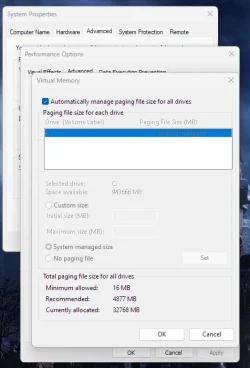
I started out with a 64 GB page file, then followed the instruction below, and ended up where I started with a Currently allocated 64 GB page file. The Recommended size says 8984 MB, so I was hoping for that. My laptop has 64 GB RAM.

Welcome to Eleven Forum.

Automatic management will readily enlarge the page file when there is a demand for more virtual memory. It seems reluctant to shrink it again when no longer needed.

To reset it's a two step process. First set 'No paging file', this will require a restart to take effect. Then turn 'Automatically manage..' back on. This should return you to the recommended defaults.

The next question you need to ask yourself is what was it that you were running that had asked for that much memory to be used?
 

My Computer

System One

  • OS
    Windows 11 Pro 23H2, OS build: 22631.6199
    Computer type
    Laptop
My page file has been 4GB ever since I installed Windows 11 on this new system. I have 64GB of memory and I don't do games, but I do work on 3D design and circuit board design on the system. I've checked memory use with a number of applications active, and memory use has never hit 32GB in Task Manager, I saw it a 29GB once. The page file size has never changed since installation.
 

My Computers

System One System Two

  • OS
    Win 11 Pro 25H2, Build 26200.8524
    Computer type
    PC/Desktop
    Manufacturer/Model
    Home Brew
    CPU
    Intel Core i5 14500
    Motherboard
    Gigabyte B760M G P WIFI
    Memory
    64GB DDR4
    Graphics Card(s)
    GeForce RTX 4060
    Sound Card
    Chipset Realtek
    Monitor(s) Displays
    LG 45" Ultragear, Acer 24" 1080p
    Screen Resolution
    5120x1440, 1920x1080
    Hard Drives
    Crucial P310 2TB 2280 PCIe Gen4 3D NAND NVMe M.2 SSD (O/S)
    Silicon Power 2TB US75 NVMe PCIe Gen4 M.2 2280 SSD (backup)
    Crucial BX500 2TB 3D NAND (2nd backup)
    Seagate 4TB Ironwolf, rotating HDD archive files
    External off-line backup Drives: 2 NVMe 4TB drives in external enclosures
    PSU
    Thermaltake Toughpower GF3 750W
    Case
    LIAN LI LANCOOL 216 E-ATX PC Case
    Cooling
    Lots of fans!
    Keyboard
    Microsoft Comfort Curve 2000
    Mouse
    Logitech G305
    Internet Speed
    Verizon FiOS 1GB
    Browser
    Firefox
    Antivirus
    Malware Bytes & Windows Defender Security
  • Operating System
    Win 11 Pro 25H2, Build 26200.8524
    Computer type
    PC/Desktop
    Manufacturer/Model
    Home Brew
    CPU
    Intel Core i5 14400
    Motherboard
    Gigabyte B760M DS3H AX
    Memory
    32GB DDR5
    Graphics card(s)
    Intel 700 Embedded GPU
    Sound Card
    Realtek Embedded
    Monitor(s) Displays
    27" HP 1080p
    Screen Resolution
    1920x1080
    Hard Drives
    Crucial P310 2TB 2280 PCIe Gen4 eD NAND PCIe SSD
    Samsung EVO 990 2TB NVMe Gen4 SSD
    Samsung 2TB SATA SSD
    PSU
    Thermaltake Smart BM3 650W
    Case
    Okinos Micro ATX Case
    Cooling
    Fans
    Keyboard
    Microsoft Comfort Curve 2000
    Mouse
    Logitech G305
    Internet Speed
    Verizon FiOS 1GB
    Browser
    Firefox
    Antivirus
    Malware Bytes & Windows Defender Security
i am not advising this for anybody else but ..
my system has 64GB of RAM and the page file disabled

that's on two desktop systems, haven't had any problem thus far.
best of luck, Steve ..
 

My Computers

System One System Two

  • OS
    Windows 11 Home
    Computer type
    PC/Desktop
    Manufacturer/Model
    HP 24" AiO
    CPU
    Ryzen 7 5825u
    Motherboard
    HP
    Memory
    64GB DDR4 3200
    Graphics Card(s)
    Ryzen 7 5825u
    Sound Card
    RealTek
    Monitor(s) Displays
    24" HP AiO
    Screen Resolution
    1920 x 1080 @60 Hz
    Hard Drives
    1TB WD Blue SN580 M2 SSD Partitioned.
    2x 1TB USB HDD External Backup/Storage.
    PSU
    90W external power brick
    Case
    24" All in One
    Cooling
    Default Air Cooling
    Keyboard
    HP WiFi UK extended
    Mouse
    HP WiFi 3 Button
    Internet Speed
    1GB full fibre
    Browser
    Edge & Firefox
    Antivirus
    AVG Internet Security/Windows Defender
    Other Info
    Mainly Open Source Software
  • Operating System
    Ubuntu 22.04.5 LTS
    Computer type
    Laptop
    Manufacturer/Model
    Dell 13" Latitude 2017
    CPU
    i5 7200u
    Motherboard
    Dell
    Memory
    16GB DDR4
    Graphics card(s)
    Intel
    Sound Card
    Intel
    Monitor(s) Displays
    13" Dell Laptop
    Hard Drives
    250GB Crucial 2.5" SSD
    Mouse
    Generic WiFi 3 button
    Internet Speed
    WiFi only
    Browser
    Firefox
    Antivirus
    ClamAV TK
    Other Info
    Mainly Open Source Software
My pagefile is always around 31744MB or Higher, but i'm also a Gamer--so might explain why mind is always way above the Recommended size

Typical games i play is the following

Firefighter Simulator Ignite
American Truck SImulator
Euro Truck Simulator 2
SecondLife with 3rd party Viewer (Firestorm 64bit)
Wreckfest
Forza Horizon 5

I've had it as high in the past as 58566MB, but seems to be holding around 31744MB lately pretty steady. If i have a memory leak on my system, i'd probably guess related to SecondLife 3rd Party Viewer Firestorm, but not 100 percent positive on that
 

My Computers

System One System Two

  • OS
    Windows 11 Pro 25H2 26200.8037
    Computer type
    PC/Desktop
    Manufacturer/Model
    PreBuilt
    CPU
    AMD Ryzen 7700X
    Motherboard
    MSI B650 VC WIfi Rev 1.0
    Memory
    32GB DDR 5 RGB 5600Mhz
    Graphics Card(s)
    Radeon 7800XT
    Sound Card
    Onboard Audio
    Monitor(s) Displays
    Asus VG245H
    Screen Resolution
    1920x1080
    Hard Drives
    Samsung 990 Evo Plus NVMe Boot
    Samsung 990 Pro 1TB Game NVMe


    External
    Western Digital Elements 500GB
    Western Digital My Passport 2TB Blue
    Western Digital My Passport 2TB Red
    Toshiba 2TB in External Enclosure
    Seagate 8TB in External Enclosure
    Seagate 1TB Portable USB 3 External Drive
    Western Digital My Book 8TB (Primary Backup drive)
    Western Digital Black 4TB In External Enclosure
    PSU
    750 Watt High Power
    Case
    Lian Li Lan Cool 216 ARGB Airflow
    Cooling
    2 160MM Front, 1 140MM Rear Exhaust
    Keyboard
    Logitech G513
    Mouse
    Logitech G502 X
    Internet Speed
    Gigabit 1100Mb/35 Upload
    Browser
    MS Edge Chromium and Bing Search
    Antivirus
    Windows Defender, Malwarebytes Premium
    Other Info
    UEFI, Secure Boot, TPM 2.0, Macrium Reflect X
  • Operating System
    Windows 11 Pro 25H2 26200.8037
    Computer type
    Laptop
    Manufacturer/Model
    Asus TUF A16 Advantage Edition FA617NT.A16.R7700
    CPU
    Ryzen 7 7735HS
    Motherboard
    OEM Asus Motherboard
    Memory
    16GB DDR 5
    Graphics card(s)
    AMD Radeon™ 680M & Radeon 7700S
    Sound Card
    Onboard
    Monitor(s) Displays
    16inch FHD 165hz
    Screen Resolution
    1920x1080
    Hard Drives
    512GB NVMe Boot Drive
    PSU
    Laptop PSU
    Case
    Laptop Case
    Cooling
    OEM Cooling
    Keyboard
    OEM Laptop Keyboard
    Mouse
    Touchpad & G502 Hero
    Internet Speed
    Gigabit 1100 Download/35 Upload
    Browser
    MS Edge with Bing search
    Antivirus
    Windows Defender & Malwarebytes Premium
    Other Info
    Macrium Reflect X
Well, everyone running Windows 11 has one memory leak, it's Windows Explorer!

Here's the initial memory use of Explorer.

1759257908522.webp

Here's the memory use after open a few windows and then closing them all back to the initial state.

1759257919641.webp

I do have to say, they've made some progress in plugging the leak, it used to whack off close to 20MB for every window opened and closed, now it's around 6-7MB for the same operation.
 

My Computers

System One System Two

  • OS
    Win 11 Pro 25H2, Build 26200.8524
    Computer type
    PC/Desktop
    Manufacturer/Model
    Home Brew
    CPU
    Intel Core i5 14500
    Motherboard
    Gigabyte B760M G P WIFI
    Memory
    64GB DDR4
    Graphics Card(s)
    GeForce RTX 4060
    Sound Card
    Chipset Realtek
    Monitor(s) Displays
    LG 45" Ultragear, Acer 24" 1080p
    Screen Resolution
    5120x1440, 1920x1080
    Hard Drives
    Crucial P310 2TB 2280 PCIe Gen4 3D NAND NVMe M.2 SSD (O/S)
    Silicon Power 2TB US75 NVMe PCIe Gen4 M.2 2280 SSD (backup)
    Crucial BX500 2TB 3D NAND (2nd backup)
    Seagate 4TB Ironwolf, rotating HDD archive files
    External off-line backup Drives: 2 NVMe 4TB drives in external enclosures
    PSU
    Thermaltake Toughpower GF3 750W
    Case
    LIAN LI LANCOOL 216 E-ATX PC Case
    Cooling
    Lots of fans!
    Keyboard
    Microsoft Comfort Curve 2000
    Mouse
    Logitech G305
    Internet Speed
    Verizon FiOS 1GB
    Browser
    Firefox
    Antivirus
    Malware Bytes & Windows Defender Security
  • Operating System
    Win 11 Pro 25H2, Build 26200.8524
    Computer type
    PC/Desktop
    Manufacturer/Model
    Home Brew
    CPU
    Intel Core i5 14400
    Motherboard
    Gigabyte B760M DS3H AX
    Memory
    32GB DDR5
    Graphics card(s)
    Intel 700 Embedded GPU
    Sound Card
    Realtek Embedded
    Monitor(s) Displays
    27" HP 1080p
    Screen Resolution
    1920x1080
    Hard Drives
    Crucial P310 2TB 2280 PCIe Gen4 eD NAND PCIe SSD
    Samsung EVO 990 2TB NVMe Gen4 SSD
    Samsung 2TB SATA SSD
    PSU
    Thermaltake Smart BM3 650W
    Case
    Okinos Micro ATX Case
    Cooling
    Fans
    Keyboard
    Microsoft Comfort Curve 2000
    Mouse
    Logitech G305
    Internet Speed
    Verizon FiOS 1GB
    Browser
    Firefox
    Antivirus
    Malware Bytes & Windows Defender Security
I started out with a 64 GB page file, then followed the instruction below, and ended up where I started with a Currently allocated 64 GB page file. The Recommended size says 8984 MB, so I was hoping for that. My laptop has 64 GB RAM.
After 219 days I finally managed to reduce my huge 64 GB page file :-)

Solution:
[WIN] + View advanced system settings: System Properties window > Startup and Recovery > Settings >
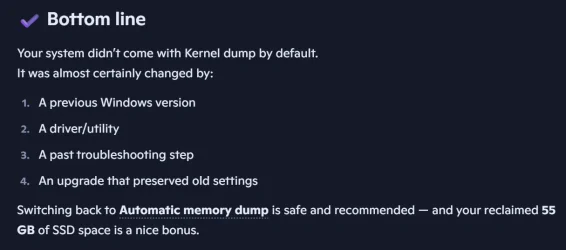
"Write debuggin information" was set to "Kernel memory dump" => 64 GB page file.
I changed it back to Windows 11 default "Automatic memory dump", restarted my laptop, and now the page file is 9.216 GB.

I had a long chat with MS Copilot about this huge page file and here is the bottom line:

huge-page-file.webp
 

My Computer

System One

  • OS
    Windows 11 Pro 23H2, OS build: 22631.6199
    Computer type
    Laptop
I have 32 GB RAM in laptop and paging file is disabled. Of course I clearly know the possible disadvantages or problems of such setting, but all my software is not memory hungry and I don't have voracious video games. Task Manager very rarely shows memory usage above 50%. On the other side, disabling the paging file prolongs the SSD lifetime.
 

My Computer

System One

  • OS
    Windows 11 Pro 25H2
    Computer type
    Laptop
    Manufacturer/Model
    Lenovo Legion 5-15ARH05
    CPU
    AMD Rysen 5 4600H
    Memory
    32 GB (2 x 16 GB Samsung SO-DIMM DDR4-3200)
    Graphics Card(s)
    GeForce GTX 1650 Ti, 4 GB GDDR6
    Screen Resolution
    1920x1080
    Hard Drives
    SSD M.2 512 GB SAMSUNG MZALQ512; SSD M.2 1 TB Seagate FireCuda 530
    Mouse
    Logitech M650L in Bluetooth mode
disabling the paging file prolongs the SSD lifetime.


From copilot AI:


Code:
disabling the paging file prolongs the SSD lifetime   

is this true or false?


Short answer: Disabling the paging file does not meaningfully prolong SSD lifespan.

In most cases, it’s actually false, and disabling it can hurt system stability far more than it helps SSD longevity.

You can explore more about the paging file, SSD wear, or Windows memory management.

🧠 Why the claim is false
Modern SSDs use:

Wear‑leveling

Over‑provisioning

High endurance NAND

TRIM

These technologies make SSD write wear extremely low.
A typical consumer SSD can handle hundreds of terabytes written (TBW)—far more than normal paging file activity will ever generate.

Windows’ paging file writes are:

Small

Buffered

Optimized

Not constant

Even heavy paging barely dents SSD lifespan.

📊 Real‑world numbers
A mid‑range 1 TB SSD often has:

600 TBW endurance

Typical paging file writes per day: 0.5–2 GB

That’s 0.0003% of the drive’s rated endurance per day

At that rate, the SSD would last centuries from paging file writes alone.

⚠️ Why disabling the paging file is risky
Turning off the paging file can cause:

Application crashes

Out‑of‑memory errors

Windows Update failures

Blue screens (especially with games or browsers)

Memory dumps not being created

Windows is designed to expect a paging file even if you have lots of RAM.

You can explore paging file risks or optimal paging file settings.

✔️ What actually helps SSD longevity
If you want to maximize SSD life, these matter far more:

Keep 10–20% free space

Avoid filling the drive to 100%

Enable TRIM (Windows does this automatically)

Avoid unnecessary write‑heavy workloads (e.g., constant logging)

Paging file writes are trivial compared to normal OS and application activity.

🧩 Bottom line
Disabling the paging file does not meaningfully extend SSD life, and it reduces system stability.
Keeping it enabled is the better choice for almost every system.

If you want, I can help you choose the best paging file size for your RAM amount or workload.


Code:
what is:  Avoid unnecessary write‑heavy workloads (e.g., constant logging)


Short answer: 
“Unnecessary write‑heavy workloads” means tasks that constantly write data to your SSD, wearing it out faster than normal. 
This has nothing to do with the paging file specifically — it refers to other behaviors that generate huge amounts of writes for no good reason.

You can explore SSD wear, write‑heavy workloads, or Windows logging.

🧠 What counts as “write‑heavy workloads”
These are activities that continuously write large amounts of data to the SSD, often unnecessarily.

Examples
Constant logging — apps writing nonstop logs (debug logs, telemetry logs, server logs)

Browser cache thrashing — huge cache writes from Chrome/Edge with many tabs

Torrenting — constant downloading + rewriting pieces

Video surveillance recording — nonstop write streams

Virtual machines — VM disks generate heavy write I/O

Database servers — constant transaction logs

Telemetry/debug tools — apps writing logs every second

These workloads can write tens or hundreds of gigabytes per day, which does affect SSD lifespan.

📝 Why this matters
Your SSD has a finite write endurance (TBW).
Normal Windows usage — including the paging file — barely touches that limit.

But the workloads above can generate massive, continuous writes, which is why they’re considered “unnecessary” unless you truly need them.

🧩 Bottom line
“Unnecessary write‑heavy workloads” refers to software that writes to the SSD constantly, not normal system activity.
Avoiding those helps SSD longevity far more than disabling the paging file ever would.

If you want, I can check whether your system is doing any write‑heavy tasks right now — just tell me what apps or services you’re running.
 

My Computer

System One

  • OS
    Windows 10
    Computer type
    Laptop
    Manufacturer/Model
    HP
    CPU
    Intel(R) Core(TM) i7-4800MQ CPU @ 2.70GHz
    Motherboard
    Product : 190A Version : KBC Version 94.56
    Memory
    16 GB Total: Manufacturer : Samsung MemoryType : DDR3 FormFactor : SODIMM Capacity : 8GB Speed : 1600
    Graphics Card(s)
    NVIDIA Quadro K3100M; Intel(R) HD Graphics 4600
    Sound Card
    IDT High Definition Audio CODEC; PNP Device ID HDAUDIO\FUNC_01&VEN_111D&DEV_76E0
    Hard Drives
    Model Hitachi HTS727575A9E364
    Antivirus
    Microsoft Defender
    Other Info
    Mobile Workstation

My Computer

System One

  • OS
    Windows 11 Pro 25H2
    Computer type
    Laptop
    Manufacturer/Model
    Lenovo Legion 5-15ARH05
    CPU
    AMD Rysen 5 4600H
    Memory
    32 GB (2 x 16 GB Samsung SO-DIMM DDR4-3200)
    Graphics Card(s)
    GeForce GTX 1650 Ti, 4 GB GDDR6
    Screen Resolution
    1920x1080
    Hard Drives
    SSD M.2 512 GB SAMSUNG MZALQ512; SSD M.2 1 TB Seagate FireCuda 530
    Mouse
    Logitech M650L in Bluetooth mode
Back
Top Bottom