Solved PC crashes while hibernating


JohnSmith13

Well-known member
Member
Local time
9:43 PM
Posts
42
OS
Windows 11
Hello to all.

My PC crashes while hibernating.
Hibernation used to work just fine, but the last couple weeks, 9 times out of 10, when hibernating it crashes.
No BSOD, no restart, just hard shutdown.

At boot, the usual errors.
Code:
Kernel Boot    Event ID 16    Windows failed to resume from hibernate with error status 0xC0000001.
EventLog    Event ID 6008    The previous system shutdown was unexpected.
volmgr        Event ID 162    Dump file generation succeded.
Kernel-Power    Event ID 41    The system has rebooted without cleanly shutting down first. This error could be caused if the system stopped responding, crashed, or lost power unexpectedly.
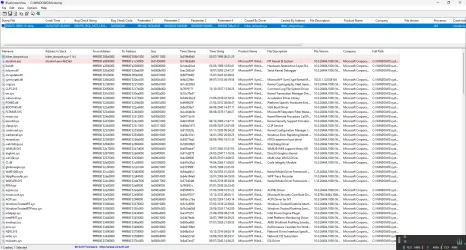
BugCheck    Event ID 1001    The computer has rebooted from a bugcheck.  The bugcheck was: 0x000000d1 (0xffffc60c0000d008, 0x00000000000000ff, 0x0000000000000000, 0xfffff800388a11c5). A dump was saved in: C:\WINDOWS\Minidump\092425-18093-01.dmp. Report Id: 9197b8bd-3b4b-4534-a795-d45f895cd308.

The Minidump file reports DRIVER_IRQL_NOT_LESS_OR_EQUAL 0x000000d1 fault, due to hiber_storport.sys, ntoskrnl.exe.
Code:
092425-18093-01.dmp    24/09/2025 00:49:01    DRIVER_IRQL_NOT_LESS_OR_EQUAL    0x000000d1    ffffc60c`0000d008    00000000`000000ff    00000000`00000000    fffff800`388a11c5    hiber_storport.sys    hiber_storport.sys+11c5                    x64    ntoskrnl.exe+4f6bb0                    C:\WINDOWS\Minidump\092425-18093-01.dmp    8    15    26484    199.680    24/09/2025 10:13:31

Windows is up to date, did an in-place update from ISO last week.

I have checked numerous times with
Code:
chkdsk /scan
dism /Online /Cleanup-Image /AnalyzeComponentStore
dism /Online /Cleanup-Image /CheckHealth
dism /Online /Cleanup-Image /ScanHealth
dism /Online /Cleanup-Image /RestoreHealth
sfc /scannow
dism /online /Cleanup-Image /Startcomponentcleanup /resetbase

All looks good.

I have uninstalled, rebooted and reinstalled multiple times the usual suspects, drivers for all NICs, GPU, Audio, AHCI etc.
(Just a question: a usual suspect in the past, Realtek with its GBE Ethernet Controller,
has released drivers with "Not Support Power Saving". What's up with that?
Realtek)

All drivers are the latest available.
I have not been able to narrow it down, partly because that 1 time out of 10 it will successfully hibernate.
Usually, but not always, if I put it in hibernation shortly after boot (maybe in less than an hour) it will go to hibernation.
If the PC is on for longer than that, it will usually crash while hibernating.

Any clues?
Thanks in advance.

PS: If mods feel that the post is BSOD related, please feel free to move it as appropriate.
Screenshot 2025-09-24 110209.webp
 
Windows Build/Version
Windows Server 24H2 Build 26484.1000

Attachments

Last edited:

My Computer

System One

  • OS
    Windows 11
Hello to all.

My PC crashes while hibernating.
Hibernation used to work just fine, but the last couple weeks, 9 times out of 10, when hibernating it crashes.
No BSOD, no restart, just hard shutdown.

At boot, the usual errors.
Code:
Kernel Boot    Event ID 16    Windows failed to resume from hibernate with error status 0xC0000001.
EventLog    Event ID 6008    The previous system shutdown was unexpected.
volmgr        Event ID 162    Dump file generation succeded.
Kernel-Power    Event ID 41    The system has rebooted without cleanly shutting down first. This error could be caused if the system stopped responding, crashed, or lost power unexpectedly.
BugCheck    Event ID 1001    The computer has rebooted from a bugcheck.  The bugcheck was: 0x000000d1 (0xffffc60c0000d008, 0x00000000000000ff, 0x0000000000000000, 0xfffff800388a11c5). A dump was saved in: C:\WINDOWS\Minidump\092425-18093-01.dmp. Report Id: 9197b8bd-3b4b-4534-a795-d45f895cd308.

The Minidump file reports DRIVER_IRQL_NOT_LESS_OR_EQUAL 0x000000d1 fault, due to hiber_storport.sys, ntoskrnl.exe.
Code:
092425-18093-01.dmp    24/09/2025 00:49:01    DRIVER_IRQL_NOT_LESS_OR_EQUAL    0x000000d1    ffffc60c`0000d008    00000000`000000ff    00000000`00000000    fffff800`388a11c5    hiber_storport.sys    hiber_storport.sys+11c5                    x64    ntoskrnl.exe+4f6bb0                    C:\WINDOWS\Minidump\092425-18093-01.dmp    8    15    26484    199.680    24/09/2025 10:13:31


The computer had a BSOD with bugcheck 0x000000d1


1) Run Tuneup plus:


2) Create a new restore point


3) Monitor using:


4) Run V2 > post a share link


My Computer

System One

  • OS
    Windows 10
    Computer type
    Laptop
    Manufacturer/Model
    HP
    CPU
    Intel(R) Core(TM) i7-4800MQ CPU @ 2.70GHz
    Motherboard
    Product : 190A Version : KBC Version 94.56
    Memory
    16 GB Total: Manufacturer : Samsung MemoryType : DDR3 FormFactor : SODIMM Capacity : 8GB Speed : 1600
    Graphics Card(s)
    NVIDIA Quadro K3100M; Intel(R) HD Graphics 4600
    Sound Card
    IDT High Definition Audio CODEC; PNP Device ID HDAUDIO\FUNC_01&VEN_111D&DEV_76E0
    Hard Drives
    Model Hitachi HTS727575A9E364
    Antivirus
    Microsoft Defender
    Other Info
    Mobile Workstation
Can you fill in your "My Computer". Helps us to help you ;-)
 

My Computer

System One

  • OS
    Windows 11 Pro 25H2
    Computer type
    PC/Desktop
    Manufacturer/Model
    My Self
    CPU
    Intel Alder lake i7 12700K
    Motherboard
    Asus z690 Gaming WiFi D4, Bios Ver 4505
    Memory
    32 Gb Corsair Vengeance LPX DDR4 3200 XMP2
    Graphics Card(s)
    EVGA 3070ti FTW3 Ultra Gaming & Intel Arc
    Sound Card
    Via Display port
    Monitor(s) Displays
    Dell AW2723DF
    Screen Resolution
    2560 x 1440 @ 280Hz G-Sync mode
    Hard Drives
    WD Black SN850 1Tb NVME (Boot Drive)
    WD BLACK SN850X + Heatsink 1Tb NVME
    Samsung 870 Qvo 1Tb SSD,
    Pioneer DVD-RW DVR-219L
    WD Black SN850x NVME 2Tb x3
    PSU
    Corsair RM850
    Case
    Phanteks Enthoo Pro M Tempered Glass
    Cooling
    Be Quiet Shadow Rock 3
    Keyboard
    Logitech G Pro
    Mouse
    Logitech G903, Lightspeed + Powerplay Mat
    Internet Speed
    900Mb/900Mb Fritz!Box 7590ax v2
    Browser
    Firefox
    Antivirus
    MS Defender
    Other Info
    Logitech C930e webcam
    Synology DS218 play 2 x 4Tb Synology HAT3300-4T
Some files used for troubleshooting were missing.

Please make sure that cleaning is not performed during the troubleshooting.


How come Microsoft Windows Server 2025 Datacenter was installed twelve days ago?

What was the prior OS?

What were the computer problems with the prior OS.

Is this the cost?


System Model HP Pavilion dv8 Notebook PC
Microsoft Windows Server 2025 Datacenter


1) Please add WMIC:

Code:
DISM /Online /Add-Capability /CapabilityName:WMIC~~~~


2) Rerun Tuneup plus > post a new share link


3) Post a new V2 share link into the newest post


4) Some of the event log files were in a foreign language and could not be scanned or read

It may remain impossible to convert but check:


Code:
 Phase duration (Data attribute verification): 14.92 milliseconds.
CHKDSK is verifying Usn Journal...
The USN Journal length 0x3d3d160 in file 0x39 is less the
largest USN encountered, 0x3d3d380, plus eight in file 0x4f897.
Usn Journal verification completed.

Windows has made corrections to the file system.
No further action is required.


Code:
Event[13018]
  Log Name: System
  Source: EventLog
  Date: 2025-09-24T10:13:35.9290000Z
  Event ID: 6008
  Task: ╩άΉ▀ά
  Level: ╙÷▄ΈΉά
  Opcode: N/A
  Keyword: ╩Έά≤ώΆ▐,
  User: N/A
  User Name: N/A
  Computer: HPDV8
  Description:
╧ Ώ±ΎύήΎ²ΉίΊΎ≥ Ϊί±ΉάΪώ≤Ήⁿ≥ ΈίώΪΎΫ±ή▀ά≥ ΪΎΫ ≤Ϋ≤Ϊ▐ΉάΪΎ≥ ≤ί12:17:52 ΏΉ ≤ί ?24/?9/?2025 ▐ΪάΊ Ήύ άΊάΉίΊⁿΉίΊΎ≥.


Code:
Event[10878]
  Log Name: System
  Source: Microsoft-Windows-Kernel-Power
  Date: 2025-09-22T19:30:07.3300000Z
  Event ID: 41
  Task: N/A
  Level: ╩±▀≤ώΉΎ
  Opcode: ╨Έύ±Ύ÷Ύ±▀ί≥
  Keyword: N/A
  User: S-1-5-18
  User Name: NT AUTHORITY\SYSTEM
  Computer: HPDV8
  Description:
╕ήώΊί ίΏάΊίΆΆ▀Ίύ≤ύ ΪΎΫ ≤Ϋ≤Ϊ▐ΉάΪΎ≥ ≈∙±▀≥ Ώ±ΎύήΎ²ΉίΊΎ ΏΈ▐±ύ Ϊί±ΉάΪώ≤Ήⁿ. ┴ΫΪⁿ ΪΎ ≤÷▄ΈΉά ΉΏΎ±ί▀ Ίά Ώ±ΎΆΈ▐ϋύΆί, άΊ ΪΎ ≤²≤ΪύΉά ≤ΪάΉ▄Ϊύ≤ί Ίά άΊΪάΏΎΆ±▀ΊίΪάώ, άΊ ϊώάΆⁿΏύΆί ύ ΈίώΪΎΫ±ή▀ά ▐ άΊ Ώά±ΎΫ≤ώ▄≤ΪύΆί άΏ±ⁿ≤ΉίΊύ ϊώάΆΎΏ▐ ±ί²ΉάΪΎ≥.


Code:
 Microsoft Windows Server 2025 Datacenter  Version 24H2 (OS Build 26484.1000)
 
==================================================================

    Started on 24/09/2025 at 12:54:25,84
   
        [SFC /ScanNow]
   
Beginning system scan.  This process will take some time.

Results:
 
Windows Resource Protection found corrupt files but was unable to fix some of them.

For online repairs, details are included in the CBS log file located at
windir\Logs\CBS\CBS.log. For example C:\Windows\Logs\CBS\CBS.log. For offline
repairs, details are included in the log file provided by the /OFFLOGFILE flag.
 
==================================================================
 
A TXT file named SFC_details-1.txt has been created.

==================================================================

    Started on 24/09/2025 at 13:02:19,65

        [DISM /online /cleanup-image /ScanHealth]

Deployment Image Servicing and Management tool
Version: 10.0.26484.1000

Image Version: 10.0.26484.1000
 
The component store is repairable.

The operation completed successfully.
 
==================================================================

    Started on 24/09/2025 at 13:08:49,02

        [DISM /online /cleanup-image /RestoreHealth]

Deployment Image Servicing and Management tool
Version: 10.0.26484.1000

Image Version: 10.0.26484.1000
 
Error: 0x800f0915
The repair content could not be found anywhere.
Check the internet connectivity or use the "Source" option to specify the location of the files that are required to restore the image. For more information on specifying a source location, see https://go.microsoft.com/fwlink/?LinkId=243077.
The DISM log file can be found at C:\WINDOWS\Logs\DISM\dism.log
 
==================================================================

    Started on 24/09/2025 at 13:15:54,72

        [SFC /ScanNow]

Beginning system scan.  This process will take some time.

Results:
 
Windows Resource Protection found corrupt files but was unable to fix some of them.

For online repairs, details are included in the CBS log file located at
windir\Logs\CBS\CBS.log. For example C:\Windows\Logs\CBS\CBS.log. For offline
repairs, details are included in the log file provided by the /OFFLOGFILE flag.
 
==================================================================
 
A TXT file named SFC_details-2.txt has been created.

==================================================================
 

My Computer

System One

  • OS
    Windows 10
    Computer type
    Laptop
    Manufacturer/Model
    HP
    CPU
    Intel(R) Core(TM) i7-4800MQ CPU @ 2.70GHz
    Motherboard
    Product : 190A Version : KBC Version 94.56
    Memory
    16 GB Total: Manufacturer : Samsung MemoryType : DDR3 FormFactor : SODIMM Capacity : 8GB Speed : 1600
    Graphics Card(s)
    NVIDIA Quadro K3100M; Intel(R) HD Graphics 4600
    Sound Card
    IDT High Definition Audio CODEC; PNP Device ID HDAUDIO\FUNC_01&VEN_111D&DEV_76E0
    Hard Drives
    Model Hitachi HTS727575A9E364
    Antivirus
    Microsoft Defender
    Other Info
    Mobile Workstation
How come Microsoft Windows Server 2025 Datacenter was installed twelve days ago?
It was updated with an in-place update from the ISO.

What was the prior OS?
It was Windows Server 2025 LTSC vNext Preview build 26470
Windows Server 2025 LTSC vNext Preview build 26470 - Aug. 27

And before that there was Server 24H2, Server 23H2, Windows 11 and a lot more.

What were the computer problems with the prior OS.
There were a few problems, but very minor.
Hibernation was working just fine on the latest version up till recently.
Hibernation was also working on all the previous OSs.

Is this the cost?
I do not know.
It is an evaluation copy, good for 90 or 180 days or so, until the next evaluation version comes out.
Windows Server 2025 | Microsoft Evaluation Center

zbook:

Some of the event log files were in a foreign language and could not be scanned or read
It may remain impossible to convert but check:
The OS is in an English en-us ISO.
I don't get how the log files got scrambled.
And I don't think there is something to convert.

Anyway, I'll try again.
 

My Computer

System One

  • OS
    Windows 11
I used to have a problem that my PC would lock up coming out of hibernation, I fixed that by disabling hibernation and using S3 sleep. I have a UPS so S3 sleep is much faster to wake up and accomplishes the same thing as hibernation.
 

My Computers

System One System Two

  • OS
    Win 11 Pro 25H2, Build 26200.8524
    Computer type
    PC/Desktop
    Manufacturer/Model
    Home Brew
    CPU
    Intel Core i5 14500
    Motherboard
    Gigabyte B760M G P WIFI
    Memory
    64GB DDR4
    Graphics Card(s)
    GeForce RTX 4060
    Sound Card
    Chipset Realtek
    Monitor(s) Displays
    LG 45" Ultragear, Acer 24" 1080p
    Screen Resolution
    5120x1440, 1920x1080
    Hard Drives
    Crucial P310 2TB 2280 PCIe Gen4 3D NAND NVMe M.2 SSD (O/S)
    Silicon Power 2TB US75 NVMe PCIe Gen4 M.2 2280 SSD (backup)
    Crucial BX500 2TB 3D NAND (2nd backup)
    Seagate 4TB Ironwolf, rotating HDD archive files
    External off-line backup Drives: 2 NVMe 4TB drives in external enclosures
    PSU
    Thermaltake Toughpower GF3 750W
    Case
    LIAN LI LANCOOL 216 E-ATX PC Case
    Cooling
    Lots of fans!
    Keyboard
    Microsoft Comfort Curve 2000
    Mouse
    Logitech G305
    Internet Speed
    Verizon FiOS 1GB
    Browser
    Firefox
    Antivirus
    Malware Bytes & Windows Defender Security
  • Operating System
    Win 11 Pro 25H2, Build 26200.8524
    Computer type
    PC/Desktop
    Manufacturer/Model
    Home Brew
    CPU
    Intel Core i5 14400
    Motherboard
    Gigabyte B760M DS3H AX
    Memory
    32GB DDR5
    Graphics card(s)
    Intel 700 Embedded GPU
    Sound Card
    Realtek Embedded
    Monitor(s) Displays
    27" HP 1080p
    Screen Resolution
    1920x1080
    Hard Drives
    Crucial P310 2TB 2280 PCIe Gen4 eD NAND PCIe SSD
    Samsung EVO 990 2TB NVMe Gen4 SSD
    Samsung 2TB SATA SSD
    PSU
    Thermaltake Smart BM3 650W
    Case
    Okinos Micro ATX Case
    Cooling
    Fans
    Keyboard
    Microsoft Comfort Curve 2000
    Mouse
    Logitech G305
    Internet Speed
    Verizon FiOS 1GB
    Browser
    Firefox
    Antivirus
    Malware Bytes & Windows Defender Security
Please add WMIC


Code:
DISM /Online /Add-Capability /CapabilityName:WMIC~~~~

Deployment Image Servicing and Management tool
Version: 10.0.26484.1000

Image Version: 10.0.26484.1000

Error: 87

A Windows capability name was not recognized.

The DISM log file can be found at C:\WINDOWS\Logs\DISM\dism.log

2025-09-24 21:41:23, Warning               DISM   DISM Package Manager: PID=5676 TID=6844 Failed to find capability by name WMIC~~~~?. HR=0x80070490 - CPackageManagerCLIHandler::Private_GetCapabilitiesFromCommandLine
2025-09-24 21:41:23, Error                 DISM   DISM Package Manager: PID=5676 TID=6844 No capabilities were recognized on the command-line. - CPackageManagerCLIHandler::Private_GetCapabilitiesFromCommandLine(hr:0x80070057)
2025-09-24 21:41:23, Error                 DISM   DISM Package Manager: PID=5676 TID=6844 Failed to get the list of packages from the command line. - CPackageManagerCLIHandler::ProcessCmdLine_AddCapability(hr:0x80070057)
2025-09-24 21:41:23, Error                 DISM   DISM Package Manager: PID=5676 TID=6844 Failed while processing command add-capability. - CPackageManagerCLIHandler::ExecuteCmdLine(hr:0x80070057)
 

My Computer

System One

  • OS
    Windows 11
Any insight from anyone?

Thanks in advance.
Have you recently updated your graphics drivers before the crashes began. Sounds weird but mine would crash trying to wake from S0 Modern Standby Sleep after updating to generic NVIDIA and intel graphics drivers from their sites. Went back to Dell factory drivers and all was well again.
 

My Computers

System One System Two

  • OS
    Windows 11 25H2
    Computer type
    Laptop
    Manufacturer/Model
    Alienware 18 Area-51
    CPU
    Intel Core Ultra 9 275HX (24-Core)
    Motherboard
    Alienware
    Memory
    64GB DDR5 6400MT/s
    Graphics Card(s)
    NVIDIA GeForce RTX 5080 and Intel UHD Graphics
    Sound Card
    Onboard, Realtek high-performance Audio chips (ALC3329 & ALC1708))
    Monitor(s) Displays
    300HZ 18-inch QHD 500 nit Comfort View+
    Screen Resolution
    2560 x 1600
    Hard Drives
    2TB NVMe M.2 PCIe Gen 5 SSD
    Case
    Magnesium Alloy
    Cooling
    Advanced Cryo-Tech Quad-Fan Cooling system & large vapor chamber
    Keyboard
    Cherry MX ultra low profile mechanical keyboard with per key AlienFX RGB lighting
    Mouse
    Logitech MX Master 4
    Browser
    Vivaldi (main), Firefox, Chrome, Edge
    Antivirus
    MS Defender and Malwarebytes Free
  • Operating System
    Windows 11 25H2
    Computer type
    Laptop
    Manufacturer/Model
    Microsoft Surface Laptop 7
    CPU
    Qualcomm Snapdragon X Elite (12 Core) ARM based CPU
    Motherboard
    Microsoft Corp.
    Memory
    16GB LPDDR5
    Graphics card(s)
    Qualcomm Adreno X1-85
    Sound Card
    Omnisonic speakers with Dolby Atmos spatial sound
    Monitor(s) Displays
    120 Hz 13.8-inch 600 nit PixelSense Flow touchscreen
    Screen Resolution
    2304x1536
    Hard Drives
    1TB NVMe Gen 4 SSD
    Case
    Anodized Aluminum
    Cooling
    Traditional active cooling fan system
    Keyboard
    Mechanical QWERTY, backlit when in use
    Mouse
    Logitech MX Master 4 and Surface Arc Mouse
    Browser
    Vivaldi (main), Firefox, Chrome, Edge
    Antivirus
    MS Defender and Malwarebytes Free
I used to have a problem that my PC would lock up coming out of hibernation, I fixed that by disabling hibernation and using S3 sleep. I have a UPS so S3 sleep is much faster to wake up and accomplishes the same thing as hibernation.

Thanks for the tip.
Unfortunately, in this case the PC just crashes while going in hibernation, not waking up from it.
I know because, under normal circumstances, and up till recently or when it does work, going in hibernation takes about 10 to 15 seconds.

In most cases recently, though, what seems like "going" in hibernation takes only 5 seconds or so.
There is no BlackScreenOfDeath, no restart, no error screen, nothing.
It appears as it has shut down.
But upon restart, it throws error about that bugcheck.

And I have a UPS, but I really do need hibernation, some times for a few hours, but occasionally for a few days.
 

My Computer

System One

  • OS
    Windows 11
Have you recently updated your graphics drivers before the crashes began. Sounds weird but mine would crash trying to wake from S0 Modern Standby Sleep after updating to generic NVIDIA and intel graphics drivers from their sites. Went back to Dell factory drivers and all was well again.

I have uninstalled, rebooted and reinstalled multiple times the usual suspects, drivers for all NICs, GPU, Audio, AHCI etc.

All the drivers are pretty old.
And it makes no difference either with the generic NVIDIA or the HP GPU driver.
 

My Computer

System One

  • OS
    Windows 11
Just a question: a usual suspect in the past, Realtek with its GBE Ethernet Controller,
has released drivers with "Not Support Power Saving". What's up with that?
Realtek

Although I have tried every driver from their site and here
[DRIVERS] Realtek Ethernet/WiFi/Bluetooth
could that have something to do with it?
 

My Computer

System One

  • OS
    Windows 11

My Computer

System One

  • OS
    Windows 10
    Computer type
    Laptop
    Manufacturer/Model
    HP
    CPU
    Intel(R) Core(TM) i7-4800MQ CPU @ 2.70GHz
    Motherboard
    Product : 190A Version : KBC Version 94.56
    Memory
    16 GB Total: Manufacturer : Samsung MemoryType : DDR3 FormFactor : SODIMM Capacity : 8GB Speed : 1600
    Graphics Card(s)
    NVIDIA Quadro K3100M; Intel(R) HD Graphics 4600
    Sound Card
    IDT High Definition Audio CODEC; PNP Device ID HDAUDIO\FUNC_01&VEN_111D&DEV_76E0
    Hard Drives
    Model Hitachi HTS727575A9E364
    Antivirus
    Microsoft Defender
    Other Info
    Mobile Workstation
Glad to read the success.

If you want the files scanned for any BSOD or live kernel events please post a new V2 share link into the newest post.
 

My Computer

System One

  • OS
    Windows 10
    Computer type
    Laptop
    Manufacturer/Model
    HP
    CPU
    Intel(R) Core(TM) i7-4800MQ CPU @ 2.70GHz
    Motherboard
    Product : 190A Version : KBC Version 94.56
    Memory
    16 GB Total: Manufacturer : Samsung MemoryType : DDR3 FormFactor : SODIMM Capacity : 8GB Speed : 1600
    Graphics Card(s)
    NVIDIA Quadro K3100M; Intel(R) HD Graphics 4600
    Sound Card
    IDT High Definition Audio CODEC; PNP Device ID HDAUDIO\FUNC_01&VEN_111D&DEV_76E0
    Hard Drives
    Model Hitachi HTS727575A9E364
    Antivirus
    Microsoft Defender
    Other Info
    Mobile Workstation
Back
Top Bottom