- Local time
- 6:40 AM
- Posts
- 43
- OS
- Windows 11
Hello to all.
My PC crashes while hibernating.
Hibernation used to work just fine, but the last couple weeks, 9 times out of 10, when hibernating it crashes.
No BSOD, no restart, just hard shutdown.
At boot, the usual errors.
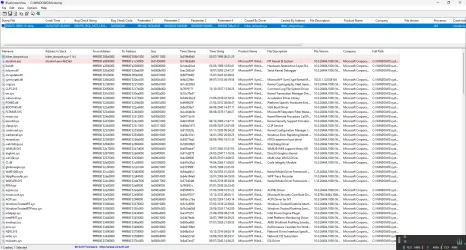
The Minidump file reports DRIVER_IRQL_NOT_LESS_OR_EQUAL 0x000000d1 fault, due to hiber_storport.sys, ntoskrnl.exe.
Windows is up to date, did an in-place update from ISO last week.
I have checked numerous times with
All looks good.
I have uninstalled, rebooted and reinstalled multiple times the usual suspects, drivers for all NICs, GPU, Audio, AHCI etc.
(Just a question: a usual suspect in the past, Realtek with its GBE Ethernet Controller,
has released drivers with "Not Support Power Saving". What's up with that?
Realtek)
All drivers are the latest available.
I have not been able to narrow it down, partly because that 1 time out of 10 it will successfully hibernate.
Usually, but not always, if I put it in hibernation shortly after boot (maybe in less than an hour) it will go to hibernation.
If the PC is on for longer than that, it will usually crash while hibernating.
Any clues?
Thanks in advance.
PS: If mods feel that the post is BSOD related, please feel free to move it as appropriate.
My PC crashes while hibernating.
Hibernation used to work just fine, but the last couple weeks, 9 times out of 10, when hibernating it crashes.
No BSOD, no restart, just hard shutdown.
At boot, the usual errors.
Code:
Kernel Boot    Event ID 16    Windows failed to resume from hibernate with error status 0xC0000001.
EventLog    Event ID 6008    The previous system shutdown was unexpected.
volmgr        Event ID 162    Dump file generation succeded.
Kernel-Power    Event ID 41    The system has rebooted without cleanly shutting down first. This error could be caused if the system stopped responding, crashed, or lost power unexpectedly.
BugCheck    Event ID 1001    The computer has rebooted from a bugcheck.  The bugcheck was: 0x000000d1 (0xffffc60c0000d008, 0x00000000000000ff, 0x0000000000000000, 0xfffff800388a11c5). A dump was saved in: C:\WINDOWS\Minidump\092425-18093-01.dmp. Report Id: 9197b8bd-3b4b-4534-a795-d45f895cd308.
The Minidump file reports DRIVER_IRQL_NOT_LESS_OR_EQUAL 0x000000d1 fault, due to hiber_storport.sys, ntoskrnl.exe.
Code:
092425-18093-01.dmp 24/09/2025 00:49:01 DRIVER_IRQL_NOT_LESS_OR_EQUAL 0x000000d1 ffffc60c`0000d008 00000000`000000ff 00000000`00000000 fffff800`388a11c5 hiber_storport.sys hiber_storport.sys+11c5 x64 ntoskrnl.exe+4f6bb0 C:\WINDOWS\Minidump\092425-18093-01.dmp 8 15 26484 199.680 24/09/2025 10:13:31Windows is up to date, did an in-place update from ISO last week.
I have checked numerous times with
Code:
chkdsk /scan
dism /Online /Cleanup-Image /AnalyzeComponentStore
dism /Online /Cleanup-Image /CheckHealth
dism /Online /Cleanup-Image /ScanHealth
dism /Online /Cleanup-Image /RestoreHealth
sfc /scannow
dism /online /Cleanup-Image /Startcomponentcleanup /resetbase
All looks good.
I have uninstalled, rebooted and reinstalled multiple times the usual suspects, drivers for all NICs, GPU, Audio, AHCI etc.
(Just a question: a usual suspect in the past, Realtek with its GBE Ethernet Controller,
has released drivers with "Not Support Power Saving". What's up with that?
Realtek)
All drivers are the latest available.
I have not been able to narrow it down, partly because that 1 time out of 10 it will successfully hibernate.
Usually, but not always, if I put it in hibernation shortly after boot (maybe in less than an hour) it will go to hibernation.
If the PC is on for longer than that, it will usually crash while hibernating.
Any clues?
Thanks in advance.
PS: If mods feel that the post is BSOD related, please feel free to move it as appropriate.
- Windows Build/Version
- Windows Server 24H2 Build 26484.1000
Attachments
Last edited:
My Computer
At a glance
Windows 11
- OS
- Windows 11