PC goes to sleep, but won't fully wake up (3rd time in 3 years)


surio

Well-known member
Local time
3:42 AM
Posts
115
OS
Windows 11 Pro
Greetings, friends,
For some reason, every year I seem to get this problem where I can put my PC to sleep, but it won't wake up from sleep state properly.
The CPU lights up and fans power up but keyboard, mouse and monitor are all unresponsive. The only way to recover is to hard reboot PC.
I have changed my card to an NVIDIA instead of Radeon in the previous profile of my PC.
I am attaching the event viewer logs of "System" to help with any early troubleshooting or tips for further information.
Kindly let me know if you have any suggestions for me, or any other information.

Windows 25H2, version 26200.8457

Thanks,
surio.
 

Attachments

My Computer

System One

  • OS
    Windows 11 Pro
    Computer type
    PC/Desktop
    Manufacturer/Model
    Assembled
    CPU
    AMD Ryzen 7 7700X 8-Core
    Motherboard
    B650M AORUS ELITE AX
    Memory
    Corsair 16GB DDR5 XMP x2
    Graphics Card(s)
    4054MB NVIDIA GeForce RTX 5060 Ti (MSI)
    Monitor(s) Displays
    2
    Screen Resolution
    2351 x 1323 (NVIDIA DSR)
    Hard Drives
    SSD
    PSU
    CORSAIR CV750 Watts bronze80 PLUS
    Cooling
    cooler master AIO water cooled
    Keyboard
    red dragon cherry
    Mouse
    Galax 04
    Browser
    Brave, floorp, zen and others
    Antivirus
    windows defender
    Other Info
    I also have two more desktops, a windows 10 and 11 gaming desktop and a dell gaming laptop that runs windows 11
do you have fast startup enabled, if so please try disabling fast startup.

best of luck Steve ..
 

My Computers

System One System Two

  • OS
    Windows 11 Home
    Computer type
    PC/Desktop
    Manufacturer/Model
    HP 24" AiO
    CPU
    Ryzen 7 5825u
    Motherboard
    HP
    Memory
    64GB DDR4 3200
    Graphics Card(s)
    Ryzen 7 5825u
    Sound Card
    RealTek
    Monitor(s) Displays
    24" HP AiO
    Screen Resolution
    1920 x 1080 @60 Hz
    Hard Drives
    1TB WD Blue SN580 M2 SSD Partitioned.
    2x 1TB USB HDD External Backup/Storage.
    PSU
    90W external power brick
    Case
    24" All in One
    Cooling
    Default Air Cooling
    Keyboard
    HP WiFi UK extended
    Mouse
    HP WiFi 3 Button
    Internet Speed
    1GB full fibre
    Browser
    Edge & Firefox
    Antivirus
    AVG Internet Security/Windows Defender
    Other Info
    Mainly Open Source Software
  • Operating System
    Ubuntu 22.04.5 LTS
    Computer type
    Laptop
    Manufacturer/Model
    Dell 13" Latitude 2017
    CPU
    i5 7200u
    Motherboard
    Dell
    Memory
    16GB DDR4
    Graphics card(s)
    Intel
    Sound Card
    Intel
    Monitor(s) Displays
    13" Dell Laptop
    Hard Drives
    250GB Crucial 2.5" SSD
    Mouse
    Generic WiFi 3 button
    Internet Speed
    WiFi only
    Browser
    Firefox
    Antivirus
    ClamAV TK
    Other Info
    Mainly Open Source Software
Please perform the following steps:


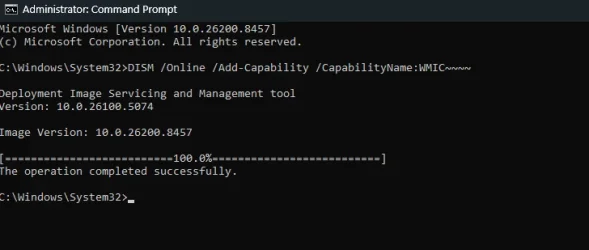
1) Add WMIC:

DISM /Online /Add-Capability /CapabilityName:WMIC~~~~


2) Run Tuneup plus > post a share link


3) Run the V2 log collector > post a share link


My Computer

System One

  • OS
    Windows 10
    Computer type
    Laptop
    Manufacturer/Model
    HP
    CPU
    Intel(R) Core(TM) i7-4800MQ CPU @ 2.70GHz
    Motherboard
    Product : 190A Version : KBC Version 94.56
    Memory
    16 GB Total: Manufacturer : Samsung MemoryType : DDR3 FormFactor : SODIMM Capacity : 8GB Speed : 1600
    Graphics Card(s)
    NVIDIA Quadro K3100M; Intel(R) HD Graphics 4600
    Sound Card
    IDT High Definition Audio CODEC; PNP Device ID HDAUDIO\FUNC_01&VEN_111D&DEV_76E0
    Hard Drives
    Model Hitachi HTS727575A9E364
    Antivirus
    Microsoft Defender
    Other Info
    Mobile Workstation
do you have fast startup enabled, if so please try disabling fast startup.

best of luck Steve ..

I followed the options to disable fast startup, rebooted PC and then put it back to sleep to test if this setting helped. While my keyboard RGB lit up when I pressed keys to wake the PC up, PC itself didn't wake up properly. '
Clicking mouse neither turned on mouse RGB nor woke up the PC.
Attaching new event viewer logs.
Thank you for the recommendation.
Please let me know if you have other suggestions.
 

Attachments

My Computer

System One

  • OS
    Windows 11 Pro
    Computer type
    PC/Desktop
    Manufacturer/Model
    Assembled
    CPU
    AMD Ryzen 7 7700X 8-Core
    Motherboard
    B650M AORUS ELITE AX
    Memory
    Corsair 16GB DDR5 XMP x2
    Graphics Card(s)
    4054MB NVIDIA GeForce RTX 5060 Ti (MSI)
    Monitor(s) Displays
    2
    Screen Resolution
    2351 x 1323 (NVIDIA DSR)
    Hard Drives
    SSD
    PSU
    CORSAIR CV750 Watts bronze80 PLUS
    Cooling
    cooler master AIO water cooled
    Keyboard
    red dragon cherry
    Mouse
    Galax 04
    Browser
    Brave, floorp, zen and others
    Antivirus
    windows defender
    Other Info
    I also have two more desktops, a windows 10 and 11 gaming desktop and a dell gaming laptop that runs windows 11
Please let me know if you have other suggestions.


The event viewer reported BSODs (March - May) (last today).
 

My Computer

System One

  • OS
    Windows 10
    Computer type
    Laptop
    Manufacturer/Model
    HP
    CPU
    Intel(R) Core(TM) i7-4800MQ CPU @ 2.70GHz
    Motherboard
    Product : 190A Version : KBC Version 94.56
    Memory
    16 GB Total: Manufacturer : Samsung MemoryType : DDR3 FormFactor : SODIMM Capacity : 8GB Speed : 1600
    Graphics Card(s)
    NVIDIA Quadro K3100M; Intel(R) HD Graphics 4600
    Sound Card
    IDT High Definition Audio CODEC; PNP Device ID HDAUDIO\FUNC_01&VEN_111D&DEV_76E0
    Hard Drives
    Model Hitachi HTS727575A9E364
    Antivirus
    Microsoft Defender
    Other Info
    Mobile Workstation
The event viewer reported BSODs (March - May) (last today).
Thanks. I saw the "Critical" messages in event viewer application, but the preceding messages didn't make sense to me. Since I had to hard reboot I got the PC was uncleanly shut down. But that is expected since my wake up was unsuccessful and I had to restart badly.

I am at my wit's end why this problem crops up on my machine literally every year. Every post of mine in this forum has been on "PC goes to sleep but will not wake up properly"
 

My Computer

System One

  • OS
    Windows 11 Pro
    Computer type
    PC/Desktop
    Manufacturer/Model
    Assembled
    CPU
    AMD Ryzen 7 7700X 8-Core
    Motherboard
    B650M AORUS ELITE AX
    Memory
    Corsair 16GB DDR5 XMP x2
    Graphics Card(s)
    4054MB NVIDIA GeForce RTX 5060 Ti (MSI)
    Monitor(s) Displays
    2
    Screen Resolution
    2351 x 1323 (NVIDIA DSR)
    Hard Drives
    SSD
    PSU
    CORSAIR CV750 Watts bronze80 PLUS
    Cooling
    cooler master AIO water cooled
    Keyboard
    red dragon cherry
    Mouse
    Galax 04
    Browser
    Brave, floorp, zen and others
    Antivirus
    windows defender
    Other Info
    I also have two more desktops, a windows 10 and 11 gaming desktop and a dell gaming laptop that runs windows 11
Please perform the following steps:


1) Add WMIC:

DISM /Online /Add-Capability /CapabilityName:WMIC~~~~


2) Run Tuneup plus > post a share link


3) Run the V2 log collector > post a share link

Screenshot 2026-05-30 121634.webp
I set it up as per instructions and ran the batch file
Log is posted below. I apologise for the length of the post.

Code:
 Microsoft Windows 11 Pro  Version 25H2 (OS Build 26200.8457)
 
==================================================================

    Started on 30-05-2026 at 12:20:10.68
    
        [SFC /ScanNow]
    
Beginning system scan.  This process will take some time.

Results:
 
Windows Resource Protection did not find any integrity violations.
 
==================================================================

    Started on 30-05-2026 at 12:21:07.78

        [DISM /online /cleanup-image /ScanHealth]

Deployment Image Servicing and Management tool
Version: 10.0.26100.5074

Image Version: 10.0.26200.8457
 
The component store is repairable.

The operation completed successfully.
 
==================================================================

    Started on 30-05-2026 at 12:22:41.74

        [DISM /online /cleanup-image /RestoreHealth]

Deployment Image Servicing and Management tool
Version: 10.0.26100.5074

Image Version: 10.0.26200.8457
 
The restore operation completed successfully.

The operation completed successfully.
 
==================================================================

The second "SFC /ScanNow" was skipped, as the first output the following:

Windows Resource Protection did not find any integrity violations.
 
==================================================================

    Started on 30-05-2026 at 12:35:45.28

        [ChkDsk /Scan] 
 
The type of the file system is NTFS.
 
Stage 1: Examining basic file system structure ...
1512192 file records processed.                                                       
File verification completed.
Phase duration (File record verification): 7.62 seconds.
48405 large file records processed.                                   
Phase duration (Orphan file record recovery): 18.25 milliseconds.
0 bad file records processed.                                     
Phase duration (Bad file record checking): 0.03 milliseconds.
 
Stage 2: Examining file name linkage ...
305 reparse records processed.                                     
1827248 index entries processed.                                                       
Index verification completed.
Phase duration (Index verification): 12.87 seconds.
0 unindexed files scanned.                                       
Phase duration (Orphan reconnection): 2.36 seconds.
0 unindexed files recovered to lost and found.                   
Phase duration (Orphan recovery to lost and found): 0.09 milliseconds.
305 reparse records processed.                                     
Phase duration (Reparse point and Object ID verification): 3.17 milliseconds.
 
Stage 3: Examining security descriptors ...
Security descriptor verification completed.
Phase duration (Security descriptor verification): 18.41 milliseconds.
157529 data files processed.                                           
Phase duration (Data attribute verification): 0.04 milliseconds.
CHKDSK is verifying Usn Journal...
33915096 USN bytes processed.                                                           
Usn Journal verification completed.
Phase duration (USN journal verification): 43.68 milliseconds.

Windows has scanned the file system and found no problems.

No further action is required.
 
463816703 KB total disk space.
160977436 KB in 705044 files.
537360 KB in 157530 indexes.
0 KB in bad sectors.
1637163 KB in use by the system.
65536 KB occupied by the log file.
300664744 KB available on disk.
 
4096 bytes in each allocation unit.
115954175 total allocation units on disk.
75166186 allocation units available on disk.
Total duration: 22.94 seconds (22949 ms).
 
==================================================================
 
    Started on 30-05-2026 at 12:36:15.72
 
AutoReboot   
 
TRUE       
 
==================================================================
 
        [Set AutoReboot = False]
 
Updating property(s) of '\\SIMHADHWAJA\ROOT\CIMV2:Win32_OSRecoveryConfiguration.Name="Microsoft Windows 11 Pro|C:\\WINDOWS|\\Device\\Harddisk2\\Partition3"'

Property(s) update successful.

==================================================================
 
AutoReboot   
 
FALSE       
 
==================================================================
 
DebugInfoType   
 
3             
 
==================================================================

        [Set DebugInfoType = 7]

Updating property(s) of '\\SIMHADHWAJA\ROOT\CIMV2:Win32_OSRecoveryConfiguration.Name="Microsoft Windows 11 Pro|C:\\WINDOWS|\\Device\\Harddisk2\\Partition3"'

Property(s) update successful.

==================================================================
 
DebugInfoType   
 
7             
 
==================================================================

        [WMIC PageFile list]

AllocatedBaseSize=23552
CurrentUsage=41
Description=C:\pagefile.sys
InstallDate=20250130213245.067622+330
Name=C:\pagefile.sys
PeakUsage=41
Status=
TempPageFile=FALSE
 
==================================================================
 
AutomaticManagedPagefile   
 
TRUE                     
 
==================================================================

        [Set AutomaticManagedPagefile = True]

Updating property(s) of '\\SIMHADHWAJA\ROOT\CIMV2:Win32_ComputerSystem.Name="SIMHADHWAJA"'

Property(s) update successful.

==================================================================
 
AutomaticManagedPagefile   
 
TRUE                     
 
==================================================================

        [BcdEdit /enum {badmemory}]

RAM Defects
-----------
identifier              {badmemory}
 
==================================================================

    Finished on 30-05-2026 at 12:36:17.10
    It took 16 minutes and 7 seconds to complete the operations.
 

My Computer

System One

  • OS
    Windows 11 Pro
    Computer type
    PC/Desktop
    Manufacturer/Model
    Assembled
    CPU
    AMD Ryzen 7 7700X 8-Core
    Motherboard
    B650M AORUS ELITE AX
    Memory
    Corsair 16GB DDR5 XMP x2
    Graphics Card(s)
    4054MB NVIDIA GeForce RTX 5060 Ti (MSI)
    Monitor(s) Displays
    2
    Screen Resolution
    2351 x 1323 (NVIDIA DSR)
    Hard Drives
    SSD
    PSU
    CORSAIR CV750 Watts bronze80 PLUS
    Cooling
    cooler master AIO water cooled
    Keyboard
    red dragon cherry
    Mouse
    Galax 04
    Browser
    Brave, floorp, zen and others
    Antivirus
    windows defender
    Other Info
    I also have two more desktops, a windows 10 and 11 gaming desktop and a dell gaming laptop that runs windows 11
1) The computer settings are now optimally configured so that you're less likely to miss BSODs.


2) Enable regback:


3) Create a new restore point:


4) Run get_powercfg_info.bat > post a share link


My Computer

System One

  • OS
    Windows 10
    Computer type
    Laptop
    Manufacturer/Model
    HP
    CPU
    Intel(R) Core(TM) i7-4800MQ CPU @ 2.70GHz
    Motherboard
    Product : 190A Version : KBC Version 94.56
    Memory
    16 GB Total: Manufacturer : Samsung MemoryType : DDR3 FormFactor : SODIMM Capacity : 8GB Speed : 1600
    Graphics Card(s)
    NVIDIA Quadro K3100M; Intel(R) HD Graphics 4600
    Sound Card
    IDT High Definition Audio CODEC; PNP Device ID HDAUDIO\FUNC_01&VEN_111D&DEV_76E0
    Hard Drives
    Model Hitachi HTS727575A9E364
    Antivirus
    Microsoft Defender
    Other Info
    Mobile Workstation

My Computer

System One

  • OS
    Windows 11 Pro
    Computer type
    PC/Desktop
    Manufacturer/Model
    Assembled
    CPU
    AMD Ryzen 7 7700X 8-Core
    Motherboard
    B650M AORUS ELITE AX
    Memory
    Corsair 16GB DDR5 XMP x2
    Graphics Card(s)
    4054MB NVIDIA GeForce RTX 5060 Ti (MSI)
    Monitor(s) Displays
    2
    Screen Resolution
    2351 x 1323 (NVIDIA DSR)
    Hard Drives
    SSD
    PSU
    CORSAIR CV750 Watts bronze80 PLUS
    Cooling
    cooler master AIO water cooled
    Keyboard
    red dragon cherry
    Mouse
    Galax 04
    Browser
    Brave, floorp, zen and others
    Antivirus
    windows defender
    Other Info
    I also have two more desktops, a windows 10 and 11 gaming desktop and a dell gaming laptop that runs windows 11


My Computer

System One

  • OS
    Windows 10
    Computer type
    Laptop
    Manufacturer/Model
    HP
    CPU
    Intel(R) Core(TM) i7-4800MQ CPU @ 2.70GHz
    Motherboard
    Product : 190A Version : KBC Version 94.56
    Memory
    16 GB Total: Manufacturer : Samsung MemoryType : DDR3 FormFactor : SODIMM Capacity : 8GB Speed : 1600
    Graphics Card(s)
    NVIDIA Quadro K3100M; Intel(R) HD Graphics 4600
    Sound Card
    IDT High Definition Audio CODEC; PNP Device ID HDAUDIO\FUNC_01&VEN_111D&DEV_76E0
    Hard Drives
    Model Hitachi HTS727575A9E364
    Antivirus
    Microsoft Defender
    Other Info
    Mobile Workstation
When available please update the progress with post #3 step #3.


See if this link is useful:

Hi, I have added registry backup and set up a restore point. I couldn't download the scripts zip file from ten forums. If you could please attach the zip file to me in your replies, I would be greatly obliged.

After running those scripts I am ready to put the machine on sleep then wake up and report any logs you ask from me for PC performance.
 

My Computer

System One

  • OS
    Windows 11 Pro
    Computer type
    PC/Desktop
    Manufacturer/Model
    Assembled
    CPU
    AMD Ryzen 7 7700X 8-Core
    Motherboard
    B650M AORUS ELITE AX
    Memory
    Corsair 16GB DDR5 XMP x2
    Graphics Card(s)
    4054MB NVIDIA GeForce RTX 5060 Ti (MSI)
    Monitor(s) Displays
    2
    Screen Resolution
    2351 x 1323 (NVIDIA DSR)
    Hard Drives
    SSD
    PSU
    CORSAIR CV750 Watts bronze80 PLUS
    Cooling
    cooler master AIO water cooled
    Keyboard
    red dragon cherry
    Mouse
    Galax 04
    Browser
    Brave, floorp, zen and others
    Antivirus
    windows defender
    Other Info
    I also have two more desktops, a windows 10 and 11 gaming desktop and a dell gaming laptop that runs windows 11
Here you go.
Thanks a lot! May I trouble you to share all of the files with me please? In case people ask me to supply other logs.
Screenshot 2026-05-31 105145.webp
 

My Computer

System One

  • OS
    Windows 11 Pro
    Computer type
    PC/Desktop
    Manufacturer/Model
    Assembled
    CPU
    AMD Ryzen 7 7700X 8-Core
    Motherboard
    B650M AORUS ELITE AX
    Memory
    Corsair 16GB DDR5 XMP x2
    Graphics Card(s)
    4054MB NVIDIA GeForce RTX 5060 Ti (MSI)
    Monitor(s) Displays
    2
    Screen Resolution
    2351 x 1323 (NVIDIA DSR)
    Hard Drives
    SSD
    PSU
    CORSAIR CV750 Watts bronze80 PLUS
    Cooling
    cooler master AIO water cooled
    Keyboard
    red dragon cherry
    Mouse
    Galax 04
    Browser
    Brave, floorp, zen and others
    Antivirus
    windows defender
    Other Info
    I also have two more desktops, a windows 10 and 11 gaming desktop and a dell gaming laptop that runs windows 11

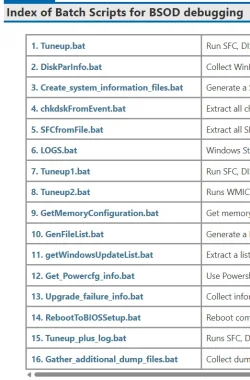
Please post V2 results:


Post #13 has bat scripts.
@Megahertz may have zip scripts that typically run without TF logon.
 

My Computer

System One

  • OS
    Windows 10
    Computer type
    Laptop
    Manufacturer/Model
    HP
    CPU
    Intel(R) Core(TM) i7-4800MQ CPU @ 2.70GHz
    Motherboard
    Product : 190A Version : KBC Version 94.56
    Memory
    16 GB Total: Manufacturer : Samsung MemoryType : DDR3 FormFactor : SODIMM Capacity : 8GB Speed : 1600
    Graphics Card(s)
    NVIDIA Quadro K3100M; Intel(R) HD Graphics 4600
    Sound Card
    IDT High Definition Audio CODEC; PNP Device ID HDAUDIO\FUNC_01&VEN_111D&DEV_76E0
    Hard Drives
    Model Hitachi HTS727575A9E364
    Antivirus
    Microsoft Defender
    Other Info
    Mobile Workstation
I ran the "Get_Powercfg_info" batch file kindly supplied earlier on the errant machine. All the log files and the html files generated are zipped into one file attachment.

Please let me know what your findings are/what to read in this?
 

Attachments

My Computer

System One

  • OS
    Windows 11 Pro
    Computer type
    PC/Desktop
    Manufacturer/Model
    Assembled
    CPU
    AMD Ryzen 7 7700X 8-Core
    Motherboard
    B650M AORUS ELITE AX
    Memory
    Corsair 16GB DDR5 XMP x2
    Graphics Card(s)
    4054MB NVIDIA GeForce RTX 5060 Ti (MSI)
    Monitor(s) Displays
    2
    Screen Resolution
    2351 x 1323 (NVIDIA DSR)
    Hard Drives
    SSD
    PSU
    CORSAIR CV750 Watts bronze80 PLUS
    Cooling
    cooler master AIO water cooled
    Keyboard
    red dragon cherry
    Mouse
    Galax 04
    Browser
    Brave, floorp, zen and others
    Antivirus
    windows defender
    Other Info
    I also have two more desktops, a windows 10 and 11 gaming desktop and a dell gaming laptop that runs windows 11
Here you go.
I forgot to write a thank you note for your help! I sincerely appreciate your help with supplying the specific batch file zbook asked for. I have uploaded the log files since!
Thanks again!!
 

My Computer

System One

  • OS
    Windows 11 Pro
    Computer type
    PC/Desktop
    Manufacturer/Model
    Assembled
    CPU
    AMD Ryzen 7 7700X 8-Core
    Motherboard
    B650M AORUS ELITE AX
    Memory
    Corsair 16GB DDR5 XMP x2
    Graphics Card(s)
    4054MB NVIDIA GeForce RTX 5060 Ti (MSI)
    Monitor(s) Displays
    2
    Screen Resolution
    2351 x 1323 (NVIDIA DSR)
    Hard Drives
    SSD
    PSU
    CORSAIR CV750 Watts bronze80 PLUS
    Cooling
    cooler master AIO water cooled
    Keyboard
    red dragon cherry
    Mouse
    Galax 04
    Browser
    Brave, floorp, zen and others
    Antivirus
    windows defender
    Other Info
    I also have two more desktops, a windows 10 and 11 gaming desktop and a dell gaming laptop that runs windows 11

Please post V2 results:


Post #13 has bat scripts.
@Megahertz may have zip scripts that typically run without TF logon.
Thanks for following up with me on this topic so far zbook!
Here is the link to the zip file. I have set up the right access permissions. Hope it allows download. It is 5MB file.


Thanks again, please help me pin point what's preventing sleep this time. In the older configuration, faulty radeon drivers iirc were the culprit.

EDIT: I navigated to post 13 as you recommended. Clicking on download link takes you to login screen. Many thanks to @KevTech for his help in this matter.
 

My Computer

System One

  • OS
    Windows 11 Pro
    Computer type
    PC/Desktop
    Manufacturer/Model
    Assembled
    CPU
    AMD Ryzen 7 7700X 8-Core
    Motherboard
    B650M AORUS ELITE AX
    Memory
    Corsair 16GB DDR5 XMP x2
    Graphics Card(s)
    4054MB NVIDIA GeForce RTX 5060 Ti (MSI)
    Monitor(s) Displays
    2
    Screen Resolution
    2351 x 1323 (NVIDIA DSR)
    Hard Drives
    SSD
    PSU
    CORSAIR CV750 Watts bronze80 PLUS
    Cooling
    cooler master AIO water cooled
    Keyboard
    red dragon cherry
    Mouse
    Galax 04
    Browser
    Brave, floorp, zen and others
    Antivirus
    windows defender
    Other Info
    I also have two more desktops, a windows 10 and 11 gaming desktop and a dell gaming laptop that runs windows 11
I simply leave the monitor on. I'm seldom away from my workstation for a length of time to put my workstations on standby mode.
 

My Computers

System One System Two

  • OS
    Windows 11 Education For 25H2
    Computer type
    Laptop
    Manufacturer/Model
    HP ZBook G2
    CPU
    Intel® Core i7 5500u
    Motherboard
    HP
    Memory
    8 GB
    Graphics Card(s)
    Intel HD Family Graphics 5500 AMD Firepro 4150M
    Sound Card
    Realtek High Audio
    Hard Drives
    1 TB SSD
    Mouse
    HP USB Mouse
    Antivirus
    Windows Defender
  • Operating System
    Windows 11 Pro For Workstations 25H2
    Computer type
    Laptop
    Manufacturer/Model
    HP Zbook G4
    CPU
    Xeon 1535m v6
    Motherboard
    HP
    Memory
    32 GB
    Graphics card(s)
    AMD Quadro Pro 4100
    Sound Card
    Bang and Olufson Audio
    Hard Drives
    1TB SSD
    Mouse
    HP USB Mouse
    Antivirus
    Windows Defender
Please reboot the computer into safe mode (shift + restart) > rerun V2 > post a share link into the newest post
 

My Computer

System One

  • OS
    Windows 10
    Computer type
    Laptop
    Manufacturer/Model
    HP
    CPU
    Intel(R) Core(TM) i7-4800MQ CPU @ 2.70GHz
    Motherboard
    Product : 190A Version : KBC Version 94.56
    Memory
    16 GB Total: Manufacturer : Samsung MemoryType : DDR3 FormFactor : SODIMM Capacity : 8GB Speed : 1600
    Graphics Card(s)
    NVIDIA Quadro K3100M; Intel(R) HD Graphics 4600
    Sound Card
    IDT High Definition Audio CODEC; PNP Device ID HDAUDIO\FUNC_01&VEN_111D&DEV_76E0
    Hard Drives
    Model Hitachi HTS727575A9E364
    Antivirus
    Microsoft Defender
    Other Info
    Mobile Workstation
Accidentally put the PC into sleep mode and ended up having to hard reset to recover it back. Well, here are your logs, ahead of time due to my "autopilot mode"! :(

Here's the results from V2 log collector! SIMHADHWAJA-(2026-05-31_20-42-21).zip

Thank you everyone who has been leaving comments and helping.
 

Attachments

My Computer

System One

  • OS
    Windows 11 Pro
    Computer type
    PC/Desktop
    Manufacturer/Model
    Assembled
    CPU
    AMD Ryzen 7 7700X 8-Core
    Motherboard
    B650M AORUS ELITE AX
    Memory
    Corsair 16GB DDR5 XMP x2
    Graphics Card(s)
    4054MB NVIDIA GeForce RTX 5060 Ti (MSI)
    Monitor(s) Displays
    2
    Screen Resolution
    2351 x 1323 (NVIDIA DSR)
    Hard Drives
    SSD
    PSU
    CORSAIR CV750 Watts bronze80 PLUS
    Cooling
    cooler master AIO water cooled
    Keyboard
    red dragon cherry
    Mouse
    Galax 04
    Browser
    Brave, floorp, zen and others
    Antivirus
    windows defender
    Other Info
    I also have two more desktops, a windows 10 and 11 gaming desktop and a dell gaming laptop that runs windows 11

Back
Top Bottom