PC Health Check says My CPU doesn't meet Spec, but it does according to their specs?


diverjer

Member
Local time
9:38 PM
Posts
8
OS
Windows 11
Microsoft Says:
Processors/CPUs (Central Processing Units): 1 Ghz or faster with 2 or more cores and appearing on our list of approved CPUs. The processor in your PC will be a main determining factor for running Windows 11. The clock speed (the 1 Ghz or faster requirement) and number of cores (2 or more) are inherent to the processor design as it was manufactured and are not considered upgradable components.

I have faster than 1Ghz, more than 2 processors, but I am not on their list. MS must be in business with computer manufactures. This is what I have on Dell Optiplex:
CPU
Intel Core i5
Cores 4
Threads 4
Name Intel Core i5
Code Name Skylake
Package Socket 1151 LGA
Technology 14nm
Specification Intel Core i5-6500 CPU @ 3.20GHz
Family 6
Extended Family 6
Model E
Extended Model 5E
Stepping 3
Revision R0
Instructions MMX, SSE, SSE2, SSE3, SSSE3, SSE4.1, SSE4.2, Intel 64, NX, AES, AVX, AVX2, FMA3
Virtualization Not supported
Hyperthreading Not supported
Bus Speed 99.7 MHz
Average Temperature 83 °F
Caches
Operating System
Windows 10 Pro 64-bit
CPU
Intel Core i5 @ 3.20GHz 83 °F
Skylake 14nm Technology
RAM
12.0GB Dual-Channel DDR3 @ 797MHz (11-11-11-28)
Motherboard
Dell Inc. 0HKCW0 (Socket 0)
Graphics
LG IPS FULLHD (1920x1080@59Hz)
Intel HD Graphics 530 (Dell)
Storage
465GB Western Digital WDC WD5000AZLX-75K2T SCSI Disk Device (SATA ) 103 °F
Optical Drives
PLDS DVD+-RW DU-8A5LH
Audio
Realtek Audio
L1 Data Cache Size 4 x 32 KBytes
L1 Instructions Cache Size 4 x 32 KBytes
L2 Unified Cache Size 4 x 256 KBytes
L3 Unified Cache Size 6144 KBytes
Cores
Core Speed Multiplier Bus Speed Temperature Threads
Core 0 3490.6 MHz x 35.0 99.7 MHz 83 °F APIC ID: 0
Core 1 3490.6 MHz x 35.0 99.7 MHz 85 °F APIC ID: 2
Core 2 3490.6 MHz x 35.0 99.7 MHz 83 °F APIC ID: 4
Core 3 3590.3 MHz x 36.0 99.7 MHz 83 °F APIC ID: 6
 

My Computer

System One

  • OS
    Windows 11
Hello @diverjer and welcome to ElevenForum. :-)

The i5-6500 is NOT on the list of compatible CPUs.
The list is what matters.


However, you can still install Windows 11 if you want, just like many others...


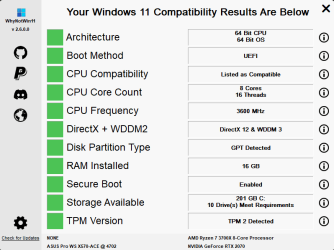
Here is the download link for a compatibility checker that is much better than Microsoft's tool...


If you get all GREEN boxes, you're compatible... like so...

WhynotWin11 results.png


BUT... like I said above... there are a few work-arounds for installing Win 11 on incompatible hardware.
 
Last edited:

My Computers

System One System Two

  • OS
    Win 11 Home ♦♦♦26200.8457 ♦♦♦♦♦♦♦25H2
    Computer type
    PC/Desktop
    Manufacturer/Model
    Built by Ghot® [May 2020]
    CPU
    AMD Ryzen 7 3700X
    Motherboard
    Asus Pro WS X570-ACE (BIOS 5302)
    Memory
    G.Skill (F4-3200C14D-16GTZKW)
    Graphics Card(s)
    EVGA RTX 2070 (08G-P4-2171-KR)
    Sound Card
    Realtek ALC1220P / ALC S1220A
    Monitor(s) Displays
    Dell U3011 30"
    Screen Resolution
    2560 x 1600
    Hard Drives
    2x Samsung 860 EVO 500GB,
    WD 4TB Black FZBX - SATA III,
    WD 8TB Black FZBX - SATA III,
    DRW-24B1ST CD/DVD Burner
    PSU
    PC Power & Cooling 750W Quad EPS12V
    Case
    Cooler Master ATCS 840 Tower
    Cooling
    CM Hyper 212 EVO (push/pull)
    Keyboard
    Ducky DK9008 Shine II Blue LED
    Mouse
    Logitech Optical M-100
    Internet Speed
    300/300
    Browser
    Firefox (latest)
    Antivirus
    Bitdefender Total Security
    Other Info
    Speakers: Klipsch Pro Media 2.1
  • Operating System
    Windows XP Pro 32bit w/SP3
    Computer type
    PC/Desktop
    Manufacturer/Model
    Built by Ghot® (not in use)
    CPU
    AMD Athlon 64 X2 5000+ (OC'd @ 3.2Ghz)
    Motherboard
    ASUS M2N32-SLI Deluxe Wireless Edition
    Memory
    TWIN2X2048-6400C4DHX (2 x 1GB, DDR2 800)
    Graphics card(s)
    EVGA 256-P2-N758-TR GeForce 8600GT SSC
    Sound Card
    Onboard
    Monitor(s) Displays
    ViewSonic G90FB Black 19" Professional (CRT)
    Screen Resolution
    up to 2048 x 1536
    Hard Drives
    WD 36GB 10,000rpm Raptor SATA
    Seagate 80GB 7200rpm SATA
    Lite-On LTR-52246S CD/RW
    Lite-On LH-18A1P CD/DVD Burner
    PSU
    PC Power & Cooling Silencer 750 Quad EPS12V
    Case
    Generic Beige case, 80mm fans
    Cooling
    ZALMAN 9500A 92mm CPU Cooler
    Keyboard
    Logitech Classic Keybooard 200
    Mouse
    Logitech Optical M-BT96a
    Internet Speed
    300/300
    Browser
    Firefox 3.x ??
    Antivirus
    Symantec (Norton)
    Other Info
    Still assembled, still runs. Haven't turned it on for 15 years?
The i5-6500 is a 6th generation Intel CPU. An 8th gen or newer is needed in order to be technically supported. However, I can tell you for a fact that this CPU can run Windows very well. I know because I have that CPU in a laptop that runs wonderfully well.
 

My Computers

System One System Two

  • OS
    Win11 Pro 25H2 (RTM+)
    Computer type
    PC/Desktop
    Manufacturer/Model
    Acemagic
    CPU
    Intel i7-14650HX
    Memory
    32 GB
    Graphics Card(s)
    No GPU - Built-in Intel Graphics
    Sound Card
    Integrated
    Monitor(s) Displays
    Varies as machine will often be moved to locations with different monitors
    Screen Resolution
    Varies
    Hard Drives
    1 x 1TB Gen 4 NVMe SSD
    PSU
    120W Power Brick
    Keyboard
    Corsair K70 Max RGB Magnetic Keyboard
    Mouse
    Logitech MX Master 3
    Internet Speed
    1Gb Up / 1 Gb Down
    Browser
    Edge
    Antivirus
    Windows Defender
  • Operating System
    Win11 Pro 25H2 (RTM+)
    Computer type
    Laptop
    Manufacturer/Model
    Lenovo ThinkBook 13x Gen 2
    CPU
    Intel i7-1255U
    Memory
    16 GB
    Graphics card(s)
    Intel Iris Xe Graphics
    Sound Card
    Realtek® ALC3306-CG codec
    Monitor(s) Displays
    13.3-inch IPS Display
    Screen Resolution
    WQXGA (2560 x 1600)
    Hard Drives
    2 TB 4 x 4 NVMe SSD
    PSU
    USB-C / Thunderbolt 4 Power / Charging
    Keyboard
    Backlit, spill resistant keyboard
    Mouse
    Buttonless Glass Precision Touchpad
    Internet Speed
    1Gb Up / 1Gb Down
    Browser
    Edge
    Antivirus
    Windows Defender
    Other Info
    WiFi 6e / Bluetooth 5.1 / Facial Recognition / Fingerprint Sensor / ToF (Time of Flight) Human Presence Sensor
Thanks for the information, I will start looking into it tomorrow. I really shouldn't be so cheap and buy another computer, but this one runs fine. It's been running 24X7 since November 2016 and I do have a backup computer (really slow) if this one dies while I ordered another.
 

My Computer

System One

  • OS
    Windows 11
The i5-6500 supports SSE 4.2, which means that it'll still work under Windows 11 24H2. (Unsupported, but that probably won't be an issue.)

You've run the PC continuously for nearly 8 years without stopping to clean the dust out of it? I'd bet its really dusty inside.
 

My Computers

System One System Two

  • OS
    Windows 11 26200.8116
    Computer type
    PC/Desktop
    Manufacturer/Model
    homebuilt
    CPU
    Amd Threadripper 7970X
    Motherboard
    Gigabyte TRX50 Aero D Rev. 1.0
    Memory
    128GB (4 X 32) G.Skill DDR5 6400 (RDIMM)
    Graphics Card(s)
    Gigabyte RTX 4090 OC
    Sound Card
    none (USB to speakers), Realtek
    Monitor(s) Displays
    Innocn 32" OLED
    Screen Resolution
    3840 X 2160 @ 60Hz
    Hard Drives
    Crucial T700 2TB M.2 NVME SSD
    WD 4TB Blue SATA SSD
    Seagate 18TB IronWolf Pro
    PSU
    BeQuiet! Straight Power 12 1500W
    Case
    Lian Li 011 Dynamic Evo XL
    Cooling
    SilverStone Technology XE360-TR5, with 3 Phanteks T30 fans
    Keyboard
    Cherry KC 500 MX LP (mechanical)
    Mouse
    Logitech M500s (wired)
    Internet Speed
    2000/250 Mbps (down/up)
    Other Info
    xFinity gateway
  • Operating System
    windows 11 26200.8116
    Computer type
    PC/Desktop
    Manufacturer/Model
    homebuilt
    CPU
    Intel I9-13900K
    Motherboard
    Asus RoG Strix Z690-E
    Memory
    64GB G.Skill DDR5-6000
    Graphics card(s)
    Gigabyte RTX 3090 ti
    Sound Card
    built in Realtek
    Monitor(s) Displays
    Philips 27E1N8900 27" OLED
    Screen Resolution
    3840 X 2160 @60Hz
    Hard Drives
    WDC SN850 1TB
    8TB Seagate Ironwolf
    4TB Seagate Ironwolf
    PSU
    eVGA SuperNOVA 1300 GT
    Case
    Lian Li 011 Dynamic Evo
    Cooling
    Corsair iCUE H150i ELITE CAPELLIX Liquid CPU Cooler
    Keyboard
    Cherry Streaming (wired)
    Mouse
    Logitech M500s (wired)
No I have shut it down and open up the case and blow it out, maybe every 6 or months or so. Also, if I go on a week vacation, I will shut it down. But that is the only shutdown time. Now this will blow people's mind. When I blow it out I use a leaf blower! But I am careful have case open sitting on driveway and stand way back.
 

My Computer

System One

  • OS
    Windows 11
No I have shut it down and open up the case and blow it out, maybe every 6 or months or so. Also, if I go on a week vacation, I will shut it down. But that is the only shutdown time. Now this will blow people's mind. When I blow it out I use a leaf blower! But I am careful have case open sitting on driveway and stand way back.
Leaf blower? Electric or gas? ;-)

A bit eccentric, I'd say. But at least you don't have to worry about spraying cold liquid, as with "canned air".
 

My Computers

System One System Two

  • OS
    Windows 11 26200.8116
    Computer type
    PC/Desktop
    Manufacturer/Model
    homebuilt
    CPU
    Amd Threadripper 7970X
    Motherboard
    Gigabyte TRX50 Aero D Rev. 1.0
    Memory
    128GB (4 X 32) G.Skill DDR5 6400 (RDIMM)
    Graphics Card(s)
    Gigabyte RTX 4090 OC
    Sound Card
    none (USB to speakers), Realtek
    Monitor(s) Displays
    Innocn 32" OLED
    Screen Resolution
    3840 X 2160 @ 60Hz
    Hard Drives
    Crucial T700 2TB M.2 NVME SSD
    WD 4TB Blue SATA SSD
    Seagate 18TB IronWolf Pro
    PSU
    BeQuiet! Straight Power 12 1500W
    Case
    Lian Li 011 Dynamic Evo XL
    Cooling
    SilverStone Technology XE360-TR5, with 3 Phanteks T30 fans
    Keyboard
    Cherry KC 500 MX LP (mechanical)
    Mouse
    Logitech M500s (wired)
    Internet Speed
    2000/250 Mbps (down/up)
    Other Info
    xFinity gateway
  • Operating System
    windows 11 26200.8116
    Computer type
    PC/Desktop
    Manufacturer/Model
    homebuilt
    CPU
    Intel I9-13900K
    Motherboard
    Asus RoG Strix Z690-E
    Memory
    64GB G.Skill DDR5-6000
    Graphics card(s)
    Gigabyte RTX 3090 ti
    Sound Card
    built in Realtek
    Monitor(s) Displays
    Philips 27E1N8900 27" OLED
    Screen Resolution
    3840 X 2160 @60Hz
    Hard Drives
    WDC SN850 1TB
    8TB Seagate Ironwolf
    4TB Seagate Ironwolf
    PSU
    eVGA SuperNOVA 1300 GT
    Case
    Lian Li 011 Dynamic Evo
    Cooling
    Corsair iCUE H150i ELITE CAPELLIX Liquid CPU Cooler
    Keyboard
    Cherry Streaming (wired)
    Mouse
    Logitech M500s (wired)
Electric, have gas but don't use it. I never cared much for the canned air. Like I said I stand waaay back. I bet if an IT person was watching they would say what an idiot! And I am someone who spent 35 years as a system software program on IBM mainframes. I can still read binary or hexadecimal as well as base 10. Right before retirement in 2003, I did have to start supporting PC.s We hated them, use to call the PC staff micro brains, then I had to start learning to be a micro brain. So using a leaf blower is something I always think is kind of funny and weird, yes even eccentric.
 

My Computer

System One

  • OS
    Windows 11
I'd prefer to use my air compressor, but it's not oil-less.

A leaf blower, judiciously applied, may be safer than risking electrostatic charges from a brush.
 

My Computers

System One System Two

  • OS
    Windows 11 26200.8116
    Computer type
    PC/Desktop
    Manufacturer/Model
    homebuilt
    CPU
    Amd Threadripper 7970X
    Motherboard
    Gigabyte TRX50 Aero D Rev. 1.0
    Memory
    128GB (4 X 32) G.Skill DDR5 6400 (RDIMM)
    Graphics Card(s)
    Gigabyte RTX 4090 OC
    Sound Card
    none (USB to speakers), Realtek
    Monitor(s) Displays
    Innocn 32" OLED
    Screen Resolution
    3840 X 2160 @ 60Hz
    Hard Drives
    Crucial T700 2TB M.2 NVME SSD
    WD 4TB Blue SATA SSD
    Seagate 18TB IronWolf Pro
    PSU
    BeQuiet! Straight Power 12 1500W
    Case
    Lian Li 011 Dynamic Evo XL
    Cooling
    SilverStone Technology XE360-TR5, with 3 Phanteks T30 fans
    Keyboard
    Cherry KC 500 MX LP (mechanical)
    Mouse
    Logitech M500s (wired)
    Internet Speed
    2000/250 Mbps (down/up)
    Other Info
    xFinity gateway
  • Operating System
    windows 11 26200.8116
    Computer type
    PC/Desktop
    Manufacturer/Model
    homebuilt
    CPU
    Intel I9-13900K
    Motherboard
    Asus RoG Strix Z690-E
    Memory
    64GB G.Skill DDR5-6000
    Graphics card(s)
    Gigabyte RTX 3090 ti
    Sound Card
    built in Realtek
    Monitor(s) Displays
    Philips 27E1N8900 27" OLED
    Screen Resolution
    3840 X 2160 @60Hz
    Hard Drives
    WDC SN850 1TB
    8TB Seagate Ironwolf
    4TB Seagate Ironwolf
    PSU
    eVGA SuperNOVA 1300 GT
    Case
    Lian Li 011 Dynamic Evo
    Cooling
    Corsair iCUE H150i ELITE CAPELLIX Liquid CPU Cooler
    Keyboard
    Cherry Streaming (wired)
    Mouse
    Logitech M500s (wired)

My Computers

System One System Two

  • OS
    Windows 11 Pro - Windows 7 HP 64 - Lubuntu
    Computer type
    PC/Desktop
    Manufacturer/Model
    custom build
    CPU
    i5 6600K - 800MHz to 4400MHz
    Motherboard
    GA-Z170-HD3P
    Memory
    4+4G GSkill DDR4 3000
    Graphics Card(s)
    IG - Intel 530
    Monitor(s) Displays
    Samsung 226BW
    Screen Resolution
    1680x1050
    Hard Drives
    (1) -1 SM951 – 128GB M.2 AHCI PCIe SSD drive for Win 11
    (2) -1 WD SATA 3 - 1T for Data
    (3) -1 WD SATA 3 - 1T for backup
    (4) -1 BX500 SSD - 256G for Windows 7 and Lubuntu
    PSU
    Thermaltake 450W TR2 gold
    Keyboard
    Old and good Chicony mechanical keyboard
    Mouse
    Logitech mX performance - 9 buttons (had to disable some)
    Internet Speed
    500 Mb/s
    Browser
    Firefox 64
  • Operating System
    Windows 11 Pro
    Computer type
    Laptop
    Manufacturer/Model
    Asus Q550LF
    CPU
    i7-4500U 800- 3000MHz
    Motherboard
    Asus Q550LF
    Memory
    (4+4)G DDR3 1600
    Graphics card(s)
    IG intel 4400 + NVIDIA GeForce GT 745M
    Sound Card
    Realtek
    Monitor(s) Displays
    LG Display LP156WF4-SPH1
    Screen Resolution
    1920 x 1080
    Hard Drives
    BX500 120G SSD for Windows and programs
    & 1T HDD for data
    Internet Speed
    500 Mb/s
    Browser
    Firefox 64
I wonder if it's still possible to upgrade from 10 using a simple registry change? "Bypassing requirements with the Registry Editor"


I believe it's not a hack, but rather something provided by MS for use by developers with older hardware.

I'm not sure if that was the Registry change I used to upgrade an unsupported laptop (Intel Gen6 CPU), but it may have been. The notable thing was that the Windows installer informed that the hardware was unsupported, and asked if I wish to proceed. (I did.)
 

My Computers

System One System Two

  • OS
    Windows 11 26200.8116
    Computer type
    PC/Desktop
    Manufacturer/Model
    homebuilt
    CPU
    Amd Threadripper 7970X
    Motherboard
    Gigabyte TRX50 Aero D Rev. 1.0
    Memory
    128GB (4 X 32) G.Skill DDR5 6400 (RDIMM)
    Graphics Card(s)
    Gigabyte RTX 4090 OC
    Sound Card
    none (USB to speakers), Realtek
    Monitor(s) Displays
    Innocn 32" OLED
    Screen Resolution
    3840 X 2160 @ 60Hz
    Hard Drives
    Crucial T700 2TB M.2 NVME SSD
    WD 4TB Blue SATA SSD
    Seagate 18TB IronWolf Pro
    PSU
    BeQuiet! Straight Power 12 1500W
    Case
    Lian Li 011 Dynamic Evo XL
    Cooling
    SilverStone Technology XE360-TR5, with 3 Phanteks T30 fans
    Keyboard
    Cherry KC 500 MX LP (mechanical)
    Mouse
    Logitech M500s (wired)
    Internet Speed
    2000/250 Mbps (down/up)
    Other Info
    xFinity gateway
  • Operating System
    windows 11 26200.8116
    Computer type
    PC/Desktop
    Manufacturer/Model
    homebuilt
    CPU
    Intel I9-13900K
    Motherboard
    Asus RoG Strix Z690-E
    Memory
    64GB G.Skill DDR5-6000
    Graphics card(s)
    Gigabyte RTX 3090 ti
    Sound Card
    built in Realtek
    Monitor(s) Displays
    Philips 27E1N8900 27" OLED
    Screen Resolution
    3840 X 2160 @60Hz
    Hard Drives
    WDC SN850 1TB
    8TB Seagate Ironwolf
    4TB Seagate Ironwolf
    PSU
    eVGA SuperNOVA 1300 GT
    Case
    Lian Li 011 Dynamic Evo
    Cooling
    Corsair iCUE H150i ELITE CAPELLIX Liquid CPU Cooler
    Keyboard
    Cherry Streaming (wired)
    Mouse
    Logitech M500s (wired)
The link that bobkn posted was Updated Jul 26, 2024.

That's only 9 days ago so it may have the new work arounds.


My Computer

System One

  • OS
    Windows 10
    Computer type
    Laptop
    Manufacturer/Model
    HP
    CPU
    Intel(R) Core(TM) i7-4800MQ CPU @ 2.70GHz
    Motherboard
    Product : 190A Version : KBC Version 94.56
    Memory
    16 GB Total: Manufacturer : Samsung MemoryType : DDR3 FormFactor : SODIMM Capacity : 8GB Speed : 1600
    Graphics Card(s)
    NVIDIA Quadro K3100M; Intel(R) HD Graphics 4600
    Sound Card
    IDT High Definition Audio CODEC; PNP Device ID HDAUDIO\FUNC_01&VEN_111D&DEV_76E0
    Hard Drives
    Model Hitachi HTS727575A9E364
    Antivirus
    Microsoft Defender
    Other Info
    Mobile Workstation
Up to 23H2 all bypass compatibility check methods still work. An additional requirement for 23H2 is to disconnect from the internet to make sure the upgrade won't fail due to a hidden online compatibility check or due to Windows Update messing with your working drivers. I have not installed 24H2 yet. I will report back when I do. For Legacy BIOS (MBR) installations we might have to replace the bootloader with the 23H2 version after the upgrade. I have read that the new 24H2 bootloader only supports UEFI mode, it doesn't boot in Legacy BIOS mode. But if it is as simple as replacing the bootloader it is another small inconvenience to keep our old unsupported computers.
 

My Computers

System One System Two

  • OS
    Windows 11 Pro 23H2 (5699), 25H2 (8457)
    Computer type
    Laptop
    Manufacturer/Model
    Acer Extensa 5630EZ
    CPU
    Mobile DualCore Intel Core 2 Duo T7250, 2000 MHz
    Motherboard
    Acer Extensa 5630
    Memory
    4GB
    Graphics Card(s)
    Mobile Intel(R) GMA 4500M (Mobile 4 series)
    Sound Card
    Realtek ALC268 @ Intel 82801IB ICH9 - High Definition Audio Controller
    Monitor(s) Displays
    1
    Screen Resolution
    1280x800
    Hard Drives
    Samsung SSD 850 EVO 250GB SATA Device (250 GB, SATA-III)
    Internet Speed
    VDSL 50 Mbps
    Browser
    MICROSOFT EDGE
    Antivirus
    WINDOWS DEFENDER
    Other Info
    Legacy MBR installation, no TPM, no Secure Boot, no WDDM 2.0 graphics drivers, no SSE4.2, cannot get more unsupported ;) This is only my test laptop. I had installed Windows 11 here before upgrading my main PC. For my main PC I use everyday see my 2nd system specs.
  • Operating System
    Windows 11 Pro v25H2 (build 26200.8457)
    Computer type
    PC/Desktop
    Manufacturer/Model
    Custom-built PC
    CPU
    Intel Core-i7 3770 3.40GHz s1155 (3rd generation)
    Motherboard
    Asus P8H61 s1155 ATX
    Memory
    2x Kingston Hyper-X Blu 8GB DDR3-1600
    Graphics card(s)
    GIGABYTE GeForce RTX 3050 WINDFORCE OC V2 6GB (GV-N3050WF2OCV2-6GD)
    Sound Card
    Realtek HD audio (ALC887)
    Monitor(s) Displays
    Sony Bravia KDL-19L4000 19" LCD TV via VGA
    Screen Resolution
    1440x900 32-bit 60Hz
    Hard Drives
    WD Blue SA510 2.5 1000GB SSD as system disk, Western Digital Caviar Purple 4TB SATA III (WD40PURZ) as second
    PSU
    Thermaltake Litepower RGB 550W Full Wired
    Case
    SUPERCASE MIDI-TOWER
    Cooling
    Deepcool Gamma Archer CPU cooler, 1x 8cm fan at the back
    Keyboard
    Mitsumi 101-key PS/2
    Mouse
    Sunnyline OptiEye PS/2
    Internet Speed
    100Mbps
    Browser
    Microsoft Edge, Mozilla Firefox
    Antivirus
    Microsoft Windows Defender
    Other Info
    Legacy BIOS (MBR) installation, no TPM, no Secure Boot, WDDM 3.0 graphics drivers, WEI score 7.4
I really shouldn't be so cheap and buy another computer,
Yep.

Just buy el cheapo Dell Optiplex with 8th/9th gen CPU support (3070, 5070, 7070), and look forward to no time wasting, running Win 11.

I got mini tower version, so PSU can power i9, when they are also cheap.. ;-)
 

My Computers

System One System Two

  • OS
    Fedora/KDE Plasma F43
    Computer type
    PC/Desktop
    Manufacturer/Model
    HP Z640
    CPU
    Xeon 2667 v4
    Motherboard
    Xeon V4 Motherboard
    Memory
    48GB ECC DDR4
    Graphics Card(s)
    nVidia GTX 1650
    Monitor(s) Displays
    LG 27"
    Screen Resolution
    1920x1080@144hz
    Hard Drives
    NVME, SSD
    PSU
    850W
  • Operating System
    Windows 11 IOT Enterprise LTSC/RHEL 10.1 KDE Plasma
    Computer type
    PC/Desktop
    Manufacturer/Model
    HP Z440
    CPU
    Intel Xeom 2680 V4
    Motherboard
    HP Z440
    Memory
    64gb DDR4 ECC
    Graphics card(s)
    AMD RX560
    Monitor(s) Displays
    LG Gsync 27" 144hz
    Screen Resolution
    1920x1080@144hz
    Hard Drives
    SSD/nVme/HDD
    PSU
    standard 700W
    Case
    standard
    Cooling
    Standard
    Browser
    MS Edge
    Antivirus
    BitDefender
Nonsense, apart from Windows 11 24H2 that requires SSE4.2 and the PopCnt instruction, all earlier versions of Windows 11 can run on almost any computer that can run Windows 8.0 64-bit. I have even installed Windows 11 23H2 on an Intel Pentium 4 640 (first Intel 64-bit family) system with 2GB DDR RAM, 250GB mechanical IDE hard disk, without UEFI, without Secure Boot, without TPM 2.0. Of course it was very slow, but I wanted to see if that's possible. Yes, it was. So anyone with an Intel Core 2 Duo with 2GB RAM or better should not hesitate. If you have a CPU that supports SSE4.2 you can upgrade to 24H2 after the general release in October or November. Any Vista 64-bit or higher driver works in Windows 11 except certain Intel graphics drivers locked by Intel to install only on Windows 7. Don't replace your old PC yet.


My Computers

System One System Two

  • OS
    Windows 11 Pro 23H2 (5699), 25H2 (8457)
    Computer type
    Laptop
    Manufacturer/Model
    Acer Extensa 5630EZ
    CPU
    Mobile DualCore Intel Core 2 Duo T7250, 2000 MHz
    Motherboard
    Acer Extensa 5630
    Memory
    4GB
    Graphics Card(s)
    Mobile Intel(R) GMA 4500M (Mobile 4 series)
    Sound Card
    Realtek ALC268 @ Intel 82801IB ICH9 - High Definition Audio Controller
    Monitor(s) Displays
    1
    Screen Resolution
    1280x800
    Hard Drives
    Samsung SSD 850 EVO 250GB SATA Device (250 GB, SATA-III)
    Internet Speed
    VDSL 50 Mbps
    Browser
    MICROSOFT EDGE
    Antivirus
    WINDOWS DEFENDER
    Other Info
    Legacy MBR installation, no TPM, no Secure Boot, no WDDM 2.0 graphics drivers, no SSE4.2, cannot get more unsupported ;) This is only my test laptop. I had installed Windows 11 here before upgrading my main PC. For my main PC I use everyday see my 2nd system specs.
  • Operating System
    Windows 11 Pro v25H2 (build 26200.8457)
    Computer type
    PC/Desktop
    Manufacturer/Model
    Custom-built PC
    CPU
    Intel Core-i7 3770 3.40GHz s1155 (3rd generation)
    Motherboard
    Asus P8H61 s1155 ATX
    Memory
    2x Kingston Hyper-X Blu 8GB DDR3-1600
    Graphics card(s)
    GIGABYTE GeForce RTX 3050 WINDFORCE OC V2 6GB (GV-N3050WF2OCV2-6GD)
    Sound Card
    Realtek HD audio (ALC887)
    Monitor(s) Displays
    Sony Bravia KDL-19L4000 19" LCD TV via VGA
    Screen Resolution
    1440x900 32-bit 60Hz
    Hard Drives
    WD Blue SA510 2.5 1000GB SSD as system disk, Western Digital Caviar Purple 4TB SATA III (WD40PURZ) as second
    PSU
    Thermaltake Litepower RGB 550W Full Wired
    Case
    SUPERCASE MIDI-TOWER
    Cooling
    Deepcool Gamma Archer CPU cooler, 1x 8cm fan at the back
    Keyboard
    Mitsumi 101-key PS/2
    Mouse
    Sunnyline OptiEye PS/2
    Internet Speed
    100Mbps
    Browser
    Microsoft Edge, Mozilla Firefox
    Antivirus
    Microsoft Windows Defender
    Other Info
    Legacy BIOS (MBR) installation, no TPM, no Secure Boot, WDDM 3.0 graphics drivers, WEI score 7.4
Nonsense,
Buying a cheap machine, with 8th/9th gen cpu, that is "fully compatible" with Win11, will require no tinkering or time wasting, you can just download iso direct from Microsoft, burn to USB key, "unmodified", and install.

That is not nonsense, that is fact.
 
Last edited:

My Computers

System One System Two

  • OS
    Fedora/KDE Plasma F43
    Computer type
    PC/Desktop
    Manufacturer/Model
    HP Z640
    CPU
    Xeon 2667 v4
    Motherboard
    Xeon V4 Motherboard
    Memory
    48GB ECC DDR4
    Graphics Card(s)
    nVidia GTX 1650
    Monitor(s) Displays
    LG 27"
    Screen Resolution
    1920x1080@144hz
    Hard Drives
    NVME, SSD
    PSU
    850W
  • Operating System
    Windows 11 IOT Enterprise LTSC/RHEL 10.1 KDE Plasma
    Computer type
    PC/Desktop
    Manufacturer/Model
    HP Z440
    CPU
    Intel Xeom 2680 V4
    Motherboard
    HP Z440
    Memory
    64gb DDR4 ECC
    Graphics card(s)
    AMD RX560
    Monitor(s) Displays
    LG Gsync 27" 144hz
    Screen Resolution
    1920x1080@144hz
    Hard Drives
    SSD/nVme/HDD
    PSU
    standard 700W
    Case
    standard
    Cooling
    Standard
    Browser
    MS Edge
    Antivirus
    BitDefender
Why buy a new one if your current PC can run Windows 11 as fast as Windows 10 64-bit or even Windows 7 64-bit? Unless you need (want) a faster PC of course.
 

My Computers

System One System Two

  • OS
    Windows 11 Pro 23H2 (5699), 25H2 (8457)
    Computer type
    Laptop
    Manufacturer/Model
    Acer Extensa 5630EZ
    CPU
    Mobile DualCore Intel Core 2 Duo T7250, 2000 MHz
    Motherboard
    Acer Extensa 5630
    Memory
    4GB
    Graphics Card(s)
    Mobile Intel(R) GMA 4500M (Mobile 4 series)
    Sound Card
    Realtek ALC268 @ Intel 82801IB ICH9 - High Definition Audio Controller
    Monitor(s) Displays
    1
    Screen Resolution
    1280x800
    Hard Drives
    Samsung SSD 850 EVO 250GB SATA Device (250 GB, SATA-III)
    Internet Speed
    VDSL 50 Mbps
    Browser
    MICROSOFT EDGE
    Antivirus
    WINDOWS DEFENDER
    Other Info
    Legacy MBR installation, no TPM, no Secure Boot, no WDDM 2.0 graphics drivers, no SSE4.2, cannot get more unsupported ;) This is only my test laptop. I had installed Windows 11 here before upgrading my main PC. For my main PC I use everyday see my 2nd system specs.
  • Operating System
    Windows 11 Pro v25H2 (build 26200.8457)
    Computer type
    PC/Desktop
    Manufacturer/Model
    Custom-built PC
    CPU
    Intel Core-i7 3770 3.40GHz s1155 (3rd generation)
    Motherboard
    Asus P8H61 s1155 ATX
    Memory
    2x Kingston Hyper-X Blu 8GB DDR3-1600
    Graphics card(s)
    GIGABYTE GeForce RTX 3050 WINDFORCE OC V2 6GB (GV-N3050WF2OCV2-6GD)
    Sound Card
    Realtek HD audio (ALC887)
    Monitor(s) Displays
    Sony Bravia KDL-19L4000 19" LCD TV via VGA
    Screen Resolution
    1440x900 32-bit 60Hz
    Hard Drives
    WD Blue SA510 2.5 1000GB SSD as system disk, Western Digital Caviar Purple 4TB SATA III (WD40PURZ) as second
    PSU
    Thermaltake Litepower RGB 550W Full Wired
    Case
    SUPERCASE MIDI-TOWER
    Cooling
    Deepcool Gamma Archer CPU cooler, 1x 8cm fan at the back
    Keyboard
    Mitsumi 101-key PS/2
    Mouse
    Sunnyline OptiEye PS/2
    Internet Speed
    100Mbps
    Browser
    Microsoft Edge, Mozilla Firefox
    Antivirus
    Microsoft Windows Defender
    Other Info
    Legacy BIOS (MBR) installation, no TPM, no Secure Boot, WDDM 3.0 graphics drivers, WEI score 7.4
Why buy a new one if your current PC can run Windows 11 as fast as Windows 10 64-bit or even Windows 7 64-bit? Unless you need (want) a faster PC of course.

I mentioned nothing about new, and previously said used/cheap.

Buying used 8th/9th gen machine, for < $200 on ebay, is cheapest/easiest way to run Win 11 with no headaches, and look forward to simple upgrade to Win 11/24H2.

I guess it's all about how much time, a person has to waste.
 

My Computers

System One System Two

  • OS
    Fedora/KDE Plasma F43
    Computer type
    PC/Desktop
    Manufacturer/Model
    HP Z640
    CPU
    Xeon 2667 v4
    Motherboard
    Xeon V4 Motherboard
    Memory
    48GB ECC DDR4
    Graphics Card(s)
    nVidia GTX 1650
    Monitor(s) Displays
    LG 27"
    Screen Resolution
    1920x1080@144hz
    Hard Drives
    NVME, SSD
    PSU
    850W
  • Operating System
    Windows 11 IOT Enterprise LTSC/RHEL 10.1 KDE Plasma
    Computer type
    PC/Desktop
    Manufacturer/Model
    HP Z440
    CPU
    Intel Xeom 2680 V4
    Motherboard
    HP Z440
    Memory
    64gb DDR4 ECC
    Graphics card(s)
    AMD RX560
    Monitor(s) Displays
    LG Gsync 27" 144hz
    Screen Resolution
    1920x1080@144hz
    Hard Drives
    SSD/nVme/HDD
    PSU
    standard 700W
    Case
    standard
    Cooling
    Standard
    Browser
    MS Edge
    Antivirus
    BitDefender
Why waste time? You start downloading the ISO while you can use the computer for your work or play. No need to wait for it to finish. Then you need 10-15 minutes to create a patched USB flash drive with Rufus. Then you are ready to upgrade any time. Just disconnect from the internet and run Setup from the patched USB flash drive to begin. Upgrading this way is no different than upgrading from Windows 7 to 10, for example. Just select the first option (upgrade) and follow on screen instructions.
 

My Computers

System One System Two

  • OS
    Windows 11 Pro 23H2 (5699), 25H2 (8457)
    Computer type
    Laptop
    Manufacturer/Model
    Acer Extensa 5630EZ
    CPU
    Mobile DualCore Intel Core 2 Duo T7250, 2000 MHz
    Motherboard
    Acer Extensa 5630
    Memory
    4GB
    Graphics Card(s)
    Mobile Intel(R) GMA 4500M (Mobile 4 series)
    Sound Card
    Realtek ALC268 @ Intel 82801IB ICH9 - High Definition Audio Controller
    Monitor(s) Displays
    1
    Screen Resolution
    1280x800
    Hard Drives
    Samsung SSD 850 EVO 250GB SATA Device (250 GB, SATA-III)
    Internet Speed
    VDSL 50 Mbps
    Browser
    MICROSOFT EDGE
    Antivirus
    WINDOWS DEFENDER
    Other Info
    Legacy MBR installation, no TPM, no Secure Boot, no WDDM 2.0 graphics drivers, no SSE4.2, cannot get more unsupported ;) This is only my test laptop. I had installed Windows 11 here before upgrading my main PC. For my main PC I use everyday see my 2nd system specs.
  • Operating System
    Windows 11 Pro v25H2 (build 26200.8457)
    Computer type
    PC/Desktop
    Manufacturer/Model
    Custom-built PC
    CPU
    Intel Core-i7 3770 3.40GHz s1155 (3rd generation)
    Motherboard
    Asus P8H61 s1155 ATX
    Memory
    2x Kingston Hyper-X Blu 8GB DDR3-1600
    Graphics card(s)
    GIGABYTE GeForce RTX 3050 WINDFORCE OC V2 6GB (GV-N3050WF2OCV2-6GD)
    Sound Card
    Realtek HD audio (ALC887)
    Monitor(s) Displays
    Sony Bravia KDL-19L4000 19" LCD TV via VGA
    Screen Resolution
    1440x900 32-bit 60Hz
    Hard Drives
    WD Blue SA510 2.5 1000GB SSD as system disk, Western Digital Caviar Purple 4TB SATA III (WD40PURZ) as second
    PSU
    Thermaltake Litepower RGB 550W Full Wired
    Case
    SUPERCASE MIDI-TOWER
    Cooling
    Deepcool Gamma Archer CPU cooler, 1x 8cm fan at the back
    Keyboard
    Mitsumi 101-key PS/2
    Mouse
    Sunnyline OptiEye PS/2
    Internet Speed
    100Mbps
    Browser
    Microsoft Edge, Mozilla Firefox
    Antivirus
    Microsoft Windows Defender
    Other Info
    Legacy BIOS (MBR) installation, no TPM, no Secure Boot, WDDM 3.0 graphics drivers, WEI score 7.4
Back
Top Bottom