PC Reset removed PC from Microsoft Account - Devices


CKavanagh

Member
Local time
1:51 AM
Posts
31
OS
Window 11 Pro
I bought a HP Elitebook Dec 31 running Windows 11 Pro 25H2. All seemed well upon first setup OOBE, I saw my laptop under Microsoft Account Devices as well as in Windows Settings - Linked Devices and was able to use Find My Device. The issue I had was in trying to delete some HP bloatware. Once I selected to uninstall HP Insights it would automatically reinstall and start running. There was an icon in the system tray saying not enrolled so I clicked to enroll and said denied and I could not remove the icon in the system tray, it just kept popping up even if I chose to not be notified about it. So I decided to just reset the pc and leave the HP Insights on my laptop and not attempt to uninstall it.

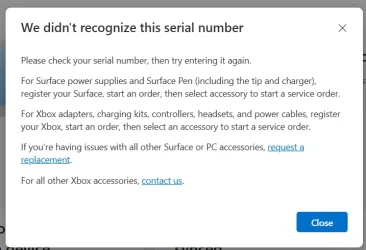
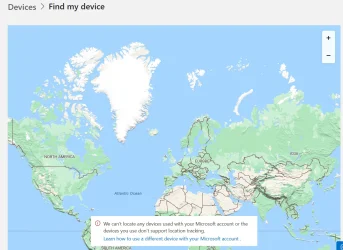
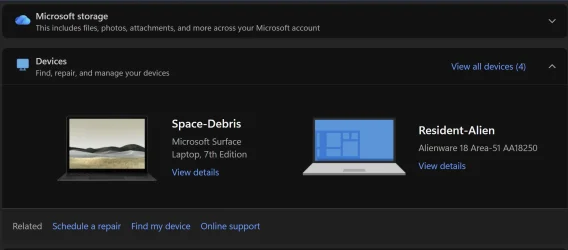
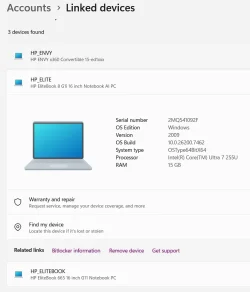
From the Windows built-in Recovery Tool, I choose Reset PC - Remove All Files - Clean Drive - Cloud Windows Reinstall. Once all was installed as new user and configured I no longer had an issue with the HP Inights icon in the system tray. All seemed well after install and setup; however, now I no longer see my device in My Microsoft Account - says No Device Registered. I entered my serial number to register and says not found. In Windows Settings - Linked Devices I do see my laptop plus 2 old laptops I am unable to remove - trace error. Find My Device does not locate my device because it is no longer registered on my Microsoft Account - Devices.
I am logged into Microsoft with the same login as inital setup and my location is configured in Windows Settings - Location.
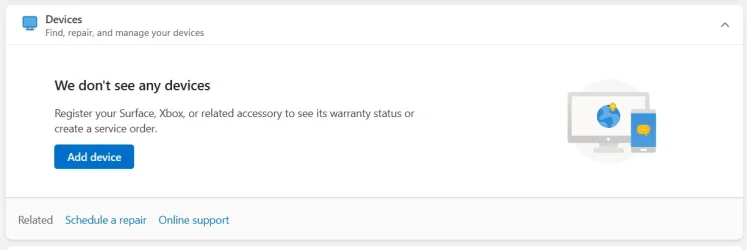
1768156580995.webp 1768156700203.webp1768156797076.webp

1768156998777.webp
 
Windows Build/Version
Windows 11 Pro, 25H2 26200.7462

My Computer

System One

  • OS
    Window 11 Pro
    Computer type
    Laptop
    Manufacturer/Model
    HP Elitebook 8
This devices in a MS account seems to be a popular topic today. FYI, the serial number only works for MS devices not other brand PC's. Since you reset your device it's like a new PC now, for non MS devices its supposed to work this way;

For Windows PCs (Non-Microsoft Brand):
  1. On the new PC, go to Start > Settings > Accounts.
  2. Select Your info and choose Sign in with a Microsoft account instead, or simply sign into any Office app (like Word) with your MS account.
  3. Follow the prompts to sign in with your existing Microsoft account.
  4. The device will then appear in your Microsoft account's device list at account.microsoft.com/devices.

    Screenshot 2026-01-11 114558.webp
 

My Computers

System One System Two

  • OS
    Windows 11 25H2
    Computer type
    Laptop
    Manufacturer/Model
    Alienware 18 Area-51
    CPU
    Intel Core Ultra 9 275HX (24-Core)
    Motherboard
    Alienware
    Memory
    64GB DDR5 6400MT/s
    Graphics Card(s)
    NVIDIA GeForce RTX 5080 and Intel UHD Graphics
    Sound Card
    Onboard, Realtek high-performance Audio chips (ALC3329 & ALC1708))
    Monitor(s) Displays
    300HZ 18-inch QHD 500 nit Comfort View+
    Screen Resolution
    2560 x 1600
    Hard Drives
    2TB NVMe M.2 PCIe Gen 5 SSD
    Case
    Magnesium Alloy
    Cooling
    Advanced Cryo-Tech Quad-Fan Cooling system & large vapor chamber
    Keyboard
    Cherry MX ultra low profile mechanical keyboard with per key AlienFX RGB lighting
    Mouse
    Logitech MX Master 4
    Browser
    Vivaldi (main), Firefox, Chrome, Edge
    Antivirus
    MS Defender and Malwarebytes Free
  • Operating System
    Windows 11 25H2
    Computer type
    Laptop
    Manufacturer/Model
    Microsoft Surface Laptop 7
    CPU
    Qualcomm Snapdragon X Elite (12 Core) ARM based CPU
    Motherboard
    Microsoft Corp.
    Memory
    16GB LPDDR5
    Graphics card(s)
    Qualcomm Adreno X1-85
    Sound Card
    Omnisonic speakers with Dolby Atmos spatial sound
    Monitor(s) Displays
    120 Hz 13.8-inch 600 nit PixelSense Flow touchscreen
    Screen Resolution
    2304x1536
    Hard Drives
    1TB NVMe Gen 4 SSD
    Case
    Anodized Aluminum
    Cooling
    Traditional active cooling fan system
    Keyboard
    Mechanical QWERTY, backlit when in use
    Mouse
    Logitech MX Master 4 and Surface Arc Mouse
    Browser
    Vivaldi (main), Firefox, Chrome, Edge
    Antivirus
    MS Defender and Malwarebytes Free
Thought I'd add if that doesn't work then maybe try switching to a local account, relogin or reboot, then switch back to your MS account and see if that adds your device.
 

My Computers

System One System Two

  • OS
    Windows 11 25H2
    Computer type
    Laptop
    Manufacturer/Model
    Alienware 18 Area-51
    CPU
    Intel Core Ultra 9 275HX (24-Core)
    Motherboard
    Alienware
    Memory
    64GB DDR5 6400MT/s
    Graphics Card(s)
    NVIDIA GeForce RTX 5080 and Intel UHD Graphics
    Sound Card
    Onboard, Realtek high-performance Audio chips (ALC3329 & ALC1708))
    Monitor(s) Displays
    300HZ 18-inch QHD 500 nit Comfort View+
    Screen Resolution
    2560 x 1600
    Hard Drives
    2TB NVMe M.2 PCIe Gen 5 SSD
    Case
    Magnesium Alloy
    Cooling
    Advanced Cryo-Tech Quad-Fan Cooling system & large vapor chamber
    Keyboard
    Cherry MX ultra low profile mechanical keyboard with per key AlienFX RGB lighting
    Mouse
    Logitech MX Master 4
    Browser
    Vivaldi (main), Firefox, Chrome, Edge
    Antivirus
    MS Defender and Malwarebytes Free
  • Operating System
    Windows 11 25H2
    Computer type
    Laptop
    Manufacturer/Model
    Microsoft Surface Laptop 7
    CPU
    Qualcomm Snapdragon X Elite (12 Core) ARM based CPU
    Motherboard
    Microsoft Corp.
    Memory
    16GB LPDDR5
    Graphics card(s)
    Qualcomm Adreno X1-85
    Sound Card
    Omnisonic speakers with Dolby Atmos spatial sound
    Monitor(s) Displays
    120 Hz 13.8-inch 600 nit PixelSense Flow touchscreen
    Screen Resolution
    2304x1536
    Hard Drives
    1TB NVMe Gen 4 SSD
    Case
    Anodized Aluminum
    Cooling
    Traditional active cooling fan system
    Keyboard
    Mechanical QWERTY, backlit when in use
    Mouse
    Logitech MX Master 4 and Surface Arc Mouse
    Browser
    Vivaldi (main), Firefox, Chrome, Edge
    Antivirus
    MS Defender and Malwarebytes Free
Thanks. My HP device was listed in my microsoft account when i first set it up before I did the reset. I tried local account aswell as another microsoft account but no resolve. LOL Only way to resolve is return this laptop and get a new one and hope for no issues that would require a reset. Basically all is well until a reset is done. Crazy the Windows settings Linked Devices is correct (exccept 2 old devices can't be removed - trace error) but not linking to the Microsoft Account.
 

My Computer

System One

  • OS
    Window 11 Pro
    Computer type
    Laptop
    Manufacturer/Model
    HP Elitebook 8
Back
Top Bottom