people in discord chat can hear youtube videos twitch streams and radio stream


alexhob123

Active member
Member
Local time
9:40 AM
Posts
229
OS
Windows 11 Pro X64 Version 25H2 Build 26200.8973
hello all for some reason in discord chat with my friends they hear youtube videos twitch streams and radio stream on Euro Truck Simulator 2 i have a Realtek R audio version 6.0.9231.1 and driver date 31/08/2021 is there anyway to stop them from hearing these on there end i got that version from this ASRock > B360M Pro4 because i have an asrock Motherboard i have tried different settings in discord and restart sound to default and checked sound settings but they can still hear for some reason. anyway to fix this
 

My Computer My Computer

At a glance

Windows 11 Pro X64 Version 25H2 Build 26200.8973Intel(R) Core(TM) i5-8400 CPU @ 2.80GHz24GBNVIDIA GeForce GTX 960
OS
Windows 11 Pro X64 Version 25H2 Build 26200.8973
Computer type
PC/Desktop
Manufacturer/Model
Custom Build
CPU
Intel(R) Core(TM) i5-8400 CPU @ 2.80GHz
Motherboard
ASROCK B360M Pro4
Memory
24GB
Graphics Card(s)
NVIDIA GeForce GTX 960
Sound Card
Realtek(R) Audio 6.0.9231.1
Monitor(s) Displays
Generic Monitor (Dell S2721HN)
Screen Resolution
1920x1080
Hard Drives
CT240BX500SSD1
EDILOCA ES106 500GB
SATA SDD
Keyboard
TECKNET Wired Gaming Keyboard Model TK-B002
Mouse
Logitech G203 LIGHTSYNC Gaming Mouse
Browser
Firefox/Chrome
Antivirus
Malwarebytes
still doing the same thing
 

My Computer My Computer

At a glance

Windows 11 Pro X64 Version 25H2 Build 26200.8973Intel(R) Core(TM) i5-8400 CPU @ 2.80GHz24GBNVIDIA GeForce GTX 960
OS
Windows 11 Pro X64 Version 25H2 Build 26200.8973
Computer type
PC/Desktop
Manufacturer/Model
Custom Build
CPU
Intel(R) Core(TM) i5-8400 CPU @ 2.80GHz
Motherboard
ASROCK B360M Pro4
Memory
24GB
Graphics Card(s)
NVIDIA GeForce GTX 960
Sound Card
Realtek(R) Audio 6.0.9231.1
Monitor(s) Displays
Generic Monitor (Dell S2721HN)
Screen Resolution
1920x1080
Hard Drives
CT240BX500SSD1
EDILOCA ES106 500GB
SATA SDD
Keyboard
TECKNET Wired Gaming Keyboard Model TK-B002
Mouse
Logitech G203 LIGHTSYNC Gaming Mouse
Browser
Firefox/Chrome
Antivirus
Malwarebytes
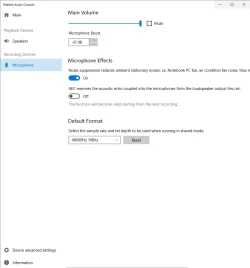
Go look in your realtek audio console settings and look for 'recording devices' there should be a checkbox for separate all input devices and check that
 

My Computer My Computer

At a glance

Linux Mint
OS
Linux Mint
Computer type
Laptop
Manufacturer/Model
System76 Lemur Pro
Go look in your realtek audio console settings and look for 'recording devices' there should be a checkbox for separate all input devices and check that

where is this i can't find it
 

Attachments

  • Screenshot 2025-11-15 193545.webp
    Screenshot 2025-11-15 193545.webp
    31 KB · Views: 1

My Computer My Computer

At a glance

Windows 11 Pro X64 Version 25H2 Build 26200.8973Intel(R) Core(TM) i5-8400 CPU @ 2.80GHz24GBNVIDIA GeForce GTX 960
OS
Windows 11 Pro X64 Version 25H2 Build 26200.8973
Computer type
PC/Desktop
Manufacturer/Model
Custom Build
CPU
Intel(R) Core(TM) i5-8400 CPU @ 2.80GHz
Motherboard
ASROCK B360M Pro4
Memory
24GB
Graphics Card(s)
NVIDIA GeForce GTX 960
Sound Card
Realtek(R) Audio 6.0.9231.1
Monitor(s) Displays
Generic Monitor (Dell S2721HN)
Screen Resolution
1920x1080
Hard Drives
CT240BX500SSD1
EDILOCA ES106 500GB
SATA SDD
Keyboard
TECKNET Wired Gaming Keyboard Model TK-B002
Mouse
Logitech G203 LIGHTSYNC Gaming Mouse
Browser
Firefox/Chrome
Antivirus
Malwarebytes
this is the problem i am having guys

When I'm in the call on Discord with my friends, they always complain of hearing my music, my Youtube videos, twitch streams and radio stream on Euro Truck Simulator 2 at first I thought they were joking, but when I went to the Discord settings > Video & Voice, i used the "Mic Test", and they were right, I wasn't talking and the bar was moving while my music was playing. At first I tried Googling the solutions myself, I tried all kinds of stuff, disabling Stereo Mic, reinstalling drivers, used different types of ports (Front and back), un checked "Listen to this device" in Control panel > Sounds, but nothing seems to work if anyone of you have had this problem and somehow fixed it, please share it. i am on windows 11 by the way
 

My Computer My Computer

At a glance

Windows 11 Pro X64 Version 25H2 Build 26200.8973Intel(R) Core(TM) i5-8400 CPU @ 2.80GHz24GBNVIDIA GeForce GTX 960
OS
Windows 11 Pro X64 Version 25H2 Build 26200.8973
Computer type
PC/Desktop
Manufacturer/Model
Custom Build
CPU
Intel(R) Core(TM) i5-8400 CPU @ 2.80GHz
Motherboard
ASROCK B360M Pro4
Memory
24GB
Graphics Card(s)
NVIDIA GeForce GTX 960
Sound Card
Realtek(R) Audio 6.0.9231.1
Monitor(s) Displays
Generic Monitor (Dell S2721HN)
Screen Resolution
1920x1080
Hard Drives
CT240BX500SSD1
EDILOCA ES106 500GB
SATA SDD
Keyboard
TECKNET Wired Gaming Keyboard Model TK-B002
Mouse
Logitech G203 LIGHTSYNC Gaming Mouse
Browser
Firefox/Chrome
Antivirus
Malwarebytes
May need to install from the Microsoft store
 

My Computer My Computer

At a glance

Linux Mint
OS
Linux Mint
Computer type
Laptop
Manufacturer/Model
System76 Lemur Pro
think i have fixed it i have input sensitivity to -49db
 

My Computer My Computer

At a glance

Windows 11 Pro X64 Version 25H2 Build 26200.8973Intel(R) Core(TM) i5-8400 CPU @ 2.80GHz24GBNVIDIA GeForce GTX 960
OS
Windows 11 Pro X64 Version 25H2 Build 26200.8973
Computer type
PC/Desktop
Manufacturer/Model
Custom Build
CPU
Intel(R) Core(TM) i5-8400 CPU @ 2.80GHz
Motherboard
ASROCK B360M Pro4
Memory
24GB
Graphics Card(s)
NVIDIA GeForce GTX 960
Sound Card
Realtek(R) Audio 6.0.9231.1
Monitor(s) Displays
Generic Monitor (Dell S2721HN)
Screen Resolution
1920x1080
Hard Drives
CT240BX500SSD1
EDILOCA ES106 500GB
SATA SDD
Keyboard
TECKNET Wired Gaming Keyboard Model TK-B002
Mouse
Logitech G203 LIGHTSYNC Gaming Mouse
Browser
Firefox/Chrome
Antivirus
Malwarebytes

Latest Support Threads

Back
Top Bottom