Phone Link - phantom post


EricVH

Member
Local time
5:31 AM
Posts
2
OS
Windows 11
I have recently found entries, ostensibly from me, that I did not generate. Here's a screenshot:

1779641452735.webp

Any idea how to stop this?
 
Windows Build/Version
Win 11 Pro

My Computer

System One

  • OS
    Windows 11
    Computer type
    PC/Desktop
    Manufacturer/Model
    Dell
    CPU
    Intel(R) Core(TM) i9-10900 CPU @ 2.80GHz (2.81 GHz)
    Memory
    64.0 GB (63.7 GB usable)
    Graphics Card(s)
    Intel(R) UHD Graphics 630 (128 MB)
    Internet Speed
    938 Mbps
    Browser
    Chrome
    Antivirus
    Norton

My Computers

System One System Two

  • OS
    All Branches but Release
    Computer type
    Laptop
    Manufacturer/Model
    Acer Nitro ANV15-51
    CPU
    AMD Ryzen 7 7735HS 3200-4500 Mhz 8 cores x 2
    Motherboard
    Sportage_RBH
    Memory
    32 GB DDR5
    Graphics Card(s)
    Radeon Graphic / NVIDIA GeForce RTX 4060 8 GB GDDR6
    Sound Card
    AMD/Realtek(R) Audio
    Monitor(s) Displays
    Integrated Monitor (15.3"vis)
    Screen Resolution
    FHD 1920X1080 16:9 144Hz
    Hard Drives
    KINGSTON OM8SEP4512Q-AA 1TB
    Western Digital 256GB
    PSU
    19V DC 6.32 A 120 W
    Cooling
    Dual Fans
    Mouse
    MS Bluetooth
    Internet Speed
    Fiber 1GB Cox -us & 1GB Orange-fr
    Browser
    Edge Canary- Firefox Nightly-Chrome Dev-Chrome Dev
    Antivirus
    Windows Defender
  • Operating System
    Windows 11 Beta
    Computer type
    Laptop
    Manufacturer/Model
    Asus X751BP
    CPU
    AMD A9-9420
    Memory
    8 GB of DDR4
    Graphics card(s)
    AMD Radeon R5
    Screen Resolution
    1600x900
    Hard Drives
    Seagate 1 TB

My Computer

System One

  • OS
    Windows 11
    Computer type
    PC/Desktop
    Manufacturer/Model
    Dell
    CPU
    Intel(R) Core(TM) i9-10900 CPU @ 2.80GHz (2.81 GHz)
    Memory
    64.0 GB (63.7 GB usable)
    Graphics Card(s)
    Intel(R) UHD Graphics 630 (128 MB)
    Internet Speed
    938 Mbps
    Browser
    Chrome
    Antivirus
    Norton
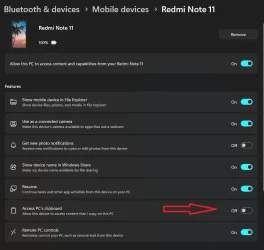
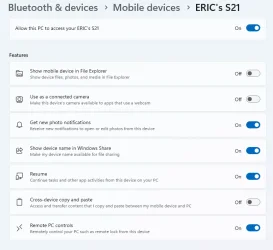
The variants between screenshot are due to the fact that the version of Phone Link, Link to Windows & Windows itself are from another build branch.

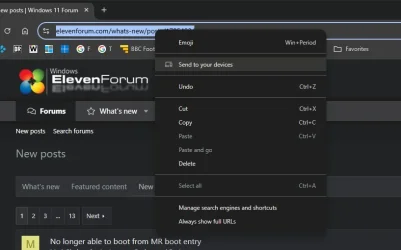
The only other thing I can think of is that while using Chrome, you accidently used the 'Send to your devices' option.
I don't see any other means to send browser content to your phone.

chrome.webp
 

My Computers

System One System Two

  • OS
    All Branches but Release
    Computer type
    Laptop
    Manufacturer/Model
    Acer Nitro ANV15-51
    CPU
    AMD Ryzen 7 7735HS 3200-4500 Mhz 8 cores x 2
    Motherboard
    Sportage_RBH
    Memory
    32 GB DDR5
    Graphics Card(s)
    Radeon Graphic / NVIDIA GeForce RTX 4060 8 GB GDDR6
    Sound Card
    AMD/Realtek(R) Audio
    Monitor(s) Displays
    Integrated Monitor (15.3"vis)
    Screen Resolution
    FHD 1920X1080 16:9 144Hz
    Hard Drives
    KINGSTON OM8SEP4512Q-AA 1TB
    Western Digital 256GB
    PSU
    19V DC 6.32 A 120 W
    Cooling
    Dual Fans
    Mouse
    MS Bluetooth
    Internet Speed
    Fiber 1GB Cox -us & 1GB Orange-fr
    Browser
    Edge Canary- Firefox Nightly-Chrome Dev-Chrome Dev
    Antivirus
    Windows Defender
  • Operating System
    Windows 11 Beta
    Computer type
    Laptop
    Manufacturer/Model
    Asus X751BP
    CPU
    AMD A9-9420
    Memory
    8 GB of DDR4
    Graphics card(s)
    AMD Radeon R5
    Screen Resolution
    1600x900
    Hard Drives
    Seagate 1 TB
You may have malware or an unwanted extension/app on your devices. Here's an article from MalwareTips:


My Computer

System One

  • OS
    Windows 11 Pro 25H2
    Computer type
    PC/Desktop
Back
Top Bottom