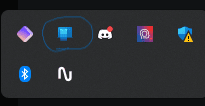
Phone Link will not stay dead


LucaraCrassus

Member
Local time
6:45 AM
Posts
7
Location
Ohio
OS
Windows 11 Home
I use Phone Link, rarely. Maybe once a month when I remember it is a thing. However, it will not stop opening in the background. I have right clicked on it in the task bar and exited it, I have unchecked the "start when windows does" option in the app settings, I have it turned off in the startup section of task manager, and I have also went into the app settings and turned off background component permissions and still no solution. I have done everything short of uninstalling the app, but I do use it from time to time. I just want it to stay closed when I exit out of the app and not run in the background or restart in the background after 5 minutes. I just closed it right as I started typing this and not even 20 seconds later, there it is, back in my taskbar. Why??
 
Windows Build/Version
Windows 11 Home

Attachments

  • Screenshot 2024-10-12 152707.png
    Screenshot 2024-10-12 152707.png
    4.9 KB · Views: 1

My Computer My Computer

At a glance

Windows 11 HomeIntel Core I7 1362H16gb DDR5Intel UHD and NVIDIA GeForce RTX 4050
OS
Windows 11 Home
Computer type
Laptop
Manufacturer/Model
MSI Katana 15 B13VEK
CPU
Intel Core I7 1362H
Motherboard
Micro-Star International Co MS-1585 (U3E1)
Memory
16gb DDR5
Graphics Card(s)
Intel UHD and NVIDIA GeForce RTX 4050
Sound Card
Realtek High Definition Autio
Hard Drives
1tb NVMe Samsung
500gb NVMe Unknown Manufacturer
Internet Speed
1gb
Browser
Opera
Antivirus
Windows Defender
See if it's in Task Manager/Startup apps. If so disable it from starting on boot.

1728843122743.png
 

My Computers My Computers

  • At a glance

    Win 11 Pro 25H2 26200.9445Intel® Core™ i7-14700KG.SKILL Ripjaws S5 Series 64GB (2 x 32GB) DDR5ASUS GeForce RTX 4070 Super 12GB
    OS
    Win 11 Pro 25H2 26200.9445
    Computer type
    PC/Desktop
    Manufacturer/Model
    Self Built
    CPU
    Intel® Core™ i7-14700K
    Motherboard
    ASUS TUF Z690-PLUS WIFI (BIOS 4505)
    Memory
    G.SKILL Ripjaws S5 Series 64GB (2 x 32GB) DDR5
    Graphics Card(s)
    ASUS GeForce RTX 4070 Super 12GB
    Sound Card
    Sound Blaster AE-5 Plus
    Monitor(s) Displays
    ASUS TUF Gaming 27" 2K HDR Gaming
    Screen Resolution
    2560 x 1440
    Hard Drives
    Samsung 990 Pro 1TB NVMe (Win 11 25H2)
    SK hynix P41 500GB NVMe
    SK hynix P41 2TB NVMe (x3)
    Crucial P3 Plus 4TB
    PSU
    Corsair RM850x Shift
    Case
    Antec Dark Phantom DP502 FLUX
    Cooling
    Corsair Nautilus 360 RS AIO
    Keyboard
    Logitech MK 320
    Mouse
    Razer Basilisk V3
    Internet Speed
    750Mbs
    Browser
    Firefox
    Antivirus
    Winows Security
    Other Info
    MR 8.1 Home
  • At a glance

    Win 11 Pro 25H2 26200.9445Intel Core i5-1140064 GB DDR4MSI GeForce RTX 3060 Ventus 2X 12GB
    Operating System
    Win 11 Pro 25H2 26200.9445
    Computer type
    PC/Desktop
    Manufacturer/Model
    Self Built
    CPU
    Intel Core i5-11400
    Motherboard
    Asus TUF Gaming Z590 Plus WiFi (BIOS 2803)
    Memory
    64 GB DDR4
    Graphics card(s)
    MSI GeForce RTX 3060 Ventus 2X 12GB
    Sound Card
    SoundBlaster Audigy Fx V2
    Monitor(s) Displays
    Samsung F27T350
    Screen Resolution
    1920x1080
    Hard Drives
    Samsung 980 Pro 1TB
    Samsung 970 EVO Plus 2TB
    Samsung 870 EVO 500GB SSD
    PSU
    Corsair HX750
    Case
    Cougar MX330-G Window
    Cooling
    Thermalright Frozen Edge 240 Black AIO
    Internet Speed
    350Mbps
    Browser
    Firefox
    Antivirus
    Windows Security
  • System Three
    Win 11 Pro 25H2 26200.9445
    ASUS PRIME Z370-P II BIOS 3004 7/12/21
    Intel Core i7-8700 CPU @ 3.20GHz
    32GB DDR4 RAM (4x8)
    EVGA RTX 2060 (used)
    iGPU Intel UHD Graphics 630 (backup)
    Cooler Master Hyper 212
    Mid-Tower Desktop
See if it's in Task Manager/Startup apps. If so disable it from starting on boot.

View attachment 112420
I did this too, it is listed as disabled but Phone Link ignores it and continues to start with Windows and will reopen itsself within minutes of me exiting it from the taskbar or using task manager to kill it. I did it 5 minutes ago and it is already back stalking me. I might just uninstall it and use Samsung Flow or even the DeX app on Windows. Phone Link is pretty good but when I don't use it, stay out of my background and ram please.
 

My Computer My Computer

At a glance

Windows 11 HomeIntel Core I7 1362H16gb DDR5Intel UHD and NVIDIA GeForce RTX 4050
OS
Windows 11 Home
Computer type
Laptop
Manufacturer/Model
MSI Katana 15 B13VEK
CPU
Intel Core I7 1362H
Motherboard
Micro-Star International Co MS-1585 (U3E1)
Memory
16gb DDR5
Graphics Card(s)
Intel UHD and NVIDIA GeForce RTX 4050
Sound Card
Realtek High Definition Autio
Hard Drives
1tb NVMe Samsung
500gb NVMe Unknown Manufacturer
Internet Speed
1gb
Browser
Opera
Antivirus
Windows Defender
if none of the correct settings are preventing it from running, you can block it via a portable Sordum app and just unblock it if you want to use it...


My Computer My Computer

At a glance

Windows 11 Pro
OS
Windows 11 Pro
I can't test this since I've removed the app. Try disabling it's service.
Stop all running processes for Phone link in Task Manager.
Services>Phone service>right click on service, select properties, and first change startup to manual to see if it will stop it from automatically starting.

If that doesn't work do the same thing but change to disabled. In this case, though, anytime you want to use the app you'll have to enable the service first.
 

My Computers My Computers

  • At a glance

    Windows 11 Pro 25H2 26200.9445i9-10900 10 core 20 threads32 gbnone-Intel UHD Graphics 630
    OS
    Windows 11 Pro 25H2 26200.9445
    Computer type
    PC/Desktop
    Manufacturer/Model
    Dell Optiplex 7080
    CPU
    i9-10900 10 core 20 threads
    Motherboard
    DELL 0J37VM
    Memory
    32 gb
    Graphics Card(s)
    none-Intel UHD Graphics 630
    Sound Card
    Integrated Realtek
    Monitor(s) Displays
    Benq 27
    Screen Resolution
    2560x1440
    Hard Drives
    2x1tb Solidigm m.2 nvme /External drives 512gb Samsung m.2 sata+2tb Kingston m2.nvme
    PSU
    500w
    Case
    MT
    Cooling
    Dell Premium
    Keyboard
    Logitech wired
    Mouse
    Logitech wireless
    Internet Speed
    so slow I'm too embarrassed to tell
    Browser
    #1 Edge #2 Firefox
    Antivirus
    Defender+MWB Premium
  • At a glance

    Windows 11 Pro 24H2 26200.9445AMD Ryzen 7 6800U32 gbintegrated
    Operating System
    Windows 11 Pro 24H2 26200.9445
    Computer type
    PC/Desktop
    Manufacturer/Model
    Beelink Mini PC SER5
    CPU
    AMD Ryzen 7 6800U
    Memory
    32 gb
    Graphics card(s)
    integrated
    Sound Card
    integrated
    Monitor(s) Displays
    Benq 27
    Screen Resolution
    2560x1440
    Hard Drives
    1TB Crucial nvme
    Keyboard
    Logitech wired
    Mouse
    Logitech wireless
    Internet Speed
    still too embarrassed to tell
    Browser
    Firefox
    Antivirus
    Defender
  • System 3 is non compliant Dell 9020 i7-4770/24gb ram Win11 PRO 26200.9445

also - you can disable it without the sordum app. just have to run a reg file each time you want to enable/disable it. preference call. same result
 

My Computer My Computer

At a glance

Windows 11 Pro
OS
Windows 11 Pro
Back
Top Bottom