Photographers here -- apart from Photoshop want app to extract EXIF info from photos


jimbo45

Well-known member
Pro User
VIP
Local time
7:14 AM
Posts
5,781
Location
Hafnarfjörður IS
OS
Windows XP,11 Linux Fedora Rawhide pre-release 45
Hi folks
Any good apps here to extract the EXIF info from digital photos -- EXCLUDING photoshop --
What I want is a quick "extraction" program that can simply scan a file list of photos - and without having to open them manually one ny one to get the EXIF info and then just create a text file.

What I'm doing is creating a MySQL (actually MariaDB) database with a thumbnail of the photo, a link to the actual print image, and the EXIF -- quite a simple DB. With this type of system I don't have to worry about proprietary "catalogs" and the system isn't at risk if a volume gets full up (MariaDB/MySQL can span dynamically many volumes if required).

It's also simple to extract MySQL / MariaDB into EXCEL via simple MsQuery type of stuff (install the Windows ODBC driver).

I know loads here do serious photography so maybe they've got aome suggestions.

Cheers
jimbo
 

My Computer

System One

  • OS
    Windows XP,11 Linux Fedora Rawhide pre-release 45
    Computer type
    PC/Desktop
    CPU
    2 X Intel i7
    Screen Resolution
    4KUHD X 2
I wonder if this would help you extract the data into your DB. Works in Windows, Linux and on MacOS

ExifTool by Phil Harvey
 

My Computers

System One System Two

  • OS
    Win 11 Pro 25H2 26200.8457 / Linux Mint 22.3
    Computer type
    Laptop
    Manufacturer/Model
    Lenovo A485
    CPU
    Ryzen 7 2700U Pro
    Motherboard
    Lenovo (WiFi/BT module upgraded to Intel Wireless-AC-9260)
    Memory
    32GB
    Graphics Card(s)
    iGPU Vega 10
    Sound Card
    Realtek
    Monitor(s) Displays
    14" FHD (built-in) + 14" Lenovo Thinkvision M14t (touch+pen) + 32" Asus PB328
    Screen Resolution
    FHD + FHD + 1440p
    Hard Drives
    Intel 660p m.2 nVME PCIe3.0 x2 512GB
    PSU
    125W(Dock)/65W(Travel Adapter)
    Keyboard
    Thinkpad / Logitech MX Keys
    Mouse
    Logitech MX Master 2S
    Internet Speed
    1/1Gbit
    Browser
    Firefox
    Antivirus
    Windows Defender
    Other Info
    SecureBoot: Enabled
    TPM2.0: Enabled
    AMD-V: Enabled
  • Operating System
    Win 11 Pro 25H2 26200.8521(RP)
    Computer type
    PC/Desktop
    Manufacturer/Model
    Custom
    CPU
    i7-7700k @4.8GHz
    Motherboard
    Asus PRIME Z270-A
    Memory
    32GB 2x16GB 2133MHz CL15
    Graphics card(s)
    EVGA GTX1080Ti FTW 11GB
    Sound Card
    Integrated
    Monitor(s) Displays
    32" 10-bit Asus PB328Q
    Screen Resolution
    WQHD 2560x1440
    Hard Drives
    512GB ADATA SX8000NP NVMe PCIe Gen 3 x4
    PSU
    850W
    Case
    Fractal Design Define 7
    Cooling
    Noctua NH-D15 chromax.black
    Keyboard
    Logitech MX Keys
    Mouse
    Logitech MX Master 2S
    Internet Speed
    1/1Gbit
    Browser
    Firefox
    Antivirus
    Windows Defender
    Other Info
    AC WiFi Card


My Computers

System One System Two

  • OS
    Windows 11 Pro 23H2 (5699), 25H2 (8457)
    Computer type
    Laptop
    Manufacturer/Model
    Acer Extensa 5630EZ
    CPU
    Mobile DualCore Intel Core 2 Duo T7250, 2000 MHz
    Motherboard
    Acer Extensa 5630
    Memory
    4GB
    Graphics Card(s)
    Mobile Intel(R) GMA 4500M (Mobile 4 series)
    Sound Card
    Realtek ALC268 @ Intel 82801IB ICH9 - High Definition Audio Controller
    Monitor(s) Displays
    1
    Screen Resolution
    1280x800
    Hard Drives
    Samsung SSD 850 EVO 250GB SATA Device (250 GB, SATA-III)
    Internet Speed
    VDSL 50 Mbps
    Browser
    MICROSOFT EDGE
    Antivirus
    WINDOWS DEFENDER
    Other Info
    Legacy MBR installation, no TPM, no Secure Boot, no WDDM 2.0 graphics drivers, no SSE4.2, cannot get more unsupported ;) This is only my test laptop. I had installed Windows 11 here before upgrading my main PC. For my main PC I use everyday see my 2nd system specs.
  • Operating System
    Windows 11 Pro v25H2 (build 26200.8457)
    Computer type
    PC/Desktop
    Manufacturer/Model
    Custom-built PC
    CPU
    Intel Core-i7 3770 3.40GHz s1155 (3rd generation)
    Motherboard
    Asus P8H61 s1155 ATX
    Memory
    2x Kingston Hyper-X Blu 8GB DDR3-1600
    Graphics card(s)
    GIGABYTE GeForce RTX 3050 WINDFORCE OC V2 6GB (GV-N3050WF2OCV2-6GD)
    Sound Card
    Realtek HD audio (ALC887)
    Monitor(s) Displays
    Sony Bravia KDL-19L4000 19" LCD TV via VGA
    Screen Resolution
    1440x900 32-bit 60Hz
    Hard Drives
    WD Blue SA510 2.5 1000GB SSD as system disk, Western Digital Caviar Purple 4TB SATA III (WD40PURZ) as second
    PSU
    Thermaltake Litepower RGB 550W Full Wired
    Case
    SUPERCASE MIDI-TOWER
    Cooling
    Deepcool Gamma Archer CPU cooler, 1x 8cm fan at the back
    Keyboard
    Mitsumi 101-key PS/2
    Mouse
    Sunnyline OptiEye PS/2
    Internet Speed
    100Mbps
    Browser
    Microsoft Edge, Mozilla Firefox
    Antivirus
    Microsoft Windows Defender
    Other Info
    Legacy BIOS (MBR) installation, no TPM, no Secure Boot, WDDM 3.0 graphics drivers, WEI score 7.4
I left that first tool out of my post because it is not what @jimbo45 was looking for.
 

My Computers

System One System Two

  • OS
    Win 11 Pro 25H2 26200.8457 / Linux Mint 22.3
    Computer type
    Laptop
    Manufacturer/Model
    Lenovo A485
    CPU
    Ryzen 7 2700U Pro
    Motherboard
    Lenovo (WiFi/BT module upgraded to Intel Wireless-AC-9260)
    Memory
    32GB
    Graphics Card(s)
    iGPU Vega 10
    Sound Card
    Realtek
    Monitor(s) Displays
    14" FHD (built-in) + 14" Lenovo Thinkvision M14t (touch+pen) + 32" Asus PB328
    Screen Resolution
    FHD + FHD + 1440p
    Hard Drives
    Intel 660p m.2 nVME PCIe3.0 x2 512GB
    PSU
    125W(Dock)/65W(Travel Adapter)
    Keyboard
    Thinkpad / Logitech MX Keys
    Mouse
    Logitech MX Master 2S
    Internet Speed
    1/1Gbit
    Browser
    Firefox
    Antivirus
    Windows Defender
    Other Info
    SecureBoot: Enabled
    TPM2.0: Enabled
    AMD-V: Enabled
  • Operating System
    Win 11 Pro 25H2 26200.8521(RP)
    Computer type
    PC/Desktop
    Manufacturer/Model
    Custom
    CPU
    i7-7700k @4.8GHz
    Motherboard
    Asus PRIME Z270-A
    Memory
    32GB 2x16GB 2133MHz CL15
    Graphics card(s)
    EVGA GTX1080Ti FTW 11GB
    Sound Card
    Integrated
    Monitor(s) Displays
    32" 10-bit Asus PB328Q
    Screen Resolution
    WQHD 2560x1440
    Hard Drives
    512GB ADATA SX8000NP NVMe PCIe Gen 3 x4
    PSU
    850W
    Case
    Fractal Design Define 7
    Cooling
    Noctua NH-D15 chromax.black
    Keyboard
    Logitech MX Keys
    Mouse
    Logitech MX Master 2S
    Internet Speed
    1/1Gbit
    Browser
    Firefox
    Antivirus
    Windows Defender
    Other Info
    AC WiFi Card
Don't these EXIF data appear when you right-click on the photo and select Properties? However I am not sure if you can extract the data from there apart from copy-paste them.

PS: Yes, you can read them, but not copy-paste or extract them.
 

My Computers

System One System Two

  • OS
    Windows 11 Pro 23H2 (5699), 25H2 (8457)
    Computer type
    Laptop
    Manufacturer/Model
    Acer Extensa 5630EZ
    CPU
    Mobile DualCore Intel Core 2 Duo T7250, 2000 MHz
    Motherboard
    Acer Extensa 5630
    Memory
    4GB
    Graphics Card(s)
    Mobile Intel(R) GMA 4500M (Mobile 4 series)
    Sound Card
    Realtek ALC268 @ Intel 82801IB ICH9 - High Definition Audio Controller
    Monitor(s) Displays
    1
    Screen Resolution
    1280x800
    Hard Drives
    Samsung SSD 850 EVO 250GB SATA Device (250 GB, SATA-III)
    Internet Speed
    VDSL 50 Mbps
    Browser
    MICROSOFT EDGE
    Antivirus
    WINDOWS DEFENDER
    Other Info
    Legacy MBR installation, no TPM, no Secure Boot, no WDDM 2.0 graphics drivers, no SSE4.2, cannot get more unsupported ;) This is only my test laptop. I had installed Windows 11 here before upgrading my main PC. For my main PC I use everyday see my 2nd system specs.
  • Operating System
    Windows 11 Pro v25H2 (build 26200.8457)
    Computer type
    PC/Desktop
    Manufacturer/Model
    Custom-built PC
    CPU
    Intel Core-i7 3770 3.40GHz s1155 (3rd generation)
    Motherboard
    Asus P8H61 s1155 ATX
    Memory
    2x Kingston Hyper-X Blu 8GB DDR3-1600
    Graphics card(s)
    GIGABYTE GeForce RTX 3050 WINDFORCE OC V2 6GB (GV-N3050WF2OCV2-6GD)
    Sound Card
    Realtek HD audio (ALC887)
    Monitor(s) Displays
    Sony Bravia KDL-19L4000 19" LCD TV via VGA
    Screen Resolution
    1440x900 32-bit 60Hz
    Hard Drives
    WD Blue SA510 2.5 1000GB SSD as system disk, Western Digital Caviar Purple 4TB SATA III (WD40PURZ) as second
    PSU
    Thermaltake Litepower RGB 550W Full Wired
    Case
    SUPERCASE MIDI-TOWER
    Cooling
    Deepcool Gamma Archer CPU cooler, 1x 8cm fan at the back
    Keyboard
    Mitsumi 101-key PS/2
    Mouse
    Sunnyline OptiEye PS/2
    Internet Speed
    100Mbps
    Browser
    Microsoft Edge, Mozilla Firefox
    Antivirus
    Microsoft Windows Defender
    Other Info
    Legacy BIOS (MBR) installation, no TPM, no Secure Boot, WDDM 3.0 graphics drivers, WEI score 7.4
Don't these EXIF data appear when you right-click on the photo and select Properties? However I am not sure if you can extract the data from there apart from copy-paste them.
exactly...BINGO...and here lies the issue.
 

My Computers

System One System Two

  • OS
    Win 11 Pro 25H2 26200.8457 / Linux Mint 22.3
    Computer type
    Laptop
    Manufacturer/Model
    Lenovo A485
    CPU
    Ryzen 7 2700U Pro
    Motherboard
    Lenovo (WiFi/BT module upgraded to Intel Wireless-AC-9260)
    Memory
    32GB
    Graphics Card(s)
    iGPU Vega 10
    Sound Card
    Realtek
    Monitor(s) Displays
    14" FHD (built-in) + 14" Lenovo Thinkvision M14t (touch+pen) + 32" Asus PB328
    Screen Resolution
    FHD + FHD + 1440p
    Hard Drives
    Intel 660p m.2 nVME PCIe3.0 x2 512GB
    PSU
    125W(Dock)/65W(Travel Adapter)
    Keyboard
    Thinkpad / Logitech MX Keys
    Mouse
    Logitech MX Master 2S
    Internet Speed
    1/1Gbit
    Browser
    Firefox
    Antivirus
    Windows Defender
    Other Info
    SecureBoot: Enabled
    TPM2.0: Enabled
    AMD-V: Enabled
  • Operating System
    Win 11 Pro 25H2 26200.8521(RP)
    Computer type
    PC/Desktop
    Manufacturer/Model
    Custom
    CPU
    i7-7700k @4.8GHz
    Motherboard
    Asus PRIME Z270-A
    Memory
    32GB 2x16GB 2133MHz CL15
    Graphics card(s)
    EVGA GTX1080Ti FTW 11GB
    Sound Card
    Integrated
    Monitor(s) Displays
    32" 10-bit Asus PB328Q
    Screen Resolution
    WQHD 2560x1440
    Hard Drives
    512GB ADATA SX8000NP NVMe PCIe Gen 3 x4
    PSU
    850W
    Case
    Fractal Design Define 7
    Cooling
    Noctua NH-D15 chromax.black
    Keyboard
    Logitech MX Keys
    Mouse
    Logitech MX Master 2S
    Internet Speed
    1/1Gbit
    Browser
    Firefox
    Antivirus
    Windows Defender
    Other Info
    AC WiFi Card
I wonder if this would help you extract the data into your DB. Works in Windows, Linux and on MacOS

ExifTool by Phil Harvey
Looks "Exactly what the doctor ordered" !!! -- Might have to create some type of batch script to recursively navigate folders -- this is where the Linux version could be better as I'm OK with Linux Bash scripts and crontab for running jobs than Windows.

Thanks

@SlicEnDicE

Playing around with it now on Linux -- should keep me quiet and busy this weekend !!!!!


Screenshot_20251010_111222.webp

Cheers
jimbo
 
Last edited:

My Computer

System One

  • OS
    Windows XP,11 Linux Fedora Rawhide pre-release 45
    Computer type
    PC/Desktop
    CPU
    2 X Intel i7
    Screen Resolution
    4KUHD X 2
I realise this is a bit late, but I had looked into this a bit a few years back, using vbs. So I set about creating something that simply listed all the properties for a jpeg file (which seem to all be EXIF values). But a holiday to Greece got in the way, and I only got back today. So I 'finished it off' as far as it seems worth going at this stage. It allows one to select a folder at or below the starting point (the location of the vbs file) and lists, to screen and text file, all the properties it can find of the jpegs in that folder. If it proves useful, then it could be extended to start in any folder, and search sub-folders also.

The code looks like this (sorry for the tab alignment, should have used spaces):

Code:
'MNG 18/10/25  List EXIF data in jpg files
'source: https://superuser.com/questions/1408564/vbscript-to-extract-date-taken-from-a-photo
'most returned values confirmed by IrfanView

Option Explicit
Const   ForWriting          = 2
Const   FileCreate          = True
Const   TristateTrue        = 0     'We are OK with just ASCII data (I think), need -1 for unicode
Dim WshShell, sCurrentFolderName, sOutputFileName
Dim oFS, oImg, oTS, iPos, sExt, sprop, oCF, ofi, oShell, oBFF, sfn, spath

Set WshShell        = WScript.CreateObject("WScript.Shell")
sCurrentFolderName    = WshShell.CurrentDirectory
sOutputFileName        = sCurrentFolderName & "\EXIF data.txt"

Set oFS                = WScript.CreateObject("Scripting.FileSystemObject")
Set oTS                = oFS.OpenTextFile(sOutputFileName, ForWriting, FileCreate, TristateTrue)
Set oImg            = WScript.CreateObject("WIA.ImageFile")
Set oShell = CreateObject("Shell.Application")
Set oCF = oShell.Namespace(sCurrentFolderName)
'Browse for a folder - can't go above start point - room for improvement!
Set oBFF = oShell.BrowseForFolder( 0, "Select Folder", 0, oCF)

For Each ofi in oBFF.Items                    'for each file in folder (does not search sub-folders)
    sfn = ofi.name                            'get file name
    spath = oBFF.self.path                    'and path to it
    sfn = spath&"\"&sfn                        'combine to create fully-defined file path
                                            '(there may be a better way to do this)
'    WScript.Echo sfn                        'comfort the user when it all fails
    iPos    = InStrRev(sfn, ".")            'find first 'dot'
    if iPos > 0 then                        'folders have no . ! (I don't know if they will be found)
        sExt = Mid(sfn, iPos)                'extract file extension
        If (LCase(sExt) = ".jpg") Then        'for jpg only (this could also be improved)
            sprop = props(sfn)                'get all available properties
            oTS.WriteLine sprop                'write to file
            WScript.Echo sprop                'and screen until we are sure it works
        End If
    end if
Next
oTS.Close                                    'should probably delete objects also

Function props(sFileName)                    'read properties (mostly EXIF data)
    Dim s, prp

    oImg.LoadFile sFileName                    'Needs complete path
    s = "File: " & sFileName & vbcrlf & "prop count: " & oImg.Properties.Count & vbcrlf
    For Each prp In oImg.Properties            'seems to find 2 less than count?
        If prp.IsVector = False Then        'not sure what this excludes
            s = s & prp.propertyID & ": " & prp.name & " == " & prp.Value & vbcrlf
        end if
    next
    props = s
End Function

The output will look like this:
File: D:\dad\docs\dev\vbs\Read EXIF\spare\TRV - Copy.jpg
prop count: 50
271: EquipMake == Apple
272: EquipModel == iPhone 5
274: Orientation == 1
282: XResolution == 72
283: YResolution == 72
296: ResolutionUnit == 2
305: SoftwareUsed == 10.3.3
306: DateTime == 2018:02:19 19:18:04
531: YCbCrPositioning == 1
etc etc


I hope this may be of some use, but even if not, it kept me amused for a bit. Martin
 

My Computers

System One System Two

  • OS
    W10
    Computer type
    PC/Desktop
    Manufacturer/Model
    Home brew
    CPU
    Ryzen3-2200G
    Motherboard
    GA-A320M-S2H
    Memory
    16 GB Kingston HyperX DDR4
    Graphics Card(s)
    Integrated
    Sound Card
    Integrated
    Monitor(s) Displays
    LG W2246
    Screen Resolution
    1920x1080
    Hard Drives
    Intel 760p 256GB NVMe M.2
    Seagate Barracuda 7200 1TB
    Gash Seagate ST31608
    PSU
    2006-vintage no-name
    Case
    Acer Aspire 2006
    Cooling
    Air (fan-assist)
    Keyboard
    HP SK-2885
    Mouse
    wireless
    Internet Speed
    32 mbps
    Browser
    FF latest
    Antivirus
    MS Defender
  • Operating System
    W10
    Computer type
    Laptop
    Manufacturer/Model
    HP 255 G8
    CPU
    Ryzen 5 3500U
    Memory
    8 GB
    Graphics card(s)
    on-board
    Monitor(s) Displays
    16"
    Screen Resolution
    1920x1080
    Hard Drives
    Samsung SSD 512GB Nvme
    Browser
    FF + Edge
    Antivirus
    MS Defender
Don't these EXIF data appear when you right-click on the photo and select Properties? However I am not sure if you can extract the data from there apart from copy-paste them.

PS: Yes, you can read them, but not copy-paste or extract them.
Yes, but photo metadata is far more extensive than what Windows properties will show you.

Go to the CIPA website and download EXIF 3.0
 

My Computer

System One

  • OS
    Windows 11 2H25
    Computer type
    PC/Desktop
    Manufacturer/Model
    DIY
    CPU
    AMD 9900X
    Motherboard
    MSI X870E Carbon
    Memory
    64 GB
    Graphics Card(s)
    AMD 9070 XT
    Sound Card
    built-in
    Monitor(s) Displays
    Dell 24"
    Hard Drives
    Sabrent 1 TB NVMe, 4 x SSD (need to check models), 4 x 3.5" HDD, 8-16 TB, all WD
    PSU
    Seasonic 850
    Case
    Fractal Design North XL (which I likw)
    Cooling
    Corsair AIO for CPU, fans for case
    Keyboard
    Das Keyboard 4
    Mouse
    Corsair M65 (white)
    Internet Speed
    1 TB download
    Browser
    Firefox
    Antivirus
    Bitdefender
    Other Info
    Also have Lenovo T14S laptop (me) and Lenovo Slim 71 (wife)
ShareX
 

My Computers

System One System Two

  • OS
    Windows 11 Pro
    Computer type
    PC/Desktop
    Manufacturer/Model
    ASUS ROG Strix
  • Operating System
    Windows 11 Pro
    Computer type
    Laptop
    Manufacturer/Model
    ASUS VivoBook
How about this approach

'Ask chatGpt to write you a PowerShell process to batch process multiple files and write all the EXIF values into your database.

Be sure to include your favorite RAW file format


b
 

My Computer

System One

  • OS
    Windows 11 2H25
    Computer type
    PC/Desktop
    Manufacturer/Model
    DIY
    CPU
    AMD 9900X
    Motherboard
    MSI X870E Carbon
    Memory
    64 GB
    Graphics Card(s)
    AMD 9070 XT
    Sound Card
    built-in
    Monitor(s) Displays
    Dell 24"
    Hard Drives
    Sabrent 1 TB NVMe, 4 x SSD (need to check models), 4 x 3.5" HDD, 8-16 TB, all WD
    PSU
    Seasonic 850
    Case
    Fractal Design North XL (which I likw)
    Cooling
    Corsair AIO for CPU, fans for case
    Keyboard
    Das Keyboard 4
    Mouse
    Corsair M65 (white)
    Internet Speed
    1 TB download
    Browser
    Firefox
    Antivirus
    Bitdefender
    Other Info
    Also have Lenovo T14S laptop (me) and Lenovo Slim 71 (wife)
How about this approach

'Ask chatGpt to write you a PowerShell process to batch process multiple files and write all the EXIF values into your database.

Be sure to include your favorite RAW file format
And if you do, oh please, oh please, make sure you have a complete backup of all the files :oops:
 

My Computers

System One System Two

  • OS
    Windows 11 2xH2 (latest update ... forever anal)
    Computer type
    PC/Desktop
    Manufacturer/Model
    HP Slim S01
    CPU
    Intel i5-12400
    Memory
    8GB
    Graphics Card(s)
    NVIDIA GeForce GT730
    Sound Card
    OOBE
    Monitor(s) Displays
    Acer 32"
    Screen Resolution
    1920x1080
    Hard Drives
    512GB KIOXIA NVMe
    1TB SATA SSD
    PSU
    OOBE
    Case
    OOBE
    Cooling
    OOBE
    Keyboard
    BT
    Mouse
    BT
    Browser
    Brave FFox Chrome Opera
    Antivirus
    KIS
  • Operating System
    Windows 11 Pro 2xH2 (latest update ... 4ever anal)
    Computer type
    Laptop
    Manufacturer/Model
    HP Pavillion 15
    CPU
    i7-1165G7 @ 2.80GHz
    Graphics card(s)
    Intel Iris Xe Graphics
    Hard Drives
    Samsung NVMe 512GB
    + numerous/multiple SSD Type C USB enclosures
    Internet Speed
    NBN FTTN 50
    Browser
    Brave
    Antivirus
    KIS
Exiftool is about the only option really. I wouldn't say it was simple though and it can be quite complex. I had to use it once. They do have a forum though to help with getting the right instructions to do it. If you remove ALL exif data then the photos lose their orientation and rotate. But if you only remove, say, the location, it doesn't remove all of it as there are so many different aspects to the location. With the help of their forum I ran the code that removed all exif data, while re adding the rotation data at the same time. Because removing all exif data was the only way to guarantee removing all location exif - including itty bits of things.

And that worked. But, be warned - I then found apple devices couldn't view the photos online and ended up having to convert them all to webp from jpeg.

Exiftool is quite powerful - and complicated. Things like photoshop and right clicking don't always show all the exif data.
 

My Computers

System One System Two

  • OS
    Windows 11 Home 25H2
    Computer type
    Laptop
    Manufacturer/Model
    HP Pavilion 14-ce3606sa
    CPU
    Core i5-1035G1
    Memory
    32gb
    Hard Drives
    Samsung 870 evo sata ssd
    Cooling
    Could be better
    Internet Speed
    50 mbps Starlink
    Browser
    Firefox
    Other Info
    Originally came installed with a 500gb H10 Optane ssd
  • Operating System
    Windows 11 Home
    Computer type
    Laptop
    Manufacturer/Model
    HP Pavilion ce3606sa
    CPU
    Intel Core i5-1035G1
    Memory
    16gb
    Hard Drives
    Hynix Gold P31 2TB
    Internet Speed
    200mbps Starlink
    Browser
    Firefox
    Antivirus
    Defender
Also this site is very good for uploading the images after (or before) exif removal to tell you exactly what exif is on them and if there is any left and if so, what it is. It's also free and you can upload large numbers of photos. And it's accurate. No data is stored during the process - it's all in browser.


My Computers

System One System Two

  • OS
    Windows 11 Home 25H2
    Computer type
    Laptop
    Manufacturer/Model
    HP Pavilion 14-ce3606sa
    CPU
    Core i5-1035G1
    Memory
    32gb
    Hard Drives
    Samsung 870 evo sata ssd
    Cooling
    Could be better
    Internet Speed
    50 mbps Starlink
    Browser
    Firefox
    Other Info
    Originally came installed with a 500gb H10 Optane ssd
  • Operating System
    Windows 11 Home
    Computer type
    Laptop
    Manufacturer/Model
    HP Pavilion ce3606sa
    CPU
    Intel Core i5-1035G1
    Memory
    16gb
    Hard Drives
    Hynix Gold P31 2TB
    Internet Speed
    200mbps Starlink
    Browser
    Firefox
    Antivirus
    Defender
This was the powershell command I used to remove all exif while re-adding the rotation exif (although note this was for .data files so "data" would need to be replaced with jpg if they are jpeg files. It was because they were .data files that apple devices then couldn't see them online as they were looking for jpeg files - it got complicated .............. And have backups before you start in case anything goes wrong!

exiftool -r -ext data -all= -tagsfromfile @ -Orientation -overwrite_original

Actually getting exiftool to work on computer can be tricky as well. The exiftool forum recommends installing exiftool via this Oliver Betz method - it makes it a lot simpler and guaranteed to work.


My Computers

System One System Two

  • OS
    Windows 11 Home 25H2
    Computer type
    Laptop
    Manufacturer/Model
    HP Pavilion 14-ce3606sa
    CPU
    Core i5-1035G1
    Memory
    32gb
    Hard Drives
    Samsung 870 evo sata ssd
    Cooling
    Could be better
    Internet Speed
    50 mbps Starlink
    Browser
    Firefox
    Other Info
    Originally came installed with a 500gb H10 Optane ssd
  • Operating System
    Windows 11 Home
    Computer type
    Laptop
    Manufacturer/Model
    HP Pavilion ce3606sa
    CPU
    Intel Core i5-1035G1
    Memory
    16gb
    Hard Drives
    Hynix Gold P31 2TB
    Internet Speed
    200mbps Starlink
    Browser
    Firefox
    Antivirus
    Defender
One doesn't need to remove the exif info -- orig photo remains untouched - only a text COPY of selected exif info.
Then breaking that down into a csv type text file easy to load into MariaDB / MySQL and then one can run queries like "all beach photos between jul 1 and 10 shot with Canon D5 and 50 mm lens". Then you get a list back with file url links to the photos with thumbnails in -- depending om how you set your DB up. HediSQL is a good Windows tool for creating and managing tables etc in a MariaDB database.

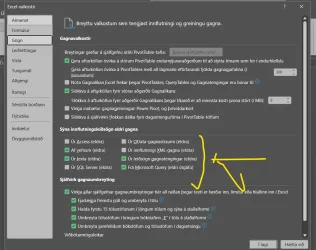
EXCEL with ODBC driver from the AB/AQL site works brilliantly -- in EXCEL options though don't forget for the DATA option to enable the legacy data applications - web, msQuery etc.

e.g in properties in EXCEL -->Data (It's the 3rd option down in Data option for Engloish version of EXCEL). !!

Skjámynd 2025-11-18 091023.webp

Cheers
jimbo
 

My Computer

System One

  • OS
    Windows XP,11 Linux Fedora Rawhide pre-release 45
    Computer type
    PC/Desktop
    CPU
    2 X Intel i7
    Screen Resolution
    4KUHD X 2
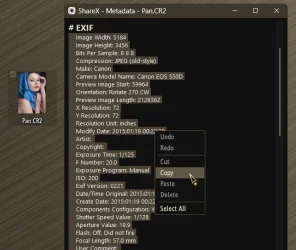
In ShareX, you can simply copy the data, but, only one at a time.
I haven't a clue how you would batch that process without making a mess of all the data! 🤷‍♂️

11024.webp
 

My Computers

System One System Two

  • OS
    Windows 11 Pro
    Computer type
    PC/Desktop
    Manufacturer/Model
    ASUS ROG Strix
  • Operating System
    Windows 11 Pro
    Computer type
    Laptop
    Manufacturer/Model
    ASUS VivoBook
Apologies I may have misread - I saw extract exif and assumed it meant remove - but maybe it’s more about copying exif data is that right?
 

My Computers

System One System Two

  • OS
    Windows 11 Home 25H2
    Computer type
    Laptop
    Manufacturer/Model
    HP Pavilion 14-ce3606sa
    CPU
    Core i5-1035G1
    Memory
    32gb
    Hard Drives
    Samsung 870 evo sata ssd
    Cooling
    Could be better
    Internet Speed
    50 mbps Starlink
    Browser
    Firefox
    Other Info
    Originally came installed with a 500gb H10 Optane ssd
  • Operating System
    Windows 11 Home
    Computer type
    Laptop
    Manufacturer/Model
    HP Pavilion ce3606sa
    CPU
    Intel Core i5-1035G1
    Memory
    16gb
    Hard Drives
    Hynix Gold P31 2TB
    Internet Speed
    200mbps Starlink
    Browser
    Firefox
    Antivirus
    Defender
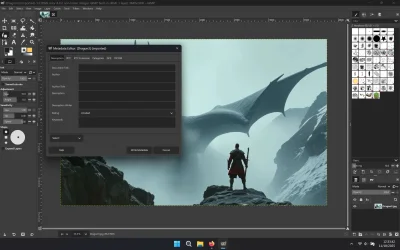
You can change the metadata to anything you want in GIMP, and it's completely free.

1763490856670.webp
 

My Computer

System One

  • OS
    Windows 11 22H2 Pro (X-lite Micro 11 version)
    Computer type
    Laptop
    Manufacturer/Model
    Dell/ Precision 7680
    CPU
    i7 13850HX (20 cores, 28 threads)
    Motherboard
    Dell
    Memory
    32GB DDR5
    Graphics Card(s)
    Intel UHD/ RTX 1000 ADA
    Sound Card
    Realtek
    Monitor(s) Displays
    4K UHD Touchscreen
    Screen Resolution
    3840 x 2400
    Hard Drives
    Samsung 512GB system drive
    WD Blue 1TB game drive
    PSU
    240W AC adapter, 1800W when docked
    Internet Speed
    1 gigabit symmetrical
    Browser
    Firefox, Librewolf
    Antivirus
    None. Manully configured so nobody except me can change any critical system files. (Don't ask how, it's probably against some rule somewhere)
Back
Top Bottom