Solved Photos Now Open In Uninvited Editors (Solved)


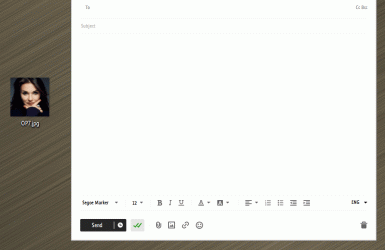
I installed it, then started an email, added an app, tried to open it, which brought up a menu to see the image, , which opened in a editor; no change.

Yesterday, I saw something abut being able to keep MS Photos from starting during a restart, which sounded promising. As I had deleted MS Photos, I downloaded and ran the installer. I was not at al l pleased by what happened when I clicked on the installer, which ran, and then told me to install two more programs, names forgotten ( I am good at that.}
OMG!! How much more messy can this get.

I installed it, then started an email, added an app,
WTF???? What "app"?????

Hang on! Why am I starting to think about a mythical Scandinavian being of Nordic folklore origins ..... ??
 

My Computers

System One System Two

  • OS
    Windows 11 2xH2 (latest update ... forever anal)
    Computer type
    PC/Desktop
    Manufacturer/Model
    HP Slim S01
    CPU
    Intel i5-12400
    Memory
    8GB
    Graphics Card(s)
    NVIDIA GeForce GT730
    Sound Card
    OOBE
    Monitor(s) Displays
    Acer 32"
    Screen Resolution
    1920x1080
    Hard Drives
    512GB KIOXIA NVMe
    1TB SATA SSD
    PSU
    OOBE
    Case
    OOBE
    Cooling
    OOBE
    Keyboard
    BT
    Mouse
    BT
    Browser
    Brave FFox Chrome Opera
    Antivirus
    KIS
  • Operating System
    Windows 11 Pro 2xH2 (latest update ... 4ever anal)
    Computer type
    Laptop
    Manufacturer/Model
    HP Pavillion 15
    CPU
    i7-1165G7 @ 2.80GHz
    Graphics card(s)
    Intel Iris Xe Graphics
    Hard Drives
    Samsung NVMe 512GB
    + numerous/multiple SSD Type C USB enclosures
    Internet Speed
    NBN FTTN 50
    Browser
    Brave
    Antivirus
    KIS
If you don't want to try what I pointed you at (turn off single click), then I am done here.
 

My Computers

System One System Two

  • OS
    W10
    Computer type
    PC/Desktop
    Manufacturer/Model
    Home brew
    CPU
    Ryzen3-2200G
    Motherboard
    GA-A320M-S2H
    Memory
    16 GB Kingston HyperX DDR4
    Graphics Card(s)
    Integrated
    Sound Card
    Integrated
    Monitor(s) Displays
    LG W2246
    Screen Resolution
    1920x1080
    Hard Drives
    Intel 760p 256GB NVMe M.2
    Seagate Barracuda 7200 1TB
    Gash Seagate ST31608
    PSU
    2006-vintage no-name
    Case
    Acer Aspire 2006
    Cooling
    Air (fan-assist)
    Keyboard
    HP SK-2885
    Mouse
    wireless
    Internet Speed
    32 mbps
    Browser
    FF latest
    Antivirus
    MS Defender
  • Operating System
    W10
    Computer type
    Laptop
    Manufacturer/Model
    HP 255 G8
    CPU
    Ryzen 5 3500U
    Memory
    8 GB
    Graphics card(s)
    on-board
    Monitor(s) Displays
    16"
    Screen Resolution
    1920x1080
    Hard Drives
    Samsung SSD 512GB Nvme
    Browser
    FF + Edge
    Antivirus
    MS Defender
Hang on! Why am I starting to think about a mythical Scandinavian being of Nordic folklore origins ..... ??
You may be right, but I hope not - what a waste of time that would be.
 

My Computers

System One System Two

  • OS
    W10
    Computer type
    PC/Desktop
    Manufacturer/Model
    Home brew
    CPU
    Ryzen3-2200G
    Motherboard
    GA-A320M-S2H
    Memory
    16 GB Kingston HyperX DDR4
    Graphics Card(s)
    Integrated
    Sound Card
    Integrated
    Monitor(s) Displays
    LG W2246
    Screen Resolution
    1920x1080
    Hard Drives
    Intel 760p 256GB NVMe M.2
    Seagate Barracuda 7200 1TB
    Gash Seagate ST31608
    PSU
    2006-vintage no-name
    Case
    Acer Aspire 2006
    Cooling
    Air (fan-assist)
    Keyboard
    HP SK-2885
    Mouse
    wireless
    Internet Speed
    32 mbps
    Browser
    FF latest
    Antivirus
    MS Defender
  • Operating System
    W10
    Computer type
    Laptop
    Manufacturer/Model
    HP 255 G8
    CPU
    Ryzen 5 3500U
    Memory
    8 GB
    Graphics card(s)
    on-board
    Monitor(s) Displays
    16"
    Screen Resolution
    1920x1080
    Hard Drives
    Samsung SSD 512GB Nvme
    Browser
    FF + Edge
    Antivirus
    MS Defender
I have always been able to open .jpeg files without anything except the file itself.
That has NEVER been the case, an image like every file is just data thats interpreted using some sort of handler /application in order to give the designed results.
 

My Computers

System One System Two

  • OS
    Windows 11 Enterprise 25H2 26200 7462
    Computer type
    PC/Desktop
    Manufacturer/Model
    Custom Build
    CPU
    Intel XEON E5-2699 v3
    Motherboard
    ASUS X99-A
    Memory
    64GB Teamgroup UD4-3600
    Graphics Card(s)
    NVIDIA GeForce GTX 1080 Ti
    Sound Card
    Integrated
    Monitor(s) Displays
    ACER X34 Predator
    Screen Resolution
    3440 x 1440
    Hard Drives
    Crucial CT1000P 3P SSD8 1TB
    Crucial CT1000 BX500 SSD 1TB
    PSU
    GameMax Pro
    Case
    Fractal Design
    Cooling
    Corsair H110iGT + 6 140mm Fans
    Keyboard
    Corsair K4
    Mouse
    G-Skill G502
    Internet Speed
    300MBs
    Browser
    Chrome
    Antivirus
    OEM
    Other Info
    ASUS RT-AC87U Router
  • Operating System
    25H2 26200.5074
    Computer type
    Laptop
    Manufacturer/Model
    ASUS X555LA
    Memory
    8GB
    Browser
    Chrome
    Antivirus
    OEM
That has NEVER been the case, an image like every file is just data thats interpreted using some sort of handler /application in order to give the designed results.
I can only suppose that he/she has used the preview pane of explorer? That is nearly 'not anything'.
 

My Computers

System One System Two

  • OS
    W10
    Computer type
    PC/Desktop
    Manufacturer/Model
    Home brew
    CPU
    Ryzen3-2200G
    Motherboard
    GA-A320M-S2H
    Memory
    16 GB Kingston HyperX DDR4
    Graphics Card(s)
    Integrated
    Sound Card
    Integrated
    Monitor(s) Displays
    LG W2246
    Screen Resolution
    1920x1080
    Hard Drives
    Intel 760p 256GB NVMe M.2
    Seagate Barracuda 7200 1TB
    Gash Seagate ST31608
    PSU
    2006-vintage no-name
    Case
    Acer Aspire 2006
    Cooling
    Air (fan-assist)
    Keyboard
    HP SK-2885
    Mouse
    wireless
    Internet Speed
    32 mbps
    Browser
    FF latest
    Antivirus
    MS Defender
  • Operating System
    W10
    Computer type
    Laptop
    Manufacturer/Model
    HP 255 G8
    CPU
    Ryzen 5 3500U
    Memory
    8 GB
    Graphics card(s)
    on-board
    Monitor(s) Displays
    16"
    Screen Resolution
    1920x1080
    Hard Drives
    Samsung SSD 512GB Nvme
    Browser
    FF + Edge
    Antivirus
    MS Defender
There seems to be an enormous amount of confusion here between an Image Editor, an Image Viewer and an Open Dialog for attaching a file to an email!!! 🤷‍♂️
 

My Computers

System One System Two

  • OS
    Windows 11 Pro
    Computer type
    PC/Desktop
    Manufacturer/Model
    ASUS ROG Strix
  • Operating System
    Windows 11 Pro
    Computer type
    Laptop
    Manufacturer/Model
    ASUS VivoBook
If you don't want to try what I pointed you at (turn off single click), then I am done here.
I I would not blame you, and for that matter I blame myself, as apparently I failed to state in this thread that I had tuned single click off. I thought I had written that that change made no difference.

This whole matter is taking much longer than I expected. When I looked at the settings or whatever they are called, I saw a greyed out button to prevent the app from staring when the computer was restarted. Much too hastily, instead of asking, I deleted it in the wrong feeling that would solve the problem.

It is not that I don't have anything else to do; one computer chore which I have been ignoring is to use three sets of on-line instructions to fix fix File Explorer so that I can then deal with the actual problem, so to speak, which I will have to return to the thread to be reminded of what that problem is.

Another problem which happily in a sense has nothing to do with computing is to finish weed whacking the incredible weeds and grass this year so that I can start splitting this season's fire place logs.
 

My Computer

System One

  • OS
    Windows 11 PRO 25H2 (OS Build 26200.6725)
    Computer type
    PC/Desktop
    Manufacturer/Model
    Dell XPS 8960
    CPU
    Intel Core i7-13700 2.10GHz
    Motherboard
    Dell
    Memory
    32 GB
    Graphics Card(s)
    NVidia GetForce RTX 4060 Ti
    Sound Card
    Realtec
    Monitor(s) Displays
    Dell U2722D
    Screen Resolution
    2560 x 1440
    Hard Drives
    1024GB SSD boot drive; 2TB Internal Mechanical Hard Disc; WD My Passport (1Tb) external; My Passport Ultra (2Tb) external
    Keyboard
    Dell
    Mouse
    MX Master 3
    Internet Speed
    40Mbps (Bonded DSL)
    Browser
    Firefox (default)
    Antivirus
    Malwarebytes, MS Defender AV
There seems to be an enormous amount of confusion here between an Image Editor, an Image Viewer and an Open Dialog for attaching a file to an email!!!

Yes, I am certainly confused, period. I know only one thing, and that is that when I add a .jpeg as an attachment to email, it opens in what I believe to be a photo editor. It occurred to me that I need to send myself an attachment and make a /peg of it so that the problem cam be seen. I would be surprised if Snagit would not take an image of that, which I can give a name and post here. I'll do that when I feel up to it; for now,, I shall see if I can finish today's LA Times Sunday crossword puzzle
 

My Computer

System One

  • OS
    Windows 11 PRO 25H2 (OS Build 26200.6725)
    Computer type
    PC/Desktop
    Manufacturer/Model
    Dell XPS 8960
    CPU
    Intel Core i7-13700 2.10GHz
    Motherboard
    Dell
    Memory
    32 GB
    Graphics Card(s)
    NVidia GetForce RTX 4060 Ti
    Sound Card
    Realtec
    Monitor(s) Displays
    Dell U2722D
    Screen Resolution
    2560 x 1440
    Hard Drives
    1024GB SSD boot drive; 2TB Internal Mechanical Hard Disc; WD My Passport (1Tb) external; My Passport Ultra (2Tb) external
    Keyboard
    Dell
    Mouse
    MX Master 3
    Internet Speed
    40Mbps (Bonded DSL)
    Browser
    Firefox (default)
    Antivirus
    Malwarebytes, MS Defender AV
... when I add a .jpeg as an attachment to email, it opens in what I believe to be a photo editor.
I don't get it!!! 🤷‍♂️

Just drag-n-drop into a Compose window..., Send..., done!!!

10451.gif
 

My Computers

System One System Two

  • OS
    Windows 11 Pro
    Computer type
    PC/Desktop
    Manufacturer/Model
    ASUS ROG Strix
  • Operating System
    Windows 11 Pro
    Computer type
    Laptop
    Manufacturer/Model
    ASUS VivoBook
Did you also do the part to set default app for pictures to photo viewer?
If I was told to do that, it got by me. Just to be sure, how will the viewer's name be shown in the default setting module? I do not believe that I have ever set anything in that module, I have simply added the desired attachments to email messages using whatever the computer was set to do the adding. To me, even "photo viewer" is foreign.

I have written an illustrated book, a thoroughly illustrated training manual, and a history with several illustrations. For those items I doubt that I ever change anything having to deal with images The composition was anything but easy, but did not have any known connection to what the wonderful thread contributors are telling me.

I can only hope that this makes it clear why I don't have any understanding of, nor use of, he various items I am told to deal with. As I have stated, I have only a very limited knowledge limited of the inner operations, such as what happens when I add an attachment to an email, it just happens.
 

My Computer

System One

  • OS
    Windows 11 PRO 25H2 (OS Build 26200.6725)
    Computer type
    PC/Desktop
    Manufacturer/Model
    Dell XPS 8960
    CPU
    Intel Core i7-13700 2.10GHz
    Motherboard
    Dell
    Memory
    32 GB
    Graphics Card(s)
    NVidia GetForce RTX 4060 Ti
    Sound Card
    Realtec
    Monitor(s) Displays
    Dell U2722D
    Screen Resolution
    2560 x 1440
    Hard Drives
    1024GB SSD boot drive; 2TB Internal Mechanical Hard Disc; WD My Passport (1Tb) external; My Passport Ultra (2Tb) external
    Keyboard
    Dell
    Mouse
    MX Master 3
    Internet Speed
    40Mbps (Bonded DSL)
    Browser
    Firefox (default)
    Antivirus
    Malwarebytes, MS Defender AV
@Not Myself
You're gonna have to film a screen recording illustrating explicitly the anomalies you're facing and upload it to YouTube, or sumpthin, cuz I'm officially lost!!! 🤷‍♂️
 

My Computers

System One System Two

  • OS
    Windows 11 Pro
    Computer type
    PC/Desktop
    Manufacturer/Model
    ASUS ROG Strix
  • Operating System
    Windows 11 Pro
    Computer type
    Laptop
    Manufacturer/Model
    ASUS VivoBook
If I was told to do that, it got by me. Just to be sure, how will the viewer's name be shown in the default setting module?
Settings > Apps > Default apps

You can type the following in the run box to go directly there.

ms-settings:defaultapps
 

My Computer

System One

  • OS
    Windows 11 Pro
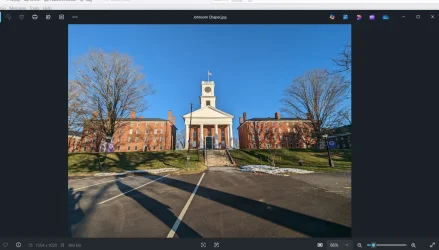
I am attaching a photo of Johnson Chapel at Amherst College, Amherst, Massachusetts, 1827, a short time before I matriculated there. The chapel is between two buildings which were the first dormitories, now serving other uses. The on-line photo does not, of course, have the black surroundings on the image I am uploading. The college itself dates from 1821, and has been rated at either number one or number two among liberal arts schools in the annual listing by US News & World report.

I clicked on "Save As" on the photo, which created the image I am posting.

Johnson Chapel.webp
 

My Computer

System One

  • OS
    Windows 11 PRO 25H2 (OS Build 26200.6725)
    Computer type
    PC/Desktop
    Manufacturer/Model
    Dell XPS 8960
    CPU
    Intel Core i7-13700 2.10GHz
    Motherboard
    Dell
    Memory
    32 GB
    Graphics Card(s)
    NVidia GetForce RTX 4060 Ti
    Sound Card
    Realtec
    Monitor(s) Displays
    Dell U2722D
    Screen Resolution
    2560 x 1440
    Hard Drives
    1024GB SSD boot drive; 2TB Internal Mechanical Hard Disc; WD My Passport (1Tb) external; My Passport Ultra (2Tb) external
    Keyboard
    Dell
    Mouse
    MX Master 3
    Internet Speed
    40Mbps (Bonded DSL)
    Browser
    Firefox (default)
    Antivirus
    Malwarebytes, MS Defender AV
I clicked on "Save As" on the photo, which created the image I am posting.
Looks as though the Photos App is acting as your Preview Handler, there should be a button to Save, perhaps in the 3 dots menu.
 

My Computers

System One System Two

  • OS
    Windows 11 Pro
    Computer type
    PC/Desktop
    Manufacturer/Model
    ASUS ROG Strix
  • Operating System
    Windows 11 Pro
    Computer type
    Laptop
    Manufacturer/Model
    ASUS VivoBook
Mea maxima culpa!

It has been stated at least once in this thread that the poster had never sent an attachment inside a photo editor. I, however, had never determined that my attachments which, in the past, did not appear that way when I opened them before sending the email; my sent attachments might work that way.It has, after entirely too long and entirely too many posting by me has finally been determined to be correct.

It suddenly and belatedly occurred to me that i have an easy way to test the statement: I created an email with an attachment that opened in an editor on my computer, but which was sent to my wife;s computer did NOT appear in an editor.

For reasons unknown to me as yet, the two attachments appeared, not as attachments but as open text on the monitor. My first test, with one attachment, did that, so before I created and sent the two-attachment email, I did a quick search about this; the information did not speak to this, so I sent the second test to see what would happen.

I shall ask on the Thunderbird forum on mozillaZine, where there are Tb experts.
 

My Computer

System One

  • OS
    Windows 11 PRO 25H2 (OS Build 26200.6725)
    Computer type
    PC/Desktop
    Manufacturer/Model
    Dell XPS 8960
    CPU
    Intel Core i7-13700 2.10GHz
    Motherboard
    Dell
    Memory
    32 GB
    Graphics Card(s)
    NVidia GetForce RTX 4060 Ti
    Sound Card
    Realtec
    Monitor(s) Displays
    Dell U2722D
    Screen Resolution
    2560 x 1440
    Hard Drives
    1024GB SSD boot drive; 2TB Internal Mechanical Hard Disc; WD My Passport (1Tb) external; My Passport Ultra (2Tb) external
    Keyboard
    Dell
    Mouse
    MX Master 3
    Internet Speed
    40Mbps (Bonded DSL)
    Browser
    Firefox (default)
    Antivirus
    Malwarebytes, MS Defender AV
I shall ask on the Thunderbird forum on mozillaZine, where there are Tb experts.
When you do, you are going to have to be much more precise in the words and sentence structure that you use. Most (all?) of us here have trouble understanding what is actually happening. For example, you wrote above "It has, after entirely too long and entirely too many posting by me has finally been determined to be correct.". In that sentence, what is the 'it'? I can not see a clearly defined 'it' in the preceding sentence. Martin, trying to be helpful.
 

My Computers

System One System Two

  • OS
    W10
    Computer type
    PC/Desktop
    Manufacturer/Model
    Home brew
    CPU
    Ryzen3-2200G
    Motherboard
    GA-A320M-S2H
    Memory
    16 GB Kingston HyperX DDR4
    Graphics Card(s)
    Integrated
    Sound Card
    Integrated
    Monitor(s) Displays
    LG W2246
    Screen Resolution
    1920x1080
    Hard Drives
    Intel 760p 256GB NVMe M.2
    Seagate Barracuda 7200 1TB
    Gash Seagate ST31608
    PSU
    2006-vintage no-name
    Case
    Acer Aspire 2006
    Cooling
    Air (fan-assist)
    Keyboard
    HP SK-2885
    Mouse
    wireless
    Internet Speed
    32 mbps
    Browser
    FF latest
    Antivirus
    MS Defender
  • Operating System
    W10
    Computer type
    Laptop
    Manufacturer/Model
    HP 255 G8
    CPU
    Ryzen 5 3500U
    Memory
    8 GB
    Graphics card(s)
    on-board
    Monitor(s) Displays
    16"
    Screen Resolution
    1920x1080
    Hard Drives
    Samsung SSD 512GB Nvme
    Browser
    FF + Edge
    Antivirus
    MS Defender
Back
Top Bottom