
Solved Playing Computer Music Files Through Stereo Receiver


I'm also wondering if I disconnect the entire DAC from the back of my PC, if I could then get an adapter for my HDMI cable to a USB cable and then connect that USB cable into the back of my PC in place of the USB cable that's presently going from my DAC into the back of my PC.

DAC.red.circle.webp
 

My Computer My Computer

At a glance

Windows 11Hexa-Core i5-8600T processor 3.2GHz32GB of DDR4 RAMintegrated Intel HD 630 coprocessor
OS
Windows 11
Computer type
PC/Desktop
Manufacturer/Model
Dell OptiPlex 7060
CPU
Hexa-Core i5-8600T processor 3.2GHz
Motherboard
Dell Inc. 0DWPVW A00
Memory
32GB of DDR4 RAM
Graphics Card(s)
integrated Intel HD 630 coprocessor
Monitor(s) Displays
Intel(R) UHD Graphics 630 [Display adapter] DELL S2230MX [Monitor] (21.7"vis, s/n XX-05GX1Y-XXXXX-23J-08WM, March 2012)
Antivirus
Windows Defender Version 4.18.24090.11 Malwarebytes Anti-Malware Version 5.2.4.157
So, it sounds like I need to disconnect my Altec Lansing speakers and find a way to only connect my Denon to the DAC without having the front R/L RCA cord connected.
Maybe..., play around with it..., you'll get it! :wink:
 

My Computers My Computers

  • At a glance

    Windows 11 Pro
    OS
    Windows 11 Pro
    Computer type
    PC/Desktop
    Manufacturer/Model
    ASUS ROG Strix
  • At a glance

    Windows 11 Pro
    Operating System
    Windows 11 Pro
    Computer type
    Laptop
    Manufacturer/Model
    ASUS VivoBook
  • ASUS VivoBook 'Lite' ~ Windows 11 Home
On both of my DAC's having headphones plugged in the front disables the sound from all the outputs on the back.
 

My Computers My Computers

  • At a glance

    Windows 11 Pro 25H2Intel Core i9 13900KCorsair Dominator Platinum 64gb 5600MT/s DDR5...Sapphire NITRO+ AMD Radeon RX 7900 XTX Vapor-...
    OS
    Windows 11 Pro 25H2
    Computer type
    PC/Desktop
    Manufacturer/Model
    Homebuilt
    CPU
    Intel Core i9 13900K
    Motherboard
    Asus ProArt Z790 Creator WiFi - Bios 3107
    Memory
    Corsair Dominator Platinum 64gb 5600MT/s DDR5 Dual Channel
    Graphics Card(s)
    Sapphire NITRO+ AMD Radeon RX 7900 XTX Vapor-X 24GB
    Sound Card
    External DAC: Cambridge Audio DACMagic200M - Headphone Amp: Topping L50
    Monitor(s) Displays
    Panasonic MX950 Mini LED 55" TV 120hz
    Screen Resolution
    3840 x 2160 120hz
    Hard Drives
    Samsung 980 Pro 2TB (OS)
    Samsung 980 Pro 1TB (Files)
    Lexar NZ790 4TB
    LaCie d2 Professional 6TB external - USB 3.1
    Seagate Expansion 16TB external - USB 3.2
    Seagate One Touch 18TB external HD - USB 3.0
    PSU
    Corsair RM1200x Shift
    Case
    Corsair RGB Smart Case 5000x (white)
    Cooling
    Corsair iCue H150i Elite Capellix XT
    Keyboard
    Incase Ergonomic USB (Microsoft clone)
    Mouse
    Logitech MX Master 3S
    Internet Speed
    Fibre 900/500 Mbps
    Browser
    Microsoft Edge Chromium
    Antivirus
    Bitdefender Total Security
    Other Info
    AMD Radeon Software & Drivers 26.1.1
    Hasleo Backup Suite
    Dashlane password manager
    Kensington Verimark fingerprint reader
    Logitech Brio 4K webcam
    Orico 10-port powered USB 3.0 hub
  • At a glance

    Windows 11 Pro 25H2Intel® Core™ i9-13900H32GB DDR4-3200 Dual channel*Intel Iris Xᵉ Graphics G7
    Operating System
    Windows 11 Pro 25H2
    Computer type
    Laptop
    Manufacturer/Model
    Asus Vivobook X1605VA
    CPU
    Intel® Core™ i9-13900H
    Motherboard
    Asus X1605VA bios 309
    Memory
    32GB DDR4-3200 Dual channel
    Graphics card(s)
    *Intel Iris Xᵉ Graphics G7
    Sound Card
    Realtek | Intel SST Bluetooth & USB
    Monitor(s) Displays
    16.0-inch, WUXGA 16:10 aspect ratio, IPS-level Panel
    Screen Resolution
    1920 x 1200 60hz
    Hard Drives
    512GB M.2 NVMe™ PCIe® 3.0 SSD
    Mouse
    Logitech MX Ergo Trackball
    Antivirus
    Bitdefender Total Security
    Other Info
    720p Webcam
    WiFi & USB to ethernet
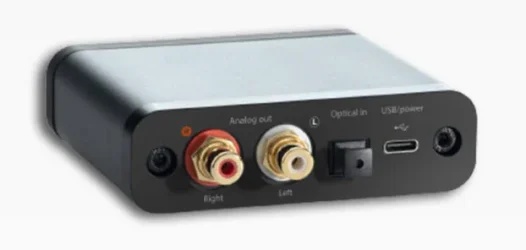
Fwiw,
This is the rear connections on the AudioengineD1.

audioengined1 rear.webp
 

My Computers My Computers

  • At a glance

    Windows 11 Pro 25H2Intel Core i9 13900KCorsair Dominator Platinum 64gb 5600MT/s DDR5...Sapphire NITRO+ AMD Radeon RX 7900 XTX Vapor-...
    OS
    Windows 11 Pro 25H2
    Computer type
    PC/Desktop
    Manufacturer/Model
    Homebuilt
    CPU
    Intel Core i9 13900K
    Motherboard
    Asus ProArt Z790 Creator WiFi - Bios 3107
    Memory
    Corsair Dominator Platinum 64gb 5600MT/s DDR5 Dual Channel
    Graphics Card(s)
    Sapphire NITRO+ AMD Radeon RX 7900 XTX Vapor-X 24GB
    Sound Card
    External DAC: Cambridge Audio DACMagic200M - Headphone Amp: Topping L50
    Monitor(s) Displays
    Panasonic MX950 Mini LED 55" TV 120hz
    Screen Resolution
    3840 x 2160 120hz
    Hard Drives
    Samsung 980 Pro 2TB (OS)
    Samsung 980 Pro 1TB (Files)
    Lexar NZ790 4TB
    LaCie d2 Professional 6TB external - USB 3.1
    Seagate Expansion 16TB external - USB 3.2
    Seagate One Touch 18TB external HD - USB 3.0
    PSU
    Corsair RM1200x Shift
    Case
    Corsair RGB Smart Case 5000x (white)
    Cooling
    Corsair iCue H150i Elite Capellix XT
    Keyboard
    Incase Ergonomic USB (Microsoft clone)
    Mouse
    Logitech MX Master 3S
    Internet Speed
    Fibre 900/500 Mbps
    Browser
    Microsoft Edge Chromium
    Antivirus
    Bitdefender Total Security
    Other Info
    AMD Radeon Software & Drivers 26.1.1
    Hasleo Backup Suite
    Dashlane password manager
    Kensington Verimark fingerprint reader
    Logitech Brio 4K webcam
    Orico 10-port powered USB 3.0 hub
  • At a glance

    Windows 11 Pro 25H2Intel® Core™ i9-13900H32GB DDR4-3200 Dual channel*Intel Iris Xᵉ Graphics G7
    Operating System
    Windows 11 Pro 25H2
    Computer type
    Laptop
    Manufacturer/Model
    Asus Vivobook X1605VA
    CPU
    Intel® Core™ i9-13900H
    Motherboard
    Asus X1605VA bios 309
    Memory
    32GB DDR4-3200 Dual channel
    Graphics card(s)
    *Intel Iris Xᵉ Graphics G7
    Sound Card
    Realtek | Intel SST Bluetooth & USB
    Monitor(s) Displays
    16.0-inch, WUXGA 16:10 aspect ratio, IPS-level Panel
    Screen Resolution
    1920 x 1200 60hz
    Hard Drives
    512GB M.2 NVMe™ PCIe® 3.0 SSD
    Mouse
    Logitech MX Ergo Trackball
    Antivirus
    Bitdefender Total Security
    Other Info
    720p Webcam
    WiFi & USB to ethernet
On both of my DAC's having headphones plugged in the front disables the sound from all the outputs on the back.
So, is a DAC required to produced audio from Windows 11 computers to audio devices?
 

My Computer My Computer

At a glance

Windows 11Hexa-Core i5-8600T processor 3.2GHz32GB of DDR4 RAMintegrated Intel HD 630 coprocessor
OS
Windows 11
Computer type
PC/Desktop
Manufacturer/Model
Dell OptiPlex 7060
CPU
Hexa-Core i5-8600T processor 3.2GHz
Motherboard
Dell Inc. 0DWPVW A00
Memory
32GB of DDR4 RAM
Graphics Card(s)
integrated Intel HD 630 coprocessor
Monitor(s) Displays
Intel(R) UHD Graphics 630 [Display adapter] DELL S2230MX [Monitor] (21.7"vis, s/n XX-05GX1Y-XXXXX-23J-08WM, March 2012)
Antivirus
Windows Defender Version 4.18.24090.11 Malwarebytes Anti-Malware Version 5.2.4.157
So, is a DAC required to produced audio from Windows 11 computers to audio devices?
Not always. With my system I could run an HDMI cable from the PC straight to the AVR to get audio (which I'm not) and not use a DAC.
 

My Computers My Computers

  • At a glance

    Windows 11 Pro 25H2Intel Core i9 13900KCorsair Dominator Platinum 64gb 5600MT/s DDR5...Sapphire NITRO+ AMD Radeon RX 7900 XTX Vapor-...
    OS
    Windows 11 Pro 25H2
    Computer type
    PC/Desktop
    Manufacturer/Model
    Homebuilt
    CPU
    Intel Core i9 13900K
    Motherboard
    Asus ProArt Z790 Creator WiFi - Bios 3107
    Memory
    Corsair Dominator Platinum 64gb 5600MT/s DDR5 Dual Channel
    Graphics Card(s)
    Sapphire NITRO+ AMD Radeon RX 7900 XTX Vapor-X 24GB
    Sound Card
    External DAC: Cambridge Audio DACMagic200M - Headphone Amp: Topping L50
    Monitor(s) Displays
    Panasonic MX950 Mini LED 55" TV 120hz
    Screen Resolution
    3840 x 2160 120hz
    Hard Drives
    Samsung 980 Pro 2TB (OS)
    Samsung 980 Pro 1TB (Files)
    Lexar NZ790 4TB
    LaCie d2 Professional 6TB external - USB 3.1
    Seagate Expansion 16TB external - USB 3.2
    Seagate One Touch 18TB external HD - USB 3.0
    PSU
    Corsair RM1200x Shift
    Case
    Corsair RGB Smart Case 5000x (white)
    Cooling
    Corsair iCue H150i Elite Capellix XT
    Keyboard
    Incase Ergonomic USB (Microsoft clone)
    Mouse
    Logitech MX Master 3S
    Internet Speed
    Fibre 900/500 Mbps
    Browser
    Microsoft Edge Chromium
    Antivirus
    Bitdefender Total Security
    Other Info
    AMD Radeon Software & Drivers 26.1.1
    Hasleo Backup Suite
    Dashlane password manager
    Kensington Verimark fingerprint reader
    Logitech Brio 4K webcam
    Orico 10-port powered USB 3.0 hub
  • At a glance

    Windows 11 Pro 25H2Intel® Core™ i9-13900H32GB DDR4-3200 Dual channel*Intel Iris Xᵉ Graphics G7
    Operating System
    Windows 11 Pro 25H2
    Computer type
    Laptop
    Manufacturer/Model
    Asus Vivobook X1605VA
    CPU
    Intel® Core™ i9-13900H
    Motherboard
    Asus X1605VA bios 309
    Memory
    32GB DDR4-3200 Dual channel
    Graphics card(s)
    *Intel Iris Xᵉ Graphics G7
    Sound Card
    Realtek | Intel SST Bluetooth & USB
    Monitor(s) Displays
    16.0-inch, WUXGA 16:10 aspect ratio, IPS-level Panel
    Screen Resolution
    1920 x 1200 60hz
    Hard Drives
    512GB M.2 NVMe™ PCIe® 3.0 SSD
    Mouse
    Logitech MX Ergo Trackball
    Antivirus
    Bitdefender Total Security
    Other Info
    720p Webcam
    WiFi & USB to ethernet
Mine looks like this...
Older model then..., no biggie!
I would just concentrate on making the DAC your primary output to the Denon, making sure your Sub and speakers are receiving a signal.
You could probably hook your Altec Lansing's via the headphone jack on the front of your Tower, but..., worry about that later.
 

My Computers My Computers

  • At a glance

    Windows 11 Pro
    OS
    Windows 11 Pro
    Computer type
    PC/Desktop
    Manufacturer/Model
    ASUS ROG Strix
  • At a glance

    Windows 11 Pro
    Operating System
    Windows 11 Pro
    Computer type
    Laptop
    Manufacturer/Model
    ASUS VivoBook
  • ASUS VivoBook 'Lite' ~ Windows 11 Home
Not always. With my system I could run an HDMI cable from the PC straight to the AVR to get audio (which I'm not) and not use a DAC.
That's how mine was with Windows 10. But now everything seems to be different with Windows 11 and a bit of a headache.
 

My Computer My Computer

At a glance

Windows 11Hexa-Core i5-8600T processor 3.2GHz32GB of DDR4 RAMintegrated Intel HD 630 coprocessor
OS
Windows 11
Computer type
PC/Desktop
Manufacturer/Model
Dell OptiPlex 7060
CPU
Hexa-Core i5-8600T processor 3.2GHz
Motherboard
Dell Inc. 0DWPVW A00
Memory
32GB of DDR4 RAM
Graphics Card(s)
integrated Intel HD 630 coprocessor
Monitor(s) Displays
Intel(R) UHD Graphics 630 [Display adapter] DELL S2230MX [Monitor] (21.7"vis, s/n XX-05GX1Y-XXXXX-23J-08WM, March 2012)
Antivirus
Windows Defender Version 4.18.24090.11 Malwarebytes Anti-Malware Version 5.2.4.157
Older model then..., no biggie!
I would just concentrate on making the DAC your primary output to the Denon, making sure your Sub and speakers are receiving a signal.
You could probably hook your Altec Lansing's via the headphone jack on the front of your Tower, but..., worry about that later.
That certainly makes sense.
 

My Computer My Computer

At a glance

Windows 11Hexa-Core i5-8600T processor 3.2GHz32GB of DDR4 RAMintegrated Intel HD 630 coprocessor
OS
Windows 11
Computer type
PC/Desktop
Manufacturer/Model
Dell OptiPlex 7060
CPU
Hexa-Core i5-8600T processor 3.2GHz
Motherboard
Dell Inc. 0DWPVW A00
Memory
32GB of DDR4 RAM
Graphics Card(s)
integrated Intel HD 630 coprocessor
Monitor(s) Displays
Intel(R) UHD Graphics 630 [Display adapter] DELL S2230MX [Monitor] (21.7"vis, s/n XX-05GX1Y-XXXXX-23J-08WM, March 2012)
Antivirus
Windows Defender Version 4.18.24090.11 Malwarebytes Anti-Malware Version 5.2.4.157
Does anyone know of a good, updated DAC that I could connect an HDMI cord via a USB adapter to the back of my Denon?
 

My Computer My Computer

At a glance

Windows 11Hexa-Core i5-8600T processor 3.2GHz32GB of DDR4 RAMintegrated Intel HD 630 coprocessor
OS
Windows 11
Computer type
PC/Desktop
Manufacturer/Model
Dell OptiPlex 7060
CPU
Hexa-Core i5-8600T processor 3.2GHz
Motherboard
Dell Inc. 0DWPVW A00
Memory
32GB of DDR4 RAM
Graphics Card(s)
integrated Intel HD 630 coprocessor
Monitor(s) Displays
Intel(R) UHD Graphics 630 [Display adapter] DELL S2230MX [Monitor] (21.7"vis, s/n XX-05GX1Y-XXXXX-23J-08WM, March 2012)
Antivirus
Windows Defender Version 4.18.24090.11 Malwarebytes Anti-Malware Version 5.2.4.157

My Computer My Computer

At a glance

Windows 11Hexa-Core i5-8600T processor 3.2GHz32GB of DDR4 RAMintegrated Intel HD 630 coprocessor
OS
Windows 11
Computer type
PC/Desktop
Manufacturer/Model
Dell OptiPlex 7060
CPU
Hexa-Core i5-8600T processor 3.2GHz
Motherboard
Dell Inc. 0DWPVW A00
Memory
32GB of DDR4 RAM
Graphics Card(s)
integrated Intel HD 630 coprocessor
Monitor(s) Displays
Intel(R) UHD Graphics 630 [Display adapter] DELL S2230MX [Monitor] (21.7"vis, s/n XX-05GX1Y-XXXXX-23J-08WM, March 2012)
Antivirus
Windows Defender Version 4.18.24090.11 Malwarebytes Anti-Malware Version 5.2.4.157
I'm with @Edwin here. It is easier to figure out trying just one connection at a time. Keep it simple as possible.
 

My Computers My Computers

  • At a glance

    Windows 11 Pro 25H2Intel Core i9 13900KCorsair Dominator Platinum 64gb 5600MT/s DDR5...Sapphire NITRO+ AMD Radeon RX 7900 XTX Vapor-...
    OS
    Windows 11 Pro 25H2
    Computer type
    PC/Desktop
    Manufacturer/Model
    Homebuilt
    CPU
    Intel Core i9 13900K
    Motherboard
    Asus ProArt Z790 Creator WiFi - Bios 3107
    Memory
    Corsair Dominator Platinum 64gb 5600MT/s DDR5 Dual Channel
    Graphics Card(s)
    Sapphire NITRO+ AMD Radeon RX 7900 XTX Vapor-X 24GB
    Sound Card
    External DAC: Cambridge Audio DACMagic200M - Headphone Amp: Topping L50
    Monitor(s) Displays
    Panasonic MX950 Mini LED 55" TV 120hz
    Screen Resolution
    3840 x 2160 120hz
    Hard Drives
    Samsung 980 Pro 2TB (OS)
    Samsung 980 Pro 1TB (Files)
    Lexar NZ790 4TB
    LaCie d2 Professional 6TB external - USB 3.1
    Seagate Expansion 16TB external - USB 3.2
    Seagate One Touch 18TB external HD - USB 3.0
    PSU
    Corsair RM1200x Shift
    Case
    Corsair RGB Smart Case 5000x (white)
    Cooling
    Corsair iCue H150i Elite Capellix XT
    Keyboard
    Incase Ergonomic USB (Microsoft clone)
    Mouse
    Logitech MX Master 3S
    Internet Speed
    Fibre 900/500 Mbps
    Browser
    Microsoft Edge Chromium
    Antivirus
    Bitdefender Total Security
    Other Info
    AMD Radeon Software & Drivers 26.1.1
    Hasleo Backup Suite
    Dashlane password manager
    Kensington Verimark fingerprint reader
    Logitech Brio 4K webcam
    Orico 10-port powered USB 3.0 hub
  • At a glance

    Windows 11 Pro 25H2Intel® Core™ i9-13900H32GB DDR4-3200 Dual channel*Intel Iris Xᵉ Graphics G7
    Operating System
    Windows 11 Pro 25H2
    Computer type
    Laptop
    Manufacturer/Model
    Asus Vivobook X1605VA
    CPU
    Intel® Core™ i9-13900H
    Motherboard
    Asus X1605VA bios 309
    Memory
    32GB DDR4-3200 Dual channel
    Graphics card(s)
    *Intel Iris Xᵉ Graphics G7
    Sound Card
    Realtek | Intel SST Bluetooth & USB
    Monitor(s) Displays
    16.0-inch, WUXGA 16:10 aspect ratio, IPS-level Panel
    Screen Resolution
    1920 x 1200 60hz
    Hard Drives
    512GB M.2 NVMe™ PCIe® 3.0 SSD
    Mouse
    Logitech MX Ergo Trackball
    Antivirus
    Bitdefender Total Security
    Other Info
    720p Webcam
    WiFi & USB to ethernet
That's how mine was with Windows 10. But now everything seems to be different with Windows 11 and a bit of a headache.
Or perhaps some of the adapters that I used would have worked if I didn't have the DAC hooked up to it. Also, someone said that a Windows 11 computer could take an unlimited amount of audio devices.
 

My Computer My Computer

At a glance

Windows 11Hexa-Core i5-8600T processor 3.2GHz32GB of DDR4 RAMintegrated Intel HD 630 coprocessor
OS
Windows 11
Computer type
PC/Desktop
Manufacturer/Model
Dell OptiPlex 7060
CPU
Hexa-Core i5-8600T processor 3.2GHz
Motherboard
Dell Inc. 0DWPVW A00
Memory
32GB of DDR4 RAM
Graphics Card(s)
integrated Intel HD 630 coprocessor
Monitor(s) Displays
Intel(R) UHD Graphics 630 [Display adapter] DELL S2230MX [Monitor] (21.7"vis, s/n XX-05GX1Y-XXXXX-23J-08WM, March 2012)
Antivirus
Windows Defender Version 4.18.24090.11 Malwarebytes Anti-Malware Version 5.2.4.157
Does anyone know of a good, updated DAC that I could connect an HDMI cord via a USB adapter to the back of my Denon?
Let's work with what you've got first...,
Step by step..., here we go...
#1..., when you open the Sound Applet, (mmsys.cpl in a Run box), does Windows recognize your Audioengine D1?
(Provided you still have it connected the way you did earlier)

9400.webp
 

My Computers My Computers

  • At a glance

    Windows 11 Pro
    OS
    Windows 11 Pro
    Computer type
    PC/Desktop
    Manufacturer/Model
    ASUS ROG Strix
  • At a glance

    Windows 11 Pro
    Operating System
    Windows 11 Pro
    Computer type
    Laptop
    Manufacturer/Model
    ASUS VivoBook
  • ASUS VivoBook 'Lite' ~ Windows 11 Home
I would just concentrate on making the DAC your primary output to the Denon, making sure your Sub and speakers are receiving a signal.
So, how exactly would I do that?
 

My Computer My Computer

At a glance

Windows 11Hexa-Core i5-8600T processor 3.2GHz32GB of DDR4 RAMintegrated Intel HD 630 coprocessor
OS
Windows 11
Computer type
PC/Desktop
Manufacturer/Model
Dell OptiPlex 7060
CPU
Hexa-Core i5-8600T processor 3.2GHz
Motherboard
Dell Inc. 0DWPVW A00
Memory
32GB of DDR4 RAM
Graphics Card(s)
integrated Intel HD 630 coprocessor
Monitor(s) Displays
Intel(R) UHD Graphics 630 [Display adapter] DELL S2230MX [Monitor] (21.7"vis, s/n XX-05GX1Y-XXXXX-23J-08WM, March 2012)
Antivirus
Windows Defender Version 4.18.24090.11 Malwarebytes Anti-Malware Version 5.2.4.157
Let's work with what you've got first...,
Step by step..., here we go...
#1..., when you open the Sound Applet, (mmsys.cpl in a Run box), does Windows recognize your Audioengine D1?
(Provided you still have it connected the way you did earlier)

View attachment 123362
Yes.
 

My Computer My Computer

At a glance

Windows 11Hexa-Core i5-8600T processor 3.2GHz32GB of DDR4 RAMintegrated Intel HD 630 coprocessor
OS
Windows 11
Computer type
PC/Desktop
Manufacturer/Model
Dell OptiPlex 7060
CPU
Hexa-Core i5-8600T processor 3.2GHz
Motherboard
Dell Inc. 0DWPVW A00
Memory
32GB of DDR4 RAM
Graphics Card(s)
integrated Intel HD 630 coprocessor
Monitor(s) Displays
Intel(R) UHD Graphics 630 [Display adapter] DELL S2230MX [Monitor] (21.7"vis, s/n XX-05GX1Y-XXXXX-23J-08WM, March 2012)
Antivirus
Windows Defender Version 4.18.24090.11 Malwarebytes Anti-Malware Version 5.2.4.157
Good! Make it the Default.
Next..., we need to know the last configuration you had set up with the DAC, where both your Sub and speakers worked properly through the Denon...
 

My Computers My Computers

  • At a glance

    Windows 11 Pro
    OS
    Windows 11 Pro
    Computer type
    PC/Desktop
    Manufacturer/Model
    ASUS ROG Strix
  • At a glance

    Windows 11 Pro
    Operating System
    Windows 11 Pro
    Computer type
    Laptop
    Manufacturer/Model
    ASUS VivoBook
  • ASUS VivoBook 'Lite' ~ Windows 11 Home
Good! Make it the Default.
Next..., we need to know the last configuration you had set up with the DAC, where both your Sub and speakers worked properly through the Denon...
How do I make it the Default? Also, I never had a set up with the DAC where both my sub and speakers worked through the Denon. In my Windows 10 computer, I simply had an HDMI cord running from the back of my computer into my Denon. The DAC was only used for my Altec Lansing computer speakers to enhance their sound.
 

My Computer My Computer

At a glance

Windows 11Hexa-Core i5-8600T processor 3.2GHz32GB of DDR4 RAMintegrated Intel HD 630 coprocessor
OS
Windows 11
Computer type
PC/Desktop
Manufacturer/Model
Dell OptiPlex 7060
CPU
Hexa-Core i5-8600T processor 3.2GHz
Motherboard
Dell Inc. 0DWPVW A00
Memory
32GB of DDR4 RAM
Graphics Card(s)
integrated Intel HD 630 coprocessor
Monitor(s) Displays
Intel(R) UHD Graphics 630 [Display adapter] DELL S2230MX [Monitor] (21.7"vis, s/n XX-05GX1Y-XXXXX-23J-08WM, March 2012)
Antivirus
Windows Defender Version 4.18.24090.11 Malwarebytes Anti-Malware Version 5.2.4.157

My Computers My Computers

  • At a glance

    Windows 11 Pro
    OS
    Windows 11 Pro
    Computer type
    PC/Desktop
    Manufacturer/Model
    ASUS ROG Strix
  • At a glance

    Windows 11 Pro
    Operating System
    Windows 11 Pro
    Computer type
    Laptop
    Manufacturer/Model
    ASUS VivoBook
  • ASUS VivoBook 'Lite' ~ Windows 11 Home
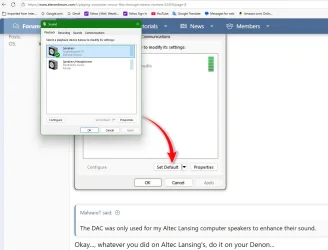
Click Set Default...

View attachment 123364


Okay..., whatever you did on Altec Lansing's, do it on your Denon...
Actually, I just noticed that it already says that it's the Default device. Also, for my Altec Lansing speakers, if I recall correctly (it's been years), it had a R/L speaker cord, and one of those cords was combined with the subwoofer cord. Therefore, on the back of my DAC, I only had to plug in the R/L RCA speaker cords. So, I wouldn't be able to include the subwoofer connect to my Denon with my DAC.

dac.default.webp
 

My Computer My Computer

At a glance

Windows 11Hexa-Core i5-8600T processor 3.2GHz32GB of DDR4 RAMintegrated Intel HD 630 coprocessor
OS
Windows 11
Computer type
PC/Desktop
Manufacturer/Model
Dell OptiPlex 7060
CPU
Hexa-Core i5-8600T processor 3.2GHz
Motherboard
Dell Inc. 0DWPVW A00
Memory
32GB of DDR4 RAM
Graphics Card(s)
integrated Intel HD 630 coprocessor
Monitor(s) Displays
Intel(R) UHD Graphics 630 [Display adapter] DELL S2230MX [Monitor] (21.7"vis, s/n XX-05GX1Y-XXXXX-23J-08WM, March 2012)
Antivirus
Windows Defender Version 4.18.24090.11 Malwarebytes Anti-Malware Version 5.2.4.157

Back
Top Bottom



