Poll on Backup software


Which imaging program do you use for backups?


  • Total voters
    433

My Computer

System One

  • OS
    windows 11 Pro
    Computer type
    Laptop
    Manufacturer/Model
    Dell XPS 15 9510
    CPU
    11th Gen Intel(R) Core(TM) i7-11800H @ 2.30GHz (16 CPUs
    Memory
    16 GB
    Graphics Card(s)
    NVIDIA GeForce RTX 3050 Ti
    Hard Drives
    512GB Solid State Drive
    Browser
    Firefox
arsed
 

My Computers

System One System Two

  • OS
    Windows 11 Pro 25H2 26200.8524
    Computer type
    Laptop
    Manufacturer/Model
    Acemagic LX15PRO
    CPU
    AMD Ryzen 7 5825U with Radeon Graphics
    Memory
    16GB
    Screen Resolution
    1920 x 1080
    Hard Drives
    SSD 2TB
    Internet Speed
    30 Mbps
    Browser
    Brave
    Antivirus
    Webroot Secure Anywhere
    Other Info
    System 3

    Acer Swift SF114-34 laptop
    OS Windows 11 Pro 26200.8524
    CPU Pentium Silver N6000
    RAM 4GB
    SSD Samsung 970 EVO Plus SSD 2TB (an upgrade)
  • Operating System
    Windows 11 Pro 23H2 22631.2506
    Computer type
    Laptop
    Manufacturer/Model
    HP Mini 210-1090NR PC (bought in late 2009!)
    CPU
    Atom N450 1.66GHz
    Memory
    2GB
    Browser
    Brave
    Antivirus
    Webroot
Cant Believe Antspants
 

My Computers

System One System Two

  • OS
    Windows 11 Pro 25H2 Build 26200.8524
    Computer type
    PC/Desktop
    Manufacturer/Model
    Sin-built 2013
    CPU
    Intel(R) Core(TM) i7-4770K CPU @ 3.50GHz
    Motherboard
    ASUS ROG Maximus VI Formula
    Memory
    32.0 GB of I forget and the box is in storage.
    Graphics Card(s)
    Gigabyte nVidia GeForce GTX 1660 Super OC 6GB
    Sound Card
    Onboard thingy
    Monitor(s) Displays
    5 x LG 25MS500-B - 1 x 24MK430H-B - 1 x Wacom Pro 22" Touch Screen Tablet
    Screen Resolution
    All over the place
    Hard Drives
    Too many to list.
    OS on Samsung 1TB 870 QVO SATA
    PSU
    Silverstone 1500
    Case
    NZXT Phantom 820 Full-Tower Case
    Cooling
    Noctua NH-D15 Elite Class Dual Tower CPU Cooler / 6 x EziDIY 120mm / 2 x Corsair 140mm somethings / 1 x 140mm Thermaltake something / 2 x 200mm Corsair.
    Keyboard
    Corsair K95 / Logitech diNovo Edge Wireless
    Mouse
    Logitech: G402 / G502 / Mx Masters / Mx Air Cordless
    Internet Speed
    2000/500Mbps
    Browser
    All sorts
    Antivirus
    Kaspersky Premium
    Other Info
    ㅤㅤㅤㅤㅤㅤㅤㅤㅤㅤㅤㅤㅤㅤㅤㅤㅤㅤㅤㅤㅤㅤㅤㅤㅤㅤㅤㅤㅤㅤㅤㅤㅤㅤㅤㅤㅤㅤㅤㅤ⠀⠀⠀⠀⠀⠀⠀⠀⠀⠀
    TP-Link BE9300 WiFi 7 Bluetooth 5.4 (Archer TBE550E)
    TP-Link TX201 V1 2.5GB Lan

    Grandstream HT812 - VoIP
    ASUS DSL-AX82U - Mesh
    ASUS RT-AC68U - Mesh
    ASUS RT-BE88U Router

    Brother MFC-L2880DW Printer

    I’m on a horse.
  • Operating System
    Windows 11 Pro 25H2 Build 26200.8524
    Computer type
    Laptop
    Manufacturer/Model
    LENOVO Yoga 7 14IRL8 - 7i EVO OLED 14" Touchscreen i5 12 Core 16GB/512GB
    CPU
    Intel Core 12th Gen i5-1240P Processor (1.7 - 4.4GHz)
    Memory
    16GB LPDDR5 RAM
    Graphics card(s)
    Intel Iris Xe Graphics Processor
    Sound Card
    Optimized with Dolby Atmos®
    Screen Resolution
    QHD 2880 x 1800 OLED
    Hard Drives
    M.2 512GB
    Antivirus
    Defender / Malwarebytes
    Other Info
    …still on a horse.
Please read the thread!
I spent some time reading through, I ended up downloading the free version of Macrium Reflect. My question is it didn't ask upon starting it to create any rescue/boot media etc. Do I need to ? Or should i be good with backups only.
 

My Computers

System One System Two

  • OS
    Windows 11 Pro 24H2
    Computer type
    PC/Desktop
    Manufacturer/Model
    Myself
    CPU
    AMD 7950X3D
    Motherboard
    Asus ROG Crosshair X670E Gene
    Memory
    G.Skill Z5 Neo RGB 2x32GB @ 6000CL26 (F5-6000J2636G32GX2-TZ5NR)
    Graphics Card(s)
    MSI 4090 Gaming X Slim
    Monitor(s) Displays
    Dell Alienware AW3423DW
    Screen Resolution
    3440x1440
    Hard Drives
    1 x Samsung 990 Pro 2TB
    2 x Samsung 990 Pro 4TB
    1 x Samsung 870 QVO 8TB
    PSU
    Corsair SF1000
    Case
    Sliger Cerberus
    Cooling
    Noctua NH-D12L
    Keyboard
    Wooting Two HE
    Mouse
    Logitech G Pro Wireless
    Internet Speed
    1.6Gbps
    Browser
    DuckDuckGo
    Antivirus
    Kaspersky Premium
    Other Info
    Speakers: SoundBlaster Katana X v2
    Headphones: Audeze LCD-GX & AIAIAI TMA-2 Wireless+
    Camera: Logitech Brio
    Drawing Tablet: Wacom Intuos Pro M
    NAS: WD MyCloud
    Onboard WiFi/BT: Qualcomm NCM865 WiFi 7
  • Operating System
    Windows 11 Pro 23H2
    Computer type
    PC/Desktop
    Manufacturer/Model
    Myself
    CPU
    AMD 5950X
    Motherboard
    Asus ROG Crosshair VIII Impact
    Graphics card(s)
    PNY GeForce RTX 3090 24GB XLR8 Gaming
    Monitor(s) Displays
    Asus ROG Swift PG35VQ
    Screen Resolution
    3440x1440
    Hard Drives
    Samsung 980 Pro 2TB
    PSU
    Corsair SF750
    Case
    Ncase M1 v6
    Cooling
    Custom loop
    Keyboard
    Wooting One
    Mouse
    Logitech G Pro Wireless
    Internet Speed
    1.6Gbps
    Antivirus
    Kapsersky Premium
    Other Info
    Soundblaster Katana X
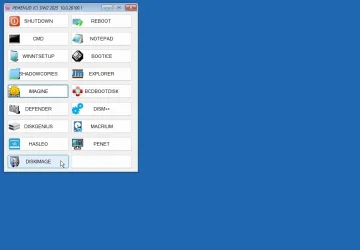
I spent a few minutes cobbling it together.

Easy way:

copy the program folder from %sytemdrive%\program files into the program files folder of the wim

point at it in some way. simple ways to point at it are either winpeshl.ini, or make a little menu like wot I did

All seems to work apart from mounting which doesnt matter because explore image works.

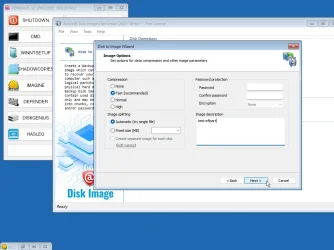
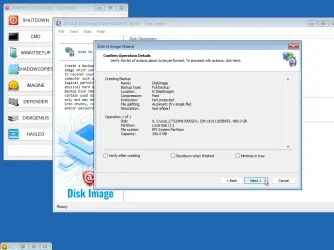
lets make a small test image, just the efi partition will do

active-image1.webp


active-image2.webp

active-image3.webp

active-image4.webp
 
Last edited:

My Computers

System One System Two

  • OS
    Win7,Win11
    Computer type
    PC/Desktop
    CPU
    i7-9700
    Motherboard
    gigabyte b365m ds3h
    Memory
    2x16gb 3600mhz
    Monitor(s) Displays
    benq gw2480
    PSU
    bequiet pure power 11 400CM
    Cooling
    cryorig m9i
  • Operating System
    win7,win11
    Computer type
    PC/Desktop
    CPU
    i5-8400
    Motherboard
    gigabyte b365m ds3h
    Memory
    2x8gb 3200
    PSU
    xfx pro 450
lets have a look with explore image. Looks ok.

active-image6.webp
 

My Computers

System One System Two

  • OS
    Win7,Win11
    Computer type
    PC/Desktop
    CPU
    i7-9700
    Motherboard
    gigabyte b365m ds3h
    Memory
    2x16gb 3600mhz
    Monitor(s) Displays
    benq gw2480
    PSU
    bequiet pure power 11 400CM
    Cooling
    cryorig m9i
  • Operating System
    win7,win11
    Computer type
    PC/Desktop
    CPU
    i5-8400
    Motherboard
    gigabyte b365m ds3h
    Memory
    2x8gb 3200
    PSU
    xfx pro 450
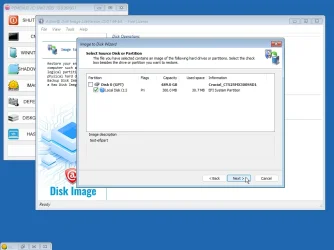
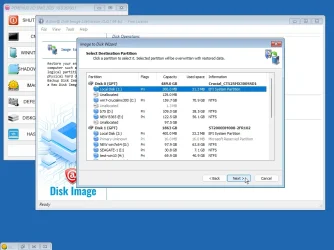
Now restore the thing

active-image-restore.webp


active-image-restore2.webp

active-image-restore3.webp

active-image-restore4.webp

active-image-restore5.webp

active-image-restore6.webp

I dont know why it wants to restore as 299 mb rather than the original 300mb , but it works fine
 

My Computers

System One System Two

  • OS
    Win7,Win11
    Computer type
    PC/Desktop
    CPU
    i7-9700
    Motherboard
    gigabyte b365m ds3h
    Memory
    2x16gb 3600mhz
    Monitor(s) Displays
    benq gw2480
    PSU
    bequiet pure power 11 400CM
    Cooling
    cryorig m9i
  • Operating System
    win7,win11
    Computer type
    PC/Desktop
    CPU
    i5-8400
    Motherboard
    gigabyte b365m ds3h
    Memory
    2x8gb 3200
    PSU
    xfx pro 450
I spent some time reading through, I ended up downloading the free version of Macrium Reflect. My question is it didn't ask upon starting it to create any rescue/boot media etc. Do I need to ? Or should i be good with backups only.
you need rescue media.

you can use the function in macrium to create the bog standard one

or you can do a fairly simple thing with a menu so you could have a few extra programs in the same wim. For example yor imaging program , a partitioning program, maybe also an antivirus and a file recovery

or you can go full pe building nerd and do something unnecessarily fancy.
 

My Computers

System One System Two

  • OS
    Win7,Win11
    Computer type
    PC/Desktop
    CPU
    i7-9700
    Motherboard
    gigabyte b365m ds3h
    Memory
    2x16gb 3600mhz
    Monitor(s) Displays
    benq gw2480
    PSU
    bequiet pure power 11 400CM
    Cooling
    cryorig m9i
  • Operating System
    win7,win11
    Computer type
    PC/Desktop
    CPU
    i5-8400
    Motherboard
    gigabyte b365m ds3h
    Memory
    2x8gb 3200
    PSU
    xfx pro 450
pemenud-activediskimage.webp
 

My Computers

System One System Two

  • OS
    Win7,Win11
    Computer type
    PC/Desktop
    CPU
    i7-9700
    Motherboard
    gigabyte b365m ds3h
    Memory
    2x16gb 3600mhz
    Monitor(s) Displays
    benq gw2480
    PSU
    bequiet pure power 11 400CM
    Cooling
    cryorig m9i
  • Operating System
    win7,win11
    Computer type
    PC/Desktop
    CPU
    i5-8400
    Motherboard
    gigabyte b365m ds3h
    Memory
    2x8gb 3200
    PSU
    xfx pro 450
Very surprised Terabyte isn't on your list. Tells me something.
Anyway, used Image for Windows for a couple of years now. Used Macrium before that. I can't use things like EaseUs (and many others) because it is not Linux/win/whatever boot mix friendly, or just not easy to use. I am single boot win at the moment but adding a Mint or whatever boot w grub might happen unpredictably. That's my 2 cents. Be well!!!
 

My Computers

System One System Two

  • OS
    win 11Pro 25H2 26200.8246
    Computer type
    PC/Desktop
    Manufacturer/Model
    DIY: LianLi 207 case, ASUS mobo, Arctic aio cooling
    CPU
    I9-13900k
    Motherboard
    ASUS ROG STRIX Z790-E Gaming wifi-6E, latest AMI BIOS 3107
    Memory
    G.Skill Ripjaws S5 32GB Kit DDR5 6000.
    Graphics Card(s)
    GeForce RTX™ 3060 Ti VISION OC 8G (rev. 2.0)
    Sound Card
    on mobo
    Monitor(s) Displays
    Dell S3221QS (curved 32")
    Screen Resolution
    4K but I usually display at 1K
    Hard Drives
    Sam 980 Pro 1T M.2, 990Pro, WD 570, others(all NVMe)
    PSU
    Corsair RM750e fully modular
    Case
    Lian Li 207
    Cooling
    CPU:Arctic liq frz iii Pro 360 on top, CASE: 2 front fans IN, 2 bottom fans in.
    Keyboard
    Corsair K70 RGB Core
    Mouse
    Logitech M510
    Internet Speed
    100Mbps Comcast; I226-V NIC
    Browser
    Firefox(current)
    Antivirus
    on win BitDefender AV Free
    Other Info
    Terabyte Unlimited Image
    WuMgr, StartAllBack, , Revo Uninstaller Pro Portable.

    Davinci Resolve or Wondershare Filmora Basic to process my vlogs. DJI Pocket 2
  • Operating System
    win 10, Mint
    Computer type
    Laptop
    Manufacturer/Model
    Lenovo P15s
    CPU
    i7-10510U 1.8-4.9GHz
    Motherboard
    Intel SoC
    Memory
    16GB DDR4
    Graphics card(s)
    Nvidia Quadro P520 2GB DDR5 supports 4K external via HDMI or USB-C
    Sound Card
    Realtek ALC3287 HD
    Monitor(s) Displays
    15.6"
    Screen Resolution
    1K
    Hard Drives
    NVMe various
Very surprised Terabyte isn't on your list. Tells me something.

And what would that be, what does that tell you?
There are only so many options allowed when creating a Poll.
 
Last edited:

My Computers

System One System Two

  • OS
    Windows 11 Pro 25H2 Build 26200.8524
    Computer type
    PC/Desktop
    Manufacturer/Model
    Sin-built 2013
    CPU
    Intel(R) Core(TM) i7-4770K CPU @ 3.50GHz
    Motherboard
    ASUS ROG Maximus VI Formula
    Memory
    32.0 GB of I forget and the box is in storage.
    Graphics Card(s)
    Gigabyte nVidia GeForce GTX 1660 Super OC 6GB
    Sound Card
    Onboard thingy
    Monitor(s) Displays
    5 x LG 25MS500-B - 1 x 24MK430H-B - 1 x Wacom Pro 22" Touch Screen Tablet
    Screen Resolution
    All over the place
    Hard Drives
    Too many to list.
    OS on Samsung 1TB 870 QVO SATA
    PSU
    Silverstone 1500
    Case
    NZXT Phantom 820 Full-Tower Case
    Cooling
    Noctua NH-D15 Elite Class Dual Tower CPU Cooler / 6 x EziDIY 120mm / 2 x Corsair 140mm somethings / 1 x 140mm Thermaltake something / 2 x 200mm Corsair.
    Keyboard
    Corsair K95 / Logitech diNovo Edge Wireless
    Mouse
    Logitech: G402 / G502 / Mx Masters / Mx Air Cordless
    Internet Speed
    2000/500Mbps
    Browser
    All sorts
    Antivirus
    Kaspersky Premium
    Other Info
    ㅤㅤㅤㅤㅤㅤㅤㅤㅤㅤㅤㅤㅤㅤㅤㅤㅤㅤㅤㅤㅤㅤㅤㅤㅤㅤㅤㅤㅤㅤㅤㅤㅤㅤㅤㅤㅤㅤㅤㅤ⠀⠀⠀⠀⠀⠀⠀⠀⠀⠀
    TP-Link BE9300 WiFi 7 Bluetooth 5.4 (Archer TBE550E)
    TP-Link TX201 V1 2.5GB Lan

    Grandstream HT812 - VoIP
    ASUS DSL-AX82U - Mesh
    ASUS RT-AC68U - Mesh
    ASUS RT-BE88U Router

    Brother MFC-L2880DW Printer

    I’m on a horse.
  • Operating System
    Windows 11 Pro 25H2 Build 26200.8524
    Computer type
    Laptop
    Manufacturer/Model
    LENOVO Yoga 7 14IRL8 - 7i EVO OLED 14" Touchscreen i5 12 Core 16GB/512GB
    CPU
    Intel Core 12th Gen i5-1240P Processor (1.7 - 4.4GHz)
    Memory
    16GB LPDDR5 RAM
    Graphics card(s)
    Intel Iris Xe Graphics Processor
    Sound Card
    Optimized with Dolby Atmos®
    Screen Resolution
    QHD 2880 x 1800 OLED
    Hard Drives
    M.2 512GB
    Antivirus
    Defender / Malwarebytes
    Other Info
    …still on a horse.
There was I think a thread devoted to Terabyte Backup software here at Elevenforum.
 

My Computers

System One System Two

  • OS
    Windows 11 Pro 25H2
    Computer type
    PC/Desktop
    Manufacturer/Model
    Homebuilt
    CPU
    Intel Core i9 13900K
    Motherboard
    Asus ProArt Z790 Creator WiFi - Bios 3107
    Memory
    Corsair Dominator Platinum 64gb 5600MT/s DDR5 Dual Channel
    Graphics Card(s)
    Sapphire NITRO+ AMD Radeon RX 7900 XTX Vapor-X 24GB
    Sound Card
    External DAC: Cambridge Audio DACMagic200M - Headphone Amp: Topping L50
    Monitor(s) Displays
    Panasonic MX950 Mini LED 55" TV 120hz
    Screen Resolution
    3840 x 2160 120hz
    Hard Drives
    Samsung 980 Pro 2TB (OS)
    Samsung 980 Pro 1TB (Files)
    Lexar NZ790 4TB
    LaCie d2 Professional 6TB external - USB 3.1
    Seagate Expansion 16TB external - USB 3.2
    Seagate One Touch 18TB external HD - USB 3.0
    PSU
    Corsair RM1200x Shift
    Case
    Corsair RGB Smart Case 5000x (white)
    Cooling
    Corsair iCue H150i Elite Capellix XT
    Keyboard
    Incase Ergonomic USB (Microsoft clone)
    Mouse
    Logitech MX Master 3S
    Internet Speed
    Fibre 900/500 Mbps
    Browser
    Microsoft Edge Chromium
    Antivirus
    Bitdefender Total Security
    Other Info
    AMD Radeon Software & Drivers 26.1.1
    Hasleo Backup Suite
    Dashlane password manager
    Kensington Verimark fingerprint reader
    Logitech Brio 4K webcam
    Orico 10-port powered USB 3.0 hub
  • Operating System
    Windows 11 Pro 25H2
    Computer type
    Laptop
    Manufacturer/Model
    Asus Vivobook X1605VA
    CPU
    Intel® Core™ i9-13900H
    Motherboard
    Asus X1605VA bios 309
    Memory
    32GB DDR4-3200 Dual channel
    Graphics card(s)
    *Intel Iris Xᵉ Graphics G7
    Sound Card
    Realtek | Intel SST Bluetooth & USB
    Monitor(s) Displays
    16.0-inch, WUXGA 16:10 aspect ratio, IPS-level Panel
    Screen Resolution
    1920 x 1200 60hz
    Hard Drives
    512GB M.2 NVMe™ PCIe® 3.0 SSD
    Mouse
    Logitech MX Ergo Trackball
    Antivirus
    Bitdefender Total Security
    Other Info
    720p Webcam
    WiFi & USB to ethernet
There was I think a thread devoted to Terabyte Backup software here at Elevenforum.

Probably got hijacked by Macrium users, like every other backup thread here.
Members telling us how small (and fast) their Macriums are 😂
 

My Computers

System One System Two

  • OS
    Windows 11 Pro 25H2 Build 26200.8524
    Computer type
    PC/Desktop
    Manufacturer/Model
    Sin-built 2013
    CPU
    Intel(R) Core(TM) i7-4770K CPU @ 3.50GHz
    Motherboard
    ASUS ROG Maximus VI Formula
    Memory
    32.0 GB of I forget and the box is in storage.
    Graphics Card(s)
    Gigabyte nVidia GeForce GTX 1660 Super OC 6GB
    Sound Card
    Onboard thingy
    Monitor(s) Displays
    5 x LG 25MS500-B - 1 x 24MK430H-B - 1 x Wacom Pro 22" Touch Screen Tablet
    Screen Resolution
    All over the place
    Hard Drives
    Too many to list.
    OS on Samsung 1TB 870 QVO SATA
    PSU
    Silverstone 1500
    Case
    NZXT Phantom 820 Full-Tower Case
    Cooling
    Noctua NH-D15 Elite Class Dual Tower CPU Cooler / 6 x EziDIY 120mm / 2 x Corsair 140mm somethings / 1 x 140mm Thermaltake something / 2 x 200mm Corsair.
    Keyboard
    Corsair K95 / Logitech diNovo Edge Wireless
    Mouse
    Logitech: G402 / G502 / Mx Masters / Mx Air Cordless
    Internet Speed
    2000/500Mbps
    Browser
    All sorts
    Antivirus
    Kaspersky Premium
    Other Info
    ㅤㅤㅤㅤㅤㅤㅤㅤㅤㅤㅤㅤㅤㅤㅤㅤㅤㅤㅤㅤㅤㅤㅤㅤㅤㅤㅤㅤㅤㅤㅤㅤㅤㅤㅤㅤㅤㅤㅤㅤ⠀⠀⠀⠀⠀⠀⠀⠀⠀⠀
    TP-Link BE9300 WiFi 7 Bluetooth 5.4 (Archer TBE550E)
    TP-Link TX201 V1 2.5GB Lan

    Grandstream HT812 - VoIP
    ASUS DSL-AX82U - Mesh
    ASUS RT-AC68U - Mesh
    ASUS RT-BE88U Router

    Brother MFC-L2880DW Printer

    I’m on a horse.
  • Operating System
    Windows 11 Pro 25H2 Build 26200.8524
    Computer type
    Laptop
    Manufacturer/Model
    LENOVO Yoga 7 14IRL8 - 7i EVO OLED 14" Touchscreen i5 12 Core 16GB/512GB
    CPU
    Intel Core 12th Gen i5-1240P Processor (1.7 - 4.4GHz)
    Memory
    16GB LPDDR5 RAM
    Graphics card(s)
    Intel Iris Xe Graphics Processor
    Sound Card
    Optimized with Dolby Atmos®
    Screen Resolution
    QHD 2880 x 1800 OLED
    Hard Drives
    M.2 512GB
    Antivirus
    Defender / Malwarebytes
    Other Info
    …still on a horse.
Probably got hijacked by Macrium users, like every other backup thread here.
Members telling us how small (and fast) their Macriums are 😂

I rather object to this unfunny response.

If anything posts get more hijacked by the anti-Reflect brigade.

When it comes to speed Macrium Reflect X is much faster than any other tool (based on extensive various tests of other tools that I have undertaken).

There is a reason Macrium Reflect won the poll. As Tina T used to sing it is "Simply the best" in the eyes of most forum users.

The issue now with Macrium Reflect is purely a commercial one i e. is one prepared to pay an annual lease for the tool? That is purely a personal decision.

PS Terabyte is rather "meh" - nothing special.

In the end, it really does not matter which imaging tool a person uses. What is far more important is that a user actually uses an imaging tool.

For basic imaging, any well known tool will be adequate.
 

My Computer

System One

  • OS
    Windows 11 Pro + Win11 Canary VM.
    Computer type
    Laptop
    Manufacturer/Model
    ASUS Zenbook 14
    CPU
    I9 13th gen i9-13900H 2.60 GHZ
    Motherboard
    Yep, Laptop has one.
    Memory
    16 GB soldered
    Graphics Card(s)
    Integrated Intel Iris XE
    Sound Card
    Realtek built in
    Monitor(s) Displays
    laptop OLED screen
    Screen Resolution
    2880x1800 touchscreen
    Hard Drives
    1 TB NVME SSD (only weakness is only one slot)
    PSU
    Internal + 65W thunderbolt USB4 charger
    Case
    Yep, got one
    Cooling
    Stella Artois (UK pint cans - 568 ml) - extra cost.
    Keyboard
    Built in UK keybd
    Mouse
    Bluetooth , wireless dongled, wired
    Internet Speed
    900 mbs (ethernet), wifi 6 typical 350-450 mb/s both up and down
    Browser
    Edge
    Antivirus
    Defender
    Other Info
    TPM 2.0, 2xUSB4 thunderbolt, 1xUsb3 (usb a), 1xUsb-c, hdmi out, 3.5 mm audio out/in combo, ASUS backlit trackpad (inc. switchable number pad)

    Macrium Reflect Home V8
    Office 365 Family (6 users each 1TB onedrive space)
    Hyper-V (a vm runs almost as fast as my older laptop)

My Computers

System One System Two

  • OS
    Windows 11 Pro 25H2 Build 26200.8524
    Computer type
    PC/Desktop
    Manufacturer/Model
    Sin-built 2013
    CPU
    Intel(R) Core(TM) i7-4770K CPU @ 3.50GHz
    Motherboard
    ASUS ROG Maximus VI Formula
    Memory
    32.0 GB of I forget and the box is in storage.
    Graphics Card(s)
    Gigabyte nVidia GeForce GTX 1660 Super OC 6GB
    Sound Card
    Onboard thingy
    Monitor(s) Displays
    5 x LG 25MS500-B - 1 x 24MK430H-B - 1 x Wacom Pro 22" Touch Screen Tablet
    Screen Resolution
    All over the place
    Hard Drives
    Too many to list.
    OS on Samsung 1TB 870 QVO SATA
    PSU
    Silverstone 1500
    Case
    NZXT Phantom 820 Full-Tower Case
    Cooling
    Noctua NH-D15 Elite Class Dual Tower CPU Cooler / 6 x EziDIY 120mm / 2 x Corsair 140mm somethings / 1 x 140mm Thermaltake something / 2 x 200mm Corsair.
    Keyboard
    Corsair K95 / Logitech diNovo Edge Wireless
    Mouse
    Logitech: G402 / G502 / Mx Masters / Mx Air Cordless
    Internet Speed
    2000/500Mbps
    Browser
    All sorts
    Antivirus
    Kaspersky Premium
    Other Info
    ㅤㅤㅤㅤㅤㅤㅤㅤㅤㅤㅤㅤㅤㅤㅤㅤㅤㅤㅤㅤㅤㅤㅤㅤㅤㅤㅤㅤㅤㅤㅤㅤㅤㅤㅤㅤㅤㅤㅤㅤ⠀⠀⠀⠀⠀⠀⠀⠀⠀⠀
    TP-Link BE9300 WiFi 7 Bluetooth 5.4 (Archer TBE550E)
    TP-Link TX201 V1 2.5GB Lan

    Grandstream HT812 - VoIP
    ASUS DSL-AX82U - Mesh
    ASUS RT-AC68U - Mesh
    ASUS RT-BE88U Router

    Brother MFC-L2880DW Printer

    I’m on a horse.
  • Operating System
    Windows 11 Pro 25H2 Build 26200.8524
    Computer type
    Laptop
    Manufacturer/Model
    LENOVO Yoga 7 14IRL8 - 7i EVO OLED 14" Touchscreen i5 12 Core 16GB/512GB
    CPU
    Intel Core 12th Gen i5-1240P Processor (1.7 - 4.4GHz)
    Memory
    16GB LPDDR5 RAM
    Graphics card(s)
    Intel Iris Xe Graphics Processor
    Sound Card
    Optimized with Dolby Atmos®
    Screen Resolution
    QHD 2880 x 1800 OLED
    Hard Drives
    M.2 512GB
    Antivirus
    Defender / Malwarebytes
    Other Info
    …still on a horse.
Hasleo free is faster than Macrium 8.1 paid. Perhaps Hasleo will overtake Macrium again?
 

My Computers

System One System Two

  • OS
    Windows 11 Pro 25H2 26200.8524
    Computer type
    Laptop
    Manufacturer/Model
    Acemagic LX15PRO
    CPU
    AMD Ryzen 7 5825U with Radeon Graphics
    Memory
    16GB
    Screen Resolution
    1920 x 1080
    Hard Drives
    SSD 2TB
    Internet Speed
    30 Mbps
    Browser
    Brave
    Antivirus
    Webroot Secure Anywhere
    Other Info
    System 3

    Acer Swift SF114-34 laptop
    OS Windows 11 Pro 26200.8524
    CPU Pentium Silver N6000
    RAM 4GB
    SSD Samsung 970 EVO Plus SSD 2TB (an upgrade)
  • Operating System
    Windows 11 Pro 23H2 22631.2506
    Computer type
    Laptop
    Manufacturer/Model
    HP Mini 210-1090NR PC (bought in late 2009!)
    CPU
    Atom N450 1.66GHz
    Memory
    2GB
    Browser
    Brave
    Antivirus
    Webroot
Hasleo free is faster than Macrium 8.1 paid. Perhaps Hasleo will overtake Macrium again?

Possibly true, but not on my system with it being ancient. Any software takes a long, long time to backup. I just start a backup before bed or when going out. But I do like Hasleo, a lot.
 

My Computers

System One System Two

  • OS
    Windows 11 Pro 25H2 Build 26200.8524
    Computer type
    PC/Desktop
    Manufacturer/Model
    Sin-built 2013
    CPU
    Intel(R) Core(TM) i7-4770K CPU @ 3.50GHz
    Motherboard
    ASUS ROG Maximus VI Formula
    Memory
    32.0 GB of I forget and the box is in storage.
    Graphics Card(s)
    Gigabyte nVidia GeForce GTX 1660 Super OC 6GB
    Sound Card
    Onboard thingy
    Monitor(s) Displays
    5 x LG 25MS500-B - 1 x 24MK430H-B - 1 x Wacom Pro 22" Touch Screen Tablet
    Screen Resolution
    All over the place
    Hard Drives
    Too many to list.
    OS on Samsung 1TB 870 QVO SATA
    PSU
    Silverstone 1500
    Case
    NZXT Phantom 820 Full-Tower Case
    Cooling
    Noctua NH-D15 Elite Class Dual Tower CPU Cooler / 6 x EziDIY 120mm / 2 x Corsair 140mm somethings / 1 x 140mm Thermaltake something / 2 x 200mm Corsair.
    Keyboard
    Corsair K95 / Logitech diNovo Edge Wireless
    Mouse
    Logitech: G402 / G502 / Mx Masters / Mx Air Cordless
    Internet Speed
    2000/500Mbps
    Browser
    All sorts
    Antivirus
    Kaspersky Premium
    Other Info
    ㅤㅤㅤㅤㅤㅤㅤㅤㅤㅤㅤㅤㅤㅤㅤㅤㅤㅤㅤㅤㅤㅤㅤㅤㅤㅤㅤㅤㅤㅤㅤㅤㅤㅤㅤㅤㅤㅤㅤㅤ⠀⠀⠀⠀⠀⠀⠀⠀⠀⠀
    TP-Link BE9300 WiFi 7 Bluetooth 5.4 (Archer TBE550E)
    TP-Link TX201 V1 2.5GB Lan

    Grandstream HT812 - VoIP
    ASUS DSL-AX82U - Mesh
    ASUS RT-AC68U - Mesh
    ASUS RT-BE88U Router

    Brother MFC-L2880DW Printer

    I’m on a horse.
  • Operating System
    Windows 11 Pro 25H2 Build 26200.8524
    Computer type
    Laptop
    Manufacturer/Model
    LENOVO Yoga 7 14IRL8 - 7i EVO OLED 14" Touchscreen i5 12 Core 16GB/512GB
    CPU
    Intel Core 12th Gen i5-1240P Processor (1.7 - 4.4GHz)
    Memory
    16GB LPDDR5 RAM
    Graphics card(s)
    Intel Iris Xe Graphics Processor
    Sound Card
    Optimized with Dolby Atmos®
    Screen Resolution
    QHD 2880 x 1800 OLED
    Hard Drives
    M.2 512GB
    Antivirus
    Defender / Malwarebytes
    Other Info
    …still on a horse.

My Computer

System One

  • OS
    Windows XP (Stable, iconic) 7/8.1/10/11
    Computer type
    PC/Desktop
    Manufacturer/Model
    Alienware PC
    CPU
    Intel i7 4790K
    Motherboard
    ASROCK Z97 EXTREME4
    Memory
    32GB DDR3 1600 MHz
    Graphics Card(s)
    ATI Radeon HD 7770 2GB GDDR5
    Sound Card
    Onboard
    Monitor(s) Displays
    SAMSUNG UE57 Series 28-Inch 4K UHD
    Hard Drives
    SAMSUNG 970 EVO PLUS M.2
    PSU
    EVGA 850 watt
    Case
    Alienware Area 51 Black Tower Case
    Keyboard
    HyperX - Alloy Elite 2 Mechanical Gaming Keyboard.
    Mouse
    Microsoft Wireless
    Internet Speed
    1.2 GHz
    Browser
    Chrome..Edge..Firefox
I am a noob here (been doing computers since '62) so had no idea this topic was a battle zone. For years I used and loved Macrium. When they announced the free one would end I naturally(to me) did my due diligence and tried/tested a bunch and also asked at the forum I was then at.
It had to be:
Easy like Macrium to use.
Friendly to mixed linux/win boot drives.(I frequently over the past few decades have dual booted using grub)
Run under windows and stand-alone.
Widely used with excellent knowledgeable support.
I believe I only tried ones that had a free trial so I could really tell w/o spending money.

In short I chose Terabyte Image for Windows simply because it was way faster(for me!(battle zone!!!) ) . Stand-alone I could image a 60-80GB(of data) NVMe Sam 980Pro to a Sam 990Pro Nvme in about 1 min. Of course, I did not have those 2 sticks when I first tested i4w - they were perhaps half that speed, but I still was getting a much faster speed than Macrium gave me.

If this offends or angers folks, I know now that it will and have donned my flak suit and am hiding under my kipple wood computer desk. :D

But as I think cereberus said - It really doesn't matter WHAT you use, but, please, for the rest of us,. USE SOMETHING, and frequently. NVMe's and SSK adapter/sockets are cheap. Just do it!!! Image what you don't want to lose! Frequently!!!
be well!!!

 

My Computers

System One System Two

  • OS
    win 11Pro 25H2 26200.8246
    Computer type
    PC/Desktop
    Manufacturer/Model
    DIY: LianLi 207 case, ASUS mobo, Arctic aio cooling
    CPU
    I9-13900k
    Motherboard
    ASUS ROG STRIX Z790-E Gaming wifi-6E, latest AMI BIOS 3107
    Memory
    G.Skill Ripjaws S5 32GB Kit DDR5 6000.
    Graphics Card(s)
    GeForce RTX™ 3060 Ti VISION OC 8G (rev. 2.0)
    Sound Card
    on mobo
    Monitor(s) Displays
    Dell S3221QS (curved 32")
    Screen Resolution
    4K but I usually display at 1K
    Hard Drives
    Sam 980 Pro 1T M.2, 990Pro, WD 570, others(all NVMe)
    PSU
    Corsair RM750e fully modular
    Case
    Lian Li 207
    Cooling
    CPU:Arctic liq frz iii Pro 360 on top, CASE: 2 front fans IN, 2 bottom fans in.
    Keyboard
    Corsair K70 RGB Core
    Mouse
    Logitech M510
    Internet Speed
    100Mbps Comcast; I226-V NIC
    Browser
    Firefox(current)
    Antivirus
    on win BitDefender AV Free
    Other Info
    Terabyte Unlimited Image
    WuMgr, StartAllBack, , Revo Uninstaller Pro Portable.

    Davinci Resolve or Wondershare Filmora Basic to process my vlogs. DJI Pocket 2
  • Operating System
    win 10, Mint
    Computer type
    Laptop
    Manufacturer/Model
    Lenovo P15s
    CPU
    i7-10510U 1.8-4.9GHz
    Motherboard
    Intel SoC
    Memory
    16GB DDR4
    Graphics card(s)
    Nvidia Quadro P520 2GB DDR5 supports 4K external via HDMI or USB-C
    Sound Card
    Realtek ALC3287 HD
    Monitor(s) Displays
    15.6"
    Screen Resolution
    1K
    Hard Drives
    NVMe various

My Computer

System One

  • OS
    Windows 11 Pro + Win11 Canary VM.
    Computer type
    Laptop
    Manufacturer/Model
    ASUS Zenbook 14
    CPU
    I9 13th gen i9-13900H 2.60 GHZ
    Motherboard
    Yep, Laptop has one.
    Memory
    16 GB soldered
    Graphics Card(s)
    Integrated Intel Iris XE
    Sound Card
    Realtek built in
    Monitor(s) Displays
    laptop OLED screen
    Screen Resolution
    2880x1800 touchscreen
    Hard Drives
    1 TB NVME SSD (only weakness is only one slot)
    PSU
    Internal + 65W thunderbolt USB4 charger
    Case
    Yep, got one
    Cooling
    Stella Artois (UK pint cans - 568 ml) - extra cost.
    Keyboard
    Built in UK keybd
    Mouse
    Bluetooth , wireless dongled, wired
    Internet Speed
    900 mbs (ethernet), wifi 6 typical 350-450 mb/s both up and down
    Browser
    Edge
    Antivirus
    Defender
    Other Info
    TPM 2.0, 2xUSB4 thunderbolt, 1xUsb3 (usb a), 1xUsb-c, hdmi out, 3.5 mm audio out/in combo, ASUS backlit trackpad (inc. switchable number pad)

    Macrium Reflect Home V8
    Office 365 Family (6 users each 1TB onedrive space)
    Hyper-V (a vm runs almost as fast as my older laptop)

Latest Support Threads

Back
Top Bottom