Pop up messages that my laptop is infected


tzxlyd

Member
Local time
12:06 PM
Posts
13
OS
windows 11 pro
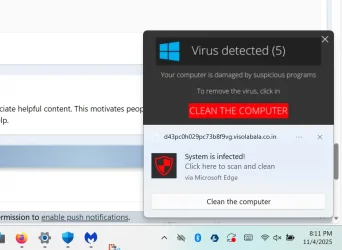
For some reason yesterday when I tried to open a .pdf file on my laptop I received messages that my laptop is infected that keep popping up but defender says there are no threats. How do I remove these messages when windows defender cannot see them? I have tried to return my laptop to factory settings but my laptop will not reset. I do not see anything but a blank screen when I try to reset to factory settings.
 

My Computer

System One

  • OS
    windows 11 pro
    Computer type
    Laptop
    Manufacturer/Model
    Dell Precision 7730
    CPU
    Intel Core i7-8750H @2.20GHz (2.21GHz)
    Memory
    954 GB
    Graphics Card(s)
    NVIDIA Quadro P4200
    Monitor(s) Displays
    LG 32" and MSI 32"
    Screen Resolution
    Both 1080P
    Browser
    Firefox and Edge
    Antivirus
    Windows Defender
Scan your computer with MalwareBytes.
 

My Computer

System One

  • OS
    Windows 11
    Computer type
    PC/Desktop
    Manufacturer/Model
    HP Pavilion
    CPU
    AMD Ryzen 7 5700G
    Motherboard
    Erica6
    Memory
    Micron Technology DDR4-3200 16GB
    Graphics Card(s)
    NVIDIA GeForce RTX 3060
    Sound Card
    Realtek ALC671
    Monitor(s) Displays
    Samsung SyncMaster U28E590
    Screen Resolution
    3840 x 2160
    Hard Drives
    SAMSUNG MZVLQ1T0HALB-000H1
Hello @tzxlyd and welcome to ElevenForum. :-)

Download, install and run Malwarebytes.
Most folks use a combination of Microsoft Defender and Malwarebytes.

Malwarebytes
 

My Computers

System One System Two

  • OS
    Win 11 Home ♦♦♦26200.8457 ♦♦♦♦♦♦♦25H2
    Computer type
    PC/Desktop
    Manufacturer/Model
    Built by Ghot® [May 2020]
    CPU
    AMD Ryzen 7 3700X
    Motherboard
    Asus Pro WS X570-ACE (BIOS 5302)
    Memory
    G.Skill (F4-3200C14D-16GTZKW)
    Graphics Card(s)
    EVGA RTX 2070 (08G-P4-2171-KR)
    Sound Card
    Realtek ALC1220P / ALC S1220A
    Monitor(s) Displays
    Dell U3011 30"
    Screen Resolution
    2560 x 1600
    Hard Drives
    2x Samsung 860 EVO 500GB,
    WD 4TB Black FZBX - SATA III,
    WD 8TB Black FZBX - SATA III,
    DRW-24B1ST CD/DVD Burner
    PSU
    PC Power & Cooling 750W Quad EPS12V
    Case
    Cooler Master ATCS 840 Tower
    Cooling
    CM Hyper 212 EVO (push/pull)
    Keyboard
    Ducky DK9008 Shine II Blue LED
    Mouse
    Logitech Optical M-100
    Internet Speed
    300/300
    Browser
    Firefox (latest)
    Antivirus
    Bitdefender Total Security
    Other Info
    Speakers: Klipsch Pro Media 2.1
  • Operating System
    Windows XP Pro 32bit w/SP3
    Computer type
    PC/Desktop
    Manufacturer/Model
    Built by Ghot® (not in use)
    CPU
    AMD Athlon 64 X2 5000+ (OC'd @ 3.2Ghz)
    Motherboard
    ASUS M2N32-SLI Deluxe Wireless Edition
    Memory
    TWIN2X2048-6400C4DHX (2 x 1GB, DDR2 800)
    Graphics card(s)
    EVGA 256-P2-N758-TR GeForce 8600GT SSC
    Sound Card
    Onboard
    Monitor(s) Displays
    ViewSonic G90FB Black 19" Professional (CRT)
    Screen Resolution
    up to 2048 x 1536
    Hard Drives
    WD 36GB 10,000rpm Raptor SATA
    Seagate 80GB 7200rpm SATA
    Lite-On LTR-52246S CD/RW
    Lite-On LH-18A1P CD/DVD Burner
    PSU
    PC Power & Cooling Silencer 750 Quad EPS12V
    Case
    Generic Beige case, 80mm fans
    Cooling
    ZALMAN 9500A 92mm CPU Cooler
    Keyboard
    Logitech Classic Keybooard 200
    Mouse
    Logitech Optical M-BT96a
    Internet Speed
    300/300
    Browser
    Firefox 3.x ??
    Antivirus
    Symantec (Norton)
    Other Info
    Still assembled, still runs. Haven't turned it on for 15 years?

My Computers

System One System Two

  • OS
    Windows 11 Pro
    Computer type
    PC/Desktop
    Manufacturer/Model
    Custom Built
    CPU
    Ryzen 7 5700 X3D
    Motherboard
    MSI MPG B550 GAMING PLUS
    Memory
    64 GB DDR4 3600mhz Gskill Ripjaws V
    Graphics Card(s)
    RTX 4070 Super , 12GB VRAM Asus EVO Overclock
    Monitor(s) Displays
    Gigabyte M27Q (rev. 2.0) 2560 x 1440 @ 170hz HDR
    Hard Drives
    2TB Samsung nvme ssd
    4TB Western Digital nvme ssd
    PSU
    CORSAIR RMx SHIFT Series™ RM750x 80 PLUS Gold Fully Modular ATX Power Supply
    Case
    CORSAIR 3500X ARGB Mid-Tower ATX PC Case – Black
    Cooling
    ID-COOLING FROSTFLOW X 240 CPU Water Cooler
    Keyboard
    Logitech G213
    Mouse
    Logitech G203
    Internet Speed
    1.2gbps Fiber 😎
  • Operating System
    Chrome OS
    Computer type
    Laptop
    Manufacturer/Model
    HP Chromebook
    CPU
    Intel Pentium Quad Core
    Memory
    4GB LPDDR4
    Monitor(s) Displays
    14 Inch HD SVA anti glare micro edge display
    Hard Drives
    64 GB emmc
For some reason yesterday when I tried to open a .pdf file on my laptop I received messages that my laptop is infected that keep popping up but defender says there are no threats. How do I remove these messages when windows defender cannot see them? I have tried to return my laptop to factory settings but my laptop will not reset. I do not see anything but a blank screen when I try to reset to factory settings.
Please post a screenshot.

Ben
 

My Computer

System One

  • OS
    Windows 10 Home
    Computer type
    Laptop
    Manufacturer/Model
    HP Elitebook 2530p
    CPU
    Intel Core 2 Duo [email protected] GHz
    Memory
    2 GB
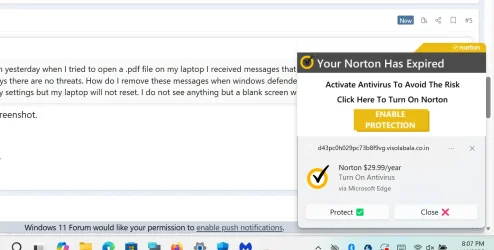
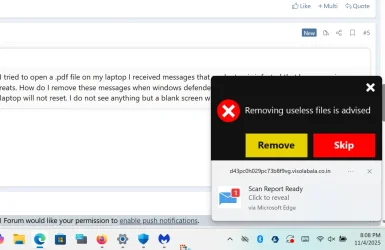
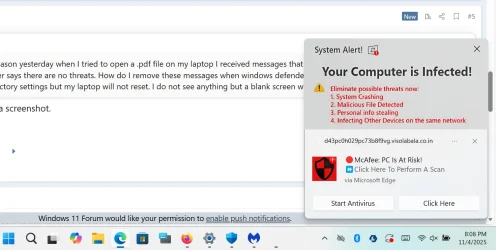
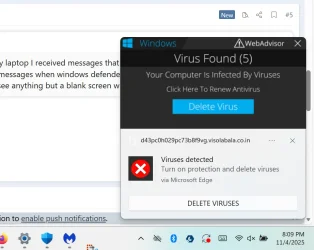
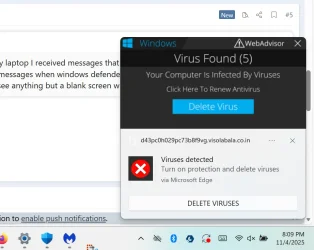
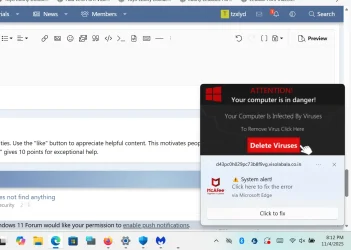
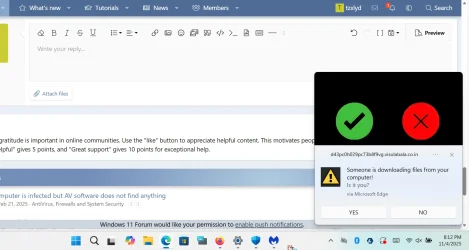
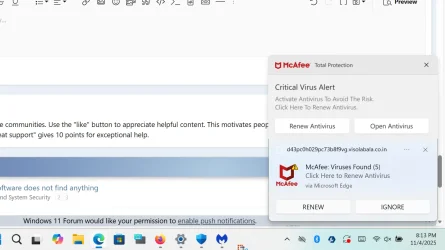
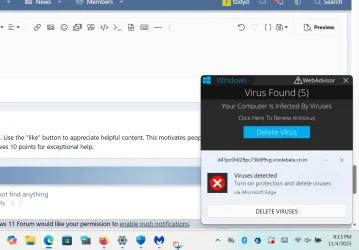
Malwarebytes said there are no threats, but I keep getting pop ups saying "your Norton has expired;' "action required! Renew Your McAfee subscription;" "someone logged into your account from Russia," "Viruses detected, turn on protection," etc.
 

My Computer

System One

  • OS
    windows 11 pro
    Computer type
    Laptop
    Manufacturer/Model
    Dell Precision 7730
    CPU
    Intel Core i7-8750H @2.20GHz (2.21GHz)
    Memory
    954 GB
    Graphics Card(s)
    NVIDIA Quadro P4200
    Monitor(s) Displays
    LG 32" and MSI 32"
    Screen Resolution
    Both 1080P
    Browser
    Firefox and Edge
    Antivirus
    Windows Defender
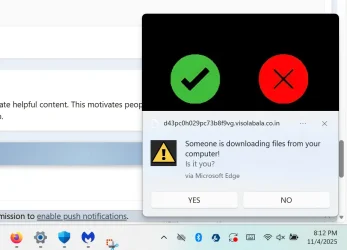
Here are some screen shots of what is popping up.
 

Attachments

  • Screenshot 2025-11-04 200800.webp
    Screenshot 2025-11-04 200800.webp
    61.1 KB · Views: 1
  • Screenshot 2025-11-04 200838.webp
    Screenshot 2025-11-04 200838.webp
    50.9 KB · Views: 1
  • Screenshot 2025-11-04 200910.webp
    Screenshot 2025-11-04 200910.webp
    72.2 KB · Views: 1
  • Screenshot 2025-11-04 200927.webp
    Screenshot 2025-11-04 200927.webp
    40.4 KB · Views: 2

My Computer

System One

  • OS
    windows 11 pro
    Computer type
    Laptop
    Manufacturer/Model
    Dell Precision 7730
    CPU
    Intel Core i7-8750H @2.20GHz (2.21GHz)
    Memory
    954 GB
    Graphics Card(s)
    NVIDIA Quadro P4200
    Monitor(s) Displays
    LG 32" and MSI 32"
    Screen Resolution
    Both 1080P
    Browser
    Firefox and Edge
    Antivirus
    Windows Defender
Here are better screen shots of the full pop ups that are in the lower right area of my screen.
 

Attachments

  • Screenshot 2025-11-04 200927.webp
    Screenshot 2025-11-04 200927.webp
    40.4 KB · Views: 1
  • Screenshot 2025-11-04 201248.webp
    Screenshot 2025-11-04 201248.webp
    62.7 KB · Views: 1
  • Screenshot 2025-11-04 201236.webp
    Screenshot 2025-11-04 201236.webp
    78.9 KB · Views: 1
  • Screenshot 2025-11-04 201219.webp
    Screenshot 2025-11-04 201219.webp
    30 KB · Views: 1
  • Screenshot 2025-11-04 201159.webp
    Screenshot 2025-11-04 201159.webp
    34.2 KB · Views: 1
  • Screenshot 2025-11-04 201315.webp
    Screenshot 2025-11-04 201315.webp
    59 KB · Views: 1
  • Screenshot 2025-11-04 201402.webp
    Screenshot 2025-11-04 201402.webp
    56.4 KB · Views: 1

My Computer

System One

  • OS
    windows 11 pro
    Computer type
    Laptop
    Manufacturer/Model
    Dell Precision 7730
    CPU
    Intel Core i7-8750H @2.20GHz (2.21GHz)
    Memory
    954 GB
    Graphics Card(s)
    NVIDIA Quadro P4200
    Monitor(s) Displays
    LG 32" and MSI 32"
    Screen Resolution
    Both 1080P
    Browser
    Firefox and Edge
    Antivirus
    Windows Defender

Browser related scareware, maybe related to something you clicked on previously - knowingly or unknowingly

Flush/clean/wipe your browser cache. Install browser popup blocker add-ons (Adguard AdBlocker, uBlock Origin (Lite if using Chrome). Switch your search engine to duckduckgo, and install their search and tracker protection add-on

EDIT
Worst case scenario solution, uninstall your browser using RevoUninstaller, + Revo's Advanced option (freeware), then re-install
 

My Computers

System One System Two

  • OS
    Windows 11 2xH2 (latest update ... forever anal)
    Computer type
    PC/Desktop
    Manufacturer/Model
    HP Slim S01
    CPU
    Intel i5-12400
    Memory
    8GB
    Graphics Card(s)
    NVIDIA GeForce GT730
    Sound Card
    OOBE
    Monitor(s) Displays
    Acer 32"
    Screen Resolution
    1920x1080
    Hard Drives
    512GB KIOXIA NVMe
    1TB SATA SSD
    PSU
    OOBE
    Case
    OOBE
    Cooling
    OOBE
    Keyboard
    BT
    Mouse
    BT
    Browser
    Brave FFox Chrome Opera
    Antivirus
    KIS
  • Operating System
    Windows 11 Pro 2xH2 (latest update ... 4ever anal)
    Computer type
    Laptop
    Manufacturer/Model
    HP Pavillion 15
    CPU
    i7-1165G7 @ 2.80GHz
    Graphics card(s)
    Intel Iris Xe Graphics
    Hard Drives
    Samsung NVMe 512GB
    + numerous/multiple SSD Type C USB enclosures
    Internet Speed
    NBN FTTN 50
    Browser
    Brave
    Antivirus
    KIS

My Computers

System One System Two

  • OS
    Windows 11 Pro
    Computer type
    PC/Desktop
    Manufacturer/Model
    Stigg's Build
    CPU
    Intel Core i9-10900X
    Motherboard
    GIGABYTE X299X DESIGNARE 10G
    Memory
    Corsair 64 GB (4 x 16 GB) CMW64GX4M4C3000C15 Vengeance RGB Pro 3000Mhz DDR4
    Graphics Card(s)
    GIGABYTE GeForce GTX 1660 Super Mini ITX 6 GB OC
    Sound Card
    Realtek ALC1220
    Monitor(s) Displays
    Samsung 27" FHD LED FreeSync Gaming Monitor (LS27F350FHEXXY)
    Screen Resolution
    1920 x 1080
    Hard Drives
    Samsung 970 Pro Series 1TB M.2 2280 NVMe SSD
    Western Digital Red Pro WD8003FFBX-68B9AN0 8 TB, 7200 RPM, SATA-III
    Western Digital Red Pro WD8003FFBX-68B9AN0 8 TB, 7200 RPM, SATA-III
    PSU
    Corsair HX1200 1200W 80 Plus Platinum
    Case
    Fractal Design Define 7 Black Solid Case
    Cooling
    Noctua NH-D15 Chromax Black
    Keyboard
    Razer Ornata V2
    Mouse
    Razer DeathAdder Essential
    Internet Speed
    FTTN 100Mbps / 40Mbps
    Browser
    Mozilla Firefox
    Antivirus
    N/A
    Other Info
    Logitech BRIO 4k Ultra HD USB-C Webcam
  • Operating System
    Windows 10 Pro
    Computer type
    Laptop
    Manufacturer/Model
    ASUS ROG Zephyrus M GM501GS
    CPU
    Core i7-8750H
    Motherboard
    Zephyrus M GM501GS
    Memory
    SK Hynix 32 GB (2 x 16 GB) HMA82GS6CJR8N-VK 16 GB DDR4-2666 DDR4 SDRAM
    Graphics card(s)
    NVIDIA GeForce GTX 1070
    Sound Card
    Realtek ALC294
    Monitor(s) Displays
    AU Optronics B156HAN07.1 [15.6" LCD]
    Screen Resolution
    1920 x 1080
    Hard Drives
    Samsung MZVKW512HMJP-00000 512 GB, PCI-E 3.0 x4
    Samsung SSD 860 QVO 4TB 4 TB, SATA-III
    PSU
    N/A
    Case
    N/A
    Cooling
    N/A
    Keyboard
    PC/AT Enhanced PS2 Keyboard (101/102-Key)
    Mouse
    Razer DeathAdder Essential
    Internet Speed
    FTTN 100Mbps / 40Mbps
    Browser
    Mozilla Firefox
    Antivirus
    N/A
    Other Info
    USB2.0 HD UVC Webcam
I have tried to clear the browser cache multiple times but that has not helped. Also, I am unable to reset to factory settings for some reason. I will try the AdwCleaner 2025 and/or remove the browsers if that does not work. Very confusing problem.
 

My Computer

System One

  • OS
    windows 11 pro
    Computer type
    Laptop
    Manufacturer/Model
    Dell Precision 7730
    CPU
    Intel Core i7-8750H @2.20GHz (2.21GHz)
    Memory
    954 GB
    Graphics Card(s)
    NVIDIA Quadro P4200
    Monitor(s) Displays
    LG 32" and MSI 32"
    Screen Resolution
    Both 1080P
    Browser
    Firefox and Edge
    Antivirus
    Windows Defender

The AdwCleaner 2025 resulted in the BSOD -- that is not good and the laptop restarted with the same problem.
 

My Computer

System One

  • OS
    windows 11 pro
    Computer type
    Laptop
    Manufacturer/Model
    Dell Precision 7730
    CPU
    Intel Core i7-8750H @2.20GHz (2.21GHz)
    Memory
    954 GB
    Graphics Card(s)
    NVIDIA Quadro P4200
    Monitor(s) Displays
    LG 32" and MSI 32"
    Screen Resolution
    Both 1080P
    Browser
    Firefox and Edge
    Antivirus
    Windows Defender

I am not sure uninstalling the edge browser will solve the issue. I did uninstall Firefox but I was not using it as my browser. I have only been using Edge and like I said I have cleared the cache numerous times but that has not resolved the problem. Again, I do not understand why I cannot reset to factory settings.
 

My Computer

System One

  • OS
    windows 11 pro
    Computer type
    Laptop
    Manufacturer/Model
    Dell Precision 7730
    CPU
    Intel Core i7-8750H @2.20GHz (2.21GHz)
    Memory
    954 GB
    Graphics Card(s)
    NVIDIA Quadro P4200
    Monitor(s) Displays
    LG 32" and MSI 32"
    Screen Resolution
    Both 1080P
    Browser
    Firefox and Edge
    Antivirus
    Windows Defender

Looks like your browser is 'hijacked' ?
 

My Computer

System One

  • OS
    Windows 11 23H2
    Computer type
    PC/Desktop
    Manufacturer/Model
    Assembled
    CPU
    Intel i7-7700k
    Motherboard
    Asrock Z270 Taichi
    Memory
    16 GB
    Graphics Card(s)
    Intel 630 onboard
    Sound Card
    Onboard
    Monitor(s) Displays
    Benq 1080p
    Screen Resolution
    1920*1080
    Hard Drives
    NVMe, SSD and HDD
    Case
    Cooler Master
    Keyboard
    Asus wireless
    Mouse
    Asus Wireless
    Internet Speed
    75 Mbps
    Browser
    Chrome, Edge, Arc
    Antivirus
    Windows Defender

  • Sad
Reactions: OAT
Again, I do not understand why I cannot reset to factory settings.
What's stopping this from happening - option not available? Attempts fail? Why can't it be done?
 

My Computers

System One System Two

  • OS
    Windows 11 2xH2 (latest update ... forever anal)
    Computer type
    PC/Desktop
    Manufacturer/Model
    HP Slim S01
    CPU
    Intel i5-12400
    Memory
    8GB
    Graphics Card(s)
    NVIDIA GeForce GT730
    Sound Card
    OOBE
    Monitor(s) Displays
    Acer 32"
    Screen Resolution
    1920x1080
    Hard Drives
    512GB KIOXIA NVMe
    1TB SATA SSD
    PSU
    OOBE
    Case
    OOBE
    Cooling
    OOBE
    Keyboard
    BT
    Mouse
    BT
    Browser
    Brave FFox Chrome Opera
    Antivirus
    KIS
  • Operating System
    Windows 11 Pro 2xH2 (latest update ... 4ever anal)
    Computer type
    Laptop
    Manufacturer/Model
    HP Pavillion 15
    CPU
    i7-1165G7 @ 2.80GHz
    Graphics card(s)
    Intel Iris Xe Graphics
    Hard Drives
    Samsung NVMe 512GB
    + numerous/multiple SSD Type C USB enclosures
    Internet Speed
    NBN FTTN 50
    Browser
    Brave
    Antivirus
    KIS
I did uninstall Firefox but I was not using it as my browser.
Did this happen with Firefox? What about, say, Google Chrome?
 

My Computers

System One System Two

  • OS
    Windows 11 2xH2 (latest update ... forever anal)
    Computer type
    PC/Desktop
    Manufacturer/Model
    HP Slim S01
    CPU
    Intel i5-12400
    Memory
    8GB
    Graphics Card(s)
    NVIDIA GeForce GT730
    Sound Card
    OOBE
    Monitor(s) Displays
    Acer 32"
    Screen Resolution
    1920x1080
    Hard Drives
    512GB KIOXIA NVMe
    1TB SATA SSD
    PSU
    OOBE
    Case
    OOBE
    Cooling
    OOBE
    Keyboard
    BT
    Mouse
    BT
    Browser
    Brave FFox Chrome Opera
    Antivirus
    KIS
  • Operating System
    Windows 11 Pro 2xH2 (latest update ... 4ever anal)
    Computer type
    Laptop
    Manufacturer/Model
    HP Pavillion 15
    CPU
    i7-1165G7 @ 2.80GHz
    Graphics card(s)
    Intel Iris Xe Graphics
    Hard Drives
    Samsung NVMe 512GB
    + numerous/multiple SSD Type C USB enclosures
    Internet Speed
    NBN FTTN 50
    Browser
    Brave
    Antivirus
    KIS
Some malware must be running on your computer.

If you open up an elevated command prompt, then copy and paste the following, it will produce a list of your running processes on your desktop.

Code:
tasklist > "%userprofile%\Desktop\running.txt"

Post running.txt.
 

My Computers

System One System Two

  • OS
    Windows 11 Pro
    Computer type
    PC/Desktop
    Manufacturer/Model
    Stigg's Build
    CPU
    Intel Core i9-10900X
    Motherboard
    GIGABYTE X299X DESIGNARE 10G
    Memory
    Corsair 64 GB (4 x 16 GB) CMW64GX4M4C3000C15 Vengeance RGB Pro 3000Mhz DDR4
    Graphics Card(s)
    GIGABYTE GeForce GTX 1660 Super Mini ITX 6 GB OC
    Sound Card
    Realtek ALC1220
    Monitor(s) Displays
    Samsung 27" FHD LED FreeSync Gaming Monitor (LS27F350FHEXXY)
    Screen Resolution
    1920 x 1080
    Hard Drives
    Samsung 970 Pro Series 1TB M.2 2280 NVMe SSD
    Western Digital Red Pro WD8003FFBX-68B9AN0 8 TB, 7200 RPM, SATA-III
    Western Digital Red Pro WD8003FFBX-68B9AN0 8 TB, 7200 RPM, SATA-III
    PSU
    Corsair HX1200 1200W 80 Plus Platinum
    Case
    Fractal Design Define 7 Black Solid Case
    Cooling
    Noctua NH-D15 Chromax Black
    Keyboard
    Razer Ornata V2
    Mouse
    Razer DeathAdder Essential
    Internet Speed
    FTTN 100Mbps / 40Mbps
    Browser
    Mozilla Firefox
    Antivirus
    N/A
    Other Info
    Logitech BRIO 4k Ultra HD USB-C Webcam
  • Operating System
    Windows 10 Pro
    Computer type
    Laptop
    Manufacturer/Model
    ASUS ROG Zephyrus M GM501GS
    CPU
    Core i7-8750H
    Motherboard
    Zephyrus M GM501GS
    Memory
    SK Hynix 32 GB (2 x 16 GB) HMA82GS6CJR8N-VK 16 GB DDR4-2666 DDR4 SDRAM
    Graphics card(s)
    NVIDIA GeForce GTX 1070
    Sound Card
    Realtek ALC294
    Monitor(s) Displays
    AU Optronics B156HAN07.1 [15.6" LCD]
    Screen Resolution
    1920 x 1080
    Hard Drives
    Samsung MZVKW512HMJP-00000 512 GB, PCI-E 3.0 x4
    Samsung SSD 860 QVO 4TB 4 TB, SATA-III
    PSU
    N/A
    Case
    N/A
    Cooling
    N/A
    Keyboard
    PC/AT Enhanced PS2 Keyboard (101/102-Key)
    Mouse
    Razer DeathAdder Essential
    Internet Speed
    FTTN 100Mbps / 40Mbps
    Browser
    Mozilla Firefox
    Antivirus
    N/A
    Other Info
    USB2.0 HD UVC Webcam
you mean the Edge browser is hijacked?

I cannot reset because when I use the F12 option and select the OS Recovery option nothing happens --the laptop restarts but it is not reset. When I choose the F2 option the same thing -- the laptop restarts but nothing is changed.
 

My Computer

System One

  • OS
    windows 11 pro
    Computer type
    Laptop
    Manufacturer/Model
    Dell Precision 7730
    CPU
    Intel Core i7-8750H @2.20GHz (2.21GHz)
    Memory
    954 GB
    Graphics Card(s)
    NVIDIA Quadro P4200
    Monitor(s) Displays
    LG 32" and MSI 32"
    Screen Resolution
    Both 1080P
    Browser
    Firefox and Edge
    Antivirus
    Windows Defender
I am not running Chrome -- only Edge
 

My Computer

System One

  • OS
    windows 11 pro
    Computer type
    Laptop
    Manufacturer/Model
    Dell Precision 7730
    CPU
    Intel Core i7-8750H @2.20GHz (2.21GHz)
    Memory
    954 GB
    Graphics Card(s)
    NVIDIA Quadro P4200
    Monitor(s) Displays
    LG 32" and MSI 32"
    Screen Resolution
    Both 1080P
    Browser
    Firefox and Edge
    Antivirus
    Windows Defender
I have only had the laptop for a few weeks.
 

My Computer

System One

  • OS
    windows 11 pro
    Computer type
    Laptop
    Manufacturer/Model
    Dell Precision 7730
    CPU
    Intel Core i7-8750H @2.20GHz (2.21GHz)
    Memory
    954 GB
    Graphics Card(s)
    NVIDIA Quadro P4200
    Monitor(s) Displays
    LG 32" and MSI 32"
    Screen Resolution
    Both 1080P
    Browser
    Firefox and Edge
    Antivirus
    Windows Defender

Latest Support Threads

Back
Top Bottom