Solved Power options missing


CompuGeekCasey

Active member
Member
Local time
9:43 AM
Posts
55
OS
Windows 11 Home 25H2 (OS Build: 26200.7849)
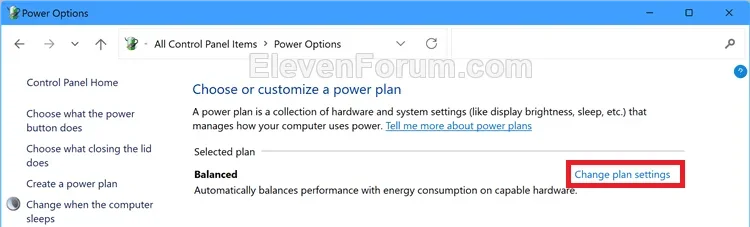
When I go to power option in the control panel it only shows Balanced power plan and I seem to not be able to get them back. I tried this tutorial and restarted my computer, but the missing power plans are still missing, so how do I get the power plans back?
 
Windows Build/Version
25H2 (OS Build 26200.7849)

My Computer

System One

  • OS
    Windows 11 Home 25H2 (OS Build: 26200.7849)
    Computer type
    Laptop
    Manufacturer/Model
    HP Laptop 15-fc0xxx
    CPU
    AMD Athlon Silver 7120U 2.40 gigahertz
    Motherboard
    HP 8DC9 52.52
    Memory
    8GB with 7.25 Gigabytes Usable Installed Memory
    Graphics Card(s)
    512MB ATI AMD Radeon Graphics (HP)
    Sound Card
    Realtek High Definition Audio
    Monitor(s) Displays
    Integrated Monitor (15.3"vis, May 2021)
    Screen Resolution
    1366 X 768
    Hard Drives
    SAMSUNG MZVL8256HEJD-00BH1 NVMe SSD
    Keyboard
    Standard PS/2 Keyboard
    Mouse
    USB HID-compliant mouse
    Internet Speed
    103.67Mbps (Up) and 11.22 Mbps (Down)
    Browser
    Microsoft Edge
    Antivirus
    Windows Security

When I go to power option in the control panel it only shows Balanced power plan and I seem to not be able to get them back. I tried this tutorial and restarted my computer, but the missing power plans are still missing, so how do I get the power plans back?
unlock all advanced power options and see if they show when you go into balanced > advanced

1772049849872.webp


My Computer

System One

  • OS
    Windows 11 Pro
unlock all advanced power options and see if they show when you go into balanced > advanced

View attachment 164350

Nope advanced options only show the balanced plan.
 

My Computer

System One

  • OS
    Windows 11 Home 25H2 (OS Build: 26200.7849)
    Computer type
    Laptop
    Manufacturer/Model
    HP Laptop 15-fc0xxx
    CPU
    AMD Athlon Silver 7120U 2.40 gigahertz
    Motherboard
    HP 8DC9 52.52
    Memory
    8GB with 7.25 Gigabytes Usable Installed Memory
    Graphics Card(s)
    512MB ATI AMD Radeon Graphics (HP)
    Sound Card
    Realtek High Definition Audio
    Monitor(s) Displays
    Integrated Monitor (15.3"vis, May 2021)
    Screen Resolution
    1366 X 768
    Hard Drives
    SAMSUNG MZVL8256HEJD-00BH1 NVMe SSD
    Keyboard
    Standard PS/2 Keyboard
    Mouse
    USB HID-compliant mouse
    Internet Speed
    103.67Mbps (Up) and 11.22 Mbps (Down)
    Browser
    Microsoft Edge
    Antivirus
    Windows Security

Windows 11 devices that support Modern Standby will usually only have the Balanced power plan scheme available by default, and can only add custom power plans.


My Computers

System One System Two

  • OS
    Windows 11 Pro for Workstations
    Computer type
    PC/Desktop
    Manufacturer/Model
    Custom self build
    CPU
    Intel i7-8700K 5 GHz
    Motherboard
    ASUS ROG Maximus XI Formula Z390
    Memory
    64 GB (4x16GB) G.SKILL TridentZ RGB DDR4 3600 MHz (F4-3600C18D-32GTZR)
    Graphics Card(s)
    ASUS ROG-STRIX-GTX1080TI-O11G-GAMING (11GB GDDR5X)
    Sound Card
    Integrated Digital Audio (S/PDIF)
    Monitor(s) Displays
    2 x Samsung Odyssey G75 27"
    Screen Resolution
    2560x1440
    Hard Drives
    1TB Samsung 990 PRO M.2,
    4TB Samsung 990 PRO M.2,
    TerraMaster F8 SSD Plus NAS
    PSU
    Seasonic Prime Titanium 850W
    Case
    Thermaltake Core P3 wall mounted
    Cooling
    Corsair Hydro H115i
    Keyboard
    Amazon Basics Wired Full Keyboard MD005
    Mouse
    Logitech MX Master 4
    Internet Speed
    2 Gbps Download and 100 Mbps Upload
    Browser
    Chrome and Edge
    Antivirus
    Microsoft Defender
    Other Info
    Logitech Z625 speaker system,
    Logitech BRIO 4K Pro webcam,
    HP Color LaserJet Pro MFP M477fdn,
    CyberPower CP1500PFCLCD
    Galaxy S23 Plus phone
  • Operating System
    Windows 11 Pro
    Computer type
    Laptop
    Manufacturer/Model
    Surface Laptop 7 Copilot+ PC
    CPU
    Snapdragon X Elite (12 core) 3.42 GHz
    Memory
    16 GB LPDDR5x-7467 MHz
    Monitor(s) Displays
    15" HDR
    Screen Resolution
    2496 x 1664
    Hard Drives
    1 TB SSD
    Internet Speed
    Wi-Fi 7 and Bluetooth 5.4
    Browser
    Chrome and Edge
    Antivirus
    Microsoft Defender

Windows 11 devices that support Modern Standby will usually only have the Balanced power plan scheme available by default, and can only add custom power plans.


Didn't work and my computer doesn't support modern standby.
did you run the powershell script i linked...?
Yes and it didn't work
 

My Computer

System One

  • OS
    Windows 11 Home 25H2 (OS Build: 26200.7849)
    Computer type
    Laptop
    Manufacturer/Model
    HP Laptop 15-fc0xxx
    CPU
    AMD Athlon Silver 7120U 2.40 gigahertz
    Motherboard
    HP 8DC9 52.52
    Memory
    8GB with 7.25 Gigabytes Usable Installed Memory
    Graphics Card(s)
    512MB ATI AMD Radeon Graphics (HP)
    Sound Card
    Realtek High Definition Audio
    Monitor(s) Displays
    Integrated Monitor (15.3"vis, May 2021)
    Screen Resolution
    1366 X 768
    Hard Drives
    SAMSUNG MZVL8256HEJD-00BH1 NVMe SSD
    Keyboard
    Standard PS/2 Keyboard
    Mouse
    USB HID-compliant mouse
    Internet Speed
    103.67Mbps (Up) and 11.22 Mbps (Down)
    Browser
    Microsoft Edge
    Antivirus
    Windows Security

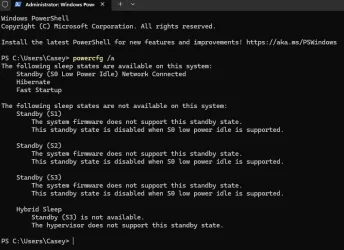
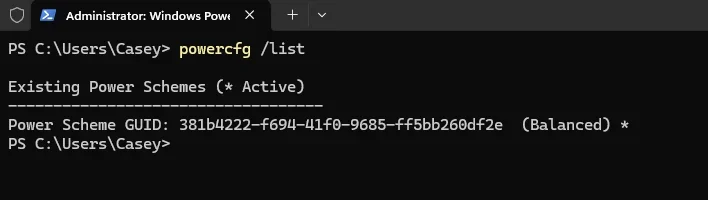
Just to confirm, run the two separate commands below, and post a screenshot of the results to see if anything may stand out.

powercfg /a

powercfg /list
 

My Computers

System One System Two

  • OS
    Windows 11 Pro for Workstations
    Computer type
    PC/Desktop
    Manufacturer/Model
    Custom self build
    CPU
    Intel i7-8700K 5 GHz
    Motherboard
    ASUS ROG Maximus XI Formula Z390
    Memory
    64 GB (4x16GB) G.SKILL TridentZ RGB DDR4 3600 MHz (F4-3600C18D-32GTZR)
    Graphics Card(s)
    ASUS ROG-STRIX-GTX1080TI-O11G-GAMING (11GB GDDR5X)
    Sound Card
    Integrated Digital Audio (S/PDIF)
    Monitor(s) Displays
    2 x Samsung Odyssey G75 27"
    Screen Resolution
    2560x1440
    Hard Drives
    1TB Samsung 990 PRO M.2,
    4TB Samsung 990 PRO M.2,
    TerraMaster F8 SSD Plus NAS
    PSU
    Seasonic Prime Titanium 850W
    Case
    Thermaltake Core P3 wall mounted
    Cooling
    Corsair Hydro H115i
    Keyboard
    Amazon Basics Wired Full Keyboard MD005
    Mouse
    Logitech MX Master 4
    Internet Speed
    2 Gbps Download and 100 Mbps Upload
    Browser
    Chrome and Edge
    Antivirus
    Microsoft Defender
    Other Info
    Logitech Z625 speaker system,
    Logitech BRIO 4K Pro webcam,
    HP Color LaserJet Pro MFP M477fdn,
    CyberPower CP1500PFCLCD
    Galaxy S23 Plus phone
  • Operating System
    Windows 11 Pro
    Computer type
    Laptop
    Manufacturer/Model
    Surface Laptop 7 Copilot+ PC
    CPU
    Snapdragon X Elite (12 core) 3.42 GHz
    Memory
    16 GB LPDDR5x-7467 MHz
    Monitor(s) Displays
    15" HDR
    Screen Resolution
    2496 x 1664
    Hard Drives
    1 TB SSD
    Internet Speed
    Wi-Fi 7 and Bluetooth 5.4
    Browser
    Chrome and Edge
    Antivirus
    Microsoft Defender
Just to confirm, run the two separate commands below, and post a screenshot of the results to see if anything may stand out.

powercfg /a

powercfg /list

1.webp

2.webp
 

My Computer

System One

  • OS
    Windows 11 Home 25H2 (OS Build: 26200.7849)
    Computer type
    Laptop
    Manufacturer/Model
    HP Laptop 15-fc0xxx
    CPU
    AMD Athlon Silver 7120U 2.40 gigahertz
    Motherboard
    HP 8DC9 52.52
    Memory
    8GB with 7.25 Gigabytes Usable Installed Memory
    Graphics Card(s)
    512MB ATI AMD Radeon Graphics (HP)
    Sound Card
    Realtek High Definition Audio
    Monitor(s) Displays
    Integrated Monitor (15.3"vis, May 2021)
    Screen Resolution
    1366 X 768
    Hard Drives
    SAMSUNG MZVL8256HEJD-00BH1 NVMe SSD
    Keyboard
    Standard PS/2 Keyboard
    Mouse
    USB HID-compliant mouse
    Internet Speed
    103.67Mbps (Up) and 11.22 Mbps (Down)
    Browser
    Microsoft Edge
    Antivirus
    Windows Security
@CompuGeekCasey

Your powercfg /a results show that your laptop does indeed support Modern Standby (S0). This would be why you only have the Balanced plan available. You can add custom power plans if wanted, but you won't be able to restore any other default plans. :(

You can change your power mode level below instead though.


My Computers

System One System Two

  • OS
    Windows 11 Pro for Workstations
    Computer type
    PC/Desktop
    Manufacturer/Model
    Custom self build
    CPU
    Intel i7-8700K 5 GHz
    Motherboard
    ASUS ROG Maximus XI Formula Z390
    Memory
    64 GB (4x16GB) G.SKILL TridentZ RGB DDR4 3600 MHz (F4-3600C18D-32GTZR)
    Graphics Card(s)
    ASUS ROG-STRIX-GTX1080TI-O11G-GAMING (11GB GDDR5X)
    Sound Card
    Integrated Digital Audio (S/PDIF)
    Monitor(s) Displays
    2 x Samsung Odyssey G75 27"
    Screen Resolution
    2560x1440
    Hard Drives
    1TB Samsung 990 PRO M.2,
    4TB Samsung 990 PRO M.2,
    TerraMaster F8 SSD Plus NAS
    PSU
    Seasonic Prime Titanium 850W
    Case
    Thermaltake Core P3 wall mounted
    Cooling
    Corsair Hydro H115i
    Keyboard
    Amazon Basics Wired Full Keyboard MD005
    Mouse
    Logitech MX Master 4
    Internet Speed
    2 Gbps Download and 100 Mbps Upload
    Browser
    Chrome and Edge
    Antivirus
    Microsoft Defender
    Other Info
    Logitech Z625 speaker system,
    Logitech BRIO 4K Pro webcam,
    HP Color LaserJet Pro MFP M477fdn,
    CyberPower CP1500PFCLCD
    Galaxy S23 Plus phone
  • Operating System
    Windows 11 Pro
    Computer type
    Laptop
    Manufacturer/Model
    Surface Laptop 7 Copilot+ PC
    CPU
    Snapdragon X Elite (12 core) 3.42 GHz
    Memory
    16 GB LPDDR5x-7467 MHz
    Monitor(s) Displays
    15" HDR
    Screen Resolution
    2496 x 1664
    Hard Drives
    1 TB SSD
    Internet Speed
    Wi-Fi 7 and Bluetooth 5.4
    Browser
    Chrome and Edge
    Antivirus
    Microsoft Defender
@CompuGeekCasey

Your powercfg /a results show that your laptop does indeed support Modern Standby (S0). This would be why you only have the Balanced plan available. You can add custom power plans if wanted, but you won't be able to restore any other default plans. :(

You can change your power mode level below instead though.

Okay thank I guess I will just stick with the balanced plan.
 

My Computer

System One

  • OS
    Windows 11 Home 25H2 (OS Build: 26200.7849)
    Computer type
    Laptop
    Manufacturer/Model
    HP Laptop 15-fc0xxx
    CPU
    AMD Athlon Silver 7120U 2.40 gigahertz
    Motherboard
    HP 8DC9 52.52
    Memory
    8GB with 7.25 Gigabytes Usable Installed Memory
    Graphics Card(s)
    512MB ATI AMD Radeon Graphics (HP)
    Sound Card
    Realtek High Definition Audio
    Monitor(s) Displays
    Integrated Monitor (15.3"vis, May 2021)
    Screen Resolution
    1366 X 768
    Hard Drives
    SAMSUNG MZVL8256HEJD-00BH1 NVMe SSD
    Keyboard
    Standard PS/2 Keyboard
    Mouse
    USB HID-compliant mouse
    Internet Speed
    103.67Mbps (Up) and 11.22 Mbps (Down)
    Browser
    Microsoft Edge
    Antivirus
    Windows Security
You're welcome. :shawn:

The Balanced plan will still automatically increase performance as needed, and reduce it when not.

Otherwise, you could select a higher power mode level to run with higher performance all the time.
 

My Computers

System One System Two

  • OS
    Windows 11 Pro for Workstations
    Computer type
    PC/Desktop
    Manufacturer/Model
    Custom self build
    CPU
    Intel i7-8700K 5 GHz
    Motherboard
    ASUS ROG Maximus XI Formula Z390
    Memory
    64 GB (4x16GB) G.SKILL TridentZ RGB DDR4 3600 MHz (F4-3600C18D-32GTZR)
    Graphics Card(s)
    ASUS ROG-STRIX-GTX1080TI-O11G-GAMING (11GB GDDR5X)
    Sound Card
    Integrated Digital Audio (S/PDIF)
    Monitor(s) Displays
    2 x Samsung Odyssey G75 27"
    Screen Resolution
    2560x1440
    Hard Drives
    1TB Samsung 990 PRO M.2,
    4TB Samsung 990 PRO M.2,
    TerraMaster F8 SSD Plus NAS
    PSU
    Seasonic Prime Titanium 850W
    Case
    Thermaltake Core P3 wall mounted
    Cooling
    Corsair Hydro H115i
    Keyboard
    Amazon Basics Wired Full Keyboard MD005
    Mouse
    Logitech MX Master 4
    Internet Speed
    2 Gbps Download and 100 Mbps Upload
    Browser
    Chrome and Edge
    Antivirus
    Microsoft Defender
    Other Info
    Logitech Z625 speaker system,
    Logitech BRIO 4K Pro webcam,
    HP Color LaserJet Pro MFP M477fdn,
    CyberPower CP1500PFCLCD
    Galaxy S23 Plus phone
  • Operating System
    Windows 11 Pro
    Computer type
    Laptop
    Manufacturer/Model
    Surface Laptop 7 Copilot+ PC
    CPU
    Snapdragon X Elite (12 core) 3.42 GHz
    Memory
    16 GB LPDDR5x-7467 MHz
    Monitor(s) Displays
    15" HDR
    Screen Resolution
    2496 x 1664
    Hard Drives
    1 TB SSD
    Internet Speed
    Wi-Fi 7 and Bluetooth 5.4
    Browser
    Chrome and Edge
    Antivirus
    Microsoft Defender
I used Power Option Settings in the Control Panel to set the Ultimate Performance Plan because I have high end PCs.
 

My Computers

System One System Two

  • OS
    Windows 11 Education For 25H2
    Computer type
    Laptop
    Manufacturer/Model
    HP ZBook G2
    CPU
    Intel® Core i7 5500u
    Motherboard
    HP
    Memory
    8 GB
    Graphics Card(s)
    Intel HD Family Graphics 5500 AMD Firepro 4150M
    Sound Card
    Realtek High Audio
    Hard Drives
    1 TB SSD
    Mouse
    HP USB Mouse
    Antivirus
    Windows Defender
  • Operating System
    Windows 11 Pro For Workstations 25H2
    Computer type
    Laptop
    Manufacturer/Model
    HP Zbook G4
    CPU
    Xeon 1535m v6
    Motherboard
    HP
    Memory
    32 GB
    Graphics card(s)
    AMD Quadro Pro 4100
    Sound Card
    Bang and Olufson Audio
    Hard Drives
    1TB SSD
    Mouse
    HP USB Mouse
    Antivirus
    Windows Defender
I used Power Option Settings in the Control Panel to set the Ultimate Performance Plan because I have high end PCs.
UPP is really only needed if the PC is being used as a server.

You are just keeping the CPU at max clock speed even when the PC is idle and stopping core parking.

On balanced the PC will still go to max performance when needed so you really gain nothing from using UPP.

Balanced also dynamically adjusts CPU speed based on load so the CPU speed will idle lower and save energy which will also reduces heat which will help in the longevity of the components.

I have benchmarked the two power plans and found consistently that there is negligible differences between balanced and UPP related to FPS in games.
 

My Computer

System One

  • OS
    Windows 11 Pro
Back
Top Bottom