Powershell batch job fails when run as a scheduled task.


jpullam

New member
Local time
8:42 AM
Posts
9
Location
Toronto
OS
Windows 11
I've set up a new Windows 11 system and am now trying to set up my regular file backups. I have created a Powershell batch job to take the contents of one folder and its subfolders, zip them, and add the zip file to another folder. I want to run this weekly overnight. When I run the batch job manually (right click then select "Run with Powershell") it runs fine and creates the new zip file. But when I use a scheduled task to run that same batch job, it does not. The result of the batch job is event 129 for the Create Task Process step which ends very quickly. The drives are both on a Synology device which is locally attached on my LAN.

Any suggestions for me ??
 
Windows Build/Version
25H2

My Computer My Computer

At a glance

Windows 11Ryzen 9 9900
OS
Windows 11
Computer type
PC/Desktop
Manufacturer/Model
AMD Custom
CPU
Ryzen 9 9900
Probably need to see how the task is configured.
When you 'run manually' the task runs in your interactive session. When a scheduled task runs on a schedule it runs as a true batch job. There are different permissions required for interactive vs batch.

Also is this Home or Pro edition of Windows?
 

My Computer My Computer

At a glance

Linux Mint
OS
Linux Mint
Computer type
Laptop
Manufacturer/Model
System76 Lemur Pro
It's the Pro edition. Where do I check the permissions for the batch job?
 

My Computer My Computer

At a glance

Windows 11Ryzen 9 9900
OS
Windows 11
Computer type
PC/Desktop
Manufacturer/Model
AMD Custom
CPU
Ryzen 9 9900
I suggest you check all the folder paths given in the script.
- When you run the script manually, its initial folder path is that it is running in.
- When TS runs a script, its initial folder path is often C:\Windows\System32.

Investigating Event 129 may or may not be useful.

I agree that the TS task settings need to be checked.
If, just for example, you are trying to run it Whether the user is logged on or not then that can cause errors in any script that can call up a user interface [whether or not you make use of that user interface]. If this applies to your problem then try Run only if the user is logged on instead.

It would be useful to see the script. I suggest you post it.


Denis
 
Last edited:

My Computer My Computer

At a glance

Windows 11 Home x64 Version 25H2 Build 26200....
OS
Windows 11 Home x64 Version 25H2 Build 26200.9168
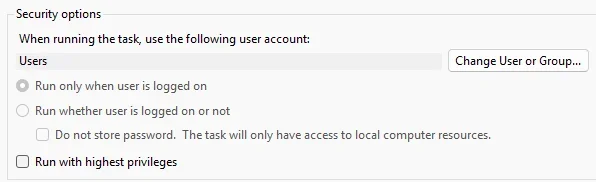
Who the scheduled job executes as is configured in the schedule task

1785793245006.webp


By default only members of the Administrators group can run scheduled tasks as a batch job.
On Pro it's easier to assign this right to other users.

'Windows key' + r
Type 'secpol.msc'
'Local Policies'
'User Rights Assignment'
Double click on 'Log on as a batch job'
Add desired user
 

My Computer My Computer

At a glance

Linux Mint
OS
Linux Mint
Computer type
Laptop
Manufacturer/Model
System76 Lemur Pro

My Computer My Computer

At a glance

Windows 11 Home x64 Version 25H2 Build 26200....
OS
Windows 11 Home x64 Version 25H2 Build 26200.9168

My Computer My Computer

At a glance

Windows 11 Pro
OS
Windows 11 Pro
Clarifications (in case my terminology wasn't correct).

Yes. a PS1 file.

Re adding the ZIP file ... I have a folder in which I store the backup copies, and the powershell creates a Zip file in that folder. The following is my code (not elegant, as I am not a Powershell user):

# Define source and destination paths
$SourcePath = "N:\MyDocsCopy\*"
$Timestamp = Get-Date -Format "yyyy-MM-dd_HHmm"
$DestinationZip = "N:\MyDocsArchives\MyDocs_$Timestamp.zip"

# Create the zip archive
Compress-Archive -Path "N:\MyDocsCopy\*" -DestinationPath "N:\MyDocsArchives\MyDocsArchive_$(Get-Date -Format 'yyyy-MM-dd').zip"

As I said previously, this works fine when I execute it directly, outside the task scheduler, so I assume it is correct.
 

My Computer My Computer

At a glance

Windows 11Ryzen 9 9900
OS
Windows 11
Computer type
PC/Desktop
Manufacturer/Model
AMD Custom
CPU
Ryzen 9 9900
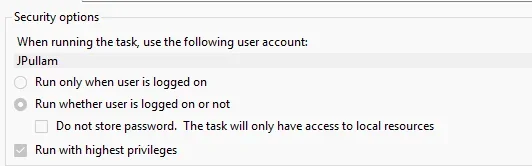
Here are the security options:
1785801031557.webp

and here is the account I use:
1785801098107.webp
Does this all look good?
 

My Computer My Computer

At a glance

Windows 11Ryzen 9 9900
OS
Windows 11
Computer type
PC/Desktop
Manufacturer/Model
AMD Custom
CPU
Ryzen 9 9900
What is drive N? Is this a mapped drive?

A background task can't access a mapped drive, you could try an UNC path, like "\\server\folder" or "\\192.168.0.12\folder"
 

My Computer My Computer

At a glance

Windows 7
OS
Windows 7
What happens if you create a shortcut to the .ps1, edit the Target line in the properties to:

Code:
conhost.exe --headless powershell.exe -NoProfile -ExecutionPolicy Bypass -File "C:\path\to\file.ps1"

And run the shortcut? If it works as it should, and as @garlin the task cannot access the mapped drive and if you cannot get it to work via UNC, I can make an ahk script compiled to exe that will execute that shortcut file. That should avoid any inaccessible issue(s).
 

My Computer My Computer

At a glance

Windows 11 Pro
OS
Windows 11 Pro
It is a mapped drive. I didn't realize that I couldn't do that. I'm now using \\NAS3\folder and will see when it tries tonight.
 

My Computer My Computer

At a glance

Windows 11Ryzen 9 9900
OS
Windows 11
Computer type
PC/Desktop
Manufacturer/Model
AMD Custom
CPU
Ryzen 9 9900
Running the task as SYSTEM is likely the real problem.

SYSTEM does not normally authenticate to a NAS using the logged-on user's NAS credentials. On a domain, it may present the computer account. On a typical home workgroup and NAS arrangement, the NAS is unlikely to recognize or authorize that computer account.

I would suggest setting up the Scheduled Task something like this

Run as:
The normal Windows user account that has access to \\NAS3\folder

Security option:
Run whether user is logged on or not

Store password:
Yes

Run with highest privileges:
Not normally required


Using a batch file as the target to call PowerShell in the Scheduled Task is often easier.
 

My Computer My Computer

At a glance

Windows 11 Pro build 25H2 x64Intel i9-13900K64GBNvidia GeForce RTX-3090 Ti
OS
Windows 11 Pro build 25H2 x64
Computer type
PC/Desktop
Manufacturer/Model
ASUS Custom build
CPU
Intel i9-13900K
Motherboard
Asus ROG STRIX Z790 E GAMING WIFI 11
Memory
64GB
Graphics Card(s)
Nvidia GeForce RTX-3090 Ti
Internet Speed
1 Gbps
Browser
Firefox
Antivirus
Malwarebytes
About how much data in size are we talking about creating a zip of each week?
 

My Computer My Computer

At a glance

Windows 11 Pro build 25H2 x64Intel i9-13900K64GBNvidia GeForce RTX-3090 Ti
OS
Windows 11 Pro build 25H2 x64
Computer type
PC/Desktop
Manufacturer/Model
ASUS Custom build
CPU
Intel i9-13900K
Motherboard
Asus ROG STRIX Z790 E GAMING WIFI 11
Memory
64GB
Graphics Card(s)
Nvidia GeForce RTX-3090 Ti
Internet Speed
1 Gbps
Browser
Firefox
Antivirus
Malwarebytes
I love the idea of using PoweShell for a backup task. I have one a lot more sophisticated I can share if wanted. I also use RoboCopy (Robust File Copy for Windows) for some local secondary backup aside from the real backups.

But, Hasleo Backup Suite Free v5.9 is a professional backup utility that allows not only Disk and Partition backup but also File and Folder backups. Then it can be scheduled a variety of ways. You might consider that.

But if you'd like to continue to use PoweShell and would be interested in a more sophisticate backup let me know and I can share one I use.
 

My Computer My Computer

At a glance

Windows 11 Pro build 25H2 x64Intel i9-13900K64GBNvidia GeForce RTX-3090 Ti
OS
Windows 11 Pro build 25H2 x64
Computer type
PC/Desktop
Manufacturer/Model
ASUS Custom build
CPU
Intel i9-13900K
Motherboard
Asus ROG STRIX Z790 E GAMING WIFI 11
Memory
64GB
Graphics Card(s)
Nvidia GeForce RTX-3090 Ti
Internet Speed
1 Gbps
Browser
Firefox
Antivirus
Malwarebytes
Does this all look good?
No. As mentioned in my earlier post, try setting it for running only when the user is logged on.


Denis
 

My Computer My Computer

At a glance

Windows 11 Home x64 Version 25H2 Build 26200....
OS
Windows 11 Home x64 Version 25H2 Build 26200.9168
Why? It can be run with no one logged into the computer.

Change values to what works for you.
Once edited to what you want, the entire block can be copied and pasted to an Admin leval command prompt
This will prompt you for your password.

Code:
schtasks.exe /Create ^
 /TN "\Backups\Zip Backup" ^
 /SC DAILY ^
 /ST 02:00 ^
 /RU "%USERDOMAIN%\%USERNAME%" ^
 /RP * ^
 /RL LIMITED ^
 /TR "\"C:\Windows\System32\WindowsPowerShell\v1.0\powershell.exe\" -NoProfile -NonInteractive -ExecutionPolicy Bypass -File \"C:\Scripts\ZipBackup.ps1\"" ^
 /F
 

My Computer My Computer

At a glance

Windows 11 Pro build 25H2 x64Intel i9-13900K64GBNvidia GeForce RTX-3090 Ti
OS
Windows 11 Pro build 25H2 x64
Computer type
PC/Desktop
Manufacturer/Model
ASUS Custom build
CPU
Intel i9-13900K
Motherboard
Asus ROG STRIX Z790 E GAMING WIFI 11
Memory
64GB
Graphics Card(s)
Nvidia GeForce RTX-3090 Ti
Internet Speed
1 Gbps
Browser
Firefox
Antivirus
Malwarebytes
I tried running it last night using the UNC format rather than the mapped drive letter. It failed too, and this time my local test said that when using the UNC format, the destination folder had to be created first (it was). There are a number of things in the comments above which I can try, but during my reading I learned that there is a 2GB limit on files which I am close to, so I decided to look for another solution to the problem. Right now I'm testing 7-Zip. I'm not opposed to paying a reasonable amount (one time) for utility that will do this, but most of what I have read about cannot create the zip file output.

This was a lot simpler in Windows 10 where I used Cobian backup happily for 10+ years, and it did everything.

Thanx to all responders for your feedback.
 

My Computer My Computer

At a glance

Windows 11Ryzen 9 9900
OS
Windows 11
Computer type
PC/Desktop
Manufacturer/Model
AMD Custom
CPU
Ryzen 9 9900
What is the NAS brand and model number? @jpullam

Approximately how much data are you backing up total?

What is the largest single file in your backups?
 
Last edited:

My Computer My Computer

At a glance

Windows 11 Pro build 25H2 x64Intel i9-13900K64GBNvidia GeForce RTX-3090 Ti
OS
Windows 11 Pro build 25H2 x64
Computer type
PC/Desktop
Manufacturer/Model
ASUS Custom build
CPU
Intel i9-13900K
Motherboard
Asus ROG STRIX Z790 E GAMING WIFI 11
Memory
64GB
Graphics Card(s)
Nvidia GeForce RTX-3090 Ti
Internet Speed
1 Gbps
Browser
Firefox
Antivirus
Malwarebytes
This backup fully runs from PowerShell and using 7-zip as the archiving tool. I don't use a NAS device but I don't see an obvious reason why it wouldn't work as long as share permissions are setup properly.

I just ran the script again today

PS C:\Scripts> .\Invoke-Rolling7ZipBackup.ps1
2026-08-04 13:26:58 [INFO] Invoke-Rolling7ZipBackup version 1.03
2026-08-04 13:26:58 [INFO] Start Time: 2026-08-04 13:26:58.795
2026-08-04 13:26:58 [INFO] Backup run started.
2026-08-04 13:26:58 [INFO] Computer: LAB-01
2026-08-04 13:26:58 [INFO] User: LAB-01\AS
2026-08-04 13:26:58 [INFO] PowerShell: 5.1.26100.8875
2026-08-04 13:26:58 [INFO] Source configured as: C:\Scripts
2026-08-04 13:26:58 [INFO] Destination: E:\Backup\Scripts
2026-08-04 13:26:58 [INFO] Weekly archives retained: 5
2026-08-04 13:26:58 [INFO] Compression level: 5
2026-08-04 13:26:58 [INFO] Solid compression: False
2026-08-04 13:26:58 [INFO] Exclusive backup lock acquired.
2026-08-04 13:26:58 [INFO] Source resolved as: C:\Scripts
2026-08-04 13:26:58 [INFO] Destination create/delete permission test passed.
2026-08-04 13:26:58 [INFO] 7-Zip executable: C:\Program Files\7-Zip\7z.exe
2026-08-04 13:26:58 [INFO] 7-Zip information: 7-Zip 26.02 (x64) : Copyright (c) 1999-2026 Igor Pavlov : 2026-06-25
2026-08-04 13:26:58 [INFO] Existing immutable Master retained unchanged: E:\Backup\Scripts\MyScriptingProjects_Master_2026-08-03_194717.7z
2026-08-04 13:26:58 [INFO] Current weekly archive exists and will be updated: E:\Backup\Scripts\MyScriptingProjects_Weekly_2026-W32.7z
2026-08-04 13:26:58 [INFO] Updating current weekly archive started.
2026-08-04 13:27:00 [7ZIP] 7-Zip 26.02 (x64) : Copyright (c) 1999-2026 Igor Pavlov : 2026-06-25
2026-08-04 13:27:00 [7ZIP] Open archive: E:\Backup\Scripts\MyScriptingProjects_Weekly_2026-W32.7z
2026-08-04 13:27:00 [7ZIP] --
2026-08-04 13:27:00 [7ZIP] Path = E:\Backup\Scripts\MyScriptingProjects_Weekly_2026-W32.7z
2026-08-04 13:27:00 [7ZIP] Type = 7z
2026-08-04 13:27:00 [7ZIP] Physical Size = 438174624
2026-08-04 13:27:00 [7ZIP] Headers Size = 168856
2026-08-04 13:27:00 [7ZIP] Method = ARM64 LZMA2:25 BCJ
2026-08-04 13:27:00 [7ZIP] Solid = -
2026-08-04 13:27:00 [7ZIP] Blocks = 13141
2026-08-04 13:27:00 [7ZIP] Scanning the drive:
2026-08-04 13:27:00 [7ZIP] 1112 folders, 13238 files, 1798147813 bytes (1715 MiB)
2026-08-04 13:27:00 [7ZIP] Updating archive: E:\Backup\Scripts\MyScriptingProjects_Weekly_2026-W32.7z
2026-08-04 13:27:00 [7ZIP] Keep old data in archive: 1111 folders, 13231 files, 1798044108 bytes (1715 MiB)
2026-08-04 13:27:00 [7ZIP] Add new data to archive: 1 folder, 7 files, 103705 bytes (102 KiB)
2026-08-04 13:27:00 [7ZIP] Files read from disk: 7
2026-08-04 13:27:00 [7ZIP] Archive size: 438195207 bytes (418 MiB)
2026-08-04 13:27:00 [7ZIP] Everything is Ok
2026-08-04 13:27:00 [INFO] Updating current weekly archive completed successfully.
2026-08-04 13:27:00 [INFO] Archive integrity test started.
2026-08-04 13:27:00 [7ZIP] 7-Zip 26.02 (x64) : Copyright (c) 1999-2026 Igor Pavlov : 2026-06-25
2026-08-04 13:27:00 [7ZIP] Scanning the drive for archives:
2026-08-04 13:27:00 [7ZIP] 1 file, 438195207 bytes (418 MiB)
2026-08-04 13:27:00 [7ZIP] Testing archive: E:\Backup\Scripts\MyScriptingProjects_Weekly_2026-W32.7z
2026-08-04 13:27:09 [7ZIP] --
2026-08-04 13:27:09 [7ZIP] Path = E:\Backup\Scripts\MyScriptingProjects_Weekly_2026-W32.7z
2026-08-04 13:27:09 [7ZIP] Type = 7z
2026-08-04 13:27:09 [7ZIP] Physical Size = 438195207
2026-08-04 13:27:09 [7ZIP] Headers Size = 169025
2026-08-04 13:27:09 [7ZIP] Method = ARM64 LZMA2:25 BCJ
2026-08-04 13:27:09 [7ZIP] Solid = -
2026-08-04 13:27:09 [7ZIP] Blocks = 13146
2026-08-04 13:27:09 [7ZIP] Everything is Ok
2026-08-04 13:27:09 [7ZIP] Folders: 1112
2026-08-04 13:27:09 [7ZIP] Files: 13238
2026-08-04 13:27:09 [7ZIP] Size: 1798147813
2026-08-04 13:27:09 [7ZIP] Compressed: 438195207
2026-08-04 13:27:09 [INFO] Archive integrity test completed successfully.
2026-08-04 13:27:09 [INFO] Current weekly archive verified. Size: 417.90 MB
2026-08-04 13:27:09 [INFO] Weekly retention requires no deletion. Found 1; keeping 5.
2026-08-04 13:27:09 [INFO] Backup run completed successfully.
2026-08-04 13:27:09 [INFO] Exclusive backup lock released.
2026-08-04 13:27:09 [INFO] End Time: 2026-08-04 13:27:09.204
2026-08-04 13:27:09 [INFO] Duration: 00:00:10.409


1785875592425.webp
 

My Computer My Computer

At a glance

Windows 11 Pro build 25H2 x64Intel i9-13900K64GBNvidia GeForce RTX-3090 Ti
OS
Windows 11 Pro build 25H2 x64
Computer type
PC/Desktop
Manufacturer/Model
ASUS Custom build
CPU
Intel i9-13900K
Motherboard
Asus ROG STRIX Z790 E GAMING WIFI 11
Memory
64GB
Graphics Card(s)
Nvidia GeForce RTX-3090 Ti
Internet Speed
1 Gbps
Browser
Firefox
Antivirus
Malwarebytes
Back
Top Bottom