Preboot troubles


Over 4 hours work went straight down the toilet. Despite having paused updates for 2 weeks, when I shut down last night Windows reinstalled this rogue update. I really have no idea what to do now, because you can't stop it from installing an update. Will Microsoft even attempt to fix the problem they caused? I'm not optimistic on that score seeing as they deny it is even happening.
Should be easier the second time then use the "Show or Hide Updates" Tool as Allan mentioned. Did it download it again or did it install it because it was already downloaded?
 

My Computers My Computers

  • At a glance

    Windows 11 (up to date)Intel i5 12400Corsair Vengeance LPX 16GBOn Board the Z690
    OS
    Windows 11 (up to date)
    Computer type
    PC/Desktop
    Manufacturer/Model
    Custom
    CPU
    Intel i5 12400
    Motherboard
    Gigabyte Z690 UA
    Memory
    Corsair Vengeance LPX 16GB
    Graphics Card(s)
    On Board the Z690
    Sound Card
    On Board
    Monitor(s) Displays
    43" Samsung tu7000
    Screen Resolution
    2560 x 1440
    Hard Drives
    SAMSUNG SSD 1TB NVMe M.2
    PSU
    Thermaltake smart 500w 80+
    Case
    LIAN LANCOOL_205M
    Cooling
    Bunch of fans . . . :o) (lights dont work)
    Keyboard
    Unicomp: Ultra Classic White Buckling Spring USB
    Mouse
    M510
    Internet Speed
    50mbps on Ethernet
    Browser
    Fire Fox
    Antivirus
    Windows
    Other Info
    Love this computer but I still prefer Win-7 like I love my old Lazy Boy Recliner . . . it just feels better.
  • At a glance

    WIN-7-64BIT and Win-11 pro for testing on uns...i5-3570K CPU @ 3.40GHz, 3801 Mhz, 4 Core(s), ...16 GB - Crucial Ballistick 4GB PC3-14900 DDR3...NVIDIA GeForce GTX 1050
    Operating System
    WIN-7-64BIT and Win-11 pro for testing on unsupported hardware
    Computer type
    PC/Desktop
    Manufacturer/Model
    Home built
    CPU
    i5-3570K CPU @ 3.40GHz, 3801 Mhz, 4 Core(s), 4 Logical Processor(s)
    Motherboard
    GA-Z77-HD3
    Memory
    16 GB - Crucial Ballistick 4GB PC3-14900 DDR3-1333 MHz
    Graphics card(s)
    NVIDIA GeForce GTX 1050
    Sound Card
    On Board
    Monitor(s) Displays
    ASUS VP278
    Screen Resolution
    1920 x 1080
    Hard Drives
    4 - internal Samsung 2.5" SSD, 1 WD HDD 7200 and some external drives
    PSU
    EVGA 550w
    Case
    Old Gygabyte Tower
    Cooling
    Yes
    Keyboard
    Unicomp - UNIOP4A USB (like the old IBM Model H that I started with)
    Mouse
    M510
    Internet Speed
    50mbps
    Browser
    Firefox
    Antivirus
    Windows
    Other Info
    The only thing it lack is USB-3.2 on the front face but it has 3.0 on the back

My Computer My Computer

At a glance

Windows 11Intel(R) Core(TM) i9-10900K CPU @ 3.70GHz32,0 GBNvidia GeForce RTX2080 Super
OS
Windows 11
Computer type
Laptop
Manufacturer/Model
Alienware A51M R2
CPU
Intel(R) Core(TM) i9-10900K CPU @ 3.70GHz
Memory
32,0 GB
Graphics Card(s)
Nvidia GeForce RTX2080 Super
Sound Card
Realtek
Screen Resolution
4K
Hard Drives
2TB (2x 1TB PCle M.2 SSD) RAID 0 [Boot] + 2TB (2x 1TB
PCle M.2 SSD) Non-Raid [Storage]
have you uninstalled the problematic update?
 

My Computer My Computer

At a glance

W11
OS
W11
Computer type
PC/Desktop
Manufacturer/Model
2 HP Desktops, 1 Dell Desktop, 2 Dell XPS Laptops, 1 HP Laptop
Keyboard
Logitech
Mouse
Logitech MX Master 4 & 3
Internet Speed
500 mps
Browser
Firefox
Antivirus
Bitdefender
Should be easier the second time then use the "Show or Hide Updates" Tool as Allan mentioned. Did it download it again or did it install it because it was already downloaded?
I tried again and seemingly managed to uninstall it, after which I re-enabled Windows Sandbox (that sonofabitch takes ages to install!). Windows Update history still shows it as having been installed on Feb 11, however it no longer appears in the list of updates to uninstall. I also downloaded the Show or Hide Updates tool, but when running it in show mode, it found no updates. In hide mode the result was the same. I'm guessing my uninstall was successful, but I will have to wait until tomorrow morning to see if the preboot loop has been fixed.

In WU settings, I have updates paused for 2 weeks. Is that why the tool couldn't find any updates?
have you uninstalled the problematic update?
Yes, I think so. See my reply to john1955 above.
 

My Computer My Computer

At a glance

Windows 11Intel(R) Core(TM) i9-10900K CPU @ 3.70GHz32,0 GBNvidia GeForce RTX2080 Super
OS
Windows 11
Computer type
Laptop
Manufacturer/Model
Alienware A51M R2
CPU
Intel(R) Core(TM) i9-10900K CPU @ 3.70GHz
Memory
32,0 GB
Graphics Card(s)
Nvidia GeForce RTX2080 Super
Sound Card
Realtek
Screen Resolution
4K
Hard Drives
2TB (2x 1TB PCle M.2 SSD) RAID 0 [Boot] + 2TB (2x 1TB
PCle M.2 SSD) Non-Raid [Storage]
So, I'm back to square one, because the pre-boot loop is still present. 😫
 

My Computer My Computer

At a glance

Windows 11Intel(R) Core(TM) i9-10900K CPU @ 3.70GHz32,0 GBNvidia GeForce RTX2080 Super
OS
Windows 11
Computer type
Laptop
Manufacturer/Model
Alienware A51M R2
CPU
Intel(R) Core(TM) i9-10900K CPU @ 3.70GHz
Memory
32,0 GB
Graphics Card(s)
Nvidia GeForce RTX2080 Super
Sound Card
Realtek
Screen Resolution
4K
Hard Drives
2TB (2x 1TB PCle M.2 SSD) RAID 0 [Boot] + 2TB (2x 1TB
PCle M.2 SSD) Non-Raid [Storage]
Please take pictures > post images or share links displaying what is seen including error messages and codes


What happens with each:

a) hard boot

b) booting to a flash drive with Windows Media Creation Tool (MCT) / iso

c) clean install Windows 10


My Computer My Computer

At a glance

Windows 10Intel(R) Core(TM) i7-4800MQ CPU @ 2.70GHz16 GB Total: Manufacturer : Samsung MemoryTyp...NVIDIA Quadro K3100M; Intel(R) HD Graphics 4600
OS
Windows 10
Computer type
Laptop
Manufacturer/Model
HP
CPU
Intel(R) Core(TM) i7-4800MQ CPU @ 2.70GHz
Motherboard
Product : 190A Version : KBC Version 94.56
Memory
16 GB Total: Manufacturer : Samsung MemoryType : DDR3 FormFactor : SODIMM Capacity : 8GB Speed : 1600
Graphics Card(s)
NVIDIA Quadro K3100M; Intel(R) HD Graphics 4600
Sound Card
IDT High Definition Audio CODEC; PNP Device ID HDAUDIO\FUNC_01&VEN_111D&DEV_76E0
Hard Drives
Model Hitachi HTS727575A9E364
Antivirus
Microsoft Defender
Other Info
Mobile Workstation
Please take pictures > post images or share links displaying what is seen including error messages and codes


What happens with each:

a) hard boot

b) booting to a flash drive with Windows Media Creation Tool (MCT) / iso

c) clean install Windows 10


a) what is a hard boot?
b) I have WinPE on a rescue flash drive dedicated to work with Macrium Reflect. The pre-boot loop starts before that is recognized. In other words, it makes no difference.
c) I am not prepared to reinstall Windows as I only did it a few weeks ago and restoring all my programs, licenses, and mail accounts took almost 2 weeks.

Pictures of the pre-boot cycle would tell you nothing. You would need to see a video. I can, of course, do that although I remind you that the issue only happens at first boot when the machine is cold. It doesn't happen on restart, nor if I shutdown and then start the machine again. So, if you want me to make a video, I can only do it tomorrow morning.
 

My Computer My Computer

At a glance

Windows 11Intel(R) Core(TM) i9-10900K CPU @ 3.70GHz32,0 GBNvidia GeForce RTX2080 Super
OS
Windows 11
Computer type
Laptop
Manufacturer/Model
Alienware A51M R2
CPU
Intel(R) Core(TM) i9-10900K CPU @ 3.70GHz
Memory
32,0 GB
Graphics Card(s)
Nvidia GeForce RTX2080 Super
Sound Card
Realtek
Screen Resolution
4K
Hard Drives
2TB (2x 1TB PCle M.2 SSD) RAID 0 [Boot] + 2TB (2x 1TB
PCle M.2 SSD) Non-Raid [Storage]
Can the computer:

a) clean install Windows
b) boot into Windows RE (Recovery Environment)
c) boot to a flash drive with Windows 11 MCT (Media Creation Tool) / iso
d) hard reboot
e) boot to safe mode
f) normal boot
g) run Memtest86+
 

My Computer My Computer

At a glance

Windows 10Intel(R) Core(TM) i7-4800MQ CPU @ 2.70GHz16 GB Total: Manufacturer : Samsung MemoryTyp...NVIDIA Quadro K3100M; Intel(R) HD Graphics 4600
OS
Windows 10
Computer type
Laptop
Manufacturer/Model
HP
CPU
Intel(R) Core(TM) i7-4800MQ CPU @ 2.70GHz
Motherboard
Product : 190A Version : KBC Version 94.56
Memory
16 GB Total: Manufacturer : Samsung MemoryType : DDR3 FormFactor : SODIMM Capacity : 8GB Speed : 1600
Graphics Card(s)
NVIDIA Quadro K3100M; Intel(R) HD Graphics 4600
Sound Card
IDT High Definition Audio CODEC; PNP Device ID HDAUDIO\FUNC_01&VEN_111D&DEV_76E0
Hard Drives
Model Hitachi HTS727575A9E364
Antivirus
Microsoft Defender
Other Info
Mobile Workstation

My Computers My Computers

  • At a glance

    Windows 11 (up to date)Intel i5 12400Corsair Vengeance LPX 16GBOn Board the Z690
    OS
    Windows 11 (up to date)
    Computer type
    PC/Desktop
    Manufacturer/Model
    Custom
    CPU
    Intel i5 12400
    Motherboard
    Gigabyte Z690 UA
    Memory
    Corsair Vengeance LPX 16GB
    Graphics Card(s)
    On Board the Z690
    Sound Card
    On Board
    Monitor(s) Displays
    43" Samsung tu7000
    Screen Resolution
    2560 x 1440
    Hard Drives
    SAMSUNG SSD 1TB NVMe M.2
    PSU
    Thermaltake smart 500w 80+
    Case
    LIAN LANCOOL_205M
    Cooling
    Bunch of fans . . . :o) (lights dont work)
    Keyboard
    Unicomp: Ultra Classic White Buckling Spring USB
    Mouse
    M510
    Internet Speed
    50mbps on Ethernet
    Browser
    Fire Fox
    Antivirus
    Windows
    Other Info
    Love this computer but I still prefer Win-7 like I love my old Lazy Boy Recliner . . . it just feels better.
  • At a glance

    WIN-7-64BIT and Win-11 pro for testing on uns...i5-3570K CPU @ 3.40GHz, 3801 Mhz, 4 Core(s), ...16 GB - Crucial Ballistick 4GB PC3-14900 DDR3...NVIDIA GeForce GTX 1050
    Operating System
    WIN-7-64BIT and Win-11 pro for testing on unsupported hardware
    Computer type
    PC/Desktop
    Manufacturer/Model
    Home built
    CPU
    i5-3570K CPU @ 3.40GHz, 3801 Mhz, 4 Core(s), 4 Logical Processor(s)
    Motherboard
    GA-Z77-HD3
    Memory
    16 GB - Crucial Ballistick 4GB PC3-14900 DDR3-1333 MHz
    Graphics card(s)
    NVIDIA GeForce GTX 1050
    Sound Card
    On Board
    Monitor(s) Displays
    ASUS VP278
    Screen Resolution
    1920 x 1080
    Hard Drives
    4 - internal Samsung 2.5" SSD, 1 WD HDD 7200 and some external drives
    PSU
    EVGA 550w
    Case
    Old Gygabyte Tower
    Cooling
    Yes
    Keyboard
    Unicomp - UNIOP4A USB (like the old IBM Model H that I started with)
    Mouse
    M510
    Internet Speed
    50mbps
    Browser
    Firefox
    Antivirus
    Windows
    Other Info
    The only thing it lack is USB-3.2 on the front face but it has 3.0 on the back
a) what is a hard boot?
b) I have WinPE on a rescue flash drive dedicated to work with Macrium Reflect. The pre-boot loop starts before that is recognized. In other words, it makes no difference.
c) I am not prepared to reinstall Windows as I only did it a few weeks ago and restoring all my programs, licenses, and mail accounts took almost 2 weeks.

Pictures of the pre-boot cycle would tell you nothing. You would need to see a video. I can, of course, do that although I remind you that the issue only happens at first boot when the machine is cold. It doesn't happen on restart, nor if I shutdown and then start the machine again. So, if you want me to make a video, I can only do it tomorrow morning.
Have you replaced the CMOS battery?
 

My Computer My Computer

At a glance

Windows 11 25H2Broadwell-e 6850K 4.5ghz @1.36v32GB Corsair LPM 3600 C16EVGA RTX 3080Ti FTW
OS
Windows 11 25H2
Computer type
PC/Desktop
Manufacturer/Model
EVGA home brew
CPU
Broadwell-e 6850K 4.5ghz @1.36v
Motherboard
EVGA X99 FTW K
Memory
32GB Corsair LPM 3600 C16
Graphics Card(s)
EVGA RTX 3080Ti FTW
Sound Card
Asus Centurion true 7.1 headset. (5 speakers in each earpeice)
Monitor(s) Displays
LG C4 55"
Screen Resolution
4K 144hz
Hard Drives
Various models of SSDs ~10TB No HDDs installed.
PSU
be quiet! BN516 Straight Power 12-1000w 80 Plus Platinum
Case
Corsair 780T modified to dual 200mm intake fans
Cooling
Corsair H110i
Keyboard
Corsair K95 Platinum
Mouse
Corsair M65 RGB Elite
Internet Speed
50Mbs
Can the computer:

a) clean install Windows
b) boot into Windows RE (Recovery Environment)
c) boot to a flash drive with Windows 11 MCT (Media Creation Tool) / iso
d) hard reboot
e) boot to safe mode
f) normal boot
g) run Memtest86+
a) as stated previously, I refuse to do this.
b) yes.
c) not from a cold boot. Otherwise, yes.
d) yes.
e) have not yet tried from a cold boot. Otherwise, it surely can.
f) yes.
g) no. There was a warning on their site about secure boot violations which they have no fix for. Besides which, there is nothing wrong with my memory or disks.

I should add that the AI droid on Dell's support forum tells me the problem is the CMOS battery needs replacing. Would it not be better to do that before trying anything else?
 

My Computer My Computer

At a glance

Windows 11Intel(R) Core(TM) i9-10900K CPU @ 3.70GHz32,0 GBNvidia GeForce RTX2080 Super
OS
Windows 11
Computer type
Laptop
Manufacturer/Model
Alienware A51M R2
CPU
Intel(R) Core(TM) i9-10900K CPU @ 3.70GHz
Memory
32,0 GB
Graphics Card(s)
Nvidia GeForce RTX2080 Super
Sound Card
Realtek
Screen Resolution
4K
Hard Drives
2TB (2x 1TB PCle M.2 SSD) RAID 0 [Boot] + 2TB (2x 1TB
PCle M.2 SSD) Non-Raid [Storage]
Have you replaced the CMOS battery?
Not yet. I am going to do that. I need to find a supplier in France.
Edit: I just found one and ordered it. It should arrive next Wednesday or Thursday.
 

My Computer My Computer

At a glance

Windows 11Intel(R) Core(TM) i9-10900K CPU @ 3.70GHz32,0 GBNvidia GeForce RTX2080 Super
OS
Windows 11
Computer type
Laptop
Manufacturer/Model
Alienware A51M R2
CPU
Intel(R) Core(TM) i9-10900K CPU @ 3.70GHz
Memory
32,0 GB
Graphics Card(s)
Nvidia GeForce RTX2080 Super
Sound Card
Realtek
Screen Resolution
4K
Hard Drives
2TB (2x 1TB PCle M.2 SSD) RAID 0 [Boot] + 2TB (2x 1TB
PCle M.2 SSD) Non-Raid [Storage]
Last edited:

My Computer My Computer

At a glance

Windows 10Intel(R) Core(TM) i7-4800MQ CPU @ 2.70GHz16 GB Total: Manufacturer : Samsung MemoryTyp...NVIDIA Quadro K3100M; Intel(R) HD Graphics 4600
OS
Windows 10
Computer type
Laptop
Manufacturer/Model
HP
CPU
Intel(R) Core(TM) i7-4800MQ CPU @ 2.70GHz
Motherboard
Product : 190A Version : KBC Version 94.56
Memory
16 GB Total: Manufacturer : Samsung MemoryType : DDR3 FormFactor : SODIMM Capacity : 8GB Speed : 1600
Graphics Card(s)
NVIDIA Quadro K3100M; Intel(R) HD Graphics 4600
Sound Card
IDT High Definition Audio CODEC; PNP Device ID HDAUDIO\FUNC_01&VEN_111D&DEV_76E0
Hard Drives
Model Hitachi HTS727575A9E364
Antivirus
Microsoft Defender
Other Info
Mobile Workstation
f) normal boot


Please update the progress with post #8 steps #2 and #3.
This morning, I took a video of startup, but it did only one pre-boot cycle before going into normal boot. Of course, this doesn't mean the problem is fixed, but it's a massive improvement over the last few days.

I did not understand the instructions you gave in #3 however here is a link to the V2 log results: https://storage.ionos.fr/f/40258440
 

My Computer My Computer

At a glance

Windows 11Intel(R) Core(TM) i9-10900K CPU @ 3.70GHz32,0 GBNvidia GeForce RTX2080 Super
OS
Windows 11
Computer type
Laptop
Manufacturer/Model
Alienware A51M R2
CPU
Intel(R) Core(TM) i9-10900K CPU @ 3.70GHz
Memory
32,0 GB
Graphics Card(s)
Nvidia GeForce RTX2080 Super
Sound Card
Realtek
Screen Resolution
4K
Hard Drives
2TB (2x 1TB PCle M.2 SSD) RAID 0 [Boot] + 2TB (2x 1TB
PCle M.2 SSD) Non-Raid [Storage]
For share links please use:

Drop box

Google drive

GoFile.io


Temporarily use English as needed as the default language so that they can be scanned and read.


Make sure that links are available without logon.


My Computer My Computer

At a glance

Windows 10Intel(R) Core(TM) i7-4800MQ CPU @ 2.70GHz16 GB Total: Manufacturer : Samsung MemoryTyp...NVIDIA Quadro K3100M; Intel(R) HD Graphics 4600
OS
Windows 10
Computer type
Laptop
Manufacturer/Model
HP
CPU
Intel(R) Core(TM) i7-4800MQ CPU @ 2.70GHz
Motherboard
Product : 190A Version : KBC Version 94.56
Memory
16 GB Total: Manufacturer : Samsung MemoryType : DDR3 FormFactor : SODIMM Capacity : 8GB Speed : 1600
Graphics Card(s)
NVIDIA Quadro K3100M; Intel(R) HD Graphics 4600
Sound Card
IDT High Definition Audio CODEC; PNP Device ID HDAUDIO\FUNC_01&VEN_111D&DEV_76E0
Hard Drives
Model Hitachi HTS727575A9E364
Antivirus
Microsoft Defender
Other Info
Mobile Workstation

Sign in​

with your Google Account to continue to Google Drive. This account will be available to other Google apps in the browser.


Make sure that links are available without logon.


My Computer My Computer

At a glance

Windows 10Intel(R) Core(TM) i7-4800MQ CPU @ 2.70GHz16 GB Total: Manufacturer : Samsung MemoryTyp...NVIDIA Quadro K3100M; Intel(R) HD Graphics 4600
OS
Windows 10
Computer type
Laptop
Manufacturer/Model
HP
CPU
Intel(R) Core(TM) i7-4800MQ CPU @ 2.70GHz
Motherboard
Product : 190A Version : KBC Version 94.56
Memory
16 GB Total: Manufacturer : Samsung MemoryType : DDR3 FormFactor : SODIMM Capacity : 8GB Speed : 1600
Graphics Card(s)
NVIDIA Quadro K3100M; Intel(R) HD Graphics 4600
Sound Card
IDT High Definition Audio CODEC; PNP Device ID HDAUDIO\FUNC_01&VEN_111D&DEV_76E0
Hard Drives
Model Hitachi HTS727575A9E364
Antivirus
Microsoft Defender
Other Info
Mobile Workstation

My Computer My Computer

At a glance

Windows 11Intel(R) Core(TM) i9-10900K CPU @ 3.70GHz32,0 GBNvidia GeForce RTX2080 Super
OS
Windows 11
Computer type
Laptop
Manufacturer/Model
Alienware A51M R2
CPU
Intel(R) Core(TM) i9-10900K CPU @ 3.70GHz
Memory
32,0 GB
Graphics Card(s)
Nvidia GeForce RTX2080 Super
Sound Card
Realtek
Screen Resolution
4K
Hard Drives
2TB (2x 1TB PCle M.2 SSD) RAID 0 [Boot] + 2TB (2x 1TB
PCle M.2 SSD) Non-Raid [Storage]
I sent you the Google drive link via PM yesterday.


Sign in​

with your Google Account to continue to Google Drive. This account will be available to other Google apps in the browser.


Make sure that links are available without logon.


Hi zbook, hopefully no logon will be required:
https://drive.google.com/file/d/1nBtDhDtS1qi9VDtMJB-DdPBN7tzC7g--/view?usp=sharing


Sign in​

with your Google Account to continue to Google Drive. This account will be available to other Google apps in the browser.


Why not check before posting?
 

My Computer My Computer

At a glance

Windows 10Intel(R) Core(TM) i7-4800MQ CPU @ 2.70GHz16 GB Total: Manufacturer : Samsung MemoryTyp...NVIDIA Quadro K3100M; Intel(R) HD Graphics 4600
OS
Windows 10
Computer type
Laptop
Manufacturer/Model
HP
CPU
Intel(R) Core(TM) i7-4800MQ CPU @ 2.70GHz
Motherboard
Product : 190A Version : KBC Version 94.56
Memory
16 GB Total: Manufacturer : Samsung MemoryType : DDR3 FormFactor : SODIMM Capacity : 8GB Speed : 1600
Graphics Card(s)
NVIDIA Quadro K3100M; Intel(R) HD Graphics 4600
Sound Card
IDT High Definition Audio CODEC; PNP Device ID HDAUDIO\FUNC_01&VEN_111D&DEV_76E0
Hard Drives
Model Hitachi HTS727575A9E364
Antivirus
Microsoft Defender
Other Info
Mobile Workstation

Why not check before posting?
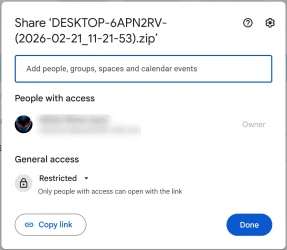
I cannot see what I need to do to make it downloadable without login?
This is what I am offered and I don't have your mail address.

gdrive.webp

What was wrong with the direct link I provided on my Ionos HiDrive server? I could have sent that to you as a PM if preferred. The file has been deleted there now, but I can reupload it if you will accept that.
 

My Computer My Computer

At a glance

Windows 11Intel(R) Core(TM) i9-10900K CPU @ 3.70GHz32,0 GBNvidia GeForce RTX2080 Super
OS
Windows 11
Computer type
Laptop
Manufacturer/Model
Alienware A51M R2
CPU
Intel(R) Core(TM) i9-10900K CPU @ 3.70GHz
Memory
32,0 GB
Graphics Card(s)
Nvidia GeForce RTX2080 Super
Sound Card
Realtek
Screen Resolution
4K
Hard Drives
2TB (2x 1TB PCle M.2 SSD) RAID 0 [Boot] + 2TB (2x 1TB
PCle M.2 SSD) Non-Raid [Storage]
Something odd is happening which makes me wonder if the problem really is due to the CMOS battery?
If I hold down the shift key when starting, instead of going into Win RE, Windows boots normally with no pre-boot looping.
 

My Computer My Computer

At a glance

Windows 11Intel(R) Core(TM) i9-10900K CPU @ 3.70GHz32,0 GBNvidia GeForce RTX2080 Super
OS
Windows 11
Computer type
Laptop
Manufacturer/Model
Alienware A51M R2
CPU
Intel(R) Core(TM) i9-10900K CPU @ 3.70GHz
Memory
32,0 GB
Graphics Card(s)
Nvidia GeForce RTX2080 Super
Sound Card
Realtek
Screen Resolution
4K
Hard Drives
2TB (2x 1TB PCle M.2 SSD) RAID 0 [Boot] + 2TB (2x 1TB
PCle M.2 SSD) Non-Raid [Storage]

Latest Support Threads

Back
Top Bottom