Preboot troubles


QuicktellPro

Active member
Member
Local time
7:06 PM
Posts
297
OS
Windows 11
My Alienware A51 M2's warranty expired at the end of last month. 2 days later it began refusing to boot. The problem is in the preboot stage so has nothing to do with Windows. A full diagnostic test revealed no hardware or memory issues. Ideally, I need to discuss what is happening with people specialized in this particular make and model. Can anyone recommend me to a forum or community that deals with Alienware laptops, please?
 

My Computer

System One

  • OS
    Windows 11
    Computer type
    Laptop
    Manufacturer/Model
    Alienware A51M R2
    CPU
    Intel(R) Core(TM) i9-10900K CPU @ 3.70GHz
    Memory
    32,0 GB
    Graphics Card(s)
    Nvidia GeForce RTX2080 Super
    Sound Card
    Realtek
    Screen Resolution
    4K
    Hard Drives
    2TB (2x 1TB PCle M.2 SSD) RAID 0 [Boot] + 2TB (2x 1TB
    PCle M.2 SSD) Non-Raid [Storage]
My Alienware A51 M2's warranty expired at the end of last month. 2 days later it began refusing to boot. The problem is in the preboot stage so has nothing to do with Windows. A full diagnostic test revealed no hardware or memory issues. Ideally, I need to discuss what is happening with people specialized in this particular make and model. Can anyone recommend me to a forum or community that deals with Alienware laptops, please?
Hang on.

Even before pc boots into Windows, it still needs to hook into a winpe bootstrap.

You need to eliminate software booting issues before delving into more complicated hardware issues.

Try creating a Macrium Reflect Rescue USB Flash Drive on another pc (adding any nvme drivers if needed).

See if you can boot from that and if it boots, select link "fix windows boot problems".

If you cannot boot into the Rescue Drive, that suggests hardware issues.

Note; the free trial version should be adequate or you can still download free version from 3rd party sites.
 

My Computer

System One

  • OS
    Windows 11 Pro + Win11 Canary VM.
    Computer type
    Laptop
    Manufacturer/Model
    ASUS Zenbook 14
    CPU
    I9 13th gen i9-13900H 2.60 GHZ
    Motherboard
    Yep, Laptop has one.
    Memory
    16 GB soldered
    Graphics Card(s)
    Integrated Intel Iris XE
    Sound Card
    Realtek built in
    Monitor(s) Displays
    laptop OLED screen
    Screen Resolution
    2880x1800 touchscreen
    Hard Drives
    1 TB NVME SSD (only weakness is only one slot)
    PSU
    Internal + 65W thunderbolt USB4 charger
    Case
    Yep, got one
    Cooling
    Stella Artois (UK pint cans - 568 ml) - extra cost.
    Keyboard
    Built in UK keybd
    Mouse
    Bluetooth , wireless dongled, wired
    Internet Speed
    900 mbs (ethernet), wifi 6 typical 350-450 mb/s both up and down
    Browser
    Edge
    Antivirus
    Defender
    Other Info
    TPM 2.0, 2xUSB4 thunderbolt, 1xUsb3 (usb a), 1xUsb-c, hdmi out, 3.5 mm audio out/in combo, ASUS backlit trackpad (inc. switchable number pad)

    Macrium Reflect Home V8
    Office 365 Family (6 users each 1TB onedrive space)
    Hyper-V (a vm runs almost as fast as my older laptop)
Exactly what happens when you attempt to boot - what (if anything) appears on the screen?
 

My Computer

System One

  • OS
    W11
    Computer type
    PC/Desktop
    Manufacturer/Model
    2 HP Desktops, 1 Dell Desktop, 2 Dell XPS Laptops, 1 HP Laptop
    Keyboard
    Logitech
    Mouse
    Logitech MX Master 4 & 3
    Internet Speed
    500 mps
    Browser
    Firefox
    Antivirus
    Bitdefender
Exactly what happens when you attempt to boot - what (if anything) appears on the screen?
When pressing the power button, it hesitates for 3 seconds and then lights up red. The keyboard does a left to right multicolour scan continually and the fans turn for about 5 seconds. Then the fans stop, the laptop goes silent, a click is heard, the machine turns off, and the whole process restarts automatically. It does this several times until it does one of the following:
1. the power button remains very dim and alternates between red and mauve, or
2. the screen turns on and the preboot procedure finally begins, eventually ending with Windows being loaded.

If the first event happens, I can only do a hard shutdown and try again, because leaving it makes no difference. The battery is fully charged, so that isn't the problem.
 

My Computer

System One

  • OS
    Windows 11
    Computer type
    Laptop
    Manufacturer/Model
    Alienware A51M R2
    CPU
    Intel(R) Core(TM) i9-10900K CPU @ 3.70GHz
    Memory
    32,0 GB
    Graphics Card(s)
    Nvidia GeForce RTX2080 Super
    Sound Card
    Realtek
    Screen Resolution
    4K
    Hard Drives
    2TB (2x 1TB PCle M.2 SSD) RAID 0 [Boot] + 2TB (2x 1TB
    PCle M.2 SSD) Non-Raid [Storage]
Even before pc boots into Windows, it still needs to hook into a winpe bootstrap.
It doesn't even get that far. I have a full version of Reflect 8. Using the rescue media makes no difference because it can't even read the USB drives.

For now, it is just misbehaving and can eventually be coaxed into starting, but I need to get to the bottom of why it is doing this, because there is no mention of this in the troubleshooting steps provided with the laptop's service manual.
 

My Computer

System One

  • OS
    Windows 11
    Computer type
    Laptop
    Manufacturer/Model
    Alienware A51M R2
    CPU
    Intel(R) Core(TM) i9-10900K CPU @ 3.70GHz
    Memory
    32,0 GB
    Graphics Card(s)
    Nvidia GeForce RTX2080 Super
    Sound Card
    Realtek
    Screen Resolution
    4K
    Hard Drives
    2TB (2x 1TB PCle M.2 SSD) RAID 0 [Boot] + 2TB (2x 1TB
    PCle M.2 SSD) Non-Raid [Storage]

My Computer

System One

  • OS
    Windows 11 Pro 25H2 build 26200.8457
    Computer type
    Laptop
    Manufacturer/Model
    Lenovo ThinkPad Workstation P72
    CPU
    Intel i7 8750H @ 2.2 GHz
    Motherboard
    Lenovo 01YU291
    Memory
    16 GB (all Samsung) DDR4-3200 SODIMM (non-ECC) PCIe 3
    Graphics Card(s)
    Intel UHD Graphics 630 & NVIDIA Quadro P600
    Sound Card
    Realtek ALC3286 & Focusrite Saffire 24 Pro DSP
    Monitor(s) Displays
    17.3"
    Screen Resolution
    3840x2160
    Hard Drives
    1TB SSD Samsung 860 EVO SATA 3
    1TB SSD Samsung 970 EVO M.2 NVMe PCIe 3 x 4
    2TB SSD Samsung 990 PRO M.2 NVMe PCIe 3 x 4
    PSU
    230W
    Cooling
    fan
    Keyboard
    UltraNav
    Mouse
    Kensington wireless Orbit
    Internet Speed
    640Mbps
    Browser
    DuckDuckGo and Firefox
    Antivirus
    Defender
    Other Info
    CM246 Chipset
There's still a few things you can do.
Firstly, can you re-confirm your laptop model number, because the closest I can find is the Alienware Area-51m R2.
Then can you confirm your BIOS version, assuming you can get in to the BIOS occasionally.

Next I would run an SSD diagnosis with the software from your SSD manufacturer. This will be better at telling you if there are any issues over the included Dell Diagnostics, which I'm presuming you ran in the first post.
 

My Computer

System One

  • OS
    Windows 11 Pro / LTSC 2024
1) Please turn off windows fast startup:


2) Run the V2 log collector > post a share link


3) Run administrative command prompt: > post share links

wevtutil epl Application %userprofile%\Desktop\application.evtx

wevtutil epl System %userprofile%\Desktop\system.evtx
 

My Computer

System One

  • OS
    Windows 10
    Computer type
    Laptop
    Manufacturer/Model
    HP
    CPU
    Intel(R) Core(TM) i7-4800MQ CPU @ 2.70GHz
    Motherboard
    Product : 190A Version : KBC Version 94.56
    Memory
    16 GB Total: Manufacturer : Samsung MemoryType : DDR3 FormFactor : SODIMM Capacity : 8GB Speed : 1600
    Graphics Card(s)
    NVIDIA Quadro K3100M; Intel(R) HD Graphics 4600
    Sound Card
    IDT High Definition Audio CODEC; PNP Device ID HDAUDIO\FUNC_01&VEN_111D&DEV_76E0
    Hard Drives
    Model Hitachi HTS727575A9E364
    Antivirus
    Microsoft Defender
    Other Info
    Mobile Workstation
Some suggestions to try before anything else:

Have the service manual handy.
Service Manual

Turn OFF and unplug everything.

Remove and inspect the battery - is it getting swollen? If so, replace it.
Swollen Battery

Remove and reseat the memory modules.
Memory Modules
 

My Computers

System One System Two

  • OS
    Win 10 Pro / Win 11 Pro & Home, Linux Mint
    Computer type
    PC/Desktop
    Manufacturer/Model
    Custom builds
    CPU
    AMD Ryzen 7 5700X / A10-7860K
    Motherboard
    MSI PRO B550-VC / ASRock A88M-G/3.1
    Memory
    32GB / 16GB
    Graphics Card(s)
    AMD RX 6650 XT / RX 580
    Monitor(s) Displays
    Samsung 27" / LG 24"
    Screen Resolution
    1920x1080
    Hard Drives
    Toshiba 2 TB
    Toshiba 1 TB
    Toshiba 1 TB
    WD Black SN770 1TB

    PNY 1 TB
    PNY 500 GB
    WD Black SN770 200 GB
    Inland 500 GB
    Inland 256 GB
    Case
    NZXT / Lian LI
    Keyboard
    ROCCAT PYRO / Logitech 148
    Mouse
    Logitech
    Browser
    Firefox, Opera, Waterfox, Tor
  • Operating System
    Windows 11 Home
    Computer type
    Laptop
    Manufacturer/Model
    HP 17
    CPU
    Intel i5
    Memory
    16GB
    Screen Resolution
    1920 x 1080
    Hard Drives
    512 GB
    Browser
    Firefox
My Alienware A51 M2's warranty expired at the end of last month. 2 days later it began refusing to boot. The problem is in the preboot stage so has nothing to do with Windows. A full diagnostic test revealed no hardware or memory issues. Ideally, I need to discuss what is happening with people specialized in this particular make and model. Can anyone recommend me to a forum or community that deals with Alienware laptops, please?
I watch a YouTube channel (Parts-People Dell Laptop Experts) and he is always working on Alienware laptops)

Google AI has some suggestions when I enter your entire OP and one of then is to clear the CMOS and remove the battery and try and run it only from a power supply . . . The last option is to get service (the YouTube guy) and he gets a lot of laptops ruined by other shops.

better if you read it yourself if you haven't already . . .

Google search result
 
Last edited:

My Computers

System One System Two

  • OS
    Windows 11 (up to date)
    Computer type
    PC/Desktop
    Manufacturer/Model
    Custom
    CPU
    Intel i5 12400
    Motherboard
    Gigabyte Z690 UA
    Memory
    Corsair Vengeance LPX 16GB
    Graphics Card(s)
    On Board the Z690
    Sound Card
    On Board
    Monitor(s) Displays
    43" Samsung tu7000
    Screen Resolution
    2560 x 1440
    Hard Drives
    SAMSUNG SSD 1TB NVMe M.2
    PSU
    Thermaltake smart 500w 80+
    Case
    LIAN LANCOOL_205M
    Cooling
    Bunch of fans . . . :o) (lights dont work)
    Keyboard
    Unicomp: Ultra Classic White Buckling Spring USB
    Mouse
    M510
    Internet Speed
    50mbps on Ethernet
    Browser
    Fire Fox
    Antivirus
    Windows
    Other Info
    Love this computer but I still prefer Win-7 like I love my old Lazy Boy Recliner . . . it just feels better.
  • Operating System
    WIN-7-64BIT and Win-11 pro for testing on unsupported hardware
    Computer type
    PC/Desktop
    Manufacturer/Model
    Home built
    CPU
    i5-3570K CPU @ 3.40GHz, 3801 Mhz, 4 Core(s), 4 Logical Processor(s)
    Motherboard
    GA-Z77-HD3
    Memory
    16 GB - Crucial Ballistick 4GB PC3-14900 DDR3-1333 MHz
    Graphics card(s)
    NVIDIA GeForce GTX 1050
    Sound Card
    On Board
    Monitor(s) Displays
    ASUS VP278
    Screen Resolution
    1920 x 1080
    Hard Drives
    4 - internal Samsung 2.5" SSD, 1 WD HDD 7200 and some external drives
    PSU
    EVGA 550w
    Case
    Old Gygabyte Tower
    Cooling
    Yes
    Keyboard
    Unicomp - UNIOP4A USB (like the old IBM Model H that I started with)
    Mouse
    M510
    Internet Speed
    50mbps
    Browser
    Firefox
    Antivirus
    Windows
    Other Info
    The only thing it lack is USB-3.2 on the front face but it has 3.0 on the back

My Computers

System One System Two

  • OS
    Win 11 Home ♦♦♦26200.8655 ♦♦♦♦♦♦♦25H2
    Computer type
    PC/Desktop
    Manufacturer/Model
    Built by Ghot® [May 2020]
    CPU
    AMD Ryzen 7 3700X
    Motherboard
    Asus Pro WS X570-ACE (BIOS 5302)
    Memory
    G.Skill (F4-3200C14D-16GTZKW)
    Graphics Card(s)
    EVGA RTX 2070 (08G-P4-2171-KR)
    Sound Card
    Realtek ALC1220P / ALC S1220A
    Monitor(s) Displays
    Dell U3011 30"
    Screen Resolution
    2560 x 1600
    Hard Drives
    2x Samsung 860 EVO 500GB,
    WD 4TB Black FZBX - SATA III,
    WD 8TB Black FZBX - SATA III,
    DRW-24B1ST CD/DVD Burner
    PSU
    PC Power & Cooling 750W Quad EPS12V
    Case
    Cooler Master ATCS 840 Tower
    Cooling
    CM Hyper 212 EVO (push/pull)
    Keyboard
    Ducky DK9008 Shine II Blue LED
    Mouse
    Logitech Optical M-100
    Internet Speed
    300/300
    Browser
    Firefox (latest)
    Antivirus
    Bitdefender Total Security
    Other Info
    Speakers: Klipsch Pro Media 2.1
  • Operating System
    Windows XP Pro 32bit w/SP3
    Computer type
    PC/Desktop
    Manufacturer/Model
    Built by Ghot® (not in use)
    CPU
    AMD Athlon 64 X2 5000+ (OC'd @ 3.2Ghz)
    Motherboard
    ASUS M2N32-SLI Deluxe Wireless Edition
    Memory
    TWIN2X2048-6400C4DHX (2 x 1GB, DDR2 800)
    Graphics card(s)
    EVGA 256-P2-N758-TR GeForce 8600GT SSC
    Sound Card
    Onboard
    Monitor(s) Displays
    ViewSonic G90FB Black 19" Professional (CRT)
    Screen Resolution
    up to 2048 x 1536
    Hard Drives
    WD 36GB 10,000rpm Raptor SATA
    Seagate 80GB 7200rpm SATA
    Lite-On LTR-52246S CD/RW
    Lite-On LH-18A1P CD/DVD Burner
    PSU
    PC Power & Cooling Silencer 750 Quad EPS12V
    Case
    Generic Beige case, 80mm fans
    Cooling
    ZALMAN 9500A 92mm CPU Cooler
    Keyboard
    Logitech Classic Keybooard 200
    Mouse
    Logitech Optical M-BT96a
    Internet Speed
    300/300
    Browser
    Firefox 3.x ??
    Antivirus
    Symantec (Norton)
    Other Info
    Still assembled, still runs. Haven't turned it on for 15 years?
There's still a few things you can do.
Firstly, can you re-confirm your laptop model number, because the closest I can find is the Alienware Area-51m R2.
Then can you confirm your BIOS version, assuming you can get in to the BIOS occasionally.

Next I would run an SSD diagnosis with the software from your SSD manufacturer. This will be better at telling you if there are any issues over the included Dell Diagnostics, which I'm presuming you ran in the first post.
I noted my error but only after it was too late to edit the post. It is indeed an Area 51m R2.
BIOS v1.35.0

I am downloading the Hynix SK Drive Manager at the moment, however it is taking a very long time at only 33.3 kb/s. I will post the results when I have managed to complete the test.
 

My Computer

System One

  • OS
    Windows 11
    Computer type
    Laptop
    Manufacturer/Model
    Alienware A51M R2
    CPU
    Intel(R) Core(TM) i9-10900K CPU @ 3.70GHz
    Memory
    32,0 GB
    Graphics Card(s)
    Nvidia GeForce RTX2080 Super
    Sound Card
    Realtek
    Screen Resolution
    4K
    Hard Drives
    2TB (2x 1TB PCle M.2 SSD) RAID 0 [Boot] + 2TB (2x 1TB
    PCle M.2 SSD) Non-Raid [Storage]
I watch a YouTube channel (Parts-People Dell Laptop Experts) and he is always working on Alienware laptops)

Google AI has some suggestions when I enter your entire OP and one of then is to clear the CMOS and remove the battery and try and run it only from a power supply . . . The last option is to get service (the YouTube guy) and he gets a lot of laptops ruined by other shops.

better if you read it yourself if you haven't already . . .

Google search result
Thanks for these suggestions, John. I will try them tomorrow. I do have a few questions though.
Will a hard reset with battery disconnected also reset my BIOS to factory default or can I rest assured they will not be altered?
The laptop has never been moved since I bought it which makes me wonder how the RAM modules could have become unseated?
If one of the RAM sticks was faulty, would that not show when running DELL diagnostics? I ran the deep analysis option and it said no faults were detected.
 

My Computer

System One

  • OS
    Windows 11
    Computer type
    Laptop
    Manufacturer/Model
    Alienware A51M R2
    CPU
    Intel(R) Core(TM) i9-10900K CPU @ 3.70GHz
    Memory
    32,0 GB
    Graphics Card(s)
    Nvidia GeForce RTX2080 Super
    Sound Card
    Realtek
    Screen Resolution
    4K
    Hard Drives
    2TB (2x 1TB PCle M.2 SSD) RAID 0 [Boot] + 2TB (2x 1TB
    PCle M.2 SSD) Non-Raid [Storage]
Do you have the same problem when plugged into the wall?
It is always plugged in and I have verified that both power bricks are performing correctly.
I did, however, try to start the machine with them disconnected to see if running on battery alone would make any difference. It didn't.
 

My Computer

System One

  • OS
    Windows 11
    Computer type
    Laptop
    Manufacturer/Model
    Alienware A51M R2
    CPU
    Intel(R) Core(TM) i9-10900K CPU @ 3.70GHz
    Memory
    32,0 GB
    Graphics Card(s)
    Nvidia GeForce RTX2080 Super
    Sound Card
    Realtek
    Screen Resolution
    4K
    Hard Drives
    2TB (2x 1TB PCle M.2 SSD) RAID 0 [Boot] + 2TB (2x 1TB
    PCle M.2 SSD) Non-Raid [Storage]

It is always plugged in and I have verified that both power bricks are performing correctly.
I did, however, try to start the machine with them disconnected to see if running on battery alone would make any difference. It didn't.


I'm not familiar with modern laptops, but if possible... take the battery out and run only on wall power.
See if that makes a difference.

Other than that, I'd say check you BIOS settings, see if one of them changed.
 

My Computers

System One System Two

  • OS
    Win 11 Home ♦♦♦26200.8655 ♦♦♦♦♦♦♦25H2
    Computer type
    PC/Desktop
    Manufacturer/Model
    Built by Ghot® [May 2020]
    CPU
    AMD Ryzen 7 3700X
    Motherboard
    Asus Pro WS X570-ACE (BIOS 5302)
    Memory
    G.Skill (F4-3200C14D-16GTZKW)
    Graphics Card(s)
    EVGA RTX 2070 (08G-P4-2171-KR)
    Sound Card
    Realtek ALC1220P / ALC S1220A
    Monitor(s) Displays
    Dell U3011 30"
    Screen Resolution
    2560 x 1600
    Hard Drives
    2x Samsung 860 EVO 500GB,
    WD 4TB Black FZBX - SATA III,
    WD 8TB Black FZBX - SATA III,
    DRW-24B1ST CD/DVD Burner
    PSU
    PC Power & Cooling 750W Quad EPS12V
    Case
    Cooler Master ATCS 840 Tower
    Cooling
    CM Hyper 212 EVO (push/pull)
    Keyboard
    Ducky DK9008 Shine II Blue LED
    Mouse
    Logitech Optical M-100
    Internet Speed
    300/300
    Browser
    Firefox (latest)
    Antivirus
    Bitdefender Total Security
    Other Info
    Speakers: Klipsch Pro Media 2.1
  • Operating System
    Windows XP Pro 32bit w/SP3
    Computer type
    PC/Desktop
    Manufacturer/Model
    Built by Ghot® (not in use)
    CPU
    AMD Athlon 64 X2 5000+ (OC'd @ 3.2Ghz)
    Motherboard
    ASUS M2N32-SLI Deluxe Wireless Edition
    Memory
    TWIN2X2048-6400C4DHX (2 x 1GB, DDR2 800)
    Graphics card(s)
    EVGA 256-P2-N758-TR GeForce 8600GT SSC
    Sound Card
    Onboard
    Monitor(s) Displays
    ViewSonic G90FB Black 19" Professional (CRT)
    Screen Resolution
    up to 2048 x 1536
    Hard Drives
    WD 36GB 10,000rpm Raptor SATA
    Seagate 80GB 7200rpm SATA
    Lite-On LTR-52246S CD/RW
    Lite-On LH-18A1P CD/DVD Burner
    PSU
    PC Power & Cooling Silencer 750 Quad EPS12V
    Case
    Generic Beige case, 80mm fans
    Cooling
    ZALMAN 9500A 92mm CPU Cooler
    Keyboard
    Logitech Classic Keybooard 200
    Mouse
    Logitech Optical M-BT96a
    Internet Speed
    300/300
    Browser
    Firefox 3.x ??
    Antivirus
    Symantec (Norton)
    Other Info
    Still assembled, still runs. Haven't turned it on for 15 years?
Thanks for these suggestions, John. I will try them tomorrow. I do have a few questions though.
Will a hard reset with battery disconnected also reset my BIOS to factory default or can I rest assured they will not be altered?
The laptop has never been moved since I bought it which makes me wonder how the RAM modules could have become unseated?
If one of the RAM sticks was faulty, would that not show when running DELL diagnostics? I ran the deep analysis option and it said no faults were detected.
It might reset the BIOS to fail-safe default which is OK but it will not effect BIOS version. It's to rule out corruption. If you can access the BIOS while booting you should be able to back it up but search for how to do it. If you have overclocking it will change that as overclocking can cause issues. I think you would have different issues if it was the ram and that link did not mention resetting ram but if it's easy enough to get to why not try it.
 
Last edited:

My Computers

System One System Two

  • OS
    Windows 11 (up to date)
    Computer type
    PC/Desktop
    Manufacturer/Model
    Custom
    CPU
    Intel i5 12400
    Motherboard
    Gigabyte Z690 UA
    Memory
    Corsair Vengeance LPX 16GB
    Graphics Card(s)
    On Board the Z690
    Sound Card
    On Board
    Monitor(s) Displays
    43" Samsung tu7000
    Screen Resolution
    2560 x 1440
    Hard Drives
    SAMSUNG SSD 1TB NVMe M.2
    PSU
    Thermaltake smart 500w 80+
    Case
    LIAN LANCOOL_205M
    Cooling
    Bunch of fans . . . :o) (lights dont work)
    Keyboard
    Unicomp: Ultra Classic White Buckling Spring USB
    Mouse
    M510
    Internet Speed
    50mbps on Ethernet
    Browser
    Fire Fox
    Antivirus
    Windows
    Other Info
    Love this computer but I still prefer Win-7 like I love my old Lazy Boy Recliner . . . it just feels better.
  • Operating System
    WIN-7-64BIT and Win-11 pro for testing on unsupported hardware
    Computer type
    PC/Desktop
    Manufacturer/Model
    Home built
    CPU
    i5-3570K CPU @ 3.40GHz, 3801 Mhz, 4 Core(s), 4 Logical Processor(s)
    Motherboard
    GA-Z77-HD3
    Memory
    16 GB - Crucial Ballistick 4GB PC3-14900 DDR3-1333 MHz
    Graphics card(s)
    NVIDIA GeForce GTX 1050
    Sound Card
    On Board
    Monitor(s) Displays
    ASUS VP278
    Screen Resolution
    1920 x 1080
    Hard Drives
    4 - internal Samsung 2.5" SSD, 1 WD HDD 7200 and some external drives
    PSU
    EVGA 550w
    Case
    Old Gygabyte Tower
    Cooling
    Yes
    Keyboard
    Unicomp - UNIOP4A USB (like the old IBM Model H that I started with)
    Mouse
    M510
    Internet Speed
    50mbps
    Browser
    Firefox
    Antivirus
    Windows
    Other Info
    The only thing it lack is USB-3.2 on the front face but it has 3.0 on the back
1) Please turn off windows fast startup:


2) Run the V2 log collector > post a share link


3) Run administrative command prompt: > post share links

wevtutil epl Application %userprofile%\Desktop\application.evtx

wevtutil epl System %userprofile%\Desktop\system.evtx
I have turned off fast start-up. The problem I am having does not happen on restart. I have to shut down the PC and start it again manually. Should I run the V2 log collector after start-up or prior to shutdown? I ask because I fail to see how it could work unless in automated restart.
 

My Computer

System One

  • OS
    Windows 11
    Computer type
    Laptop
    Manufacturer/Model
    Alienware A51M R2
    CPU
    Intel(R) Core(TM) i9-10900K CPU @ 3.70GHz
    Memory
    32,0 GB
    Graphics Card(s)
    Nvidia GeForce RTX2080 Super
    Sound Card
    Realtek
    Screen Resolution
    4K
    Hard Drives
    2TB (2x 1TB PCle M.2 SSD) RAID 0 [Boot] + 2TB (2x 1TB
    PCle M.2 SSD) Non-Raid [Storage]
Was there any pattern to the lights blinking when it fails to boot that can be interpreted?
 

My Computers

System One System Two

  • OS
    Windows 11 (up to date)
    Computer type
    PC/Desktop
    Manufacturer/Model
    Custom
    CPU
    Intel i5 12400
    Motherboard
    Gigabyte Z690 UA
    Memory
    Corsair Vengeance LPX 16GB
    Graphics Card(s)
    On Board the Z690
    Sound Card
    On Board
    Monitor(s) Displays
    43" Samsung tu7000
    Screen Resolution
    2560 x 1440
    Hard Drives
    SAMSUNG SSD 1TB NVMe M.2
    PSU
    Thermaltake smart 500w 80+
    Case
    LIAN LANCOOL_205M
    Cooling
    Bunch of fans . . . :o) (lights dont work)
    Keyboard
    Unicomp: Ultra Classic White Buckling Spring USB
    Mouse
    M510
    Internet Speed
    50mbps on Ethernet
    Browser
    Fire Fox
    Antivirus
    Windows
    Other Info
    Love this computer but I still prefer Win-7 like I love my old Lazy Boy Recliner . . . it just feels better.
  • Operating System
    WIN-7-64BIT and Win-11 pro for testing on unsupported hardware
    Computer type
    PC/Desktop
    Manufacturer/Model
    Home built
    CPU
    i5-3570K CPU @ 3.40GHz, 3801 Mhz, 4 Core(s), 4 Logical Processor(s)
    Motherboard
    GA-Z77-HD3
    Memory
    16 GB - Crucial Ballistick 4GB PC3-14900 DDR3-1333 MHz
    Graphics card(s)
    NVIDIA GeForce GTX 1050
    Sound Card
    On Board
    Monitor(s) Displays
    ASUS VP278
    Screen Resolution
    1920 x 1080
    Hard Drives
    4 - internal Samsung 2.5" SSD, 1 WD HDD 7200 and some external drives
    PSU
    EVGA 550w
    Case
    Old Gygabyte Tower
    Cooling
    Yes
    Keyboard
    Unicomp - UNIOP4A USB (like the old IBM Model H that I started with)
    Mouse
    M510
    Internet Speed
    50mbps
    Browser
    Firefox
    Antivirus
    Windows
    Other Info
    The only thing it lack is USB-3.2 on the front face but it has 3.0 on the back
Next I would run an SSD diagnosis with the software from your SSD manufacturer. This will be better at telling you if there are any issues over the included Dell Diagnostics, which I'm presuming you ran in the first post.
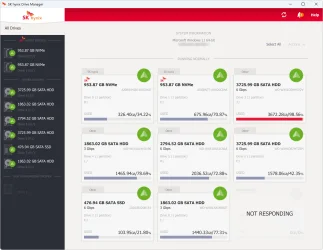
After running the SK Hynix Drive Manager tool, it confirmed both my SSD's to be in perfect health (status 100%). However, one of my other drives is showing as unresponsive. All the drives I use are working normally, so I am guessing this probably refers to an old HDD that is built-in to my office desk which I have not used in the last 16 years. The notification it gave said:
19:26:03 Drive 2. Read Device Info failed. SCSI Error detected. Status : 0x02 CHECK CONDITION Sense Key : 0x05 ILLEGAL REQUEST ASC : 0x20 ASCQ : 0x0

How can I check the condition? In diskmgmt, all my drives are showing as healthy. There is no mention of any non-responsive drive.

SSD_health.webp
 

My Computer

System One

  • OS
    Windows 11
    Computer type
    Laptop
    Manufacturer/Model
    Alienware A51M R2
    CPU
    Intel(R) Core(TM) i9-10900K CPU @ 3.70GHz
    Memory
    32,0 GB
    Graphics Card(s)
    Nvidia GeForce RTX2080 Super
    Sound Card
    Realtek
    Screen Resolution
    4K
    Hard Drives
    2TB (2x 1TB PCle M.2 SSD) RAID 0 [Boot] + 2TB (2x 1TB
    PCle M.2 SSD) Non-Raid [Storage]

Was there any pattern to the lights blinking when it fails to boot that can be interpreted?
I have yet to test it again. When booting this morning, the only pattern I could see was the power button (Alien head logo) oscillating between red and mauve. It was definitely mauve, not blue or cyan. After a hard shutdown, it lit as red and continued restarting every 15 to 20 seconds until the screen finally lit and the boot procedure began.
 

My Computer

System One

  • OS
    Windows 11
    Computer type
    Laptop
    Manufacturer/Model
    Alienware A51M R2
    CPU
    Intel(R) Core(TM) i9-10900K CPU @ 3.70GHz
    Memory
    32,0 GB
    Graphics Card(s)
    Nvidia GeForce RTX2080 Super
    Sound Card
    Realtek
    Screen Resolution
    4K
    Hard Drives
    2TB (2x 1TB PCle M.2 SSD) RAID 0 [Boot] + 2TB (2x 1TB
    PCle M.2 SSD) Non-Raid [Storage]
Back
Top Bottom