
Solved Preparing to image my computer, need help


I’m sorry, everyone.

I’m hoplessly lost trying to do what I believed to be a relatively simple disk clean/Windows reinstall. (Stuff people say they methodically do every year.) Pryor to this I had performed a number of Win10 reinstalls—both regular ones (which meant I had to contend with OneDrive) that only required installing software on a thumb drive and running the installer.

So finding out that I could accomplish a reinstall that would bypass the disaster of an automatic OneDrive install was thrilling. Now, after getting advice from everyone regarding how easy cleaning my drive and installing Win11 should be, I seem to be back at the beginning: finding out there’s work I need to do involving Dell and computer drivers (or not, since the computer is not the Pro edition) and possibly involving RegEdit and none of that is included in any of the Tutorials I was sent to or any user advice before just now.

Am I reading this all wrong?
 

My Computers My Computers

  • At a glance

    Win11 Pro16GB2.30 gigahertz Intel 11th Gen Core i7-11800H
    OS
    Win11 Pro
    Computer type
    PC/Desktop
    Manufacturer/Model
    Beelink
    Memory
    16GB
    Graphics Card(s)
    2.30 gigahertz Intel 11th Gen Core i7-11800H
    Sound Card
    Intel® Smart Sound Technology for USB Audio
    Monitor(s) Displays
    laptop (small) and 1 or 2 external monitors
    Screen Resolution
    -
    Hard Drives
    PC711 NVMe SK hynix 1TB 1.02 TB NVMe ANB2N582412102F0G_0001
    PSU
    -
    Case
    Laptop
    Cooling
    fan
    Keyboard
    External!
    Mouse
    External
    Internet Speed
    -
    Browser
    Chrome (Chrome profiles), Firefox (Bookmark Search Plus2), Edge (History page), Opera (annoying)
    Antivirus
    WinDefender
    Other Info
    Win11 Home 23H2 22631.3447
  • At a glance

    Win108068 MB Usable Installed Memory2.30 gigahertz Intel 11th Gen Core i7-11800H
    Operating System
    Win10
    Computer type
    PC/Desktop
    Manufacturer/Model
    self
    Motherboard
    Gigabyte B75M-D3H
    Memory
    8068 MB Usable Installed Memory
    Graphics card(s)
    2.30 gigahertz Intel 11th Gen Core i7-11800H
    Sound Card
    Intel® Smart Sound Technology for USB Audio
    Monitor(s) Displays
    3 Displays
    Screen Resolution
    n/a
    Hard Drives
    SSD and others (internal and external)
    Case
    Desktop
    Cooling
    Fan
    Keyboard
    External
    Mouse
    External
    Browser
    Chrome, Firefox, Tor, Brave, Opera, etc.
    Antivirus
    Win Defender
    Other Info
    Win10 & unfortunately OneDrive: Can't completely rid myself of this!!
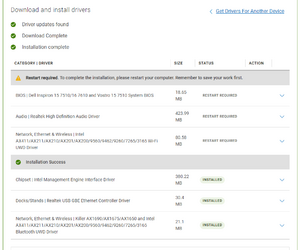
Drivers updated...

1705265577214.png
And it seems I might be able to download, save, and install??? other drivers when the Win11 install is finished?

By the way
1705266164950.png
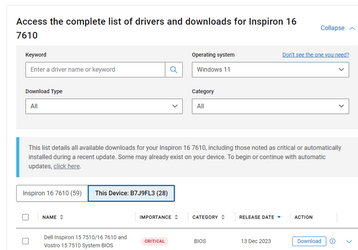
Why does Dell, based on my service number, list this computer as a Inspiron 16 7610 (requiring 59 drivers)
yet refer to "This Device B7J9FL3" as a computer requiring only 28 drivers?


1705266311211.png A new whatever...
 

My Computers My Computers

  • At a glance

    Win11 Pro16GB2.30 gigahertz Intel 11th Gen Core i7-11800H
    OS
    Win11 Pro
    Computer type
    PC/Desktop
    Manufacturer/Model
    Beelink
    Memory
    16GB
    Graphics Card(s)
    2.30 gigahertz Intel 11th Gen Core i7-11800H
    Sound Card
    Intel® Smart Sound Technology for USB Audio
    Monitor(s) Displays
    laptop (small) and 1 or 2 external monitors
    Screen Resolution
    -
    Hard Drives
    PC711 NVMe SK hynix 1TB 1.02 TB NVMe ANB2N582412102F0G_0001
    PSU
    -
    Case
    Laptop
    Cooling
    fan
    Keyboard
    External!
    Mouse
    External
    Internet Speed
    -
    Browser
    Chrome (Chrome profiles), Firefox (Bookmark Search Plus2), Edge (History page), Opera (annoying)
    Antivirus
    WinDefender
    Other Info
    Win11 Home 23H2 22631.3447
  • At a glance

    Win108068 MB Usable Installed Memory2.30 gigahertz Intel 11th Gen Core i7-11800H
    Operating System
    Win10
    Computer type
    PC/Desktop
    Manufacturer/Model
    self
    Motherboard
    Gigabyte B75M-D3H
    Memory
    8068 MB Usable Installed Memory
    Graphics card(s)
    2.30 gigahertz Intel 11th Gen Core i7-11800H
    Sound Card
    Intel® Smart Sound Technology for USB Audio
    Monitor(s) Displays
    3 Displays
    Screen Resolution
    n/a
    Hard Drives
    SSD and others (internal and external)
    Case
    Desktop
    Cooling
    Fan
    Keyboard
    External
    Mouse
    External
    Browser
    Chrome, Firefox, Tor, Brave, Opera, etc.
    Antivirus
    Win Defender
    Other Info
    Win10 & unfortunately OneDrive: Can't completely rid myself of this!!
This is a crazy thread.

Backups;
Make an image of your drive (tutorial has been supplied)
For extra safety & precautions, copy your important files to an external.
/The end.

The reinstall;
Make a USB with the latest ISO & Rufus
Install/Upgrade
/The end.
 

My Computers My Computers

  • At a glance

    Windows 11 Pro 25H2 Build 26200.8894Intel(R) Core(TM) i7-4770K CPU @ 3.50GHz32.0 GB of I forget and the box is in storage.Gigabyte nVidia GeForce GTX 1660 Super OC 6GB
    OS
    Windows 11 Pro 25H2 Build 26200.8894
    Computer type
    PC/Desktop
    Manufacturer/Model
    Sin-built 2013
    CPU
    Intel(R) Core(TM) i7-4770K CPU @ 3.50GHz
    Motherboard
    ASUS ROG Maximus VI Formula
    Memory
    32.0 GB of I forget and the box is in storage.
    Graphics Card(s)
    Gigabyte nVidia GeForce GTX 1660 Super OC 6GB
    Sound Card
    ROG SupremeFX Formula 8-Channel High Definition Audio
    Monitor(s) Displays
    5 x LG 25MS500-B - 1 x 24MK430H-B - 1 x Wacom Pro 22" Touch Screen Tablet
    Screen Resolution
    All over the place
    Hard Drives
    Too many to list. OS on Samsung 1TB 870 QVO SATA
    PSU
    Silverstone 1500
    Case
    NZXT Phantom 820 Full-Tower Case
    Cooling
    Noctua NH-D15 Elite Class Dual Tower CPU Cooler / 6 x EziDIY 120mm / 2 x Corsair 140mm somethings / 1 x 140mm Thermaltake something / 2 x 200mm Corsair.
    Keyboard
    Corsair K95 / Logitech diNovo Edge Wireless
    Mouse
    Logitech: G402 / G502 / Mx Masters / Mx Air Cordless
    Internet Speed
    2000/500Mbps
    Browser
    All sorts
    Antivirus
    Kaspersky Premium
    Other Info
    ㅤㅤㅤㅤㅤㅤㅤㅤㅤㅤㅤㅤㅤㅤㅤㅤㅤㅤㅤㅤㅤㅤㅤㅤㅤㅤㅤㅤㅤㅤㅤㅤㅤㅤㅤㅤㅤㅤㅤㅤ⠀⠀⠀⠀⠀⠀⠀⠀⠀⠀
    TP-Link BE9300 WiFi 7 Bluetooth 5.4 (Archer TBE550E)
    TP-Link TX201 V1 2.5GB Lan

    Grandstream HT812 - VoIP
    ASUS DSL-AX82U - Mesh
    ASUS RT-AC68U - Mesh
    ASUS RT-BE88U Router

    Brother MFC-L2880DW Printer

    I’m on a horse.
  • At a glance

    Windows 11 Pro 25H2 Build 26200.8894 (Wifes)13th Generation Intel® Core™ i5-1340P Process...16GB LPDDR5-52001x Intel® Iris® Xe Graphics
    Operating System
    Windows 11 Pro 25H2 Build 26200.8894 (Wifes)
    Computer type
    Laptop
    Manufacturer/Model
    LENOVO Yoga 7 14IRL8 - Type 82YL
    CPU
    13th Generation Intel® Core™ i5-1340P Processor(Core™ i5-1340P)
    Memory
    16GB LPDDR5-5200
    Graphics card(s)
    1x Intel® Iris® Xe Graphics
    Sound Card
    Optimized with Dolby Atmos®
    Screen Resolution
    QHD 2880 x 1800 OLED
    Hard Drives
    M.2 512 GB SSD PCIe
    Mouse
    Logiteck MX Master 3S
    Internet Speed
    2000/500
    Antivirus
    Defender / Malwarebytes
    Other Info
    …still on a horse.


    Wireless Network: Wi-Fi 6E 2x2 AX; Bluetooth® 5.1 or above
    Ports: 1x 1 Novo button; 2 in 1 Audio Combo jack; Micro SD Card Reader; HDMI 1.4b; 2 x USB Type-C (TBT4)
    USB 3.2 Gen 2 DP 1.4a
    PD 3.0); 1 x USB 3.2 Gen1 Type A
    Camera
    1x 1080P FHD IR/RGB Hybrid with Privacy Shutter and Dual Array Microphone
    Graphics
    1x Intel® Iris® Xe Graphics
    Monitor
    14" WUXGA
    Form Factor
    Convertible Notebook
  • Windows 11 Pro 25H2 Build 26200.8894 (Wifes)

    Yoga 7 2-in-1 14IML9 - Type 83DJ

    Processor: Intel® Core™ Ultra 7 155H Processor(Core™ Ultra 7 155H)

    Memory: 32GB LPD5X-7467

    Hard Drive: 1 TB SSD PCIe

    Wireless Network: 1x Wi-Fi 6E 2x2 AX; Bluetooth® 5.1 or above

    Ports: 1 x HDMI 2.1 TMDS; 1 x Novo Button; 1 x Combo Audio Jack
    2 x USB-C (USB 4.0)
    1 x USB-A 3.2 Gen 1

    Camera: 1080P FHD IR Hybrid with Dual Microphone

    Graphics: Intel® Arc™ Graphics

    Monitor: 14" 2.8K

    ...Where's my horse?
I’m hoplessly lost trying to do what I believed to be a relatively simple disk clean/Windows reinstall.
I believe you are your worst enemy. Keep it simple…
If Macrium is too complicated, use something else.
 

My Computers My Computers

  • At a glance

    Windows 11 Pro 25H2 Build 26200.8894Intel(R) Core(TM) i7-4770K CPU @ 3.50GHz32.0 GB of I forget and the box is in storage.Gigabyte nVidia GeForce GTX 1660 Super OC 6GB
    OS
    Windows 11 Pro 25H2 Build 26200.8894
    Computer type
    PC/Desktop
    Manufacturer/Model
    Sin-built 2013
    CPU
    Intel(R) Core(TM) i7-4770K CPU @ 3.50GHz
    Motherboard
    ASUS ROG Maximus VI Formula
    Memory
    32.0 GB of I forget and the box is in storage.
    Graphics Card(s)
    Gigabyte nVidia GeForce GTX 1660 Super OC 6GB
    Sound Card
    ROG SupremeFX Formula 8-Channel High Definition Audio
    Monitor(s) Displays
    5 x LG 25MS500-B - 1 x 24MK430H-B - 1 x Wacom Pro 22" Touch Screen Tablet
    Screen Resolution
    All over the place
    Hard Drives
    Too many to list. OS on Samsung 1TB 870 QVO SATA
    PSU
    Silverstone 1500
    Case
    NZXT Phantom 820 Full-Tower Case
    Cooling
    Noctua NH-D15 Elite Class Dual Tower CPU Cooler / 6 x EziDIY 120mm / 2 x Corsair 140mm somethings / 1 x 140mm Thermaltake something / 2 x 200mm Corsair.
    Keyboard
    Corsair K95 / Logitech diNovo Edge Wireless
    Mouse
    Logitech: G402 / G502 / Mx Masters / Mx Air Cordless
    Internet Speed
    2000/500Mbps
    Browser
    All sorts
    Antivirus
    Kaspersky Premium
    Other Info
    ㅤㅤㅤㅤㅤㅤㅤㅤㅤㅤㅤㅤㅤㅤㅤㅤㅤㅤㅤㅤㅤㅤㅤㅤㅤㅤㅤㅤㅤㅤㅤㅤㅤㅤㅤㅤㅤㅤㅤㅤ⠀⠀⠀⠀⠀⠀⠀⠀⠀⠀
    TP-Link BE9300 WiFi 7 Bluetooth 5.4 (Archer TBE550E)
    TP-Link TX201 V1 2.5GB Lan

    Grandstream HT812 - VoIP
    ASUS DSL-AX82U - Mesh
    ASUS RT-AC68U - Mesh
    ASUS RT-BE88U Router

    Brother MFC-L2880DW Printer

    I’m on a horse.
  • At a glance

    Windows 11 Pro 25H2 Build 26200.8894 (Wifes)13th Generation Intel® Core™ i5-1340P Process...16GB LPDDR5-52001x Intel® Iris® Xe Graphics
    Operating System
    Windows 11 Pro 25H2 Build 26200.8894 (Wifes)
    Computer type
    Laptop
    Manufacturer/Model
    LENOVO Yoga 7 14IRL8 - Type 82YL
    CPU
    13th Generation Intel® Core™ i5-1340P Processor(Core™ i5-1340P)
    Memory
    16GB LPDDR5-5200
    Graphics card(s)
    1x Intel® Iris® Xe Graphics
    Sound Card
    Optimized with Dolby Atmos®
    Screen Resolution
    QHD 2880 x 1800 OLED
    Hard Drives
    M.2 512 GB SSD PCIe
    Mouse
    Logiteck MX Master 3S
    Internet Speed
    2000/500
    Antivirus
    Defender / Malwarebytes
    Other Info
    …still on a horse.


    Wireless Network: Wi-Fi 6E 2x2 AX; Bluetooth® 5.1 or above
    Ports: 1x 1 Novo button; 2 in 1 Audio Combo jack; Micro SD Card Reader; HDMI 1.4b; 2 x USB Type-C (TBT4)
    USB 3.2 Gen 2 DP 1.4a
    PD 3.0); 1 x USB 3.2 Gen1 Type A
    Camera
    1x 1080P FHD IR/RGB Hybrid with Privacy Shutter and Dual Array Microphone
    Graphics
    1x Intel® Iris® Xe Graphics
    Monitor
    14" WUXGA
    Form Factor
    Convertible Notebook
  • Windows 11 Pro 25H2 Build 26200.8894 (Wifes)

    Yoga 7 2-in-1 14IML9 - Type 83DJ

    Processor: Intel® Core™ Ultra 7 155H Processor(Core™ Ultra 7 155H)

    Memory: 32GB LPD5X-7467

    Hard Drive: 1 TB SSD PCIe

    Wireless Network: 1x Wi-Fi 6E 2x2 AX; Bluetooth® 5.1 or above

    Ports: 1 x HDMI 2.1 TMDS; 1 x Novo Button; 1 x Combo Audio Jack
    2 x USB-C (USB 4.0)
    1 x USB-A 3.2 Gen 1

    Camera: 1080P FHD IR Hybrid with Dual Microphone

    Graphics: Intel® Arc™ Graphics

    Monitor: 14" 2.8K

    ...Where's my horse?
When creating installation media, you have to be connected to the internet. The media can be downloaded and created using the troublesome computer (if it's operational and connected to the internet or can be created from any other computer.) Use option 1 or 2.
I really suggest you have a copy of the tutorial in front of you, checking off each step as you go.To create a local account use step 21 in the tutorial.

Please do not take this the wrong way. I do not know your level of expertise, but I feel from your posts that you may not fully understand all the necessary preparation and are confused about the procedure in general. May I suggest that, if you are not comfortable doing this, that you seek assistance from someone more experienced with it. Sometimes having 2 heads together can make things easier. It is an involved procedure but does require some familiarity.
 

My Computers My Computers

  • At a glance

    Windows 11 Pro 25H2 26200.8875i9-10900 10 core 20 threads32 gbnone-Intel UHD Graphics 630
    OS
    Windows 11 Pro 25H2 26200.8875
    Computer type
    PC/Desktop
    Manufacturer/Model
    Dell Optiplex 7080
    CPU
    i9-10900 10 core 20 threads
    Motherboard
    DELL 0J37VM
    Memory
    32 gb
    Graphics Card(s)
    none-Intel UHD Graphics 630
    Sound Card
    Integrated Realtek
    Monitor(s) Displays
    Benq 27
    Screen Resolution
    2560x1440
    Hard Drives
    2x1tb Solidigm m.2 nvme /External drives 512gb Samsung m.2 sata+2tb Kingston m2.nvme
    PSU
    500w
    Case
    MT
    Cooling
    Dell Premium
    Keyboard
    Logitech wired
    Mouse
    Logitech wireless
    Internet Speed
    so slow I'm too embarrassed to tell
    Browser
    #1 Edge #2 Firefox
    Antivirus
    Defender+MWB Premium
  • At a glance

    Windows 11 Pro 24H2 26200.8875AMD Ryzen 7 6800U32 gbintegrated
    Operating System
    Windows 11 Pro 24H2 26200.8875
    Computer type
    PC/Desktop
    Manufacturer/Model
    Beelink Mini PC SER5
    CPU
    AMD Ryzen 7 6800U
    Memory
    32 gb
    Graphics card(s)
    integrated
    Sound Card
    integrated
    Monitor(s) Displays
    Benq 27
    Screen Resolution
    2560x1440
    Hard Drives
    1TB Crucial nvme
    Keyboard
    Logitech wired
    Mouse
    Logitech wireless
    Internet Speed
    still too embarrassed to tell
    Browser
    Firefox
    Antivirus
    Defender
    Other Info
    System 3 is non compliant Dell 9020 i7-4770/24gb ram Win11 PRO 26200.8875
Please do not take this the wrong way. I do not know your level of expertise, but I feel from your posts that you may not fully understand all the necessary preparation and are confused about the procedure in general. May I suggest that, if you are not comfortable doing this, that you seek assistance from someone more experienced with it.
Closest help is to deliver the machine to a computer repair shop 3 hours away--pick it up in a week.

At this point, I'm not even sure how I would describe the problem or desired solution.

Maybe I need to look at it again
1) Reformat the drive.
2) Install Win11 on the drive any way I can.
 

My Computers My Computers

  • At a glance

    Win11 Pro16GB2.30 gigahertz Intel 11th Gen Core i7-11800H
    OS
    Win11 Pro
    Computer type
    PC/Desktop
    Manufacturer/Model
    Beelink
    Memory
    16GB
    Graphics Card(s)
    2.30 gigahertz Intel 11th Gen Core i7-11800H
    Sound Card
    Intel® Smart Sound Technology for USB Audio
    Monitor(s) Displays
    laptop (small) and 1 or 2 external monitors
    Screen Resolution
    -
    Hard Drives
    PC711 NVMe SK hynix 1TB 1.02 TB NVMe ANB2N582412102F0G_0001
    PSU
    -
    Case
    Laptop
    Cooling
    fan
    Keyboard
    External!
    Mouse
    External
    Internet Speed
    -
    Browser
    Chrome (Chrome profiles), Firefox (Bookmark Search Plus2), Edge (History page), Opera (annoying)
    Antivirus
    WinDefender
    Other Info
    Win11 Home 23H2 22631.3447
  • At a glance

    Win108068 MB Usable Installed Memory2.30 gigahertz Intel 11th Gen Core i7-11800H
    Operating System
    Win10
    Computer type
    PC/Desktop
    Manufacturer/Model
    self
    Motherboard
    Gigabyte B75M-D3H
    Memory
    8068 MB Usable Installed Memory
    Graphics card(s)
    2.30 gigahertz Intel 11th Gen Core i7-11800H
    Sound Card
    Intel® Smart Sound Technology for USB Audio
    Monitor(s) Displays
    3 Displays
    Screen Resolution
    n/a
    Hard Drives
    SSD and others (internal and external)
    Case
    Desktop
    Cooling
    Fan
    Keyboard
    External
    Mouse
    External
    Browser
    Chrome, Firefox, Tor, Brave, Opera, etc.
    Antivirus
    Win Defender
    Other Info
    Win10 & unfortunately OneDrive: Can't completely rid myself of this!!

At this point, I'm not even sure how I would describe the problem or desired solution.
Very simple. Tell a reputable repair person what data you want him to preserve, that you want a clean install using a local account and your backed up data imported into this account. Stress local account with no connection to OneDrive. Any repair person worth his salt will know what to do.

Otherwise, your only option is to tackle the issue yourself and accept whatever result you get. I do not say that facetiously, only to mean it sometimes requires a little experience to get the results we want. The procedure in the tutorial works...if you understand it. But if you don't, you can end up in a predicament. Best of luck in whatever you decide to do.
 

My Computers My Computers

  • At a glance

    Windows 11 Pro 25H2 26200.8875i9-10900 10 core 20 threads32 gbnone-Intel UHD Graphics 630
    OS
    Windows 11 Pro 25H2 26200.8875
    Computer type
    PC/Desktop
    Manufacturer/Model
    Dell Optiplex 7080
    CPU
    i9-10900 10 core 20 threads
    Motherboard
    DELL 0J37VM
    Memory
    32 gb
    Graphics Card(s)
    none-Intel UHD Graphics 630
    Sound Card
    Integrated Realtek
    Monitor(s) Displays
    Benq 27
    Screen Resolution
    2560x1440
    Hard Drives
    2x1tb Solidigm m.2 nvme /External drives 512gb Samsung m.2 sata+2tb Kingston m2.nvme
    PSU
    500w
    Case
    MT
    Cooling
    Dell Premium
    Keyboard
    Logitech wired
    Mouse
    Logitech wireless
    Internet Speed
    so slow I'm too embarrassed to tell
    Browser
    #1 Edge #2 Firefox
    Antivirus
    Defender+MWB Premium
  • At a glance

    Windows 11 Pro 24H2 26200.8875AMD Ryzen 7 6800U32 gbintegrated
    Operating System
    Windows 11 Pro 24H2 26200.8875
    Computer type
    PC/Desktop
    Manufacturer/Model
    Beelink Mini PC SER5
    CPU
    AMD Ryzen 7 6800U
    Memory
    32 gb
    Graphics card(s)
    integrated
    Sound Card
    integrated
    Monitor(s) Displays
    Benq 27
    Screen Resolution
    2560x1440
    Hard Drives
    1TB Crucial nvme
    Keyboard
    Logitech wired
    Mouse
    Logitech wireless
    Internet Speed
    still too embarrassed to tell
    Browser
    Firefox
    Antivirus
    Defender
    Other Info
    System 3 is non compliant Dell 9020 i7-4770/24gb ram Win11 PRO 26200.8875
Make an image of your drive (tutorial has been supplied)
For extra safety & precautions, copy your important files to an external.
An image of a drive does no good unless the drive is in good shape, correct?
Therefore why image a messy drive? If you install the image you just have your mess back.
 

My Computers My Computers

  • At a glance

    Win11 Pro16GB2.30 gigahertz Intel 11th Gen Core i7-11800H
    OS
    Win11 Pro
    Computer type
    PC/Desktop
    Manufacturer/Model
    Beelink
    Memory
    16GB
    Graphics Card(s)
    2.30 gigahertz Intel 11th Gen Core i7-11800H
    Sound Card
    Intel® Smart Sound Technology for USB Audio
    Monitor(s) Displays
    laptop (small) and 1 or 2 external monitors
    Screen Resolution
    -
    Hard Drives
    PC711 NVMe SK hynix 1TB 1.02 TB NVMe ANB2N582412102F0G_0001
    PSU
    -
    Case
    Laptop
    Cooling
    fan
    Keyboard
    External!
    Mouse
    External
    Internet Speed
    -
    Browser
    Chrome (Chrome profiles), Firefox (Bookmark Search Plus2), Edge (History page), Opera (annoying)
    Antivirus
    WinDefender
    Other Info
    Win11 Home 23H2 22631.3447
  • At a glance

    Win108068 MB Usable Installed Memory2.30 gigahertz Intel 11th Gen Core i7-11800H
    Operating System
    Win10
    Computer type
    PC/Desktop
    Manufacturer/Model
    self
    Motherboard
    Gigabyte B75M-D3H
    Memory
    8068 MB Usable Installed Memory
    Graphics card(s)
    2.30 gigahertz Intel 11th Gen Core i7-11800H
    Sound Card
    Intel® Smart Sound Technology for USB Audio
    Monitor(s) Displays
    3 Displays
    Screen Resolution
    n/a
    Hard Drives
    SSD and others (internal and external)
    Case
    Desktop
    Cooling
    Fan
    Keyboard
    External
    Mouse
    External
    Browser
    Chrome, Firefox, Tor, Brave, Opera, etc.
    Antivirus
    Win Defender
    Other Info
    Win10 & unfortunately OneDrive: Can't completely rid myself of this!!
Very simple. Tell a reputable repair person what data you want him to preserve, that you want a clean install using a local account and your backed up data imported into this account. Stress local account with no connection to OneDrive. Any repair person worth his salt will know what to do.
Eventually I'm going to need to involve my Microsoft account, aren't I? In the long term, one can't operate a computer using a local account, right? For example, are System Updates available to systems operating using a local account?
 

My Computers My Computers

  • At a glance

    Win11 Pro16GB2.30 gigahertz Intel 11th Gen Core i7-11800H
    OS
    Win11 Pro
    Computer type
    PC/Desktop
    Manufacturer/Model
    Beelink
    Memory
    16GB
    Graphics Card(s)
    2.30 gigahertz Intel 11th Gen Core i7-11800H
    Sound Card
    Intel® Smart Sound Technology for USB Audio
    Monitor(s) Displays
    laptop (small) and 1 or 2 external monitors
    Screen Resolution
    -
    Hard Drives
    PC711 NVMe SK hynix 1TB 1.02 TB NVMe ANB2N582412102F0G_0001
    PSU
    -
    Case
    Laptop
    Cooling
    fan
    Keyboard
    External!
    Mouse
    External
    Internet Speed
    -
    Browser
    Chrome (Chrome profiles), Firefox (Bookmark Search Plus2), Edge (History page), Opera (annoying)
    Antivirus
    WinDefender
    Other Info
    Win11 Home 23H2 22631.3447
  • At a glance

    Win108068 MB Usable Installed Memory2.30 gigahertz Intel 11th Gen Core i7-11800H
    Operating System
    Win10
    Computer type
    PC/Desktop
    Manufacturer/Model
    self
    Motherboard
    Gigabyte B75M-D3H
    Memory
    8068 MB Usable Installed Memory
    Graphics card(s)
    2.30 gigahertz Intel 11th Gen Core i7-11800H
    Sound Card
    Intel® Smart Sound Technology for USB Audio
    Monitor(s) Displays
    3 Displays
    Screen Resolution
    n/a
    Hard Drives
    SSD and others (internal and external)
    Case
    Desktop
    Cooling
    Fan
    Keyboard
    External
    Mouse
    External
    Browser
    Chrome, Firefox, Tor, Brave, Opera, etc.
    Antivirus
    Win Defender
    Other Info
    Win10 & unfortunately OneDrive: Can't completely rid myself of this!!
Eventually I'm going to need to involve my Microsoft account, aren't I? No, a local account works just fine.

In the long term, one can't operate a computer using a local account, right? Wrong. The only limitations of using a local account is that some apps cannot be installed from the MS Store.

For example, are System Updates available to systems operating using a local account? Using a local account has no affect whatsoever on windows updates.
 

My Computers My Computers

  • At a glance

    Windows 11 Pro 25H2 26200.8875i9-10900 10 core 20 threads32 gbnone-Intel UHD Graphics 630
    OS
    Windows 11 Pro 25H2 26200.8875
    Computer type
    PC/Desktop
    Manufacturer/Model
    Dell Optiplex 7080
    CPU
    i9-10900 10 core 20 threads
    Motherboard
    DELL 0J37VM
    Memory
    32 gb
    Graphics Card(s)
    none-Intel UHD Graphics 630
    Sound Card
    Integrated Realtek
    Monitor(s) Displays
    Benq 27
    Screen Resolution
    2560x1440
    Hard Drives
    2x1tb Solidigm m.2 nvme /External drives 512gb Samsung m.2 sata+2tb Kingston m2.nvme
    PSU
    500w
    Case
    MT
    Cooling
    Dell Premium
    Keyboard
    Logitech wired
    Mouse
    Logitech wireless
    Internet Speed
    so slow I'm too embarrassed to tell
    Browser
    #1 Edge #2 Firefox
    Antivirus
    Defender+MWB Premium
  • At a glance

    Windows 11 Pro 24H2 26200.8875AMD Ryzen 7 6800U32 gbintegrated
    Operating System
    Windows 11 Pro 24H2 26200.8875
    Computer type
    PC/Desktop
    Manufacturer/Model
    Beelink Mini PC SER5
    CPU
    AMD Ryzen 7 6800U
    Memory
    32 gb
    Graphics card(s)
    integrated
    Sound Card
    integrated
    Monitor(s) Displays
    Benq 27
    Screen Resolution
    2560x1440
    Hard Drives
    1TB Crucial nvme
    Keyboard
    Logitech wired
    Mouse
    Logitech wireless
    Internet Speed
    still too embarrassed to tell
    Browser
    Firefox
    Antivirus
    Defender
    Other Info
    System 3 is non compliant Dell 9020 i7-4770/24gb ram Win11 PRO 26200.8875
After instructing Dell to install the updated drivers my desktop was rearranged in such manner that all the shortcut icons were rearranged symmetrically. But that was not the unusual part, Each of the shortcut locations contained at least 4 (some the same; some different) icons superimposed upon each other!
I have never seen this behavior! I selected all icons on the desktop and attempted to move them to a folder. More than half the icons disappeared and a window came up speaking about Recycle Bin.
I can't imagine doing anything, or asking anyone to do anything on this computer before I completely reformat the disk! What I see bears no relationship to what was there before I instructed Dell to update the drivers.
 

My Computers My Computers

  • At a glance

    Win11 Pro16GB2.30 gigahertz Intel 11th Gen Core i7-11800H
    OS
    Win11 Pro
    Computer type
    PC/Desktop
    Manufacturer/Model
    Beelink
    Memory
    16GB
    Graphics Card(s)
    2.30 gigahertz Intel 11th Gen Core i7-11800H
    Sound Card
    Intel® Smart Sound Technology for USB Audio
    Monitor(s) Displays
    laptop (small) and 1 or 2 external monitors
    Screen Resolution
    -
    Hard Drives
    PC711 NVMe SK hynix 1TB 1.02 TB NVMe ANB2N582412102F0G_0001
    PSU
    -
    Case
    Laptop
    Cooling
    fan
    Keyboard
    External!
    Mouse
    External
    Internet Speed
    -
    Browser
    Chrome (Chrome profiles), Firefox (Bookmark Search Plus2), Edge (History page), Opera (annoying)
    Antivirus
    WinDefender
    Other Info
    Win11 Home 23H2 22631.3447
  • At a glance

    Win108068 MB Usable Installed Memory2.30 gigahertz Intel 11th Gen Core i7-11800H
    Operating System
    Win10
    Computer type
    PC/Desktop
    Manufacturer/Model
    self
    Motherboard
    Gigabyte B75M-D3H
    Memory
    8068 MB Usable Installed Memory
    Graphics card(s)
    2.30 gigahertz Intel 11th Gen Core i7-11800H
    Sound Card
    Intel® Smart Sound Technology for USB Audio
    Monitor(s) Displays
    3 Displays
    Screen Resolution
    n/a
    Hard Drives
    SSD and others (internal and external)
    Case
    Desktop
    Cooling
    Fan
    Keyboard
    External
    Mouse
    External
    Browser
    Chrome, Firefox, Tor, Brave, Opera, etc.
    Antivirus
    Win Defender
    Other Info
    Win10 & unfortunately OneDrive: Can't completely rid myself of this!!
Why does Dell, based on my service number, list this computer as a Inspiron 16 7610 (requiring 59 drivers)
yet refer to "This Device B7J9FL3" as a computer requiring only 28 drivers?
The 59 drivers are what is available to cover all 7610 devices that Dell made. The 28 drivers are specific to your particular 7610 with whatever configuration you have.
 

My Computer My Computer

At a glance

I'm off Windows at home.
OS
I'm off Windows at home.
Some of those aren't drivers, but include Dell management utilities and BIOS updates. On the web page, you can filter them.
A lot of Dell utilities are meant for the corporate space, and the home user doesn't need them.

Some of the listed drivers will be older versions. They're provided in case you have compatibility problems. But normally the latest version is recommended.
 

My Computer My Computer

At a glance

Windows 7
OS
Windows 7
Tell a reputable repair person what data you want him to preserve, that you want a clean install using a local account and your backed up data imported into this account. Stress local account with no connection to OneDrive. Any repair person worth his salt will know what to do.
Ok. If I get a person to come here how do I tell him/her to configure disk partitions and the like? I want to end up with something better than the setup this computer started with and learn something in the process--since I will immediately will want to do the whole process again to my Win10 computer.
 

My Computers My Computers

  • At a glance

    Win11 Pro16GB2.30 gigahertz Intel 11th Gen Core i7-11800H
    OS
    Win11 Pro
    Computer type
    PC/Desktop
    Manufacturer/Model
    Beelink
    Memory
    16GB
    Graphics Card(s)
    2.30 gigahertz Intel 11th Gen Core i7-11800H
    Sound Card
    Intel® Smart Sound Technology for USB Audio
    Monitor(s) Displays
    laptop (small) and 1 or 2 external monitors
    Screen Resolution
    -
    Hard Drives
    PC711 NVMe SK hynix 1TB 1.02 TB NVMe ANB2N582412102F0G_0001
    PSU
    -
    Case
    Laptop
    Cooling
    fan
    Keyboard
    External!
    Mouse
    External
    Internet Speed
    -
    Browser
    Chrome (Chrome profiles), Firefox (Bookmark Search Plus2), Edge (History page), Opera (annoying)
    Antivirus
    WinDefender
    Other Info
    Win11 Home 23H2 22631.3447
  • At a glance

    Win108068 MB Usable Installed Memory2.30 gigahertz Intel 11th Gen Core i7-11800H
    Operating System
    Win10
    Computer type
    PC/Desktop
    Manufacturer/Model
    self
    Motherboard
    Gigabyte B75M-D3H
    Memory
    8068 MB Usable Installed Memory
    Graphics card(s)
    2.30 gigahertz Intel 11th Gen Core i7-11800H
    Sound Card
    Intel® Smart Sound Technology for USB Audio
    Monitor(s) Displays
    3 Displays
    Screen Resolution
    n/a
    Hard Drives
    SSD and others (internal and external)
    Case
    Desktop
    Cooling
    Fan
    Keyboard
    External
    Mouse
    External
    Browser
    Chrome, Firefox, Tor, Brave, Opera, etc.
    Antivirus
    Win Defender
    Other Info
    Win10 & unfortunately OneDrive: Can't completely rid myself of this!!
how do I tell him/her to configure disk partitions and the like
You don't manually configure partitions. During a clean install, all partitions should be deleted thus creating all unallocated space on the drive. You tell the installation process to install windows in the unallocated space. The installation process does the rest, creating all the partitions it requires automatically. It's in the tutorial.
 

My Computers My Computers

  • At a glance

    Windows 11 Pro 25H2 26200.8875i9-10900 10 core 20 threads32 gbnone-Intel UHD Graphics 630
    OS
    Windows 11 Pro 25H2 26200.8875
    Computer type
    PC/Desktop
    Manufacturer/Model
    Dell Optiplex 7080
    CPU
    i9-10900 10 core 20 threads
    Motherboard
    DELL 0J37VM
    Memory
    32 gb
    Graphics Card(s)
    none-Intel UHD Graphics 630
    Sound Card
    Integrated Realtek
    Monitor(s) Displays
    Benq 27
    Screen Resolution
    2560x1440
    Hard Drives
    2x1tb Solidigm m.2 nvme /External drives 512gb Samsung m.2 sata+2tb Kingston m2.nvme
    PSU
    500w
    Case
    MT
    Cooling
    Dell Premium
    Keyboard
    Logitech wired
    Mouse
    Logitech wireless
    Internet Speed
    so slow I'm too embarrassed to tell
    Browser
    #1 Edge #2 Firefox
    Antivirus
    Defender+MWB Premium
  • At a glance

    Windows 11 Pro 24H2 26200.8875AMD Ryzen 7 6800U32 gbintegrated
    Operating System
    Windows 11 Pro 24H2 26200.8875
    Computer type
    PC/Desktop
    Manufacturer/Model
    Beelink Mini PC SER5
    CPU
    AMD Ryzen 7 6800U
    Memory
    32 gb
    Graphics card(s)
    integrated
    Sound Card
    integrated
    Monitor(s) Displays
    Benq 27
    Screen Resolution
    2560x1440
    Hard Drives
    1TB Crucial nvme
    Keyboard
    Logitech wired
    Mouse
    Logitech wireless
    Internet Speed
    still too embarrassed to tell
    Browser
    Firefox
    Antivirus
    Defender
    Other Info
    System 3 is non compliant Dell 9020 i7-4770/24gb ram Win11 PRO 26200.8875

My Computers My Computers

  • At a glance

    Windows 11 Pro
    OS
    Windows 11 Pro
    Computer type
    PC/Desktop
    Manufacturer/Model
    ASUS ROG Strix
  • At a glance

    Windows 11 Pro
    Operating System
    Windows 11 Pro
    Computer type
    Laptop
    Manufacturer/Model
    ASUS VivoBook
  • ASUS VivoBook 'Lite' ~ Windows 11 Home
You tell the installation process to install windows in the unallocated space. The installation process does the rest, creating all the partitions it requires automatically. It's in the tutorial.
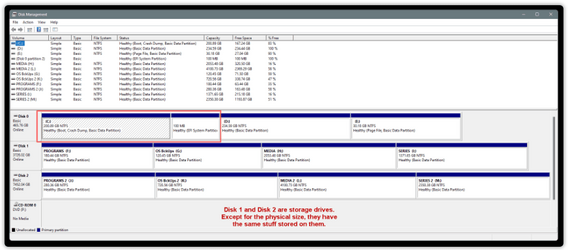
I know that. I was just thinking about the rest of the system (secondary internal and single external), e.g.,
1705290389433.png
 

My Computers My Computers

  • At a glance

    Win11 Pro16GB2.30 gigahertz Intel 11th Gen Core i7-11800H
    OS
    Win11 Pro
    Computer type
    PC/Desktop
    Manufacturer/Model
    Beelink
    Memory
    16GB
    Graphics Card(s)
    2.30 gigahertz Intel 11th Gen Core i7-11800H
    Sound Card
    Intel® Smart Sound Technology for USB Audio
    Monitor(s) Displays
    laptop (small) and 1 or 2 external monitors
    Screen Resolution
    -
    Hard Drives
    PC711 NVMe SK hynix 1TB 1.02 TB NVMe ANB2N582412102F0G_0001
    PSU
    -
    Case
    Laptop
    Cooling
    fan
    Keyboard
    External!
    Mouse
    External
    Internet Speed
    -
    Browser
    Chrome (Chrome profiles), Firefox (Bookmark Search Plus2), Edge (History page), Opera (annoying)
    Antivirus
    WinDefender
    Other Info
    Win11 Home 23H2 22631.3447
  • At a glance

    Win108068 MB Usable Installed Memory2.30 gigahertz Intel 11th Gen Core i7-11800H
    Operating System
    Win10
    Computer type
    PC/Desktop
    Manufacturer/Model
    self
    Motherboard
    Gigabyte B75M-D3H
    Memory
    8068 MB Usable Installed Memory
    Graphics card(s)
    2.30 gigahertz Intel 11th Gen Core i7-11800H
    Sound Card
    Intel® Smart Sound Technology for USB Audio
    Monitor(s) Displays
    3 Displays
    Screen Resolution
    n/a
    Hard Drives
    SSD and others (internal and external)
    Case
    Desktop
    Cooling
    Fan
    Keyboard
    External
    Mouse
    External
    Browser
    Chrome, Firefox, Tor, Brave, Opera, etc.
    Antivirus
    Win Defender
    Other Info
    Win10 & unfortunately OneDrive: Can't completely rid myself of this!!
I was just thinking about the rest of the system (secondary internal and single external), e.g.,
very important All additional drives (except your system drive and your windows installation usb) should be disconnected during a clean install. ( to not only prevent data loss but to make sure BCD data is written to proper drive. )Their data is not affected.
 

My Computers My Computers

  • At a glance

    Windows 11 Pro 25H2 26200.8875i9-10900 10 core 20 threads32 gbnone-Intel UHD Graphics 630
    OS
    Windows 11 Pro 25H2 26200.8875
    Computer type
    PC/Desktop
    Manufacturer/Model
    Dell Optiplex 7080
    CPU
    i9-10900 10 core 20 threads
    Motherboard
    DELL 0J37VM
    Memory
    32 gb
    Graphics Card(s)
    none-Intel UHD Graphics 630
    Sound Card
    Integrated Realtek
    Monitor(s) Displays
    Benq 27
    Screen Resolution
    2560x1440
    Hard Drives
    2x1tb Solidigm m.2 nvme /External drives 512gb Samsung m.2 sata+2tb Kingston m2.nvme
    PSU
    500w
    Case
    MT
    Cooling
    Dell Premium
    Keyboard
    Logitech wired
    Mouse
    Logitech wireless
    Internet Speed
    so slow I'm too embarrassed to tell
    Browser
    #1 Edge #2 Firefox
    Antivirus
    Defender+MWB Premium
  • At a glance

    Windows 11 Pro 24H2 26200.8875AMD Ryzen 7 6800U32 gbintegrated
    Operating System
    Windows 11 Pro 24H2 26200.8875
    Computer type
    PC/Desktop
    Manufacturer/Model
    Beelink Mini PC SER5
    CPU
    AMD Ryzen 7 6800U
    Memory
    32 gb
    Graphics card(s)
    integrated
    Sound Card
    integrated
    Monitor(s) Displays
    Benq 27
    Screen Resolution
    2560x1440
    Hard Drives
    1TB Crucial nvme
    Keyboard
    Logitech wired
    Mouse
    Logitech wireless
    Internet Speed
    still too embarrassed to tell
    Browser
    Firefox
    Antivirus
    Defender
    Other Info
    System 3 is non compliant Dell 9020 i7-4770/24gb ram Win11 PRO 26200.8875
I just read the whole thread..., my head is still spinning! :cool:
Want your head to spin even more?

1) The screenshot key combination (Windows/Shift/s) does in fact capture a designated area on the screen. Only now it doesn't show that area on the bottom right corner of the screen (like, so that you can modify it. Can't display the problem since it no longer is there)

2) Now Edge is showing side/popups on its page: 1705340929782.png
 

My Computers My Computers

  • At a glance

    Win11 Pro16GB2.30 gigahertz Intel 11th Gen Core i7-11800H
    OS
    Win11 Pro
    Computer type
    PC/Desktop
    Manufacturer/Model
    Beelink
    Memory
    16GB
    Graphics Card(s)
    2.30 gigahertz Intel 11th Gen Core i7-11800H
    Sound Card
    Intel® Smart Sound Technology for USB Audio
    Monitor(s) Displays
    laptop (small) and 1 or 2 external monitors
    Screen Resolution
    -
    Hard Drives
    PC711 NVMe SK hynix 1TB 1.02 TB NVMe ANB2N582412102F0G_0001
    PSU
    -
    Case
    Laptop
    Cooling
    fan
    Keyboard
    External!
    Mouse
    External
    Internet Speed
    -
    Browser
    Chrome (Chrome profiles), Firefox (Bookmark Search Plus2), Edge (History page), Opera (annoying)
    Antivirus
    WinDefender
    Other Info
    Win11 Home 23H2 22631.3447
  • At a glance

    Win108068 MB Usable Installed Memory2.30 gigahertz Intel 11th Gen Core i7-11800H
    Operating System
    Win10
    Computer type
    PC/Desktop
    Manufacturer/Model
    self
    Motherboard
    Gigabyte B75M-D3H
    Memory
    8068 MB Usable Installed Memory
    Graphics card(s)
    2.30 gigahertz Intel 11th Gen Core i7-11800H
    Sound Card
    Intel® Smart Sound Technology for USB Audio
    Monitor(s) Displays
    3 Displays
    Screen Resolution
    n/a
    Hard Drives
    SSD and others (internal and external)
    Case
    Desktop
    Cooling
    Fan
    Keyboard
    External
    Mouse
    External
    Browser
    Chrome, Firefox, Tor, Brave, Opera, etc.
    Antivirus
    Win Defender
    Other Info
    Win10 & unfortunately OneDrive: Can't completely rid myself of this!!
My Computers My Computers

  • At a glance

    Windows 11 Pro
    OS
    Windows 11 Pro
    Computer type
    PC/Desktop
    Manufacturer/Model
    ASUS ROG Strix
  • At a glance

    Windows 11 Pro
    Operating System
    Windows 11 Pro
    Computer type
    Laptop
    Manufacturer/Model
    ASUS VivoBook
  • ASUS VivoBook 'Lite' ~ Windows 11 Home

Latest Support Threads

Back
Top Bottom




