Problem installing Windows 11 "2025-10 Cumulative Update for Windows 11 Version 24H2 for x64-based Systems (KB5066835) (26100.6899)"


HGTaylor

Member
Local time
5:03 AM
Posts
10
OS
Windows 11 Home Version 24H2 Build 26100.6584
Each time I try to install the update I get error message
"Install error - 0x800f081f"

Can anyone advise me, please?

[Thought should deal with the update before asking for guidance regarding a very slow boot up.]
 

My Computer My Computer

At a glance

Windows 11 Home Version 24H2 Build 26100.658411th Gen Intel(R) Core(TM) i5-1135G7 @ 2.40GH...8.00 GB (7.70 GB usable) Speed 3200 MT/sIntel(R) Iris(R) Xe Graphics. 128 MB
OS
Windows 11 Home Version 24H2 Build 26100.6584
Computer type
Laptop
Manufacturer/Model
ASUSTEK X515EA X1500EA VivoBook laptop
CPU
11th Gen Intel(R) Core(TM) i5-1135G7 @ 2.40GHz (2.42 GH
Motherboard
64-bit operating system, x64-based processor
Memory
8.00 GB (7.70 GB usable) Speed 3200 MT/s
Graphics Card(s)
Intel(R) Iris(R) Xe Graphics. 128 MB
Sound Card
integrated auduo with built-in speakers and a microphone
Monitor(s) Displays
Built-in display
Screen Resolution
1920 x 1080 60.16 Hz. Orientation Landscaape
Hard Drives
Built-in storage 477 GB - 132 GB used
PSU
Built-i
Case
As model
Cooling
As built-in
Keyboard
As built-in
Mouse
Inphic PW1 wired mouse
Internet Speed
11 Mbps download. 27 Mbps upload
Browser
Default: Google Chrome
Antivirus
Windows Firewall and Microsoft Defender
Other Info
Voicemeeter virtual audio with its Macro Buttons app loads on Windows start
Each time I try to install the update I get error message
"Install error - 0x800f081f"

Can anyone advise me, please?

[Thought should deal with the update before asking for guidance regarding a very slow boot up.]
You are apparently not the only one. The article offers a solution though.


My Computers My Computers

  • At a glance

    All Branches but ReleaseAMD Ryzen 7 7735HS 3200-4500 Mhz 8 cores x 232 GB DDR5Radeon Graphic / NVIDIA GeForce RTX 4060 8 GB...
    OS
    All Branches but Release
    Computer type
    Laptop
    Manufacturer/Model
    Acer Nitro ANV15-51
    CPU
    AMD Ryzen 7 7735HS 3200-4500 Mhz 8 cores x 2
    Motherboard
    Sportage_RBH
    Memory
    32 GB DDR5
    Graphics Card(s)
    Radeon Graphic / NVIDIA GeForce RTX 4060 8 GB GDDR6
    Sound Card
    AMD/Realtek(R) Audio
    Monitor(s) Displays
    Integrated Monitor (15.3"vis)
    Screen Resolution
    FHD 1920X1080 16:9 144Hz
    Hard Drives
    KINGSTON OM8SEP4512Q-AA 1TB
    Western Digital 256GB
    PSU
    19V DC 6.32 A 120 W
    Cooling
    Dual Fans
    Mouse
    MS Bluetooth
    Internet Speed
    Fiber 1GB Cox -us & 1GB Orange-fr
    Browser
    Edge Canary- Firefox Nightly-Chrome Dev-Chrome Dev
    Antivirus
    Windows Defender
  • At a glance

    Windows 11 BetaAMD A9-94208 GB of DDR4AMD Radeon R5
    Operating System
    Windows 11 Beta
    Computer type
    Laptop
    Manufacturer/Model
    Asus X751BP
    CPU
    AMD A9-9420
    Memory
    8 GB of DDR4
    Graphics card(s)
    AMD Radeon R5
    Screen Resolution
    1600x900
    Hard Drives
    Seagate 1 TB
Each time I try to install the update I get error message
"Install error - 0x800f081f"

I am running Windows 11 Home, Version 24H2, OS build 26100.6584. Other details are in my profile here on Windows 11 Forum - per 'My Computer' link below in this post.

Can anyone advise me, please?

[Thought should deal with the update before asking for guidance regarding a very slow boot up.]
 

My Computer My Computer

At a glance

Windows 11 Home Version 24H2 Build 26100.658411th Gen Intel(R) Core(TM) i5-1135G7 @ 2.40GH...8.00 GB (7.70 GB usable) Speed 3200 MT/sIntel(R) Iris(R) Xe Graphics. 128 MB
OS
Windows 11 Home Version 24H2 Build 26100.6584
Computer type
Laptop
Manufacturer/Model
ASUSTEK X515EA X1500EA VivoBook laptop
CPU
11th Gen Intel(R) Core(TM) i5-1135G7 @ 2.40GHz (2.42 GH
Motherboard
64-bit operating system, x64-based processor
Memory
8.00 GB (7.70 GB usable) Speed 3200 MT/s
Graphics Card(s)
Intel(R) Iris(R) Xe Graphics. 128 MB
Sound Card
integrated auduo with built-in speakers and a microphone
Monitor(s) Displays
Built-in display
Screen Resolution
1920 x 1080 60.16 Hz. Orientation Landscaape
Hard Drives
Built-in storage 477 GB - 132 GB used
PSU
Built-i
Case
As model
Cooling
As built-in
Keyboard
As built-in
Mouse
Inphic PW1 wired mouse
Internet Speed
11 Mbps download. 27 Mbps upload
Browser
Default: Google Chrome
Antivirus
Windows Firewall and Microsoft Defender
Other Info
Voicemeeter virtual audio with its Macro Buttons app loads on Windows start
See windows update troubleshooting steps listed here.
 

My Computers My Computers

  • At a glance

    Windows 11 Pro 25H2 26200.8875i9-10900 10 core 20 threads32 gbnone-Intel UHD Graphics 630
    OS
    Windows 11 Pro 25H2 26200.8875
    Computer type
    PC/Desktop
    Manufacturer/Model
    Dell Optiplex 7080
    CPU
    i9-10900 10 core 20 threads
    Motherboard
    DELL 0J37VM
    Memory
    32 gb
    Graphics Card(s)
    none-Intel UHD Graphics 630
    Sound Card
    Integrated Realtek
    Monitor(s) Displays
    Benq 27
    Screen Resolution
    2560x1440
    Hard Drives
    2x1tb Solidigm m.2 nvme /External drives 512gb Samsung m.2 sata+2tb Kingston m2.nvme
    PSU
    500w
    Case
    MT
    Cooling
    Dell Premium
    Keyboard
    Logitech wired
    Mouse
    Logitech wireless
    Internet Speed
    so slow I'm too embarrassed to tell
    Browser
    #1 Edge #2 Firefox
    Antivirus
    Defender+MWB Premium
  • At a glance

    Windows 11 Pro 24H2 26200.8875AMD Ryzen 7 6800U32 gbintegrated
    Operating System
    Windows 11 Pro 24H2 26200.8875
    Computer type
    PC/Desktop
    Manufacturer/Model
    Beelink Mini PC SER5
    CPU
    AMD Ryzen 7 6800U
    Memory
    32 gb
    Graphics card(s)
    integrated
    Sound Card
    integrated
    Monitor(s) Displays
    Benq 27
    Screen Resolution
    2560x1440
    Hard Drives
    1TB Crucial nvme
    Keyboard
    Logitech wired
    Mouse
    Logitech wireless
    Internet Speed
    still too embarrassed to tell
    Browser
    Firefox
    Antivirus
    Defender
    Other Info
    System 3 is non compliant Dell 9020 i7-4770/24gb ram Win11 PRO 26200.8875
You are apparently not the only one. The article offers a solution though.

Thank you, OAT. I visited link but some of what I read was not clear to me as to what to do or whether to do nothing at the moment. My laptop is set to 'auto download and update' but obviously there is an overriding issue:unsure:.
 

My Computer My Computer

At a glance

Windows 11 Home Version 24H2 Build 26100.658411th Gen Intel(R) Core(TM) i5-1135G7 @ 2.40GH...8.00 GB (7.70 GB usable) Speed 3200 MT/sIntel(R) Iris(R) Xe Graphics. 128 MB
OS
Windows 11 Home Version 24H2 Build 26100.6584
Computer type
Laptop
Manufacturer/Model
ASUSTEK X515EA X1500EA VivoBook laptop
CPU
11th Gen Intel(R) Core(TM) i5-1135G7 @ 2.40GHz (2.42 GH
Motherboard
64-bit operating system, x64-based processor
Memory
8.00 GB (7.70 GB usable) Speed 3200 MT/s
Graphics Card(s)
Intel(R) Iris(R) Xe Graphics. 128 MB
Sound Card
integrated auduo with built-in speakers and a microphone
Monitor(s) Displays
Built-in display
Screen Resolution
1920 x 1080 60.16 Hz. Orientation Landscaape
Hard Drives
Built-in storage 477 GB - 132 GB used
PSU
Built-i
Case
As model
Cooling
As built-in
Keyboard
As built-in
Mouse
Inphic PW1 wired mouse
Internet Speed
11 Mbps download. 27 Mbps upload
Browser
Default: Google Chrome
Antivirus
Windows Firewall and Microsoft Defender
Other Info
Voicemeeter virtual audio with its Macro Buttons app loads on Windows start
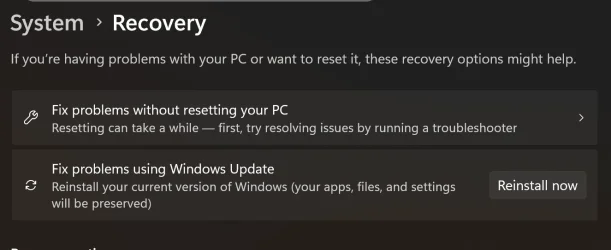
I've had this 2 or 3 times on previous updates. Best way to resolve it is to do a repair update which is run by Windows Update thus -

Settings -> windows update -> advanced options -> recovery -> fix problems using windows update.
 

My Computers My Computers

  • At a glance

    Windows 11 Home 24H2 RPIntel I3-1010016 GBNvidia GT 1030
    OS
    Windows 11 Home 24H2 RP
    Computer type
    PC/Desktop
    Manufacturer/Model
    Self-build
    CPU
    Intel I3-10100
    Motherboard
    MSI H410M-PRO
    Memory
    16 GB
    Graphics Card(s)
    Nvidia GT 1030
    Sound Card
    Motherboard default
    Monitor(s) Displays
    Philips 27 inch
    Screen Resolution
    1920x1080
    Hard Drives
    Samsung EVO 970 NVMe SSD 256 Gb
    Samsung QVO 870 SATA SSD 2 Tb
    PSU
    ATX 450W
    Keyboard
    Logitech
    Mouse
    Logitech Wireless
    Internet Speed
    930 Mb down / 120 Mb up
    Browser
    Edge
    Antivirus
    Windows Defender
    Other Info
    Microsoft Office 2021 Plus
  • At a glance

    Windows 11 HomeIntel i3-810016 GbNvidia GT 720
    Operating System
    Windows 11 Home
    Computer type
    PC/Desktop
    Manufacturer/Model
    Self-build
    CPU
    Intel i3-8100
    Motherboard
    Gigabyte Z370 D3
    Memory
    16 Gb
    Graphics card(s)
    Nvidia GT 720
    Sound Card
    Motherboard default
    Monitor(s) Displays
    Philips 27-inch
    Screen Resolution
    1920x1080
    Hard Drives
    Samsung 960 NVMe SSD 256 Gb
    Seagate 2 Tb HDD
    PSU
    ATX 450W
    Keyboard
    Microsoft
    Mouse
    Logitech Wireless
    Internet Speed
    930 Mb down / 120 Mb up
    Browser
    Edge
    Antivirus
    Windows Defender
Thank you, OAT. I visited link but some of what I read was not clear to me as to what to do or whether to do nothing at the moment. My laptop is set to 'auto download and update' but obviously there is an overriding issue:unsure:.
Since you are on 24H2, you need to install the 1st .msu on the list from the update catalog:
Once downloaded, run the .msu file.
 

My Computers My Computers

  • At a glance

    All Branches but ReleaseAMD Ryzen 7 7735HS 3200-4500 Mhz 8 cores x 232 GB DDR5Radeon Graphic / NVIDIA GeForce RTX 4060 8 GB...
    OS
    All Branches but Release
    Computer type
    Laptop
    Manufacturer/Model
    Acer Nitro ANV15-51
    CPU
    AMD Ryzen 7 7735HS 3200-4500 Mhz 8 cores x 2
    Motherboard
    Sportage_RBH
    Memory
    32 GB DDR5
    Graphics Card(s)
    Radeon Graphic / NVIDIA GeForce RTX 4060 8 GB GDDR6
    Sound Card
    AMD/Realtek(R) Audio
    Monitor(s) Displays
    Integrated Monitor (15.3"vis)
    Screen Resolution
    FHD 1920X1080 16:9 144Hz
    Hard Drives
    KINGSTON OM8SEP4512Q-AA 1TB
    Western Digital 256GB
    PSU
    19V DC 6.32 A 120 W
    Cooling
    Dual Fans
    Mouse
    MS Bluetooth
    Internet Speed
    Fiber 1GB Cox -us & 1GB Orange-fr
    Browser
    Edge Canary- Firefox Nightly-Chrome Dev-Chrome Dev
    Antivirus
    Windows Defender
  • At a glance

    Windows 11 BetaAMD A9-94208 GB of DDR4AMD Radeon R5
    Operating System
    Windows 11 Beta
    Computer type
    Laptop
    Manufacturer/Model
    Asus X751BP
    CPU
    AMD A9-9420
    Memory
    8 GB of DDR4
    Graphics card(s)
    AMD Radeon R5
    Screen Resolution
    1600x900
    Hard Drives
    Seagate 1 TB
Since you are on 24H2, you need to install the 1st .msu on the list from the update catalog:
Once downloaded, run the .msu file.
Again, thank you, OAT.
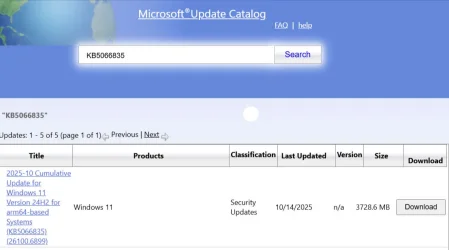
I used the 'catalog' link you gave and I clicked to download of 1st item (per attatched JPG file) of the 5 in the 'cumulative' update list.

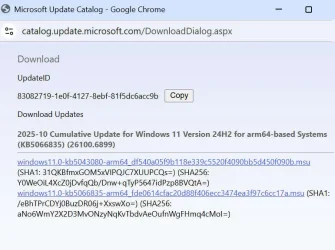
Per attached JPG file, the 1st item is a list that contains links to 2 '.msu' files and I have downloaded both of the '.msu' files.

Do I now run both '.msu' files one after the other, please?
 

Attachments

  • Microsoft-Update-Catalog-10-24-2025_07_17_PM.webp
    Microsoft-Update-Catalog-10-24-2025_07_17_PM.webp
    31.6 KB · Views: 2
  • content-of-1st-item-cumulative-update-KB5066835-26100.6899.webp
    content-of-1st-item-cumulative-update-KB5066835-26100.6899.webp
    61.8 KB · Views: 3

My Computer My Computer

At a glance

Windows 11 Home Version 24H2 Build 26100.658411th Gen Intel(R) Core(TM) i5-1135G7 @ 2.40GH...8.00 GB (7.70 GB usable) Speed 3200 MT/sIntel(R) Iris(R) Xe Graphics. 128 MB
OS
Windows 11 Home Version 24H2 Build 26100.6584
Computer type
Laptop
Manufacturer/Model
ASUSTEK X515EA X1500EA VivoBook laptop
CPU
11th Gen Intel(R) Core(TM) i5-1135G7 @ 2.40GHz (2.42 GH
Motherboard
64-bit operating system, x64-based processor
Memory
8.00 GB (7.70 GB usable) Speed 3200 MT/s
Graphics Card(s)
Intel(R) Iris(R) Xe Graphics. 128 MB
Sound Card
integrated auduo with built-in speakers and a microphone
Monitor(s) Displays
Built-in display
Screen Resolution
1920 x 1080 60.16 Hz. Orientation Landscaape
Hard Drives
Built-in storage 477 GB - 132 GB used
PSU
Built-i
Case
As model
Cooling
As built-in
Keyboard
As built-in
Mouse
Inphic PW1 wired mouse
Internet Speed
11 Mbps download. 27 Mbps upload
Browser
Default: Google Chrome
Antivirus
Windows Firewall and Microsoft Defender
Other Info
Voicemeeter virtual audio with its Macro Buttons app loads on Windows start
Again, thank you, OAT.
I used the 'catalog' link you gave and I clicked to download of 1st item (per attatched JPG file) of the 5 in the 'cumulative' update list.

Per attached JPG file, the 1st item is a list that contains links to 2 '.msu' files and I have downloaded both of the '.msu' files.

Do I now run both '.msu' files one after the other, please?
My apologies as I made you waste time downloading the wrong files.

It is actually the third option you need to get since you do not have an ARM64 system.
Had you tried to run any of those two, it would have warned you that it was not appropriate for your device.
Please delete these in order to avoid confusion.

So, after downloading again,you will end up indeed with 2 .msu, run the lower number KB first.

1- windows11.0-kb5043080-x64_953449672073f8fb99badb4cc6d5d7849b9c83e8.msu
2- windows11.0-kb5066835-x64_2f193bc50987a9c27e42eceeb90648af19cc813a.msu
 

My Computers My Computers

  • At a glance

    All Branches but ReleaseAMD Ryzen 7 7735HS 3200-4500 Mhz 8 cores x 232 GB DDR5Radeon Graphic / NVIDIA GeForce RTX 4060 8 GB...
    OS
    All Branches but Release
    Computer type
    Laptop
    Manufacturer/Model
    Acer Nitro ANV15-51
    CPU
    AMD Ryzen 7 7735HS 3200-4500 Mhz 8 cores x 2
    Motherboard
    Sportage_RBH
    Memory
    32 GB DDR5
    Graphics Card(s)
    Radeon Graphic / NVIDIA GeForce RTX 4060 8 GB GDDR6
    Sound Card
    AMD/Realtek(R) Audio
    Monitor(s) Displays
    Integrated Monitor (15.3"vis)
    Screen Resolution
    FHD 1920X1080 16:9 144Hz
    Hard Drives
    KINGSTON OM8SEP4512Q-AA 1TB
    Western Digital 256GB
    PSU
    19V DC 6.32 A 120 W
    Cooling
    Dual Fans
    Mouse
    MS Bluetooth
    Internet Speed
    Fiber 1GB Cox -us & 1GB Orange-fr
    Browser
    Edge Canary- Firefox Nightly-Chrome Dev-Chrome Dev
    Antivirus
    Windows Defender
  • At a glance

    Windows 11 BetaAMD A9-94208 GB of DDR4AMD Radeon R5
    Operating System
    Windows 11 Beta
    Computer type
    Laptop
    Manufacturer/Model
    Asus X751BP
    CPU
    AMD A9-9420
    Memory
    8 GB of DDR4
    Graphics card(s)
    AMD Radeon R5
    Screen Resolution
    1600x900
    Hard Drives
    Seagate 1 TB

My Computer My Computer

At a glance

Windows 11
OS
Windows 11
My apologies as I made you waste time downloading the wrong files.

It is actually the third option you need to get since you do not have an ARM64 system.
Had you tried to run any of those two, it would have warned you that it was not appropriate for your device.
Please delete these in order to avoid confusion.

So, after downloading again,you will end up indeed with 2 .msu, run the lower number KB first.

1- windows11.0-kb5043080-x64_953449672073f8fb99badb4cc6d5d7849b9c83e8.msu
2- windows11.0-kb5066835-x64_2f193bc50987a9c27e42eceeb90648af19cc813a.msu
Thank you, again, OAT.
Had I looked closely at what I was doing I could have assisted you :-) Sorry.
I am grateful for your guidance.

I have set about the new downloads and I will let you know the outcome(s) - and after that also ask if there is more to do to complete update 'KB5066835 26100.6899'.
 

My Computer My Computer

At a glance

Windows 11 Home Version 24H2 Build 26100.658411th Gen Intel(R) Core(TM) i5-1135G7 @ 2.40GH...8.00 GB (7.70 GB usable) Speed 3200 MT/sIntel(R) Iris(R) Xe Graphics. 128 MB
OS
Windows 11 Home Version 24H2 Build 26100.6584
Computer type
Laptop
Manufacturer/Model
ASUSTEK X515EA X1500EA VivoBook laptop
CPU
11th Gen Intel(R) Core(TM) i5-1135G7 @ 2.40GHz (2.42 GH
Motherboard
64-bit operating system, x64-based processor
Memory
8.00 GB (7.70 GB usable) Speed 3200 MT/s
Graphics Card(s)
Intel(R) Iris(R) Xe Graphics. 128 MB
Sound Card
integrated auduo with built-in speakers and a microphone
Monitor(s) Displays
Built-in display
Screen Resolution
1920 x 1080 60.16 Hz. Orientation Landscaape
Hard Drives
Built-in storage 477 GB - 132 GB used
PSU
Built-i
Case
As model
Cooling
As built-in
Keyboard
As built-in
Mouse
Inphic PW1 wired mouse
Internet Speed
11 Mbps download. 27 Mbps upload
Browser
Default: Google Chrome
Antivirus
Windows Firewall and Microsoft Defender
Other Info
Voicemeeter virtual audio with its Macro Buttons app loads on Windows start

My Computer My Computer

At a glance

Windows 11 Home Version 24H2 Build 26100.658411th Gen Intel(R) Core(TM) i5-1135G7 @ 2.40GH...8.00 GB (7.70 GB usable) Speed 3200 MT/sIntel(R) Iris(R) Xe Graphics. 128 MB
OS
Windows 11 Home Version 24H2 Build 26100.6584
Computer type
Laptop
Manufacturer/Model
ASUSTEK X515EA X1500EA VivoBook laptop
CPU
11th Gen Intel(R) Core(TM) i5-1135G7 @ 2.40GHz (2.42 GH
Motherboard
64-bit operating system, x64-based processor
Memory
8.00 GB (7.70 GB usable) Speed 3200 MT/s
Graphics Card(s)
Intel(R) Iris(R) Xe Graphics. 128 MB
Sound Card
integrated auduo with built-in speakers and a microphone
Monitor(s) Displays
Built-in display
Screen Resolution
1920 x 1080 60.16 Hz. Orientation Landscaape
Hard Drives
Built-in storage 477 GB - 132 GB used
PSU
Built-i
Case
As model
Cooling
As built-in
Keyboard
As built-in
Mouse
Inphic PW1 wired mouse
Internet Speed
11 Mbps download. 27 Mbps upload
Browser
Default: Google Chrome
Antivirus
Windows Firewall and Microsoft Defender
Other Info
Voicemeeter virtual audio with its Macro Buttons app loads on Windows start
Hello, Helmut.

To whom was/is your "Just leave it ..." message addressed, please?
Build KB5066835 26100.6899 has numerous bugs/issues so go with the fix 26100.6901. Also the easiest workaround for WU install errors is what RFS posted earlier Settings -> windows update -> advanced options -> recovery -> fix problems using windows update.
 

Attachments

  • Screenshot 2025-10-21 135736.webp
    Screenshot 2025-10-21 135736.webp
    37.1 KB · Views: 3

My Computers My Computers

  • At a glance

    Windows 11 25H2Intel Core Ultra 9 275HX (24-Core)64GB DDR5 6400MT/sNVIDIA GeForce RTX 5080 and Intel UHD Graphics
    OS
    Windows 11 25H2
    Computer type
    Laptop
    Manufacturer/Model
    Alienware 18 Area-51
    CPU
    Intel Core Ultra 9 275HX (24-Core)
    Motherboard
    Alienware
    Memory
    64GB DDR5 6400MT/s
    Graphics Card(s)
    NVIDIA GeForce RTX 5080 and Intel UHD Graphics
    Sound Card
    Onboard, Realtek high-performance Audio chips (ALC3329 & ALC1708))
    Monitor(s) Displays
    300HZ 18-inch QHD 500 nit Comfort View+
    Screen Resolution
    2560 x 1600
    Hard Drives
    2TB NVMe M.2 PCIe Gen 5 SSD
    Case
    Magnesium Alloy
    Cooling
    Advanced Cryo-Tech Quad-Fan Cooling system & large vapor chamber
    Keyboard
    Cherry MX ultra low profile mechanical keyboard with per key AlienFX RGB lighting
    Mouse
    Logitech MX Master 4
    Browser
    Vivaldi (main), Firefox, Chrome, Edge
    Antivirus
    MS Defender and Malwarebytes Free
  • At a glance

    Windows 11 25H2Qualcomm Snapdragon X Elite (12 Core) ARM bas...16GB LPDDR5Qualcomm Adreno X1-85
    Operating System
    Windows 11 25H2
    Computer type
    Laptop
    Manufacturer/Model
    Microsoft Surface Laptop 7
    CPU
    Qualcomm Snapdragon X Elite (12 Core) ARM based CPU
    Motherboard
    Microsoft Corp.
    Memory
    16GB LPDDR5
    Graphics card(s)
    Qualcomm Adreno X1-85
    Sound Card
    Omnisonic speakers with Dolby Atmos spatial sound
    Monitor(s) Displays
    120 Hz 13.8-inch 600 nit PixelSense Flow touchscreen
    Screen Resolution
    2304x1536
    Hard Drives
    1TB NVMe Gen 4 SSD
    Case
    Anodized Aluminum
    Cooling
    Traditional active cooling fan system
    Keyboard
    Mechanical QWERTY, backlit when in use
    Mouse
    Logitech MX Master 4 and Surface Arc Mouse
    Browser
    Vivaldi (main), Firefox, Chrome, Edge
    Antivirus
    MS Defender and Malwarebytes Free
Build KB5066835 26100.6899 has numerous bugs/issues so go with the fix 26100.6901. Also the easiest workaround for WU install errors is what RFS posted earlier Settings -> windows update -> advanced options -> recovery -> fix problems using windows update.
Thank you for your notes, FrancoDT.
My technical knowledge is limited so I would want to avoid using 'workaround'.

Presently I do not have 'build KB5066835 26100.6899' installed.
From your note, it seems that if I install 'build KB5066835 26100.6899', I will need to install the official '26100.6901' fix.
 

My Computer My Computer

At a glance

Windows 11 Home Version 24H2 Build 26100.658411th Gen Intel(R) Core(TM) i5-1135G7 @ 2.40GH...8.00 GB (7.70 GB usable) Speed 3200 MT/sIntel(R) Iris(R) Xe Graphics. 128 MB
OS
Windows 11 Home Version 24H2 Build 26100.6584
Computer type
Laptop
Manufacturer/Model
ASUSTEK X515EA X1500EA VivoBook laptop
CPU
11th Gen Intel(R) Core(TM) i5-1135G7 @ 2.40GHz (2.42 GH
Motherboard
64-bit operating system, x64-based processor
Memory
8.00 GB (7.70 GB usable) Speed 3200 MT/s
Graphics Card(s)
Intel(R) Iris(R) Xe Graphics. 128 MB
Sound Card
integrated auduo with built-in speakers and a microphone
Monitor(s) Displays
Built-in display
Screen Resolution
1920 x 1080 60.16 Hz. Orientation Landscaape
Hard Drives
Built-in storage 477 GB - 132 GB used
PSU
Built-i
Case
As model
Cooling
As built-in
Keyboard
As built-in
Mouse
Inphic PW1 wired mouse
Internet Speed
11 Mbps download. 27 Mbps upload
Browser
Default: Google Chrome
Antivirus
Windows Firewall and Microsoft Defender
Other Info
Voicemeeter virtual audio with its Macro Buttons app loads on Windows start
Thank you for your notes, FrancoDT.
My technical knowledge is limited to I would not want to use 'workaround'.

Presently I do not have 'build KB5066835 26100.6899' installed.
From your note, it seems that if I install 'build KB5066835 26100.6899', I will need to install the official '6100.6901' fix.
If WU offers it that's the easiest way to get it. By workaround I mean the built in settings repair install is the easiest and least complicated fix. It's the preferred way to get the update that keeps giving installation errors like 0x800f081f and other common ones.
 

My Computers My Computers

  • At a glance

    Windows 11 25H2Intel Core Ultra 9 275HX (24-Core)64GB DDR5 6400MT/sNVIDIA GeForce RTX 5080 and Intel UHD Graphics
    OS
    Windows 11 25H2
    Computer type
    Laptop
    Manufacturer/Model
    Alienware 18 Area-51
    CPU
    Intel Core Ultra 9 275HX (24-Core)
    Motherboard
    Alienware
    Memory
    64GB DDR5 6400MT/s
    Graphics Card(s)
    NVIDIA GeForce RTX 5080 and Intel UHD Graphics
    Sound Card
    Onboard, Realtek high-performance Audio chips (ALC3329 & ALC1708))
    Monitor(s) Displays
    300HZ 18-inch QHD 500 nit Comfort View+
    Screen Resolution
    2560 x 1600
    Hard Drives
    2TB NVMe M.2 PCIe Gen 5 SSD
    Case
    Magnesium Alloy
    Cooling
    Advanced Cryo-Tech Quad-Fan Cooling system & large vapor chamber
    Keyboard
    Cherry MX ultra low profile mechanical keyboard with per key AlienFX RGB lighting
    Mouse
    Logitech MX Master 4
    Browser
    Vivaldi (main), Firefox, Chrome, Edge
    Antivirus
    MS Defender and Malwarebytes Free
  • At a glance

    Windows 11 25H2Qualcomm Snapdragon X Elite (12 Core) ARM bas...16GB LPDDR5Qualcomm Adreno X1-85
    Operating System
    Windows 11 25H2
    Computer type
    Laptop
    Manufacturer/Model
    Microsoft Surface Laptop 7
    CPU
    Qualcomm Snapdragon X Elite (12 Core) ARM based CPU
    Motherboard
    Microsoft Corp.
    Memory
    16GB LPDDR5
    Graphics card(s)
    Qualcomm Adreno X1-85
    Sound Card
    Omnisonic speakers with Dolby Atmos spatial sound
    Monitor(s) Displays
    120 Hz 13.8-inch 600 nit PixelSense Flow touchscreen
    Screen Resolution
    2304x1536
    Hard Drives
    1TB NVMe Gen 4 SSD
    Case
    Anodized Aluminum
    Cooling
    Traditional active cooling fan system
    Keyboard
    Mechanical QWERTY, backlit when in use
    Mouse
    Logitech MX Master 4 and Surface Arc Mouse
    Browser
    Vivaldi (main), Firefox, Chrome, Edge
    Antivirus
    MS Defender and Malwarebytes Free
Hello, Helmut.

To whom was/is your "Just leave it ..." message addressed, please?
Of course it was addressed to you. post #10 and more importantly the bit you edited out, the MS reference.
 

My Computer My Computer

At a glance

Windows 11
OS
Windows 11
Thought should deal with the update before asking for guidance regarding a very slow boot up
Your drive may have bad sectors and starting to fail.
Download DiskGenius or Crystal Disk Info both in my signature.
View the SMART Info on the drive (s) if it is less than GOOD the drive needs to be replaced.
 

My Computer My Computer

At a glance

Windows 11 Pro Insider 64 bit 25H2 26200.5742Intel Core i7 9700K 3.6016 GBnVidia GEForce RTX 2060 Super
OS
Windows 11 Pro Insider 64 bit 25H2 26200.5742
Computer type
PC/Desktop
Manufacturer/Model
Gigabyte Z390 UD
CPU
Intel Core i7 9700K 3.60
Motherboard
Gigabyte Z390 UD
Memory
16 GB
Graphics Card(s)
nVidia GEForce RTX 2060 Super
Sound Card
onboard
Monitor(s) Displays
Two 27" Dell 4K monitors
Screen Resolution
3840 x 2160
Hard Drives
M.2 NVME SSD, 500 GB; Two 2TB Mechanical HDD's
PSU
850w PSU
Case
Cyberpower PC
Cooling
Water cooled
Keyboard
Backlit Cyberpower gaming keyboard
Mouse
Backlit Cyberpower gaming mouse
Internet Speed
1 GB mbps
Browser
Brave
Antivirus
Windows Security
My apologies as I made you waste time downloading the wrong files.

It is actually the third option you need to get since you do not have an ARM64 system.
Had you tried to run any of those two, it would have warned you that it was not appropriate for your device.
Please delete these in order to avoid confusion.

So, after downloading again,you will end up indeed with 2 .msu, run the lower number KB first.

1- windows11.0-kb5043080-x64_953449672073f8fb99badb4cc6d5d7849b9c83e8.msu
2- windows11.0-kb5066835-x64_2f193bc50987a9c27e42eceeb90648af19cc813a.msu
Hello, OAT.
Your guidance is clear to understand and to follow, with my limited knowledge.

I have downloaded the two .msu files ready for double clicking to run the "...kb5043..." .msu file first.

I have gotten other guidance in this thread that is not as clear to me as yours. Before I run the first .msu I ask please that, when you have time, you look through the other guidance offered to me in this thread, then offer me your further direction, please.
 

My Computer My Computer

At a glance

Windows 11 Home Version 24H2 Build 26100.658411th Gen Intel(R) Core(TM) i5-1135G7 @ 2.40GH...8.00 GB (7.70 GB usable) Speed 3200 MT/sIntel(R) Iris(R) Xe Graphics. 128 MB
OS
Windows 11 Home Version 24H2 Build 26100.6584
Computer type
Laptop
Manufacturer/Model
ASUSTEK X515EA X1500EA VivoBook laptop
CPU
11th Gen Intel(R) Core(TM) i5-1135G7 @ 2.40GHz (2.42 GH
Motherboard
64-bit operating system, x64-based processor
Memory
8.00 GB (7.70 GB usable) Speed 3200 MT/s
Graphics Card(s)
Intel(R) Iris(R) Xe Graphics. 128 MB
Sound Card
integrated auduo with built-in speakers and a microphone
Monitor(s) Displays
Built-in display
Screen Resolution
1920 x 1080 60.16 Hz. Orientation Landscaape
Hard Drives
Built-in storage 477 GB - 132 GB used
PSU
Built-i
Case
As model
Cooling
As built-in
Keyboard
As built-in
Mouse
Inphic PW1 wired mouse
Internet Speed
11 Mbps download. 27 Mbps upload
Browser
Default: Google Chrome
Antivirus
Windows Firewall and Microsoft Defender
Other Info
Voicemeeter virtual audio with its Macro Buttons app loads on Windows start
Of course it was addressed to you. post #10 and more importantly the bit you edited out, the MS reference.
Thank you very much, Helmut, for offering me guidance.

I already begun following guidance offered to me in this thread by OAT. If you think following the OAT guidance has problems, I will be very grateful if you raise the point with OAT, please.
 

My Computer My Computer

At a glance

Windows 11 Home Version 24H2 Build 26100.658411th Gen Intel(R) Core(TM) i5-1135G7 @ 2.40GH...8.00 GB (7.70 GB usable) Speed 3200 MT/sIntel(R) Iris(R) Xe Graphics. 128 MB
OS
Windows 11 Home Version 24H2 Build 26100.6584
Computer type
Laptop
Manufacturer/Model
ASUSTEK X515EA X1500EA VivoBook laptop
CPU
11th Gen Intel(R) Core(TM) i5-1135G7 @ 2.40GHz (2.42 GH
Motherboard
64-bit operating system, x64-based processor
Memory
8.00 GB (7.70 GB usable) Speed 3200 MT/s
Graphics Card(s)
Intel(R) Iris(R) Xe Graphics. 128 MB
Sound Card
integrated auduo with built-in speakers and a microphone
Monitor(s) Displays
Built-in display
Screen Resolution
1920 x 1080 60.16 Hz. Orientation Landscaape
Hard Drives
Built-in storage 477 GB - 132 GB used
PSU
Built-i
Case
As model
Cooling
As built-in
Keyboard
As built-in
Mouse
Inphic PW1 wired mouse
Internet Speed
11 Mbps download. 27 Mbps upload
Browser
Default: Google Chrome
Antivirus
Windows Firewall and Microsoft Defender
Other Info
Voicemeeter virtual audio with its Macro Buttons app loads on Windows start
Your drive may have bad sectors and starting to fail.
Download DiskGenius or Crystal Disk Info both in my signature.
View the SMART Info on the drive (s) if it is less than GOOD the drive needs to be replaced.
Thank for your note, Spunk, although in this thread we should deal with the Win-update issue. I will make a note of "Disk Genius" and "Crystal Disk" and view the "SMART info". I will feedback to you separately — but not in this thread.
 

My Computer My Computer

At a glance

Windows 11 Home Version 24H2 Build 26100.658411th Gen Intel(R) Core(TM) i5-1135G7 @ 2.40GH...8.00 GB (7.70 GB usable) Speed 3200 MT/sIntel(R) Iris(R) Xe Graphics. 128 MB
OS
Windows 11 Home Version 24H2 Build 26100.6584
Computer type
Laptop
Manufacturer/Model
ASUSTEK X515EA X1500EA VivoBook laptop
CPU
11th Gen Intel(R) Core(TM) i5-1135G7 @ 2.40GHz (2.42 GH
Motherboard
64-bit operating system, x64-based processor
Memory
8.00 GB (7.70 GB usable) Speed 3200 MT/s
Graphics Card(s)
Intel(R) Iris(R) Xe Graphics. 128 MB
Sound Card
integrated auduo with built-in speakers and a microphone
Monitor(s) Displays
Built-in display
Screen Resolution
1920 x 1080 60.16 Hz. Orientation Landscaape
Hard Drives
Built-in storage 477 GB - 132 GB used
PSU
Built-i
Case
As model
Cooling
As built-in
Keyboard
As built-in
Mouse
Inphic PW1 wired mouse
Internet Speed
11 Mbps download. 27 Mbps upload
Browser
Default: Google Chrome
Antivirus
Windows Firewall and Microsoft Defender
Other Info
Voicemeeter virtual audio with its Macro Buttons app loads on Windows start

Latest Support Threads

Back
Top Bottom