Problem With "apps" opening as "background processes"


StIdes40oz

Member
Local time
2:43 AM
Posts
4
OS
Windows 11
version 25H2

I've been having a strange problem lately where randomly while my PC is running and I try to launch a new game it will only open as background process instead of foreground app. I can't alt-tab to them, I can't access them in anyway but I can see them running in task manager. This problem persists across multiple HDDs and multiple launchers (ie steam, epic, no launcher). Also when this problem decides to activate itself I can no longer shut down or restart my PC. If I try to, it will just hang on the shutdown or restarting screen. The only way to fix the problem is to power off my PC with no shutdown and turn it back on. Then it will work fine until it decides to do it again. Any ideas?? I'm stumped.
 

My Computer

System One

  • OS
    Windows 11
    Computer type
    PC/Desktop
    CPU
    i9-9900k
    Motherboard
    Asus
    Memory
    32 GB
    Graphics Card(s)
    4070 ti
I've got a similar issue, though I can still shut down, it just takes a longer time.
 

My Computer

System One

  • OS
    Windows 11
    Computer type
    PC/Desktop
    CPU
    Ryzen 5 9600X
    Motherboard
    MSI B650 Pro WiFI
    Memory
    Crucial Pro 32 GB DDR5
    Graphics Card(s)
    Radeon 9070XT
I've got a similar issue, though I can still shut down, it just takes a longer time.
It's highly annoying. I hope someone can help us out.
 

My Computer

System One

  • OS
    Windows 11
    Computer type
    PC/Desktop
    CPU
    i9-9900k
    Motherboard
    Asus
    Memory
    32 GB
    Graphics Card(s)
    4070 ti
I try to launch a new game it will only open as background process instead of foreground app

I've only ever seen that when logged in a standard user and the game (or app) is launched as admin (or another user). Check Task Manager for the app's process the next time the game doesn't appear, and see if it's process is running under another user name.

Alternatively, it could be the game's window launching off the desktop so it doesn't appear.
 

My Computer

System One

  • OS
    Windows 11 Pro
I've only ever seen that when logged in a standard user and the game (or app) is launched as admin (or another user). Check Task Manager for the app's process the next time the game doesn't appear, and see if it's process is running under another user name.

Alternatively, it could be the game's window launching off the desktop so it doesn't appear.
I appreciate the thoughts but no the process is running under my name and it's definitely not loading off the desktop because you can't alt-tab to it or see it in the alt-tab small window view.
 

My Computer

System One

  • OS
    Windows 11
    Computer type
    PC/Desktop
    CPU
    i9-9900k
    Motherboard
    Asus
    Memory
    32 GB
    Graphics Card(s)
    4070 ti
Very strange, then. So it literally doesn't appear anywhere? Is the process name in Task Manager?

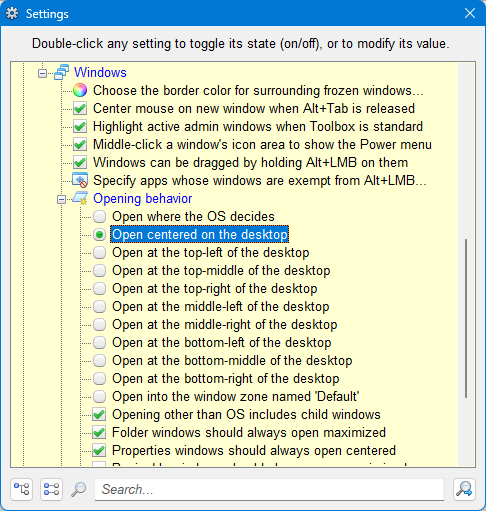
I use an app called AlomWare Toolbox and it has a system tweak to open all windows in the center of the desktop. The app has a free mode, so maybe try it and see if it pushes the game's window to the center? Because if your game window is opened somewhere, then this should center it.

lsNWCDJ.png
 

My Computer

System One

  • OS
    Windows 11 Pro
Very strange, then. So it literally doesn't appear anywhere? Is the process name in Task Manager?

I use an app called AlomWare Toolbox and it has a system tweak to open all windows in the center of the desktop. The app has a free mode, so maybe try it and see if it pushes the game's window to the center? Because if your game window is opened somewhere, then this should center it.

lsNWCDJ.png
I
The games I try to load will appear in task manager but they'll be listed as "background processes" instead of "apps" like they normally would. I'll give it a try next time the problem pops up. Thankfully I haven't dealt with the problem for like 5 days now. *knocks on wood*
 

My Computer

System One

  • OS
    Windows 11
    Computer type
    PC/Desktop
    CPU
    i9-9900k
    Motherboard
    Asus
    Memory
    32 GB
    Graphics Card(s)
    4070 ti
Back
Top Bottom