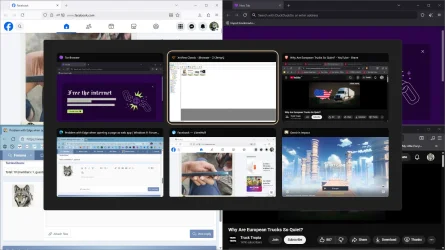
I am not sure where is the correct place to post this but,if I open a page as a web app(I usually do that for Discord(it happens with any page)rather than opening the browser with a lot of tabs),if I have a game running in the background that is not minimized,the app window will often freeze(I mean nothing on the page gets refreshed)until I move the window\resize\maximize it and that's temporary,the problem may appear after few seconds
It's like you start tipping and suddenly nothing appears and when you do something with the windows,suddenly everything you typed appears
What else is happening is that sometimes that window is flashing like crazy
Possible solutions I have found are:
1.Disable "use graphic acceleration when available" but that makes the browser feel sluggish
2.Move the game window to another to another virtual desktop(kinda of annoying solution)
3.Don't use web app windows,just open the page in the browser...that's also not a solution because it can be hard to find the tab if I have a lot of them
4.Open the page in its own browser window(not as web app)...this cases problems with the sessions.If you close the main window first with all of the tabs and then the window with one tab,you will loose all of the tabs from the other window
Using web apps in edge also cases another problem
If the web app is the last edge window open,when I close it,windows freezes for 1-2 seconds because for some reason this wakes up the dgpu
I have all of the latest nvidia\intel drivers installed and windows is also up to date
It's like you start tipping and suddenly nothing appears and when you do something with the windows,suddenly everything you typed appears
What else is happening is that sometimes that window is flashing like crazy
Possible solutions I have found are:
1.Disable "use graphic acceleration when available" but that makes the browser feel sluggish
2.Move the game window to another to another virtual desktop(kinda of annoying solution)
3.Don't use web app windows,just open the page in the browser...that's also not a solution because it can be hard to find the tab if I have a lot of them
4.Open the page in its own browser window(not as web app)...this cases problems with the sessions.If you close the main window first with all of the tabs and then the window with one tab,you will loose all of the tabs from the other window
Using web apps in edge also cases another problem
If the web app is the last edge window open,when I close it,windows freezes for 1-2 seconds because for some reason this wakes up the dgpu
I have all of the latest nvidia\intel drivers installed and windows is also up to date
My Computer
At a glance
Windows 1114700HX64GBRTX 4070
- OS
- Windows 11
- Computer type
- Laptop
- Manufacturer/Model
- MSI Sword 17 HX
- CPU
- 14700HX
- Memory
- 64GB
- Graphics Card(s)
- RTX 4070