

- Local time
- 3:44 AM
- Posts
- 500
- OS
- Windows 11 - Updated automatically
As you can see from the attached screen grab, the right hand edge of the Pages panel has been clipped. Only about 3/4 of the pages are displayed. 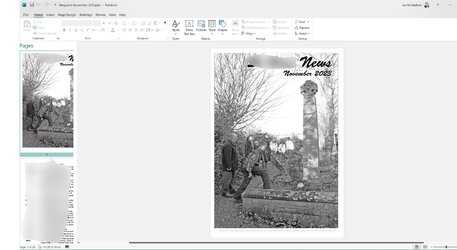
I can scroll up and down and select pages to work on and edit the pages on the main panel so I was able to get the village magazine out, but I'd like to sort this irritation out before starting on the December issue. I can't see how to alter it. I can adjust the width of the panel but the text expands with it so that doesn't help.
Any suggestions please?
I can scroll up and down and select pages to work on and edit the pages on the main panel so I was able to get the village magazine out, but I'd like to sort this irritation out before starting on the December issue. I can't see how to alter it. I can adjust the width of the panel but the text expands with it so that doesn't help.
Any suggestions please?
My Computer
At a glance
Windows 11 - Updated automaticallyIntel i7 12700K Twelve Core 3.6GhzCorsair 32Gb Vengeance RAM
- OS
- Windows 11 - Updated automatically
- Computer type
- PC/Desktop
- Manufacturer/Model
- Updated Chillblast
- CPU
- Intel i7 12700K Twelve Core 3.6Ghz
- Motherboard
- MSI PRO Z690-A DDR4 Motherboard
- Memory
- Corsair 32Gb Vengeance RAM
- Cooling
- Air cooled
- Internet Speed
- 72Mb down, 18Mb up
- Browser
- Chrome
- Antivirus
- Avast





