- Local time
- 1:39 PM
- Posts
- 176
- OS
- Windows 11 Pro Version 25H2 (OS Build 26200.9168)
Hi All -
I have had a huge problem with updating a recovery drive. This is on my system 1 Windows 11 Pro computer in my profile. When it was new, one of the first things I did was create a recovery drive. No problem. It was on a SanDisk Ultra 32GB flash drive, which I still have. I want to keep that as a backup, but it doesn't have two years of system updates on it. That was done when the current version was at 22H2. I have updated my system each time it was available, and am now on 25H2 (which seems to run OK at present)! I read where it is good to update your recovery drive each year, so I decided to try a new drive, but since I have read that a 32GB drive is not really 32GB, but less, I bought a 64GB Lexar flash drive and tried to create a recovery drive with it. I had disconnected all my other USB drives, and fired up my computer, And got this:
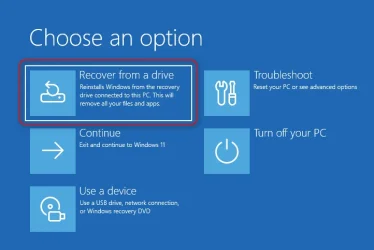
So, I clicked "Next," and got this:
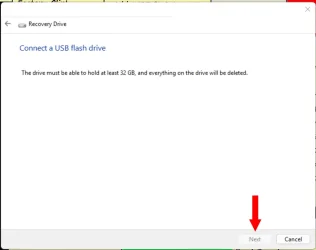
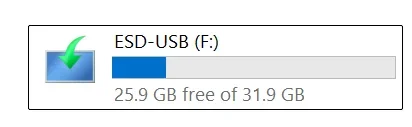
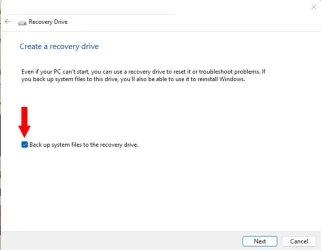
The computer wasn't recognizing the drive in this program. So, I tried formatting the 64GB flash drive in FAT32. I was unable to do that, as the only choices were EX-FAT, and NTFS. I read that you could format the drive to FAT32 in a command prompt, and there was a command where I had to substitute the drive letter for X in the example. I did that, and it took a while, but when I looked at the drive's properties it said FAT32. Great, right? Except that computer still did not recognize the drive in the utility. I returned the 64GB drive, and figured that the original recovery drive was 32GB, so I went and bought the same make (SanDisk) and model and tried it. Same result, only this time, I could format FAT32 without a problem, but still no joy. I returned the drive to the store and got a 128GB PNY drive, as I had used that on my other new Win 11 Pro computer without a problem, or issue. I checked with Google's AI, and it said that I could possibly get the recovery drive made by unchecking the box said "back up system files in the recovery drive:"
So, I tried that, and I could see the recovery drive, by clicking "Next."
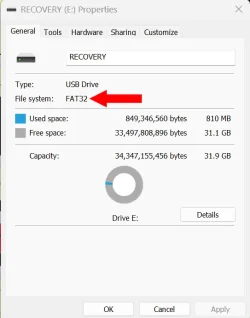
I clicked "Next" on the following page, and it formatted the drive as FAT32.
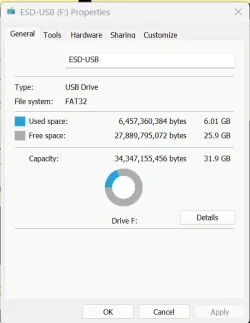
Here is the screenshot of the properties:
So, I go back in and set up to start to create a recovery drive, and the utility will still not recognize this drive.
Has anyone run into this before, and if so, how did you fix it? I have come to the conclusion that it is not the drives, but my computer. I don't wish to purchase any new programs for backup, as my budget is thin. Is there some way I can get my computer to recognize the flash drive, and make a recovery drive from this drive, as I really don't want to return this drive to the store?
Thanks.
I have had a huge problem with updating a recovery drive. This is on my system 1 Windows 11 Pro computer in my profile. When it was new, one of the first things I did was create a recovery drive. No problem. It was on a SanDisk Ultra 32GB flash drive, which I still have. I want to keep that as a backup, but it doesn't have two years of system updates on it. That was done when the current version was at 22H2. I have updated my system each time it was available, and am now on 25H2 (which seems to run OK at present)! I read where it is good to update your recovery drive each year, so I decided to try a new drive, but since I have read that a 32GB drive is not really 32GB, but less, I bought a 64GB Lexar flash drive and tried to create a recovery drive with it. I had disconnected all my other USB drives, and fired up my computer, And got this:
So, I clicked "Next," and got this:
The computer wasn't recognizing the drive in this program. So, I tried formatting the 64GB flash drive in FAT32. I was unable to do that, as the only choices were EX-FAT, and NTFS. I read that you could format the drive to FAT32 in a command prompt, and there was a command where I had to substitute the drive letter for X in the example. I did that, and it took a while, but when I looked at the drive's properties it said FAT32. Great, right? Except that computer still did not recognize the drive in the utility. I returned the 64GB drive, and figured that the original recovery drive was 32GB, so I went and bought the same make (SanDisk) and model and tried it. Same result, only this time, I could format FAT32 without a problem, but still no joy. I returned the drive to the store and got a 128GB PNY drive, as I had used that on my other new Win 11 Pro computer without a problem, or issue. I checked with Google's AI, and it said that I could possibly get the recovery drive made by unchecking the box said "back up system files in the recovery drive:"
So, I tried that, and I could see the recovery drive, by clicking "Next."
I clicked "Next" on the following page, and it formatted the drive as FAT32.
Here is the screenshot of the properties:
So, I go back in and set up to start to create a recovery drive, and the utility will still not recognize this drive.
Has anyone run into this before, and if so, how did you fix it? I have come to the conclusion that it is not the drives, but my computer. I don't wish to purchase any new programs for backup, as my budget is thin. Is there some way I can get my computer to recognize the flash drive, and make a recovery drive from this drive, as I really don't want to return this drive to the store?
Thanks.
- Windows Build/Version
- Windows 11 Pro Version 25H2 (OS Build 26200.7462)
My Computers
-
At a glance
Windows 11 Pro Version 25H2 (OS Build 26200.9...i9 12th Generation64GBPNY 3060 12GB- OS
- Windows 11 Pro Version 25H2 (OS Build 26200.9168)
- Computer type
- PC/Desktop
- Manufacturer/Model
- Dell 8950
- CPU
- i9 12th Generation
- Memory
- 64GB
- Graphics Card(s)
- PNY 3060 12GB
- Monitor(s) Displays
- NEC EA27IU
- Screen Resolution
- 3840X2160
- Hard Drives
- SSD internal, external drives
- Cooling
- Advanced Air Cooling
- Keyboard
- Microsoft
- Mouse
- Logitech
- Internet Speed
- High-Speed
- Browser
- MS Edge
- Antivirus
- Norton 360
-
At a glance
Win 11 Pro 25H2 (OS Build 26200.8655)Intel Ultra 7 265 (20 cores) processor32GB DDR5 RamBuilt-in Intel UHD Graphics- Operating System
- Win 11 Pro 25H2 (OS Build 26200.8655)
- Computer type
- PC/Desktop
- Manufacturer/Model
- Dell Tower ECT1250
- CPU
- Intel Ultra 7 265 (20 cores) processor
- Memory
- 32GB DDR5 Ram
- Graphics card(s)
- Built-in Intel UHD Graphics
- Sound Card
- Built-in
- Screen Resolution
- 1920X1080
- Hard Drives
- 2TB internal SSD
- Case
- Tower