Problems Creating Recovery Drive On Win 11 Pro Computer


archfoto

Well-known member
Member
VIP
Local time
11:45 AM
Posts
176
OS
Windows 11 Pro Version 25H2 (OS Build 26200.8655)
Hi All -
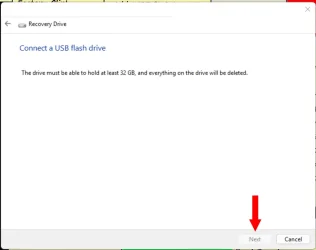
I have had a huge problem with updating a recovery drive. This is on my system 1 Windows 11 Pro computer in my profile. When it was new, one of the first things I did was create a recovery drive. No problem. It was on a SanDisk Ultra 32GB flash drive, which I still have. I want to keep that as a backup, but it doesn't have two years of system updates on it. That was done when the current version was at 22H2. I have updated my system each time it was available, and am now on 25H2 (which seems to run OK at present)! I read where it is good to update your recovery drive each year, so I decided to try a new drive, but since I have read that a 32GB drive is not really 32GB, but less, I bought a 64GB Lexar flash drive and tried to create a recovery drive with it. I had disconnected all my other USB drives, and fired up my computer, And got this:
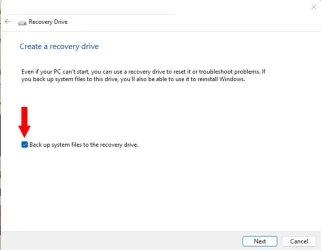
Screenshot 2026-01-04 134229.webp

So, I clicked "Next," and got this:

Screenshot 2026-01-03 193418.webp

The computer wasn't recognizing the drive in this program. So, I tried formatting the 64GB flash drive in FAT32. I was unable to do that, as the only choices were EX-FAT, and NTFS. I read that you could format the drive to FAT32 in a command prompt, and there was a command where I had to substitute the drive letter for X in the example. I did that, and it took a while, but when I looked at the drive's properties it said FAT32. Great, right? Except that computer still did not recognize the drive in the utility. I returned the 64GB drive, and figured that the original recovery drive was 32GB, so I went and bought the same make (SanDisk) and model and tried it. Same result, only this time, I could format FAT32 without a problem, but still no joy. I returned the drive to the store and got a 128GB PNY drive, as I had used that on my other new Win 11 Pro computer without a problem, or issue. I checked with Google's AI, and it said that I could possibly get the recovery drive made by unchecking the box said "back up system files in the recovery drive:"

Screenshot 2026-01-04 134229.webp

So, I tried that, and I could see the recovery drive, by clicking "Next."
I clicked "Next" on the following page, and it formatted the drive as FAT32.
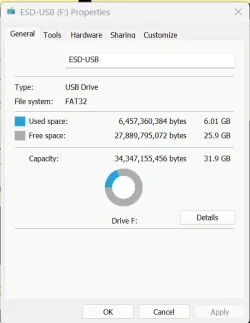
Here is the screenshot of the properties:
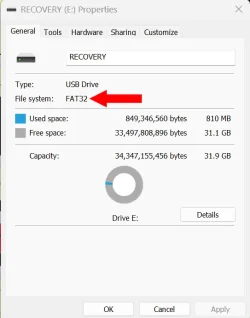
Screenshot 2026-01-04 132805.webp

So, I go back in and set up to start to create a recovery drive, and the utility will still not recognize this drive.

Has anyone run into this before, and if so, how did you fix it? I have come to the conclusion that it is not the drives, but my computer. I don't wish to purchase any new programs for backup, as my budget is thin. Is there some way I can get my computer to recognize the flash drive, and make a recovery drive from this drive, as I really don't want to return this drive to the store?

Thanks.
 
Windows Build/Version
Windows 11 Pro Version 25H2 (OS Build 26200.7462)

My Computers My Computers

  • At a glance

    Windows 11 Pro Version 25H2 (OS Build 26200.8...i9 12th Generation64GBPNY 3060 12GB
    OS
    Windows 11 Pro Version 25H2 (OS Build 26200.8655)
    Computer type
    PC/Desktop
    Manufacturer/Model
    Dell 8950
    CPU
    i9 12th Generation
    Memory
    64GB
    Graphics Card(s)
    PNY 3060 12GB
    Monitor(s) Displays
    NEC EA27IU
    Screen Resolution
    3840X2160
    Hard Drives
    SSD internal, external drives
    Cooling
    Advanced Air Cooling
    Keyboard
    Microsoft
    Mouse
    Logitech
    Internet Speed
    High-Speed
    Browser
    MS Edge
    Antivirus
    Norton 360
  • At a glance

    Win 11 Pro 25H2 (OS Build 26200.8655)Intel Ultra 7 265 (20 cores) processor32GB DDR5 RamBuilt-in Intel UHD Graphics
    Operating System
    Win 11 Pro 25H2 (OS Build 26200.8655)
    Computer type
    PC/Desktop
    Manufacturer/Model
    Dell Tower ECT1250
    CPU
    Intel Ultra 7 265 (20 cores) processor
    Memory
    32GB DDR5 Ram
    Graphics card(s)
    Built-in Intel UHD Graphics
    Sound Card
    Built-in
    Screen Resolution
    1920X1080
    Hard Drives
    2TB internal SSD
    Case
    Tower
I read where it is good to update your recovery drive each year

I have a small tray of Windows Recovery USB sticks. I randomly take one out. One is a Windows 8.1 Recovery, Windows 10 & a Windows 11, all work on Windows 11.

but it doesn't have two years of system updates on it

System updates being placed on a recovery drive is new to me. I actually never looked in a recovery USB.
 

My Computers My Computers

  • At a glance

    Windows 11 Pro 25H2 Build 26200.8655Intel(R) Core(TM) i7-4770K CPU @ 3.50GHz32.0 GB of I forget and the box is in storage.Gigabyte nVidia GeForce GTX 1660 Super OC 6GB
    OS
    Windows 11 Pro 25H2 Build 26200.8655
    Computer type
    PC/Desktop
    Manufacturer/Model
    Sin-built 2013
    CPU
    Intel(R) Core(TM) i7-4770K CPU @ 3.50GHz
    Motherboard
    ASUS ROG Maximus VI Formula
    Memory
    32.0 GB of I forget and the box is in storage.
    Graphics Card(s)
    Gigabyte nVidia GeForce GTX 1660 Super OC 6GB
    Sound Card
    ROG SupremeFX Formula 8-Channel High Definition Audio
    Monitor(s) Displays
    5 x LG 25MS500-B - 1 x 24MK430H-B - 1 x Wacom Pro 22" Touch Screen Tablet
    Screen Resolution
    All over the place
    Hard Drives
    Too many to list. OS on Samsung 1TB 870 QVO SATA
    PSU
    Silverstone 1500
    Case
    NZXT Phantom 820 Full-Tower Case
    Cooling
    Noctua NH-D15 Elite Class Dual Tower CPU Cooler / 6 x EziDIY 120mm / 2 x Corsair 140mm somethings / 1 x 140mm Thermaltake something / 2 x 200mm Corsair.
    Keyboard
    Corsair K95 / Logitech diNovo Edge Wireless
    Mouse
    Logitech: G402 / G502 / Mx Masters / Mx Air Cordless
    Internet Speed
    2000/500Mbps
    Browser
    All sorts
    Antivirus
    Kaspersky Premium
    Other Info
    ㅤㅤㅤㅤㅤㅤㅤㅤㅤㅤㅤㅤㅤㅤㅤㅤㅤㅤㅤㅤㅤㅤㅤㅤㅤㅤㅤㅤㅤㅤㅤㅤㅤㅤㅤㅤㅤㅤㅤㅤ⠀⠀⠀⠀⠀⠀⠀⠀⠀⠀
    TP-Link BE9300 WiFi 7 Bluetooth 5.4 (Archer TBE550E)
    TP-Link TX201 V1 2.5GB Lan

    Grandstream HT812 - VoIP
    ASUS DSL-AX82U - Mesh
    ASUS RT-AC68U - Mesh
    ASUS RT-BE88U Router

    Brother MFC-L2880DW Printer

    I’m on a horse.
  • At a glance

    Windows 11 Pro 25H2 Build 26200.8655 (Wifes)13th Generation Intel® Core™ i5-1340P Process...16GB LPDDR5-52001x Intel® Iris® Xe Graphics
    Operating System
    Windows 11 Pro 25H2 Build 26200.8655 (Wifes)
    Computer type
    Laptop
    Manufacturer/Model
    LENOVO Yoga 7 14IRL8 - Type 82YL
    CPU
    13th Generation Intel® Core™ i5-1340P Processor(Core™ i5-1340P)
    Memory
    16GB LPDDR5-5200
    Graphics card(s)
    1x Intel® Iris® Xe Graphics
    Sound Card
    Optimized with Dolby Atmos®
    Screen Resolution
    QHD 2880 x 1800 OLED
    Hard Drives
    M.2 512 GB SSD PCIe
    Mouse
    Logiteck MX Master 3S
    Internet Speed
    2000/500
    Antivirus
    Defender / Malwarebytes
    Other Info
    …still on a horse.


    Wireless Network: Wi-Fi 6E 2x2 AX; Bluetooth® 5.1 or above
    Ports: 1x 1 Novo button; 2 in 1 Audio Combo jack; Micro SD Card Reader; HDMI 1.4b; 2 x USB Type-C (TBT4)
    USB 3.2 Gen 2 DP 1.4a
    PD 3.0); 1 x USB 3.2 Gen1 Type A
    Camera
    1x 1080P FHD IR/RGB Hybrid with Privacy Shutter and Dual Array Microphone
    Graphics
    1x Intel® Iris® Xe Graphics
    Monitor
    14" WUXGA
    Form Factor
    Convertible Notebook
  • Windows 11 Pro 25H2 Build 26200.8655 (Wifes)

    Yoga 7 2-in-1 14IML9 - Type 83DJ

    Processor: Intel® Core™ Ultra 7 155H Processor(Core™ Ultra 7 155H)

    Memory: 32GB LPD5X-7467

    Hard Drive: 1 TB SSD PCIe

    Wireless Network: 1x Wi-Fi 6E 2x2 AX; Bluetooth® 5.1 or above

    Ports: 1 x HDMI 2.1 TMDS; 1 x Novo Button; 1 x Combo Audio Jack
    2 x USB-C (USB 4.0)
    1 x USB-A 3.2 Gen 1

    Camera: 1080P FHD IR Hybrid with Dual Microphone

    Graphics: Intel® Arc™ Graphics

    Monitor: 14" 2.8K

    ...Where's my horse?
I believe you have a misunderstanding about what a recovery drive is. It a bootable USB stick or other media containing Windows Recovery Environment(WinRE) tools like Startup Repair and System Restore. It is NOT a backup of your complete Windows OS. One can also access these same recovery tools using a Windows Installation usb. Using a 32 gb usb is a big overkill for a recovery drive. You can create a full windows install disk on a 8gb usb.
I don't wish to purchase any new programs for backup,
Hasleo Backup Suite is free. It can image your entire system to external media; OS, applications, user files, everything. Hasleo provides Windows Backup & Clone, Data Recovery, Windows To Go Creator, and more.
You create a Hasleo usb boot drive (4gb or larger)from within Hasleo once it is installed. This boot drive allows you to recover your entire system.
 

My Computers My Computers

  • At a glance

    Windows 11 Pro 25H2 26200.8655i9-10900 10 core 20 threads32 gbnone-Intel UHD Graphics 630
    OS
    Windows 11 Pro 25H2 26200.8655
    Computer type
    PC/Desktop
    Manufacturer/Model
    Dell Optiplex 7080
    CPU
    i9-10900 10 core 20 threads
    Motherboard
    DELL 0J37VM
    Memory
    32 gb
    Graphics Card(s)
    none-Intel UHD Graphics 630
    Sound Card
    Integrated Realtek
    Monitor(s) Displays
    Benq 27
    Screen Resolution
    2560x1440
    Hard Drives
    2x1tb Solidigm m.2 nvme /External drives 512gb Samsung m.2 sata+2tb Kingston m2.nvme
    PSU
    500w
    Case
    MT
    Cooling
    Dell Premium
    Keyboard
    Logitech wired
    Mouse
    Logitech wireless
    Internet Speed
    so slow I'm too embarrassed to tell
    Browser
    #1 Edge #2 Firefox
    Antivirus
    Defender+MWB Premium
  • At a glance

    Windows 11 Pro 24H2 26200.8457AMD Ryzen 7 6800U32 gbintegrated
    Operating System
    Windows 11 Pro 24H2 26200.8457
    Computer type
    PC/Desktop
    Manufacturer/Model
    Beelink Mini PC SER5
    CPU
    AMD Ryzen 7 6800U
    Memory
    32 gb
    Graphics card(s)
    integrated
    Sound Card
    integrated
    Monitor(s) Displays
    Benq 27
    Screen Resolution
    2560x1440
    Hard Drives
    1TB Crucial nvme
    Keyboard
    Logitech wired
    Mouse
    Logitech wireless
    Internet Speed
    still too embarrassed to tell
    Browser
    Firefox
    Antivirus
    Defender
    Other Info
    System 3 is non compliant Dell 9020 i7-4770/24gb ram Win11 PRO 26200.8457
@archfoto
the FAT32 format has a partition limit of 32GB
for the recovery drive please try NTFS.

best of luck Steve ..
 

My Computers My Computers

  • At a glance

    Debian 13 KDE .. Windows 11 HomeRyzen 7 5825u64GB DDR4 3200Ryzen 7 5825u
    OS
    Debian 13 KDE .. Windows 11 Home
    Computer type
    PC/Desktop
    Manufacturer/Model
    HP 24" AiO
    CPU
    Ryzen 7 5825u
    Motherboard
    HP
    Memory
    64GB DDR4 3200
    Graphics Card(s)
    Ryzen 7 5825u
    Sound Card
    RealTek
    Monitor(s) Displays
    24" HP AiO
    Screen Resolution
    1920 x 1080 @60 Hz
    Hard Drives
    1TB WD Blue SN580 M2 SSD Partitioned.
    2x 1TB USB HDD External Backup/Storage.
    PSU
    90W external power brick
    Case
    24" All in One
    Cooling
    Default Air Cooling
    Keyboard
    HP WiFi UK extended
    Mouse
    HP WiFi 3 Button
    Internet Speed
    1GB full fibre
    Browser
    Edge & Firefox
    Antivirus
    AVG Internet Security/Windows Defender
    Other Info
    Mainly Open Source Software
  • At a glance

    Ubuntu 22.04.5 LTSi5 7200u16GB DDR4Intel
    Operating System
    Ubuntu 22.04.5 LTS
    Computer type
    Laptop
    Manufacturer/Model
    Dell 13" Latitude 2017
    CPU
    i5 7200u
    Motherboard
    Dell
    Memory
    16GB DDR4
    Graphics card(s)
    Intel
    Sound Card
    Intel
    Monitor(s) Displays
    13" Dell Laptop
    Hard Drives
    250GB Crucial 2.5" SSD
    Mouse
    Generic WiFi 3 button
    Internet Speed
    WiFi only
    Browser
    Firefox
    Antivirus
    ClamAV TK
    Other Info
    Mainly Open Source Software
I have a small tray of Windows Recovery USB sticks. I randomly take one out. One is a Windows 8.1 Recovery, Windows 10 & a Windows 11, all work on Windows 11.


System updates being placed on a recovery drive is new to me. I actually never looked in a recovery USB.
Hi Antspants -
Yeah, according to what I have read, all of your updates and drivers will be included in recovering just Windows, so that if I used the original recovery drive I made when the computer was new, it wouldn't have any of those updates, and I would have to update constantly to catch up. Also, I found out that if you have an old Win 10 computer, and you want to have the last updates, since MS won't provide those, you have to have them backed up, or you start with the oldest version!
 

My Computers My Computers

  • At a glance

    Windows 11 Pro Version 25H2 (OS Build 26200.8...i9 12th Generation64GBPNY 3060 12GB
    OS
    Windows 11 Pro Version 25H2 (OS Build 26200.8655)
    Computer type
    PC/Desktop
    Manufacturer/Model
    Dell 8950
    CPU
    i9 12th Generation
    Memory
    64GB
    Graphics Card(s)
    PNY 3060 12GB
    Monitor(s) Displays
    NEC EA27IU
    Screen Resolution
    3840X2160
    Hard Drives
    SSD internal, external drives
    Cooling
    Advanced Air Cooling
    Keyboard
    Microsoft
    Mouse
    Logitech
    Internet Speed
    High-Speed
    Browser
    MS Edge
    Antivirus
    Norton 360
  • At a glance

    Win 11 Pro 25H2 (OS Build 26200.8655)Intel Ultra 7 265 (20 cores) processor32GB DDR5 RamBuilt-in Intel UHD Graphics
    Operating System
    Win 11 Pro 25H2 (OS Build 26200.8655)
    Computer type
    PC/Desktop
    Manufacturer/Model
    Dell Tower ECT1250
    CPU
    Intel Ultra 7 265 (20 cores) processor
    Memory
    32GB DDR5 Ram
    Graphics card(s)
    Built-in Intel UHD Graphics
    Sound Card
    Built-in
    Screen Resolution
    1920X1080
    Hard Drives
    2TB internal SSD
    Case
    Tower
according to what I have read, all of your updates and drivers will be included in recovering just Windows,
As I said, you are misunderstanding what a recovery drive is and exactly what it can do.
 

My Computers My Computers

  • At a glance

    Windows 11 Pro 25H2 26200.8655i9-10900 10 core 20 threads32 gbnone-Intel UHD Graphics 630
    OS
    Windows 11 Pro 25H2 26200.8655
    Computer type
    PC/Desktop
    Manufacturer/Model
    Dell Optiplex 7080
    CPU
    i9-10900 10 core 20 threads
    Motherboard
    DELL 0J37VM
    Memory
    32 gb
    Graphics Card(s)
    none-Intel UHD Graphics 630
    Sound Card
    Integrated Realtek
    Monitor(s) Displays
    Benq 27
    Screen Resolution
    2560x1440
    Hard Drives
    2x1tb Solidigm m.2 nvme /External drives 512gb Samsung m.2 sata+2tb Kingston m2.nvme
    PSU
    500w
    Case
    MT
    Cooling
    Dell Premium
    Keyboard
    Logitech wired
    Mouse
    Logitech wireless
    Internet Speed
    so slow I'm too embarrassed to tell
    Browser
    #1 Edge #2 Firefox
    Antivirus
    Defender+MWB Premium
  • At a glance

    Windows 11 Pro 24H2 26200.8457AMD Ryzen 7 6800U32 gbintegrated
    Operating System
    Windows 11 Pro 24H2 26200.8457
    Computer type
    PC/Desktop
    Manufacturer/Model
    Beelink Mini PC SER5
    CPU
    AMD Ryzen 7 6800U
    Memory
    32 gb
    Graphics card(s)
    integrated
    Sound Card
    integrated
    Monitor(s) Displays
    Benq 27
    Screen Resolution
    2560x1440
    Hard Drives
    1TB Crucial nvme
    Keyboard
    Logitech wired
    Mouse
    Logitech wireless
    Internet Speed
    still too embarrassed to tell
    Browser
    Firefox
    Antivirus
    Defender
    Other Info
    System 3 is non compliant Dell 9020 i7-4770/24gb ram Win11 PRO 26200.8457
I believe you have a misunderstanding about what a recovery drive is. It a bootable USB stick or other media containing Windows Recovery Environment(WinRE) tools like Startup Repair and System Restore. It is NOT a backup of your complete Windows OS. One can also access these same recovery tools using a Windows Installation usb. Using a 32 gb usb is a big overkill for a recovery drive. You can create a full windows install disk on a 8gb usb.

Hasleo Backup Suite is free. It can image your entire system to external media; OS, applications, user files, everything. Hasleo provides Windows Backup & Clone, Data Recovery, Windows To Go Creator, and more.
You create a Hasleo usb boot drive (4gb or larger)from within Hasleo once it is installed. This boot drive allows you to recover your entire system.
Hi Glasskuter -
Yeah, I understand that. This, to me, is just somewhat of an insurance policy. I have used the Windows restore feature from the restore points a few times, and it has gotten me back on track, and thank goodness, I have not had to use the recovery drive, ever. I just want to know why my computer can recognize the flashdrives among the other USB drives I have in "My PC," but not in the recovery drive utility. I just created a recovery drive a little while back on my wife's old Win 10 Pro computer using a Lexar 64GB drive with no problems, as I will probably think about selling it down the road, sans any of our information. It has all the updates until support was stopped by MS. Thanks for the tip on Hasleo.
 

My Computers My Computers

  • At a glance

    Windows 11 Pro Version 25H2 (OS Build 26200.8...i9 12th Generation64GBPNY 3060 12GB
    OS
    Windows 11 Pro Version 25H2 (OS Build 26200.8655)
    Computer type
    PC/Desktop
    Manufacturer/Model
    Dell 8950
    CPU
    i9 12th Generation
    Memory
    64GB
    Graphics Card(s)
    PNY 3060 12GB
    Monitor(s) Displays
    NEC EA27IU
    Screen Resolution
    3840X2160
    Hard Drives
    SSD internal, external drives
    Cooling
    Advanced Air Cooling
    Keyboard
    Microsoft
    Mouse
    Logitech
    Internet Speed
    High-Speed
    Browser
    MS Edge
    Antivirus
    Norton 360
  • At a glance

    Win 11 Pro 25H2 (OS Build 26200.8655)Intel Ultra 7 265 (20 cores) processor32GB DDR5 RamBuilt-in Intel UHD Graphics
    Operating System
    Win 11 Pro 25H2 (OS Build 26200.8655)
    Computer type
    PC/Desktop
    Manufacturer/Model
    Dell Tower ECT1250
    CPU
    Intel Ultra 7 265 (20 cores) processor
    Memory
    32GB DDR5 Ram
    Graphics card(s)
    Built-in Intel UHD Graphics
    Sound Card
    Built-in
    Screen Resolution
    1920X1080
    Hard Drives
    2TB internal SSD
    Case
    Tower
@archfoto
the FAT32 format has a partition limit of 32GB
for the recovery drive please try NTFS.

best of luck Steve ..
Hi XxXxX -

Apparently, the utility will format the drive only in FAT32! I have also tried starting out in NTFS!
 

My Computers My Computers

  • At a glance

    Windows 11 Pro Version 25H2 (OS Build 26200.8...i9 12th Generation64GBPNY 3060 12GB
    OS
    Windows 11 Pro Version 25H2 (OS Build 26200.8655)
    Computer type
    PC/Desktop
    Manufacturer/Model
    Dell 8950
    CPU
    i9 12th Generation
    Memory
    64GB
    Graphics Card(s)
    PNY 3060 12GB
    Monitor(s) Displays
    NEC EA27IU
    Screen Resolution
    3840X2160
    Hard Drives
    SSD internal, external drives
    Cooling
    Advanced Air Cooling
    Keyboard
    Microsoft
    Mouse
    Logitech
    Internet Speed
    High-Speed
    Browser
    MS Edge
    Antivirus
    Norton 360
  • At a glance

    Win 11 Pro 25H2 (OS Build 26200.8655)Intel Ultra 7 265 (20 cores) processor32GB DDR5 RamBuilt-in Intel UHD Graphics
    Operating System
    Win 11 Pro 25H2 (OS Build 26200.8655)
    Computer type
    PC/Desktop
    Manufacturer/Model
    Dell Tower ECT1250
    CPU
    Intel Ultra 7 265 (20 cores) processor
    Memory
    32GB DDR5 Ram
    Graphics card(s)
    Built-in Intel UHD Graphics
    Sound Card
    Built-in
    Screen Resolution
    1920X1080
    Hard Drives
    2TB internal SSD
    Case
    Tower
Hi Antspants -
Yeah, according to what I have read, all of your updates and drivers will be included in recovering just Windows, so that if I used the original recovery drive I made when the computer was new, it wouldn't have any of those updates, and I would have to update constantly to catch up. Also, I found out that if you have an old Win 10 computer, and you want to have the last updates, since MS won't provide those, you have to have them backed up, or you start with the oldest version!

Like glasskuter says, I believe you’re confusing a Windows recovery USB (for troubleshooting) to a System “Image”
What you’re showing in the first post is a recovery USB to boot to so as you can run troubleshooting etc
 

My Computers My Computers

  • At a glance

    Windows 11 Pro 25H2 Build 26200.8655Intel(R) Core(TM) i7-4770K CPU @ 3.50GHz32.0 GB of I forget and the box is in storage.Gigabyte nVidia GeForce GTX 1660 Super OC 6GB
    OS
    Windows 11 Pro 25H2 Build 26200.8655
    Computer type
    PC/Desktop
    Manufacturer/Model
    Sin-built 2013
    CPU
    Intel(R) Core(TM) i7-4770K CPU @ 3.50GHz
    Motherboard
    ASUS ROG Maximus VI Formula
    Memory
    32.0 GB of I forget and the box is in storage.
    Graphics Card(s)
    Gigabyte nVidia GeForce GTX 1660 Super OC 6GB
    Sound Card
    ROG SupremeFX Formula 8-Channel High Definition Audio
    Monitor(s) Displays
    5 x LG 25MS500-B - 1 x 24MK430H-B - 1 x Wacom Pro 22" Touch Screen Tablet
    Screen Resolution
    All over the place
    Hard Drives
    Too many to list. OS on Samsung 1TB 870 QVO SATA
    PSU
    Silverstone 1500
    Case
    NZXT Phantom 820 Full-Tower Case
    Cooling
    Noctua NH-D15 Elite Class Dual Tower CPU Cooler / 6 x EziDIY 120mm / 2 x Corsair 140mm somethings / 1 x 140mm Thermaltake something / 2 x 200mm Corsair.
    Keyboard
    Corsair K95 / Logitech diNovo Edge Wireless
    Mouse
    Logitech: G402 / G502 / Mx Masters / Mx Air Cordless
    Internet Speed
    2000/500Mbps
    Browser
    All sorts
    Antivirus
    Kaspersky Premium
    Other Info
    ㅤㅤㅤㅤㅤㅤㅤㅤㅤㅤㅤㅤㅤㅤㅤㅤㅤㅤㅤㅤㅤㅤㅤㅤㅤㅤㅤㅤㅤㅤㅤㅤㅤㅤㅤㅤㅤㅤㅤㅤ⠀⠀⠀⠀⠀⠀⠀⠀⠀⠀
    TP-Link BE9300 WiFi 7 Bluetooth 5.4 (Archer TBE550E)
    TP-Link TX201 V1 2.5GB Lan

    Grandstream HT812 - VoIP
    ASUS DSL-AX82U - Mesh
    ASUS RT-AC68U - Mesh
    ASUS RT-BE88U Router

    Brother MFC-L2880DW Printer

    I’m on a horse.
  • At a glance

    Windows 11 Pro 25H2 Build 26200.8655 (Wifes)13th Generation Intel® Core™ i5-1340P Process...16GB LPDDR5-52001x Intel® Iris® Xe Graphics
    Operating System
    Windows 11 Pro 25H2 Build 26200.8655 (Wifes)
    Computer type
    Laptop
    Manufacturer/Model
    LENOVO Yoga 7 14IRL8 - Type 82YL
    CPU
    13th Generation Intel® Core™ i5-1340P Processor(Core™ i5-1340P)
    Memory
    16GB LPDDR5-5200
    Graphics card(s)
    1x Intel® Iris® Xe Graphics
    Sound Card
    Optimized with Dolby Atmos®
    Screen Resolution
    QHD 2880 x 1800 OLED
    Hard Drives
    M.2 512 GB SSD PCIe
    Mouse
    Logiteck MX Master 3S
    Internet Speed
    2000/500
    Antivirus
    Defender / Malwarebytes
    Other Info
    …still on a horse.


    Wireless Network: Wi-Fi 6E 2x2 AX; Bluetooth® 5.1 or above
    Ports: 1x 1 Novo button; 2 in 1 Audio Combo jack; Micro SD Card Reader; HDMI 1.4b; 2 x USB Type-C (TBT4)
    USB 3.2 Gen 2 DP 1.4a
    PD 3.0); 1 x USB 3.2 Gen1 Type A
    Camera
    1x 1080P FHD IR/RGB Hybrid with Privacy Shutter and Dual Array Microphone
    Graphics
    1x Intel® Iris® Xe Graphics
    Monitor
    14" WUXGA
    Form Factor
    Convertible Notebook
  • Windows 11 Pro 25H2 Build 26200.8655 (Wifes)

    Yoga 7 2-in-1 14IML9 - Type 83DJ

    Processor: Intel® Core™ Ultra 7 155H Processor(Core™ Ultra 7 155H)

    Memory: 32GB LPD5X-7467

    Hard Drive: 1 TB SSD PCIe

    Wireless Network: 1x Wi-Fi 6E 2x2 AX; Bluetooth® 5.1 or above

    Ports: 1 x HDMI 2.1 TMDS; 1 x Novo Button; 1 x Combo Audio Jack
    2 x USB-C (USB 4.0)
    1 x USB-A 3.2 Gen 1

    Camera: 1080P FHD IR Hybrid with Dual Microphone

    Graphics: Intel® Arc™ Graphics

    Monitor: 14" 2.8K

    ...Where's my horse?
It isn't bad to update a Recovery drive yearly or so. Maybe the utility includes more files with zeroes just to boast, but every new Recovery drive I've done (all successfully) has higher occupied space.

If you choose FAT32 to format any USB stick with enough capacity (64 GB, 128 GB, 1,048,576 PB, etc), Diskmgmt will shrink any previous partition to about 31.9 GB, which is NOT enough to recognize the media as valid for a Recovery drive.

You don't have to format anything, unless you've done erroeous formats like the one of the previous paragraph, in which case you have to enlarge the partition before.

I have never fixed it with Diskmgmt (Idk if it can be done), I use 3rd party managers instead, normally MiniTool Free except MiniTool paid in one of my computers, but any should do.

With a 3rd party partition app, pick any USB stick w/o important data and with exactly "64 GB" commercially (I have doubts about if it can be done on a 128 GB one in general or in your computer after reading your posts, and I have always used 64 GB anyway), DELETE any partition it has and leave the USB drive unallocated, CREATE a new partition with any filesystem different from FAT, FAT16 and FAT32 (maybe exFAT, my favourite one for pendrives, is better than NTFS in your computer for any odd reason, but NTFS should work too, I prefer exFAT for my pendrives with data b/c it's totally passive and very accurate with the files dates, but you'll lose this format when you do the Recovery drive anyway).

The Recovery drive program will delete any data or partition, it will create a FAT32 partition with exactly 32 GB, and the Recovery disk in it.
 

My Computer My Computer

At a glance

Windows 11Celeron J4125 (10th gen)8GB DDR4
OS
Windows 11
Manufacturer/Model
MeLE Quieter 2Q (fanless miniPC)
CPU
Celeron J4125 (10th gen)
Memory
8GB DDR4
Monitor(s) Displays
Samsung SyncMaster T260
Screen Resolution
1920x1200
Hard Drives
256GB eMMC (Windows)
2TB USB3 HDD Toshiba (Data)
I tried formatting the 64GB flash drive in FAT32. I was unable to do that
Use a tool such as Minitool partition wizard to do the Fat32 formatting.
Windows is able to work with such large Fat32 partitions; it's just the >32GB formatting task that Windows cannot handle.

You were right to set the checkbox for
back up system files in the recovery drive
Without that setting a Recovery drive is about the same as a System repair disk.
There are several incorrect statements about Recovery drives in this thread. What you were trying to do when you started was correct.
Create Recovery Drive - ElevenForumTutorials


Denis
 
Last edited:

My Computer My Computer

At a glance

Windows 11 Home x64 Version 25H2 Build 26200....
OS
Windows 11 Home x64 Version 25H2 Build 26200.8037
This is a link for recovery drive:


This is link for bootable USB:


This is a link for backup imaging:


My Computer My Computer

At a glance

Windows 10Intel(R) Core(TM) i7-4800MQ CPU @ 2.70GHz16 GB Total: Manufacturer : Samsung MemoryTyp...NVIDIA Quadro K3100M; Intel(R) HD Graphics 4600
OS
Windows 10
Computer type
Laptop
Manufacturer/Model
HP
CPU
Intel(R) Core(TM) i7-4800MQ CPU @ 2.70GHz
Motherboard
Product : 190A Version : KBC Version 94.56
Memory
16 GB Total: Manufacturer : Samsung MemoryType : DDR3 FormFactor : SODIMM Capacity : 8GB Speed : 1600
Graphics Card(s)
NVIDIA Quadro K3100M; Intel(R) HD Graphics 4600
Sound Card
IDT High Definition Audio CODEC; PNP Device ID HDAUDIO\FUNC_01&VEN_111D&DEV_76E0
Hard Drives
Model Hitachi HTS727575A9E364
Antivirus
Microsoft Defender
Other Info
Mobile Workstation
It isn't bad to update a Recovery drive yearly or so. Maybe the utility includes more files with zeroes just to boast, but every new Recovery drive I've done (all successfully) has higher occupied space.

If you choose FAT32 to format any USB stick with enough capacity (64 GB, 128 GB, 1,048,576 PB, etc), Diskmgmt will shrink any previous partition to about 31.9 GB, which is NOT enough to recognize the media as valid for a Recovery drive.

You don't have to format anything, unless you've done erroeous formats like the one of the previous paragraph, in which case you have to enlarge the partition before.

I have never fixed it with Diskmgmt (Idk if it can be done), I use 3rd party managers instead, normally MiniTool Free except MiniTool paid in one of my computers, but any should do.

With a 3rd party partition app, pick any USB stick w/o important data and with exactly "64 GB" commercially (I have doubts about if it can be done on a 128 GB one in general or in your computer after reading your posts, and I have always used 64 GB anyway), DELETE any partition it has and leave the USB drive unallocated, CREATE a new partition with any filesystem different from FAT, FAT16 and FAT32 (maybe exFAT, my favourite one for pendrives, is better than NTFS in your computer for any odd reason, but NTFS should work too, I prefer exFAT for my pendrives with data b/c it's totally passive and very accurate with the files dates, but you'll lose this format when you do the Recovery drive anyway).

The Recovery drive program will delete any data or partition, it will create a FAT32 partition with exactly 32 GB, and the Recovery disk in it.
Hi JLArranz -
I did not choose FAT32, the program did, when I formatted the flashdrive with the utility. And you are right, the partition goes to 31.9GB. What I want to know, primarily, since some of the other members have given me ways to actually back up my main hard drive or create a bootable USB drive, and I also have several terabytes of hard drive space on external USB drives to do so, is why I was able to make a recovery stick when the computer was new, but why it refuses to do so now, by not recognizing the drive within the utility, even though it was able to format it.
 

My Computers My Computers

  • At a glance

    Windows 11 Pro Version 25H2 (OS Build 26200.8...i9 12th Generation64GBPNY 3060 12GB
    OS
    Windows 11 Pro Version 25H2 (OS Build 26200.8655)
    Computer type
    PC/Desktop
    Manufacturer/Model
    Dell 8950
    CPU
    i9 12th Generation
    Memory
    64GB
    Graphics Card(s)
    PNY 3060 12GB
    Monitor(s) Displays
    NEC EA27IU
    Screen Resolution
    3840X2160
    Hard Drives
    SSD internal, external drives
    Cooling
    Advanced Air Cooling
    Keyboard
    Microsoft
    Mouse
    Logitech
    Internet Speed
    High-Speed
    Browser
    MS Edge
    Antivirus
    Norton 360
  • At a glance

    Win 11 Pro 25H2 (OS Build 26200.8655)Intel Ultra 7 265 (20 cores) processor32GB DDR5 RamBuilt-in Intel UHD Graphics
    Operating System
    Win 11 Pro 25H2 (OS Build 26200.8655)
    Computer type
    PC/Desktop
    Manufacturer/Model
    Dell Tower ECT1250
    CPU
    Intel Ultra 7 265 (20 cores) processor
    Memory
    32GB DDR5 Ram
    Graphics card(s)
    Built-in Intel UHD Graphics
    Sound Card
    Built-in
    Screen Resolution
    1920X1080
    Hard Drives
    2TB internal SSD
    Case
    Tower
This is a link for recovery drive:


This is link for bootable USB:


This is a link for backup imaging:

Hi Zbook -

Thanks for the links!
 

My Computers My Computers

  • At a glance

    Windows 11 Pro Version 25H2 (OS Build 26200.8...i9 12th Generation64GBPNY 3060 12GB
    OS
    Windows 11 Pro Version 25H2 (OS Build 26200.8655)
    Computer type
    PC/Desktop
    Manufacturer/Model
    Dell 8950
    CPU
    i9 12th Generation
    Memory
    64GB
    Graphics Card(s)
    PNY 3060 12GB
    Monitor(s) Displays
    NEC EA27IU
    Screen Resolution
    3840X2160
    Hard Drives
    SSD internal, external drives
    Cooling
    Advanced Air Cooling
    Keyboard
    Microsoft
    Mouse
    Logitech
    Internet Speed
    High-Speed
    Browser
    MS Edge
    Antivirus
    Norton 360
  • At a glance

    Win 11 Pro 25H2 (OS Build 26200.8655)Intel Ultra 7 265 (20 cores) processor32GB DDR5 RamBuilt-in Intel UHD Graphics
    Operating System
    Win 11 Pro 25H2 (OS Build 26200.8655)
    Computer type
    PC/Desktop
    Manufacturer/Model
    Dell Tower ECT1250
    CPU
    Intel Ultra 7 265 (20 cores) processor
    Memory
    32GB DDR5 Ram
    Graphics card(s)
    Built-in Intel UHD Graphics
    Sound Card
    Built-in
    Screen Resolution
    1920X1080
    Hard Drives
    2TB internal SSD
    Case
    Tower
Hi JLArranz -
I did not choose FAT32, the program did, when I formatted the flashdrive with the utility. And you are right, the partition goes to 31.9GB. What I want to know, primarily, since some of the other members have given me ways to actually back up my main hard drive or create a bootable USB drive, and I also have several terabytes of hard drive space on external USB drives to do so, is why I was able to make a recovery stick when the computer was new, but why it refuses to do so now, by not recognizing the drive within the utility, even though it was able to format it.
A computer or the programs are automatons. If it recognized the USB drive you used time ago as capable of being a Recovery disk, it was b/c the drive had a recognizable 32 GB or larger partition (others here may know more than me about how the involved automatons behave -an OS can have millions of instructions, not just 2 or 3-, I have a diffuse memory that formatting a partition in FAT32 with more than 32 GB requires tricks, and tricks are prone to work for some concrete things but not for others: you know that formatting in FAT32 with Diskmgmt gives a 31.9 GB partition, and when you finally get the Recovery drive you'll see it's a 32 GB partition, so 31.9 or 32, does Windows have double personality or what??? depending on what and the details you watch you can notice hundreds or millions of "personalities", software science calls them procedures, functions, methods, objects, classes, dlls,... any big program has many, and we've detected 2 here: one that formats 31.9 GB, and other that first requires 32 GB or more and after formats 32 GB, not 31.9).

Why did it work before? If you don't prepare a new 64 GB stick it works, if the stick isn't new but you have never fiddled with its partition it works, and if you get to prepare it with the correct requisites it works too, but normally the latter isn't necessary. It is necessary if for whatever reason the partition isn't 32 GB or bigger.

The "31.9 GB personality" has caused some confusion. That's all the problem.
 

My Computer My Computer

At a glance

Windows 11Celeron J4125 (10th gen)8GB DDR4
OS
Windows 11
Manufacturer/Model
MeLE Quieter 2Q (fanless miniPC)
CPU
Celeron J4125 (10th gen)
Memory
8GB DDR4
Monitor(s) Displays
Samsung SyncMaster T260
Screen Resolution
1920x1200
Hard Drives
256GB eMMC (Windows)
2TB USB3 HDD Toshiba (Data)
Okay, in the case of making a recovery drive, I realized this wasn't going to happen, no matter what I tried, or advice I received. I even formatted the drive in NTFS, and that really screwed things up in the drive, as I had already formatted it as a recovery drive in the utility, basically it said there was zero room on the drive, and it could not be formatted using the format Windows app. So I disconnected all my drives again, for the umpteenth time (out of caution of wiping the wrong drive). I went to Computer Management and then to Disk Management. I plugged in the USB drive which was stuck in NTFS now, and it showed a partition on the drive, and right-clicked the drive. It said I could format it as a "simple drive," and it would remove all partitions. So, I tried it, and it did open the drive up again, without partitions in NTFS.

I still wanted a bootable drive, so I followed the 1st set of instructions given on this forum to create a windows bootable installation media, posted earlier by Zbook (Thanks Zbook). I was successful. I hope I never have to use it, but like insurance, it is there.

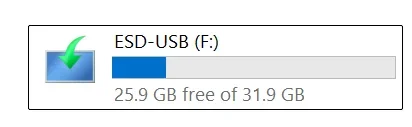
And, thanks to Glasskuter, I will be looking into Hasleo as soon as I have a chance.

Just to set the record straight - what I wound up with was a drive formatted in - you guessed it: FAT32 (see pix)! Screenshot 2026-01-05 132458.webp Thanks, everyone for your help!Screenshot 2026-01-05 132529.webp
 

My Computers My Computers

  • At a glance

    Windows 11 Pro Version 25H2 (OS Build 26200.8...i9 12th Generation64GBPNY 3060 12GB
    OS
    Windows 11 Pro Version 25H2 (OS Build 26200.8655)
    Computer type
    PC/Desktop
    Manufacturer/Model
    Dell 8950
    CPU
    i9 12th Generation
    Memory
    64GB
    Graphics Card(s)
    PNY 3060 12GB
    Monitor(s) Displays
    NEC EA27IU
    Screen Resolution
    3840X2160
    Hard Drives
    SSD internal, external drives
    Cooling
    Advanced Air Cooling
    Keyboard
    Microsoft
    Mouse
    Logitech
    Internet Speed
    High-Speed
    Browser
    MS Edge
    Antivirus
    Norton 360
  • At a glance

    Win 11 Pro 25H2 (OS Build 26200.8655)Intel Ultra 7 265 (20 cores) processor32GB DDR5 RamBuilt-in Intel UHD Graphics
    Operating System
    Win 11 Pro 25H2 (OS Build 26200.8655)
    Computer type
    PC/Desktop
    Manufacturer/Model
    Dell Tower ECT1250
    CPU
    Intel Ultra 7 265 (20 cores) processor
    Memory
    32GB DDR5 Ram
    Graphics card(s)
    Built-in Intel UHD Graphics
    Sound Card
    Built-in
    Screen Resolution
    1920X1080
    Hard Drives
    2TB internal SSD
    Case
    Tower
@archfoto
Please run Device Manager and double check all USB devices are working properly ie. no yellow exclamation marks on any of them then use a different port to plug in your USB stick.
If still does not work then the program Recovery.exe might be defective. Try to run:
dism /online /cleanup-image /restorehealth
sfc /scannow

FYI,
- To create a Recovery Drive with System Files included, you will need a USB stick with 16GB minimum. In reality it will take ~8GB+
to create which include System Files, Drivers, new .wim files etc... customized for your PC.
- The RevoveryDrive.exe program will wipe out the drive, initialize it as MBR type disk, create partition and format as FAT32 so you have no control over this.
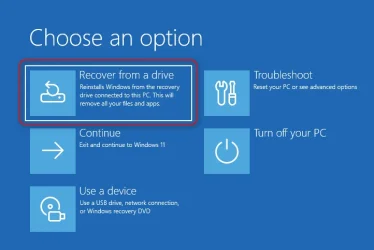
Once done and reboot, you will get a screen as follows:
R.webp
Booting the Windows Recovery from the installation Media is completely different. So you are absolutely correct.
Others might misunderstand of what you are trying to do.

P.S Personally I use backup software to backup/Restore. It is much faster and more flexible. Just do this to help you with your problem.
 
Last edited:

My Computers My Computers

  • At a glance

    Windows 11 Pro 25H2, Linux Mint 21.3Intel Core i9-14900K @5.8GHZ64GB (2XG Skill F5-6400J3239G32G) @6800Radeon (TM) RX 480 Graphics (8 GB)
    OS
    Windows 11 Pro 25H2, Linux Mint 21.3
    Computer type
    PC/Desktop
    Manufacturer/Model
    Self Build Feb.2024
    CPU
    Intel Core i9-14900K @5.8GHZ
    Motherboard
    MSI MAG Z790 Tomahawk Max WiFi 7
    Memory
    64GB (2XG Skill F5-6400J3239G32G) @6800
    Graphics Card(s)
    Radeon (TM) RX 480 Graphics (8 GB)
    Sound Card
    Intergrated Realtek
    Monitor(s) Displays
    Samsung
    Screen Resolution
    3840x2160
    Hard Drives
    1 - Crucial 705 1TB GEN5
    1 - Crucial 705 2TB GEN5
    2 - Crucial T500 2TB Gen4
    PSU
    750W EVGA-G3
    Case
    Antec NX410
    Cooling
    H2O Thermalright
    Keyboard
    Logitech K800
    Mouse
    Logitech Master 2S
    Internet Speed
    600 Mbps
    Browser
    Chrome
    Antivirus
    WD
  • At a glance

    Windows 11 Pro & Linux Mint X64Intel(R) Core(TM) i7-3770K CPU @ 4.20 GHz32.0GB Dual-Channel CMY16GX3M2A1600C9NVIDIA GeForce GT 740
    Operating System
    Windows 11 Pro & Linux Mint X64
    Computer type
    PC/Desktop
    Manufacturer/Model
    MSI Z77 MPower (MS-7751)
    CPU
    Intel(R) Core(TM) i7-3770K CPU @ 4.20 GHz
    Motherboard
    Z77 MPower (MS-7751)
    Memory
    32.0GB Dual-Channel CMY16GX3M2A1600C9
    Graphics card(s)
    NVIDIA GeForce GT 740
    Monitor(s) Displays
    40" Samsung
    Screen Resolution
    1920X1080
    Hard Drives
    WIN10 - 111GB Samsung SSD 840 Series
    WIN11 - 223GB Crucial CT240BX500SSD
    2X931GB Crucial CT1000BX500SSD1
    PSU
    Antec 850W
    Case
    Antec 900
    Cooling
    H20
    Keyboard
    Logitech K800 Wireless
    Mouse
    Logitech MX Master 2S
    Internet Speed
    100 Mbps
    Browser
    Chrome
    Antivirus
    Windows Defender
@archfoto
Please run Device Manager and double check all USB devices are working properly ie. no yellow exclamation marks on any of them then use a different port to plug in your USB stick.
If still does not work then the program Recovery.exe might be defective. Try to run:
dism /online /cleanup-image /restorehealth
sfc /scannow

FYI,
- To create a Recovery Drive with System Files included, you will need a USB stick with 16GB minimum. In reality it will take ~8GB+
to create which include System Files, Drivers, new .wim files etc... customized for your PC.
- The RevoveryDrive.exe program will wipe out the drive, initialize it as MBR type disk, create partition and format as FAT32 so you have no control over this.
Once done and reboot, you will get a screen as follows:
View attachment 159088
Booting the Windows Recovery from the installation Media is completely different. So you are absolutely correct.
Others might misunderstand of what you are trying to do.

P.S Personally I use backup software to backup/Restore. It is much faster and more flexible. Just do this to help you with your problem.
Thanks, Topgundcp!
 

My Computers My Computers

  • At a glance

    Windows 11 Pro Version 25H2 (OS Build 26200.8...i9 12th Generation64GBPNY 3060 12GB
    OS
    Windows 11 Pro Version 25H2 (OS Build 26200.8655)
    Computer type
    PC/Desktop
    Manufacturer/Model
    Dell 8950
    CPU
    i9 12th Generation
    Memory
    64GB
    Graphics Card(s)
    PNY 3060 12GB
    Monitor(s) Displays
    NEC EA27IU
    Screen Resolution
    3840X2160
    Hard Drives
    SSD internal, external drives
    Cooling
    Advanced Air Cooling
    Keyboard
    Microsoft
    Mouse
    Logitech
    Internet Speed
    High-Speed
    Browser
    MS Edge
    Antivirus
    Norton 360
  • At a glance

    Win 11 Pro 25H2 (OS Build 26200.8655)Intel Ultra 7 265 (20 cores) processor32GB DDR5 RamBuilt-in Intel UHD Graphics
    Operating System
    Win 11 Pro 25H2 (OS Build 26200.8655)
    Computer type
    PC/Desktop
    Manufacturer/Model
    Dell Tower ECT1250
    CPU
    Intel Ultra 7 265 (20 cores) processor
    Memory
    32GB DDR5 Ram
    Graphics card(s)
    Built-in Intel UHD Graphics
    Sound Card
    Built-in
    Screen Resolution
    1920X1080
    Hard Drives
    2TB internal SSD
    Case
    Tower
Thanks, Topgundcp!

@archfoto
Please run Device Manager and double check all USB devices are working properly ie. no yellow exclamation marks on any of them then use a different port to plug in your USB stick.
If still does not work then the program Recovery.exe might be defective. Try to run:
dism /online /cleanup-image /restorehealth
sfc /scannow

FYI,
- To create a Recovery Drive with System Files included, you will need a USB stick with 16GB minimum. In reality it will take ~8GB+
to create which include System Files, Drivers, new .wim files etc... customized for your PC.
- The RevoveryDrive.exe program will wipe out the drive, initialize it as MBR type disk, create partition and format as FAT32 so you have no control over this.
Once done and reboot, you will get a screen as follows:
View attachment 159088
Booting the Windows Recovery from the installation Media is completely different. So you are absolutely correct.
Others might misunderstand of what you are trying to do.

P.S Personally I use backup software to backup/Restore. It is much faster and more flexible. Just do this to help you with your problem.
Hi Topgundcp -
What directory should I be in in the command prompt to run the script? Also, should that all be typed on one line? Thanks.
 

My Computers My Computers

  • At a glance

    Windows 11 Pro Version 25H2 (OS Build 26200.8...i9 12th Generation64GBPNY 3060 12GB
    OS
    Windows 11 Pro Version 25H2 (OS Build 26200.8655)
    Computer type
    PC/Desktop
    Manufacturer/Model
    Dell 8950
    CPU
    i9 12th Generation
    Memory
    64GB
    Graphics Card(s)
    PNY 3060 12GB
    Monitor(s) Displays
    NEC EA27IU
    Screen Resolution
    3840X2160
    Hard Drives
    SSD internal, external drives
    Cooling
    Advanced Air Cooling
    Keyboard
    Microsoft
    Mouse
    Logitech
    Internet Speed
    High-Speed
    Browser
    MS Edge
    Antivirus
    Norton 360
  • At a glance

    Win 11 Pro 25H2 (OS Build 26200.8655)Intel Ultra 7 265 (20 cores) processor32GB DDR5 RamBuilt-in Intel UHD Graphics
    Operating System
    Win 11 Pro 25H2 (OS Build 26200.8655)
    Computer type
    PC/Desktop
    Manufacturer/Model
    Dell Tower ECT1250
    CPU
    Intel Ultra 7 265 (20 cores) processor
    Memory
    32GB DDR5 Ram
    Graphics card(s)
    Built-in Intel UHD Graphics
    Sound Card
    Built-in
    Screen Resolution
    1920X1080
    Hard Drives
    2TB internal SSD
    Case
    Tower
Okay, in the case of making a recovery drive, I realized this wasn't going to happen, no matter what I tried, or advice I received. I even formatted the drive in NTFS, and that really screwed things up in the drive, as I had already formatted it as a recovery drive in the utility, basically it said there was zero room on the drive, and it could not be formatted using the format Windows app. So I disconnected all my drives again, for the umpteenth time (out of caution of wiping the wrong drive). I went to Computer Management and then to Disk Management. I plugged in the USB drive which was stuck in NTFS now, and it showed a partition on the drive, and right-clicked the drive. It said I could format it as a "simple drive," and it would remove all partitions. So, I tried it, and it did open the drive up again, without partitions in NTFS.

I still wanted a bootable drive, so I followed the 1st set of instructions given on this forum to create a windows bootable installation media, posted earlier by Zbook (Thanks Zbook). I was successful. I hope I never have to use it, but like insurance, it is there.

And, thanks to Glasskuter, I will be looking into Hasleo as soon as I have a chance.

Just to set the record straight - what I wound up with was a drive formatted in - you guessed it: FAT32 (see pix)! View attachment 159041 Thanks, everyone for your help!View attachment 159042
Just to clarify. You took a 64 GB USB Flash/Thumb drive. Connected it to a computer. Launched the Disk Management, erased all the partitions that were there and then used it to create a Windows Recovery Drive (i.e. C:\Windows\System32\RecoveryDrive.exe). It was a success and now the USB Flash/Thumb drive which was 64 GB in capacity is now shown as 31.9 GB. Is this correct?
 

My Computer My Computer

At a glance

Windows 11Intel16 GBIntel UHD Integrated
OS
Windows 11
Computer type
Laptop
CPU
Intel
Memory
16 GB
Graphics Card(s)
Intel UHD Integrated
Mouse
Inbuilt
Browser
Firefox
Antivirus
Microsoft Defender
Back
Top Bottom