Program that extract only new or modified files from archive


vsub

Active member
Member
VIP
Local time
10:51 PM
Posts
207
OS
Windows 11
Is such a program exist
Lets say I have a folder with 1k files and download an archive that contains those 1k files and maybe 20 new and 50 modified files
Is there is any software that can extract only the new and modified files
Extracting all to the temporary folder and then move all new and modified files is not a solution
 

My Computer

System One

  • OS
    Windows 11
    Computer type
    Laptop
    Manufacturer/Model
    MSI Sword 17 HX
    CPU
    14700HX
    Memory
    64GB
    Graphics Card(s)
    RTX 4070
None exactly like you describe that I am aware of. You can however download an archive, unzip it, then use an app like synctoy or freefilesync to sync the original folder to the unzipped folder. New and changed files will sync from the folder you choose as the left folder to the folder you choose as the right folder in either one of those apps. (In other words you choose the unzipped folder as the left folder and your current folder as the right folder) Only new and changed files will copy.

You can also do it manually. Unzip the folder. Open the unzipped folder in one instance of file explorer, then open the original folder in another instance of file explorer, view each folder by date modified.. Snap the 2 instances of file explorer side by side and easily copy files from one folder to the other.
 

My Computers

System One System Two

  • OS
    Windows 11 Pro 25H2 26200.8655
    Computer type
    PC/Desktop
    Manufacturer/Model
    Dell Optiplex 7080
    CPU
    i9-10900 10 core 20 threads
    Motherboard
    DELL 0J37VM
    Memory
    32 gb
    Graphics Card(s)
    none-Intel UHD Graphics 630
    Sound Card
    Integrated Realtek
    Monitor(s) Displays
    Benq 27
    Screen Resolution
    2560x1440
    Hard Drives
    2x1tb Solidigm m.2 nvme /External drives 512gb Samsung m.2 sata+2tb Kingston m2.nvme
    PSU
    500w
    Case
    MT
    Cooling
    Dell Premium
    Keyboard
    Logitech wired
    Mouse
    Logitech wireless
    Internet Speed
    so slow I'm too embarrassed to tell
    Browser
    #1 Edge #2 Firefox
    Antivirus
    Defender+MWB Premium
  • Operating System
    Windows 11 Pro 24H2 26200.8457
    Computer type
    PC/Desktop
    Manufacturer/Model
    Beelink Mini PC SER5
    CPU
    AMD Ryzen 7 6800U
    Memory
    32 gb
    Graphics card(s)
    integrated
    Sound Card
    integrated
    Monitor(s) Displays
    Benq 27
    Screen Resolution
    2560x1440
    Hard Drives
    1TB Crucial nvme
    Keyboard
    Logitech wired
    Mouse
    Logitech wireless
    Internet Speed
    still too embarrassed to tell
    Browser
    Firefox
    Antivirus
    Defender
    Other Info
    System 3 is non compliant Dell 9020 i7-4770/24gb ram Win11 PRO 26200.8457
1.webp

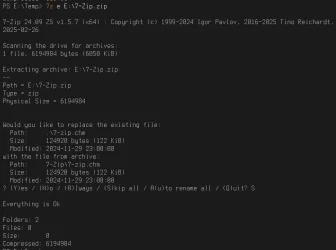
Of course the %Temp% folder will be used.
 
Last edited:

My Computer

System One

  • OS
    Microsoft Windows 11 Home
    Computer type
    PC/Desktop
    Manufacturer/Model
    MSI MS-7D98
    CPU
    Intel Core i5-13490F
    Motherboard
    MSI B760 GAMING PLUS WIFI
    Memory
    2 x 16 Patriot Memory (PDP Systems) PSD516G560081 6400MT (32-37-37-74); 1.35V)
    Graphics Card(s)
    GIGABYTE GeForce RTX 4070 WINDFORCE OC 12G (GV-N4070WF3OC-12GD)
    Sound Card
    Bluetooth Аудио
    Monitor(s) Displays
    INNOCN 15K1F
    Screen Resolution
    1920 x 1080
    Hard Drives
    WD_BLACK SN770 250GB
    KINGSTON SNV2S1000G (ELFK0S.6)
    PSU
    Thermaltake Toughpower GF3 1000W
    Case
    CG560 - DeepCool
    Cooling
    ID-COOLING SE-224-XTS / 2 x 140Mm Fan - rear and top; 3 x 120Mm - front
    Keyboard
    Corsair K70 RGB TKL
    Mouse
    Corsair KATAR PRO XT
    Internet Speed
    100 Mbps
    Browser
    Firefox
    Antivirus
    Microsoft Defender Antivirus
    Other Info
    https://www.userbenchmark.com/UserRun/66553205

My Computer

System One

  • OS
    Windows 11
    Computer type
    Laptop
    Manufacturer/Model
    MSI Sword 17 HX
    CPU
    14700HX
    Memory
    64GB
    Graphics Card(s)
    RTX 4070
Since I could not find any command line `unzip.exe` on my computer, I downloaded this:

filename: `info-zip-3.0__unzip-6.0__win64.zip`
size: 853 KB (873 574 bytes))

My test case:

Original files in folder `C:\temp-original>`
01.txt : "01"
02.txt : "02"
03.txt : "03"
04.txt : "04"

Content of the zip file `original-new-modified.zip` and also the final outcome of the folder containing the original files.
01.txt : "01"
02.txt : "02"
03.txt : "03 modified"
04.txt : "04 modified"
05.txt : "05 new"
06.txt : "06 new"

I ran this command in CMD.exe:

Code:
C:\temp-original>unzip -u original-new-modified.zip

Archive:  original-new-modified.zip

  inflating: 06.txt

replace 03.txt? [y]es, [n]o, [A]ll, [N]one, [r]ename: A

  inflating: 03.txt

  inflating: 04.txt

  inflating: 05.txt


C:\temp-original>

From the result you can see that the files `01.txt` and `02.txt` were left untouched, no overwriting.

Code:
-f
freshen existing files, i.e.,  extract  only  those  files  that
already  exist  on disk and that are newer than the disk copies.
By default unzip queries before overwriting, but the  -o  option
may be used to suppress the queries.  Note that under many oper-
ating systems, the TZ (timezone) environment  variable  must  be
set  correctly  in  order  for -f and -u to work properly (under
Unix the variable is usually set  automatically).   The  reasons
for this are somewhat subtle but have to do with the differences
between DOS-format file times (always local time) and  Unix-for-
mat  times  (always in GMT/UTC) and the necessity to compare the
two.  A typical TZ value is ``PST8PDT'' (US  Pacific  time  with
automatic  adjustment  for  Daylight  Savings  Time  or ``summer
time'').

-u
update existing files and  create  new  ones  if  needed.   This
option  performs  the same function as the -f option, extracting
(with query) files that are newer than those with the same  name
on  disk,  and  in  addition it extracts those files that do not
already exist on disk.  See -f above for information on  setting
the timezone properly.
 
Last edited:

My Computer

System One

  • OS
    Windows 11 Pro 25H2, OS build: 26200.8655
    Computer type
    Laptop
Yes, a synchronizer should do the trick.
 

My Computer

System One

  • OS
    Win 7,8.1,10,11, Mint, Kde Plasma, Debian
    Computer type
    Laptop
    Manufacturer/Model
    Dell
    CPU
    Intel(R) Core(TM) i7-6500U CPU @ 2.50GHz
    Memory
    16 GB
    Graphics Card(s)
    Intel(R) HD Graphics 520/Nvidia GeForce 930M
    Sound Card
    Intel(R) Display Audio/RealtekAudio
    Monitor(s) Displays
    Generic Pnp Monitor
    Screen Resolution
    1366 X 768
    Hard Drives
    ST2000LM024-1EJ164
    Keyboard
    Eng (US)
    Mouse
    Sanwa Supply
    Browser
    Firefox
    Antivirus
    Avast One
    Other Info
    Too many laptops with different system specifications.
Is such a program exist
Lets say I have a folder with 1k files and download an archive that contains those 1k files and maybe 20 new and 50 modified files
Is there is any software that can extract only the new and modified files
Extracting all to the temporary folder and then move all new and modified files is not a solution
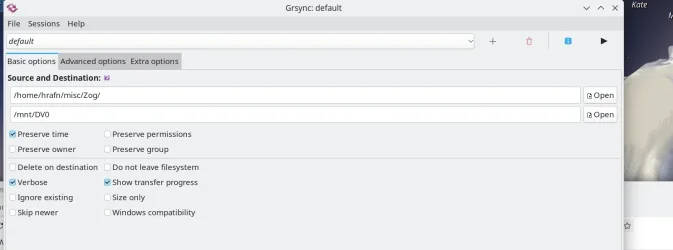
If you don't mind using Linux (it can read / write NTFS stuff too) - boot up any decent live distro (doesn't touch your Windows main disk(s) and then run grsync (a GUI front end to rsync) with zillions of options - including skip older files etc etc --quite a lot of options but in there there are loads of available options. For Windows does Robocopy or Xcopy have some features that could do what you want.

Grsync : (many more options in advanced and extra -- well worth learning). - Nothing wrong on using a different OS or tools to fix problems --I've used Windows to get eseoteric hardware details for Linux issues but find 99.999% of the time Linux is far better for any data or disk issues (correcting / recovering / backing up / restoring / sharing/networking etc.).

Grsync also runs in "test / simulate" mode so you can test out various options etc before any changes are actually done !!.

A useful tool is the stand alone bootable version of Gparted -- it's an underlying Debian system but opens in a GUI. If you create a "persistent version" you can add grsync which makes it a really useful tool - bootable on a small usb stick too.

Cheers
jimbo

Screenshot_20250921_115532.webp


Cheers
jimbo
 

My Computer

System One

  • OS
    Windows XP,11 Linux Fedora Rawhide pre-release 45
    Computer type
    PC/Desktop
    CPU
    2 X Intel i7
    Screen Resolution
    4KUHD X 2
I presume the 20 new and 50 modified files are not large.

First, go to the folder where you keep the original files. Rename those files (F2 key) that you want modified by adding the letter ‘d’ at the end of their names.(d stands for to be deleted).

Next go to the folder containing 1k files including those new and modified ones. Look for an empty spot in the folder and click the Ctrl key+A (Select all) on the keyboard. Right-click and click ‘Copy’ on the drop down menu.

Now go the folder where you keep your original files. I take it you wish to paste the new and modified files in this folder. Look for an empty spot in the folder, right-click and then click ‘Paste’ on the drop down list.

A pop up window will appear asking if you wish to replace all the original files with the new ones. Click ‘Skip’. Your computer will now proceed to paste only the new and modified files to this folder.

Finally, you can easily look for the original files that have not yet been modified to delete. They have the letter ‘d’ at the end of their names.

I think this is what glasskuter has suggested.

On the other hand, if those new and modified files are very large in size (say 1GB+ each), using a synchronizer is the way to go.

If it were me, that’s how I would do it.

If this is not what you meant, then I am sorry!
 
Last edited:

My Computer

System One

  • OS
    Win 7,8.1,10,11, Mint, Kde Plasma, Debian
    Computer type
    Laptop
    Manufacturer/Model
    Dell
    CPU
    Intel(R) Core(TM) i7-6500U CPU @ 2.50GHz
    Memory
    16 GB
    Graphics Card(s)
    Intel(R) HD Graphics 520/Nvidia GeForce 930M
    Sound Card
    Intel(R) Display Audio/RealtekAudio
    Monitor(s) Displays
    Generic Pnp Monitor
    Screen Resolution
    1366 X 768
    Hard Drives
    ST2000LM024-1EJ164
    Keyboard
    Eng (US)
    Mouse
    Sanwa Supply
    Browser
    Firefox
    Antivirus
    Avast One
    Other Info
    Too many laptops with different system specifications.
Back
Top Bottom