Solved PT 2. Windows 11 feels slow considering my specs (21h2)


Read a tutorial somewhere on how to back up game saves by copying the folders across to external drive as well - google will probably tell you. Just to be sure you don't lose anything.
 

My Computers My Computers

  • At a glance

    Windows 11 Home 25H2Core i5-1035G132gb
    OS
    Windows 11 Home 25H2
    Computer type
    Laptop
    Manufacturer/Model
    HP Pavilion 14-ce3606sa
    CPU
    Core i5-1035G1
    Memory
    32gb
    Hard Drives
    Samsung 870 evo sata ssd
    Cooling
    Could be better
    Internet Speed
    50 mbps Starlink
    Browser
    Firefox
    Other Info
    Originally came installed with a 500gb H10 Optane ssd
  • At a glance

    Windows 11 HomeIntel Core i5-1035G116gb
    Operating System
    Windows 11 Home
    Computer type
    Laptop
    Manufacturer/Model
    HP Pavilion ce3606sa
    CPU
    Intel Core i5-1035G1
    Memory
    16gb
    Hard Drives
    Hynix Gold P31 2TB
    Internet Speed
    200mbps Starlink
    Browser
    Firefox
    Antivirus
    Defender
How full is the SSD currently? They can really slow down if they get too full. Best to leave it half empty IMO
 

My Computers My Computers

  • At a glance

    Windows 11 Home 25H2Core i5-1035G132gb
    OS
    Windows 11 Home 25H2
    Computer type
    Laptop
    Manufacturer/Model
    HP Pavilion 14-ce3606sa
    CPU
    Core i5-1035G1
    Memory
    32gb
    Hard Drives
    Samsung 870 evo sata ssd
    Cooling
    Could be better
    Internet Speed
    50 mbps Starlink
    Browser
    Firefox
    Other Info
    Originally came installed with a 500gb H10 Optane ssd
  • At a glance

    Windows 11 HomeIntel Core i5-1035G116gb
    Operating System
    Windows 11 Home
    Computer type
    Laptop
    Manufacturer/Model
    HP Pavilion ce3606sa
    CPU
    Intel Core i5-1035G1
    Memory
    16gb
    Hard Drives
    Hynix Gold P31 2TB
    Internet Speed
    200mbps Starlink
    Browser
    Firefox
    Antivirus
    Defender
How full is the SSD currently? They can really slow down if they get too full. Best to leave it half empty IMO
1674757310206.png

It certainately is not half full/empty. But if I format it I will 100% ensure it is LESS than half full.
 

My Computers My Computers

  • At a glance

    Windows 11 21H2AMD Ryzen 3 3100Corsair 8GB x 2 (16GB)Asus Nvidia Geforce GTX 1650 Super
    OS
    Windows 11 21H2
    Computer type
    PC/Desktop
    Manufacturer/Model
    Chillblast
    CPU
    AMD Ryzen 3 3100
    Motherboard
    Asus ROG Strix b450-f
    Memory
    Corsair 8GB x 2 (16GB)
    Graphics Card(s)
    Asus Nvidia Geforce GTX 1650 Super
    Monitor(s) Displays
    Dell 27" 1440p
    Screen Resolution
    1440p
    Hard Drives
    Seagate Barracuda 1TB
    256GB NVME Seagate Barracuda
    Browser
    Firefox / Edge
    Antivirus
    Windows Defender
  • At a glance

    Windows 8.1Amd E24GB
    Operating System
    Windows 8.1
    Computer type
    Laptop
    Manufacturer/Model
    HP
    CPU
    Amd E2
    Memory
    4GB
    Hard Drives
    128GB SSD
As a question; should I install a MODIFIED version of windows, all the bloatware taken out, or do that myself with fresh windows. Personally leaning towards the latter. What do you all think?
 

My Computers My Computers

  • At a glance

    Windows 11 21H2AMD Ryzen 3 3100Corsair 8GB x 2 (16GB)Asus Nvidia Geforce GTX 1650 Super
    OS
    Windows 11 21H2
    Computer type
    PC/Desktop
    Manufacturer/Model
    Chillblast
    CPU
    AMD Ryzen 3 3100
    Motherboard
    Asus ROG Strix b450-f
    Memory
    Corsair 8GB x 2 (16GB)
    Graphics Card(s)
    Asus Nvidia Geforce GTX 1650 Super
    Monitor(s) Displays
    Dell 27" 1440p
    Screen Resolution
    1440p
    Hard Drives
    Seagate Barracuda 1TB
    256GB NVME Seagate Barracuda
    Browser
    Firefox / Edge
    Antivirus
    Windows Defender
  • At a glance

    Windows 8.1Amd E24GB
    Operating System
    Windows 8.1
    Computer type
    Laptop
    Manufacturer/Model
    HP
    CPU
    Amd E2
    Memory
    4GB
    Hard Drives
    128GB SSD
How full is the SSD currently? They can really slow down if they get too full. Best to leave it half empty IMO
Huh - that does not happen same way as HDDs. Some claim you wear drive out quicker when overfilled as you are writing more frequently to reduced space. Leaving it empty 50% is just wasting space.
 

My Computer My Computer

At a glance

Windows 11 Pro + Win11 Canary VM.I9 13th gen i9-13900H 2.60 GHZ16 GB solderedIntegrated Intel Iris XE
OS
Windows 11 Pro + Win11 Canary VM.
Computer type
Laptop
Manufacturer/Model
ASUS Zenbook 14
CPU
I9 13th gen i9-13900H 2.60 GHZ
Motherboard
Yep, Laptop has one.
Memory
16 GB soldered
Graphics Card(s)
Integrated Intel Iris XE
Sound Card
Realtek built in
Monitor(s) Displays
laptop OLED screen
Screen Resolution
2880x1800 touchscreen
Hard Drives
1 TB NVME SSD (only weakness is only one slot)
PSU
Internal + 65W thunderbolt USB4 charger
Case
Yep, got one
Cooling
Stella Artois (UK pint cans - 568 ml) - extra cost.
Keyboard
Built in UK keybd
Mouse
Bluetooth , wireless dongled, wired
Internet Speed
900 mbs (ethernet), wifi 6 typical 350-450 mb/s both up and down
Browser
Edge
Antivirus
Defender
Other Info
TPM 2.0, 2xUSB4 thunderbolt, 1xUsb3 (usb a), 1xUsb-c, hdmi out, 3.5 mm audio out/in combo, ASUS backlit trackpad (inc. switchable number pad)

Macrium Reflect Home V8
Office 365 Family (6 users each 1TB onedrive space)
Hyper-V (a vm runs almost as fast as my older laptop)
Huh - that does not happen same way as HDDs. Some claim you wear drive out quicker when overfilled as you are writing more frequently to reduced space. Leaving it empty 50% is just wasting space.
Confusing. Really?
 

My Computers My Computers

  • At a glance

    Windows 11 21H2AMD Ryzen 3 3100Corsair 8GB x 2 (16GB)Asus Nvidia Geforce GTX 1650 Super
    OS
    Windows 11 21H2
    Computer type
    PC/Desktop
    Manufacturer/Model
    Chillblast
    CPU
    AMD Ryzen 3 3100
    Motherboard
    Asus ROG Strix b450-f
    Memory
    Corsair 8GB x 2 (16GB)
    Graphics Card(s)
    Asus Nvidia Geforce GTX 1650 Super
    Monitor(s) Displays
    Dell 27" 1440p
    Screen Resolution
    1440p
    Hard Drives
    Seagate Barracuda 1TB
    256GB NVME Seagate Barracuda
    Browser
    Firefox / Edge
    Antivirus
    Windows Defender
  • At a glance

    Windows 8.1Amd E24GB
    Operating System
    Windows 8.1
    Computer type
    Laptop
    Manufacturer/Model
    HP
    CPU
    Amd E2
    Memory
    4GB
    Hard Drives
    128GB SSD
As a question; should I install a MODIFIED version of windows, all the bloatware taken out, or do that myself with fresh windows. Personally leaning towards the latter. What do you all think?
Waste of time - you can uninstall most other apps. More people break things in pursuit of a false dream.
 

My Computer My Computer

At a glance

Windows 11 Pro + Win11 Canary VM.I9 13th gen i9-13900H 2.60 GHZ16 GB solderedIntegrated Intel Iris XE
OS
Windows 11 Pro + Win11 Canary VM.
Computer type
Laptop
Manufacturer/Model
ASUS Zenbook 14
CPU
I9 13th gen i9-13900H 2.60 GHZ
Motherboard
Yep, Laptop has one.
Memory
16 GB soldered
Graphics Card(s)
Integrated Intel Iris XE
Sound Card
Realtek built in
Monitor(s) Displays
laptop OLED screen
Screen Resolution
2880x1800 touchscreen
Hard Drives
1 TB NVME SSD (only weakness is only one slot)
PSU
Internal + 65W thunderbolt USB4 charger
Case
Yep, got one
Cooling
Stella Artois (UK pint cans - 568 ml) - extra cost.
Keyboard
Built in UK keybd
Mouse
Bluetooth , wireless dongled, wired
Internet Speed
900 mbs (ethernet), wifi 6 typical 350-450 mb/s both up and down
Browser
Edge
Antivirus
Defender
Other Info
TPM 2.0, 2xUSB4 thunderbolt, 1xUsb3 (usb a), 1xUsb-c, hdmi out, 3.5 mm audio out/in combo, ASUS backlit trackpad (inc. switchable number pad)

Macrium Reflect Home V8
Office 365 Family (6 users each 1TB onedrive space)
Hyper-V (a vm runs almost as fast as my older laptop)
Waste of time - you can uninstall most other apps. More people break things in pursuit of a false dream.
Thought so. Also no need for rufus etc.
 

My Computers My Computers

  • At a glance

    Windows 11 21H2AMD Ryzen 3 3100Corsair 8GB x 2 (16GB)Asus Nvidia Geforce GTX 1650 Super
    OS
    Windows 11 21H2
    Computer type
    PC/Desktop
    Manufacturer/Model
    Chillblast
    CPU
    AMD Ryzen 3 3100
    Motherboard
    Asus ROG Strix b450-f
    Memory
    Corsair 8GB x 2 (16GB)
    Graphics Card(s)
    Asus Nvidia Geforce GTX 1650 Super
    Monitor(s) Displays
    Dell 27" 1440p
    Screen Resolution
    1440p
    Hard Drives
    Seagate Barracuda 1TB
    256GB NVME Seagate Barracuda
    Browser
    Firefox / Edge
    Antivirus
    Windows Defender
  • At a glance

    Windows 8.1Amd E24GB
    Operating System
    Windows 8.1
    Computer type
    Laptop
    Manufacturer/Model
    HP
    CPU
    Amd E2
    Memory
    4GB
    Hard Drives
    128GB SSD
The HDD was in when I installed windows, has been the whole life of this PC. For further information, it was a custom built PC and it is just over 2 years old.
I've never bought into the "having two hard drives connected when installing Windows slows the OS" bit. And for the record I have two NVMe drives, and three SATA drives connected, and all I do is disconnect the SATA drives, while leaving the other NVMe drive connected as it's a pain in the arse to remove, so I just leave it, and BIOS disconnect the SATA drives. No slow performing OS here.

Also, not a fan of disabling services as many apps and other services depend on them and in the end, this brings nothing but trouble - all of a sudden you have this issue you can't figure out why or where it came from. Turns out is was some service you disabled some month back, or when you installed the OS :oops:

At the end of the day, it's your PC, but....

All that said, did you insure you installed the motherboard drivers? What does your Device Manager look like???
 

My Computers My Computers

  • At a glance

    Windows 11 Pro 24H2 (Build 26100.4770)Intel Core 9 Ultra 285K64G (4x16) DDR5 Corsair RGB Dominator Platinu...Radeon (XFX Mercury) RX 9070XT OC (with Magne...
    OS
    Windows 11 Pro 24H2 (Build 26100.4770)
    Computer type
    PC/Desktop
    Manufacturer/Model
    Custom built
    CPU
    Intel Core 9 Ultra 285K
    Motherboard
    Gigabyte Aorus Z890 Xtreme AI Top
    Memory
    64G (4x16) DDR5 Corsair RGB Dominator Platinum (6400Mhz)
    Graphics Card(s)
    Radeon (XFX Mercury) RX 9070XT OC (with Magnetic Fans)
    Sound Card
    Onboard (DTS:X® Ultra Audio: ESS ES9280A DAC)
    Monitor(s) Displays
    27-inch Eizo Color Edge - CG2700X
    Screen Resolution
    3840 x 2160
    Hard Drives
    4 Samsung NVM 990 Pro drives: 1TB (OS), 2TB, 2 X 4TB.
    PSU
    Seasonic TX-1300 (1300 Watts)
    Case
    Cooler Master H500M
    Cooling
    Corsair Link Titan 280 RX RGB
    Keyboard
    Logitech Craft
    Mouse
    Logitech MX Master 3S
    Internet Speed
    1TB Download. 512mb Upload
    Browser
    Microsoft Edge Chromium
    Antivirus
    Windows Security
    Other Info
    System used for gaming, photography, music, school.
  • At a glance

    Windows 11 Pro 24H2 (Build 26100.4061)Intel Core i9-9900K32gig (4 x 8) Corsair Dominator Platinum DDR4...Radeon XFX Merc 7900XT (20gig)
    Operating System
    Windows 11 Pro 24H2 (Build 26100.4061)
    Computer type
    PC/Desktop
    Manufacturer/Model
    Custom built
    CPU
    Intel Core i9-9900K
    Motherboard
    Gigabyte Z390 Aorus Xtreme
    Memory
    32gig (4 x 8) Corsair Dominator Platinum DDR4 3600Mhz (B-Die)
    Graphics card(s)
    Radeon XFX Merc 7900XT (20gig)
    Sound Card
    Onboard
    Monitor(s) Displays
    24-Inch NEC PA242W
    Screen Resolution
    2880 x 1800
    Hard Drives
    2 X NVME, 1 X SATA SSD
    PSU
    EVGA Super Nova 1000 P2 (1000 Watt)
    Case
    Phantek Enthoo Luxe
    Cooling
    Corsair H115i Elite AIO Cooler
    Keyboard
    Logitech Keys
    Mouse
    Logitech MX Master 3
    Internet Speed
    1TB Download. 512mb Upload
    Browser
    Microsoft Edge Chromium
    Antivirus
    Windows Security
    Other Info
    Backup System
Should I reinstall

  • Windows 10
I generally prefer windows 10 and it feels faster
  • Windows 11
Easier to help on this forum and after all is the newer OS
 

My Computers My Computers

  • At a glance

    Windows 11 21H2AMD Ryzen 3 3100Corsair 8GB x 2 (16GB)Asus Nvidia Geforce GTX 1650 Super
    OS
    Windows 11 21H2
    Computer type
    PC/Desktop
    Manufacturer/Model
    Chillblast
    CPU
    AMD Ryzen 3 3100
    Motherboard
    Asus ROG Strix b450-f
    Memory
    Corsair 8GB x 2 (16GB)
    Graphics Card(s)
    Asus Nvidia Geforce GTX 1650 Super
    Monitor(s) Displays
    Dell 27" 1440p
    Screen Resolution
    1440p
    Hard Drives
    Seagate Barracuda 1TB
    256GB NVME Seagate Barracuda
    Browser
    Firefox / Edge
    Antivirus
    Windows Defender
  • At a glance

    Windows 8.1Amd E24GB
    Operating System
    Windows 8.1
    Computer type
    Laptop
    Manufacturer/Model
    HP
    CPU
    Amd E2
    Memory
    4GB
    Hard Drives
    128GB SSD
Should I reinstall

  • Windows 10
I generally prefer windows 10 and it feels faster
  • Windows 11
Easier to help on this forum and after all is the newer OS
I see absolutely see no evidence to support W10 seems faster than W11.

Unless you do proper benchmarks, and evaluate what apps are in use etc, nobody can agree or disagree with you as such.

Although it is slow, W11 is developing, W10 is static. So if pc is W11 compatible, you can either get stuck in a cul de sac or not.
 

My Computer My Computer

At a glance

Windows 11 Pro + Win11 Canary VM.I9 13th gen i9-13900H 2.60 GHZ16 GB solderedIntegrated Intel Iris XE
OS
Windows 11 Pro + Win11 Canary VM.
Computer type
Laptop
Manufacturer/Model
ASUS Zenbook 14
CPU
I9 13th gen i9-13900H 2.60 GHZ
Motherboard
Yep, Laptop has one.
Memory
16 GB soldered
Graphics Card(s)
Integrated Intel Iris XE
Sound Card
Realtek built in
Monitor(s) Displays
laptop OLED screen
Screen Resolution
2880x1800 touchscreen
Hard Drives
1 TB NVME SSD (only weakness is only one slot)
PSU
Internal + 65W thunderbolt USB4 charger
Case
Yep, got one
Cooling
Stella Artois (UK pint cans - 568 ml) - extra cost.
Keyboard
Built in UK keybd
Mouse
Bluetooth , wireless dongled, wired
Internet Speed
900 mbs (ethernet), wifi 6 typical 350-450 mb/s both up and down
Browser
Edge
Antivirus
Defender
Other Info
TPM 2.0, 2xUSB4 thunderbolt, 1xUsb3 (usb a), 1xUsb-c, hdmi out, 3.5 mm audio out/in combo, ASUS backlit trackpad (inc. switchable number pad)

Macrium Reflect Home V8
Office 365 Family (6 users each 1TB onedrive space)
Hyper-V (a vm runs almost as fast as my older laptop)
Decisions decisions. I have 10 on one computer and 11 on another. Sooner or later you will need to get used to 11. I am still using 10 mainly. Muscle memory I guess - but nothing to do with speed of one or the other.

You could install 11 and try it out for a day or so and see how things are. If you're not so sure - install 10 instead and then add everything else back. But at some point you might accidentally click to upgrade to 11 again. If you install 11 from scratch that isn't an issue :-)

Sorry that wasn't much help!
 

My Computers My Computers

  • At a glance

    Windows 11 Home 25H2Core i5-1035G132gb
    OS
    Windows 11 Home 25H2
    Computer type
    Laptop
    Manufacturer/Model
    HP Pavilion 14-ce3606sa
    CPU
    Core i5-1035G1
    Memory
    32gb
    Hard Drives
    Samsung 870 evo sata ssd
    Cooling
    Could be better
    Internet Speed
    50 mbps Starlink
    Browser
    Firefox
    Other Info
    Originally came installed with a 500gb H10 Optane ssd
  • At a glance

    Windows 11 HomeIntel Core i5-1035G116gb
    Operating System
    Windows 11 Home
    Computer type
    Laptop
    Manufacturer/Model
    HP Pavilion ce3606sa
    CPU
    Intel Core i5-1035G1
    Memory
    16gb
    Hard Drives
    Hynix Gold P31 2TB
    Internet Speed
    200mbps Starlink
    Browser
    Firefox
    Antivirus
    Defender
Decisions decisions. I have 10 on one computer and 11 on another. Sooner or later you will need to get used to 11. I am still using 10 mainly. Muscle memory I guess - but nothing to do with speed of one or the other.

You could install 11 and try it out for a day or so and see how things are. If you're not so sure - install 10 instead and then add everything else back. But at some point you might accidentally click to upgrade to 11 again. If you install 11 from scratch that isn't an issue :-)

Sorry that wasn't much help!
'sorry that wasn't much help!' ??? That made my whole decision. I think i will install 11. I'm used to it now, and it's more optimised for games. On top of that I won't have to deal with updating and it is an undoubtedly better-looking and more consistent OS. When 12 comes out, unless it is trash I am going to install ASAP.
 

My Computers My Computers

  • At a glance

    Windows 11 21H2AMD Ryzen 3 3100Corsair 8GB x 2 (16GB)Asus Nvidia Geforce GTX 1650 Super
    OS
    Windows 11 21H2
    Computer type
    PC/Desktop
    Manufacturer/Model
    Chillblast
    CPU
    AMD Ryzen 3 3100
    Motherboard
    Asus ROG Strix b450-f
    Memory
    Corsair 8GB x 2 (16GB)
    Graphics Card(s)
    Asus Nvidia Geforce GTX 1650 Super
    Monitor(s) Displays
    Dell 27" 1440p
    Screen Resolution
    1440p
    Hard Drives
    Seagate Barracuda 1TB
    256GB NVME Seagate Barracuda
    Browser
    Firefox / Edge
    Antivirus
    Windows Defender
  • At a glance

    Windows 8.1Amd E24GB
    Operating System
    Windows 8.1
    Computer type
    Laptop
    Manufacturer/Model
    HP
    CPU
    Amd E2
    Memory
    4GB
    Hard Drives
    128GB SSD
I just ran Josh Cell's ancient but still capable Uncleaner on my production desktop: it went from 5.2 GB of junk files to just under 260 MB. Might help you, too: grab it from Major Geeks.
HTH,
--Ed--
 

My Computers My Computers

  • At a glance

    Windows 11i7-8650U (8th Gen/Kaby Lake)16 GBIntel UHD Graphics 620
    OS
    Windows 11
    Computer type
    Laptop
    Manufacturer/Model
    Lenovo X380 Yoga
    CPU
    i7-8650U (8th Gen/Kaby Lake)
    Motherboard
    20LH000MUS (U3E1)
    Memory
    16 GB
    Graphics Card(s)
    Intel UHD Graphics 620
    Sound Card
    Integrated Conexant SmartAudio HD
    Monitor(s) Displays
    FlexView Display
    Screen Resolution
    1920x1080
    Hard Drives
    Toshiba 1 TB PCIe x3 NVMe SSD
    external 5TB Seagate USB-C attached HDD
    PSU
    Lenovo integrated 65W power brick
    Case
    Laptop
    Cooling
    Laptop
    Keyboard
    Integrated Lenovo ThinkPad keyboard
    Mouse
    touchscreen, touchpad
    Internet Speed
    GbE (Spectrum/Charter)
    Browser
    all of em
    Antivirus
    Defender
    Other Info
    Purchased early 2019 as Windows Insider test PC
  • At a glance

    Windows 11Ryzen 5800X128 GB (4x32 DDR5-5600)NVIDIA 3070Ti
    Operating System
    Windows 11
    Computer type
    PC/Desktop
    Manufacturer/Model
    DIY
    CPU
    Ryzen 5800X
    Motherboard
    Asrock B550 Extreme4
    Memory
    128 GB (4x32 DDR5-5600)
    Graphics card(s)
    NVIDIA 3070Ti
    Sound Card
    built-in
    Monitor(s) Displays
    2xDell 2707
    Screen Resolution
    1980x1200
    Hard Drives
    2XNVMe, multiple HDDs from 3 to 12 TB
    PSU
    Seasonic 650
    Case
    NZXT Flo 6
    Cooling
    dual-fan air cooler
    Keyboard
    Logitech Wave
    Mouse
    Logitech Logi
    Internet Speed
    GbE
    Browser
    all of 'em
    Antivirus
    Defender
    Other Info
    temperamental UEFI
it's more optimised for games
Good reason :-) It feels slicker too - you soon get used to the odd annoying menu type things and there are workarounds and various tweaks to make it operate more like W10 if needed.
 

My Computers My Computers

  • At a glance

    Windows 11 Home 25H2Core i5-1035G132gb
    OS
    Windows 11 Home 25H2
    Computer type
    Laptop
    Manufacturer/Model
    HP Pavilion 14-ce3606sa
    CPU
    Core i5-1035G1
    Memory
    32gb
    Hard Drives
    Samsung 870 evo sata ssd
    Cooling
    Could be better
    Internet Speed
    50 mbps Starlink
    Browser
    Firefox
    Other Info
    Originally came installed with a 500gb H10 Optane ssd
  • At a glance

    Windows 11 HomeIntel Core i5-1035G116gb
    Operating System
    Windows 11 Home
    Computer type
    Laptop
    Manufacturer/Model
    HP Pavilion ce3606sa
    CPU
    Intel Core i5-1035G1
    Memory
    16gb
    Hard Drives
    Hynix Gold P31 2TB
    Internet Speed
    200mbps Starlink
    Browser
    Firefox
    Antivirus
    Defender
I just ran Josh Cell's ancient but still capable Uncleaner on my production desktop: it went from 5.2 GB of junk files to just under 260 MB. Might help you, too: grab it from Major Geeks.
HTH,
--Ed--
Will use on fresh install.
 

My Computers My Computers

  • At a glance

    Windows 11 21H2AMD Ryzen 3 3100Corsair 8GB x 2 (16GB)Asus Nvidia Geforce GTX 1650 Super
    OS
    Windows 11 21H2
    Computer type
    PC/Desktop
    Manufacturer/Model
    Chillblast
    CPU
    AMD Ryzen 3 3100
    Motherboard
    Asus ROG Strix b450-f
    Memory
    Corsair 8GB x 2 (16GB)
    Graphics Card(s)
    Asus Nvidia Geforce GTX 1650 Super
    Monitor(s) Displays
    Dell 27" 1440p
    Screen Resolution
    1440p
    Hard Drives
    Seagate Barracuda 1TB
    256GB NVME Seagate Barracuda
    Browser
    Firefox / Edge
    Antivirus
    Windows Defender
  • At a glance

    Windows 8.1Amd E24GB
    Operating System
    Windows 8.1
    Computer type
    Laptop
    Manufacturer/Model
    HP
    CPU
    Amd E2
    Memory
    4GB
    Hard Drives
    128GB SSD
@Hazel123

OK. When I have installed windows, what are the top things I should do. Remove things - install things, what?

I'm only going to put (on the ssd)
  • Browser
 

My Computers My Computers

  • At a glance

    Windows 11 21H2AMD Ryzen 3 3100Corsair 8GB x 2 (16GB)Asus Nvidia Geforce GTX 1650 Super
    OS
    Windows 11 21H2
    Computer type
    PC/Desktop
    Manufacturer/Model
    Chillblast
    CPU
    AMD Ryzen 3 3100
    Motherboard
    Asus ROG Strix b450-f
    Memory
    Corsair 8GB x 2 (16GB)
    Graphics Card(s)
    Asus Nvidia Geforce GTX 1650 Super
    Monitor(s) Displays
    Dell 27" 1440p
    Screen Resolution
    1440p
    Hard Drives
    Seagate Barracuda 1TB
    256GB NVME Seagate Barracuda
    Browser
    Firefox / Edge
    Antivirus
    Windows Defender
  • At a glance

    Windows 8.1Amd E24GB
    Operating System
    Windows 8.1
    Computer type
    Laptop
    Manufacturer/Model
    HP
    CPU
    Amd E2
    Memory
    4GB
    Hard Drives
    128GB SSD
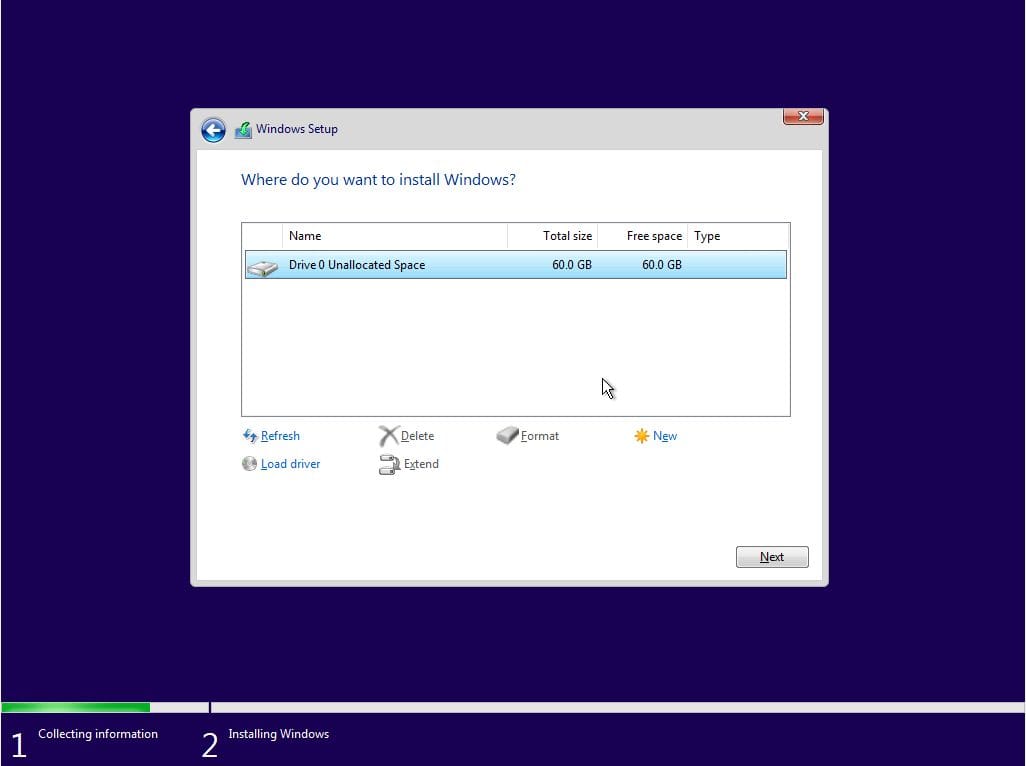
Do I format the ssd here?

Install-Windows-11-select-disk.jpg
 

My Computers My Computers

  • At a glance

    Windows 11 21H2AMD Ryzen 3 3100Corsair 8GB x 2 (16GB)Asus Nvidia Geforce GTX 1650 Super
    OS
    Windows 11 21H2
    Computer type
    PC/Desktop
    Manufacturer/Model
    Chillblast
    CPU
    AMD Ryzen 3 3100
    Motherboard
    Asus ROG Strix b450-f
    Memory
    Corsair 8GB x 2 (16GB)
    Graphics Card(s)
    Asus Nvidia Geforce GTX 1650 Super
    Monitor(s) Displays
    Dell 27" 1440p
    Screen Resolution
    1440p
    Hard Drives
    Seagate Barracuda 1TB
    256GB NVME Seagate Barracuda
    Browser
    Firefox / Edge
    Antivirus
    Windows Defender
  • At a glance

    Windows 8.1Amd E24GB
    Operating System
    Windows 8.1
    Computer type
    Laptop
    Manufacturer/Model
    HP
    CPU
    Amd E2
    Memory
    4GB
    Hard Drives
    128GB SSD
Yes - click new. Is the ssd only 60gb?

With a clean install you shouldn't need to remove any junk. I wouldn't mess with it.
 

My Computers My Computers

  • At a glance

    Windows 11 Home 25H2Core i5-1035G132gb
    OS
    Windows 11 Home 25H2
    Computer type
    Laptop
    Manufacturer/Model
    HP Pavilion 14-ce3606sa
    CPU
    Core i5-1035G1
    Memory
    32gb
    Hard Drives
    Samsung 870 evo sata ssd
    Cooling
    Could be better
    Internet Speed
    50 mbps Starlink
    Browser
    Firefox
    Other Info
    Originally came installed with a 500gb H10 Optane ssd
  • At a glance

    Windows 11 HomeIntel Core i5-1035G116gb
    Operating System
    Windows 11 Home
    Computer type
    Laptop
    Manufacturer/Model
    HP Pavilion ce3606sa
    CPU
    Intel Core i5-1035G1
    Memory
    16gb
    Hard Drives
    Hynix Gold P31 2TB
    Internet Speed
    200mbps Starlink
    Browser
    Firefox
    Antivirus
    Defender
Yes - click new. Is the ssd only 60gb?

With a clean install you shouldn't need to remove any junk. I wouldn't mess with it.
That’s just an image of the step on Google, ssd is 256gb.

thanks!
 

My Computers My Computers

  • At a glance

    Windows 11 21H2AMD Ryzen 3 3100Corsair 8GB x 2 (16GB)Asus Nvidia Geforce GTX 1650 Super
    OS
    Windows 11 21H2
    Computer type
    PC/Desktop
    Manufacturer/Model
    Chillblast
    CPU
    AMD Ryzen 3 3100
    Motherboard
    Asus ROG Strix b450-f
    Memory
    Corsair 8GB x 2 (16GB)
    Graphics Card(s)
    Asus Nvidia Geforce GTX 1650 Super
    Monitor(s) Displays
    Dell 27" 1440p
    Screen Resolution
    1440p
    Hard Drives
    Seagate Barracuda 1TB
    256GB NVME Seagate Barracuda
    Browser
    Firefox / Edge
    Antivirus
    Windows Defender
  • At a glance

    Windows 8.1Amd E24GB
    Operating System
    Windows 8.1
    Computer type
    Laptop
    Manufacturer/Model
    HP
    CPU
    Amd E2
    Memory
    4GB
    Hard Drives
    128GB SSD

Latest Support Threads

Back
Top Bottom