smilejack1
Member
- Local time
- 7:02 PM
- Posts
- 4
- OS
- Windows 11 Version 25H2 Build 26200.7562
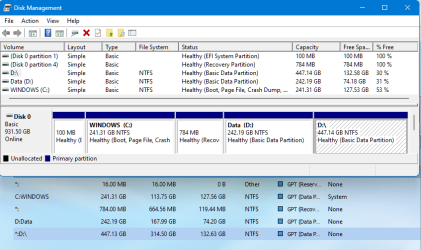
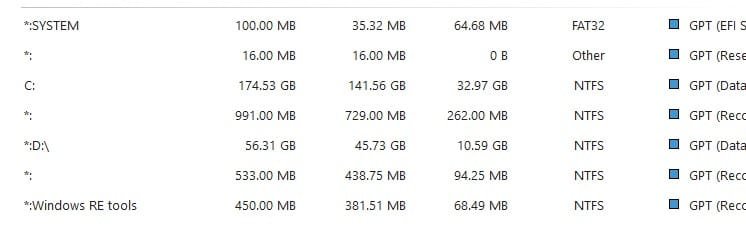
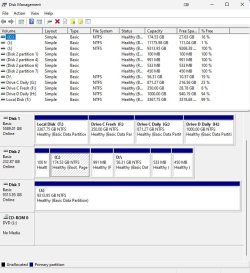
Here's the problem: One of my drives is listed in MiniTool as * :\, whereas in Windows Disk Management, it is listed as D:\ - no parentheses - and it is not visible in File Explorer at all.
Here's the background, and I hope it's not excessive: Late last year, I installed Windows 11, and against my better judgment, I did a full upgrade from Windows 10, as opposed to formatting my system drive and starting anew. What I got was a fairly buggy installation which grew buggier over time.
Then I tried a reset - again, against my better judgment - and what I got was an even buggier installation, such that I bit the bullet and did a clean install about 5 days ago.
I first became aware of the drive label issue when I installed Backblaze after the reset and it alerted me to the drive label issue not long after I installed it.
I don't know how much harm the drive label issue can cause, but it scares me and I'd like to get it cleaned up. I have a backup of the data, so should I reformat the drive and start over, or is there an easier way? All help is appreciated.
:\, whereas in Windows Disk Management, it is listed as D:\ - no parentheses - and it is not visible in File Explorer at all. Here's the background, and I hope it's not excessive: Late last year, I installed Windows 11, and against my better judgment, I did a full upgrade from Windows 10, as opposed to formatting my system drive and starting anew. What I got was a fairly buggy installation which grew buggier over time.
Then I tried a reset - again, against my better judgment - and what I got was an even buggier installation, such that I bit the bullet and did a clean install about 5 days ago.
I first became aware of the drive label issue when I installed Backblaze after the reset and it alerted me to the drive label issue not long after I installed it.
I don't know how much harm the drive label issue can cause, but it scares me and I'd like to get it cleaned up. I have a backup of the data, so should I reformat the drive and start over, or is there an easier way? All help is appreciated.
- Windows Build/Version
- Windows 11 Home 23H2 (OS Build22631.4169)
Attachments
My Computer
At a glance
Windows 11 Version 25H2 Build 26200.7562AMD Ryzen 5 5500Crucial 16 GB DDR4-2400 (12MHz)Gigabyte GeForce 3050
- OS
- Windows 11 Version 25H2 Build 26200.7562
- Computer type
- PC/Desktop
- Manufacturer/Model
- Me
- CPU
- AMD Ryzen 5 5500
- Motherboard
- Aorus B450 Pro Wifi Rev 1.x version F66d
- Memory
- Crucial 16 GB DDR4-2400 (12MHz)
- Graphics Card(s)
- Gigabyte GeForce 3050
- Sound Card
- Onboard
- Monitor(s) Displays
- Samsung SyncMaster P2370 HD/AOC C3583FQ/HPw2207h
- Screen Resolution
- Depends
- Hard Drives
- System: Samsung SSD 970 EVO 250GB us Number 0, Target Id 0, LUN 0 250 GB
Storage:
WDC WD60EZAZ-OOSF3B0 Bus Number 0, Target Id 0, LUN 0 5.45 TB
OOS12000G Bus Number 1, Target Id 0, LUN 0 ooS12000G
WD Elements 25A3 USB Device 9.09 TB
- PSU
- Corsair CX850M
- Case
- An old Coolermaster
- Cooling
- The one which came with my CPU
- Keyboard
- Logitech K710
- Mouse
- Logi M510
- Internet Speed
- 100 MBPS
- Browser
- Chrome
- Antivirus
- Bitdefender