Solved RAM utilization?


Alexey2912

Well-known member
Member
VIP
Local time
7:48 AM
Posts
2,144
Location
Aiea, Honolulu HI
OS
Windows 11 Pro 25H2 (26200.8457).
Hi,

Hope all are fine and, healthy! (covid/long covid free).

I have a question regarding my Dell laptop's memory utilization:

1. It never exceeds max.7.5 GB, despite multiple browser tabs, MS Words docs opened, Youtubes, movies, external devices etc. With none reboot and always on.

2. After a 5-7 days when I sense the lap slightly sluggish, less responsive I perform a reboot, even than the RAM usage in TM has never exceeded 7.5.

3. A year back when I got the laptop, customized to 16 GB of RAM, though the MB can hold 32 GB.

4. In advanced system settings have let Windows manage page file.

5. Recommended 2911, allocated 2432.


To sum up my questions are:

a. Did I waste installing 16 vs. 8 was good enough?

b. To enable usage of more should I turn off page file/virtual memory or system managed/custom set?

c. Is it to do with the Dell's BIOS, that is set to use max 8 GB?

d. Can RAM usage be changed in BIOS settings?


Hoping to hear from the experts.
Best regards!
 
Windows Build/Version
22H2 (22621.1344)
Last edited:

My Computers My Computers

  • At a glance

    Windows 11 Pro 25H2 (26200.8457).core i7 11th gen16 GB DDR4 @3200 MHz
    OS
    Windows 11 Pro 25H2 (26200.8457).
    Computer type
    Laptop
    Manufacturer/Model
    Dell Inspiron i5 5510
    CPU
    core i7 11th gen
    Memory
    16 GB DDR4 @3200 MHz
    Hard Drives
    1 TB SSD M.2 NVMe
    Keyboard
    Dell Premier Multi-Device Wireless Keyboard and Mouse – KM7321W
    Browser
    Brave.
    Other Info
    Edifier speakers. (Thanks to @Edwin).
  • At a glance

    W11 25H2 (26200.7840)11th Gen Intel® Core i7-11700 processor32 GB, 2 x 16 GB, DDR4, 2933 MHz, dual channelNVIDIA GeForce RTX 3060 12GB GDDR6
    Operating System
    W11 25H2 (26200.7840)
    Computer type
    PC/Desktop
    Manufacturer/Model
    XPS Special Edition
    CPU
    11th Gen Intel® Core i7-11700 processor
    Memory
    32 GB, 2 x 16 GB, DDR4, 2933 MHz, dual channel
    Graphics card(s)
    NVIDIA GeForce RTX 3060 12GB GDDR6
    Hard Drives
    2TB M.2 PCIe NVMe SSD
Did I waste installing 16 vs. 8 was good enough?


The tasks you're doing aren't using all 16GB.
Find a 100MB picture and convert it from jpg to png.... that will use some RAM. ^^
Run a few instances of the same online game. That will use some RAM.


Try this...

1. Go HERE and after the picture loads, click on it and wait for it to change to full size AND come in focus.
2. Then right click it and choose: Copy Image.
3. Then on your computer, open any image editor and choose: Edit > Paste
4. Then choose: File > Save As... and choose .PNG or .BMP
5. While it's spending 3-4 minutes saving... open Task Manager and check your RAM usage.
 

My Computers My Computers

  • At a glance

    Win 11 Home ♦♦♦26200.8655 ♦♦♦♦♦♦♦25H2AMD Ryzen 7 3700XG.Skill (F4-3200C14D-16GTZKW)EVGA RTX 2070 (08G-P4-2171-KR)
    OS
    Win 11 Home ♦♦♦26200.8655 ♦♦♦♦♦♦♦25H2
    Computer type
    PC/Desktop
    Manufacturer/Model
    Built by Ghot® [May 2020]
    CPU
    AMD Ryzen 7 3700X
    Motherboard
    Asus Pro WS X570-ACE (BIOS 5302)
    Memory
    G.Skill (F4-3200C14D-16GTZKW)
    Graphics Card(s)
    EVGA RTX 2070 (08G-P4-2171-KR)
    Sound Card
    Realtek ALC1220P / ALC S1220A
    Monitor(s) Displays
    Dell U3011 30"
    Screen Resolution
    2560 x 1600
    Hard Drives
    2x Samsung 860 EVO 500GB,
    WD 4TB Black FZBX - SATA III,
    WD 8TB Black FZBX - SATA III,
    DRW-24B1ST CD/DVD Burner
    PSU
    PC Power & Cooling 750W Quad EPS12V
    Case
    Cooler Master ATCS 840 Tower
    Cooling
    CM Hyper 212 EVO (push/pull)
    Keyboard
    Ducky DK9008 Shine II Blue LED
    Mouse
    Logitech Optical M-100
    Internet Speed
    300/300
    Browser
    Firefox (latest)
    Antivirus
    Bitdefender Total Security
    Other Info
    Speakers: Klipsch Pro Media 2.1
  • At a glance

    Windows XP Pro 32bit w/SP3AMD Athlon 64 X2 5000+ (OC'd @ 3.2Ghz)TWIN2X2048-6400C4DHX (2 x 1GB, DDR2 800)EVGA 256-P2-N758-TR GeForce 8600GT SSC
    Operating System
    Windows XP Pro 32bit w/SP3
    Computer type
    PC/Desktop
    Manufacturer/Model
    Built by Ghot® (not in use)
    CPU
    AMD Athlon 64 X2 5000+ (OC'd @ 3.2Ghz)
    Motherboard
    ASUS M2N32-SLI Deluxe Wireless Edition
    Memory
    TWIN2X2048-6400C4DHX (2 x 1GB, DDR2 800)
    Graphics card(s)
    EVGA 256-P2-N758-TR GeForce 8600GT SSC
    Sound Card
    Onboard
    Monitor(s) Displays
    ViewSonic G90FB Black 19" Professional (CRT)
    Screen Resolution
    up to 2048 x 1536
    Hard Drives
    WD 36GB 10,000rpm Raptor SATA
    Seagate 80GB 7200rpm SATA
    Lite-On LTR-52246S CD/RW
    Lite-On LH-18A1P CD/DVD Burner
    PSU
    PC Power & Cooling Silencer 750 Quad EPS12V
    Case
    Generic Beige case, 80mm fans
    Cooling
    ZALMAN 9500A 92mm CPU Cooler
    Keyboard
    Logitech Classic Keybooard 200
    Mouse
    Logitech Optical M-BT96a
    Internet Speed
    300/300
    Browser
    Firefox 3.x ??
    Antivirus
    Symantec (Norton)
    Other Info
    Still assembled, still runs. Haven't turned it on for 15 years?
The tasks you're doing aren't using all 16GB.
Find a 100MB picture and convert it from jpg to png.... that will use some RAM. ^^
Run a few instances of the same online game. That will use some RAM.

Thanks, shall try it.

Any ideas than why doe it become less responsive after a dew days...of my usage?

RAM.png
 

My Computers My Computers

  • At a glance

    Windows 11 Pro 25H2 (26200.8457).core i7 11th gen16 GB DDR4 @3200 MHz
    OS
    Windows 11 Pro 25H2 (26200.8457).
    Computer type
    Laptop
    Manufacturer/Model
    Dell Inspiron i5 5510
    CPU
    core i7 11th gen
    Memory
    16 GB DDR4 @3200 MHz
    Hard Drives
    1 TB SSD M.2 NVMe
    Keyboard
    Dell Premier Multi-Device Wireless Keyboard and Mouse – KM7321W
    Browser
    Brave.
    Other Info
    Edifier speakers. (Thanks to @Edwin).
  • At a glance

    W11 25H2 (26200.7840)11th Gen Intel® Core i7-11700 processor32 GB, 2 x 16 GB, DDR4, 2933 MHz, dual channelNVIDIA GeForce RTX 3060 12GB GDDR6
    Operating System
    W11 25H2 (26200.7840)
    Computer type
    PC/Desktop
    Manufacturer/Model
    XPS Special Edition
    CPU
    11th Gen Intel® Core i7-11700 processor
    Memory
    32 GB, 2 x 16 GB, DDR4, 2933 MHz, dual channel
    Graphics card(s)
    NVIDIA GeForce RTX 3060 12GB GDDR6
    Hard Drives
    2TB M.2 PCIe NVMe SSD
The tasks you're doing aren't using all 16GB.
Find a 100MB picture and convert it from jpg to png.... that will use some RAM. ^^
Run a few instances of the same online game. That will use some RAM.


Try this...

1. Go HERE and after the picture loads, click on it and wait for it to change to full size AND come in focus.
2. Then right click it and choose: Copy Image.
3. Then on your computer, open any image editor and choose: Edit > Paste
4. Then choose: File > Save As... and choose .PNG or .BMP
5. While it's spending 3-4 minutes saving... open Task Manager and check your RAM usage.

Correct for the 1st time it hit +10/11.

Thanks for clearing up all my confusions, queries.
Lastly, is it normal with my usage mentioned, for the laptop to get sluggish after a few days, needing a reboot?


Regards!


RAM 2.png
 

My Computers My Computers

  • At a glance

    Windows 11 Pro 25H2 (26200.8457).core i7 11th gen16 GB DDR4 @3200 MHz
    OS
    Windows 11 Pro 25H2 (26200.8457).
    Computer type
    Laptop
    Manufacturer/Model
    Dell Inspiron i5 5510
    CPU
    core i7 11th gen
    Memory
    16 GB DDR4 @3200 MHz
    Hard Drives
    1 TB SSD M.2 NVMe
    Keyboard
    Dell Premier Multi-Device Wireless Keyboard and Mouse – KM7321W
    Browser
    Brave.
    Other Info
    Edifier speakers. (Thanks to @Edwin).
  • At a glance

    W11 25H2 (26200.7840)11th Gen Intel® Core i7-11700 processor32 GB, 2 x 16 GB, DDR4, 2933 MHz, dual channelNVIDIA GeForce RTX 3060 12GB GDDR6
    Operating System
    W11 25H2 (26200.7840)
    Computer type
    PC/Desktop
    Manufacturer/Model
    XPS Special Edition
    CPU
    11th Gen Intel® Core i7-11700 processor
    Memory
    32 GB, 2 x 16 GB, DDR4, 2933 MHz, dual channel
    Graphics card(s)
    NVIDIA GeForce RTX 3060 12GB GDDR6
    Hard Drives
    2TB M.2 PCIe NVMe SSD
Any ideas than why doe it become less responsive after a dew days...of my usage?


No.
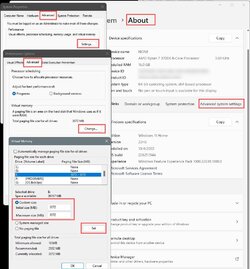
I have my page file set at a fixed size. Both min. and max. size are 3072MB.
Programs should pull all their leftovers out of RAM when you close the program, but very few do.

Mine does the same thing... slowly fills up until I reboot. It doesn't get less responsive though.
That is probably because I have the page file set the way I do.

Image1.jpg

The Page File is an area on your SSD or hard drive, that the computer uses when the RAM fills up.
It's a bazillion times slower than the RAM. So keeping the Page File small, and "fixed" means the RAM will get used... more, which is way faster.

Over time, the % of RAM used will still increase, and a reboot will lower it back down, but the responsiveness shouldn't deteriorate.
 

My Computers My Computers

  • At a glance

    Win 11 Home ♦♦♦26200.8655 ♦♦♦♦♦♦♦25H2AMD Ryzen 7 3700XG.Skill (F4-3200C14D-16GTZKW)EVGA RTX 2070 (08G-P4-2171-KR)
    OS
    Win 11 Home ♦♦♦26200.8655 ♦♦♦♦♦♦♦25H2
    Computer type
    PC/Desktop
    Manufacturer/Model
    Built by Ghot® [May 2020]
    CPU
    AMD Ryzen 7 3700X
    Motherboard
    Asus Pro WS X570-ACE (BIOS 5302)
    Memory
    G.Skill (F4-3200C14D-16GTZKW)
    Graphics Card(s)
    EVGA RTX 2070 (08G-P4-2171-KR)
    Sound Card
    Realtek ALC1220P / ALC S1220A
    Monitor(s) Displays
    Dell U3011 30"
    Screen Resolution
    2560 x 1600
    Hard Drives
    2x Samsung 860 EVO 500GB,
    WD 4TB Black FZBX - SATA III,
    WD 8TB Black FZBX - SATA III,
    DRW-24B1ST CD/DVD Burner
    PSU
    PC Power & Cooling 750W Quad EPS12V
    Case
    Cooler Master ATCS 840 Tower
    Cooling
    CM Hyper 212 EVO (push/pull)
    Keyboard
    Ducky DK9008 Shine II Blue LED
    Mouse
    Logitech Optical M-100
    Internet Speed
    300/300
    Browser
    Firefox (latest)
    Antivirus
    Bitdefender Total Security
    Other Info
    Speakers: Klipsch Pro Media 2.1
  • At a glance

    Windows XP Pro 32bit w/SP3AMD Athlon 64 X2 5000+ (OC'd @ 3.2Ghz)TWIN2X2048-6400C4DHX (2 x 1GB, DDR2 800)EVGA 256-P2-N758-TR GeForce 8600GT SSC
    Operating System
    Windows XP Pro 32bit w/SP3
    Computer type
    PC/Desktop
    Manufacturer/Model
    Built by Ghot® (not in use)
    CPU
    AMD Athlon 64 X2 5000+ (OC'd @ 3.2Ghz)
    Motherboard
    ASUS M2N32-SLI Deluxe Wireless Edition
    Memory
    TWIN2X2048-6400C4DHX (2 x 1GB, DDR2 800)
    Graphics card(s)
    EVGA 256-P2-N758-TR GeForce 8600GT SSC
    Sound Card
    Onboard
    Monitor(s) Displays
    ViewSonic G90FB Black 19" Professional (CRT)
    Screen Resolution
    up to 2048 x 1536
    Hard Drives
    WD 36GB 10,000rpm Raptor SATA
    Seagate 80GB 7200rpm SATA
    Lite-On LTR-52246S CD/RW
    Lite-On LH-18A1P CD/DVD Burner
    PSU
    PC Power & Cooling Silencer 750 Quad EPS12V
    Case
    Generic Beige case, 80mm fans
    Cooling
    ZALMAN 9500A 92mm CPU Cooler
    Keyboard
    Logitech Classic Keybooard 200
    Mouse
    Logitech Optical M-BT96a
    Internet Speed
    300/300
    Browser
    Firefox 3.x ??
    Antivirus
    Symantec (Norton)
    Other Info
    Still assembled, still runs. Haven't turned it on for 15 years?
No.
I have my page file set at a fixed size. Both min. and max. size are 3072MB.
Programs should pull all their leftovers out of RAM when you close the program, but very few do.

Mine does the same thing... slowly fills up until I reboot. It doesn't get less responsive though.
That is probably because I have the page file set the way I do.

View attachment 54890

The Page File is an area on your SSD or hard drive, that the computer uses when the RAM fills up.
It's a bazillion times slower than the RAM. So keeping the Page File small, and "fixed" means the RAM will get used... more, which is way faster.

Over time, the % of RAM used will increase, and a reboot will lower it back down, but the responsiveness shouldn't deteriorate.

What should I set mine to, both min and max?

Thanks.
 

My Computers My Computers

  • At a glance

    Windows 11 Pro 25H2 (26200.8457).core i7 11th gen16 GB DDR4 @3200 MHz
    OS
    Windows 11 Pro 25H2 (26200.8457).
    Computer type
    Laptop
    Manufacturer/Model
    Dell Inspiron i5 5510
    CPU
    core i7 11th gen
    Memory
    16 GB DDR4 @3200 MHz
    Hard Drives
    1 TB SSD M.2 NVMe
    Keyboard
    Dell Premier Multi-Device Wireless Keyboard and Mouse – KM7321W
    Browser
    Brave.
    Other Info
    Edifier speakers. (Thanks to @Edwin).
  • At a glance

    W11 25H2 (26200.7840)11th Gen Intel® Core i7-11700 processor32 GB, 2 x 16 GB, DDR4, 2933 MHz, dual channelNVIDIA GeForce RTX 3060 12GB GDDR6
    Operating System
    W11 25H2 (26200.7840)
    Computer type
    PC/Desktop
    Manufacturer/Model
    XPS Special Edition
    CPU
    11th Gen Intel® Core i7-11700 processor
    Memory
    32 GB, 2 x 16 GB, DDR4, 2933 MHz, dual channel
    Graphics card(s)
    NVIDIA GeForce RTX 3060 12GB GDDR6
    Hard Drives
    2TB M.2 PCIe NVMe SSD
What should I set mine to, both min and max?

Thanks.


Try 3072 for both min. and max.


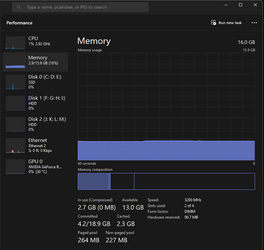
I just rebooted... my RAM seems to sit at 18% utilization, after reboot.
With Firefox open to four tabs, I'm sitting at 22%.

My RAM will slowly climb up to about 32% before I reboot for some other reason.

Image1.png


Remember though... I don't run any Windows Apps. Pretty much the only things I have running are...

Bitdefender, Firefox and AIDA64 Extreme.
 

My Computers My Computers

  • At a glance

    Win 11 Home ♦♦♦26200.8655 ♦♦♦♦♦♦♦25H2AMD Ryzen 7 3700XG.Skill (F4-3200C14D-16GTZKW)EVGA RTX 2070 (08G-P4-2171-KR)
    OS
    Win 11 Home ♦♦♦26200.8655 ♦♦♦♦♦♦♦25H2
    Computer type
    PC/Desktop
    Manufacturer/Model
    Built by Ghot® [May 2020]
    CPU
    AMD Ryzen 7 3700X
    Motherboard
    Asus Pro WS X570-ACE (BIOS 5302)
    Memory
    G.Skill (F4-3200C14D-16GTZKW)
    Graphics Card(s)
    EVGA RTX 2070 (08G-P4-2171-KR)
    Sound Card
    Realtek ALC1220P / ALC S1220A
    Monitor(s) Displays
    Dell U3011 30"
    Screen Resolution
    2560 x 1600
    Hard Drives
    2x Samsung 860 EVO 500GB,
    WD 4TB Black FZBX - SATA III,
    WD 8TB Black FZBX - SATA III,
    DRW-24B1ST CD/DVD Burner
    PSU
    PC Power & Cooling 750W Quad EPS12V
    Case
    Cooler Master ATCS 840 Tower
    Cooling
    CM Hyper 212 EVO (push/pull)
    Keyboard
    Ducky DK9008 Shine II Blue LED
    Mouse
    Logitech Optical M-100
    Internet Speed
    300/300
    Browser
    Firefox (latest)
    Antivirus
    Bitdefender Total Security
    Other Info
    Speakers: Klipsch Pro Media 2.1
  • At a glance

    Windows XP Pro 32bit w/SP3AMD Athlon 64 X2 5000+ (OC'd @ 3.2Ghz)TWIN2X2048-6400C4DHX (2 x 1GB, DDR2 800)EVGA 256-P2-N758-TR GeForce 8600GT SSC
    Operating System
    Windows XP Pro 32bit w/SP3
    Computer type
    PC/Desktop
    Manufacturer/Model
    Built by Ghot® (not in use)
    CPU
    AMD Athlon 64 X2 5000+ (OC'd @ 3.2Ghz)
    Motherboard
    ASUS M2N32-SLI Deluxe Wireless Edition
    Memory
    TWIN2X2048-6400C4DHX (2 x 1GB, DDR2 800)
    Graphics card(s)
    EVGA 256-P2-N758-TR GeForce 8600GT SSC
    Sound Card
    Onboard
    Monitor(s) Displays
    ViewSonic G90FB Black 19" Professional (CRT)
    Screen Resolution
    up to 2048 x 1536
    Hard Drives
    WD 36GB 10,000rpm Raptor SATA
    Seagate 80GB 7200rpm SATA
    Lite-On LTR-52246S CD/RW
    Lite-On LH-18A1P CD/DVD Burner
    PSU
    PC Power & Cooling Silencer 750 Quad EPS12V
    Case
    Generic Beige case, 80mm fans
    Cooling
    ZALMAN 9500A 92mm CPU Cooler
    Keyboard
    Logitech Classic Keybooard 200
    Mouse
    Logitech Optical M-BT96a
    Internet Speed
    300/300
    Browser
    Firefox 3.x ??
    Antivirus
    Symantec (Norton)
    Other Info
    Still assembled, still runs. Haven't turned it on for 15 years?
Try 3072 for both min. and max.


I just rebooted... my RAM seems to sit at 18% utilization, after reboot.

View attachment 54891

Thanks will set @3072 both min and max.
@Ghot , you got a nice screen posting app....may I know which one.

Thanks again and best regards!


BTW: Treating/Curing covid or any disease is far simpler than learning tech. Windows :confused:
Finished curing 2 today, 1 Aussie online and the other in my office in 48 hrs...RT-PCR neg.;-)
 

My Computers My Computers

  • At a glance

    Windows 11 Pro 25H2 (26200.8457).core i7 11th gen16 GB DDR4 @3200 MHz
    OS
    Windows 11 Pro 25H2 (26200.8457).
    Computer type
    Laptop
    Manufacturer/Model
    Dell Inspiron i5 5510
    CPU
    core i7 11th gen
    Memory
    16 GB DDR4 @3200 MHz
    Hard Drives
    1 TB SSD M.2 NVMe
    Keyboard
    Dell Premier Multi-Device Wireless Keyboard and Mouse – KM7321W
    Browser
    Brave.
    Other Info
    Edifier speakers. (Thanks to @Edwin).
  • At a glance

    W11 25H2 (26200.7840)11th Gen Intel® Core i7-11700 processor32 GB, 2 x 16 GB, DDR4, 2933 MHz, dual channelNVIDIA GeForce RTX 3060 12GB GDDR6
    Operating System
    W11 25H2 (26200.7840)
    Computer type
    PC/Desktop
    Manufacturer/Model
    XPS Special Edition
    CPU
    11th Gen Intel® Core i7-11700 processor
    Memory
    32 GB, 2 x 16 GB, DDR4, 2933 MHz, dual channel
    Graphics card(s)
    NVIDIA GeForce RTX 3060 12GB GDDR6
    Hard Drives
    2TB M.2 PCIe NVMe SSD
Thanks will set @3072 both min and max.
@Ghot , you got a nice screen posting app....may I know which one.

Thanks again and best regards!


BTW: Treating/Curing covid or any disease is far simpler than learning tech. Windows :confused:


I don't use an "app". I use Paintshop Pro 7.04 as an image editor.
I also use XnView Classic (minimal) to "handle" all the images on my drives.


I've been using it for years. I'm as fast as an app now. :cool:
 

My Computers My Computers

  • At a glance

    Win 11 Home ♦♦♦26200.8655 ♦♦♦♦♦♦♦25H2AMD Ryzen 7 3700XG.Skill (F4-3200C14D-16GTZKW)EVGA RTX 2070 (08G-P4-2171-KR)
    OS
    Win 11 Home ♦♦♦26200.8655 ♦♦♦♦♦♦♦25H2
    Computer type
    PC/Desktop
    Manufacturer/Model
    Built by Ghot® [May 2020]
    CPU
    AMD Ryzen 7 3700X
    Motherboard
    Asus Pro WS X570-ACE (BIOS 5302)
    Memory
    G.Skill (F4-3200C14D-16GTZKW)
    Graphics Card(s)
    EVGA RTX 2070 (08G-P4-2171-KR)
    Sound Card
    Realtek ALC1220P / ALC S1220A
    Monitor(s) Displays
    Dell U3011 30"
    Screen Resolution
    2560 x 1600
    Hard Drives
    2x Samsung 860 EVO 500GB,
    WD 4TB Black FZBX - SATA III,
    WD 8TB Black FZBX - SATA III,
    DRW-24B1ST CD/DVD Burner
    PSU
    PC Power & Cooling 750W Quad EPS12V
    Case
    Cooler Master ATCS 840 Tower
    Cooling
    CM Hyper 212 EVO (push/pull)
    Keyboard
    Ducky DK9008 Shine II Blue LED
    Mouse
    Logitech Optical M-100
    Internet Speed
    300/300
    Browser
    Firefox (latest)
    Antivirus
    Bitdefender Total Security
    Other Info
    Speakers: Klipsch Pro Media 2.1
  • At a glance

    Windows XP Pro 32bit w/SP3AMD Athlon 64 X2 5000+ (OC'd @ 3.2Ghz)TWIN2X2048-6400C4DHX (2 x 1GB, DDR2 800)EVGA 256-P2-N758-TR GeForce 8600GT SSC
    Operating System
    Windows XP Pro 32bit w/SP3
    Computer type
    PC/Desktop
    Manufacturer/Model
    Built by Ghot® (not in use)
    CPU
    AMD Athlon 64 X2 5000+ (OC'd @ 3.2Ghz)
    Motherboard
    ASUS M2N32-SLI Deluxe Wireless Edition
    Memory
    TWIN2X2048-6400C4DHX (2 x 1GB, DDR2 800)
    Graphics card(s)
    EVGA 256-P2-N758-TR GeForce 8600GT SSC
    Sound Card
    Onboard
    Monitor(s) Displays
    ViewSonic G90FB Black 19" Professional (CRT)
    Screen Resolution
    up to 2048 x 1536
    Hard Drives
    WD 36GB 10,000rpm Raptor SATA
    Seagate 80GB 7200rpm SATA
    Lite-On LTR-52246S CD/RW
    Lite-On LH-18A1P CD/DVD Burner
    PSU
    PC Power & Cooling Silencer 750 Quad EPS12V
    Case
    Generic Beige case, 80mm fans
    Cooling
    ZALMAN 9500A 92mm CPU Cooler
    Keyboard
    Logitech Classic Keybooard 200
    Mouse
    Logitech Optical M-BT96a
    Internet Speed
    300/300
    Browser
    Firefox 3.x ??
    Antivirus
    Symantec (Norton)
    Other Info
    Still assembled, still runs. Haven't turned it on for 15 years?
I don't use an "app". I use Paintshop Pro 7.04 as an image editor.
I also use XnView Classic (minimal) to "handle" all the images on my drives.


I've been using it for years. I'm as fast as an app now. :cool:

Do I need to download Paintshop Pro 7.04 and XnView Classic (minimal)?

Thanks.🙏
 

My Computers My Computers

  • At a glance

    Windows 11 Pro 25H2 (26200.8457).core i7 11th gen16 GB DDR4 @3200 MHz
    OS
    Windows 11 Pro 25H2 (26200.8457).
    Computer type
    Laptop
    Manufacturer/Model
    Dell Inspiron i5 5510
    CPU
    core i7 11th gen
    Memory
    16 GB DDR4 @3200 MHz
    Hard Drives
    1 TB SSD M.2 NVMe
    Keyboard
    Dell Premier Multi-Device Wireless Keyboard and Mouse – KM7321W
    Browser
    Brave.
    Other Info
    Edifier speakers. (Thanks to @Edwin).
  • At a glance

    W11 25H2 (26200.7840)11th Gen Intel® Core i7-11700 processor32 GB, 2 x 16 GB, DDR4, 2933 MHz, dual channelNVIDIA GeForce RTX 3060 12GB GDDR6
    Operating System
    W11 25H2 (26200.7840)
    Computer type
    PC/Desktop
    Manufacturer/Model
    XPS Special Edition
    CPU
    11th Gen Intel® Core i7-11700 processor
    Memory
    32 GB, 2 x 16 GB, DDR4, 2933 MHz, dual channel
    Graphics card(s)
    NVIDIA GeForce RTX 3060 12GB GDDR6
    Hard Drives
    2TB M.2 PCIe NVMe SSD
Do I need to download Paintshop Pro 7.04 and XnView Classic (minimal)?

Thanks.🙏


If you want to use them you do. For Paintshop Pro... download the ISO and save it to your desktop.
I included a text file in that topic with the install instructions.
You'll need to install them as well. :-)
 

My Computers My Computers

  • At a glance

    Win 11 Home ♦♦♦26200.8655 ♦♦♦♦♦♦♦25H2AMD Ryzen 7 3700XG.Skill (F4-3200C14D-16GTZKW)EVGA RTX 2070 (08G-P4-2171-KR)
    OS
    Win 11 Home ♦♦♦26200.8655 ♦♦♦♦♦♦♦25H2
    Computer type
    PC/Desktop
    Manufacturer/Model
    Built by Ghot® [May 2020]
    CPU
    AMD Ryzen 7 3700X
    Motherboard
    Asus Pro WS X570-ACE (BIOS 5302)
    Memory
    G.Skill (F4-3200C14D-16GTZKW)
    Graphics Card(s)
    EVGA RTX 2070 (08G-P4-2171-KR)
    Sound Card
    Realtek ALC1220P / ALC S1220A
    Monitor(s) Displays
    Dell U3011 30"
    Screen Resolution
    2560 x 1600
    Hard Drives
    2x Samsung 860 EVO 500GB,
    WD 4TB Black FZBX - SATA III,
    WD 8TB Black FZBX - SATA III,
    DRW-24B1ST CD/DVD Burner
    PSU
    PC Power & Cooling 750W Quad EPS12V
    Case
    Cooler Master ATCS 840 Tower
    Cooling
    CM Hyper 212 EVO (push/pull)
    Keyboard
    Ducky DK9008 Shine II Blue LED
    Mouse
    Logitech Optical M-100
    Internet Speed
    300/300
    Browser
    Firefox (latest)
    Antivirus
    Bitdefender Total Security
    Other Info
    Speakers: Klipsch Pro Media 2.1
  • At a glance

    Windows XP Pro 32bit w/SP3AMD Athlon 64 X2 5000+ (OC'd @ 3.2Ghz)TWIN2X2048-6400C4DHX (2 x 1GB, DDR2 800)EVGA 256-P2-N758-TR GeForce 8600GT SSC
    Operating System
    Windows XP Pro 32bit w/SP3
    Computer type
    PC/Desktop
    Manufacturer/Model
    Built by Ghot® (not in use)
    CPU
    AMD Athlon 64 X2 5000+ (OC'd @ 3.2Ghz)
    Motherboard
    ASUS M2N32-SLI Deluxe Wireless Edition
    Memory
    TWIN2X2048-6400C4DHX (2 x 1GB, DDR2 800)
    Graphics card(s)
    EVGA 256-P2-N758-TR GeForce 8600GT SSC
    Sound Card
    Onboard
    Monitor(s) Displays
    ViewSonic G90FB Black 19" Professional (CRT)
    Screen Resolution
    up to 2048 x 1536
    Hard Drives
    WD 36GB 10,000rpm Raptor SATA
    Seagate 80GB 7200rpm SATA
    Lite-On LTR-52246S CD/RW
    Lite-On LH-18A1P CD/DVD Burner
    PSU
    PC Power & Cooling Silencer 750 Quad EPS12V
    Case
    Generic Beige case, 80mm fans
    Cooling
    ZALMAN 9500A 92mm CPU Cooler
    Keyboard
    Logitech Classic Keybooard 200
    Mouse
    Logitech Optical M-BT96a
    Internet Speed
    300/300
    Browser
    Firefox 3.x ??
    Antivirus
    Symantec (Norton)
    Other Info
    Still assembled, still runs. Haven't turned it on for 15 years?
If you want to use them you do. :-)


Thanks again, shall keep you posted after setting the RAM etc.
Have a great weekend! ;-)
 

My Computers My Computers

  • At a glance

    Windows 11 Pro 25H2 (26200.8457).core i7 11th gen16 GB DDR4 @3200 MHz
    OS
    Windows 11 Pro 25H2 (26200.8457).
    Computer type
    Laptop
    Manufacturer/Model
    Dell Inspiron i5 5510
    CPU
    core i7 11th gen
    Memory
    16 GB DDR4 @3200 MHz
    Hard Drives
    1 TB SSD M.2 NVMe
    Keyboard
    Dell Premier Multi-Device Wireless Keyboard and Mouse – KM7321W
    Browser
    Brave.
    Other Info
    Edifier speakers. (Thanks to @Edwin).
  • At a glance

    W11 25H2 (26200.7840)11th Gen Intel® Core i7-11700 processor32 GB, 2 x 16 GB, DDR4, 2933 MHz, dual channelNVIDIA GeForce RTX 3060 12GB GDDR6
    Operating System
    W11 25H2 (26200.7840)
    Computer type
    PC/Desktop
    Manufacturer/Model
    XPS Special Edition
    CPU
    11th Gen Intel® Core i7-11700 processor
    Memory
    32 GB, 2 x 16 GB, DDR4, 2933 MHz, dual channel
    Graphics card(s)
    NVIDIA GeForce RTX 3060 12GB GDDR6
    Hard Drives
    2TB M.2 PCIe NVMe SSD
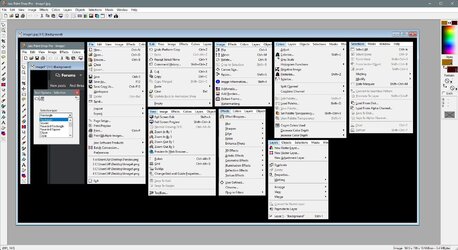
This is what Paintshop Pro 7.04 looks like...

Image1.jpg

It looks far more complicated than it is.


With Paintshop Pro 7.04, you can make awesome pictures like these...

Kilroy4.png

Image1.png


Backup Gravestone.png
 
Last edited:

My Computers My Computers

  • At a glance

    Win 11 Home ♦♦♦26200.8655 ♦♦♦♦♦♦♦25H2AMD Ryzen 7 3700XG.Skill (F4-3200C14D-16GTZKW)EVGA RTX 2070 (08G-P4-2171-KR)
    OS
    Win 11 Home ♦♦♦26200.8655 ♦♦♦♦♦♦♦25H2
    Computer type
    PC/Desktop
    Manufacturer/Model
    Built by Ghot® [May 2020]
    CPU
    AMD Ryzen 7 3700X
    Motherboard
    Asus Pro WS X570-ACE (BIOS 5302)
    Memory
    G.Skill (F4-3200C14D-16GTZKW)
    Graphics Card(s)
    EVGA RTX 2070 (08G-P4-2171-KR)
    Sound Card
    Realtek ALC1220P / ALC S1220A
    Monitor(s) Displays
    Dell U3011 30"
    Screen Resolution
    2560 x 1600
    Hard Drives
    2x Samsung 860 EVO 500GB,
    WD 4TB Black FZBX - SATA III,
    WD 8TB Black FZBX - SATA III,
    DRW-24B1ST CD/DVD Burner
    PSU
    PC Power & Cooling 750W Quad EPS12V
    Case
    Cooler Master ATCS 840 Tower
    Cooling
    CM Hyper 212 EVO (push/pull)
    Keyboard
    Ducky DK9008 Shine II Blue LED
    Mouse
    Logitech Optical M-100
    Internet Speed
    300/300
    Browser
    Firefox (latest)
    Antivirus
    Bitdefender Total Security
    Other Info
    Speakers: Klipsch Pro Media 2.1
  • At a glance

    Windows XP Pro 32bit w/SP3AMD Athlon 64 X2 5000+ (OC'd @ 3.2Ghz)TWIN2X2048-6400C4DHX (2 x 1GB, DDR2 800)EVGA 256-P2-N758-TR GeForce 8600GT SSC
    Operating System
    Windows XP Pro 32bit w/SP3
    Computer type
    PC/Desktop
    Manufacturer/Model
    Built by Ghot® (not in use)
    CPU
    AMD Athlon 64 X2 5000+ (OC'd @ 3.2Ghz)
    Motherboard
    ASUS M2N32-SLI Deluxe Wireless Edition
    Memory
    TWIN2X2048-6400C4DHX (2 x 1GB, DDR2 800)
    Graphics card(s)
    EVGA 256-P2-N758-TR GeForce 8600GT SSC
    Sound Card
    Onboard
    Monitor(s) Displays
    ViewSonic G90FB Black 19" Professional (CRT)
    Screen Resolution
    up to 2048 x 1536
    Hard Drives
    WD 36GB 10,000rpm Raptor SATA
    Seagate 80GB 7200rpm SATA
    Lite-On LTR-52246S CD/RW
    Lite-On LH-18A1P CD/DVD Burner
    PSU
    PC Power & Cooling Silencer 750 Quad EPS12V
    Case
    Generic Beige case, 80mm fans
    Cooling
    ZALMAN 9500A 92mm CPU Cooler
    Keyboard
    Logitech Classic Keybooard 200
    Mouse
    Logitech Optical M-BT96a
    Internet Speed
    300/300
    Browser
    Firefox 3.x ??
    Antivirus
    Symantec (Norton)
    Other Info
    Still assembled, still runs. Haven't turned it on for 15 years?
Thanks will set @3072 both min and max.
[
You really cannot just set it like this as it is different to each user.

It really is best to let Windows manage it . If you want a specific size, you have to monitor pagefiling usage over time.

The problem with setting upper and lower limit the same is you will get problems if you need a bigger page file.

The size you need is a function of apps you run.

As for slowing down over time, that is more likely related to accumulation of temporary files.

Regular disk cleanup can help manage this - alternatively set Storage Sense to clean up junk to a schedule.

TBH if you are using only 8 GB RAM and have 16 GB, you are hardly ever pagefiling probably anyway.
 

My Computer My Computer

At a glance

Windows 11 Pro + Win11 Canary VM.I9 13th gen i9-13900H 2.60 GHZ16 GB solderedIntegrated Intel Iris XE
OS
Windows 11 Pro + Win11 Canary VM.
Computer type
Laptop
Manufacturer/Model
ASUS Zenbook 14
CPU
I9 13th gen i9-13900H 2.60 GHZ
Motherboard
Yep, Laptop has one.
Memory
16 GB soldered
Graphics Card(s)
Integrated Intel Iris XE
Sound Card
Realtek built in
Monitor(s) Displays
laptop OLED screen
Screen Resolution
2880x1800 touchscreen
Hard Drives
1 TB NVME SSD (only weakness is only one slot)
PSU
Internal + 65W thunderbolt USB4 charger
Case
Yep, got one
Cooling
Stella Artois (UK pint cans - 568 ml) - extra cost.
Keyboard
Built in UK keybd
Mouse
Bluetooth , wireless dongled, wired
Internet Speed
900 mbs (ethernet), wifi 6 typical 350-450 mb/s both up and down
Browser
Edge
Antivirus
Defender
Other Info
TPM 2.0, 2xUSB4 thunderbolt, 1xUsb3 (usb a), 1xUsb-c, hdmi out, 3.5 mm audio out/in combo, ASUS backlit trackpad (inc. switchable number pad)

Macrium Reflect Home V8
Office 365 Family (6 users each 1TB onedrive space)
Hyper-V (a vm runs almost as fast as my older laptop)

Latest Support Threads

Back
Top Bottom