Random BSODs during Games


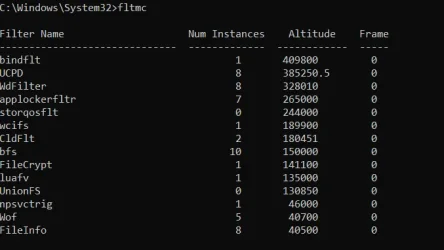
Baseline V2 and fltmc posted.
 

Attachments

My Computer My Computer

At a glance

Windows 11Ryzen 7 5800X32GB GskillRTX 3080
OS
Windows 11
Computer type
PC/Desktop
Manufacturer/Model
ASUS ROG
CPU
Ryzen 7 5800X
Motherboard
GA35DX motherboard
Memory
32GB Gskill
Graphics Card(s)
RTX 3080
Monitor(s) Displays
Asus
Hard Drives
ST1000DM010-2EP102
ST4000DM004-2CV104
Case
GA35DX
Internet Speed
1gb up/down
Please monitor using: reliability-history


For any BSOD run V2 > post a link into the newest post
 

My Computer My Computer

At a glance

Windows 10Intel(R) Core(TM) i7-4800MQ CPU @ 2.70GHz16 GB Total: Manufacturer : Samsung MemoryTyp...NVIDIA Quadro K3100M; Intel(R) HD Graphics 4600
OS
Windows 10
Computer type
Laptop
Manufacturer/Model
HP
CPU
Intel(R) Core(TM) i7-4800MQ CPU @ 2.70GHz
Motherboard
Product : 190A Version : KBC Version 94.56
Memory
16 GB Total: Manufacturer : Samsung MemoryType : DDR3 FormFactor : SODIMM Capacity : 8GB Speed : 1600
Graphics Card(s)
NVIDIA Quadro K3100M; Intel(R) HD Graphics 4600
Sound Card
IDT High Definition Audio CODEC; PNP Device ID HDAUDIO\FUNC_01&VEN_111D&DEV_76E0
Hard Drives
Model Hitachi HTS727575A9E364
Antivirus
Microsoft Defender
Other Info
Mobile Workstation
Got another BSOD. Reliability monitor shows as follows:

Source
Windows

Summary
Hardware error

Date
‎2/‎19/‎2026 12:11 PM

Status
Not reported

Description
A problem with your hardware caused Windows to stop working correctly.

Problem signature
Problem Event Name: LiveKernelEvent
Code: 193
Parameter 1: 80e
Parameter 2: ffffcd816fdb5080
Parameter 3: ffffbd8bb9136130
Parameter 4: 0
OS version: 10_0_26200
Service Pack: 0_0
Product: 256_1
OS Version: 10.0.26200.2.0.0.256.48
Locale ID: 1033

Files that help describe the problem
WATCHDOG-20260219-1211.dmp
sysdata.xml
WERInternalMetadata.xml
memory.csv
sysinfo.txt
WERInternalRequest.xml
 

Attachments

My Computer My Computer

At a glance

Windows 11Ryzen 7 5800X32GB GskillRTX 3080
OS
Windows 11
Computer type
PC/Desktop
Manufacturer/Model
ASUS ROG
CPU
Ryzen 7 5800X
Motherboard
GA35DX motherboard
Memory
32GB Gskill
Graphics Card(s)
RTX 3080
Monitor(s) Displays
Asus
Hard Drives
ST1000DM010-2EP102
ST4000DM004-2CV104
Case
GA35DX
Internet Speed
1gb up/down
It took 12 days to have instability with a new BSOD.


Can all non-Windows drives be continuously detached for substantially longer than 12 days?

If not then plan to clean install Windows 10.


Please save any new important files to restore after restoring the previous Windows 11 backup image.


Code:
Event[4191]
  Log Name: System
  Source: volmgr
  Date: 2026-02-19T23:04:28.3750000Z
  Event ID: 161
  Task: None
  Level: Error
  Opcode: N/A
  Keyword: Classic,
  User: N/A
  User Name: N/A
  Computer: DESKTOP-3GL55U2
  Description:
Dump file creation failed due to error during dump creation. BugCheckProgress was: 0x00040049
 

My Computer My Computer

At a glance

Windows 10Intel(R) Core(TM) i7-4800MQ CPU @ 2.70GHz16 GB Total: Manufacturer : Samsung MemoryTyp...NVIDIA Quadro K3100M; Intel(R) HD Graphics 4600
OS
Windows 10
Computer type
Laptop
Manufacturer/Model
HP
CPU
Intel(R) Core(TM) i7-4800MQ CPU @ 2.70GHz
Motherboard
Product : 190A Version : KBC Version 94.56
Memory
16 GB Total: Manufacturer : Samsung MemoryType : DDR3 FormFactor : SODIMM Capacity : 8GB Speed : 1600
Graphics Card(s)
NVIDIA Quadro K3100M; Intel(R) HD Graphics 4600
Sound Card
IDT High Definition Audio CODEC; PNP Device ID HDAUDIO\FUNC_01&VEN_111D&DEV_76E0
Hard Drives
Model Hitachi HTS727575A9E364
Antivirus
Microsoft Defender
Other Info
Mobile Workstation
New crashes today. Two BSODs.

Both occurred different ways, with one crashing when exiting a game, allowing me to do certain things like move programs around while some programs froze, then BSOD stating memory management.

Went to Bios, disabled SATA connections beyond my OS drive (in case I missed one), and when booting it went straight to bios again on restart. When it did finally exit bios, it went to desktop, I attempted to open discord, then V2 collector, then it crashed with a critical process died error.

New V2 file attached.
 

Attachments

My Computer My Computer

At a glance

Windows 11Ryzen 7 5800X32GB GskillRTX 3080
OS
Windows 11
Computer type
PC/Desktop
Manufacturer/Model
ASUS ROG
CPU
Ryzen 7 5800X
Motherboard
GA35DX motherboard
Memory
32GB Gskill
Graphics Card(s)
RTX 3080
Monitor(s) Displays
Asus
Hard Drives
ST1000DM010-2EP102
ST4000DM004-2CV104
Case
GA35DX
Internet Speed
1gb up/down
Happened once more, then got stuck in a BIOs loop for about 4 iterations before it let me boot to windows.

Would it be a valid test to move my OS to one of the other drives to determine if the current drive is the failure point?

EDIT: Happened again a few minutes after, this time not as a BSOD, but a black screen crash with a white line across the bottom of each monitor (oddly not a solid white line, it was an ultra wide U shape at the bottom on one and a line on the other monitor).
 
Last edited:

My Computer My Computer

At a glance

Windows 11Ryzen 7 5800X32GB GskillRTX 3080
OS
Windows 11
Computer type
PC/Desktop
Manufacturer/Model
ASUS ROG
CPU
Ryzen 7 5800X
Motherboard
GA35DX motherboard
Memory
32GB Gskill
Graphics Card(s)
RTX 3080
Monitor(s) Displays
Asus
Hard Drives
ST1000DM010-2EP102
ST4000DM004-2CV104
Case
GA35DX
Internet Speed
1gb up/down
1) See if you can find an Asus Qualified Vendor List (QVL) for RAM.

Post images for G Skill: F4-3200C16-16GTZKW


2) Run FurMark - GPU Stress Test Windows 10 Performance Maintenance Tutorials

FurMark - GPU Stress Test Windows 10 Performance Maintenance Tutorials:

Please make note of the importance of temperature monitoring and aborting the test in the GPU link.
a) Record the maximum temperature and post the maximum temperature into the thread.
b) Record the test duration and post the uninterrupted test duration into the thread.
c) Aim for testing 1 hour.
d) Post images or share links into this thread.


3) Rerun Memtest86+ (this time for substantially more than 8 passes)


EF
1A
141
193


Code:
Location     : DIMM_A2
BankLabel    : BANK 1
Manufacturer : G Skill Intl
MemoryType   : DDR4
FormFactor   : DIMM
Capacity     : 16GB
Speed        : 2133
Serial       : 00000000
PartNumber   : F4-3200C16-16GTZKW
ECC          : False
TypeDetail   : {Synchronous, Unbuffered (Unregistered)}

Location     : DIMM_B2
BankLabel    : BANK 3
Manufacturer : G Skill Intl
MemoryType   : DDR4
FormFactor   : DIMM
Capacity     : 16GB
Speed        : 2133
Serial       : 00000000
PartNumber   : F4-3200C16-16GTZKW
ECC          : False
TypeDetail   : {Synchronous, Unbuffered (Unregistered)}


Code:
Event[4718]
  Log Name: System
  Source: Microsoft-Windows-Kernel-Power
  Date: 2026-02-20T21:58:55.4700000Z
  Event ID: 41
  Task: N/A
  Level: Critical
  Opcode: Info 
  Keyword: N/A
  User: S-1-5-18
  User Name: NT AUTHORITY\SYSTEM
  Computer: DESKTOP-3GL55U2
  Description:
The system has rebooted without cleanly shutting down first. This error could be caused if the system stopped responding, crashed, or lost power unexpectedly.

Code:
Event[4714]
  Log Name: System
  Source: volmgr
  Date: 2026-02-20T21:58:55.1810000Z
  Event ID: 161
  Task: None
  Level: Error
  Opcode: N/A
  Keyword: Classic,
  User: N/A
  User Name: N/A
  Computer: DESKTOP-3GL55U2
  Description:
Dump file creation failed due to error during dump creation. BugCheckProgress was: 0x00040049


Code:
Event[4704]
  Log Name: System
  Source: EventLog
  Date: 2026-02-20T21:59:03.5360000Z
  Event ID: 6008
  Task: None
  Level: Error
  Opcode: N/A
  Keyword: Classic,
  User: N/A
  User Name: N/A
  Computer: DESKTOP-3GL55U2
  Description:
The previous system shutdown at 9:57:04 PM on ?2/?20/?2026 was unexpected.


Code:
Event[4607]
  Log Name: System
  Source: Microsoft-Windows-Kernel-Power
  Date: 2026-02-20T21:56:54.8530000Z
  Event ID: 41
  Task: N/A
  Level: Critical
  Opcode: Info 
  Keyword: N/A
  User: S-1-5-18
  User Name: NT AUTHORITY\SYSTEM
  Computer: DESKTOP-3GL55U2
  Description:
The system has rebooted without cleanly shutting down first. This error could be caused if the system stopped responding, crashed, or lost power unexpectedly.


Code:
Event[4603]
  Log Name: System
  Source: volmgr
  Date: 2026-02-20T21:56:47.9950000Z
  Event ID: 161
  Task: None
  Level: Error
  Opcode: N/A
  Keyword: Classic,
  User: N/A
  User Name: N/A
  Computer: DESKTOP-3GL55U2
  Description:
Dump file creation failed due to error during dump creation. BugCheckProgress was: 0x00060049


Code:
Event[4593]
  Log Name: System
  Source: EventLog
  Date: 2026-02-20T21:57:04.7730000Z
  Event ID: 6008
  Task: None
  Level: Error
  Opcode: N/A
  Keyword: Classic,
  User: N/A
  User Name: N/A
  Computer: DESKTOP-3GL55U2
  Description:
The previous system shutdown at 9:13:43 PM on ?2/?20/?2026 was unexpected.
 

My Computer My Computer

At a glance

Windows 10Intel(R) Core(TM) i7-4800MQ CPU @ 2.70GHz16 GB Total: Manufacturer : Samsung MemoryTyp...NVIDIA Quadro K3100M; Intel(R) HD Graphics 4600
OS
Windows 10
Computer type
Laptop
Manufacturer/Model
HP
CPU
Intel(R) Core(TM) i7-4800MQ CPU @ 2.70GHz
Motherboard
Product : 190A Version : KBC Version 94.56
Memory
16 GB Total: Manufacturer : Samsung MemoryType : DDR3 FormFactor : SODIMM Capacity : 8GB Speed : 1600
Graphics Card(s)
NVIDIA Quadro K3100M; Intel(R) HD Graphics 4600
Sound Card
IDT High Definition Audio CODEC; PNP Device ID HDAUDIO\FUNC_01&VEN_111D&DEV_76E0
Hard Drives
Model Hitachi HTS727575A9E364
Antivirus
Microsoft Defender
Other Info
Mobile Workstation
Had to go off the mobo for the QVL (ROG STRIX X570-E GAMING WIFI II), since the overall computer model (GA35DX) did not have a QVL. That RAM does not show on the list. However, if it's not on the list, why would it only throw errors like this now (past month), when I've had the computer with this RAM installed for years without issue?

Running Furmark now.
 

My Computer My Computer

At a glance

Windows 11Ryzen 7 5800X32GB GskillRTX 3080
OS
Windows 11
Computer type
PC/Desktop
Manufacturer/Model
ASUS ROG
CPU
Ryzen 7 5800X
Motherboard
GA35DX motherboard
Memory
32GB Gskill
Graphics Card(s)
RTX 3080
Monitor(s) Displays
Asus
Hard Drives
ST1000DM010-2EP102
ST4000DM004-2CV104
Case
GA35DX
Internet Speed
1gb up/down
Update. Ran Furmark for 5 minutes, then things started failing, but seemingly unrelated, as Furmark showed no extra heat or issues with my gpu.

One by one, everything popped up "the required data was not placed in memory"... until everything was finally crashed out, including Windows explorer.
 

My Computer My Computer

At a glance

Windows 11Ryzen 7 5800X32GB GskillRTX 3080
OS
Windows 11
Computer type
PC/Desktop
Manufacturer/Model
ASUS ROG
CPU
Ryzen 7 5800X
Motherboard
GA35DX motherboard
Memory
32GB Gskill
Graphics Card(s)
RTX 3080
Monitor(s) Displays
Asus
Hard Drives
ST1000DM010-2EP102
ST4000DM004-2CV104
Case
GA35DX
Internet Speed
1gb up/down
Please post new V2 and event viewer system share links into the newest post.
 

My Computer My Computer

At a glance

Windows 10Intel(R) Core(TM) i7-4800MQ CPU @ 2.70GHz16 GB Total: Manufacturer : Samsung MemoryTyp...NVIDIA Quadro K3100M; Intel(R) HD Graphics 4600
OS
Windows 10
Computer type
Laptop
Manufacturer/Model
HP
CPU
Intel(R) Core(TM) i7-4800MQ CPU @ 2.70GHz
Motherboard
Product : 190A Version : KBC Version 94.56
Memory
16 GB Total: Manufacturer : Samsung MemoryType : DDR3 FormFactor : SODIMM Capacity : 8GB Speed : 1600
Graphics Card(s)
NVIDIA Quadro K3100M; Intel(R) HD Graphics 4600
Sound Card
IDT High Definition Audio CODEC; PNP Device ID HDAUDIO\FUNC_01&VEN_111D&DEV_76E0
Hard Drives
Model Hitachi HTS727575A9E364
Antivirus
Microsoft Defender
Other Info
Mobile Workstation
See attached.
 

Attachments

My Computer My Computer

At a glance

Windows 11Ryzen 7 5800X32GB GskillRTX 3080
OS
Windows 11
Computer type
PC/Desktop
Manufacturer/Model
ASUS ROG
CPU
Ryzen 7 5800X
Motherboard
GA35DX motherboard
Memory
32GB Gskill
Graphics Card(s)
RTX 3080
Monitor(s) Displays
Asus
Hard Drives
ST1000DM010-2EP102
ST4000DM004-2CV104
Case
GA35DX
Internet Speed
1gb up/down
Please run the multiple one hour OCCT stability tests:


Also see what Asus has in their one click for system diagnostic:


Then run Memtest86+ for substantially more than 8 passes.
The run times can be very long so one module can be tested at a time in the same DIMM.


EF
7A
1A
 

My Computer My Computer

At a glance

Windows 10Intel(R) Core(TM) i7-4800MQ CPU @ 2.70GHz16 GB Total: Manufacturer : Samsung MemoryTyp...NVIDIA Quadro K3100M; Intel(R) HD Graphics 4600
OS
Windows 10
Computer type
Laptop
Manufacturer/Model
HP
CPU
Intel(R) Core(TM) i7-4800MQ CPU @ 2.70GHz
Motherboard
Product : 190A Version : KBC Version 94.56
Memory
16 GB Total: Manufacturer : Samsung MemoryType : DDR3 FormFactor : SODIMM Capacity : 8GB Speed : 1600
Graphics Card(s)
NVIDIA Quadro K3100M; Intel(R) HD Graphics 4600
Sound Card
IDT High Definition Audio CODEC; PNP Device ID HDAUDIO\FUNC_01&VEN_111D&DEV_76E0
Hard Drives
Model Hitachi HTS727575A9E364
Antivirus
Microsoft Defender
Other Info
Mobile Workstation
Back
Top Bottom