Random freezes


pivsxii

Member
Local time
1:28 AM
Posts
32
OS
Windows 11 25H2 26200.8037
Hi all,
I've been having random freezer on my pc with no common application open (today was while playing Monster Train with Steam and Firefox open, the other day was with only Firefox open) and I've decided to investigate further this strange behavior.
Looking in the event logs I noticed a strange error

Italian: Rilevato blocco danneggiato sul dispositivo \Device\Harddisk3\DR3.
English :Bad block detected on device \Device\Harddisk3\DR3.

Event ID 7 with source "disk"

1776605784255.webp

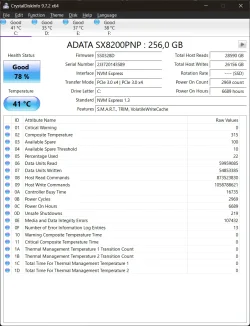
Then, I ran Crystal disk and these are the results:


Should I be worried about "Media and Data Integrity Errors" and start looking for an NVME replacement ? This is my system disk.

Thank you in advance for your help :-)
 
Windows Build/Version
25H2 26200.6584

Attachments

  • 1776605583832.webp
    1776605583832.webp
    96.5 KB · Views: 1

My Computer

System One

  • OS
    Windows 11 25H2 26200.8037
    Computer type
    PC/Desktop
    CPU
    AMD Ryzen 5700X3D
    Motherboard
    MSI B450 Tomahawk Max
    Memory
    2x32 GB Corsair
    Graphics Card(s)
    AMD 6750 XT
    Monitor(s) Displays
    LG Ultragear 27''
    Screen Resolution
    2k
    Hard Drives
    1x NVME Adata 256gb
    1x HDD Toshiba 3TB
    1x SSD CT1000MX
    1x SSD CT500MX
    PSU
    650w
    Case
    Sharkoon TG5
    Mouse
    LG G502
    Antivirus
    Windows Defender
1) Please temporarily modify the default language to English so that log files can be scanned and read:


2) Run the V2 log collector > post a share link


3) Run administrative command prompt: > post share links

wevtutil epl SYSTEM "%userprofile%\Desktop\System.evt"

wevtutil epl APPLICATION "%userprofile%\Desktop\Application.evt"
 

My Computer

System One

  • OS
    Windows 10
    Computer type
    Laptop
    Manufacturer/Model
    HP
    CPU
    Intel(R) Core(TM) i7-4800MQ CPU @ 2.70GHz
    Motherboard
    Product : 190A Version : KBC Version 94.56
    Memory
    16 GB Total: Manufacturer : Samsung MemoryType : DDR3 FormFactor : SODIMM Capacity : 8GB Speed : 1600
    Graphics Card(s)
    NVIDIA Quadro K3100M; Intel(R) HD Graphics 4600
    Sound Card
    IDT High Definition Audio CODEC; PNP Device ID HDAUDIO\FUNC_01&VEN_111D&DEV_76E0
    Hard Drives
    Model Hitachi HTS727575A9E364
    Antivirus
    Microsoft Defender
    Other Info
    Mobile Workstation
It looks like you are right, this is a result of integrity error. I think it's an internal problem of your SSD: ADATA is not counted the best manufacturer of SSD devices, its TBW (Total Bytes Written) is usually noticeably less than SSD of high-end manufacturers like Samsung.

To better compare the data, I added current test results of my Seagate SSD, which also is used as system drive. As you can see, my SSD worked more than twice longer than your, but Media and Data Integrity Errors is zero. And even it's in good state right now, I try to make the full system backup regularly, a few days after every big system update, when I am sure that current OS condition is stable.

Seagate.webp
 

My Computer

System One

  • OS
    Windows 11 Pro 25H2
    Computer type
    Laptop
    Manufacturer/Model
    Lenovo Legion 5-15ARH05
    CPU
    AMD Rysen 5 4600H
    Memory
    32 GB (2 x 16 GB Samsung SO-DIMM DDR4-3200)
    Graphics Card(s)
    GeForce GTX 1650 Ti, 4 GB GDDR6
    Screen Resolution
    1920x1080
    Hard Drives
    SSD M.2 512 GB SAMSUNG MZALQ512; SSD M.2 1 TB Seagate FireCuda 530
    Mouse
    Logitech M650L in Bluetooth mode
1) Please temporarily modify the default language to English so that log files can be scanned and read:


2) Run the V2 log collector > post a share link


3) Run administrative command prompt: > post share links

wevtutil epl SYSTEM "%userprofile%\Desktop\System.evt"

wevtutil epl APPLICATION "%userprofile%\Desktop\Application.evt"
Please find attached the files.
 

Attachments

My Computer

System One

  • OS
    Windows 11 25H2 26200.8037
    Computer type
    PC/Desktop
    CPU
    AMD Ryzen 5700X3D
    Motherboard
    MSI B450 Tomahawk Max
    Memory
    2x32 GB Corsair
    Graphics Card(s)
    AMD 6750 XT
    Monitor(s) Displays
    LG Ultragear 27''
    Screen Resolution
    2k
    Hard Drives
    1x NVME Adata 256gb
    1x HDD Toshiba 3TB
    1x SSD CT1000MX
    1x SSD CT500MX
    PSU
    650w
    Case
    Sharkoon TG5
    Mouse
    LG G502
    Antivirus
    Windows Defender
It looks like you are right, this is a result of integrity error. I think it's an internal problem of your SSD: ADATA is not counted the best manufacturer of SSD devices, its TBW (Total Bytes Written) is usually noticeably less than SSD of high-end manufacturers like Samsung.

To better compare the data, I added current test results of my Seagate SSD, which also is used as system drive. As you can see, my SSD worked more than twice longer than your, but Media and Data Integrity Errors is zero. And even it's in good state right now, I try to make the full system backup regularly, a few days after every big system update, when I am sure that current OS condition is stable.

View attachment 169286
I'm already looking for a replacement for that unfortunately, but I just want to be sure that freezes are not software related
 

My Computer

System One

  • OS
    Windows 11 25H2 26200.8037
    Computer type
    PC/Desktop
    CPU
    AMD Ryzen 5700X3D
    Motherboard
    MSI B450 Tomahawk Max
    Memory
    2x32 GB Corsair
    Graphics Card(s)
    AMD 6750 XT
    Monitor(s) Displays
    LG Ultragear 27''
    Screen Resolution
    2k
    Hard Drives
    1x NVME Adata 256gb
    1x HDD Toshiba 3TB
    1x SSD CT1000MX
    1x SSD CT500MX
    PSU
    650w
    Case
    Sharkoon TG5
    Mouse
    LG G502
    Antivirus
    Windows Defender
The log files were in a foreign language.

Please see post #2.


Please perform the following steps:


1) Please temporarily modify the default language to English so that log files can be scanned and read


2) Add WMIC:

DISM /Online /Add-Capability /CapabilityName:WMIC~~~~


3) Run Tuneup plus > post a share link


4) Enable regback:


5) Create a new restore point:


Code:
Event[8845]
  Log Name: System
  Source: disk
  Date: 2026-04-19T21:09:53.1560000Z
  Event ID: 7
  Task: Nessuno
  Level: Errore
  Opcode: N/A
  Keyword: Classico,
  User: N/A
  User Name: N/A
  Computer: PivsDesktop
  Description:
Rilevato blocco danneggiato sul dispositivo \Device\Harddisk3\DR3.

Event[8846]
  Log Name: System
  Source: disk
  Date: 2026-04-19T21:09:53.1810000Z
  Event ID: 7
  Task: Nessuno
  Level: Errore
  Opcode: N/A
  Keyword: Classico,
  User: N/A
  User Name: N/A
  Computer: PivsDesktop
  Description:
Rilevato blocco danneggiato sul dispositivo \Device\Harddisk3\DR3.

Event[8847]
  Log Name: System
  Source: disk
  Date: 2026-04-19T21:09:53.1980000Z
  Event ID: 7
  Task: Nessuno
  Level: Errore
  Opcode: N/A
  Keyword: Classico,
  User: N/A
  User Name: N/A
  Computer: PivsDesktop
  Description:
Rilevato blocco danneggiato sul dispositivo \Device\Harddisk3\DR3.

Event[8848]
  Log Name: System
  Source: disk
  Date: 2026-04-19T21:09:53.2120000Z
  Event ID: 7
  Task: Nessuno
  Level: Errore
  Opcode: N/A
  Keyword: Classico,
  User: N/A
  User Name: N/A
  Computer: PivsDesktop
  Description:
Rilevato blocco danneggiato sul dispositivo \Device\Harddisk3\DR3.
 

My Computer

System One

  • OS
    Windows 10
    Computer type
    Laptop
    Manufacturer/Model
    HP
    CPU
    Intel(R) Core(TM) i7-4800MQ CPU @ 2.70GHz
    Motherboard
    Product : 190A Version : KBC Version 94.56
    Memory
    16 GB Total: Manufacturer : Samsung MemoryType : DDR3 FormFactor : SODIMM Capacity : 8GB Speed : 1600
    Graphics Card(s)
    NVIDIA Quadro K3100M; Intel(R) HD Graphics 4600
    Sound Card
    IDT High Definition Audio CODEC; PNP Device ID HDAUDIO\FUNC_01&VEN_111D&DEV_76E0
    Hard Drives
    Model Hitachi HTS727575A9E364
    Antivirus
    Microsoft Defender
    Other Info
    Mobile Workstation
The log files were in a foreign language.

Please see post #2.


Code:
Event[8845]
  Log Name: System
  Source: disk
  Date: 2026-04-19T21:09:53.1560000Z
  Event ID: 7
  Task: Nessuno
  Level: Errore
  Opcode: N/A
  Keyword: Classico,
  User: N/A
  User Name: N/A
  Computer: PivsDesktop
  Description:
Rilevato blocco danneggiato sul dispositivo \Device\Harddisk3\DR3.

Event[8846]
  Log Name: System
  Source: disk
  Date: 2026-04-19T21:09:53.1810000Z
  Event ID: 7
  Task: Nessuno
  Level: Errore
  Opcode: N/A
  Keyword: Classico,
  User: N/A
  User Name: N/A
  Computer: PivsDesktop
  Description:
Rilevato blocco danneggiato sul dispositivo \Device\Harddisk3\DR3.

Event[8847]
  Log Name: System
  Source: disk
  Date: 2026-04-19T21:09:53.1980000Z
  Event ID: 7
  Task: Nessuno
  Level: Errore
  Opcode: N/A
  Keyword: Classico,
  User: N/A
  User Name: N/A
  Computer: PivsDesktop
  Description:
Rilevato blocco danneggiato sul dispositivo \Device\Harddisk3\DR3.

Event[8848]
  Log Name: System
  Source: disk
  Date: 2026-04-19T21:09:53.2120000Z
  Event ID: 7
  Task: Nessuno
  Level: Errore
  Opcode: N/A
  Keyword: Classico,
  User: N/A
  User Name: N/A
  Computer: PivsDesktop
  Description:
Rilevato blocco danneggiato sul dispositivo \Device\Harddisk3\DR3.
Sorry. Please find attached the right ones
 

Attachments

My Computer

System One

  • OS
    Windows 11 25H2 26200.8037
    Computer type
    PC/Desktop
    CPU
    AMD Ryzen 5700X3D
    Motherboard
    MSI B450 Tomahawk Max
    Memory
    2x32 GB Corsair
    Graphics Card(s)
    AMD 6750 XT
    Monitor(s) Displays
    LG Ultragear 27''
    Screen Resolution
    2k
    Hard Drives
    1x NVME Adata 256gb
    1x HDD Toshiba 3TB
    1x SSD CT1000MX
    1x SSD CT500MX
    PSU
    650w
    Case
    Sharkoon TG5
    Mouse
    LG G502
    Antivirus
    Windows Defender
There was no noticeable change.
 

My Computer

System One

  • OS
    Windows 10
    Computer type
    Laptop
    Manufacturer/Model
    HP
    CPU
    Intel(R) Core(TM) i7-4800MQ CPU @ 2.70GHz
    Motherboard
    Product : 190A Version : KBC Version 94.56
    Memory
    16 GB Total: Manufacturer : Samsung MemoryType : DDR3 FormFactor : SODIMM Capacity : 8GB Speed : 1600
    Graphics Card(s)
    NVIDIA Quadro K3100M; Intel(R) HD Graphics 4600
    Sound Card
    IDT High Definition Audio CODEC; PNP Device ID HDAUDIO\FUNC_01&VEN_111D&DEV_76E0
    Hard Drives
    Model Hitachi HTS727575A9E364
    Antivirus
    Microsoft Defender
    Other Info
    Mobile Workstation

Attachments

My Computer

System One

  • OS
    Windows 11 25H2 26200.8037
    Computer type
    PC/Desktop
    CPU
    AMD Ryzen 5700X3D
    Motherboard
    MSI B450 Tomahawk Max
    Memory
    2x32 GB Corsair
    Graphics Card(s)
    AMD 6750 XT
    Monitor(s) Displays
    LG Ultragear 27''
    Screen Resolution
    2k
    Hard Drives
    1x NVME Adata 256gb
    1x HDD Toshiba 3TB
    1x SSD CT1000MX
    1x SSD CT500MX
    PSU
    650w
    Case
    Sharkoon TG5
    Mouse
    LG G502
    Antivirus
    Windows Defender
The findings so far were related to malfunctioning drive(s)
a) bad block(s)
b) file corruption
c) BSODs
d) newer BIOS available


Please perform the following steps:


1) Add WMIC:

DISM /Online /Add-Capability /CapabilityName:WMIC~~~~


2) Run Tuneup plus > post a share link


3) Enable regback:


4) Create a new restore point:


5) Make sure that images or share links are posted for all steps / tests.

And make sure that files are not cleaned during the troubleshooting.


6) Run Sea Tools Long generic test (all drives) > post images or share links


7) Run HD Tune (all drives) (old version) > post images or share links


a) Health

b) Full error scan


8) Open administrative command prompt and copy and paste:

chkdsk /b /v

Run these chkdsk switches on all drives using the syntax: chkdsk /b /v C: or chkdsk /b /v D: or chkdsk /b /v E: etc.

Make sure that the windows drive runs overnight while sleeping.

C:\WINDOWS\system32>chkdsk /b /v
The type of the file system is NTFS.
Cannot lock current drive.
Chkdsk cannot run because the volume is in use by another
process. Would you like to schedule this volume to be
checked the next time the system restarts? (Y/N)

Type: Y

Reboot as needed.


9) After completing all chkdsk /b /v run:

https://www.tenforums.com/attachmen...-files-use-bsod-debugging-chkdskfromevent.bat

Batch files for use in BSOD debugging - Windows 10 Help Forums

Batch files for use in BSOD debugging - Windows 10 Help Forums


Make sure that this runs only after the prior three steps for each drive.


10) Run HD Sentinel (all drives) > post images or share links (do not run until posting results for each steps 6, 7, 8 and 9)

Hard Disk Sentinel - HDD health and temperature monitoring
a) Overview
b) Temperature
c) SMART


11) Please make sure that all of the above steps are performed in sequence

These steps / tests can be performed overnight while sleeping:

a) Sea Tools Long generic test
b) HD Tune Full error scan
c) Chkdsk /b /v


12) The Versione/data BIOS American Megatrends International, LLC. 3.K2, 8/30/2024

Upgrade the BIOS to the most up to date non-beta BIOS.


13) After completing all of the above tests post a new V2 share link into the newest post


14) For any new BSODs > post a new V2 share link into the newest post


Code:
------------------------
Disk & DVD/CD-ROM Drives
------------------------
      Drive: C:
 Free Space: 130.2 GB
Total Space: 242.8 GB
File System: NTFS
      Model: ADATA SX8200PNP

      Drive: D:
 Free Space: 54.5 GB
Total Space: 476.9 GB
File System: NTFS
      Model: CT500MX500SSD1

      Drive: E:
 Free Space: 2509.0 GB
Total Space: 2861.6 GB
File System: NTFS
      Model: TOSHIBA HDWD130

      Drive: F:
 Free Space: 78.4 GB
Total Space: 953.9 GB
File System: NTFS
      Model: CT1000MX500SSD1

      Drive: G:
 Free Space: 3.3 GB
Total Space: 15.4 GB
File System: FAT32
      Model: n/a


Code:
EF
7A

Code:
Log Name:      Application
Source:        Chkdsk
Date:          4/1/2026 10:50:07 AM
Event ID:      26226
Task Category: None
Level:         Information
Keywords:      Classic
User:          N/A
Computer:      PivsDesktop
Description:
Chkdsk was executed in scan mode on a volume snapshot.

Controllo in corso del file system su \Device\HarddiskVolume4

Fase 1: analisi della struttura del file system di base in corso...
    Rilevata struttura file di base danneggiata per "...\E4F20E~1\wow64_microsoft-windows-p..rotectedprint-winrt_31bf3856ad364e35_10.0.26100.7019_none_d6e5f7af3d722d17 <0x2,0x69b35>"
        ... in coda per la riparazione offline.
  1248000 record file elaborati.                                                 

Verifica file completata.
Durata fase (Verifica record di file): 17.71 secondi.
  35072 record di file di grandi dimensioni elaborati.               

    Rilevati metadati di file inutilizzati contrassegnati come utilizzati
        ... in coda per la riparazione offline.
Durata fase (Recupero record di file orfani): 26.40 millisecondi.
  0 record file non validi elaborati.                               

Durata fase (Controllo record di file non validi): 0.00 millisecondi.

Fase 2: analisi del collegamento dei nomi file in corso...
  6089 record reparse elaborati.                               

    Rilevato collegamento non necessario ($FILE_NAME: "{3115d8f3-7e84-4502-8fef-b0f78ec6e1a0}.final") nell'indice "$I30" della directory "\Users\paolo\AppData\Roaming\Mozilla\Firefox\Profiles\rouw30ma.default-release\storage\default\https+++open.spotify.com\cache\morgue\160 <0x2,0x1dfe4>"
        ... riparati online.
    Rilevato collegamento non necessario ($FILE_NAME: "{3115D~1.FIN") nell'indice "$I30" della directory "\Users\paolo\AppData\Roaming\Mozilla\Firefox\Profiles\rouw30ma.default-release\storage\default\https+++open.spotify.com\cache\morgue\160 <0x2,0x1dfe4>"
        ... riparati online.
    Rilevato collegamento non necessario ($FILE_NAME: "System.Spatial.NetFX35.dll") nell'indice "$I30" della directory "\Program Files\Microsoft Office\root\Office16\ADDINS\Microsoft Power Query for Excel Integrated\bin <0x5,0x2631e>"
        ... riparati online.
    Rilevato collegamento non necessario ($FILE_NAME: "41bf02c24b538654_0") nell'indice "$I30" della directory "\Users\paolo\AppData\Local\Packages\Microsoft.MicrosoftOfficeHub_8wekyb3d8bbwe\LocalState\EBWebView\Default\Code Cache\js <0x9,0x297c2>"
        ... riparati online.
    Rilevato collegamento non necessario ($FILE_NAME: "41BF02~1") nell'indice "$I30" della directory "\Users\paolo\AppData\Local\Packages\Microsoft.MicrosoftOfficeHub_8wekyb3d8bbwe\LocalState\EBWebView\Default\Code Cache\js <0x9,0x297c2>"
        ... riparati online.
  1985080 voci di indice elaborate.                                                 

Verifica indici completata.
Durata fase (Verifica dell'indice): 38.30 secondi.

Durata fase (Riconnessione orfano): 3.33 secondi.

Durata fase (Ripristino orfano nella cartella dei file persi e ritrovati): 0.04 millisecondi.
  6089 record reparse elaborati.                               

Durata fase (Verifica reparse point e ID oggetto): 27.32 millisecondi.

Fase 3: analisi dei descrittori di sicurezza in corso...
Verifica descrittori di sicurezza completata.
Durata fase (Verifica descrittori di sicurezza): 100.52 millisecondi.
  368542 file di dati elaborati.                                     

Durata fase (Verifica attributi dati): 2.24 millisecondi.
CHKDSK sta verificando il journal USN...
Verifica del journal USN completata.
Si sono verificati problemi, alcuni dei quali sono stati risolti online.
I problemi rimanenti devono essere risolti offline.
Esegui "chkdsk /spotfix" per risolvere i problemi.

 248600575 KB di spazio totale su disco.
 110640440 KB in 699416 file.
    949924 KB in 368542 indici.
   1348395 KB in uso dal sistema.
     65536 KB occupati dal file registro.
 135661716 KB disponibili su disco.

      4096 byte in ogni unità di allocazione.
  62150143 unità totali di allocazione su disco.
  33915429 unità di allocazione disponibili su disco.
Durata totale: 59.52 secondi (59520 ms).

----------------------------------------------------------------------


Fase 1: analisi della struttura del file system di base in corso...
La voce danneggiata dell'elenco attributi è stata eliminato
con il codice 90 nel file 69B35.
Impossibile trovare il figlio FRS 0x1f09c con numero di sequenza 0xa.
La voce danneggiata dell'elenco attributi è stata eliminato
con il codice 100 nel file 69B35.
Impossibile trovare il figlio FRS 0x1f09c con numero di sequenza 0xa.
Eliminazione del segmento record file orfano 1F09C.
Eliminazione del segmento record file orfano 1F09D.
Eliminazione del segmento record file orfano 1F09E.
Eliminazione del segmento record file orfano 1F09F.

Fase 2: analisi del collegamento dei nomi file in corso...
Il bit di presenza indici di nome file nel file 0x69b35 non dovrebbe
essere impostato.
Correzione delle informazioni errate nel segmento record file 69B35.
La voce {3115d8f3-7e84-4502-8fef-b0f78ec6e1a0}.final dell'indice $I30 nel file 0x1dfe4 punta al file inutilizzato 0x1f09e.
Eliminazione della voce di indice {3115d8f3-7e84-4502-8fef-b0f78ec6e1a0}.final nell'indice $I30 del file 1DFE4.
La voce {3115D~1.FIN dell'indice $I30 nel file 0x1dfe4 punta al file inutilizzato 0x1f09e.
Eliminazione della voce di indice {3115D~1.FIN nell'indice $I30 del file 1DFE4.
La voce System.Spatial.NetFX35.dll dell'indice $I30 nel file 0x2631e punta al file inutilizzato 0x1f09f.
Eliminazione della voce di indice System.Spatial.NetFX35.dll nell'indice $I30 del file 2631E.
La voce 41bf02c24b538654_0 dell'indice $I30 nel file 0x297c2 punta al file inutilizzato 0x1f09d.
Eliminazione della voce di indice 41bf02c24b538654_0 nell'indice $I30 del file 297C2.
La voce 41BF02~1 dell'indice $I30 nel file 0x297c2 punta al file inutilizzato 0x1f09d.
Eliminazione della voce di indice 41BF02~1 nell'indice $I30 del file 297C2.

Fase 3: analisi dei descrittori di sicurezza in corso...
Inserimento degli attributi dei dati nel file 69B35.

Event Xml:
<Event xmlns="http://schemas.microsoft.com/win/2004/08/events/event">
  <System>
    <Provider Name="Chkdsk" />
    <EventID Qualifiers="0">26226</EventID>
    <Version>0</Version>
    <Level>4</Level>
    <Task>0</Task>
    <Opcode>0</Opcode>
    <Keywords>0x80000000000000</Keywords>
    <TimeCreated SystemTime="2026-04-01T15:50:07.9219628Z" />
    <EventRecordID>533</EventRecordID>
    <Correlation />
    <Execution ProcessID="7416" ThreadID="0" />
    <Channel>Application</Channel>
    <Computer>PivsDesktop</Computer>
    <Security />
  </System>
  <EventData>
    <Data>

Controllo in corso del file system su \Device\HarddiskVolume4

Fase 1: analisi della struttura del file system di base in corso...
    Rilevata struttura file di base danneggiata per "...\E4F20E~1\wow64_microsoft-windows-p..rotectedprint-winrt_31bf3856ad364e35_10.0.26100.7019_none_d6e5f7af3d722d17 &lt;0x2,0x69b35&gt;"
        ... in coda per la riparazione offline.
  1248000 record file elaborati.                                                 

Verifica file completata.
Durata fase (Verifica record di file): 17.71 secondi.
  35072 record di file di grandi dimensioni elaborati.               

    Rilevati metadati di file inutilizzati contrassegnati come utilizzati
        ... in coda per la riparazione offline.
Durata fase (Recupero record di file orfani): 26.40 millisecondi.
  0 record file non validi elaborati.                               

Durata fase (Controllo record di file non validi): 0.00 millisecondi.

Fase 2: analisi del collegamento dei nomi file in corso...
  6089 record reparse elaborati.                               

    Rilevato collegamento non necessario ($FILE_NAME: "{3115d8f3-7e84-4502-8fef-b0f78ec6e1a0}.final") nell'indice "$I30" della directory "\Users\paolo\AppData\Roaming\Mozilla\Firefox\Profiles\rouw30ma.default-release\storage\default\https+++open.spotify.com\cache\morgue\160 &lt;0x2,0x1dfe4&gt;"
        ... riparati online.
    Rilevato collegamento non necessario ($FILE_NAME: "{3115D~1.FIN") nell'indice "$I30" della directory "\Users\paolo\AppData\Roaming\Mozilla\Firefox\Profiles\rouw30ma.default-release\storage\default\https+++open.spotify.com\cache\morgue\160 &lt;0x2,0x1dfe4&gt;"
        ... riparati online.
    Rilevato collegamento non necessario ($FILE_NAME: "System.Spatial.NetFX35.dll") nell'indice "$I30" della directory "\Program Files\Microsoft Office\root\Office16\ADDINS\Microsoft Power Query for Excel Integrated\bin &lt;0x5,0x2631e&gt;"
        ... riparati online.
    Rilevato collegamento non necessario ($FILE_NAME: "41bf02c24b538654_0") nell'indice "$I30" della directory "\Users\paolo\AppData\Local\Packages\Microsoft.MicrosoftOfficeHub_8wekyb3d8bbwe\LocalState\EBWebView\Default\Code Cache\js &lt;0x9,0x297c2&gt;"
        ... riparati online.
    Rilevato collegamento non necessario ($FILE_NAME: "41BF02~1") nell'indice "$I30" della directory "\Users\paolo\AppData\Local\Packages\Microsoft.MicrosoftOfficeHub_8wekyb3d8bbwe\LocalState\EBWebView\Default\Code Cache\js &lt;0x9,0x297c2&gt;"
        ... riparati online.
  1985080 voci di indice elaborate.                                                 

Verifica indici completata.
Durata fase (Verifica dell'indice): 38.30 secondi.

Durata fase (Riconnessione orfano): 3.33 secondi.

Durata fase (Ripristino orfano nella cartella dei file persi e ritrovati): 0.04 millisecondi.
  6089 record reparse elaborati.                               

Durata fase (Verifica reparse point e ID oggetto): 27.32 millisecondi.

Fase 3: analisi dei descrittori di sicurezza in corso...
Verifica descrittori di sicurezza completata.
Durata fase (Verifica descrittori di sicurezza): 100.52 millisecondi.
  368542 file di dati elaborati.                                     

Durata fase (Verifica attributi dati): 2.24 millisecondi.
CHKDSK sta verificando il journal USN...
Verifica del journal USN completata.
Si sono verificati problemi, alcuni dei quali sono stati risolti online.
I problemi rimanenti devono essere risolti offline.
Esegui "chkdsk /spotfix" per risolvere i problemi.

 248600575 KB di spazio totale su disco.
 110640440 KB in 699416 file.
    949924 KB in 368542 indici.
   1348395 KB in uso dal sistema.
     65536 KB occupati dal file registro.
 135661716 KB disponibili su disco.

      4096 byte in ogni unità di allocazione.
  62150143 unità totali di allocazione su disco.
  33915429 unità di allocazione disponibili su disco.
Durata totale: 59.52 secondi (59520 ms).

----------------------------------------------------------------------


Fase 1: analisi della struttura del file system di base in corso...
La voce danneggiata dell'elenco attributi è stata eliminato
con il codice 90 nel file 69B35.
Impossibile trovare il figlio FRS 0x1f09c con numero di sequenza 0xa.
La voce danneggiata dell'elenco attributi è stata eliminato
con il codice 100 nel file 69B35.
Impossibile trovare il figlio FRS 0x1f09c con numero di sequenza 0xa.
Eliminazione del segmento record file orfano 1F09C.
Eliminazione del segmento record file orfano 1F09D.
Eliminazione del segmento record file orfano 1F09E.
Eliminazione del segmento record file orfano 1F09F.

Fase 2: analisi del collegamento dei nomi file in corso...
Il bit di presenza indici di nome file nel file 0x69b35 non dovrebbe
essere impostato.
Correzione delle informazioni errate nel segmento record file 69B35.
La voce {3115d8f3-7e84-4502-8fef-b0f78ec6e1a0}.final dell'indice $I30 nel file 0x1dfe4 punta al file inutilizzato 0x1f09e.
Eliminazione della voce di indice {3115d8f3-7e84-4502-8fef-b0f78ec6e1a0}.final nell'indice $I30 del file 1DFE4.
La voce {3115D~1.FIN dell'indice $I30 nel file 0x1dfe4 punta al file inutilizzato 0x1f09e.
Eliminazione della voce di indice {3115D~1.FIN nell'indice $I30 del file 1DFE4.
La voce System.Spatial.NetFX35.dll dell'indice $I30 nel file 0x2631e punta al file inutilizzato 0x1f09f.
Eliminazione della voce di indice System.Spatial.NetFX35.dll nell'indice $I30 del file 2631E.
La voce 41bf02c24b538654_0 dell'indice $I30 nel file 0x297c2 punta al file inutilizzato 0x1f09d.
Eliminazione della voce di indice 41bf02c24b538654_0 nell'indice $I30 del file 297C2.
La voce 41BF02~1 dell'indice $I30 nel file 0x297c2 punta al file inutilizzato 0x1f09d.
Eliminazione della voce di indice 41BF02~1 nell'indice $I30 del file 297C2.

Fase 3: analisi dei descrittori di sicurezza in corso...
Inserimento degli attributi dei dati nel file 69B35.


Code:
Log Name:      Application
Source:        Chkdsk
Date:          4/1/2026 10:50:07 AM
Event ID:      26226
Task Category: None
Level:         Information
Keywords:      Classic
User:          N/A
Computer:      PivsDesktop
Description:
Chkdsk was executed in scan mode on a volume snapshot.

Checking file system on \Device\HarddiskVolume4

Phase 1: Examining basic file system structure...
Detected corrupted basic file structure for "...\E4F20E~1\wow64_microsoft-windows-p..rotectedprint-winrt_31bf3856ad364e35_10.0.26100.7019_none_d6e5f7af3d722d17 <0x2,0x69b35>"
... queued for offline repair.
1248000 file records processed.

File verification completed.
Phase duration (File record verification): 17.71 seconds.
35072 large file records processed.

Detected unused file metadata marked as used
... queued for offline repair.
Phase duration (Orphan file record recovery): 26.40 milliseconds.
0 invalid file records processed.

Phase duration (Invalid file record check): 0.00 milliseconds.

Phase 2: Examining filename linkage...
6089 reparse records processed.

Detected unnecessary link ($FILE_NAME: "{3115d8f3-7e84-4502-8fef-b0f78ec6e1a0}.final") in index "$I30" of directory "\Users\paolo\AppData\Roaming\Mozilla\Firefox\Profiles\rouw30ma.default-release\storage\default\https+++open.spotify.com\cache\morgue\160 <0x2,0x1dfe4>"
... repaired online.
Detected unnecessary link ($FILE_NAME: "{3115D~1.FIN") in index "$I30" of directory "\Users\paolo\AppData\Roaming\Mozilla\Firefox\Profiles\rouw30ma.default-release\storage\default\https+++open.spotify.com\cache\morgue\160 <0x2,0x1dfe4>"
... repaired online.
Detected unnecessary link ($FILE_NAME: "System.Spatial.NetFX35.dll") in index "$I30" of directory "\Program Files\Microsoft Office\root\Office16\ADDINS\Microsoft Power Query for Excel Integrated\bin <0x5,0x2631e>"
... repaired online.
Detected unnecessary link ($FILE_NAME: "41bf02c24b538654_0") in index "$I30" of directory "\Users\paolo\AppData\Local\Packages\Microsoft.MicrosoftOfficeHub_8wekyb3d8bbwe\LocalState\EBWebView\Default\Code Cache\js <0x9,0x297c2>"
... repaired online. Unnecessary link detected ($FILE_NAME: "41BF02~1") in index "$I30" of directory "\Users\paolo\AppData\Local\Packages\Microsoft.MicrosoftOfficeHub_8wekyb3d8bbwe\LocalState\EBWebView\Default\Code Cache\js <0x9,0x297c2>"
... repaired online.
1985080 index entries processed.

Index verification completed.
Phase duration (Index verification): 38.30 seconds.

Phase duration (Orphan reconnection): 3.33 seconds.

Phase duration (Orphan recovery to lost and found folder): 0.04 milliseconds.
6089 reparse records processed.

Phase duration (Reparse point and object ID verification): 27.32 milliseconds.

Phase 3: Examining security descriptors...
Security descriptor verification completed.
Phase duration (Security descriptor verification): 100.52 milliseconds.
368542 data files processed.

Phase duration (Data attribute verification): 2.24 milliseconds.
CHKDSK is verifying the USN Journal...
USN Journal verification completed.
Problems were found, some of which were fixed online.
The remaining problems must be fixed offline.
Run "chkdsk /spotfix" to fix the problems.

248600575 KB total disk space.
110640440 KB in 699416 files.
949924 KB in 368542 indexes.
1348395 KB used by the system.
65536 KB occupied by the log file.
135661716 KB available on disk.

4096 bytes in each allocation unit.
62150143 total allocation units on disk.
33915429 allocation units available on disk.
Total duration: 59.52 seconds (59520 ms).

----------------------------------------------------------------------


Phase 2: Analyzing file name linkage...
The file name index presence bit in file 0x69b35 should not
be set.
Correcting errors in file record segment 69B35.
Index entry {3115d8f3-7e84-4502-8fef-b0f78ec6e1a0}.final in index $I30 of file 0x1dfe4 points to unused file 0x1f09e.
Deleting index entry {3115d8f3-7e84-4502-8fef-b0f78ec6e1a0}.final in index $I30 of file 1DFE4.
Index entry {3115D~1.FIN in index $I30 of file 0x1dfe4 points to unused file 0x1f09e.
Deleting index entry {3115D~1.FIN in index $I30 of file 1DFE4. Index entry System.Spatial.NetFX35.dll in index $I30 of file 0x2631e points to unused file 0x1f09f.
Deleting index entry System.Spatial.NetFX35.dll in index $I30 of file 2631E.
Index entry 41bf02c24b538654_0 in index $I30 of file 0x297c2 points to unused file 0x1f09d.
Deleting index entry 41bf02c24b538654_0 in index $I30 of file 297C2.
Index entry 41BF02~1 in index $I30 of file 0x297c2 points to unused file 0x1f09d.
Deleting index entry 41BF02~1 in index $I30 of file 297C2.

Stage 3: Examining security descriptors...
Inserting data attributes into file 69B35.

 
Last edited:

My Computer

System One

  • OS
    Windows 10
    Computer type
    Laptop
    Manufacturer/Model
    HP
    CPU
    Intel(R) Core(TM) i7-4800MQ CPU @ 2.70GHz
    Motherboard
    Product : 190A Version : KBC Version 94.56
    Memory
    16 GB Total: Manufacturer : Samsung MemoryType : DDR3 FormFactor : SODIMM Capacity : 8GB Speed : 1600
    Graphics Card(s)
    NVIDIA Quadro K3100M; Intel(R) HD Graphics 4600
    Sound Card
    IDT High Definition Audio CODEC; PNP Device ID HDAUDIO\FUNC_01&VEN_111D&DEV_76E0
    Hard Drives
    Model Hitachi HTS727575A9E364
    Antivirus
    Microsoft Defender
    Other Info
    Mobile Workstation
I strongly recommend using Hard Disk Sentinel as zbook mentioned for an instant analyisis of your disks, with a ahort comprehensible report right on the screen after you've launched it for each, including an attempted lifetime prediction. Good for SSDs too.

Your Crystal Disk screenshot only shows one disk. You have more than one disk in your PC. Reports on all needed. (Tabs down the side should let you select disks). Thanks.

As to whether your freezes are due to this solely and dicriminating between hardware and software- that's really difficult. A basic freeze typically generates no reports. Previously freezes have sometimes been attributable to PSU failure, for example. Determining whether it's O/S or hardware becomes a matter of patient elimination by experment and substitution where possible.

E.g. you can eliminate the O/S as a possible cause and either use a spare disk as a system disk and clean install on that, or boot your PC from a live boot disk and then run tests.
 
Last edited:

My Computer

System One

  • OS
    Windows 11 Pro
    Computer type
    Laptop
    Manufacturer/Model
    Lenovo t480s
    CPU
    i7-8650U
    Memory
    16GB
    Graphics Card(s)
    Intel UHD 620
    Screen Resolution
    1920x1080
    Hard Drives
    C SN810 SDCPNRY-512G-1006
    Browser
    Edge, Firefox
    Antivirus
    Defender
@zbook I've done steps from 1 through 5 and please find attached logs from tuneup.
I've also started chkdsk for all my drives and I'll post the result when finished. Also going to update the mobo BIOS.

I tried to run SeaTools but I got a reboot. I'll redo it after next reboot
 

Attachments

  • 1776680006951.webp
    1776680006951.webp
    6.1 KB · Views: 1
  • Tuneup.log
    Tuneup.log
    11.6 KB · Views: 1

My Computer

System One

  • OS
    Windows 11 25H2 26200.8037
    Computer type
    PC/Desktop
    CPU
    AMD Ryzen 5700X3D
    Motherboard
    MSI B450 Tomahawk Max
    Memory
    2x32 GB Corsair
    Graphics Card(s)
    AMD 6750 XT
    Monitor(s) Displays
    LG Ultragear 27''
    Screen Resolution
    2k
    Hard Drives
    1x NVME Adata 256gb
    1x HDD Toshiba 3TB
    1x SSD CT1000MX
    1x SSD CT500MX
    PSU
    650w
    Case
    Sharkoon TG5
    Mouse
    LG G502
    Antivirus
    Windows Defender
Run bootable Sea Tools Long generic test as needed.


Please backup files > replace the Windows drive

112 KB in bad sectors.

directory "\??\C:\found.023"


On the new drive make sure that WMIC is added: Post #10 step #1


Error: 0x800f0915


Code:
 Microsoft Windows 11 Home  Version 25H2 (OS Build 26200.6584)
 
==================================================================

    Started on Mon 04/20/2026 at 12:43:02.99
    
        [SFC /ScanNow]
    
Beginning system scan.  This process will take some time.

Results:
 
Windows Resource Protection did not find any integrity violations.
 
==================================================================

    Started on Mon 04/20/2026 at 12:44:16.21

        [DISM /online /cleanup-image /ScanHealth]

Deployment Image Servicing and Management tool
Version: 10.0.26100.5074

Image Version: 10.0.26200.6584
 
The component store is repairable.

The operation completed successfully.
 
==================================================================

    Started on Mon 04/20/2026 at 12:45:25.77

        [DISM /online /cleanup-image /RestoreHealth]

Deployment Image Servicing and Management tool
Version: 10.0.26100.5074

Image Version: 10.0.26200.6584
 
Error: 0x800f0915
The repair content could not be found anywhere.
Check the internet connectivity or use the "Source" option to specify the location of the files that are required to restore the image. For more information on specifying a source location, see https://go.microsoft.com/fwlink/?LinkId=243077.
The DISM log file can be found at C:\WINDOWS\Logs\DISM\dism.log
 
==================================================================

The second "SFC /ScanNow" was skipped, as the first output the following:

Windows Resource Protection did not find any integrity violations.
 
==================================================================

    Started on Mon 04/20/2026 at 12:58:46.88

        [ChkDsk /Scan] 
 
The type of the file system is NTFS.

Stage 1: Examining basic file system structure ...
                                                                                      
                                                                                      
  2482944 file records processed.                                                       

File verification completed.
 Phase duration (File record verification): 14.97 seconds.
                                                                                      
                                                                                      
  11501 large file records processed.                                   

    Found unused file metadata marked as used
        ... queued for offline repair.
 Phase duration (Orphan file record recovery): 12.83 milliseconds.
                                                                                      
                                                                                      
  0 bad file records processed.                                     

 Phase duration (Bad file record checking): 0.05 milliseconds.

Stage 2: Examining file name linkage ...
                                                                                      
                                                                                      
  5850 reparse records processed.                                     

                                                                                      
    Found an unneeded link ($FILE_NAME: "ActivationStore.dat.LOG2") in index "$I30" of directory "\ProgramData\Microsoft\Windows\AppRepository\Packages\Microsoft.Windows.ShellExperienceHost_10.0.26100.5074_neutral_neutral_cw5n1h2txyewy <0x3,0x16b2>"
        ... repaired online.
    Found an unneeded link ($FILE_NAME: "ACTIVA~2.LOG") in index "$I30" of directory "\ProgramData\Microsoft\Windows\AppRepository\Packages\Microsoft.Windows.ShellExperienceHost_10.0.26100.5074_neutral_neutral_cw5n1h2txyewy <0x3,0x16b2>"
        ... repaired online.
    Found an unneeded link ($FILE_NAME: "Trust Protection Lists") in index "$I30" of directory "\Program Files (x86)\Microsoft\Copilot\Application\147.0.3912.60\ResiliencyLinks <0x4,0x16b4>"
        ... repaired online.
    Found an unneeded link ($FILE_NAME: "TRUSTP~1") in index "$I30" of directory "\Program Files (x86)\Microsoft\Copilot\Application\147.0.3912.60\ResiliencyLinks <0x4,0x16b4>"
        ... repaired online.
    Found an unneeded link ($FILE_NAME: "CopilotDev") in index "$I30" of directory "\Program Files (x86)\Microsoft\Copilot\Application\147.0.3912.60\ResiliencyLinks\VisualElements <0x6,0x16ba>"
        ... repaired online.
    Found an unneeded link ($FILE_NAME: "COPILO~2") in index "$I30" of directory "\Program Files (x86)\Microsoft\Copilot\Application\147.0.3912.60\ResiliencyLinks\VisualElements <0x6,0x16ba>"
        ... repaired online.
    Found an unneeded link ($FILE_NAME: "amd64_microsoft-windows-d..oyment-languagepack_31bf3856ad364e35_10.0.26100.1591_ru-ru_f0f3e6ae7c970dd7.manifest") in index "$I30" of directory "\Windows\SoftwareDistribution\Download\99e566d831b6bd4d8168c203080993ba\Metadata\Windows11.0-KB5043080-x64 <0x4,0x1fd5>"
        ... repaired online.
    Found an unneeded link ($FILE_NAME: "WinPE-PPPoE-Package-Wrapper~31bf3856ad364e35~amd64~fr-CA~10.0.26100.1742.mum") in index "$I30" of directory "\Windows\SoftwareDistribution\Download\99e566d831b6bd4d8168c203080993ba\Metadata\Windows11.0-KB5043080-x64 <0x4,0x1fd5>"
        ... repaired online.
                                                                                      
    Found an unneeded link ($FILE_NAME: "2e6ffff9-e095-4566-b5b0-d299e96a6721.png") in index "$I30" of directory "\Users\paolo\AppData\Roaming\Playnite\library\files\4ccf5901-d962-47b8-ab99-cf3404c80fd5 <0xb,0x31101>"
        ... repaired online.
    Found an unneeded link ($FILE_NAME: "2E6FFF~1.PNG") in index "$I30" of directory "\Users\paolo\AppData\Roaming\Playnite\library\files\4ccf5901-d962-47b8-ab99-cf3404c80fd5 <0xb,0x31101>"
        ... repaired online.
    Found an unneeded link ($FILE_NAME: "bg-BG") in index "$I30" of directory "\Program Files\WindowsApps\Microsoft.WindowsAppRuntime.1.8_8000.770.947.0_x64__8wekyb3d8bbwe <0xb,0x342ce>"
        ... repaired online.
    Found an unneeded link ($FILE_NAME: "Microsoft.ui.xaml.dll.mui") in index "$I30" of directory "\Program Files\WindowsApps\Microsoft.WindowsAppRuntime.1.8_8000.770.947.0_x64__8wekyb3d8bbwe\az-Latn-AZ <0xb,0x342ef>"
        ... repaired online.
    Found an unneeded link ($FILE_NAME: "Microsoft.UI.Xaml.Phone.dll.mui") in index "$I30" of directory "\Program Files\WindowsApps\Microsoft.WindowsAppRuntime.1.8_8000.770.947.0_x64__8wekyb3d8bbwe\az-Latn-AZ <0xb,0x342ef>"
        ... repaired online.
    Found an unneeded link ($FILE_NAME: "MICROS~1.MUI") in index "$I30" of directory "\Program Files\WindowsApps\Microsoft.WindowsAppRuntime.1.8_8000.770.947.0_x64__8wekyb3d8bbwe\az-Latn-AZ <0xb,0x342ef>"
        ... repaired online.
    Found an unneeded link ($FILE_NAME: "MICROS~2.MUI") in index "$I30" of directory "\Program Files\WindowsApps\Microsoft.WindowsAppRuntime.1.8_8000.770.947.0_x64__8wekyb3d8bbwe\az-Latn-AZ <0xb,0x342ef>"
        ... repaired online.
                                                                                      
    Found an unneeded link ($FILE_NAME: "ad1d267356d674d8_0") in index "$I30" of directory "\Users\paolo\AppData\Local\Epic Games\EOSOverlay\BrowserCache\1\Default\Code Cache\js <0x4,0x5a5ba>"
        ... repaired online.
    Found an unneeded link ($FILE_NAME: "AD1D26~1") in index "$I30" of directory "\Users\paolo\AppData\Local\Epic Games\EOSOverlay\BrowserCache\1\Default\Code Cache\js <0x4,0x5a5ba>"
        ... repaired online.
                                                                                      
                                                                                      
  2638632 index entries processed.                                                       

Index verification completed.
 Phase duration (Index verification): 24.57 seconds.
                                                                                      
                                                                                      
  53 unindexed files scanned.                                       

                                                                                      
 Phase duration (Orphan reconnection): 2.37 seconds.
                                                                                      
                                                                                      
  2 unindexed files recovered to lost and found.                   

    Found 2 lost files (...\Mu <0xf,0x16ca>, ...\Microsoft.UI.Xaml.Phone.dll.mui <0x9,0x342f4>); requesting reconnection to index "$I30" of directory "\??\C:\found.023"
        ... repaired online.
    Found 51 files (\Program Files (x86)\Microsoft\Copilot\Application\147.0.3912.60\Trust Protection Lists\manifest.json <0x10,0xf670f>, ...) with bad links
        ... repaired online.
 Phase duration (Orphan recovery to lost and found): 14.21 milliseconds.
                                                                                      
                                                                                      
  5850 reparse records processed.                                     

 Phase duration (Reparse point and Object ID verification): 24.81 milliseconds.

Stage 3: Examining security descriptors ...
Security descriptor verification completed.
 Phase duration (Security descriptor verification): 26.50 milliseconds.
                                                                                      
                                                                                      
  77845 data files processed.                                           

 Phase duration (Data attribute verification): 0.08 milliseconds.
CHKDSK is verifying Usn Journal...
Usn Journal verification completed.
Windows has found problems and some were fixed online;
the remaining problems must be fixed offline.
Please run "chkdsk /spotfix" to fix the issues.

 248600575 KB total disk space.
 118655052 KB in 1792314 files.
   1110912 KB in 77847 indexes.
       112 KB in bad sectors.
   2580183 KB in use by the system.
     65536 KB occupied by the log file.
 126254316 KB available on disk.

      4096 bytes in each allocation unit.
  62150143 total allocation units on disk.
  31563579 allocation units available on disk.
Total duration: 42.00 seconds (42007 ms).
 
==================================================================
 
    Started on Mon 04/20/2026 at 12:59:34.15
 
 
==================================================================
 
        [Set AutoReboot = False]
 
==================================================================
 
 
==================================================================
 
 
==================================================================

        [Set DebugInfoType = 7]

==================================================================
 
 
==================================================================

        [WMIC PageFile list]

 
==================================================================
 
 
==================================================================

        [Set AutomaticManagedPagefile = True]

==================================================================
 
 
==================================================================

        [BcdEdit /enum {badmemory}]

RAM Defects
-----------
identifier              {badmemory}
 
==================================================================

    Finished on Mon 04/20/2026 at 12:59:35.54
    It took 16 minutes and 33 seconds to complete the operations.
 

My Computer

System One

  • OS
    Windows 10
    Computer type
    Laptop
    Manufacturer/Model
    HP
    CPU
    Intel(R) Core(TM) i7-4800MQ CPU @ 2.70GHz
    Motherboard
    Product : 190A Version : KBC Version 94.56
    Memory
    16 GB Total: Manufacturer : Samsung MemoryType : DDR3 FormFactor : SODIMM Capacity : 8GB Speed : 1600
    Graphics Card(s)
    NVIDIA Quadro K3100M; Intel(R) HD Graphics 4600
    Sound Card
    IDT High Definition Audio CODEC; PNP Device ID HDAUDIO\FUNC_01&VEN_111D&DEV_76E0
    Hard Drives
    Model Hitachi HTS727575A9E364
    Antivirus
    Microsoft Defender
    Other Info
    Mobile Workstation
I get these freeze issues occasionally with 11, I still have and use Windows 7 at times, never have had the freeze issues on 7. So with that said, I’m guessing it “could be” a Window 11 issue, I also use all Samsung drives. Personally, I just reboot, and it’s usually good until I’m ready to shut down.
 

My Computer

System One

  • OS
    Windows XP (Stable, iconic) 7/8.1/10/11
    Computer type
    PC/Desktop
    Manufacturer/Model
    Alienware PC
    CPU
    Intel i7 4790K
    Motherboard
    ASROCK Z97 EXTREME4
    Memory
    32GB DDR3 1600 MHz
    Graphics Card(s)
    ATI Radeon HD 7770 2GB GDDR5
    Sound Card
    Onboard
    Monitor(s) Displays
    SAMSUNG UE57 Series 28-Inch 4K UHD
    Hard Drives
    SAMSUNG 970 EVO PLUS M.2
    PSU
    EVGA 850 watt
    Case
    Alienware Area 51 Black Tower Case
    Keyboard
    HyperX - Alloy Elite 2 Mechanical Gaming Keyboard.
    Mouse
    Microsoft Wireless
    Internet Speed
    1.2 GHz
    Browser
    Chrome..Edge..Firefox
To add WMIC see post #6 step #2.
 

My Computer

System One

  • OS
    Windows 10
    Computer type
    Laptop
    Manufacturer/Model
    HP
    CPU
    Intel(R) Core(TM) i7-4800MQ CPU @ 2.70GHz
    Motherboard
    Product : 190A Version : KBC Version 94.56
    Memory
    16 GB Total: Manufacturer : Samsung MemoryType : DDR3 FormFactor : SODIMM Capacity : 8GB Speed : 1600
    Graphics Card(s)
    NVIDIA Quadro K3100M; Intel(R) HD Graphics 4600
    Sound Card
    IDT High Definition Audio CODEC; PNP Device ID HDAUDIO\FUNC_01&VEN_111D&DEV_76E0
    Hard Drives
    Model Hitachi HTS727575A9E364
    Antivirus
    Microsoft Defender
    Other Info
    Mobile Workstation

Latest Support Threads

Back
Top Bottom