Random USB Connect/Disconnect Sounds + Micro Freezes + Constant Authentication Events (Windows 11)


Mark Munoz

Member
Local time
6:50 AM
Posts
10
OS
Windows 11
Hi everyone,


I’ve been having an ongoing issue with random USB connect/disconnect sounds on Windows 11. Every time the sound happens, my system freezes for about one second — mouse and screen stutter briefly, then everything goes back to normal. It happens multiple times a day, especially while gaming. My system is pretty much brand new custom made and I've been using it since the start of September of 2025.


At the same time, the Event Viewer shows a burst of “Authentication Success” logs (Event ID 4624, 4672, 5379) — all within the same second. These keep repeating constantly, even when I’m not logging in or doing anything.


Nothing physically disconnects — all USB devices stay visible in Device Manager. Drivers, BIOS, and Windows are fully updated, USB selective suspend is disabled, and cables are secure.


Specs:
Ryzen 7 9800X3D | RTX 5070 Ti | ASUS Prime X870 WiFi | 32 GB DDR5 | Win 11 Pro


What I suspect:
Some background service (maybe Microsoft Account, OneDrive, or telemetry) might be re-authenticating repeatedly and triggering these sounds/freezes.


What I need help with:


  • How to find which process or service causes these authentication bursts and USB-like disconnect sounds.
  • How to stop the brief freezes or disable the false USB sounds.
  • Drivers (general and GPU) and Win 11 are fully updated.

Any help would be greatly appreciated.
 

My Computer My Computer

At a glance

Windows 11AMD Ryzen 7 9800X3D32GB (2x16GB) 6000MHzRTX 5070 Ti 16G
OS
Windows 11
Computer type
PC/Desktop
Manufacturer/Model
Custom PC
CPU
AMD Ryzen 7 9800X3D
Motherboard
Asus Prime X870 - P Wifi
Memory
32GB (2x16GB) 6000MHz
Graphics Card(s)
RTX 5070 Ti 16G
Sound Card
Integrated in the Motherboard
Monitor(s) Displays
ASUS Gamer TUF
Screen Resolution
1080p
Hard Drives
SSD 2TB NVMe M.2 12800MBs
PSU
1000w 80+Platinum
Case
Adventurer Pro
Cooling
Watercooling 360mm RGB
Keyboard
Redragon Mechanical Keyboard
Mouse
G203 Logitech
Other than a mouse an keyboad, please list ALL usb devices you have connected, including usb hubs. Also is your mouse/keyboard cordless?
 

My Computers My Computers

  • At a glance

    Windows 11 Pro 25H2 26200.9168i9-10900 10 core 20 threads32 gbnone-Intel UHD Graphics 630
    OS
    Windows 11 Pro 25H2 26200.9168
    Computer type
    PC/Desktop
    Manufacturer/Model
    Dell Optiplex 7080
    CPU
    i9-10900 10 core 20 threads
    Motherboard
    DELL 0J37VM
    Memory
    32 gb
    Graphics Card(s)
    none-Intel UHD Graphics 630
    Sound Card
    Integrated Realtek
    Monitor(s) Displays
    Benq 27
    Screen Resolution
    2560x1440
    Hard Drives
    2x1tb Solidigm m.2 nvme /External drives 512gb Samsung m.2 sata+2tb Kingston m2.nvme
    PSU
    500w
    Case
    MT
    Cooling
    Dell Premium
    Keyboard
    Logitech wired
    Mouse
    Logitech wireless
    Internet Speed
    so slow I'm too embarrassed to tell
    Browser
    #1 Edge #2 Firefox
    Antivirus
    Defender+MWB Premium
  • At a glance

    Windows 11 Pro 24H2 26200.9168AMD Ryzen 7 6800U32 gbintegrated
    Operating System
    Windows 11 Pro 24H2 26200.9168
    Computer type
    PC/Desktop
    Manufacturer/Model
    Beelink Mini PC SER5
    CPU
    AMD Ryzen 7 6800U
    Memory
    32 gb
    Graphics card(s)
    integrated
    Sound Card
    integrated
    Monitor(s) Displays
    Benq 27
    Screen Resolution
    2560x1440
    Hard Drives
    1TB Crucial nvme
    Keyboard
    Logitech wired
    Mouse
    Logitech wireless
    Internet Speed
    still too embarrassed to tell
    Browser
    Firefox
    Antivirus
    Defender
  • System 3 is non compliant Dell 9020 i7-4770/24gb ram Win11 PRO 26200.9168
I’ve been having an ongoing issue with random USB connect/disconnect sounds on Windows 11. Every time the sound happens, my system freezes for about one second — mouse and screen stutter briefly, then everything goes back to normal. It happens multiple times a day, especially while gaming. My system is pretty much brand new custom made and I've been using it since the start of September of 2025.
[...]
Nothing physically disconnects — all USB devices stay visible in Device Manager. Drivers, BIOS, and Windows are fully updated, USB selective suspend is disabled, and cables are secure.

Any help would be greatly appreciated.

Try these steps:
Open Device Manager
Select and Expand Universal Serial Bus controllers
Right-click on each Host Controller and select Properties
Select the Power Management tab in the Properties window
Unselect: [ ] Allow the computer to turn off this device to save power
Click OK

Strangely that my USB-C docking station on my Dell laptop has been experiencing this problem you describe. In my case, the USB-C SSK docking station seems to be going bad. When I plug the USB drive in a USB-A port on the laptop (not in the docking station), there is no problems with the same USB drive.
 

My Computers My Computers

  • At a glance

    Windows 11 ProAMD Ryzen AI 7 350 w/ Radeon 860M 50 TOPS32GB LPDDR5X 7500 MT/sAMD Radeon 860M integrated (shared memory)
    OS
    Windows 11 Pro
    Computer type
    Laptop
    Manufacturer/Model
    Dell 16 Plus DB16255
    CPU
    AMD Ryzen AI 7 350 w/ Radeon 860M 50 TOPS
    Motherboard
    Dell 0PKMHG
    Memory
    32GB LPDDR5X 7500 MT/s
    Graphics Card(s)
    AMD Radeon 860M integrated (shared memory)
    Sound Card
    Stereo speakers (2.5 W x 2 = 5 W total peak)/Realtek SounzReal/Dolby Atmos
    Monitor(s) Displays
    Displays: 16" 1920 x 1200 (Full HD+/WUXGA) 300 nits 60Hz *** Samsung - 27” Odyssey FHD IPS 240Hz G-Sync Gaming Monitor
    Screen Resolution
    1920x1080 @ 60Hz
    Hard Drives
    EG6 KIOXIA 1TB NVME
    Case
    Ice Blue
    Cooling
    "dual-fan" or "enhanced" air-cooling system
    Mouse
    Logitech M650 Wireless/Bluetooth
    Internet Speed
    800/600 Fiber
  • Computer type
    Laptop
Other than a mouse an keyboad, please list ALL usb devices you have connected, including usb hubs. Also is your mouse/keyboard cordless?
Thanks for the replies.

I only have the keyboard, mouse and speakers connected with USB ports. I already fixed the "save power" options with everything that I could find. The only thing connected that's not USB is my WIFI antena that comes with the motherbard and that uses a different connector in the back of the case.

Pretty much everytime my sound and freeze happens is at the same time that Windows 11 is spamming Security events with "Autenthication Success" this happens like 30 or 40 times in 1 second.

Sometimes I can use the computer and the freeze won't happen in 1 or 2 days. Sometimes this happens 3 times in the same day is really random but I suspect this spam of Authentications and events happening in one split second is related to the sound and the 1 second freeze.
 

My Computer My Computer

At a glance

Windows 11AMD Ryzen 7 9800X3D32GB (2x16GB) 6000MHzRTX 5070 Ti 16G
OS
Windows 11
Computer type
PC/Desktop
Manufacturer/Model
Custom PC
CPU
AMD Ryzen 7 9800X3D
Motherboard
Asus Prime X870 - P Wifi
Memory
32GB (2x16GB) 6000MHz
Graphics Card(s)
RTX 5070 Ti 16G
Sound Card
Integrated in the Motherboard
Monitor(s) Displays
ASUS Gamer TUF
Screen Resolution
1080p
Hard Drives
SSD 2TB NVMe M.2 12800MBs
PSU
1000w 80+Platinum
Case
Adventurer Pro
Cooling
Watercooling 360mm RGB
Keyboard
Redragon Mechanical Keyboard
Mouse
G203 Logitech

My Computers My Computers

  • At a glance

    Windows 11 Pro 25H2 26200.9168i9-10900 10 core 20 threads32 gbnone-Intel UHD Graphics 630
    OS
    Windows 11 Pro 25H2 26200.9168
    Computer type
    PC/Desktop
    Manufacturer/Model
    Dell Optiplex 7080
    CPU
    i9-10900 10 core 20 threads
    Motherboard
    DELL 0J37VM
    Memory
    32 gb
    Graphics Card(s)
    none-Intel UHD Graphics 630
    Sound Card
    Integrated Realtek
    Monitor(s) Displays
    Benq 27
    Screen Resolution
    2560x1440
    Hard Drives
    2x1tb Solidigm m.2 nvme /External drives 512gb Samsung m.2 sata+2tb Kingston m2.nvme
    PSU
    500w
    Case
    MT
    Cooling
    Dell Premium
    Keyboard
    Logitech wired
    Mouse
    Logitech wireless
    Internet Speed
    so slow I'm too embarrassed to tell
    Browser
    #1 Edge #2 Firefox
    Antivirus
    Defender+MWB Premium
  • At a glance

    Windows 11 Pro 24H2 26200.9168AMD Ryzen 7 6800U32 gbintegrated
    Operating System
    Windows 11 Pro 24H2 26200.9168
    Computer type
    PC/Desktop
    Manufacturer/Model
    Beelink Mini PC SER5
    CPU
    AMD Ryzen 7 6800U
    Memory
    32 gb
    Graphics card(s)
    integrated
    Sound Card
    integrated
    Monitor(s) Displays
    Benq 27
    Screen Resolution
    2560x1440
    Hard Drives
    1TB Crucial nvme
    Keyboard
    Logitech wired
    Mouse
    Logitech wireless
    Internet Speed
    still too embarrassed to tell
    Browser
    Firefox
    Antivirus
    Defender
  • System 3 is non compliant Dell 9020 i7-4770/24gb ram Win11 PRO 26200.9168
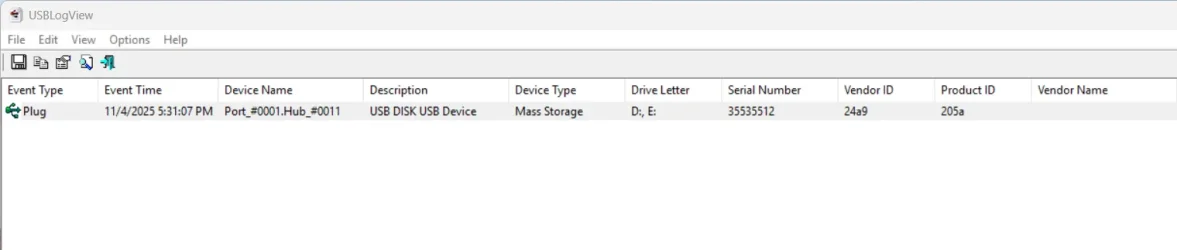
Try Nirsoft's UsbLogView. It records the details of any USB device that is plugged or unplugged into your system.

The USBLogView just shows the USB drive plugged in while Windows 11 re-detects the USB device over and over again. When I close the File Explorer window that it opens from Auto Play settings, the USBLogView does not show any other entries from "Plug" entry:

1762295654367.webp

This is an irritating problem. When this re-detection occurs, it stops whatever I was copying to the USB drive. When it occurs while burning an ISO to a USB drive, the USB drive goes in to an error and makes it a permanent I/O error. I have many USB drives that I can no longer use due to permanent I/O errors.
 

My Computers My Computers

  • At a glance

    Windows 11 ProAMD Ryzen AI 7 350 w/ Radeon 860M 50 TOPS32GB LPDDR5X 7500 MT/sAMD Radeon 860M integrated (shared memory)
    OS
    Windows 11 Pro
    Computer type
    Laptop
    Manufacturer/Model
    Dell 16 Plus DB16255
    CPU
    AMD Ryzen AI 7 350 w/ Radeon 860M 50 TOPS
    Motherboard
    Dell 0PKMHG
    Memory
    32GB LPDDR5X 7500 MT/s
    Graphics Card(s)
    AMD Radeon 860M integrated (shared memory)
    Sound Card
    Stereo speakers (2.5 W x 2 = 5 W total peak)/Realtek SounzReal/Dolby Atmos
    Monitor(s) Displays
    Displays: 16" 1920 x 1200 (Full HD+/WUXGA) 300 nits 60Hz *** Samsung - 27” Odyssey FHD IPS 240Hz G-Sync Gaming Monitor
    Screen Resolution
    1920x1080 @ 60Hz
    Hard Drives
    EG6 KIOXIA 1TB NVME
    Case
    Ice Blue
    Cooling
    "dual-fan" or "enhanced" air-cooling system
    Mouse
    Logitech M650 Wireless/Bluetooth
    Internet Speed
    800/600 Fiber
  • Computer type
    Laptop
Update:

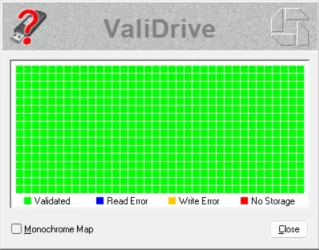
I decided to run ValiDrive on the USB drive and no errors:
1762295937916.webp
 

My Computers My Computers

  • At a glance

    Windows 11 ProAMD Ryzen AI 7 350 w/ Radeon 860M 50 TOPS32GB LPDDR5X 7500 MT/sAMD Radeon 860M integrated (shared memory)
    OS
    Windows 11 Pro
    Computer type
    Laptop
    Manufacturer/Model
    Dell 16 Plus DB16255
    CPU
    AMD Ryzen AI 7 350 w/ Radeon 860M 50 TOPS
    Motherboard
    Dell 0PKMHG
    Memory
    32GB LPDDR5X 7500 MT/s
    Graphics Card(s)
    AMD Radeon 860M integrated (shared memory)
    Sound Card
    Stereo speakers (2.5 W x 2 = 5 W total peak)/Realtek SounzReal/Dolby Atmos
    Monitor(s) Displays
    Displays: 16" 1920 x 1200 (Full HD+/WUXGA) 300 nits 60Hz *** Samsung - 27” Odyssey FHD IPS 240Hz G-Sync Gaming Monitor
    Screen Resolution
    1920x1080 @ 60Hz
    Hard Drives
    EG6 KIOXIA 1TB NVME
    Case
    Ice Blue
    Cooling
    "dual-fan" or "enhanced" air-cooling system
    Mouse
    Logitech M650 Wireless/Bluetooth
    Internet Speed
    800/600 Fiber
  • Computer type
    Laptop
Try Nirsoft's UsbLogView. It records the details of any USB device that is plugged or unplugged into your system.
I've tried to check with this method and no luck so far. Seems more like the Authentication spams are the reason for the sound when is closing and restarting some process related to this Authentication. I don't think it's normal for Windows 11 to do a full spam of 30+ authencations in one split second all at once. Also this event always happens at the same time that this "USB connect and disconnect" sound happens. Also I replaced my keyboard and mouse just in case 1 week ago just to be safe and the problem is still present.

Any ideas on how to stop this Autenthication spams? I've tried with help from Chat gpt and no luck so far.
 
Last edited:

My Computer My Computer

At a glance

Windows 11AMD Ryzen 7 9800X3D32GB (2x16GB) 6000MHzRTX 5070 Ti 16G
OS
Windows 11
Computer type
PC/Desktop
Manufacturer/Model
Custom PC
CPU
AMD Ryzen 7 9800X3D
Motherboard
Asus Prime X870 - P Wifi
Memory
32GB (2x16GB) 6000MHz
Graphics Card(s)
RTX 5070 Ti 16G
Sound Card
Integrated in the Motherboard
Monitor(s) Displays
ASUS Gamer TUF
Screen Resolution
1080p
Hard Drives
SSD 2TB NVMe M.2 12800MBs
PSU
1000w 80+Platinum
Case
Adventurer Pro
Cooling
Watercooling 360mm RGB
Keyboard
Redragon Mechanical Keyboard
Mouse
G203 Logitech
I've tried to check with this method and no luck so far. Seems more like the Authentication spams are the reason for the sound when is closing and restarting some process related to this Authentication. I don't it's normal for Windows 11 to do a full spam of 30+ authencations in one split second all at once. Also this event always happens at the same time that this "USB connect and disconnect" sound happens. Also I replaced my keyboard and mouse just in case 1 week ago just to be safe and the problem is still present.

Any ideas on how to stop this Autenthication spams? I've tried with help from Chat gpt and no luck so far.
Are you sure it is a USB notification sound and not something else? Windows reuses sounds for different events.
 

My Computer My Computer

At a glance

Windows 11 25H2Broadwell-e 6850K 4.5ghz @1.36v32GB Corsair LPM 3600 C16EVGA RTX 3080Ti FTW
OS
Windows 11 25H2
Computer type
PC/Desktop
Manufacturer/Model
EVGA home brew
CPU
Broadwell-e 6850K 4.5ghz @1.36v
Motherboard
EVGA X99 FTW K
Memory
32GB Corsair LPM 3600 C16
Graphics Card(s)
EVGA RTX 3080Ti FTW
Sound Card
Asus Centurion true 7.1 headset. (5 speakers in each earpeice)
Monitor(s) Displays
LG C4 55"
Screen Resolution
4K 144hz
Hard Drives
Various models of SSDs ~10TB No HDDs installed.
PSU
be quiet! BN516 Straight Power 12-1000w 80 Plus Platinum
Case
Corsair 780T modified to dual 200mm intake fans
Cooling
Corsair H110i
Keyboard
Corsair K95 Platinum
Mouse
Corsair M65 RGB Elite
Internet Speed
50Mbs
At the same time, the Event Viewer shows a burst of “Authentication Success” logs (Event ID 4624, 4672, 5379) — all within the same second. These keep repeating constantly, even when I’m not logging in or doing anything.
I pulled up all of Microsoft's documentation on those 3 event codes. Naturally they are in MS speak.
However for event 4624 Co-pilot gives a fairly straightforward way of using the LOGON TYPE listed in the event to decipher what user or process facilitated the logon event.
Co-pilot says "This is especially relevant if you're troubleshooting USB connect/disconnect sounds or micro-freezes, as these may coincide with service restarts or authentication events"

Co-pilot can help you breakdown the event to its source.
Open co-pilot and enter "event 4624"

Event 4672 coincides with event 4624. It flags high-risk or sensitive access.

For event 5379 (which I believe to be the key to the 3 events) Copilot says "
If you're seeing dozens or hundreds of 5379 entries per minute, it could be due to:

  • Background services (e.g., OneDrive, Microsoft Account sync, Windows Hello) repeatedly accessing stored credentials
  • Telemetry or system tasks polling Credential Manager
  • Malware or misconfigured software triggering excessive reads
  • Credential enumeration loops from a buggy or aggressive app
This behavior is often seen alongside Event IDs 4624 and 4672, especially if services are restarting or re-authenticating — which may also trigger USB connect/disconnect sounds or micro-freezes
Open co-pilot and enter "event 4672" Co pilot can help you build a powershell script to correlate the events or identify which process are triggering the reads.
 

My Computers My Computers

  • At a glance

    Windows 11 Pro 25H2 26200.9168i9-10900 10 core 20 threads32 gbnone-Intel UHD Graphics 630
    OS
    Windows 11 Pro 25H2 26200.9168
    Computer type
    PC/Desktop
    Manufacturer/Model
    Dell Optiplex 7080
    CPU
    i9-10900 10 core 20 threads
    Motherboard
    DELL 0J37VM
    Memory
    32 gb
    Graphics Card(s)
    none-Intel UHD Graphics 630
    Sound Card
    Integrated Realtek
    Monitor(s) Displays
    Benq 27
    Screen Resolution
    2560x1440
    Hard Drives
    2x1tb Solidigm m.2 nvme /External drives 512gb Samsung m.2 sata+2tb Kingston m2.nvme
    PSU
    500w
    Case
    MT
    Cooling
    Dell Premium
    Keyboard
    Logitech wired
    Mouse
    Logitech wireless
    Internet Speed
    so slow I'm too embarrassed to tell
    Browser
    #1 Edge #2 Firefox
    Antivirus
    Defender+MWB Premium
  • At a glance

    Windows 11 Pro 24H2 26200.9168AMD Ryzen 7 6800U32 gbintegrated
    Operating System
    Windows 11 Pro 24H2 26200.9168
    Computer type
    PC/Desktop
    Manufacturer/Model
    Beelink Mini PC SER5
    CPU
    AMD Ryzen 7 6800U
    Memory
    32 gb
    Graphics card(s)
    integrated
    Sound Card
    integrated
    Monitor(s) Displays
    Benq 27
    Screen Resolution
    2560x1440
    Hard Drives
    1TB Crucial nvme
    Keyboard
    Logitech wired
    Mouse
    Logitech wireless
    Internet Speed
    still too embarrassed to tell
    Browser
    Firefox
    Antivirus
    Defender
  • System 3 is non compliant Dell 9020 i7-4770/24gb ram Win11 PRO 26200.9168
Are you sure it is a USB notification sound and not something else? Windows reuses sounds for different events.
I mean I use that as an example the "Usb disconnect and connect" sound. That what I hear but I'm pretty much sure that is related to the spam of Autenthications and not a usb port that's giving me problems.
 

My Computer My Computer

At a glance

Windows 11AMD Ryzen 7 9800X3D32GB (2x16GB) 6000MHzRTX 5070 Ti 16G
OS
Windows 11
Computer type
PC/Desktop
Manufacturer/Model
Custom PC
CPU
AMD Ryzen 7 9800X3D
Motherboard
Asus Prime X870 - P Wifi
Memory
32GB (2x16GB) 6000MHz
Graphics Card(s)
RTX 5070 Ti 16G
Sound Card
Integrated in the Motherboard
Monitor(s) Displays
ASUS Gamer TUF
Screen Resolution
1080p
Hard Drives
SSD 2TB NVMe M.2 12800MBs
PSU
1000w 80+Platinum
Case
Adventurer Pro
Cooling
Watercooling 360mm RGB
Keyboard
Redragon Mechanical Keyboard
Mouse
G203 Logitech
I pulled up all of Microsoft's documentation on those 3 event codes. Naturally they are in MS speak.
However for event 4624 Co-pilot gives a fairly straightforward way of using the LOGON TYPE listed in the event to decipher what user or process facilitated the logon event.
Co-pilot says "This is especially relevant if you're troubleshooting USB connect/disconnect sounds or micro-freezes, as these may coincide with service restarts or authentication events"

Co-pilot can help you breakdown the event to its source.
Open co-pilot and enter "event 4624"

Event 4672 coincides with event 4624. It flags high-risk or sensitive access.

For event 5379 (which I believe to be the key to the 3 events) Copilot says "
If you're seeing dozens or hundreds of 5379 entries per minute, it could be due to:

  • Background services (e.g., OneDrive, Microsoft Account sync, Windows Hello) repeatedly accessing stored credentials
  • Telemetry or system tasks polling Credential Manager
  • Malware or misconfigured software triggering excessive reads
  • Credential enumeration loops from a buggy or aggressive app
This behavior is often seen alongside Event IDs 4624 and 4672, especially if services are restarting or re-authenticating — which may also trigger USB connect/disconnect sounds or micro-freezes
Open co-pilot and enter "event 4672" Co pilot can help you build a powershell script to correlate the events or identify which process are triggering the reads.
Yeah I've been trying to fix this with Chat GPT help. I'll try Copilot and see if I get a better solution. I tried a few things and the spam of Security Events is still there. Thanks for the help.
 

My Computer My Computer

At a glance

Windows 11AMD Ryzen 7 9800X3D32GB (2x16GB) 6000MHzRTX 5070 Ti 16G
OS
Windows 11
Computer type
PC/Desktop
Manufacturer/Model
Custom PC
CPU
AMD Ryzen 7 9800X3D
Motherboard
Asus Prime X870 - P Wifi
Memory
32GB (2x16GB) 6000MHz
Graphics Card(s)
RTX 5070 Ti 16G
Sound Card
Integrated in the Motherboard
Monitor(s) Displays
ASUS Gamer TUF
Screen Resolution
1080p
Hard Drives
SSD 2TB NVMe M.2 12800MBs
PSU
1000w 80+Platinum
Case
Adventurer Pro
Cooling
Watercooling 360mm RGB
Keyboard
Redragon Mechanical Keyboard
Mouse
G203 Logitech
Please run the V2 log collector > post a share link

(the log collector will collect various types of logs for scanning)


My Computer My Computer

At a glance

Windows 10Intel(R) Core(TM) i7-4800MQ CPU @ 2.70GHz16 GB Total: Manufacturer : Samsung MemoryTyp...NVIDIA Quadro K3100M; Intel(R) HD Graphics 4600
OS
Windows 10
Computer type
Laptop
Manufacturer/Model
HP
CPU
Intel(R) Core(TM) i7-4800MQ CPU @ 2.70GHz
Motherboard
Product : 190A Version : KBC Version 94.56
Memory
16 GB Total: Manufacturer : Samsung MemoryType : DDR3 FormFactor : SODIMM Capacity : 8GB Speed : 1600
Graphics Card(s)
NVIDIA Quadro K3100M; Intel(R) HD Graphics 4600
Sound Card
IDT High Definition Audio CODEC; PNP Device ID HDAUDIO\FUNC_01&VEN_111D&DEV_76E0
Hard Drives
Model Hitachi HTS727575A9E364
Antivirus
Microsoft Defender
Other Info
Mobile Workstation
Your chipset or iodie voltages are unstable and the usb controller is being dropped and reset.
 

My Computer My Computer

At a glance

Windows
OS
Windows
I am having the EXACT same problem as the OP. Same exact symptoms.. USB sounds, mouse freezes, etc. I've been trying to fix this for three weeks now and no luck.

Your chipset or iodie voltages are unstable and the usb controller is being dropped and reset.
Is this a bios setting issue?
 

My Computer My Computer

At a glance

Windows 11 HomeAMD RYZEN 5 360032 Gb 3200MTGeForce GTX
OS
Windows 11 Home
Computer type
PC/Desktop
CPU
AMD RYZEN 5 3600
Motherboard
ASUS B450M DS3H WIFI
Memory
32 Gb 3200MT
Graphics Card(s)
GeForce GTX
Monitor(s) Displays
YES
Screen Resolution
Enough
Hard Drives
SAMSUNG 990 PRO SSD 1TB NVMe
PSU
YES
Case
Thermaltake
Cooling
YES
Keyboard
Logitech K120
Mouse
Logitech
Internet Speed
200 Mb/s - 1 Gbs
Browser
Firefox
Antivirus
Windows Defender
I am having the EXACT same problem as the OP. Same exact symptoms.. USB sounds, mouse freezes, etc. I've been trying to fix this for three weeks now and no luck.


Is this a bios setting issue?
I mean. The only change I did was an undervolt but just for my CPU to lower the temps and my micro freeze problem was present already. I never had one single BSOD using the computer playing things maxed out like Battlefield 6 and Borderlands 4.

I just can't figure this out on why Windows 11 keeps spamming all this securituty events and audits success like 40 times in 1 second. Everytime this happens I check every section of my Event Viewer and the only thing that happens at the exact time are this security events triggering all in one split second.

I will try that someone posted above to really check what's going on in my logs but I'm almost sure that the micro freeze is directly related to all this spams in Security Events.
 

My Computer My Computer

At a glance

Windows 11AMD Ryzen 7 9800X3D32GB (2x16GB) 6000MHzRTX 5070 Ti 16G
OS
Windows 11
Computer type
PC/Desktop
Manufacturer/Model
Custom PC
CPU
AMD Ryzen 7 9800X3D
Motherboard
Asus Prime X870 - P Wifi
Memory
32GB (2x16GB) 6000MHz
Graphics Card(s)
RTX 5070 Ti 16G
Sound Card
Integrated in the Motherboard
Monitor(s) Displays
ASUS Gamer TUF
Screen Resolution
1080p
Hard Drives
SSD 2TB NVMe M.2 12800MBs
PSU
1000w 80+Platinum
Case
Adventurer Pro
Cooling
Watercooling 360mm RGB
Keyboard
Redragon Mechanical Keyboard
Mouse
G203 Logitech
Any update? My computer still sounds the usb connect and disconnect sounds.. about once every 5 minutes or so.
 

My Computer My Computer

At a glance

Windows 11 HomeAMD RYZEN 5 360032 Gb 3200MTGeForce GTX
OS
Windows 11 Home
Computer type
PC/Desktop
CPU
AMD RYZEN 5 3600
Motherboard
ASUS B450M DS3H WIFI
Memory
32 Gb 3200MT
Graphics Card(s)
GeForce GTX
Monitor(s) Displays
YES
Screen Resolution
Enough
Hard Drives
SAMSUNG 990 PRO SSD 1TB NVMe
PSU
YES
Case
Thermaltake
Cooling
YES
Keyboard
Logitech K120
Mouse
Logitech
Internet Speed
200 Mb/s - 1 Gbs
Browser
Firefox
Antivirus
Windows Defender
Any update? My computer still sounds the usb connect and disconnect sounds.. about once every 5 minutes or so.
Still no luck for me.

For work reasons I haven't done the Log method that someone posted earlier.

My micro freeze and "usb disconnect connect sound" problem happens randomly. Yesterday I had time to play a little and I had no issues for like 2 hours of Battlefield 6 maxed out. No sound stutters nothing. But after that 30 minutes later I was on the desktop and I had the sound and freeze twice in a row just browsing the web.

I'll keep trying to find a solution but so far I can only relate this to my spam of Authentications in my Event Viewer under the Security section. I don't think it's normal to have this security events happening 40 times on one split second. And also when I had the sound and freeze yesterday I had a Security Authentication spams in the same exact moment. No other events on my system except that one with the spam of authentication success logs.

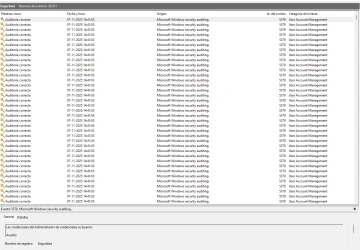
I attached an example of this spams on my Event Viewer in the Security Section. My Windows 11 is in Spanish but the event is "Authentication success" or something similar to that.

Captura de pantalla 2025-11-07 1441311.webp
 

My Computer My Computer

At a glance

Windows 11AMD Ryzen 7 9800X3D32GB (2x16GB) 6000MHzRTX 5070 Ti 16G
OS
Windows 11
Computer type
PC/Desktop
Manufacturer/Model
Custom PC
CPU
AMD Ryzen 7 9800X3D
Motherboard
Asus Prime X870 - P Wifi
Memory
32GB (2x16GB) 6000MHz
Graphics Card(s)
RTX 5070 Ti 16G
Sound Card
Integrated in the Motherboard
Monitor(s) Displays
ASUS Gamer TUF
Screen Resolution
1080p
Hard Drives
SSD 2TB NVMe M.2 12800MBs
PSU
1000w 80+Platinum
Case
Adventurer Pro
Cooling
Watercooling 360mm RGB
Keyboard
Redragon Mechanical Keyboard
Mouse
G203 Logitech

My Computers My Computers

  • At a glance

    Windows 11 ProAMD Ryzen AI 7 350 w/ Radeon 860M 50 TOPS32GB LPDDR5X 7500 MT/sAMD Radeon 860M integrated (shared memory)
    OS
    Windows 11 Pro
    Computer type
    Laptop
    Manufacturer/Model
    Dell 16 Plus DB16255
    CPU
    AMD Ryzen AI 7 350 w/ Radeon 860M 50 TOPS
    Motherboard
    Dell 0PKMHG
    Memory
    32GB LPDDR5X 7500 MT/s
    Graphics Card(s)
    AMD Radeon 860M integrated (shared memory)
    Sound Card
    Stereo speakers (2.5 W x 2 = 5 W total peak)/Realtek SounzReal/Dolby Atmos
    Monitor(s) Displays
    Displays: 16" 1920 x 1200 (Full HD+/WUXGA) 300 nits 60Hz *** Samsung - 27” Odyssey FHD IPS 240Hz G-Sync Gaming Monitor
    Screen Resolution
    1920x1080 @ 60Hz
    Hard Drives
    EG6 KIOXIA 1TB NVME
    Case
    Ice Blue
    Cooling
    "dual-fan" or "enhanced" air-cooling system
    Mouse
    Logitech M650 Wireless/Bluetooth
    Internet Speed
    800/600 Fiber
  • Computer type
    Laptop
Any USB devices plugged in to the USB ports on the computer or through a docking station?
Just the regular ones (and I connected a new Keyboard and Mouse just to be sure)

I have Keyboard, mouse, speakers. Also I have the wifi antena connected but that's a different connector that comes with the motherboard.

I swaped USB ports just in case, also I had UsbLogView open when the sound happened and I had nothing on the usb ports reconnecting.
 

My Computer My Computer

At a glance

Windows 11AMD Ryzen 7 9800X3D32GB (2x16GB) 6000MHzRTX 5070 Ti 16G
OS
Windows 11
Computer type
PC/Desktop
Manufacturer/Model
Custom PC
CPU
AMD Ryzen 7 9800X3D
Motherboard
Asus Prime X870 - P Wifi
Memory
32GB (2x16GB) 6000MHz
Graphics Card(s)
RTX 5070 Ti 16G
Sound Card
Integrated in the Motherboard
Monitor(s) Displays
ASUS Gamer TUF
Screen Resolution
1080p
Hard Drives
SSD 2TB NVMe M.2 12800MBs
PSU
1000w 80+Platinum
Case
Adventurer Pro
Cooling
Watercooling 360mm RGB
Keyboard
Redragon Mechanical Keyboard
Mouse
G203 Logitech

Latest Support Threads

Back
Top Bottom