Re-enable file counting when selecting view by type in File Explorer


Ro Wood

Active member
Local time
7:58 AM
Posts
43
OS
Windows 11 Pro for Workstations
Greetings!

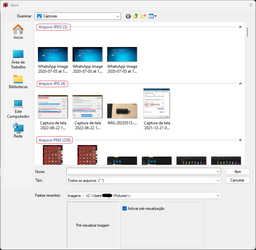
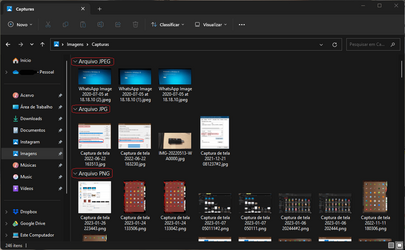
Can anyone tell me if it is possible to re-enable the numerical count of files that was displayed at the top of the Explorer window within the file folders when choosing the option and separating files by type?
Is there a specific registry key or setting for this purpose?
I don't understand why Microsoft removed this feature that for me was one of the most useful.
 
Windows Build/Version
Windows 11 Pro for Workstations Build 2263.1095

My Computer My Computer

At a glance

Windows 11 Pro for WorkstationsCore I7
OS
Windows 11 Pro for Workstations
Computer type
Laptop
Manufacturer/Model
Samsung Odyssey
CPU
Core I7
Greetings!

Can anyone tell me if it is possible to re-enable the numerical count of files that was displayed at the top of the Explorer window within the file folders when choosing the option and separating files by type?
Is there a specific registry key or setting for this purpose?
I don't understand why Microsoft removed this feature that for me was one of the most useful.
Can you post a screenshot to show what you mean?
 

My Computers My Computers

  • At a glance

    Windows 11 Pro
    OS
    Windows 11 Pro
    Computer type
    PC/Desktop
    Manufacturer/Model
    ASUS ROG Strix
  • At a glance

    Windows 11 Pro
    Operating System
    Windows 11 Pro
    Computer type
    Laptop
    Manufacturer/Model
    ASUS VivoBook
  • ASUS VivoBook 'Lite' ~ Windows 11 Home
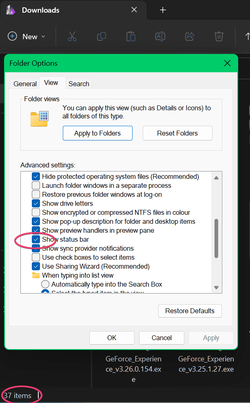
It shows amount of items if 'show status bar' is enabled?

7q9BB1Nab9.png
 

My Computers My Computers

  • At a glance

    Win 11 ProAMD Ryzen™ 7 7730U24GB Dual-Channel DDR4 @ 1596MHz (22-22-22-52)512MB ATI AMD Radeon Graphics (ASUStek Comput...
    OS
    Win 11 Pro
    Computer type
    Laptop
    Manufacturer/Model
    ASUS Vivobook
    CPU
    AMD Ryzen™ 7 7730U
    Motherboard
    M1605YA
    Memory
    24GB Dual-Channel DDR4 @ 1596MHz (22-22-22-52)
    Graphics Card(s)
    512MB ATI AMD Radeon Graphics (ASUStek Computer Inc)
    Monitor(s) Displays
    Generic PnP Monitor (1920x1200@60Hz) - P1 PLUS (1920x1080@59Hz)
    Screen Resolution
    1920 X 1200
    Hard Drives
    953GB Western Digital WD
    PSU
    45 Watts
    Mouse
    Lenovo Bluetooth.
    Internet Speed
    500 Mbps
    Browser
    Edge
    Antivirus
    Defender
  • At a glance

    Windows 11AMD Ryzen 7 5800H / 3.2 GHz32 GB DDR4 SDRAM 3200 MHzNVIDIA GeForce RTX 3060 6 GB GDDR6 SDRAM
    Operating System
    Windows 11
    Computer type
    Laptop
    Manufacturer/Model
    ACER NITRO
    CPU
    AMD Ryzen 7 5800H / 3.2 GHz
    Motherboard
    CZ Scala_CAS (FP6)
    Memory
    32 GB DDR4 SDRAM 3200 MHz
    Graphics card(s)
    NVIDIA GeForce RTX 3060 6 GB GDDR6 SDRAM
    Sound Card
    Realtek Audio. NVIDIA High Definition Audio
    Monitor(s) Displays
    15.6" LED backlight 1920 x 1080 (Full HD) 144 Hz
    Screen Resolution
    1920 x 1080 (Full HD)
    Hard Drives
    Samsung 970 Evo Plus 2TB NVMe M.2
    PSU
    180 Watt, 19.5 V
    Mouse
    Lenovo Bluetooth
    Internet Speed
    500 Mbps
    Browser
    Edge
    Antivirus
    Defender
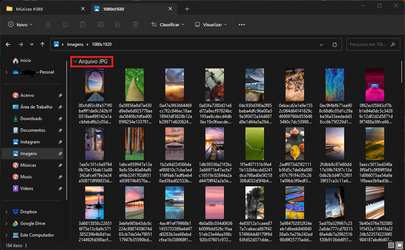
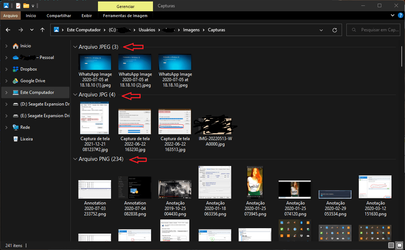
The square highlighted in red.
It's not the status bar.

Captura de tela 2023-01-06 202444#2.png

This format discriminates the file count by file type in the Explorer window.
 
Last edited:

My Computer My Computer

At a glance

Windows 11 Pro for WorkstationsCore I7
OS
Windows 11 Pro for Workstations
Computer type
Laptop
Manufacturer/Model
Samsung Odyssey
CPU
Core I7
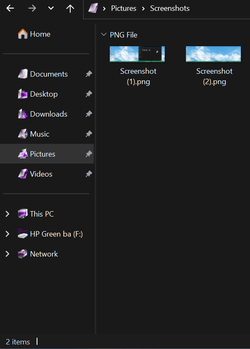
It's only showing the amount of items at the bottom. 🙁

1673048561717.png
 

My Computers My Computers

  • At a glance

    Win 11 ProAMD Ryzen™ 7 7730U24GB Dual-Channel DDR4 @ 1596MHz (22-22-22-52)512MB ATI AMD Radeon Graphics (ASUStek Comput...
    OS
    Win 11 Pro
    Computer type
    Laptop
    Manufacturer/Model
    ASUS Vivobook
    CPU
    AMD Ryzen™ 7 7730U
    Motherboard
    M1605YA
    Memory
    24GB Dual-Channel DDR4 @ 1596MHz (22-22-22-52)
    Graphics Card(s)
    512MB ATI AMD Radeon Graphics (ASUStek Computer Inc)
    Monitor(s) Displays
    Generic PnP Monitor (1920x1200@60Hz) - P1 PLUS (1920x1080@59Hz)
    Screen Resolution
    1920 X 1200
    Hard Drives
    953GB Western Digital WD
    PSU
    45 Watts
    Mouse
    Lenovo Bluetooth.
    Internet Speed
    500 Mbps
    Browser
    Edge
    Antivirus
    Defender
  • At a glance

    Windows 11AMD Ryzen 7 5800H / 3.2 GHz32 GB DDR4 SDRAM 3200 MHzNVIDIA GeForce RTX 3060 6 GB GDDR6 SDRAM
    Operating System
    Windows 11
    Computer type
    Laptop
    Manufacturer/Model
    ACER NITRO
    CPU
    AMD Ryzen 7 5800H / 3.2 GHz
    Motherboard
    CZ Scala_CAS (FP6)
    Memory
    32 GB DDR4 SDRAM 3200 MHz
    Graphics card(s)
    NVIDIA GeForce RTX 3060 6 GB GDDR6 SDRAM
    Sound Card
    Realtek Audio. NVIDIA High Definition Audio
    Monitor(s) Displays
    15.6" LED backlight 1920 x 1080 (Full HD) 144 Hz
    Screen Resolution
    1920 x 1080 (Full HD)
    Hard Drives
    Samsung 970 Evo Plus 2TB NVMe M.2
    PSU
    180 Watt, 19.5 V
    Mouse
    Lenovo Bluetooth
    Internet Speed
    500 Mbps
    Browser
    Edge
    Antivirus
    Defender
The only thing that might approach what you want is to choose sort, more, by size. That sorts files into groups based on average file sizes, for example 1 - 128MB, 1 - 5Gb and so on, at least it allows for at a glance seeing which are similar size files in a folder. Not what you are after exactly but might be of some use.
 

My Computer My Computer

At a glance

Windows 11 Pro 22H2, build: 22621.521Intel i7-12700K 3.6GHz Base (5.0GHz Turbo)64GB DDR 3600MhzAsus Tuff RTX 3080 10GB OC
OS
Windows 11 Pro 22H2, build: 22621.521
Computer type
PC/Desktop
Manufacturer/Model
Scan 3XS Custom 1700
CPU
Intel i7-12700K 3.6GHz Base (5.0GHz Turbo)
Motherboard
Asus ProArt Creator B660 D4
Memory
64GB DDR 3600Mhz
Graphics Card(s)
Asus Tuff RTX 3080 10GB OC
Sound Card
Onboard Realtek
Monitor(s) Displays
Gigabyte G32QC 32inch 16:9 curved @2560 x 1440p 165Hz Freesync Premium Pro/ Dell SE2422H 24inch 16:9 1920 x 1080p 75Hz Freesync
Screen Resolution
2560 x 1440p & 1920 x 1080p
Hard Drives
WD SN570 1TB NVME (Boot), Samsung 870QVO 1TB (SSD), SanDisk 3D Ultra 500Gb (SSD) x2, Seagate 3Tb Expansion Desk (Ext HDD), 2x Toshiba 1Tb P300 (Ext HDD)
PSU
Corsair RM1000X Modular
Case
Corsair 4000D Airflow Desktop
Cooling
Corsair Hydro H150i RGB Pro XT 360mm Liquid Cooler, 3 x 120mm fans, 1x Exhaust
Keyboard
Microsoft Ergonomic
Mouse
Logitech G402
Internet Speed
800Mbs
Browser
Edge Chromium
Antivirus
Defender, Malwarebytes
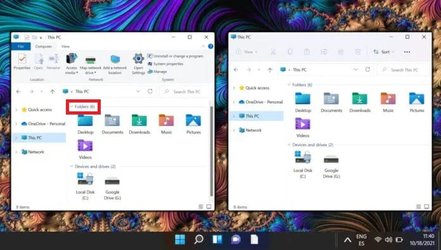
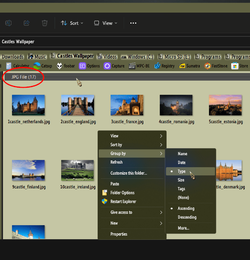
I found this low res image on the web of what it looked like before, I don't remember if Microsoft pruned this feature when they updated to 22H1 or 22H2?
Is there no way to reverse this? Nobody complained or missed this feature before? 🤔

Featured-How-to-Restore-Classic-File-Explorer-with-Ribbon-in-Windows-11-696x395.jpg
win11_new_icons.jpg
 

My Computer My Computer

At a glance

Windows 11 Pro for WorkstationsCore I7
OS
Windows 11 Pro for Workstations
Computer type
Laptop
Manufacturer/Model
Samsung Odyssey
CPU
Core I7
You probably have to resort to using a 3rd party program to restore that functionality!
I know it's possible with Old/New Explorer

0002275.png
 

My Computers My Computers

  • At a glance

    Windows 11 Pro
    OS
    Windows 11 Pro
    Computer type
    PC/Desktop
    Manufacturer/Model
    ASUS ROG Strix
  • At a glance

    Windows 11 Pro
    Operating System
    Windows 11 Pro
    Computer type
    Laptop
    Manufacturer/Model
    ASUS VivoBook
  • ASUS VivoBook 'Lite' ~ Windows 11 Home
For me the Old/New Explorer didn't work, I only found a DLL, ExplorerFrame.dll from version 21H1 which when superimposed made the file count go back, but disables the tabs in the File Explorer and the left panel as you can see in this image

Captura de tela 2023-01-07 050111#2.png
 

My Computer My Computer

At a glance

Windows 11 Pro for WorkstationsCore I7
OS
Windows 11 Pro for Workstations
Computer type
Laptop
Manufacturer/Model
Samsung Odyssey
CPU
Core I7
For me the Old/New Explorer didn't work, I only found a DLL, ExplorerFrame.dll from version 21H1 which when superimposed made the file count go back, but disables the tabs in the File Explorer and the left panel as you can see in this image

View attachment 49331
No idea how to deploy the feature without changing the system, as you can see in the image, the DLL dubstitution procedure sacrificed file explorer tabs.
 

My Computer My Computer

At a glance

Windows 11 Pro for WorkstationsCore I7
OS
Windows 11 Pro for Workstations
Computer type
Laptop
Manufacturer/Model
Samsung Odyssey
CPU
Core I7
No idea how to deploy the feature without changing the system, as you can see in the image, the DLL dubstitution procedure sacrificed file explorer tabs.
Yeah, sorry I can't help ya with that!
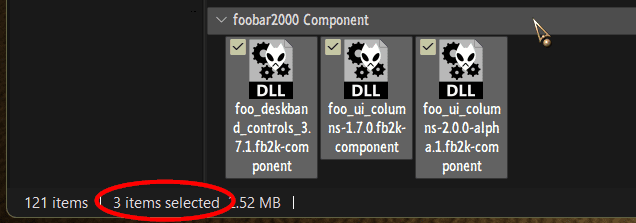
At best, you can highlight the group and check the Status Bar for info...

0002280.png
 

My Computers My Computers

  • At a glance

    Windows 11 Pro
    OS
    Windows 11 Pro
    Computer type
    PC/Desktop
    Manufacturer/Model
    ASUS ROG Strix
  • At a glance

    Windows 11 Pro
    Operating System
    Windows 11 Pro
    Computer type
    Laptop
    Manufacturer/Model
    ASUS VivoBook
  • ASUS VivoBook 'Lite' ~ Windows 11 Home

My Computer My Computer

At a glance

Windows 11 Pro for WorkstationsCore I7
OS
Windows 11 Pro for Workstations
Computer type
Laptop
Manufacturer/Model
Samsung Odyssey
CPU
Core I7
... it is to expect Microsoft geniuses to realize the bullshit they have done and correct this at some point in the near future.
Perhaps..., there's an ever increasing collection of threads pertaining to What did MS do with this feature, why did MS get rid of that........... 🤷‍♂️
 

My Computers My Computers

  • At a glance

    Windows 11 Pro
    OS
    Windows 11 Pro
    Computer type
    PC/Desktop
    Manufacturer/Model
    ASUS ROG Strix
  • At a glance

    Windows 11 Pro
    Operating System
    Windows 11 Pro
    Computer type
    Laptop
    Manufacturer/Model
    ASUS VivoBook
  • ASUS VivoBook 'Lite' ~ Windows 11 Home
Well this is the first post about this 'feature' that I have seen since Windows 11 released (as far as I recall) over several forums, so maybe it is just not something people need or want in general.
If there are millions of people using Windows 11 then the percentage of users missing certain features might be very low, too low to be concerned with. Others like Taskbar functionality have been changed to reflect popular demand with missing features, available in windows 10, added back.
Just because you think a change is dumb doesn't mean everyone else thinks the same, if you want it back then the feedback hub is probably the best place to make some noise and see if it gains traction.
 

My Computer My Computer

At a glance

Windows 11 Pro 22H2, build: 22621.521Intel i7-12700K 3.6GHz Base (5.0GHz Turbo)64GB DDR 3600MhzAsus Tuff RTX 3080 10GB OC
OS
Windows 11 Pro 22H2, build: 22621.521
Computer type
PC/Desktop
Manufacturer/Model
Scan 3XS Custom 1700
CPU
Intel i7-12700K 3.6GHz Base (5.0GHz Turbo)
Motherboard
Asus ProArt Creator B660 D4
Memory
64GB DDR 3600Mhz
Graphics Card(s)
Asus Tuff RTX 3080 10GB OC
Sound Card
Onboard Realtek
Monitor(s) Displays
Gigabyte G32QC 32inch 16:9 curved @2560 x 1440p 165Hz Freesync Premium Pro/ Dell SE2422H 24inch 16:9 1920 x 1080p 75Hz Freesync
Screen Resolution
2560 x 1440p & 1920 x 1080p
Hard Drives
WD SN570 1TB NVME (Boot), Samsung 870QVO 1TB (SSD), SanDisk 3D Ultra 500Gb (SSD) x2, Seagate 3Tb Expansion Desk (Ext HDD), 2x Toshiba 1Tb P300 (Ext HDD)
PSU
Corsair RM1000X Modular
Case
Corsair 4000D Airflow Desktop
Cooling
Corsair Hydro H150i RGB Pro XT 360mm Liquid Cooler, 3 x 120mm fans, 1x Exhaust
Keyboard
Microsoft Ergonomic
Mouse
Logitech G402
Internet Speed
800Mbs
Browser
Edge Chromium
Antivirus
Defender, Malwarebytes
I noticed something when using IrfanView, in his window the file separation count is enabled when in the file explorer they don't see it.

Captura de tela 2023-01-26 223443#2.png

IrfanView

Captura de tela 2023-01-26 223536#2.png

File Explorer

Windows 11 Pro for Workstations v22H2 (Build 22623.1245)
 

My Computer My Computer

At a glance

Windows 11 Pro for WorkstationsCore I7
OS
Windows 11 Pro for Workstations
Computer type
Laptop
Manufacturer/Model
Samsung Odyssey
CPU
Core I7
The function to display the count is part of a Windows .dll and is something you can access through programming, so the function is there still, just unused at the moment by file explorer.
Maybe it is something Microsoft are working on, improving and will add back in a later build of the explorer app. Or someone will/ has developed a plugin for explorer to re instate the feature.
It is also possible a registry value can turn it back on but if the key was removed and not just set to off then finding out what the key should be is going to be hard if not impossible.
Just some early morning thoughts. :unsure:
 

My Computer My Computer

At a glance

Windows 11 Pro 22H2, build: 22621.521Intel i7-12700K 3.6GHz Base (5.0GHz Turbo)64GB DDR 3600MhzAsus Tuff RTX 3080 10GB OC
OS
Windows 11 Pro 22H2, build: 22621.521
Computer type
PC/Desktop
Manufacturer/Model
Scan 3XS Custom 1700
CPU
Intel i7-12700K 3.6GHz Base (5.0GHz Turbo)
Motherboard
Asus ProArt Creator B660 D4
Memory
64GB DDR 3600Mhz
Graphics Card(s)
Asus Tuff RTX 3080 10GB OC
Sound Card
Onboard Realtek
Monitor(s) Displays
Gigabyte G32QC 32inch 16:9 curved @2560 x 1440p 165Hz Freesync Premium Pro/ Dell SE2422H 24inch 16:9 1920 x 1080p 75Hz Freesync
Screen Resolution
2560 x 1440p & 1920 x 1080p
Hard Drives
WD SN570 1TB NVME (Boot), Samsung 870QVO 1TB (SSD), SanDisk 3D Ultra 500Gb (SSD) x2, Seagate 3Tb Expansion Desk (Ext HDD), 2x Toshiba 1Tb P300 (Ext HDD)
PSU
Corsair RM1000X Modular
Case
Corsair 4000D Airflow Desktop
Cooling
Corsair Hydro H150i RGB Pro XT 360mm Liquid Cooler, 3 x 120mm fans, 1x Exhaust
Keyboard
Microsoft Ergonomic
Mouse
Logitech G402
Internet Speed
800Mbs
Browser
Edge Chromium
Antivirus
Defender, Malwarebytes

Latest Support Threads

Back
Top Bottom