Solved Re installing Microsoft Office 2024 not working


polli

Well-known member
Local time
11:48 PM
Posts
203
OS
Windows 11 Home. Win Version 23H2
I reset my pc yesterday and tried to reinstall office 2024
After I added the keys it said ok but no further actions
It is not showing upon my programs list
Any ideas welcome.
Google doesnt seem to have the answer
 

My Computer My Computer

At a glance

Windows 11 Home. Win Version 23H2
OS
Windows 11 Home. Win Version 23H2
Computer type
PC/Desktop
Manufacturer/Model
HP
Hard Drives
windows C Drive
D Drive is SSD
Browser
Chrome
Did you see it install? If not, from where are you installing it? Did you try again?
 

My Computer My Computer

At a glance

W11
OS
W11
Computer type
PC/Desktop
Manufacturer/Model
2 HP Desktops, 1 Dell Desktop, 2 Dell XPS Laptops, 1 HP Laptop
Keyboard
Logitech
Mouse
Logitech MX Master 4 & 3
Internet Speed
500 mps
Browser
Firefox
Antivirus
Bitdefender
I typed all.the numbers into the box and it said it was installed. But nothing else and it's not showing in my computer.
 

My Computer My Computer

At a glance

Windows 11 Home. Win Version 23H2
OS
Windows 11 Home. Win Version 23H2
Computer type
PC/Desktop
Manufacturer/Model
HP
Hard Drives
windows C Drive
D Drive is SSD
Browser
Chrome
That didn't answer either question. From where did you install it and did you actually see it install?
 

My Computer My Computer

At a glance

W11
OS
W11
Computer type
PC/Desktop
Manufacturer/Model
2 HP Desktops, 1 Dell Desktop, 2 Dell XPS Laptops, 1 HP Laptop
Keyboard
Logitech
Mouse
Logitech MX Master 4 & 3
Internet Speed
500 mps
Browser
Firefox
Antivirus
Bitdefender

My Computers My Computers

  • At a glance

    Windows 11 Pro
    OS
    Windows 11 Pro
    Computer type
    PC/Desktop
    Manufacturer/Model
    ASUS ROG Strix
  • At a glance

    Windows 11 Pro
    Operating System
    Windows 11 Pro
    Computer type
    Laptop
    Manufacturer/Model
    ASUS VivoBook
  • ASUS VivoBook 'Lite' ~ Windows 11 Home
That didn't answer either question. From where did you install it and did you actually see it install?
I sent for it from.microsoft.Cost me a fortune.
 

My Computer My Computer

At a glance

Windows 11 Home. Win Version 23H2
OS
Windows 11 Home. Win Version 23H2
Computer type
PC/Desktop
Manufacturer/Model
HP
Hard Drives
windows C Drive
D Drive is SSD
Browser
Chrome
Look in C:\Program Files\Microsoft Office\root\Office16\WINWORD.EXE
Will try tonight. The 1st time I installed it a few weeks ago it worked well. But then my pc was acting up so I reset it. Today I did as Microsoft said to install it. Typed in the long numbers. And it just said installed. That's it. Nothing in my programs list the same as before
 

My Computer My Computer

At a glance

Windows 11 Home. Win Version 23H2
OS
Windows 11 Home. Win Version 23H2
Computer type
PC/Desktop
Manufacturer/Model
HP
Hard Drives
windows C Drive
D Drive is SSD
Browser
Chrome
Will try tonight. The 1st time I installed it a few weeks ago it worked well. But then my pc was acting up so I reset it. Today I did as Microsoft said to install it. Typed in the long numbers. And it just said installed. That's it. Nothing in my programs list the same as before
Is it actually installed???
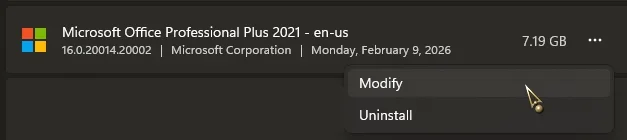
If so, click on the three dots, choose Modify, choose Online Repair...

13114.webp
 

My Computers My Computers

  • At a glance

    Windows 11 Pro
    OS
    Windows 11 Pro
    Computer type
    PC/Desktop
    Manufacturer/Model
    ASUS ROG Strix
  • At a glance

    Windows 11 Pro
    Operating System
    Windows 11 Pro
    Computer type
    Laptop
    Manufacturer/Model
    ASUS VivoBook
  • ASUS VivoBook 'Lite' ~ Windows 11 Home
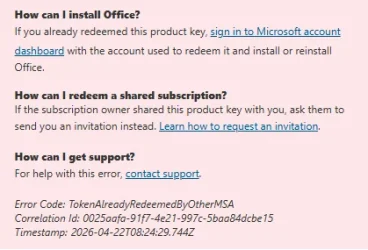
After I installed it....How can I install Office?
If you already redeemed this product key, sign in to Microsoft account dashboard with the account used to redeem it and install or reinstall Office.
But nothing shows anywhere to click on. Its invisible. Typed the long numbers in it 2 or 3 times

It says We'll add your product key
Tips here but no use Complete Microsoft Office 2024 Activation Guide by Wish Geeks

Also uninstalled office 365 sample that was on pc as it said delete all other versions of office first.
Dont know what else to do
 
Last edited:

My Computer My Computer

At a glance

Windows 11 Home. Win Version 23H2
OS
Windows 11 Home. Win Version 23H2
Computer type
PC/Desktop
Manufacturer/Model
HP
Hard Drives
windows C Drive
D Drive is SSD
Browser
Chrome
Will try tonight. The 1st time I installed it a few weeks ago it worked well. But then my pc was acting up so I reset it. Today I did as Microsoft said to install it. Typed in the long numbers. And it just said installed. That's it. Nothing in my programs list the same as before
Nothing in the folder
 

My Computer My Computer

At a glance

Windows 11 Home. Win Version 23H2
OS
Windows 11 Home. Win Version 23H2
Computer type
PC/Desktop
Manufacturer/Model
HP
Hard Drives
windows C Drive
D Drive is SSD
Browser
Chrome
Hi @polli,

Do you have OneNote installed? If so, remove it from Windows than try to install MS Office 2024.

Kind regards,

tecknot
 

My Computer My Computer

At a glance

Windows 11 Pro 25H2 build 26200.8875Intel i7 8750H @ 2.2 GHz16 GB (all Samsung) DDR4-3200 SODIMM (non-ECC...Intel UHD Graphics 630 & NVIDIA Quadro P600
OS
Windows 11 Pro 25H2 build 26200.8875
Computer type
Laptop
Manufacturer/Model
Lenovo ThinkPad Workstation P72
CPU
Intel i7 8750H @ 2.2 GHz
Motherboard
Lenovo 01YU291
Memory
16 GB (all Samsung) DDR4-3200 SODIMM (non-ECC) PCIe 3
Graphics Card(s)
Intel UHD Graphics 630 & NVIDIA Quadro P600
Sound Card
Realtek ALC3286 & Focusrite Saffire 24 Pro DSP
Monitor(s) Displays
17.3"
Screen Resolution
3840x2160
Hard Drives
1TB SSD Samsung 860 EVO SATA 3
1TB SSD Samsung 970 EVO M.2 NVMe PCIe 3 x 4
2TB SSD Samsung 990 PRO M.2 NVMe PCIe 3 x 4
PSU
230W
Cooling
fan
Keyboard
UltraNav
Mouse
Kensington wireless Orbit
Internet Speed
640Mbps
Browser
DuckDuckGo and Firefox
Antivirus
Defender
Other Info
CM246 Chipset
This is what is says now But its thesame email address and its saying it is anyway
 

Attachments

  • Office Problem.webp
    Office Problem.webp
    21.8 KB · Views: 3

My Computer My Computer

At a glance

Windows 11 Home. Win Version 23H2
OS
Windows 11 Home. Win Version 23H2
Computer type
PC/Desktop
Manufacturer/Model
HP
Hard Drives
windows C Drive
D Drive is SSD
Browser
Chrome
This is what is says now But its thesame email address and its saying it is anyway
So how can the email address be correct and it's still not showing? Do I have to buy another copy of Office 2024? Or buy office 365 which i was trying to avoid as it's a subscription.
I dont understand it.
 

My Computer My Computer

At a glance

Windows 11 Home. Win Version 23H2
OS
Windows 11 Home. Win Version 23H2
Computer type
PC/Desktop
Manufacturer/Model
HP
Hard Drives
windows C Drive
D Drive is SSD
Browser
Chrome
It it a well know fact that any Office installation doesn't tolerate any other Office installation. If you go from 2021 to 2024 or 365 you have to deinstall 2021 first. In your case I think traces of the previous installation prevents it install it proper. See page : Uninstall Microsoft 365 or Office from a PC - Microsoft Support

I am using Office 2021 and I found out that Office 2024 is registered inside your MS-account. 2021 for some reason not. Find that strange; it's a paid official product with a valid key that has been official registered. It looks like that Office 2024 behaves something like Office 365 in that way. (more cumbersome.. With 2021 I installed the product. Pressed on the registry key, enter the license number and done. With 2024 and 365 more steps are necessary. Need to go to MS itself. )

That link is not a very helpful; the troubleshooter can't handle Office 2024 issues. There are other users complaining that Office 2024 will not correctly re-install. Maybe you can take a look at this page and try the solution that the AI-chatbot suggested. If find it very strange that 2024 has these problems. With 2019, 2021 I had no issues at all. Maybe they are pushing toward 365 to much.

There is a recovery tool for Office but MS prefers to use the help function. (Type "help" in the search bar to start; *Get Help v10.2409.0*) It is available inside 25H2 but I am not sure it was with 23H2. You can download that tool here: Microsoft Support and Recovery Assistant - Download

Alternative is to talk to MS and get some assistance.
 

My Computers My Computers

  • At a glance

    Win 11 Pro 25H2 Build 26200.8894, Zorin OS ProIntel® Core™ i7-12700KF 12th Gen. (S1700)32GB DDR5 5600-36 Vengeance (2x16)PCIe4.0 Asus NVIDIA RTX3060Ti
    OS
    Win 11 Pro 25H2 Build 26200.8894, Zorin OS Pro
    Computer type
    PC/Desktop
    Manufacturer/Model
    Self built
    CPU
    Intel® Core™ i7-12700KF 12th Gen. (S1700)
    Motherboard
    ASUS Prime Z690-A, BIOS v4505 (Z690 Intel Chipset)
    Memory
    32GB DDR5 5600-36 Vengeance (2x16)
    Graphics Card(s)
    PCIe4.0 Asus NVIDIA RTX3060Ti
    Sound Card
    Onboard; Realtek
    Monitor(s) Displays
    34" LG 34UC79G-B Curved 21:9 144Hz
    Screen Resolution
    2560x1080 (No HDR)
    Hard Drives
    250Gb Samsung 870PRO NVMe (Win 11 Pro)
    1Tb Samsung 980PRO NVMe
    1Tb Samsung 970EVO NVMe
    2Tb Samsung 990PRO NVMe with heatsink.
    4Tb WDC WD40EZRZ Blue SATA (Int.)
    4Tb WDC WD40EZRZ Blue SATA (Int.)
    3Tb WDC WD30EFRZ Red SATA (Int.)
    256Gb Samsung 840PRO SSD (RHEL 9,5)
    256Gb Samsung 850PRO SSD (Zorin OS Pro 18)
    PSU
    Coolermaster 850W V2 Gold with internal 12cm exaust fan
    Case
    Be-Quiet Pure Base 600.
    Cooling
    3x Be-Quiet! 12/14cm "Silent Wings 4" casefans, 1x Arctic Freezer i35 CPU towerblock with fan.
    Keyboard
    Steelseries APEX 7 keyboard.
    Mouse
    Logitech G-502 Hero
    Internet Speed
    1Gb
    Browser
    Brave
    Antivirus
    F-Secure
    Other Info
    No Noise system.
    256Gb Kingston Travler USB 3.0 drive.
    64Gb Sandisk USB 3.2 drive. (Ventoy)
    8Gb Philips USB 3.0 drive. (Win. Inst.)
    8Gb Philips USB 3.0 drive. (Rescue disk)
    2Tb WD USB 3.0 Passport drive.
    USB Ext. 500Gb WD SATA drive.
    External USB 3.0 C.A. CD/DVD* burner.
  • At a glance

    Windows 11 Pro 25H2Intel® Core™ i7-6700K 6th Gen. (S1151)32Gb DDR4 2400 Corsair Vengeance (4x8)ASUS GeForce GTX1080
    Operating System
    Windows 11 Pro 25H2
    Computer type
    PC/Desktop
    Manufacturer/Model
    Selfbuild
    CPU
    Intel® Core™ i7-6700K 6th Gen. (S1151)
    Motherboard
    ASUS Maximus VIII Ranger (Intel Chipset Z170)
    Memory
    32Gb DDR4 2400 Corsair Vengeance (4x8)
    Graphics card(s)
    ASUS GeForce GTX1080
    Sound Card
    Onboard; Realtek
    Monitor(s) Displays
    LG IPS277L 27" WideLED, IPS
    Screen Resolution
    1920x1080
    Hard Drives
    Samsung 850 Pro SSD
    PSU
    Zalman ZM600-HP with internal exhaust fan. Heatpipes & Modular cables.
    Case
    Cooler Master Aero
    Cooling
    Scythe Mugen 4 dual fan towerblock.
    Keyboard
    Red Dragon
    Mouse
    Red Dragon
    Internet Speed
    1Gb
    Browser
    Chrome
    Antivirus
    F-Secure
You can download Microsoft Office 2024 from this Microsoft site and then use your key to activate:


My Computers My Computers

  • At a glance

    Windows 11 Pro 23H2 (5699), 25H2 (8875)Mobile DualCore Intel Core 2 Duo T7250, 2000 MHz4GBMobile Intel(R) GMA 4500M (Mobile 4 series)
    OS
    Windows 11 Pro 23H2 (5699), 25H2 (8875)
    Computer type
    Laptop
    Manufacturer/Model
    Acer Extensa 5630EZ
    CPU
    Mobile DualCore Intel Core 2 Duo T7250, 2000 MHz
    Motherboard
    Acer Extensa 5630
    Memory
    4GB
    Graphics Card(s)
    Mobile Intel(R) GMA 4500M (Mobile 4 series)
    Sound Card
    Realtek ALC268 @ Intel 82801IB ICH9 - High Definition Audio Controller
    Monitor(s) Displays
    1
    Screen Resolution
    1280x800
    Hard Drives
    Samsung SSD 850 EVO 250GB SATA Device (250 GB, SATA-III)
    Internet Speed
    VDSL 50 Mbps
    Browser
    MICROSOFT EDGE
    Antivirus
    WINDOWS DEFENDER
    Other Info
    Legacy MBR installation, no TPM, no Secure Boot, no WDDM 2.0 graphics drivers, no SSE4.2, cannot get more unsupported ;) This is only my test laptop. I had installed Windows 11 here before upgrading my main PC. For my main PC I use everyday see my 2nd system specs.
  • At a glance

    Windows 11 Pro v25H2 (build 26200.8875)Intel Core-i7 3770 3.40GHz s1155 (3rd generat...2x Kingston Hyper-X Blu 8GB DDR3-1600GIGABYTE GeForce RTX 3050 WINDFORCE OC V2 6GB...
    Operating System
    Windows 11 Pro v25H2 (build 26200.8875)
    Computer type
    PC/Desktop
    Manufacturer/Model
    Custom-built PC
    CPU
    Intel Core-i7 3770 3.40GHz s1155 (3rd generation)
    Motherboard
    Asus P8H61 s1155 ATX
    Memory
    2x Kingston Hyper-X Blu 8GB DDR3-1600
    Graphics card(s)
    GIGABYTE GeForce RTX 3050 WINDFORCE OC V2 6GB (GV-N3050WF2OCV2-6GD)
    Sound Card
    Realtek HD audio (ALC887)
    Monitor(s) Displays
    Sony Bravia KDL-19L4000 19" LCD TV via VGA
    Screen Resolution
    1440x900 32-bit 60Hz
    Hard Drives
    WD Blue SA510 2.5 1000GB SSD as system disk, Western Digital Caviar Purple 4TB SATA III (WD40PURZ) as second
    PSU
    Thermaltake Litepower RGB 550W Full Wired
    Case
    SUPERCASE MIDI-TOWER
    Cooling
    Deepcool Gamma Archer CPU cooler, 1x 8cm fan at the back
    Keyboard
    Mitsumi 101-key PS/2
    Mouse
    Sunnyline OptiEye PS/2
    Internet Speed
    100Mbps
    Browser
    Microsoft Edge, Mozilla Firefox
    Antivirus
    Microsoft Windows Defender
    Other Info
    Legacy BIOS (MBR) installation, no TPM, no Secure Boot, WDDM 3.0 graphics drivers, WEI score 7.4

My Computer My Computer

At a glance

Windows 11 Home. Win Version 23H2
OS
Windows 11 Home. Win Version 23H2
Computer type
PC/Desktop
Manufacturer/Model
HP
Hard Drives
windows C Drive
D Drive is SSD
Browser
Chrome

My Computer My Computer

At a glance

Windows 11 Home. Win Version 23H2
OS
Windows 11 Home. Win Version 23H2
Computer type
PC/Desktop
Manufacturer/Model
HP
Hard Drives
windows C Drive
D Drive is SSD
Browser
Chrome
You have to remove all office related apps, restart, and then try to install Office 2024 again.
 

My Computers My Computers

  • At a glance

    Windows 11 Pro 23H2 (5699), 25H2 (8875)Mobile DualCore Intel Core 2 Duo T7250, 2000 MHz4GBMobile Intel(R) GMA 4500M (Mobile 4 series)
    OS
    Windows 11 Pro 23H2 (5699), 25H2 (8875)
    Computer type
    Laptop
    Manufacturer/Model
    Acer Extensa 5630EZ
    CPU
    Mobile DualCore Intel Core 2 Duo T7250, 2000 MHz
    Motherboard
    Acer Extensa 5630
    Memory
    4GB
    Graphics Card(s)
    Mobile Intel(R) GMA 4500M (Mobile 4 series)
    Sound Card
    Realtek ALC268 @ Intel 82801IB ICH9 - High Definition Audio Controller
    Monitor(s) Displays
    1
    Screen Resolution
    1280x800
    Hard Drives
    Samsung SSD 850 EVO 250GB SATA Device (250 GB, SATA-III)
    Internet Speed
    VDSL 50 Mbps
    Browser
    MICROSOFT EDGE
    Antivirus
    WINDOWS DEFENDER
    Other Info
    Legacy MBR installation, no TPM, no Secure Boot, no WDDM 2.0 graphics drivers, no SSE4.2, cannot get more unsupported ;) This is only my test laptop. I had installed Windows 11 here before upgrading my main PC. For my main PC I use everyday see my 2nd system specs.
  • At a glance

    Windows 11 Pro v25H2 (build 26200.8875)Intel Core-i7 3770 3.40GHz s1155 (3rd generat...2x Kingston Hyper-X Blu 8GB DDR3-1600GIGABYTE GeForce RTX 3050 WINDFORCE OC V2 6GB...
    Operating System
    Windows 11 Pro v25H2 (build 26200.8875)
    Computer type
    PC/Desktop
    Manufacturer/Model
    Custom-built PC
    CPU
    Intel Core-i7 3770 3.40GHz s1155 (3rd generation)
    Motherboard
    Asus P8H61 s1155 ATX
    Memory
    2x Kingston Hyper-X Blu 8GB DDR3-1600
    Graphics card(s)
    GIGABYTE GeForce RTX 3050 WINDFORCE OC V2 6GB (GV-N3050WF2OCV2-6GD)
    Sound Card
    Realtek HD audio (ALC887)
    Monitor(s) Displays
    Sony Bravia KDL-19L4000 19" LCD TV via VGA
    Screen Resolution
    1440x900 32-bit 60Hz
    Hard Drives
    WD Blue SA510 2.5 1000GB SSD as system disk, Western Digital Caviar Purple 4TB SATA III (WD40PURZ) as second
    PSU
    Thermaltake Litepower RGB 550W Full Wired
    Case
    SUPERCASE MIDI-TOWER
    Cooling
    Deepcool Gamma Archer CPU cooler, 1x 8cm fan at the back
    Keyboard
    Mitsumi 101-key PS/2
    Mouse
    Sunnyline OptiEye PS/2
    Internet Speed
    100Mbps
    Browser
    Microsoft Edge, Mozilla Firefox
    Antivirus
    Microsoft Windows Defender
    Other Info
    Legacy BIOS (MBR) installation, no TPM, no Secure Boot, WDDM 3.0 graphics drivers, WEI score 7.4

My Computer My Computer

At a glance

Windows 11 Home. Win Version 23H2
OS
Windows 11 Home. Win Version 23H2
Computer type
PC/Desktop
Manufacturer/Model
HP
Hard Drives
windows C Drive
D Drive is SSD
Browser
Chrome
Then something is wrong with the installer you are using. Normally you should see a small orange box saying Microsoft Office for a few moments and then turns to a larger box saying downloading or installing Microsoft Office. This takes several minutes. If installation is successful, you should see a confirmation message. Then try to open any Office application, first time takes a little longer. In the link I provided to my previous post, scroll down to the offline installer option. Click the link to login to Microsoft with your Microsoft account and follow on-screen instructions to download the Office installer. Using your key it will automatically switch to the appropriate version and activate.
 

My Computers My Computers

  • At a glance

    Windows 11 Pro 23H2 (5699), 25H2 (8875)Mobile DualCore Intel Core 2 Duo T7250, 2000 MHz4GBMobile Intel(R) GMA 4500M (Mobile 4 series)
    OS
    Windows 11 Pro 23H2 (5699), 25H2 (8875)
    Computer type
    Laptop
    Manufacturer/Model
    Acer Extensa 5630EZ
    CPU
    Mobile DualCore Intel Core 2 Duo T7250, 2000 MHz
    Motherboard
    Acer Extensa 5630
    Memory
    4GB
    Graphics Card(s)
    Mobile Intel(R) GMA 4500M (Mobile 4 series)
    Sound Card
    Realtek ALC268 @ Intel 82801IB ICH9 - High Definition Audio Controller
    Monitor(s) Displays
    1
    Screen Resolution
    1280x800
    Hard Drives
    Samsung SSD 850 EVO 250GB SATA Device (250 GB, SATA-III)
    Internet Speed
    VDSL 50 Mbps
    Browser
    MICROSOFT EDGE
    Antivirus
    WINDOWS DEFENDER
    Other Info
    Legacy MBR installation, no TPM, no Secure Boot, no WDDM 2.0 graphics drivers, no SSE4.2, cannot get more unsupported ;) This is only my test laptop. I had installed Windows 11 here before upgrading my main PC. For my main PC I use everyday see my 2nd system specs.
  • At a glance

    Windows 11 Pro v25H2 (build 26200.8875)Intel Core-i7 3770 3.40GHz s1155 (3rd generat...2x Kingston Hyper-X Blu 8GB DDR3-1600GIGABYTE GeForce RTX 3050 WINDFORCE OC V2 6GB...
    Operating System
    Windows 11 Pro v25H2 (build 26200.8875)
    Computer type
    PC/Desktop
    Manufacturer/Model
    Custom-built PC
    CPU
    Intel Core-i7 3770 3.40GHz s1155 (3rd generation)
    Motherboard
    Asus P8H61 s1155 ATX
    Memory
    2x Kingston Hyper-X Blu 8GB DDR3-1600
    Graphics card(s)
    GIGABYTE GeForce RTX 3050 WINDFORCE OC V2 6GB (GV-N3050WF2OCV2-6GD)
    Sound Card
    Realtek HD audio (ALC887)
    Monitor(s) Displays
    Sony Bravia KDL-19L4000 19" LCD TV via VGA
    Screen Resolution
    1440x900 32-bit 60Hz
    Hard Drives
    WD Blue SA510 2.5 1000GB SSD as system disk, Western Digital Caviar Purple 4TB SATA III (WD40PURZ) as second
    PSU
    Thermaltake Litepower RGB 550W Full Wired
    Case
    SUPERCASE MIDI-TOWER
    Cooling
    Deepcool Gamma Archer CPU cooler, 1x 8cm fan at the back
    Keyboard
    Mitsumi 101-key PS/2
    Mouse
    Sunnyline OptiEye PS/2
    Internet Speed
    100Mbps
    Browser
    Microsoft Edge, Mozilla Firefox
    Antivirus
    Microsoft Windows Defender
    Other Info
    Legacy BIOS (MBR) installation, no TPM, no Secure Boot, WDDM 3.0 graphics drivers, WEI score 7.4
Back
Top Bottom