Really cheap USB HD's - is this for real?


Thanks.

Not a thing. Didn't know that gaming HDs are a thing.
I fixed my post above. maybe soemone else knows about these gaming hds
 

My Computers

System One System Two

  • OS
    WIN 11 PRO
    Computer type
    PC/Desktop
    Manufacturer/Model
    Custom built - WIN 11 PRO 64-bit ,
    CPU
    Intel(R) Core(TM) i5-14400 2.50 Ghz,
    Motherboard
    ACER Z790 motherboard
    Memory
    32 Gigs
    Hard Drives
    256 gig M2 SSD boot HD, 3 internal HD's, 2 USB
  • Operating System
    Win 10 PRO
    Computer type
    PC/Desktop
    Manufacturer/Model
    CUSTOM
    CPU
    Haswell CPU 4790k @ 4.4GHz,
    Motherboard
    AsRock Z97 motherboard,
    Memory
    16 Gigs
    Hard Drives
    OS drive 250GB SSD,
google said this:
Yes, external gaming hard drives can absolutely be used as regular external hard drives. "Gaming" branding is primarily marketing. Under the hood, they function just like any standard external drive, making them perfectly fine for storing files, movies, and backups. A "gaming" external drive will read and write regular files just as fast as any similarly priced standard external drive. Since this is for storage only I'll get it
 

My Computers

System One System Two

  • OS
    WIN 11 PRO
    Computer type
    PC/Desktop
    Manufacturer/Model
    Custom built - WIN 11 PRO 64-bit ,
    CPU
    Intel(R) Core(TM) i5-14400 2.50 Ghz,
    Motherboard
    ACER Z790 motherboard
    Memory
    32 Gigs
    Hard Drives
    256 gig M2 SSD boot HD, 3 internal HD's, 2 USB
  • Operating System
    Win 10 PRO
    Computer type
    PC/Desktop
    Manufacturer/Model
    CUSTOM
    CPU
    Haswell CPU 4790k @ 4.4GHz,
    Motherboard
    AsRock Z97 motherboard,
    Memory
    16 Gigs
    Hard Drives
    OS drive 250GB SSD,
Yeah, you might get away with using them on RAID arrays and such where you can just pop a failing drive in & out, but as singular, standalone drives for daily use? The kind most people out there use? Or even portables?

No way.
Although there is a degree of merit in your words the reality is that once you've formatted and used a completely new drive it becomes a used hard drive. The only way to avoid re-using a "brand new" drive is to disconnect it from power. I have to agree with you regarding the kind of drives most people use. IMO SMR should be illegal. There was a time just paying the extra five bucks or so to avoid SMR was worth it. So the kind of 'used drive' you are using is another variable to factor into this "used" equation. For example:

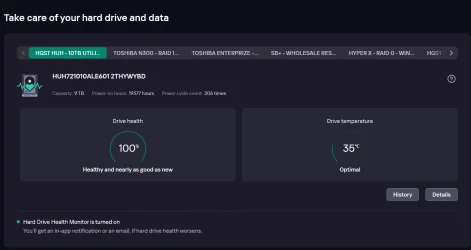
KSPHD-1.webpThis used drive has served me well for the past 5 years or so. Mind, it is a helium filled drive so it was designed to take a lot of use. I like to use these drives for my archives. If my backup drive fails at least I will still have my archives. This is another type of redundancy and I also have more than one back up. Kaspersky also provides very effective back up options. Howbeit, my Kaspersky Suite kept giving me notices about my Seagate stand alone drives which were brand spanking new when I first set them up with this build.

CDI-1-2026.webp
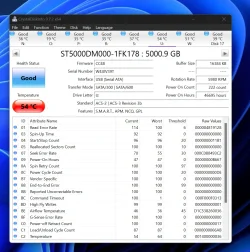
According to Crystal Disk I have two drives that are reportedly in "good" condition but are flagged due to high temps. These are both stand alone drives. They are both SMR drives but they were purchased new and came right out of the shrink wrap. This particular 5TB drive had a double, same age, same make and model. It is dead now. I'm guessing temperature was a factor as it was consistently getting flagged much like this drive. Meanwhile, my old klunkers just keep on clunking away and operating efficiently. They were purchased used. To be fair, they were refurbs.
 

My Computer

System One

  • OS
    WIN 11, WIN 10, WIN 8.1, WIN 7 U, WIN 7 PRO, WIN 7 HOME (32 Bit), LINUX MINT
    Computer type
    PC/Desktop
    Manufacturer/Model
    DIY, ASUS, and DELL
    CPU
    Intel i7 6900K and i9-7960X / AMD 3800X (8 core)
    Motherboard
    ASUS X99E-WS USB 3.1 and ASUS X299 SAGE
    Memory
    128 GB CORSAIR DOMINATOR PLATINUM (B DIE)
    Graphics Card(s)
    NVIDIA 1070 and RTX 3070
    Sound Card
    Crystal Sound (onboard)
    Monitor(s) Displays
    single Samsung 30" 4K and 8" aux monitor
    Screen Resolution
    4K and something equally attrocious. I'll be working on this.
    Hard Drives
    A, B, C, D, E, F, G, H, I, J, K, L, M, N, O, P, Q, R, S, T, U, V, W

    Ports X, Y, and Z are reserved for USB access and removable drives.

    Drive types consist of the following: Various mechanical hard drives bearing the brand names, Seagate, Toshiba, and Western Digital. Various NVMe drives bearing the brand names Kingston, Intel, Silicon Power, Crucial, Western Digital, and Team Group. Various SATA SSDs bearing various different brand names.

    RAID arrays included:

    LSI RAID 10 (WD Velociraptors) 1115.72 GB
    LSI RAID 10 (WD SSDS) 463.80 GB

    INTEL RAID 0 (KINGSTON HYPER X) System 447.14 GB
    INTEL RAID 1 TOSHIBA ENTERPRIZE class Data 2794.52 GB
    INTEL RAID 1 SEAGATE HYBRID 931.51 GB
    PSU
    SEVERAL. I prefer my Corsair Platinum HX1000i but I also like EVGA power supplies
    Case
    ThermalTake Level 10 GT (among others)
    Cooling
    Noctua is my favorite and I use it in my main. I also own various other coolers.
    Keyboard
    all kinds.
    Mouse
    all kinds
    Internet Speed
    360 mbps - 1 gbps (depending)
    Browser
    FIREFOX
    Antivirus
    KASPERSKY (no apologies)
    Other Info
    Gave Dell touch screen with Windows 11 to daughter and got me an OTVOC. Being a PC builder I own many desktop PCs as well. I am a father of five providing PCs, laptops, and tablets for all my family, most of which I have modified, rebuilt, or simply built from scratch. I do not own a cell phone, never have, never will.
google said this:
Yes, external gaming hard drives can absolutely be used as regular external hard drives. "Gaming" branding is primarily marketing. Under the hood, they function just like any standard external drive, making them perfectly fine for storing files, movies, and backups. A "gaming" external drive will read and write regular files just as fast as any similarly priced standard external drive. Since this is for storage only I'll get it
Generally the gaming label is slapped on hard drive ads based on the large capacity of the drive. Quite often gamers will play all sorts of games and many of these games can be 40GB or more so a large capacity drive is regarded as ideal for gaming.
 

My Computer

System One

  • OS
    WIN 11, WIN 10, WIN 8.1, WIN 7 U, WIN 7 PRO, WIN 7 HOME (32 Bit), LINUX MINT
    Computer type
    PC/Desktop
    Manufacturer/Model
    DIY, ASUS, and DELL
    CPU
    Intel i7 6900K and i9-7960X / AMD 3800X (8 core)
    Motherboard
    ASUS X99E-WS USB 3.1 and ASUS X299 SAGE
    Memory
    128 GB CORSAIR DOMINATOR PLATINUM (B DIE)
    Graphics Card(s)
    NVIDIA 1070 and RTX 3070
    Sound Card
    Crystal Sound (onboard)
    Monitor(s) Displays
    single Samsung 30" 4K and 8" aux monitor
    Screen Resolution
    4K and something equally attrocious. I'll be working on this.
    Hard Drives
    A, B, C, D, E, F, G, H, I, J, K, L, M, N, O, P, Q, R, S, T, U, V, W

    Ports X, Y, and Z are reserved for USB access and removable drives.

    Drive types consist of the following: Various mechanical hard drives bearing the brand names, Seagate, Toshiba, and Western Digital. Various NVMe drives bearing the brand names Kingston, Intel, Silicon Power, Crucial, Western Digital, and Team Group. Various SATA SSDs bearing various different brand names.

    RAID arrays included:

    LSI RAID 10 (WD Velociraptors) 1115.72 GB
    LSI RAID 10 (WD SSDS) 463.80 GB

    INTEL RAID 0 (KINGSTON HYPER X) System 447.14 GB
    INTEL RAID 1 TOSHIBA ENTERPRIZE class Data 2794.52 GB
    INTEL RAID 1 SEAGATE HYBRID 931.51 GB
    PSU
    SEVERAL. I prefer my Corsair Platinum HX1000i but I also like EVGA power supplies
    Case
    ThermalTake Level 10 GT (among others)
    Cooling
    Noctua is my favorite and I use it in my main. I also own various other coolers.
    Keyboard
    all kinds.
    Mouse
    all kinds
    Internet Speed
    360 mbps - 1 gbps (depending)
    Browser
    FIREFOX
    Antivirus
    KASPERSKY (no apologies)
    Other Info
    Gave Dell touch screen with Windows 11 to daughter and got me an OTVOC. Being a PC builder I own many desktop PCs as well. I am a father of five providing PCs, laptops, and tablets for all my family, most of which I have modified, rebuilt, or simply built from scratch. I do not own a cell phone, never have, never will.
Although there is a degree of merit in your words the reality is that once you've formatted and used a completely new drive it becomes a used hard drive.

Same as turning a new computer on for the first time. It then becomes legally a used computer even though they may have spent hours on the assembly line testing it. Or driving a new car off the lot for the first time. Once that happens it becomes a used car even though legally it's still called a new car because of all the financing that you'd still have to go through after test driving it and picking it up for purchase.

According to Crystal Disk I have two drives that are reportedly in "good" condition but are flagged due to high temps. These are both stand alone drives. They are both SMR drives but they were purchased new and came right out of the shrink wrap. This particular 5TB drive had a double, same age, same make and model. It is dead now. I'm guessing temperature was a factor as it was consistently getting flagged much like this drive.

I would've sent them back if that happened, either exchanging it or getting my money back. And this would be testing with Crystal Disk (and anything else) before I put any data on it.

I've got SMR drives going back 12-13 years or so, bought new and still work. Mostly due to using them for cold storage, firing them up every few months to check my archive files and see what shape the drives are in. I don't leave them mounted and running all the time, wasting energy and generating wear & tear. I've no need for a RAID array and I don't use any type of home server. But that's just me. Not everybody out there has the same needs that I do.
 

My Computers

System One System Two

  • OS
    Windows 11 Pro 25H2 build: (26200.7623)
    Computer type
    Laptop
    Manufacturer/Model
    Microsoft Surface Pro
    Memory
    32GB
  • Operating System
    Microsoft 25H2 Pro
    Computer type
    Laptop
    Manufacturer/Model
    Dell Pro 14 - PC14250
    CPU
    Intel Core Ultra 7
    Memory
    64GB
    Graphics card(s)
    Intel Integrated Graphics
    Hard Drives
    Micron 1TB SSD
GoHardDrive drives for "Gaming" just means drives that are meant to be used with Xbox or PlayStation game consoles. These consoles have technical requirements that these drives apparently meet. They are also pre-formatted for the console they are meant for.

An AI search says, "Drives sold by GoHardDrive are almost exclusively used or refurbished, typically pulled from enterprise servers and data centers. ". If you look on the GoHardDrive website they don't say where the drives come from. If the drives were "new" they would have said that.

If you are OK with refurbished hard drives then go for it. I have bought a few refurbished hard drives over the years. Most were OK but a few were bad.
 

My Computers

System One System Two

  • OS
    Windows 11 Pro 25H2 (26200.6901)
    Computer type
    Laptop
    Manufacturer/Model
    ASUS TUF Gaming A15 (2022)
    CPU
    AMD Ryzen 7 6800H with Radeon 680M GPU (486MB RAM)
    Memory
    Crucial DDR5-4800 (2400MHz) 32GB (2 x 16GB)
    Graphics Card(s)
    NVIDIA RTX 3060 Laptop (6GB RAM)
    Sound Card
    n/a
    Monitor(s) Displays
    15.6-inch
    Screen Resolution
    1920x1080 300Hz
    Hard Drives
    2 x Samsung 990 Evo Plus (2TB M.2 NVME SSD)
    PSU
    n/a
    Mouse
    Wireless Mouse M510
    Internet Speed
    2100Mbps/300Mbps
    Browser
    Firefox
    Antivirus
    Malwarebytes
  • Operating System
    Windows 11 Pro 25H2 (26200.8246)
    Computer type
    PC/Desktop
    Manufacturer/Model
    Custom build
    CPU
    AMD Ryzen 7 5700X3D
    Motherboard
    ASUS ROG Strix B550-F Gaming WiFi II
    Memory
    G.SKILL Flare X 32GB (2x16GB) DDR4
    Graphics card(s)
    ASUS ROG-STRIX-RTX3060TI-08G-V2-GAMING (RTX 3060-Ti, 8GB RAM)
    Monitor(s) Displays
    Samsung G50D IPS 27"
    Screen Resolution
    1440p/180Hz
    Hard Drives
    SAMSUNG 990 EVO Plus (2TB] M.2 NVME SSD
    SAMSUNG 990 EVO Plus (4TB) M.2 NVME SSD
    PSU
    Corsair RM750x (750 watts)
    Case
    Cooler Master MasterCase 5
    Cooling
    Scythe Mugen 6
    Keyboard
    Logitech K520 (MK540 keyboard/mouse combo)
    Mouse
    Logitech M310 (MK540 keyboard/mouse combo)
    Internet Speed
    2100 Mbps down / 300 Mbps up
    Browser
    Firefox, Edge, Chrome
    Antivirus
    Malwarebytes (Premium)
    Other Info
    ASUS Blu-ray Burner BW-16D1HT (SATA) || Western Digital Easystore 20TB USB 3.0 external hard drive used with Acronis True Image 2025 backup software || HP OfficeJet Pro 6975 Printer/Scanner
I've got SMR drives going back 12-13 years or so, bought new and still work. Mostly due to using them for cold storage, firing them up every few months to check my archive files and see what shape the drives are in. I don't leave them mounted and running all the time, wasting energy and generating wear & tear. I've no need for a RAID array and I don't use any type of home server. But that's just me. Not everybody out there has the same needs that I do.
Ideally, that's how external drives should be used: Back up your files and air gap the drive. I couldn't agree with you more on that count. Admittedly, I have a home server/network/work station that I'm quite comfortable using as my main. It satisfies my needs so-to-speak. Not everyone is playing IT to their family and friends. Howbeit as a result of choosing this little "occupation" I've learned a great deal about hard drives and I've culminated a considerable amount of experience over the years with various brands, makes, models. To be fair, the Seagate drives in question did last beyond their warranty date even if they did run a little hot. I did not find that to be the case with most Western Digital blue label drives that I purchased in the past, but I have seen them pass warranty dates when purchased by others with the PC i.e. Dell or HP. For some reason the WD mechanical drives with the blue label were among the worst for me and some would even fail in the first month despite being purchased brand new.

With the increase in silicon costs mechanical drives are making a come back. I can't rightly say what's worth buying new anymore as standards in manufacturing may have changed over the years. For me, purchasing what I'm familiar with is a boon but that means purchasing used. I'm reminded of the old mechanic who is a whiz with a vehicle that actually uses a distributor and points but shuns vehicles that run fuel injection via a computer under the dash. My specialty is more toward keeping older systems alive. These days that might be a worthy consideration. Not everyone is keen on AI or even wants it.
 

My Computer

System One

  • OS
    WIN 11, WIN 10, WIN 8.1, WIN 7 U, WIN 7 PRO, WIN 7 HOME (32 Bit), LINUX MINT
    Computer type
    PC/Desktop
    Manufacturer/Model
    DIY, ASUS, and DELL
    CPU
    Intel i7 6900K and i9-7960X / AMD 3800X (8 core)
    Motherboard
    ASUS X99E-WS USB 3.1 and ASUS X299 SAGE
    Memory
    128 GB CORSAIR DOMINATOR PLATINUM (B DIE)
    Graphics Card(s)
    NVIDIA 1070 and RTX 3070
    Sound Card
    Crystal Sound (onboard)
    Monitor(s) Displays
    single Samsung 30" 4K and 8" aux monitor
    Screen Resolution
    4K and something equally attrocious. I'll be working on this.
    Hard Drives
    A, B, C, D, E, F, G, H, I, J, K, L, M, N, O, P, Q, R, S, T, U, V, W

    Ports X, Y, and Z are reserved for USB access and removable drives.

    Drive types consist of the following: Various mechanical hard drives bearing the brand names, Seagate, Toshiba, and Western Digital. Various NVMe drives bearing the brand names Kingston, Intel, Silicon Power, Crucial, Western Digital, and Team Group. Various SATA SSDs bearing various different brand names.

    RAID arrays included:

    LSI RAID 10 (WD Velociraptors) 1115.72 GB
    LSI RAID 10 (WD SSDS) 463.80 GB

    INTEL RAID 0 (KINGSTON HYPER X) System 447.14 GB
    INTEL RAID 1 TOSHIBA ENTERPRIZE class Data 2794.52 GB
    INTEL RAID 1 SEAGATE HYBRID 931.51 GB
    PSU
    SEVERAL. I prefer my Corsair Platinum HX1000i but I also like EVGA power supplies
    Case
    ThermalTake Level 10 GT (among others)
    Cooling
    Noctua is my favorite and I use it in my main. I also own various other coolers.
    Keyboard
    all kinds.
    Mouse
    all kinds
    Internet Speed
    360 mbps - 1 gbps (depending)
    Browser
    FIREFOX
    Antivirus
    KASPERSKY (no apologies)
    Other Info
    Gave Dell touch screen with Windows 11 to daughter and got me an OTVOC. Being a PC builder I own many desktop PCs as well. I am a father of five providing PCs, laptops, and tablets for all my family, most of which I have modified, rebuilt, or simply built from scratch. I do not own a cell phone, never have, never will.
Back
Top Bottom