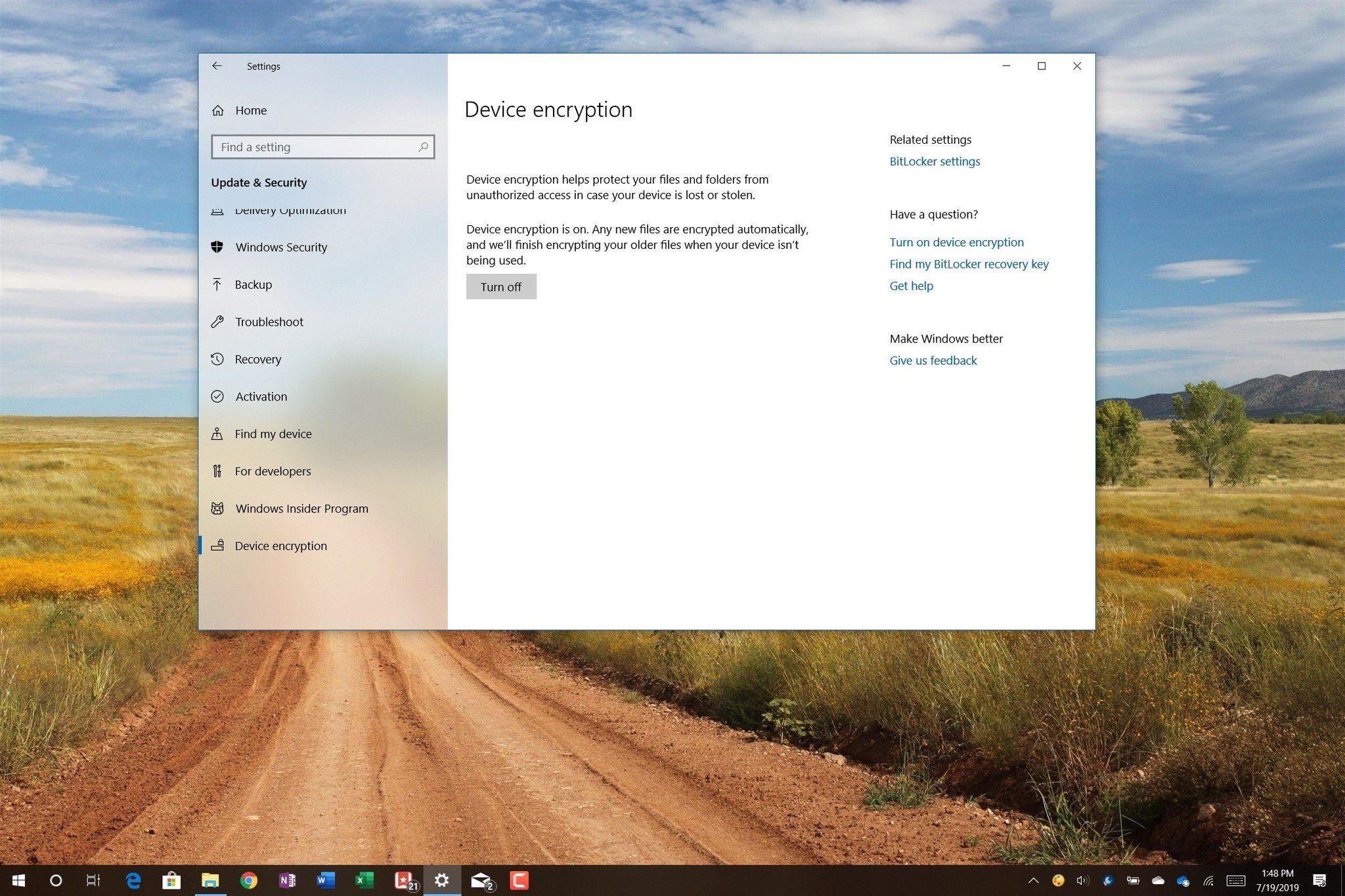
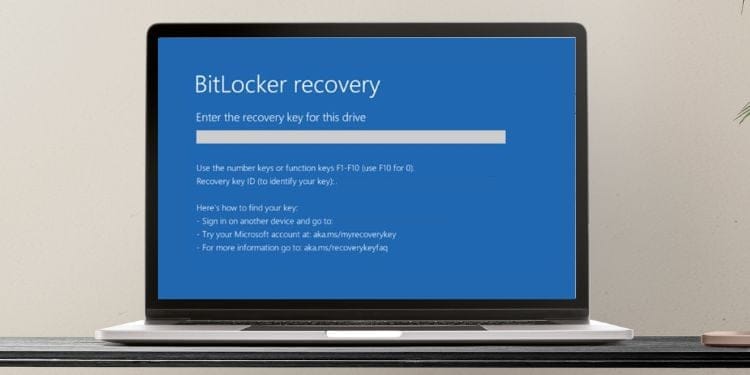
Recovery key now required after each boot.... lot of typing....


markeh

Member
Local time
5:02 PM
Posts
8
OS
Windows 11 home
I restored my C: drive using an Acronis backup, which apparently went well.
But now every time I boot the other internal drive requires me to enter the recovery key. Both are encrypted with BitLocker.
I have the key and can unlock the drive. But next boot - type in all over again.

This is Windows Home, and there is no BitLocker app in settings.
Typing the looong key in each time gets tiring.

How do I fix??

thx,

===
Edition Windows 11 Home
Version 22H2
Installed on ‎2/‎23/‎2023
OS build 22621.1265
Experience Windows Feature Experience Pack 1000.22638.1000.0
===
 

My Computer My Computer

At a glance

Windows 11 homeIntel 12th gen64gbNvidia
OS
Windows 11 home
Computer type
PC/Desktop
Manufacturer/Model
HP
CPU
Intel 12th gen
Memory
64gb
Graphics Card(s)
Nvidia
Monitor(s) Displays
LG
I don't know if this applies to Windows 11 Home edition as well, you'll simply have to try it to see if this is an option...

On the screen where you unlock the drive, you should have an open to automatically unlock the drive on this machine as in this screenshot:

Image1.jpg

Note: This is only an option if the OS drive is BitLocker encrypted, which you indicated the C: drive is. I'm still not sure how this is the case since you are running the Home edition, however. Out of curiosity, how is it that your C: drive is BitLocker encrypted on Windows 11 Home?
 

My Computers My Computers

  • At a glance

    Win11 Pro 25H2 (RTM+)Intel i7-14650HX32 GBNo GPU - Built-in Intel Graphics
    OS
    Win11 Pro 25H2 (RTM+)
    Computer type
    PC/Desktop
    Manufacturer/Model
    Acemagic
    CPU
    Intel i7-14650HX
    Memory
    32 GB
    Graphics Card(s)
    No GPU - Built-in Intel Graphics
    Sound Card
    Integrated
    Monitor(s) Displays
    Varies as machine will often be moved to locations with different monitors
    Screen Resolution
    Varies
    Hard Drives
    1 x 1TB Gen 4 NVMe SSD
    PSU
    120W Power Brick
    Keyboard
    Corsair K70 Max RGB Magnetic Keyboard
    Mouse
    Logitech MX Master 3
    Internet Speed
    1Gb Up / 1 Gb Down
    Browser
    Edge
    Antivirus
    Windows Defender
  • At a glance

    Win11 Pro 25H2 (RTM+)Intel i7-1255U16 GBIntel Iris Xe Graphics
    Operating System
    Win11 Pro 25H2 (RTM+)
    Computer type
    Laptop
    Manufacturer/Model
    Lenovo ThinkBook 13x Gen 2
    CPU
    Intel i7-1255U
    Memory
    16 GB
    Graphics card(s)
    Intel Iris Xe Graphics
    Sound Card
    Realtek® ALC3306-CG codec
    Monitor(s) Displays
    13.3-inch IPS Display
    Screen Resolution
    WQXGA (2560 x 1600)
    Hard Drives
    2 TB 4 x 4 NVMe SSD
    PSU
    USB-C / Thunderbolt 4 Power / Charging
    Keyboard
    Backlit, spill resistant keyboard
    Mouse
    Buttonless Glass Precision Touchpad
    Internet Speed
    1Gb Up / 1Gb Down
    Browser
    Edge
    Antivirus
    Windows Defender
    Other Info
    WiFi 6e / Bluetooth 5.1 / Facial Recognition / Fingerprint Sensor / ToF (Time of Flight) Human Presence Sensor
Well it says "Device encryption", and if i try to open it I'm asked for a Recovery Key.
I found the recovery key on microsoft.com, described as a "BitLocker Recovery Key."

This came with the product - maybe it's not actually Bitlocker. There is no Bitlocker app included in the control panel.

.
 

My Computer My Computer

At a glance

Windows 11 homeIntel 12th gen64gbNvidia
OS
Windows 11 home
Computer type
PC/Desktop
Manufacturer/Model
HP
CPU
Intel 12th gen
Memory
64gb
Graphics Card(s)
Nvidia
Monitor(s) Displays
LG
Ah, yes. I can see where the confusion comes from. "Device encryption" is similar to BitLocker, but it is not the same thing.

See this for more information:


I have to admit that I have not used Device Encryption. I always run the Pro edition so I run BitLocker. If no one responds with an authoritative answer, I'll stand-up a Windows Home VM in the morning and do a little testing.
 

My Computers My Computers

  • At a glance

    Win11 Pro 25H2 (RTM+)Intel i7-14650HX32 GBNo GPU - Built-in Intel Graphics
    OS
    Win11 Pro 25H2 (RTM+)
    Computer type
    PC/Desktop
    Manufacturer/Model
    Acemagic
    CPU
    Intel i7-14650HX
    Memory
    32 GB
    Graphics Card(s)
    No GPU - Built-in Intel Graphics
    Sound Card
    Integrated
    Monitor(s) Displays
    Varies as machine will often be moved to locations with different monitors
    Screen Resolution
    Varies
    Hard Drives
    1 x 1TB Gen 4 NVMe SSD
    PSU
    120W Power Brick
    Keyboard
    Corsair K70 Max RGB Magnetic Keyboard
    Mouse
    Logitech MX Master 3
    Internet Speed
    1Gb Up / 1 Gb Down
    Browser
    Edge
    Antivirus
    Windows Defender
  • At a glance

    Win11 Pro 25H2 (RTM+)Intel i7-1255U16 GBIntel Iris Xe Graphics
    Operating System
    Win11 Pro 25H2 (RTM+)
    Computer type
    Laptop
    Manufacturer/Model
    Lenovo ThinkBook 13x Gen 2
    CPU
    Intel i7-1255U
    Memory
    16 GB
    Graphics card(s)
    Intel Iris Xe Graphics
    Sound Card
    Realtek® ALC3306-CG codec
    Monitor(s) Displays
    13.3-inch IPS Display
    Screen Resolution
    WQXGA (2560 x 1600)
    Hard Drives
    2 TB 4 x 4 NVMe SSD
    PSU
    USB-C / Thunderbolt 4 Power / Charging
    Keyboard
    Backlit, spill resistant keyboard
    Mouse
    Buttonless Glass Precision Touchpad
    Internet Speed
    1Gb Up / 1Gb Down
    Browser
    Edge
    Antivirus
    Windows Defender
    Other Info
    WiFi 6e / Bluetooth 5.1 / Facial Recognition / Fingerprint Sensor / ToF (Time of Flight) Human Presence Sensor
I restored my C: drive using an Acronis backup, which apparently went well.
But now every time I boot the other internal drive requires me to enter the recovery key. Both are encrypted with BitLocker.
I have the key and can unlock the drive. But next boot - type in all over again.

This is Windows Home, and there is no BitLocker app in settings.
Typing the looong key in each time gets tiring.

How do I fix??

thx,

===
Edition Windows 11 Home
Version 22H2
Installed on ‎2/‎23/‎2023
OS build 22621.1265
Experience Windows Feature Experience Pack 1000.22638.1000.0
===
It looks like an Acronis bug to me that made 'Device Encryption' sort of behave like 'BitLocker' but not entirely.

IMHO, to avoid entering the recovery key after every boot, you could try to:

> get help from Acronis, or

> do another restore of your C: drive in a different (perhaps manual) way so that you have W11 Home with the default 'Device Encryption' behavior, or

> turn OFF 'Device Encryption' which will leave you with W11 Home without the default 'Device Encryption' behavior, or

> upgrade to W11 Pro so that you can enable 'BitLocker' and auto-unlock your other internal drive, or

> do what @hsehestedt will come up with.

Edit: @hsehestedt is listed last but definitely not least
 

My Computer My Computer

At a glance

Windows 10 Pro
OS
Windows 10 Pro
Have you simply tried turning off device encryption and reenabling it. The "bitlocker" passwords are hekd in the tpm, and I suspect the TPM has got confused. Turning it off and on again should solve the issue I think.
 

My Computer My Computer

At a glance

Windows 11 Pro + Win11 Canary VM.I9 13th gen i9-13900H 2.60 GHZ16 GB solderedIntegrated Intel Iris XE
OS
Windows 11 Pro + Win11 Canary VM.
Computer type
Laptop
Manufacturer/Model
ASUS Zenbook 14
CPU
I9 13th gen i9-13900H 2.60 GHZ
Motherboard
Yep, Laptop has one.
Memory
16 GB soldered
Graphics Card(s)
Integrated Intel Iris XE
Sound Card
Realtek built in
Monitor(s) Displays
laptop OLED screen
Screen Resolution
2880x1800 touchscreen
Hard Drives
1 TB NVME SSD (only weakness is only one slot)
PSU
Internal + 65W thunderbolt USB4 charger
Case
Yep, got one
Cooling
Stella Artois (UK pint cans - 568 ml) - extra cost.
Keyboard
Built in UK keybd
Mouse
Bluetooth , wireless dongled, wired
Internet Speed
900 mbs (ethernet), wifi 6 typical 350-450 mb/s both up and down
Browser
Edge
Antivirus
Defender
Other Info
TPM 2.0, 2xUSB4 thunderbolt, 1xUsb3 (usb a), 1xUsb-c, hdmi out, 3.5 mm audio out/in combo, ASUS backlit trackpad (inc. switchable number pad)

Macrium Reflect Home V8
Office 365 Family (6 users each 1TB onedrive space)
Hyper-V (a vm runs almost as fast as my older laptop)
A little bit of bad news, I'm afraid. After some research it turns out that in order to be able to use Device Encryption (not to be confused with BitLocker), one of the system requirements is that a PC must support Modern Standby. Not one of my systems supports modern standby. As a result, I have no way to do any testing of this either on a physical machine or in a VM.

I've also done a git of web searching and have not come up with any answers.

There are a few things that I did learn from my research: Device Encryption is a bit different than BitLocker in that you have no choice what drives to encrypt. Once enabled, it encrypts all drives.

So, @Haydon is absolutely right - it is entirely possible that this is a quirk of the restore with Acronis restore. In this case, it might very well be worth the time to turn off Device Encryption, then turn it back on again as @cereberus suggested.

Please do report back on your results as this sounds like a good learning opportunity for us :-)
 

My Computers My Computers

  • At a glance

    Win11 Pro 25H2 (RTM+)Intel i7-14650HX32 GBNo GPU - Built-in Intel Graphics
    OS
    Win11 Pro 25H2 (RTM+)
    Computer type
    PC/Desktop
    Manufacturer/Model
    Acemagic
    CPU
    Intel i7-14650HX
    Memory
    32 GB
    Graphics Card(s)
    No GPU - Built-in Intel Graphics
    Sound Card
    Integrated
    Monitor(s) Displays
    Varies as machine will often be moved to locations with different monitors
    Screen Resolution
    Varies
    Hard Drives
    1 x 1TB Gen 4 NVMe SSD
    PSU
    120W Power Brick
    Keyboard
    Corsair K70 Max RGB Magnetic Keyboard
    Mouse
    Logitech MX Master 3
    Internet Speed
    1Gb Up / 1 Gb Down
    Browser
    Edge
    Antivirus
    Windows Defender
  • At a glance

    Win11 Pro 25H2 (RTM+)Intel i7-1255U16 GBIntel Iris Xe Graphics
    Operating System
    Win11 Pro 25H2 (RTM+)
    Computer type
    Laptop
    Manufacturer/Model
    Lenovo ThinkBook 13x Gen 2
    CPU
    Intel i7-1255U
    Memory
    16 GB
    Graphics card(s)
    Intel Iris Xe Graphics
    Sound Card
    Realtek® ALC3306-CG codec
    Monitor(s) Displays
    13.3-inch IPS Display
    Screen Resolution
    WQXGA (2560 x 1600)
    Hard Drives
    2 TB 4 x 4 NVMe SSD
    PSU
    USB-C / Thunderbolt 4 Power / Charging
    Keyboard
    Backlit, spill resistant keyboard
    Mouse
    Buttonless Glass Precision Touchpad
    Internet Speed
    1Gb Up / 1Gb Down
    Browser
    Edge
    Antivirus
    Windows Defender
    Other Info
    WiFi 6e / Bluetooth 5.1 / Facial Recognition / Fingerprint Sensor / ToF (Time of Flight) Human Presence Sensor
Another thing worth trying out, since the issue affects only the second internal drive but not C: is to update the driver, reseat connectors, etc.

If the issue can be isolated to something local (something happened with the second internal drive that triggered 'Device Encryption') then turning 'Device Encryption' OFF and ON should be safe (y)

But if the issue cannot be isolated to something local, then it may not be safe to turn 'Device Encryption' back ON (n)

However, the previous paragraph is written (and colored) by someone/me who loves encryption but at the same time is also very afraid that encryption can misbehave and lock you out or even worse, misbehave like ransomware :eek1:

If the issue cannot be localized to the second internal drive (or to something else local) then my personal preference would be to rebuild the machine (y)
 

My Computer My Computer

At a glance

Windows 10 Pro
OS
Windows 10 Pro
Well it says "Device encryption", and if i try to open it I'm asked for a Recovery Key.
I found the recovery key on microsoft.com, described as a "BitLocker Recovery Key."

This came with the product - maybe it's not actually Bitlocker. There is no Bitlocker app included in the control panel.

.

A little bit of bad news, I'm afraid. After some research it turns out that in order to be able to use Device Encryption (not to be confused with BitLocker), one of the system requirements is that a PC must support Modern Standby. Not one of my systems supports modern standby. As a result, I have no way to do any testing of this either on a physical machine or in a VM.

I've also done a git of web searching and have not come up with any answers.

There are a few things that I did learn from my research: Device Encryption is a bit different than BitLocker in that you have no choice what drives to encrypt. Once enabled, it encrypts all drives.

So, @Haydon is absolutely right - it is entirely possible that this is a quirk of the restore with Acronis restore. In this case, it might very well be worth the time to turn off Device Encryption, then turn it back on again as @cereberus suggested.

Please do report back on your results as this sounds like a good learning opportunity for us :-)
Well, I have just been testing it and found a couple of things.

1) Device encryption can be used in Pro, so I tried it (not full bitlocker itself), and it bitlocked all partitions with a drive letter on OS drive.

2) It did not bitlock my second drive. I assume that is because I have Pro. All web pages I have read say ALL drives (not hidden) are bitlocked in Home.

I can separately bitlock second drive with normal bitlocker but that is using normal bitlocker.

3) When it comes to recovery keys, a lot of web pages are contradictory for Device Encryption. Some say not needed as you have aT PM, some say it is backed up to Onedrive, and some sayit is backed up to an MS account. The first two are wrong proving my point most "technical journalists" are just wannabes and just copy other posts and never actual fricking test things!

What is true is that a recovery key for each drive partition is stored on MS account. I double checked by deleting all past recovery keys (none of my drives are bitlocked) and two recovery keys were added to my MS Account (I have a C and D drive on Drive 0)

Like you I cannot test Home short of wiping my Pro installation (ok all image backed but do not really want to go there)

What I do not know is how OP gets out of the tangle they are in.

As I suggested earlier maybe turning Device Encryption off and back on will work. However, I have a feeling it will ignore second drive.

If that does not work, I would temporarily install Pro (no need to activate) in a native booting vhdx file, then use recovery key to access second drive, and then use Pro bitlocker app to turn off bitlocker on that drive. I am fairly confident this will work.

Of course, OP should backup all data on second drive first before trying any of the above!

It might just be easier to backup the data and format second drive anyway?
 

My Computer My Computer

At a glance

Windows 11 Pro + Win11 Canary VM.I9 13th gen i9-13900H 2.60 GHZ16 GB solderedIntegrated Intel Iris XE
OS
Windows 11 Pro + Win11 Canary VM.
Computer type
Laptop
Manufacturer/Model
ASUS Zenbook 14
CPU
I9 13th gen i9-13900H 2.60 GHZ
Motherboard
Yep, Laptop has one.
Memory
16 GB soldered
Graphics Card(s)
Integrated Intel Iris XE
Sound Card
Realtek built in
Monitor(s) Displays
laptop OLED screen
Screen Resolution
2880x1800 touchscreen
Hard Drives
1 TB NVME SSD (only weakness is only one slot)
PSU
Internal + 65W thunderbolt USB4 charger
Case
Yep, got one
Cooling
Stella Artois (UK pint cans - 568 ml) - extra cost.
Keyboard
Built in UK keybd
Mouse
Bluetooth , wireless dongled, wired
Internet Speed
900 mbs (ethernet), wifi 6 typical 350-450 mb/s both up and down
Browser
Edge
Antivirus
Defender
Other Info
TPM 2.0, 2xUSB4 thunderbolt, 1xUsb3 (usb a), 1xUsb-c, hdmi out, 3.5 mm audio out/in combo, ASUS backlit trackpad (inc. switchable number pad)

Macrium Reflect Home V8
Office 365 Family (6 users each 1TB onedrive space)
Hyper-V (a vm runs almost as fast as my older laptop)
It sounds to me that the method used to clone the drive did not update the hard drive serial number to the TPM so it knows to release the decryption key, which is why you have to re-enter the recovery key every time.


Decrypting and then, encrypting the drive afterward fixes the temporary glitch. Normally, running the
Code:
manage-bde –protectors –disable C:
and
Code:
manage-bde –protectors –enable C
: commands in admin-privileged Command Prompt would resolve the issue.
 

My Computers My Computers

  • At a glance

    Windows 11AMD Ryzen 5 3600G.Skill Flare X 16 GB (2 x 8 GB) DDR4-3200 CL...Dell OEM RX 5700
    OS
    Windows 11
    Computer type
    PC/Desktop
    Manufacturer/Model
    "Selene"
    CPU
    AMD Ryzen 5 3600
    Motherboard
    Gigabyte A520I AC Mini ITX AM4
    Memory
    G.Skill Flare X 16 GB (2 x 8 GB) DDR4-3200 CL16 Memory
    Graphics Card(s)
    Dell OEM RX 5700
    Monitor(s) Displays
    LG 29UM69G-B 29.0" 1.5X Ultrawide 75 Hz Monitor
    Screen Resolution
    2560 x 1080
    Hard Drives
    Intel 660p 1.02 TB M.2-2280 PCIe 3.0 X4 NVME Solid State Drive
    Western Digital Caviar Blue 1 TB 3.5" 7200 RPM Internal Hard Drive
    PSU
    Corsair CX650M 650 W 80+ Bronze Certified Semi-modular ATX Power Supply
    Case
    Thermaltake Suppressor F1
    Keyboard
    SteelSeries APEX RGB Wired Gaming Keyboard
    Mouse
    SteelSeries Rival 300 Wired Optical Mouse
    Other Info
    SteelSeries Arctis 5 7.1 Channel Headset
  • At a glance

    Windows 11
    Operating System
    Windows 11
    Computer type
    Laptop
    Manufacturer/Model
    MSI Katana GF76 11 UD
It sounds to me that the method used to clone the drive did not update the hard drive serial number to the TPM so it knows to release the decryption key, which is why you have to re-enter the recovery key every time.


Pretty sure those commands are not available in Home.
 

My Computer My Computer

At a glance

Windows 11 Pro + Win11 Canary VM.I9 13th gen i9-13900H 2.60 GHZ16 GB solderedIntegrated Intel Iris XE
OS
Windows 11 Pro + Win11 Canary VM.
Computer type
Laptop
Manufacturer/Model
ASUS Zenbook 14
CPU
I9 13th gen i9-13900H 2.60 GHZ
Motherboard
Yep, Laptop has one.
Memory
16 GB soldered
Graphics Card(s)
Integrated Intel Iris XE
Sound Card
Realtek built in
Monitor(s) Displays
laptop OLED screen
Screen Resolution
2880x1800 touchscreen
Hard Drives
1 TB NVME SSD (only weakness is only one slot)
PSU
Internal + 65W thunderbolt USB4 charger
Case
Yep, got one
Cooling
Stella Artois (UK pint cans - 568 ml) - extra cost.
Keyboard
Built in UK keybd
Mouse
Bluetooth , wireless dongled, wired
Internet Speed
900 mbs (ethernet), wifi 6 typical 350-450 mb/s both up and down
Browser
Edge
Antivirus
Defender
Other Info
TPM 2.0, 2xUSB4 thunderbolt, 1xUsb3 (usb a), 1xUsb-c, hdmi out, 3.5 mm audio out/in combo, ASUS backlit trackpad (inc. switchable number pad)

Macrium Reflect Home V8
Office 365 Family (6 users each 1TB onedrive space)
Hyper-V (a vm runs almost as fast as my older laptop)
it's 50-50. Device Encryption is a pared down version of bitlocker with some of the same core functions. but you can always just go to settings to do it
 

My Computers My Computers

  • At a glance

    Windows 11AMD Ryzen 5 3600G.Skill Flare X 16 GB (2 x 8 GB) DDR4-3200 CL...Dell OEM RX 5700
    OS
    Windows 11
    Computer type
    PC/Desktop
    Manufacturer/Model
    "Selene"
    CPU
    AMD Ryzen 5 3600
    Motherboard
    Gigabyte A520I AC Mini ITX AM4
    Memory
    G.Skill Flare X 16 GB (2 x 8 GB) DDR4-3200 CL16 Memory
    Graphics Card(s)
    Dell OEM RX 5700
    Monitor(s) Displays
    LG 29UM69G-B 29.0" 1.5X Ultrawide 75 Hz Monitor
    Screen Resolution
    2560 x 1080
    Hard Drives
    Intel 660p 1.02 TB M.2-2280 PCIe 3.0 X4 NVME Solid State Drive
    Western Digital Caviar Blue 1 TB 3.5" 7200 RPM Internal Hard Drive
    PSU
    Corsair CX650M 650 W 80+ Bronze Certified Semi-modular ATX Power Supply
    Case
    Thermaltake Suppressor F1
    Keyboard
    SteelSeries APEX RGB Wired Gaming Keyboard
    Mouse
    SteelSeries Rival 300 Wired Optical Mouse
    Other Info
    SteelSeries Arctis 5 7.1 Channel Headset
  • At a glance

    Windows 11
    Operating System
    Windows 11
    Computer type
    Laptop
    Manufacturer/Model
    MSI Katana GF76 11 UD
Well, for the moment I'm disabling Device Encryption. The 2nd drive (10Tb)is partitioned into 3 logical drives. The first 2 decrypted fine, third one (largest) still going.
My guess is that Drive Encryption is a minimalist version of BitLocker, with all user controls eliminated. I can see where this might be a problem unless everything works perfectly. Windows Settings, if asked about BitLocker tries to sell me an upgrade to Windows Pro for $100. Since BitLocker is the only likely improvement I would use, I'm trying to decide if its worth the $$$.
 

My Computer My Computer

At a glance

Windows 11 homeIntel 12th gen64gbNvidia
OS
Windows 11 home
Computer type
PC/Desktop
Manufacturer/Model
HP
CPU
Intel 12th gen
Memory
64gb
Graphics Card(s)
Nvidia
Monitor(s) Displays
LG
Since BitLocker is the only likely improvement I would use, I'm trying to decide if its worth the $$$.
My personal opinion? Yes, it's worth it!

Another one of my personal opinions? Rebuild your machine first, then load all the goodies you want. Encryption especially is too dangerous if some issues are lurking under the hood.

And even then, always have at least 1 disconnected backup at all times (so you need at least 2 backup media) (y)(y)
 

My Computer My Computer

At a glance

Windows 10 Pro
OS
Windows 10 Pro
My guess is that Drive Encryption is a minimalist version of BitLocker, with all user controls eliminated.
Well, basically the answer is yes. You have limited flexibility - encrypt all drives, decrypt all drives. So I bit the bullet and clean installed Windows 11 Home and I have now tested that.

Bizarrely, after a clean install of Home, the C drive was automatically encrypted, but the others were not. I had to turn off device encryption and then turn it on again to re-encrypt C and encrypt D and E.

bitlock1.png

I am guessing a bit here, but I do not see why it would following would not work, given after installment only one partition (C drive) was encrypted.

Due to cutdown interface, there is no option to encrypt a single drive:
So, if you added a new drive/partition and wanted to encrypt it, I think you need to decrypt all drives, then encrypt all drives.


Similarly in reverse if you wanted to decrypt a single drive already encrypted (not C drive):
You would have to unencrypt all drives, remove drive you want to remain unencrypted, encrypt the other drives, then add new drive.
Of course the above would be a PITA, especially on a laptop, but I believe it is doable to a limited extent - you could not do it for the D drive in above - it would have to be all partitions on a drive or not.

Regarding upgrading to Pro just for full Bitlocker, personally I really do not think you get enough benefit. Full bitlocker is more flexible of course with passwords etc.

There are more compelling reasons to move to Pro e.g. Hyper-V, RDP Server, Gpedit, better control over updates etc.

However, only you can judge based on your needs.
 
Last edited:

My Computer My Computer

At a glance

Windows 11 Pro + Win11 Canary VM.I9 13th gen i9-13900H 2.60 GHZ16 GB solderedIntegrated Intel Iris XE
OS
Windows 11 Pro + Win11 Canary VM.
Computer type
Laptop
Manufacturer/Model
ASUS Zenbook 14
CPU
I9 13th gen i9-13900H 2.60 GHZ
Motherboard
Yep, Laptop has one.
Memory
16 GB soldered
Graphics Card(s)
Integrated Intel Iris XE
Sound Card
Realtek built in
Monitor(s) Displays
laptop OLED screen
Screen Resolution
2880x1800 touchscreen
Hard Drives
1 TB NVME SSD (only weakness is only one slot)
PSU
Internal + 65W thunderbolt USB4 charger
Case
Yep, got one
Cooling
Stella Artois (UK pint cans - 568 ml) - extra cost.
Keyboard
Built in UK keybd
Mouse
Bluetooth , wireless dongled, wired
Internet Speed
900 mbs (ethernet), wifi 6 typical 350-450 mb/s both up and down
Browser
Edge
Antivirus
Defender
Other Info
TPM 2.0, 2xUSB4 thunderbolt, 1xUsb3 (usb a), 1xUsb-c, hdmi out, 3.5 mm audio out/in combo, ASUS backlit trackpad (inc. switchable number pad)

Macrium Reflect Home V8
Office 365 Family (6 users each 1TB onedrive space)
Hyper-V (a vm runs almost as fast as my older laptop)
Back
Top Bottom