Reflect X Best Update Price?


Steve C

Well-known member
Power User
VIP
Local time
11:05 PM
Posts
1,371
Location
North Yorkshire, UK
OS
Windows 11 Pro
Currently my Reflect X update options are to trade in a Reflect v8 licence for a Reflect X licence for £18.49 a year or pay upfront for a new Reflect X licence (no trade-in) which works out at £22.30 per year. Has anyone had a better deal during the past year via special offers from Macrium?
 
Last edited:

My Computer My Computer

At a glance

Windows 11 ProCore i7-13700K64 GB Kingston Fury Beast DDR5Gigabyte GeForce RTX 2060 Super Gaming OC 8G
OS
Windows 11 Pro
Computer type
PC/Desktop
Manufacturer/Model
Self build
CPU
Core i7-13700K
Motherboard
Asus TUF Gaming Plus WiFi Z790
Memory
64 GB Kingston Fury Beast DDR5
Graphics Card(s)
Gigabyte GeForce RTX 2060 Super Gaming OC 8G
Sound Card
Realtek S1200A
Monitor(s) Displays
Viewsonic VP2770 & Dell (secondary)
Screen Resolution
2560 x 1440
Hard Drives
Kingston KC3000 2TB NVME SSD & SATA HDDs & SSD
PSU
EVGA SuperNova G2 850W
Case
Nanoxia Deep Silence 1
Cooling
Noctua NH-D14
Keyboard
Microsoft Digital Media Pro
Mouse
Logitech Wireless
Internet Speed
80 Mb / s
Browser
Chrome
Antivirus
Defender, Malwarebytes Free & AdwCleaner
Currently my Reflect X update options are to trade in a Reflect v8 licence for a Reflect X licence for £18.49 a year or pay upfront for aa new Reflect X licence (no trade-in) which works out at £22.30 per year. Has anyone had a better deal during the past year via special offers from Macrium?
I presume the £22.30 per year is 3 years for price of 2 lease deal only available to V8 owners (but you have to pay up front).

At the end of three years, you can revert to V8 or get a new lease of VX.
However, there is no guarantee you would get the 3 for 2 deal thereafter and cost could increase to c. £36 pa.

The alternative is trade in the V8 but get 50% off in perpetuity.

I am unaware of any offers that are better than the above - indeed the Macrium FAQs guarantee the offers beat any Black Friday deal.

So

1) 50% discount lease -
PRO guaranteed discount for life (provided you always pay lease - you cannot skip a year).
CON cannot revert back to V8 if you decide not to pay leases anymore

2) Go for 3 for 2 lease
PRO - you can revert to V8 at end of 3 years, Not much dearer than (1) above for 1st three years
CON - no guarantees on future deals (worst case is paying 100% of lease).

As I had 1 single licence of V8 and a 4 pack licence of V8, I decided to trade in the single lease, accepting that if I did not renew, I would only have the four pack V8 licence (no big deal as I never used all the 4 licences in the 4 pack (plus I still have 4 V7 licences). So in my case, it was a no brainer.
I could have traded in the 4 licence pack for c. £36 per year but I rarely use the leases much (few times a year at most), so elected to stay on V8.

If you only have a single V8 licence, the 3 for 2 lease is a pretty safe deal in the short term (1st 3 years) as you are able to revert if you decide a lease is too costly long term for you (especially as you may not get a good deal after 3 years).

No matter how you look at it, the 3 for 2 deal (even if repeated) works out dearer than the straight 50% but you do get to keep the V8 licence. I do not know if you can use the V8 licence at same time (@Bree is pretty good on this stuff).

OK a longish reply but in simple terms, no offers ever better the above as that is their sweetener guarantee to existing V8 licence holders.

---------------------------------------------------------------------------------------------------------------------------------------------------------------

Of course, one could just stay on V8 at no cost, but there is a theoretical risk that one day V8 would not work e.g. due to a Windows change, but I believe the company's integrity would not allow them to leave all existing V8 licence holders in a position they could not use it any more. and they would issue a fix. Of course, that is purely personal opinion. I had such a situation with Acronis with a bug making my version unusable, but they only fixed it for the next major update, insisting I would have to pay. I (and I suspect many others) voted with their feet and went elsewhere (hence why I became a Reflect user).

Of course, many will say there are plenty of free quality alternatives, but I have NEVER been letdown by Macrium Reflect and to me, £18.49 per year (c. 3 pints of Stella per year) is peanuts for the peace of mind, and good service. Indeed I had an issue a few days ago where VX kept forgetting my lease and I had to click a popup to "transfer lease" to pc. Within 3 days (including weekend), I was given a registry edit fix that sorted the issue. None of the free versions (and paid versions) of other tools comes close to this level of support service. In simple terms, as my dear old Gran used to say "You get what you pay for".

 

My Computer My Computer

At a glance

Windows 11 Pro + Win11 Canary VM.I9 13th gen i9-13900H 2.60 GHZ16 GB solderedIntegrated Intel Iris XE
OS
Windows 11 Pro + Win11 Canary VM.
Computer type
Laptop
Manufacturer/Model
ASUS Zenbook 14
CPU
I9 13th gen i9-13900H 2.60 GHZ
Motherboard
Yep, Laptop has one.
Memory
16 GB soldered
Graphics Card(s)
Integrated Intel Iris XE
Sound Card
Realtek built in
Monitor(s) Displays
laptop OLED screen
Screen Resolution
2880x1800 touchscreen
Hard Drives
1 TB NVME SSD (only weakness is only one slot)
PSU
Internal + 65W thunderbolt USB4 charger
Case
Yep, got one
Cooling
Stella Artois (UK pint cans - 568 ml) - extra cost.
Keyboard
Built in UK keybd
Mouse
Bluetooth , wireless dongled, wired
Internet Speed
900 mbs (ethernet), wifi 6 typical 350-450 mb/s both up and down
Browser
Edge
Antivirus
Defender
Other Info
TPM 2.0, 2xUSB4 thunderbolt, 1xUsb3 (usb a), 1xUsb-c, hdmi out, 3.5 mm audio out/in combo, ASUS backlit trackpad (inc. switchable number pad)

Macrium Reflect Home V8
Office 365 Family (6 users each 1TB onedrive space)
Hyper-V (a vm runs almost as fast as my older laptop)
Currently my Reflect X update options are to trade in a Reflect v8 licence for a Reflect X licence for £18.49 a year or pay upfront for a new Reflect X licence (no trade-in) which works out at £22.30 per year. Has anyone had a better deal during the past year via special offers from Macrium?
No matter how you look at it, the 3 for 2 deal (even if repeated) works out dearer than the straight 50% but you do get to keep the V8 licence. I do not know if you can use the V8 licence at same time (@Bree is pretty good on this stuff).
I believe that the V8 licence can be continue to be used.

My deal at launch was to trade in a recently bought v8 perpetual license for 3 years of Reflect X at no cost.

Traditionally Macrium's best deals are offered on Black Friday.
 

My Computers My Computers

  • At a glance

    Windows 11 HomeAMD Athlon Silver 3050U8GBRadeon Graphics
    OS
    Windows 11 Home
    Computer type
    Laptop
    Manufacturer/Model
    Acer Aspire 3 A315-23-R9VY
    CPU
    AMD Athlon Silver 3050U
    Memory
    8GB
    Graphics Card(s)
    Radeon Graphics
    Monitor(s) Displays
    laptop screen
    Screen Resolution
    1366x768 native resolution, up to 2560x1440 with Radeon Virtual Super Resolution
    Hard Drives
    1TB Samsung EVO 870 SSD (from April 2026: 250GB EVO 850)
    Internet Speed
    150 Mbps
    Browser
    Edge, Firefox
    Antivirus
    Defender
    Other Info
    fully 'Windows 11 ready' laptop. Windows 10 C: partition migrated from my old unsupported 'main machine' then upgraded to 11. A test migration ran Insider builds for 2 months. When 11 was released on 5th October 2021 it was re-imaged back to 10 and was offered the upgrade in Windows Update on 20th October. Windows Update offered the 22H2 Feature Update on 20th September 2022. It got the 23H2 Feature Update on 4th November 2023 through Windows Update, 24H2 on 3rd October 2024 through Windows Update by setting the Target Release Version for 24H2, and 25H2 on 30th September 2025 through Windows Update by setting the Target Release Version for 25H2.

    UPDATE - 11 April 2026: due to mechanical deterioration this PC has been retired from active duty. The OS with all software and files has been migrated to my System Seven in 'Other systems' to carry on as my general purpose 'main machine'.
  • At a glance

    Windows 11 ProIntel® Core™ i5-520M8GB(integrated graphics) Intel HD Graphics
    Operating System
    Windows 11 Pro
    Computer type
    Laptop
    Manufacturer/Model
    Dell Latitude E4310
    CPU
    Intel® Core™ i5-520M
    Motherboard
    0T6M8G
    Memory
    8GB
    Graphics card(s)
    (integrated graphics) Intel HD Graphics
    Screen Resolution
    1366x768
    Hard Drives
    500GB Crucial MX500 SSD
    Browser
    Firefox, Edge
    Antivirus
    Defender
    Other Info
    unsupported machine: Legacy bios, MBR, TPM 1.2, upgraded from W10 to W11 using W10/W11 hybrid install media workaround.

    In-place upgrade to 22H2 using ISO and a workaround.
    Feature Update to 23H2 by manually installing the Enablement Package.
    In-place upgrade to 24H2 using hybrid 23H2/24H2 install media.
    Upgraded to 25H2 by Enablement Package.

    Also running Insider Dev, and Canary builds and Windows 10 as native boot .vhdx.
  • My SYSTEM THREE is a Dell Latitude 5410, i7-10610U, 32GB RAM, 512GB NVMe ssd, supported device running Windows 11 Pro.

    My SYSTEM FOUR is a 2-in-1 convertible Lenovo Yoga 11e 20DA, Celeron N2930, 8GB RAM, 256GB ssd. Unsupported device: currently running Win10 Pro, plus Win11 Pro RTM and Insider Dev, Beta, and RP 24H2 as native boot vhdx.

    My SYSTEM FIVE is a Dell Latitude 3190 2-in-1, Pentium Silver N5030, 8GB RAM, 1TB NVMe ssd, supported device running Windows 11 Pro, plus Insider Beta, Dev, and Canary builds (and a few others) as a native boot .vhdx.

    My SYSTEM SIX is a Dell Latitude 5550, Core Ultra 7 165H, 64GB RAM, 1TB NVMe SSD, supported device, Windows 11 Pro 24H2, Hyper-V host machine. Updated to 25H2 on 30th September 2025.

    My SYSTEM SEVEN is a Lenovo Thinkpad T580, Intel Core i7-8650U, 16GB RAM, 512GB NVMe SSD + 2nd 512GB NVMe SSD, a supported device for Windows 11. This is my current general purpose 'main machine'. The installed Windows 11 Home from my System One has been migrated to this machine.
I believe that the V8 licence can be continue to be used.

My deal at launch was to trade in a recently bought v8 perpetual license for 3 years of Reflect X at no cost.
Yeah - that only applied to new licences bought after 30th June 2024.

What happens after 3 years have passed? I presume you pay full price (or whatever deal you can get), so after 6 years, it could cost more that the 50% trade in deal?
 

My Computer My Computer

At a glance

Windows 11 Pro + Win11 Canary VM.I9 13th gen i9-13900H 2.60 GHZ16 GB solderedIntegrated Intel Iris XE
OS
Windows 11 Pro + Win11 Canary VM.
Computer type
Laptop
Manufacturer/Model
ASUS Zenbook 14
CPU
I9 13th gen i9-13900H 2.60 GHZ
Motherboard
Yep, Laptop has one.
Memory
16 GB soldered
Graphics Card(s)
Integrated Intel Iris XE
Sound Card
Realtek built in
Monitor(s) Displays
laptop OLED screen
Screen Resolution
2880x1800 touchscreen
Hard Drives
1 TB NVME SSD (only weakness is only one slot)
PSU
Internal + 65W thunderbolt USB4 charger
Case
Yep, got one
Cooling
Stella Artois (UK pint cans - 568 ml) - extra cost.
Keyboard
Built in UK keybd
Mouse
Bluetooth , wireless dongled, wired
Internet Speed
900 mbs (ethernet), wifi 6 typical 350-450 mb/s both up and down
Browser
Edge
Antivirus
Defender
Other Info
TPM 2.0, 2xUSB4 thunderbolt, 1xUsb3 (usb a), 1xUsb-c, hdmi out, 3.5 mm audio out/in combo, ASUS backlit trackpad (inc. switchable number pad)

Macrium Reflect Home V8
Office 365 Family (6 users each 1TB onedrive space)
Hyper-V (a vm runs almost as fast as my older laptop)
I presume the £22.30 per year is 3 years for price of 2 lease deal only available to V8 owners (but you have to pay up front).

At the end of three years, you can revert to V8 or get a new lease of VX.
However, there is no guarantee you would get the 3 for 2 deal thereafter and cost could increase to c. £36 pa.

The alternative is trade in the V8 but get 50% off in perpetuity.

I am unaware of any offers that are better than the above - indeed the Macrium FAQs guarantee the offers beat any Black Friday deal.

So

1) 50% discount lease -
PRO guaranteed discount for life (provided you always pay lease - you cannot skip a year).
CON cannot revert back to V8 if you decide not to pay leases anymore

2) Go for 3 for 2 lease
PRO - you can revert to V8 at end of 3 years, Not much dearer than (1) above for 1st three years
CON - no guarantees on future deals (worst case is paying 100% of lease).

As I had 1 single licence of V8 and a 4 pack licence of V8, I decided to trade in the single lease, accepting that if I did not renew, I would only have the four pack V8 licence (no big deal as I never used all the 4 licences in the 4 pack (plus I still have 4 V7 licences). So in my case, it was a no brainer.
I could have traded in the 4 licence pack for c. £36 per year but I rarely use the leases much (few times a year at most), so elected to stay on V8.

If you only have a single V8 licence, the 3 for 2 lease is a pretty safe deal in the short term (1st 3 years) as you are able to revert if you decide a lease is too costly long term for you (especially as you may not get a good deal after 3 years).

No matter how you look at it, the 3 for 2 deal (even if repeated) works out dearer than the straight 50% but you do get to keep the V8 licence. I do not know if you can use the V8 licence at same time (@Bree is pretty good on this stuff).

OK a longish reply but in simple terms, no offers ever better the above as that is their sweetener guarantee to existing V8 licence holders.

---------------------------------------------------------------------------------------------------------------------------------------------------------------

Of course, one could just stay on V8 at no cost, but there is a theoretical risk that one day V8 would not work e.g. due to a Windows change, but I believe the company's integrity would not allow them to leave all existing V8 licence holders in a position they could not use it any more. and they would issue a fix. Of course, that is purely personal opinion. I had such a situation with Acronis with a bug making my version unusable, but they only fixed it for the next major update, insisting I would have to pay. I (and I suspect many others) voted with their feet and went elsewhere (hence why I became a Reflect user).

Of course, many will say there are plenty of free quality alternatives, but I have NEVER been letdown by Macrium Reflect and to me, £18.49 per year (c. 3 pints of Stella per year) is peanuts for the peace of mind, and good service. Indeed I had an issue a few days ago where VX kept forgetting my lease and I had to click a popup to "transfer lease" to pc. Within 3 days (including weekend), I was given a registry edit fix that sorted the issue. None of the free versions (and paid versions) of other tools comes close to this level of support service. In simple terms, as my dear old Gran used to say "You get what you pay for".
Great reply. I have several v8 licences and am only considering updating my main desktop PC to vX leaving the laptops on v8. I also have an unused v7 licence.
 

My Computer My Computer

At a glance

Windows 11 ProCore i7-13700K64 GB Kingston Fury Beast DDR5Gigabyte GeForce RTX 2060 Super Gaming OC 8G
OS
Windows 11 Pro
Computer type
PC/Desktop
Manufacturer/Model
Self build
CPU
Core i7-13700K
Motherboard
Asus TUF Gaming Plus WiFi Z790
Memory
64 GB Kingston Fury Beast DDR5
Graphics Card(s)
Gigabyte GeForce RTX 2060 Super Gaming OC 8G
Sound Card
Realtek S1200A
Monitor(s) Displays
Viewsonic VP2770 & Dell (secondary)
Screen Resolution
2560 x 1440
Hard Drives
Kingston KC3000 2TB NVME SSD & SATA HDDs & SSD
PSU
EVGA SuperNova G2 850W
Case
Nanoxia Deep Silence 1
Cooling
Noctua NH-D14
Keyboard
Microsoft Digital Media Pro
Mouse
Logitech Wireless
Internet Speed
80 Mb / s
Browser
Chrome
Antivirus
Defender, Malwarebytes Free & AdwCleaner
What happens after 3 years have passed? I presume you pay full price (or whatever deal you can get), so after 6 years, it could cost more that the 50% trade in deal?
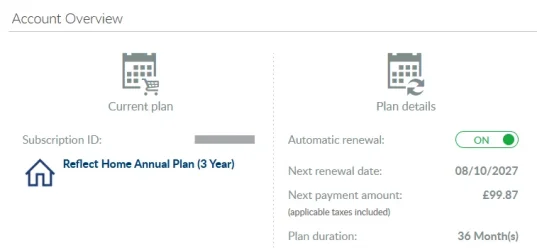
It's a 3-year subscription, currently set to auto-renew for a further 3 years. So for six year's use it will cost me a touch under £100, or £16.65 a year.

1758920393618.webp

However loyalty offers may mean I pay less (according to their initial offer).

Macrium said:
Trade in (your existing license will be deactivated after your new license is activated) your one-time license ... and receive a 3-year Annual Plan at no extra cost. Macrium may make loyalty offers available at the end of your 3-year term.
 

My Computers My Computers

  • At a glance

    Windows 11 HomeAMD Athlon Silver 3050U8GBRadeon Graphics
    OS
    Windows 11 Home
    Computer type
    Laptop
    Manufacturer/Model
    Acer Aspire 3 A315-23-R9VY
    CPU
    AMD Athlon Silver 3050U
    Memory
    8GB
    Graphics Card(s)
    Radeon Graphics
    Monitor(s) Displays
    laptop screen
    Screen Resolution
    1366x768 native resolution, up to 2560x1440 with Radeon Virtual Super Resolution
    Hard Drives
    1TB Samsung EVO 870 SSD (from April 2026: 250GB EVO 850)
    Internet Speed
    150 Mbps
    Browser
    Edge, Firefox
    Antivirus
    Defender
    Other Info
    fully 'Windows 11 ready' laptop. Windows 10 C: partition migrated from my old unsupported 'main machine' then upgraded to 11. A test migration ran Insider builds for 2 months. When 11 was released on 5th October 2021 it was re-imaged back to 10 and was offered the upgrade in Windows Update on 20th October. Windows Update offered the 22H2 Feature Update on 20th September 2022. It got the 23H2 Feature Update on 4th November 2023 through Windows Update, 24H2 on 3rd October 2024 through Windows Update by setting the Target Release Version for 24H2, and 25H2 on 30th September 2025 through Windows Update by setting the Target Release Version for 25H2.

    UPDATE - 11 April 2026: due to mechanical deterioration this PC has been retired from active duty. The OS with all software and files has been migrated to my System Seven in 'Other systems' to carry on as my general purpose 'main machine'.
  • At a glance

    Windows 11 ProIntel® Core™ i5-520M8GB(integrated graphics) Intel HD Graphics
    Operating System
    Windows 11 Pro
    Computer type
    Laptop
    Manufacturer/Model
    Dell Latitude E4310
    CPU
    Intel® Core™ i5-520M
    Motherboard
    0T6M8G
    Memory
    8GB
    Graphics card(s)
    (integrated graphics) Intel HD Graphics
    Screen Resolution
    1366x768
    Hard Drives
    500GB Crucial MX500 SSD
    Browser
    Firefox, Edge
    Antivirus
    Defender
    Other Info
    unsupported machine: Legacy bios, MBR, TPM 1.2, upgraded from W10 to W11 using W10/W11 hybrid install media workaround.

    In-place upgrade to 22H2 using ISO and a workaround.
    Feature Update to 23H2 by manually installing the Enablement Package.
    In-place upgrade to 24H2 using hybrid 23H2/24H2 install media.
    Upgraded to 25H2 by Enablement Package.

    Also running Insider Dev, and Canary builds and Windows 10 as native boot .vhdx.
  • My SYSTEM THREE is a Dell Latitude 5410, i7-10610U, 32GB RAM, 512GB NVMe ssd, supported device running Windows 11 Pro.

    My SYSTEM FOUR is a 2-in-1 convertible Lenovo Yoga 11e 20DA, Celeron N2930, 8GB RAM, 256GB ssd. Unsupported device: currently running Win10 Pro, plus Win11 Pro RTM and Insider Dev, Beta, and RP 24H2 as native boot vhdx.

    My SYSTEM FIVE is a Dell Latitude 3190 2-in-1, Pentium Silver N5030, 8GB RAM, 1TB NVMe ssd, supported device running Windows 11 Pro, plus Insider Beta, Dev, and Canary builds (and a few others) as a native boot .vhdx.

    My SYSTEM SIX is a Dell Latitude 5550, Core Ultra 7 165H, 64GB RAM, 1TB NVMe SSD, supported device, Windows 11 Pro 24H2, Hyper-V host machine. Updated to 25H2 on 30th September 2025.

    My SYSTEM SEVEN is a Lenovo Thinkpad T580, Intel Core i7-8650U, 16GB RAM, 512GB NVMe SSD + 2nd 512GB NVMe SSD, a supported device for Windows 11. This is my current general purpose 'main machine'. The installed Windows 11 Home from my System One has been migrated to this machine.
I'm inclined to get the 50% off deal for £18.49 a year for my main desktop PC. I still have v8 licences for two other laptops I could use if necessary. Do others agree with Brink that the old v8 licence still works after the trade in? Did anyone get a better deal last Black Friday than the trade in to Reflect X for £18.49 a year?
 

My Computer My Computer

At a glance

Windows 11 ProCore i7-13700K64 GB Kingston Fury Beast DDR5Gigabyte GeForce RTX 2060 Super Gaming OC 8G
OS
Windows 11 Pro
Computer type
PC/Desktop
Manufacturer/Model
Self build
CPU
Core i7-13700K
Motherboard
Asus TUF Gaming Plus WiFi Z790
Memory
64 GB Kingston Fury Beast DDR5
Graphics Card(s)
Gigabyte GeForce RTX 2060 Super Gaming OC 8G
Sound Card
Realtek S1200A
Monitor(s) Displays
Viewsonic VP2770 & Dell (secondary)
Screen Resolution
2560 x 1440
Hard Drives
Kingston KC3000 2TB NVME SSD & SATA HDDs & SSD
PSU
EVGA SuperNova G2 850W
Case
Nanoxia Deep Silence 1
Cooling
Noctua NH-D14
Keyboard
Microsoft Digital Media Pro
Mouse
Logitech Wireless
Internet Speed
80 Mb / s
Browser
Chrome
Antivirus
Defender, Malwarebytes Free & AdwCleaner
I'm inclined to get the 50% off deal for £18.49 a year for my main desktop PC. I still have v8 licences for two other laptops I could use if necessary. Do others agree with Brink that the old v8 licence still works after the trade in? Did anyone get a better deal last Black Friday than the trade in to Reflect X for £18.49 a year?
The old v8 licence gets revoked after it is traded in. It is no longer even listed on my Macrium Reflect account.

I would imagine the usb winpe version would still work but why bother?
 

My Computer My Computer

At a glance

Windows 11 Pro + Win11 Canary VM.I9 13th gen i9-13900H 2.60 GHZ16 GB solderedIntegrated Intel Iris XE
OS
Windows 11 Pro + Win11 Canary VM.
Computer type
Laptop
Manufacturer/Model
ASUS Zenbook 14
CPU
I9 13th gen i9-13900H 2.60 GHZ
Motherboard
Yep, Laptop has one.
Memory
16 GB soldered
Graphics Card(s)
Integrated Intel Iris XE
Sound Card
Realtek built in
Monitor(s) Displays
laptop OLED screen
Screen Resolution
2880x1800 touchscreen
Hard Drives
1 TB NVME SSD (only weakness is only one slot)
PSU
Internal + 65W thunderbolt USB4 charger
Case
Yep, got one
Cooling
Stella Artois (UK pint cans - 568 ml) - extra cost.
Keyboard
Built in UK keybd
Mouse
Bluetooth , wireless dongled, wired
Internet Speed
900 mbs (ethernet), wifi 6 typical 350-450 mb/s both up and down
Browser
Edge
Antivirus
Defender
Other Info
TPM 2.0, 2xUSB4 thunderbolt, 1xUsb3 (usb a), 1xUsb-c, hdmi out, 3.5 mm audio out/in combo, ASUS backlit trackpad (inc. switchable number pad)

Macrium Reflect Home V8
Office 365 Family (6 users each 1TB onedrive space)
Hyper-V (a vm runs almost as fast as my older laptop)
I'm inclined to get the 50% off deal for £18.49 a year for my main desktop PC. I still have v8 licences for two other laptops I could use if necessary. Do others agree with Brink that the old v8 licence still works after the trade in?
For the "50% off for life" deal, no. The v8 licence only remains active for the "buy 3 years for the price of 2" offer (no licence trade-in required).

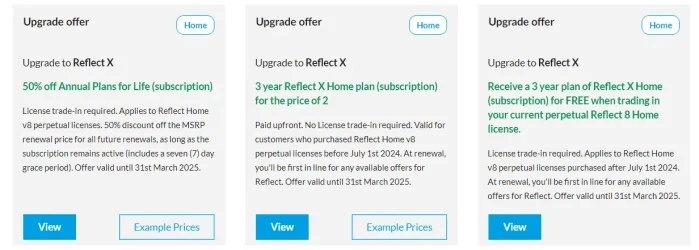
This is what I see in my Macrium account:
(Your offers may not include all of these. I have a full set of offers as I purchased v8 licences both before and after July 1st 2024)

1759656781796.webp

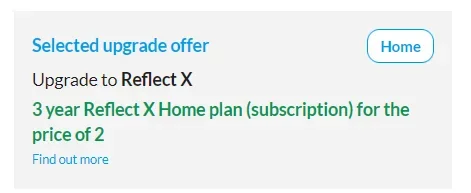
Despite saying 'Offer valid until 31st March 2025' it seems I can still click through and select any of my offers.

1759656856295.webp1759656811487.webp1759656909277.webp
 
Last edited:

My Computers My Computers

  • At a glance

    Windows 11 HomeAMD Athlon Silver 3050U8GBRadeon Graphics
    OS
    Windows 11 Home
    Computer type
    Laptop
    Manufacturer/Model
    Acer Aspire 3 A315-23-R9VY
    CPU
    AMD Athlon Silver 3050U
    Memory
    8GB
    Graphics Card(s)
    Radeon Graphics
    Monitor(s) Displays
    laptop screen
    Screen Resolution
    1366x768 native resolution, up to 2560x1440 with Radeon Virtual Super Resolution
    Hard Drives
    1TB Samsung EVO 870 SSD (from April 2026: 250GB EVO 850)
    Internet Speed
    150 Mbps
    Browser
    Edge, Firefox
    Antivirus
    Defender
    Other Info
    fully 'Windows 11 ready' laptop. Windows 10 C: partition migrated from my old unsupported 'main machine' then upgraded to 11. A test migration ran Insider builds for 2 months. When 11 was released on 5th October 2021 it was re-imaged back to 10 and was offered the upgrade in Windows Update on 20th October. Windows Update offered the 22H2 Feature Update on 20th September 2022. It got the 23H2 Feature Update on 4th November 2023 through Windows Update, 24H2 on 3rd October 2024 through Windows Update by setting the Target Release Version for 24H2, and 25H2 on 30th September 2025 through Windows Update by setting the Target Release Version for 25H2.

    UPDATE - 11 April 2026: due to mechanical deterioration this PC has been retired from active duty. The OS with all software and files has been migrated to my System Seven in 'Other systems' to carry on as my general purpose 'main machine'.
  • At a glance

    Windows 11 ProIntel® Core™ i5-520M8GB(integrated graphics) Intel HD Graphics
    Operating System
    Windows 11 Pro
    Computer type
    Laptop
    Manufacturer/Model
    Dell Latitude E4310
    CPU
    Intel® Core™ i5-520M
    Motherboard
    0T6M8G
    Memory
    8GB
    Graphics card(s)
    (integrated graphics) Intel HD Graphics
    Screen Resolution
    1366x768
    Hard Drives
    500GB Crucial MX500 SSD
    Browser
    Firefox, Edge
    Antivirus
    Defender
    Other Info
    unsupported machine: Legacy bios, MBR, TPM 1.2, upgraded from W10 to W11 using W10/W11 hybrid install media workaround.

    In-place upgrade to 22H2 using ISO and a workaround.
    Feature Update to 23H2 by manually installing the Enablement Package.
    In-place upgrade to 24H2 using hybrid 23H2/24H2 install media.
    Upgraded to 25H2 by Enablement Package.

    Also running Insider Dev, and Canary builds and Windows 10 as native boot .vhdx.
  • My SYSTEM THREE is a Dell Latitude 5410, i7-10610U, 32GB RAM, 512GB NVMe ssd, supported device running Windows 11 Pro.

    My SYSTEM FOUR is a 2-in-1 convertible Lenovo Yoga 11e 20DA, Celeron N2930, 8GB RAM, 256GB ssd. Unsupported device: currently running Win10 Pro, plus Win11 Pro RTM and Insider Dev, Beta, and RP 24H2 as native boot vhdx.

    My SYSTEM FIVE is a Dell Latitude 3190 2-in-1, Pentium Silver N5030, 8GB RAM, 1TB NVMe ssd, supported device running Windows 11 Pro, plus Insider Beta, Dev, and Canary builds (and a few others) as a native boot .vhdx.

    My SYSTEM SIX is a Dell Latitude 5550, Core Ultra 7 165H, 64GB RAM, 1TB NVMe SSD, supported device, Windows 11 Pro 24H2, Hyper-V host machine. Updated to 25H2 on 30th September 2025.

    My SYSTEM SEVEN is a Lenovo Thinkpad T580, Intel Core i7-8650U, 16GB RAM, 512GB NVMe SSD + 2nd 512GB NVMe SSD, a supported device for Windows 11. This is my current general purpose 'main machine'. The installed Windows 11 Home from my System One has been migrated to this machine.
Thanks to all. I traded in the v8 licence for X. Upgrading from within v8 failed though. An update file was downloaded then nothing happened so I ran the full X installer.
 

My Computer My Computer

At a glance

Windows 11 ProCore i7-13700K64 GB Kingston Fury Beast DDR5Gigabyte GeForce RTX 2060 Super Gaming OC 8G
OS
Windows 11 Pro
Computer type
PC/Desktop
Manufacturer/Model
Self build
CPU
Core i7-13700K
Motherboard
Asus TUF Gaming Plus WiFi Z790
Memory
64 GB Kingston Fury Beast DDR5
Graphics Card(s)
Gigabyte GeForce RTX 2060 Super Gaming OC 8G
Sound Card
Realtek S1200A
Monitor(s) Displays
Viewsonic VP2770 & Dell (secondary)
Screen Resolution
2560 x 1440
Hard Drives
Kingston KC3000 2TB NVME SSD & SATA HDDs & SSD
PSU
EVGA SuperNova G2 850W
Case
Nanoxia Deep Silence 1
Cooling
Noctua NH-D14
Keyboard
Microsoft Digital Media Pro
Mouse
Logitech Wireless
Internet Speed
80 Mb / s
Browser
Chrome
Antivirus
Defender, Malwarebytes Free & AdwCleaner
Back
Top Bottom