REG QUERY help needed


Mark K

Well-known member
Member
Local time
4:39 AM
Posts
457
OS
Windows 11 Pro
I am trying to narrow down the device and try to identify the device causing this error in Windows 11:

Universal Serial Bus controllers
<!> Unknown USB Device (Device Descriptor Requested Failed)

According to Microsoft instructions I have found, I need to search the registry and remove all instances of the GUID entries:

Unknown USB Device (Device Descriptor Request Failed)

Information
Device settings for USB\VID_0000&PID_0002\5&35b6156a&0&7 were migrated from previous OS installation.

Note: I cannot identify this USB device using USB ID Database.

Last Device Instance ID: USB\VID_0000&PID_0002\5&35b6156a&0&7
Class GUID: {36fc9e60-c465-11cf-8056-444553540000}
Location Path:
Migration Rank: 0x0
Present: true

I haven't used REG QUERY command hardly at all as I am used to working in the registry. Searching the GUID finds many entries. I would like to run a REG QUERY to save all locations of the GUID is found, then run REG DELETE on the same query to remove those entries (per Microsoft's instructions). I cannot post this link this article because you need to log in to find this article.

I have the registry already backed up including the system in case it longer boots up, which I expect. This is mostly to identify the [ghost] USB device in the registry. The USB ports on the system work fine, no problem. Even tested the USB ports on the same system through Linux and no errors. Thus Windows 11 23H2/24H2 somehow created this "Unknown USB Device (Device Descriptor Request Failed)" entry. Just some of my in-depth troubleshooting that will probably lead me without an answer still, but I have been working on this for some time. I think Windows 11 update created a ghost USB device during an update and did not remove it. I have about 10+ registry entries already manually exported in trying to identify the device by driver, etc. I hope to figure this out. So far I think this is a false-positive hardware failure indication in Windows 11.
 
Windows Build/Version
Windows 11 Pro 26100.2605

My Computers My Computers

  • At a glance

    Windows 11 ProAMD Ryzen AI 7 350 w/ Radeon 860M 50 TOPS32GB LPDDR5X 7500 MT/sAMD Radeon 860M integrated (shared memory)
    OS
    Windows 11 Pro
    Computer type
    Laptop
    Manufacturer/Model
    Dell 16 Plus DB16255
    CPU
    AMD Ryzen AI 7 350 w/ Radeon 860M 50 TOPS
    Motherboard
    Dell 0PKMHG
    Memory
    32GB LPDDR5X 7500 MT/s
    Graphics Card(s)
    AMD Radeon 860M integrated (shared memory)
    Sound Card
    Stereo speakers (2.5 W x 2 = 5 W total peak)/Realtek SounzReal/Dolby Atmos
    Monitor(s) Displays
    Displays: 16" 1920 x 1200 (Full HD+/WUXGA) 300 nits 60Hz *** Samsung - 27” Odyssey FHD IPS 240Hz G-Sync Gaming Monitor
    Screen Resolution
    1920x1080 @ 60Hz
    Hard Drives
    EG6 KIOXIA 1TB NVME
    Case
    Ice Blue
    Cooling
    "dual-fan" or "enhanced" air-cooling system
    Mouse
    Logitech M650 Wireless/Bluetooth
    Internet Speed
    800/600 Fiber
  • Computer type
    Laptop
Hey there, sorry to hear you're having this issue.

I ran into this myself with my system, a bit older than yours but still AMD fam. I'm trying to remember exactly what I did to make it go away, but I had a failed USB device that would arbitrarily show, and I think I narrowed it down to my combo Wi-Fi / BT card, because it was branded a Killer (Rivet Networks) device before Intel bought them out, and the transition period for Intel releasing Killer drivers gave my computer massive headaches for a couple of years. It really was death by 1000 papercuts in trying to figure it out.

I have a suggestion that will make it easier for you to do this, though it is not a scripted method to delete them all - but, with all the registry modifications I've done over many years, I honestly don't like scripted mass deletions anyway.

For the registry, I use an old (but still really worth its 'weight' in gold) tool called RegEditX by David Ching, RegEditX - Extend REGEDIT which includes the fantastic side application RegCrawler that should let you do it more manually, but it provides you with a full list of your search terms, not single instances.

Screenshot 2024-12-25 142534.webp

Screenshot 2024-12-25 142608.webp

For example, search my system for that GUID in RegCrawler shows this:

Screenshot 2024-12-25 142732.webp

With each instance that is found, you can click on the entry and it will open the key back in RegEditX:

Screenshot 2024-12-25 142819.webp

But, with each instance found, you can also delete it right there:

Screenshot 2024-12-25 143238.webp

Additionally, your searches are saved in the drop down box so even if you accidentally close it (either just RegCrawler, or the entire RegEditX program), open it back up and select it from the drop down and away you go.

Like I said, it's not a scripted pick all and delete - but there is a trick you can use to make it faster. If you select a key while holding the [CTRL] button on your keyboard, you can select multiple keys (just don't select a key by clicking the blue hyper-linked part) and then delete them all at once.

I am sure there is probably a tool that can do this a bit more easily (I'm thinking the alpha toll from BitSum, RegCoolX64, might be of some help there, but I cannot get it to start on my Windows 11 24H2 system for some reason, and will have to explore that). ISTR that it has the ability to search the hives directly, as well, and has the added bonus of allowing you to select keys using checkboxes, allowing for multiple deletion in a single click.

RegEditX has a 30 day trial, and while I do not think it is limited in any way (I bought this a long, long time ago, so I've forgotten), currently his payment processor is not working, and he has posted an Enterprise level key that is good until 1 Jan 2025, or basically the next week, so you can use that if there are any limitations.

Best $10 I've ever spent in my life. I HTH and hope this works for you.
 

My Computers My Computers

  • At a glance

    Windows 11 23H2 Current buildAMD Ryzen 9 3950X4 * 32 GB - Corsair Vengeance 3600 MHzEVGA GeForce RTX 3080 Ti XC3 ULTRA GAMING (12...
    OS
    Windows 11 23H2 Current build
    Computer type
    PC/Desktop
    Manufacturer/Model
    HomeBrew
    CPU
    AMD Ryzen 9 3950X
    Motherboard
    MSI MEG X570 GODLIKE
    Memory
    4 * 32 GB - Corsair Vengeance 3600 MHz
    Graphics Card(s)
    EVGA GeForce RTX 3080 Ti XC3 ULTRA GAMING (12G-P5-3955-KR)
    Sound Card
    Realtek® ALC1220 Codec
    Monitor(s) Displays
    2x Eve Spectrum ES07D03 4K Gaming Monitor (Matte) | Eve Spectrum ES07DC9 4K Gaming Monitor (Glossy)
    Screen Resolution
    3x 3840 x 2160
    Hard Drives
    3x Samsung 980 Pro NVMe PCIe 4 M.2 2 TB SSD (MZ-V8P2T0B/AM) } 3x Sabrent Rocket NVMe 4.0 1 TB SSD (USB)
    PSU
    PC Power & Cooling’s Silencer Series 1050 Watt, 80 Plus Platinum
    Case
    Fractal Design Define 7 XL Dark ATX Full Tower Case
    Cooling
    Arctic Liquid Freezer III 420 RGB + Air 3x 140mm case fans (pull front) + 1x 120 mm (push back) and 1 x 120 mm (pull bottom)
    Keyboard
    SteelSeries Apex Pro Wired Gaming Keyboard
    Mouse
    Logitech MX Master 3S | MX Master 3 for Business
    Internet Speed
    AT&T LightSpeed Gigabit Duplex Ftth
    Browser
    Nightly (default) + Firefox (stable), Chrome, Edge , Arc
    Antivirus
    Defender + MB 5 Beta
  • At a glance

    ChromeOS Flex Dev Channel (current)Intel(R) Core(TM) i5-6300U CPU @ 2.40GHz, 250...16 GBIntel(R) HD Graphics 520
    Operating System
    ChromeOS Flex Dev Channel (current)
    Computer type
    Laptop
    Manufacturer/Model
    Dell Latitude E5470
    CPU
    Intel(R) Core(TM) i5-6300U CPU @ 2.40GHz, 2501 Mhz, 2 Core(s), 4 Logical Processor(s)
    Motherboard
    Dell
    Memory
    16 GB
    Graphics card(s)
    Intel(R) HD Graphics 520
    Sound Card
    Intel(R) HD Graphics 520 + RealTek Audio
    Monitor(s) Displays
    Dell laptop display 15"
    Screen Resolution
    1920 * 1080
    Hard Drives
    Toshiba 128GB M.2 22300 drive
    INTEL Cherryville 520 Series SSDSC2CW180A 180 GB SATA III SSD
    PSU
    Dell
    Case
    Dell
    Cooling
    Dell
    Keyboard
    Dell
    Mouse
    Logitech MX Master 3S (shared w. Sys 1) | Dell TouchPad
    Internet Speed
    AT&T LightSpeed Gigabit Duplex Ftth
One other thing that might help even if you don't got the RegEditX route is clearing old drivers from the driverstore, using


Great little app for removing old, unused drivers from a simple interface. Also highly recommended, and may help with your issues - especially if it reports multiple Intel BT drivers that are 'old' but actually same as current versions - do not delete those, I think that was part of the key to solving my own issues.
 

My Computers My Computers

  • At a glance

    Windows 11 23H2 Current buildAMD Ryzen 9 3950X4 * 32 GB - Corsair Vengeance 3600 MHzEVGA GeForce RTX 3080 Ti XC3 ULTRA GAMING (12...
    OS
    Windows 11 23H2 Current build
    Computer type
    PC/Desktop
    Manufacturer/Model
    HomeBrew
    CPU
    AMD Ryzen 9 3950X
    Motherboard
    MSI MEG X570 GODLIKE
    Memory
    4 * 32 GB - Corsair Vengeance 3600 MHz
    Graphics Card(s)
    EVGA GeForce RTX 3080 Ti XC3 ULTRA GAMING (12G-P5-3955-KR)
    Sound Card
    Realtek® ALC1220 Codec
    Monitor(s) Displays
    2x Eve Spectrum ES07D03 4K Gaming Monitor (Matte) | Eve Spectrum ES07DC9 4K Gaming Monitor (Glossy)
    Screen Resolution
    3x 3840 x 2160
    Hard Drives
    3x Samsung 980 Pro NVMe PCIe 4 M.2 2 TB SSD (MZ-V8P2T0B/AM) } 3x Sabrent Rocket NVMe 4.0 1 TB SSD (USB)
    PSU
    PC Power & Cooling’s Silencer Series 1050 Watt, 80 Plus Platinum
    Case
    Fractal Design Define 7 XL Dark ATX Full Tower Case
    Cooling
    Arctic Liquid Freezer III 420 RGB + Air 3x 140mm case fans (pull front) + 1x 120 mm (push back) and 1 x 120 mm (pull bottom)
    Keyboard
    SteelSeries Apex Pro Wired Gaming Keyboard
    Mouse
    Logitech MX Master 3S | MX Master 3 for Business
    Internet Speed
    AT&T LightSpeed Gigabit Duplex Ftth
    Browser
    Nightly (default) + Firefox (stable), Chrome, Edge , Arc
    Antivirus
    Defender + MB 5 Beta
  • At a glance

    ChromeOS Flex Dev Channel (current)Intel(R) Core(TM) i5-6300U CPU @ 2.40GHz, 250...16 GBIntel(R) HD Graphics 520
    Operating System
    ChromeOS Flex Dev Channel (current)
    Computer type
    Laptop
    Manufacturer/Model
    Dell Latitude E5470
    CPU
    Intel(R) Core(TM) i5-6300U CPU @ 2.40GHz, 2501 Mhz, 2 Core(s), 4 Logical Processor(s)
    Motherboard
    Dell
    Memory
    16 GB
    Graphics card(s)
    Intel(R) HD Graphics 520
    Sound Card
    Intel(R) HD Graphics 520 + RealTek Audio
    Monitor(s) Displays
    Dell laptop display 15"
    Screen Resolution
    1920 * 1080
    Hard Drives
    Toshiba 128GB M.2 22300 drive
    INTEL Cherryville 520 Series SSDSC2CW180A 180 GB SATA III SSD
    PSU
    Dell
    Case
    Dell
    Cooling
    Dell
    Keyboard
    Dell
    Mouse
    Logitech MX Master 3S (shared w. Sys 1) | Dell TouchPad
    Internet Speed
    AT&T LightSpeed Gigabit Duplex Ftth
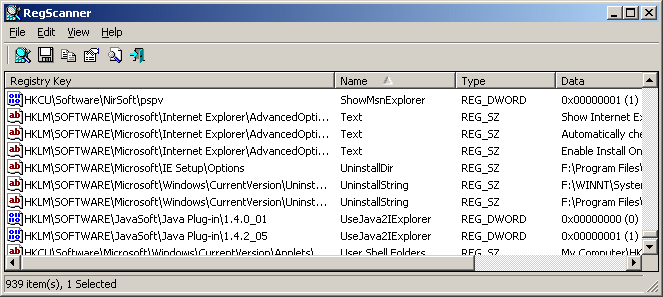
you can search with nir sofers little portable regscanner can then export results, delete, create regdelete file etc


you could also run this and see if it reveals anything relevant


USBDeview is a small utility that lists all USB devices that currently connected to your computer, as well asall USB devices that you previously used.
For each USB device, extended information is displayed: Device name/description, device type, serial number(for mass storage devices), the date/time that device was added, VendorID, ProductID, and more...
USBDeview also allows you to uninstall USB devices that you previously used, disconnect USB devices that are currently connected to your computer, as well as to disable and enable USB devices.
You can also use USBDeview on a remote computer, as long as you login to that computer with admin user.
 
Last edited:

My Computers My Computers

  • At a glance

    Win7,Win11i7-97002x16gb 3600mhz
    OS
    Win7,Win11
    Computer type
    PC/Desktop
    CPU
    i7-9700
    Motherboard
    gigabyte b365m ds3h
    Memory
    2x16gb 3600mhz
    Monitor(s) Displays
    benq gw2480
    PSU
    bequiet pure power 11 400CM
    Cooling
    cryorig m9i
  • At a glance

    win7,win11i5-84002x8gb 3200
    Operating System
    win7,win11
    Computer type
    PC/Desktop
    CPU
    i5-8400
    Motherboard
    gigabyte b365m ds3h
    Memory
    2x8gb 3200
    PSU
    xfx pro 450
Please run the V2 log collector > post a share link


Run:


Example:
Code:
Port_#0005.Hub_#0003    Unknown USB Device (Device Descriptor Request Failed)    Unknown    No    No    No    No            11/11/2024 3:01:19 PM    11/11/2024 3:01:19 PM    0000    0002    0.00        00    00    00        DESKTOP-9HEBUKS                                (Standard USB Host Controller)                Unknown USB Device (Device Descriptor Request Failed)    10.0.19041.4474    BADDEVICE.Dev.NT    usb.inf    USB\VID_0000&PID_0002\5&140ed9e3&0&5    SilentInstall, RawDeviceOK
 

My Computer My Computer

At a glance

Windows 10Intel(R) Core(TM) i7-4800MQ CPU @ 2.70GHz16 GB Total: Manufacturer : Samsung MemoryTyp...NVIDIA Quadro K3100M; Intel(R) HD Graphics 4600
OS
Windows 10
Computer type
Laptop
Manufacturer/Model
HP
CPU
Intel(R) Core(TM) i7-4800MQ CPU @ 2.70GHz
Motherboard
Product : 190A Version : KBC Version 94.56
Memory
16 GB Total: Manufacturer : Samsung MemoryType : DDR3 FormFactor : SODIMM Capacity : 8GB Speed : 1600
Graphics Card(s)
NVIDIA Quadro K3100M; Intel(R) HD Graphics 4600
Sound Card
IDT High Definition Audio CODEC; PNP Device ID HDAUDIO\FUNC_01&VEN_111D&DEV_76E0
Hard Drives
Model Hitachi HTS727575A9E364
Antivirus
Microsoft Defender
Other Info
Mobile Workstation
Hey there, sorry to hear you're having this issue.

I ran into this myself with my system, a bit older than yours but still AMD fam. I'm trying to remember exactly what I did to make it go away, but I had a failed USB device that would arbitrarily show, and I think I narrowed it down to my combo Wi-Fi / BT card, because it was branded a Killer (Rivet Networks) device before Intel bought them out, and the transition period for Intel releasing Killer drivers gave my computer massive headaches for a couple of years. It really was death by 1000 papercuts in trying to figure it out.

I have a suggestion that will make it easier for you to do this, though it is not a scripted method to delete them all - but, with all the registry modifications I've done over many years, I honestly don't like scripted mass deletions anyway.

For the registry, I use an old (but still really worth its 'weight' in gold) tool called RegEditX by David Ching, RegEditX - Extend REGEDIT which includes the fantastic side application RegCrawler that should let you do it more manually, but it provides you with a full list of your search terms, not single instances.

View attachment 120321

View attachment 120322

For example, search my system for that GUID in RegCrawler shows this:

View attachment 120323

With each instance that is found, you can click on the entry and it will open the key back in RegEditX:

View attachment 120324

But, with each instance found, you can also delete it right there:

View attachment 120326

Additionally, your searches are saved in the drop down box so even if you accidentally close it (either just RegCrawler, or the entire RegEditX program), open it back up and select it from the drop down and away you go.

Like I said, it's not a scripted pick all and delete - but there is a trick you can use to make it faster. If you select a key while holding the [CTRL] button on your keyboard, you can select multiple keys (just don't select a key by clicking the blue hyper-linked part) and then delete them all at once.

I am sure there is probably a tool that can do this a bit more easily (I'm thinking the alpha toll from BitSum, RegCoolX64, might be of some help there, but I cannot get it to start on my Windows 11 24H2 system for some reason, and will have to explore that). ISTR that it has the ability to search the hives directly, as well, and has the added bonus of allowing you to select keys using checkboxes, allowing for multiple deletion in a single click.

RegEditX has a 30 day trial, and while I do not think it is limited in any way (I bought this a long, long time ago, so I've forgotten), currently his payment processor is not working, and he has posted an Enterprise level key that is good until 1 Jan 2025, or basically the next week, so you can use that if there are any limitations.

Best $10 I've ever spent in my life. I HTH and hope this works for you.
Thank you for the detailed response.

I ran the DriverStore Explorer and removed old drivers, this made no difference. The Unknown USB device is the only items showing now.

I then tried RegEditX - Extend REGEDIT and deleted 80 of the 89 entries found for the GUID. The Unknown USB device is the only items showing now.

These are great utilities to use in Windows 11. Unfortunately that stubborn Unknown USB device still shows in Device Manager.
 

My Computers My Computers

  • At a glance

    Windows 11 ProAMD Ryzen AI 7 350 w/ Radeon 860M 50 TOPS32GB LPDDR5X 7500 MT/sAMD Radeon 860M integrated (shared memory)
    OS
    Windows 11 Pro
    Computer type
    Laptop
    Manufacturer/Model
    Dell 16 Plus DB16255
    CPU
    AMD Ryzen AI 7 350 w/ Radeon 860M 50 TOPS
    Motherboard
    Dell 0PKMHG
    Memory
    32GB LPDDR5X 7500 MT/s
    Graphics Card(s)
    AMD Radeon 860M integrated (shared memory)
    Sound Card
    Stereo speakers (2.5 W x 2 = 5 W total peak)/Realtek SounzReal/Dolby Atmos
    Monitor(s) Displays
    Displays: 16" 1920 x 1200 (Full HD+/WUXGA) 300 nits 60Hz *** Samsung - 27” Odyssey FHD IPS 240Hz G-Sync Gaming Monitor
    Screen Resolution
    1920x1080 @ 60Hz
    Hard Drives
    EG6 KIOXIA 1TB NVME
    Case
    Ice Blue
    Cooling
    "dual-fan" or "enhanced" air-cooling system
    Mouse
    Logitech M650 Wireless/Bluetooth
    Internet Speed
    800/600 Fiber
  • Computer type
    Laptop
you could also run this and see if it reveals anything relevant


Since I already used RegEditX on the registry and removed those entries already, I did not try the registry again. Thx.

I ran USBDeview and found a little more information on this device, but not much:
Code:
Port_#0007.Hub_#0002    Unknown USB Device (Device Descriptor Request Failed)    Unknown    Yes    No    No    No            12/25/2024 3:38:52 PM    12/25/2024 3:38:52 PM    0000    0002    0.00        00    00    00        ****LAPTOP                                (Standard USB Host Controller)                Unknown USB Device (Device Descriptor Request Failed)    10.0.26100.1882    BADDEVICE.Dev.NT    usb.inf    USB\VID_0000&PID_0002\5&35b6156a&0&7    SilentInstall, RawDeviceOK    12/25/2024 3:38:52 PM    12/25/2024 3:38:52 PM    12/25/2024 3:38:55 PM

Still a mystery.
 

My Computers My Computers

  • At a glance

    Windows 11 ProAMD Ryzen AI 7 350 w/ Radeon 860M 50 TOPS32GB LPDDR5X 7500 MT/sAMD Radeon 860M integrated (shared memory)
    OS
    Windows 11 Pro
    Computer type
    Laptop
    Manufacturer/Model
    Dell 16 Plus DB16255
    CPU
    AMD Ryzen AI 7 350 w/ Radeon 860M 50 TOPS
    Motherboard
    Dell 0PKMHG
    Memory
    32GB LPDDR5X 7500 MT/s
    Graphics Card(s)
    AMD Radeon 860M integrated (shared memory)
    Sound Card
    Stereo speakers (2.5 W x 2 = 5 W total peak)/Realtek SounzReal/Dolby Atmos
    Monitor(s) Displays
    Displays: 16" 1920 x 1200 (Full HD+/WUXGA) 300 nits 60Hz *** Samsung - 27” Odyssey FHD IPS 240Hz G-Sync Gaming Monitor
    Screen Resolution
    1920x1080 @ 60Hz
    Hard Drives
    EG6 KIOXIA 1TB NVME
    Case
    Ice Blue
    Cooling
    "dual-fan" or "enhanced" air-cooling system
    Mouse
    Logitech M650 Wireless/Bluetooth
    Internet Speed
    800/600 Fiber
  • Computer type
    Laptop
Please run the V2 log collector > post a share link

I am not receiving any BSODs, just the Unknown USB device in Device Manager.
 

My Computers My Computers

  • At a glance

    Windows 11 ProAMD Ryzen AI 7 350 w/ Radeon 860M 50 TOPS32GB LPDDR5X 7500 MT/sAMD Radeon 860M integrated (shared memory)
    OS
    Windows 11 Pro
    Computer type
    Laptop
    Manufacturer/Model
    Dell 16 Plus DB16255
    CPU
    AMD Ryzen AI 7 350 w/ Radeon 860M 50 TOPS
    Motherboard
    Dell 0PKMHG
    Memory
    32GB LPDDR5X 7500 MT/s
    Graphics Card(s)
    AMD Radeon 860M integrated (shared memory)
    Sound Card
    Stereo speakers (2.5 W x 2 = 5 W total peak)/Realtek SounzReal/Dolby Atmos
    Monitor(s) Displays
    Displays: 16" 1920 x 1200 (Full HD+/WUXGA) 300 nits 60Hz *** Samsung - 27” Odyssey FHD IPS 240Hz G-Sync Gaming Monitor
    Screen Resolution
    1920x1080 @ 60Hz
    Hard Drives
    EG6 KIOXIA 1TB NVME
    Case
    Ice Blue
    Cooling
    "dual-fan" or "enhanced" air-cooling system
    Mouse
    Logitech M650 Wireless/Bluetooth
    Internet Speed
    800/600 Fiber
  • Computer type
    Laptop
The V2 log collector required a name.


The name used for the log collector does not impact its ability to collect files for troubleshooting.
 

My Computer My Computer

At a glance

Windows 10Intel(R) Core(TM) i7-4800MQ CPU @ 2.70GHz16 GB Total: Manufacturer : Samsung MemoryTyp...NVIDIA Quadro K3100M; Intel(R) HD Graphics 4600
OS
Windows 10
Computer type
Laptop
Manufacturer/Model
HP
CPU
Intel(R) Core(TM) i7-4800MQ CPU @ 2.70GHz
Motherboard
Product : 190A Version : KBC Version 94.56
Memory
16 GB Total: Manufacturer : Samsung MemoryType : DDR3 FormFactor : SODIMM Capacity : 8GB Speed : 1600
Graphics Card(s)
NVIDIA Quadro K3100M; Intel(R) HD Graphics 4600
Sound Card
IDT High Definition Audio CODEC; PNP Device ID HDAUDIO\FUNC_01&VEN_111D&DEV_76E0
Hard Drives
Model Hitachi HTS727575A9E364
Antivirus
Microsoft Defender
Other Info
Mobile Workstation
Yeah, that log collector is very detailed, and can possibly help you narrow down which actual device is failing (if any). Won't hurt to try.

Also, out of curiosity - has Windows recently updated any drivers on your machine? If so, maybe go to the OEM site for the device / your machine and force install the current driver for that same device that Windows updated.
 

My Computers My Computers

  • At a glance

    Windows 11 23H2 Current buildAMD Ryzen 9 3950X4 * 32 GB - Corsair Vengeance 3600 MHzEVGA GeForce RTX 3080 Ti XC3 ULTRA GAMING (12...
    OS
    Windows 11 23H2 Current build
    Computer type
    PC/Desktop
    Manufacturer/Model
    HomeBrew
    CPU
    AMD Ryzen 9 3950X
    Motherboard
    MSI MEG X570 GODLIKE
    Memory
    4 * 32 GB - Corsair Vengeance 3600 MHz
    Graphics Card(s)
    EVGA GeForce RTX 3080 Ti XC3 ULTRA GAMING (12G-P5-3955-KR)
    Sound Card
    Realtek® ALC1220 Codec
    Monitor(s) Displays
    2x Eve Spectrum ES07D03 4K Gaming Monitor (Matte) | Eve Spectrum ES07DC9 4K Gaming Monitor (Glossy)
    Screen Resolution
    3x 3840 x 2160
    Hard Drives
    3x Samsung 980 Pro NVMe PCIe 4 M.2 2 TB SSD (MZ-V8P2T0B/AM) } 3x Sabrent Rocket NVMe 4.0 1 TB SSD (USB)
    PSU
    PC Power & Cooling’s Silencer Series 1050 Watt, 80 Plus Platinum
    Case
    Fractal Design Define 7 XL Dark ATX Full Tower Case
    Cooling
    Arctic Liquid Freezer III 420 RGB + Air 3x 140mm case fans (pull front) + 1x 120 mm (push back) and 1 x 120 mm (pull bottom)
    Keyboard
    SteelSeries Apex Pro Wired Gaming Keyboard
    Mouse
    Logitech MX Master 3S | MX Master 3 for Business
    Internet Speed
    AT&T LightSpeed Gigabit Duplex Ftth
    Browser
    Nightly (default) + Firefox (stable), Chrome, Edge , Arc
    Antivirus
    Defender + MB 5 Beta
  • At a glance

    ChromeOS Flex Dev Channel (current)Intel(R) Core(TM) i5-6300U CPU @ 2.40GHz, 250...16 GBIntel(R) HD Graphics 520
    Operating System
    ChromeOS Flex Dev Channel (current)
    Computer type
    Laptop
    Manufacturer/Model
    Dell Latitude E5470
    CPU
    Intel(R) Core(TM) i5-6300U CPU @ 2.40GHz, 2501 Mhz, 2 Core(s), 4 Logical Processor(s)
    Motherboard
    Dell
    Memory
    16 GB
    Graphics card(s)
    Intel(R) HD Graphics 520
    Sound Card
    Intel(R) HD Graphics 520 + RealTek Audio
    Monitor(s) Displays
    Dell laptop display 15"
    Screen Resolution
    1920 * 1080
    Hard Drives
    Toshiba 128GB M.2 22300 drive
    INTEL Cherryville 520 Series SSDSC2CW180A 180 GB SATA III SSD
    PSU
    Dell
    Case
    Dell
    Cooling
    Dell
    Keyboard
    Dell
    Mouse
    Logitech MX Master 3S (shared w. Sys 1) | Dell TouchPad
    Internet Speed
    AT&T LightSpeed Gigabit Duplex Ftth
The name used for the log collector does not impact its ability to collect files for troubleshooting.

Yeah, that log collector is very detailed, and can possibly help you narrow down which actual device is failing (if any). Won't hurt to try.

Also, out of curiosity - has Windows recently updated any drivers on your machine? If so, maybe go to the OEM site for the device / your machine and force install the current driver for that same device that Windows updated.
With the USB device/driver/port issue, nothing different than what I have already from the utilities I used so far.

Windows 11 keeps showing the "Unknown USB Device (Device Descriptor Requested Failed)" in Device Manager.

Even if I do a clean install of Windows 11 23H2 or 24H2, Device Manager shows this Unknown USB Device error:

Screenshot 2024-12-25 122557.webp
I know this type of error message usually indicates [hardware] device failure, but when I tests the USB ports in Linux, the USB ports work, no errors or problems.

I am about ready to give up on this problem as I cannot find any new or different information on this problem.
 

My Computers My Computers

  • At a glance

    Windows 11 ProAMD Ryzen AI 7 350 w/ Radeon 860M 50 TOPS32GB LPDDR5X 7500 MT/sAMD Radeon 860M integrated (shared memory)
    OS
    Windows 11 Pro
    Computer type
    Laptop
    Manufacturer/Model
    Dell 16 Plus DB16255
    CPU
    AMD Ryzen AI 7 350 w/ Radeon 860M 50 TOPS
    Motherboard
    Dell 0PKMHG
    Memory
    32GB LPDDR5X 7500 MT/s
    Graphics Card(s)
    AMD Radeon 860M integrated (shared memory)
    Sound Card
    Stereo speakers (2.5 W x 2 = 5 W total peak)/Realtek SounzReal/Dolby Atmos
    Monitor(s) Displays
    Displays: 16" 1920 x 1200 (Full HD+/WUXGA) 300 nits 60Hz *** Samsung - 27” Odyssey FHD IPS 240Hz G-Sync Gaming Monitor
    Screen Resolution
    1920x1080 @ 60Hz
    Hard Drives
    EG6 KIOXIA 1TB NVME
    Case
    Ice Blue
    Cooling
    "dual-fan" or "enhanced" air-cooling system
    Mouse
    Logitech M650 Wireless/Bluetooth
    Internet Speed
    800/600 Fiber
  • Computer type
    Laptop
Even if I do a clean install of Windows 11 23H2 or 24H2, Device Manager shows this Unknown USB Device error:

View attachment 120350
I know this type of error message usually indicates [hardware] device failure, but when I tests the USB ports in Linux, the USB ports work, no errors or problems.

I am about ready to give up on this problem as I cannot find any new or different information on this problem.

Mostly note to self:
I think I may know what is causing this error. The HP laptop has 2 USB 3.1 ports (2 x USB 3.1 (Gen 2 Type-A)) and in Device Manager is shows USB 3.20.
 

My Computers My Computers

  • At a glance

    Windows 11 ProAMD Ryzen AI 7 350 w/ Radeon 860M 50 TOPS32GB LPDDR5X 7500 MT/sAMD Radeon 860M integrated (shared memory)
    OS
    Windows 11 Pro
    Computer type
    Laptop
    Manufacturer/Model
    Dell 16 Plus DB16255
    CPU
    AMD Ryzen AI 7 350 w/ Radeon 860M 50 TOPS
    Motherboard
    Dell 0PKMHG
    Memory
    32GB LPDDR5X 7500 MT/s
    Graphics Card(s)
    AMD Radeon 860M integrated (shared memory)
    Sound Card
    Stereo speakers (2.5 W x 2 = 5 W total peak)/Realtek SounzReal/Dolby Atmos
    Monitor(s) Displays
    Displays: 16" 1920 x 1200 (Full HD+/WUXGA) 300 nits 60Hz *** Samsung - 27” Odyssey FHD IPS 240Hz G-Sync Gaming Monitor
    Screen Resolution
    1920x1080 @ 60Hz
    Hard Drives
    EG6 KIOXIA 1TB NVME
    Case
    Ice Blue
    Cooling
    "dual-fan" or "enhanced" air-cooling system
    Mouse
    Logitech M650 Wireless/Bluetooth
    Internet Speed
    800/600 Fiber
  • Computer type
    Laptop
Mostly note to self:
I think I may know what is causing this error. The HP laptop has 2 USB 3.1 ports (2 x USB 3.1 (Gen 2 Type-A)) and in Device Manager is shows USB 3.20.

Interesting response from HP and Microsoft on this issue.

Both HP and Microsoft on email exchange.
HP points the finger at Microsoft.
Microsoft accuses HP and Intel, redirects me to them.
Microsoft removes them from the email exchange.
HP adds Intel to email exchange.
Intel states HP fault, removes from email exchange.
HP adds Microsoft to email exchange.
After about 35+ emails between HP and Microsoft, nothing resolves, just finger pointing.
Several days of no emails. I ask what is the next step.
Nothing until today: HP and Microsoft both write: "... device is broke ..." but Microsoft wrote "... not a software issue," while HP wrote "... Windows bug causing false detections of Intel ..."
Basically, warranties and OEM support absolutely sucks and unable to get a warranty repair sent back, yet again.

My conclusion: Linux on the HP laptop. Never buy an HP computer (desktop/laptop) ever again.
 

My Computers My Computers

  • At a glance

    Windows 11 ProAMD Ryzen AI 7 350 w/ Radeon 860M 50 TOPS32GB LPDDR5X 7500 MT/sAMD Radeon 860M integrated (shared memory)
    OS
    Windows 11 Pro
    Computer type
    Laptop
    Manufacturer/Model
    Dell 16 Plus DB16255
    CPU
    AMD Ryzen AI 7 350 w/ Radeon 860M 50 TOPS
    Motherboard
    Dell 0PKMHG
    Memory
    32GB LPDDR5X 7500 MT/s
    Graphics Card(s)
    AMD Radeon 860M integrated (shared memory)
    Sound Card
    Stereo speakers (2.5 W x 2 = 5 W total peak)/Realtek SounzReal/Dolby Atmos
    Monitor(s) Displays
    Displays: 16" 1920 x 1200 (Full HD+/WUXGA) 300 nits 60Hz *** Samsung - 27” Odyssey FHD IPS 240Hz G-Sync Gaming Monitor
    Screen Resolution
    1920x1080 @ 60Hz
    Hard Drives
    EG6 KIOXIA 1TB NVME
    Case
    Ice Blue
    Cooling
    "dual-fan" or "enhanced" air-cooling system
    Mouse
    Logitech M650 Wireless/Bluetooth
    Internet Speed
    800/600 Fiber
  • Computer type
    Laptop
Since I already used RegEditX on the registry and removed those entries already, I did not try the registry again. Thx.

I ran USBDeview and found a little more information on this device, but not much:
Code:
Port_#0007.Hub_#0002    Unknown USB Device (Device Descriptor Request Failed)    Unknown    Yes    No    No    No            12/25/2024 3:38:52 PM    12/25/2024 3:38:52 PM    0000    0002    0.00        00    00    00        ****LAPTOP                                (Standard USB Host Controller)                Unknown USB Device (Device Descriptor Request Failed)    10.0.26100.1882    BADDEVICE.Dev.NT    usb.inf    USB\VID_0000&PID_0002\5&35b6156a&0&7    SilentInstall, RawDeviceOK    12/25/2024 3:38:52 PM    12/25/2024 3:38:52 PM    12/25/2024 3:38:55 PM

Still a mystery.

1735274292580.webp

I discovered after using ArchLinux installer on the HP laptop, I did find the same USB errors.

Code:
[    1.493398] usb 3-7: new low-speed USB device number 3 using xhci_hcd
[    1.610251] usb 3-7: device descriptor read/64, error -71
[    1.830231] usb 3-7: device descriptor read/64, error -71
[    2.050155] usb 3-7: new low-speed USB device number 4 using xhci_hcd
[    2.166904] usb 3-7: device descriptor read/64, error -71
[    2.390272] usb 3-7: device descriptor read/64, error -71
[    2.500044] usb usb3-port7: attempt power cycle

However, I cannot find USB 3-7 port as it does not exist.

Possible USB controller faulty, rather than the USB port(s) itself.

Thanks for everyone help.
 

My Computers My Computers

  • At a glance

    Windows 11 ProAMD Ryzen AI 7 350 w/ Radeon 860M 50 TOPS32GB LPDDR5X 7500 MT/sAMD Radeon 860M integrated (shared memory)
    OS
    Windows 11 Pro
    Computer type
    Laptop
    Manufacturer/Model
    Dell 16 Plus DB16255
    CPU
    AMD Ryzen AI 7 350 w/ Radeon 860M 50 TOPS
    Motherboard
    Dell 0PKMHG
    Memory
    32GB LPDDR5X 7500 MT/s
    Graphics Card(s)
    AMD Radeon 860M integrated (shared memory)
    Sound Card
    Stereo speakers (2.5 W x 2 = 5 W total peak)/Realtek SounzReal/Dolby Atmos
    Monitor(s) Displays
    Displays: 16" 1920 x 1200 (Full HD+/WUXGA) 300 nits 60Hz *** Samsung - 27” Odyssey FHD IPS 240Hz G-Sync Gaming Monitor
    Screen Resolution
    1920x1080 @ 60Hz
    Hard Drives
    EG6 KIOXIA 1TB NVME
    Case
    Ice Blue
    Cooling
    "dual-fan" or "enhanced" air-cooling system
    Mouse
    Logitech M650 Wireless/Bluetooth
    Internet Speed
    800/600 Fiber
  • Computer type
    Laptop
The USB ports on the HP laptop do not always work. Finally had some time to work with this laptop some more, which I do not have much time to do anymore, and the USB-A ports did not work. Each USB drive I inserted in the USB-A ports were not detected.

I had to use the Windows 11 Settings > Recovery > Reset this PC feature with selecting Remove Everything and Cloud Recovery. Windows 11 Pro 26100.2605 restored back on the system.

Yet another warranty repair for this HP laptop. I lost count on how many times that has been back to HP for warranty repair. Still have not used this laptop for the past 9 months.

Well, it is NOW a hardware problem: HP laptop and 24H2 not-a-hardware problem (FYI)
 

My Computers My Computers

  • At a glance

    Windows 11 ProAMD Ryzen AI 7 350 w/ Radeon 860M 50 TOPS32GB LPDDR5X 7500 MT/sAMD Radeon 860M integrated (shared memory)
    OS
    Windows 11 Pro
    Computer type
    Laptop
    Manufacturer/Model
    Dell 16 Plus DB16255
    CPU
    AMD Ryzen AI 7 350 w/ Radeon 860M 50 TOPS
    Motherboard
    Dell 0PKMHG
    Memory
    32GB LPDDR5X 7500 MT/s
    Graphics Card(s)
    AMD Radeon 860M integrated (shared memory)
    Sound Card
    Stereo speakers (2.5 W x 2 = 5 W total peak)/Realtek SounzReal/Dolby Atmos
    Monitor(s) Displays
    Displays: 16" 1920 x 1200 (Full HD+/WUXGA) 300 nits 60Hz *** Samsung - 27” Odyssey FHD IPS 240Hz G-Sync Gaming Monitor
    Screen Resolution
    1920x1080 @ 60Hz
    Hard Drives
    EG6 KIOXIA 1TB NVME
    Case
    Ice Blue
    Cooling
    "dual-fan" or "enhanced" air-cooling system
    Mouse
    Logitech M650 Wireless/Bluetooth
    Internet Speed
    800/600 Fiber
  • Computer type
    Laptop
Back
Top Bottom