Solved Remote Desktop connection - An Authentication Error has occurred. One or more of the parameters passed to the function was invalid.


jamisonye

New member
Local time
6:04 PM
Posts
9
OS
Windows 11
Hi,

I am at lost here how to fix this issue. It is very strange what is going on and I cannot figure if it is windows 11 (24h2) issue or not.

Here is the what is going:

I was task to upgrade to Windows 11 (24h2) and find out after the upgrade, the regular remote desktop connection no longer working on windows 11, but remote desktop connection manager still works.

I can remote desktop connection from my windows 10 machine to windows 11 machines, no issue.

Windows 11 (24h2) cannot remote desktop to any Windows 10, 11 or any Windows server.

Here is setup, I am on Windows 11 machines ( Client side, machine name WS60179) trying to remote in to Windows 10 machines (Server side, machine name WS60200)

Here is the error message when I try to remote desktop connection from the windows 11 machine to windows 10 machine:

"An Authentication error has occurred. One or more of the parameters passed to the function was invalid."

Error code: 0x0
Extended error code:0x0


1763753789079.webp

On the Server side machine (Windows 10) event log, I see event id 226, 143 and 142.
1763753993386.webp

1763754224194.webp


The client side (windows 11 machine):

1763756125070.webp


Steps I have tried to resolve the issue:

1. Disable NLA on GPO settings
2. Ran Windows Nov cumulative update on Windows 11.
3. Relax the GPO setting "Require use of specific security later for remote RDP connection" from ssl to negotiate.

Very appreciated if someone on this forum can figure out the issue. Thank you.
 

My Computer My Computer

At a glance

Windows 11
OS
Windows 11
Computer type
PC/Desktop
Check this post and apply the Registry fixes. Probably it is related. Then try connecting again.


Also if you cannot connect to a shared folder because of permissions, you can load PowerShell as Administrator and execute this two lines of code:

Set-SmbClientConfiguration -RequireSecuritySignature $false
Set-SmbClientConfiguration -EnableInsecureGuestLogons $true
 

My Computers My Computers

  • At a glance

    Windows 11 Pro 23H2 (7584), 26H2 (9711)Mobile DualCore Intel Core 2 Duo T7250, 2000 MHz4GBMobile Intel(R) GMA 4500M (Mobile 4 series)
    OS
    Windows 11 Pro 23H2 (7584), 26H2 (9711)
    Computer type
    Laptop
    Manufacturer/Model
    Acer Extensa 5630EZ
    CPU
    Mobile DualCore Intel Core 2 Duo T7250, 2000 MHz
    Motherboard
    Acer Extensa 5630
    Memory
    4GB
    Graphics Card(s)
    Mobile Intel(R) GMA 4500M (Mobile 4 series)
    Sound Card
    Realtek ALC268 @ Intel 82801IB ICH9 - High Definition Audio Controller
    Monitor(s) Displays
    1
    Screen Resolution
    1280x800
    Hard Drives
    Samsung SSD 850 EVO 250GB SATA Device (250 GB, SATA-III)
    Internet Speed
    802.11g wireless 54 Mbps
    Browser
    MICROSOFT EDGE
    Antivirus
    WINDOWS DEFENDER
    Other Info
    Legacy MBR installation, no TPM, no Secure Boot, no WDDM 2.0 graphics drivers, no SSE4.2, cannot get more unsupported ;) This is only my test laptop. I had installed Windows 11 here before upgrading my main PC. For my main PC I use everyday see my 2nd system specs.
  • At a glance

    Windows 11 Pro 26H2 (build 26300.9711)Intel Core-i7 3770 3.40GHz s1155 (3rd generat...2x Kingston Hyper-X Blu 8GB DDR3-1600GIGABYTE GeForce RTX 3050 WINDFORCE OC V2 6GB...
    Operating System
    Windows 11 Pro 26H2 (build 26300.9711)
    Computer type
    PC/Desktop
    Manufacturer/Model
    Custom-built PC
    CPU
    Intel Core-i7 3770 3.40GHz s1155 (3rd generation)
    Motherboard
    Asus P8H61 s1155 ATX
    Memory
    2x Kingston Hyper-X Blu 8GB DDR3-1600
    Graphics card(s)
    GIGABYTE GeForce RTX 3050 WINDFORCE OC V2 6GB (GV-N3050WF2OCV2-6GD)
    Sound Card
    Realtek HD audio (ALC887)
    Monitor(s) Displays
    Sony Bravia KDL-19L4000 19" LCD TV via VGA
    Screen Resolution
    1440x900 32-bit 60Hz
    Hard Drives
    WD Blue SA510 2.5 1000GB SSD as system disk, Western Digital Caviar Purple 4TB SATA III (WD40PURZ) as second
    PSU
    Thermaltake Litepower RGB 550W Full Wired
    Case
    SUPERCASE MIDI-TOWER
    Cooling
    Deepcool Gamma Archer CPU cooler, 1x 8cm fan at the back
    Keyboard
    Mitsumi 101-key PS/2
    Mouse
    Microsoft Compact Optical Mouse
    Internet Speed
    802.11ac 5GHz wireless 260Mpbs
    Browser
    Microsoft Edge, Mozilla Firefox
    Antivirus
    Microsoft Windows Defender
    Other Info
    Legacy BIOS (MBR) installation, no TPM, no Secure Boot, WDDM 3.0 graphics drivers, WEI score 7.4
Check this post and apply the Registry fixes. Probably it is related. Then try connecting again.


Also if you cannot connect to a shared folder because of permissions, you can load PowerShell as Administrator and execute this two lines of code:

Set-SmbClientConfiguration -RequireSecuritySignature $false
Set-SmbClientConfiguration -EnableInsecureGuestLogons $true
Thank you for the reply. We have no issue printing to share printer on windows 11 (24h2) and accessing shared folder on the network.
 

My Computer My Computer

At a glance

Windows 11
OS
Windows 11
Computer type
PC/Desktop
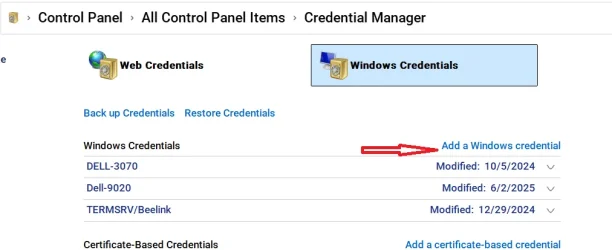
Create windows credentials on each machine for all other machines you remote into. Do this even if the same username/pw is used on multiple machines.
Note: It must be a password, not a pin.
If you use a pin to login to any machine, you MUST restart that machine and login to the user account at least once using its password.

For example, I remote into 3 machines. Notice I have created a credential for each machine.
 

Attachments

  • Screenshot 2025-11-21 150040.webp
    Screenshot 2025-11-21 150040.webp
    31.4 KB · Views: 4

My Computers My Computers

  • At a glance

    Windows 11 Pro 26H2 26300.9457i9-10900 10 core 20 threads32 gbnone-Intel UHD Graphics 630
    OS
    Windows 11 Pro 26H2 26300.9457
    Computer type
    PC/Desktop
    Manufacturer/Model
    Dell Optiplex 7080
    CPU
    i9-10900 10 core 20 threads
    Motherboard
    DELL 0J37VM
    Memory
    32 gb
    Graphics Card(s)
    none-Intel UHD Graphics 630
    Sound Card
    Integrated Realtek
    Monitor(s) Displays
    Benq 27
    Screen Resolution
    2560x1440
    Hard Drives
    2x1tb Solidigm m.2 nvme /External drives 512gb Samsung m.2 sata+2tb Kingston m2.nvme
    PSU
    500w
    Case
    MT
    Cooling
    Dell Premium
    Keyboard
    Logitech wired
    Mouse
    Logitech wireless
    Internet Speed
    so slow I'm too embarrassed to tell
    Browser
    #1 Edge #2 Firefox
    Antivirus
    Defender+MWB Premium
  • At a glance

    Windows 11 Pro 24H2 26200.9457AMD Ryzen 7 6800U32 gbintegrated
    Operating System
    Windows 11 Pro 24H2 26200.9457
    Computer type
    PC/Desktop
    Manufacturer/Model
    Beelink Mini PC SER5
    CPU
    AMD Ryzen 7 6800U
    Memory
    32 gb
    Graphics card(s)
    integrated
    Sound Card
    integrated
    Monitor(s) Displays
    Benq 27
    Screen Resolution
    2560x1440
    Hard Drives
    1TB Crucial nvme
    Keyboard
    Logitech wired
    Mouse
    Logitech wireless
    Internet Speed
    still too embarrassed to tell
    Browser
    Firefox
    Antivirus
    Defender
  • System 3 is non compliant Dell 9020 i7-4770/24gb ram Win11 PRO 26200.9457
Create windows credentials on each machine for all other machines you remote into. Do this even if the same username/pw is used on multiple machines.
Note: It must be a password, not a pin.
If you use a pin to login to any machine, you MUST restart that machine and login to the user account at least once using its password.

For example, I remote into 3 machines. Notice I have created a credential for each machine.
Create windows credentials on each machine for all other machines you remote into. Do this even if the same username/pw is used on multiple machines.
Note: It must be a password, not a pin.
If you use a pin to login to any machine, you MUST restart that machine and login to the user account at least once using its password.

For example, I remote into 3 machines. Notice I have created a credential for each machine.
Windows credentials is disabled by system administrator. All our windows 10, server 2019 and 2022 have no issue remote desktop to each others. Only the windows 11 machines are having issue. I can also remote desktop from windows 10 to windows 11, but windows 11 cannot remote desktop to any version of windows (10, 11 and server)
 

My Computer My Computer

At a glance

Windows 11
OS
Windows 11
Computer type
PC/Desktop
Try running the two commands I told you to return to the Windows 10 handle of access control. If that doesn't help, also try the Registry patches.
 

My Computers My Computers

  • At a glance

    Windows 11 Pro 23H2 (7584), 26H2 (9711)Mobile DualCore Intel Core 2 Duo T7250, 2000 MHz4GBMobile Intel(R) GMA 4500M (Mobile 4 series)
    OS
    Windows 11 Pro 23H2 (7584), 26H2 (9711)
    Computer type
    Laptop
    Manufacturer/Model
    Acer Extensa 5630EZ
    CPU
    Mobile DualCore Intel Core 2 Duo T7250, 2000 MHz
    Motherboard
    Acer Extensa 5630
    Memory
    4GB
    Graphics Card(s)
    Mobile Intel(R) GMA 4500M (Mobile 4 series)
    Sound Card
    Realtek ALC268 @ Intel 82801IB ICH9 - High Definition Audio Controller
    Monitor(s) Displays
    1
    Screen Resolution
    1280x800
    Hard Drives
    Samsung SSD 850 EVO 250GB SATA Device (250 GB, SATA-III)
    Internet Speed
    802.11g wireless 54 Mbps
    Browser
    MICROSOFT EDGE
    Antivirus
    WINDOWS DEFENDER
    Other Info
    Legacy MBR installation, no TPM, no Secure Boot, no WDDM 2.0 graphics drivers, no SSE4.2, cannot get more unsupported ;) This is only my test laptop. I had installed Windows 11 here before upgrading my main PC. For my main PC I use everyday see my 2nd system specs.
  • At a glance

    Windows 11 Pro 26H2 (build 26300.9711)Intel Core-i7 3770 3.40GHz s1155 (3rd generat...2x Kingston Hyper-X Blu 8GB DDR3-1600GIGABYTE GeForce RTX 3050 WINDFORCE OC V2 6GB...
    Operating System
    Windows 11 Pro 26H2 (build 26300.9711)
    Computer type
    PC/Desktop
    Manufacturer/Model
    Custom-built PC
    CPU
    Intel Core-i7 3770 3.40GHz s1155 (3rd generation)
    Motherboard
    Asus P8H61 s1155 ATX
    Memory
    2x Kingston Hyper-X Blu 8GB DDR3-1600
    Graphics card(s)
    GIGABYTE GeForce RTX 3050 WINDFORCE OC V2 6GB (GV-N3050WF2OCV2-6GD)
    Sound Card
    Realtek HD audio (ALC887)
    Monitor(s) Displays
    Sony Bravia KDL-19L4000 19" LCD TV via VGA
    Screen Resolution
    1440x900 32-bit 60Hz
    Hard Drives
    WD Blue SA510 2.5 1000GB SSD as system disk, Western Digital Caviar Purple 4TB SATA III (WD40PURZ) as second
    PSU
    Thermaltake Litepower RGB 550W Full Wired
    Case
    SUPERCASE MIDI-TOWER
    Cooling
    Deepcool Gamma Archer CPU cooler, 1x 8cm fan at the back
    Keyboard
    Mitsumi 101-key PS/2
    Mouse
    Microsoft Compact Optical Mouse
    Internet Speed
    802.11ac 5GHz wireless 260Mpbs
    Browser
    Microsoft Edge, Mozilla Firefox
    Antivirus
    Microsoft Windows Defender
    Other Info
    Legacy BIOS (MBR) installation, no TPM, no Secure Boot, WDDM 3.0 graphics drivers, WEI score 7.4
Spapakon, I tried your suggestions but they don't work. Thank you.
 

My Computer My Computer

At a glance

Windows 11
OS
Windows 11
Computer type
PC/Desktop
You're getting error 64, and error 0x80070040, which is the same thing, and a complaint about TLS 1.3. It's likely the TLS negotiation is failing, and the connection is immediately closed.

Try disabling TLS 1.3 temporarily, on the Windows 11 device, to force the Windows 11 device to fall back to TLS 1.2. If that works, then you have a mismatch between either the TLS version or the available cipher suites.
 

My Computer My Computer

At a glance

Win11 Ent. 25H2
OS
Win11 Ent. 25H2
An alternative is to go to Control Panel, Internet Settings, Advanced and check the boxes to enable all TLS versions.
 

My Computers My Computers

  • At a glance

    Windows 11 Pro 23H2 (7584), 26H2 (9711)Mobile DualCore Intel Core 2 Duo T7250, 2000 MHz4GBMobile Intel(R) GMA 4500M (Mobile 4 series)
    OS
    Windows 11 Pro 23H2 (7584), 26H2 (9711)
    Computer type
    Laptop
    Manufacturer/Model
    Acer Extensa 5630EZ
    CPU
    Mobile DualCore Intel Core 2 Duo T7250, 2000 MHz
    Motherboard
    Acer Extensa 5630
    Memory
    4GB
    Graphics Card(s)
    Mobile Intel(R) GMA 4500M (Mobile 4 series)
    Sound Card
    Realtek ALC268 @ Intel 82801IB ICH9 - High Definition Audio Controller
    Monitor(s) Displays
    1
    Screen Resolution
    1280x800
    Hard Drives
    Samsung SSD 850 EVO 250GB SATA Device (250 GB, SATA-III)
    Internet Speed
    802.11g wireless 54 Mbps
    Browser
    MICROSOFT EDGE
    Antivirus
    WINDOWS DEFENDER
    Other Info
    Legacy MBR installation, no TPM, no Secure Boot, no WDDM 2.0 graphics drivers, no SSE4.2, cannot get more unsupported ;) This is only my test laptop. I had installed Windows 11 here before upgrading my main PC. For my main PC I use everyday see my 2nd system specs.
  • At a glance

    Windows 11 Pro 26H2 (build 26300.9711)Intel Core-i7 3770 3.40GHz s1155 (3rd generat...2x Kingston Hyper-X Blu 8GB DDR3-1600GIGABYTE GeForce RTX 3050 WINDFORCE OC V2 6GB...
    Operating System
    Windows 11 Pro 26H2 (build 26300.9711)
    Computer type
    PC/Desktop
    Manufacturer/Model
    Custom-built PC
    CPU
    Intel Core-i7 3770 3.40GHz s1155 (3rd generation)
    Motherboard
    Asus P8H61 s1155 ATX
    Memory
    2x Kingston Hyper-X Blu 8GB DDR3-1600
    Graphics card(s)
    GIGABYTE GeForce RTX 3050 WINDFORCE OC V2 6GB (GV-N3050WF2OCV2-6GD)
    Sound Card
    Realtek HD audio (ALC887)
    Monitor(s) Displays
    Sony Bravia KDL-19L4000 19" LCD TV via VGA
    Screen Resolution
    1440x900 32-bit 60Hz
    Hard Drives
    WD Blue SA510 2.5 1000GB SSD as system disk, Western Digital Caviar Purple 4TB SATA III (WD40PURZ) as second
    PSU
    Thermaltake Litepower RGB 550W Full Wired
    Case
    SUPERCASE MIDI-TOWER
    Cooling
    Deepcool Gamma Archer CPU cooler, 1x 8cm fan at the back
    Keyboard
    Mitsumi 101-key PS/2
    Mouse
    Microsoft Compact Optical Mouse
    Internet Speed
    802.11ac 5GHz wireless 260Mpbs
    Browser
    Microsoft Edge, Mozilla Firefox
    Antivirus
    Microsoft Windows Defender
    Other Info
    Legacy BIOS (MBR) installation, no TPM, no Secure Boot, WDDM 3.0 graphics drivers, WEI score 7.4
You're getting error 64, and error 0x80070040, which is the same thing, and a complaint about TLS 1.3. It's likely the TLS negotiation is failing, and the connection is immediately closed.

Try disabling TLS 1.3 temporarily, on the Windows 11 device, to force the Windows 11 device to fall back to TLS 1.2. If that works, then you have a mismatch between either the TLS version or the available cipher suites.
How do you disable tls 1.3 settings temporarily? through registry? Also, I found out that 23h2 with not remote desktop connection issue. It looks like only isolate to 24h2.
 

My Computer My Computer

At a glance

Windows 11
OS
Windows 11
Computer type
PC/Desktop
HKEY_LOCAL_MACHINE\SYSTEM\CurrentControlSet\Control\SecurityProviders\SCHANNEL\Protocols.

If you don't have a key named TLS 1.3, create one. Create keys under TLS 1.3 for Client, and Server.

In each subkey (Client and Server), add:
- Enabled (DWORD, set to 0)
- DisabledByDefault (DWORD, set to 1)

I don't recall if you have to restart, but do it just for funsies.

Again, this should just be temporary to see if there's a TLS mismatch between your older and newer clients. Falling back to TLS 1.2 is okay short-term, but you should look toward moving the Win10 and Server clients to TLS 1.3 and a cipher suite that 10, 11, and Server can all agree on.
 

My Computer My Computer

At a glance

Win11 Ent. 25H2
OS
Win11 Ent. 25H2
How do you disable tls 1.3 settings temporarily? through registry? Also, I found out that 23h2 with not remote desktop connection issue. It looks like only isolate to 24h2.
Yes, because they recently changed the authentication method. If you run the two commands in PowerShell as Administrator you go back to the old compatible but less secure method. Personally I don't mind since only I and my wife have access to my home PCs.
 

My Computers My Computers

  • At a glance

    Windows 11 Pro 23H2 (7584), 26H2 (9711)Mobile DualCore Intel Core 2 Duo T7250, 2000 MHz4GBMobile Intel(R) GMA 4500M (Mobile 4 series)
    OS
    Windows 11 Pro 23H2 (7584), 26H2 (9711)
    Computer type
    Laptop
    Manufacturer/Model
    Acer Extensa 5630EZ
    CPU
    Mobile DualCore Intel Core 2 Duo T7250, 2000 MHz
    Motherboard
    Acer Extensa 5630
    Memory
    4GB
    Graphics Card(s)
    Mobile Intel(R) GMA 4500M (Mobile 4 series)
    Sound Card
    Realtek ALC268 @ Intel 82801IB ICH9 - High Definition Audio Controller
    Monitor(s) Displays
    1
    Screen Resolution
    1280x800
    Hard Drives
    Samsung SSD 850 EVO 250GB SATA Device (250 GB, SATA-III)
    Internet Speed
    802.11g wireless 54 Mbps
    Browser
    MICROSOFT EDGE
    Antivirus
    WINDOWS DEFENDER
    Other Info
    Legacy MBR installation, no TPM, no Secure Boot, no WDDM 2.0 graphics drivers, no SSE4.2, cannot get more unsupported ;) This is only my test laptop. I had installed Windows 11 here before upgrading my main PC. For my main PC I use everyday see my 2nd system specs.
  • At a glance

    Windows 11 Pro 26H2 (build 26300.9711)Intel Core-i7 3770 3.40GHz s1155 (3rd generat...2x Kingston Hyper-X Blu 8GB DDR3-1600GIGABYTE GeForce RTX 3050 WINDFORCE OC V2 6GB...
    Operating System
    Windows 11 Pro 26H2 (build 26300.9711)
    Computer type
    PC/Desktop
    Manufacturer/Model
    Custom-built PC
    CPU
    Intel Core-i7 3770 3.40GHz s1155 (3rd generation)
    Motherboard
    Asus P8H61 s1155 ATX
    Memory
    2x Kingston Hyper-X Blu 8GB DDR3-1600
    Graphics card(s)
    GIGABYTE GeForce RTX 3050 WINDFORCE OC V2 6GB (GV-N3050WF2OCV2-6GD)
    Sound Card
    Realtek HD audio (ALC887)
    Monitor(s) Displays
    Sony Bravia KDL-19L4000 19" LCD TV via VGA
    Screen Resolution
    1440x900 32-bit 60Hz
    Hard Drives
    WD Blue SA510 2.5 1000GB SSD as system disk, Western Digital Caviar Purple 4TB SATA III (WD40PURZ) as second
    PSU
    Thermaltake Litepower RGB 550W Full Wired
    Case
    SUPERCASE MIDI-TOWER
    Cooling
    Deepcool Gamma Archer CPU cooler, 1x 8cm fan at the back
    Keyboard
    Mitsumi 101-key PS/2
    Mouse
    Microsoft Compact Optical Mouse
    Internet Speed
    802.11ac 5GHz wireless 260Mpbs
    Browser
    Microsoft Edge, Mozilla Firefox
    Antivirus
    Microsoft Windows Defender
    Other Info
    Legacy BIOS (MBR) installation, no TPM, no Secure Boot, WDDM 3.0 graphics drivers, WEI score 7.4
Yes, because they recently changed the authentication method. If you run the two commands in PowerShell as Administrator you go back to the old compatible but less secure method. Personally I don't mind since only I and my wife have access to my home PCs.
If you're referring to the two SMB cmdlets above, they have nothing to do with RDP.
 

My Computer My Computer

At a glance

Win11 Ent. 25H2
OS
Win11 Ent. 25H2
HKEY_LOCAL_MACHINE\SYSTEM\CurrentControlSet\Control\SecurityProviders\SCHANNEL\Protocols.

If you don't have a key named TLS 1.3, create one. Create keys under TLS 1.3 for Client, and Server.

In each subkey (Client and Server), add:
- Enabled (DWORD, set to 0)
- DisabledByDefault (DWORD, set to 1)

I don't recall if you have to restart, but do it just for funsies.

Again, this should just be temporary to see if there's a TLS mismatch between your older and newer clients. Falling back to TLS 1.2 is okay short-term, but you should look toward moving the Win10 and Server clients to TLS 1.3 and a cipher suite that 10, 11, and Server can all agree on.

Ok, I have both side 23h2 and 24h2 set to same settings client and server from SSL 2.0 to TLS 1.1 expect TLS 1.2, they are reversed. I still can not remote desktop 24h2. 23h2 was ok to begin with, so no change. No issue remote desktop from windows 10 machine and 23h2 has no issue remote to windows 10 or server but it cannot remote desktop to 24h2.

1764017097305.webp


1764017340319.webp
 

My Computer My Computer

At a glance

Windows 11
OS
Windows 11
Computer type
PC/Desktop
Okay well you didn't disable TLS 1.3. 🤷‍♂️
 

My Computer My Computer

At a glance

Win11 Ent. 25H2
OS
Win11 Ent. 25H2
Okay well you didn't disable TLS 1.3. 🤷‍♂️
I was trying to match the settings from a different network that has remote desktop working on 24h2. I did what you told me and created the TLS 1.3 entries. It is magically working now. Thank you so much. To piggy back on your comment on TLS 1.3, in order all the machines on the network to switch to 1.3, do you just create this 1.3 entry and set both client and server to
  • Enabled: Set the Value data to 1.
  • DisabledByDefault: Set the Value data to 0
Is it all you need to do?
 

My Computer My Computer

At a glance

Windows 11
OS
Windows 11
Computer type
PC/Desktop
Ordinarily I'd say yes, but it looks like TLS 1.3 is not a good idea on Windows 10 at least. Tread carefully there.

"TLS 1.3 is supported starting in Windows 11 and Windows Server 2022. Enabling TLS 1.3 on earlier versions of Windows is not a safe system configuration."


My Computer My Computer

At a glance

Win11 Ent. 25H2
OS
Win11 Ent. 25H2
I'm curious why your Remote Desktop connection is not falling back to TLS 1.2 though. What should happen is the Windows 11 machine should try TLS 1.3, the Windows 10 says, "I don't know what you're talking about," and Windows 11 says "how about TLS 1.2?" And Windows 10 would say, "yeah cool man."
 

My Computer My Computer

At a glance

Win11 Ent. 25H2
OS
Win11 Ent. 25H2
I'm curious why your Remote Desktop connection is not falling back to TLS 1.2 though. What should happen is the Windows 11 machine should try TLS 1.3, the Windows 10 says, "I don't know what you're talking about," and Windows 11 says "how about TLS 1.2?" And Windows 10 would say, "yeah cool man."
Is it because I don't have TLS entries there? My windows 10 only have SSL 3.0. None of TLS entries was there.
 

My Computer My Computer

At a glance

Windows 11
OS
Windows 11
Computer type
PC/Desktop
10 22H2 supports TLS 1.2 by default.

Edit: Seems like they both support these cipher suites for TLS 1.2 by default, in priority order, and then they differ after that. Have you folks messed with the available cipher suites for 1.2?

Code:
TLS_ECDHE_ECDSA_WITH_AES_256_GCM_SHA384  
TLS_ECDHE_ECDSA_WITH_AES_128_GCM_SHA256  
TLS_ECDHE_RSA_WITH_AES_256_GCM_SHA384  
TLS_ECDHE_RSA_WITH_AES_128_GCM_SHA256
 

My Computer My Computer

At a glance

Win11 Ent. 25H2
OS
Win11 Ent. 25H2

Latest Tutorials

Back
Top Bottom