Solved Remove language icon?


Winfried

New member
Local time
3:13 AM
Posts
21
OS
Windows 11
Hello,

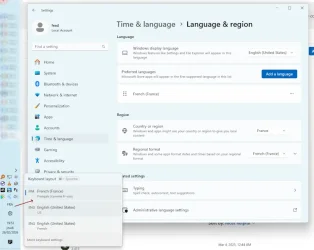
I don't know what I did, but all of sudden, the language icon popped up again in the taskbar, and now, every so often, the keyboard layout goes from FR to US and I have to hit SHIFT+ALT to go back to FR.

How can I disable that behavior?

Thank you.
1772132298792.webp
 
Windows Build/Version
10.0.22631 N/A Build 22631

My Computer

System One

  • OS
    Windows 11
keyboard.webp
 

My Computers

System One System Two

  • OS
    All Branches but Release
    Computer type
    Laptop
    Manufacturer/Model
    Acer Nitro ANV15-51
    CPU
    AMD Ryzen 7 7735HS 3200-4500 Mhz 8 cores x 2
    Motherboard
    Sportage_RBH
    Memory
    32 GB DDR5
    Graphics Card(s)
    Radeon Graphic / NVIDIA GeForce RTX 4060 8 GB GDDR6
    Sound Card
    AMD/Realtek(R) Audio
    Monitor(s) Displays
    Integrated Monitor (15.3"vis)
    Screen Resolution
    FHD 1920X1080 16:9 144Hz
    Hard Drives
    KINGSTON OM8SEP4512Q-AA 1TB
    Western Digital 256GB
    PSU
    19V DC 6.32 A 120 W
    Cooling
    Dual Fans
    Mouse
    MS Bluetooth
    Internet Speed
    Fiber 1GB Cox -us & 1GB Orange-fr
    Browser
    Edge Canary- Firefox Nightly-Chrome Dev-Chrome Dev
    Antivirus
    Windows Defender
  • Operating System
    Windows 11 Beta
    Computer type
    Laptop
    Manufacturer/Model
    Asus X751BP
    CPU
    AMD A9-9420
    Memory
    8 GB of DDR4
    Graphics card(s)
    AMD Radeon R5
    Screen Resolution
    1600x900
    Hard Drives
    Seagate 1 TB
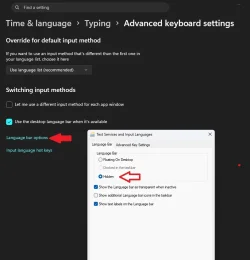
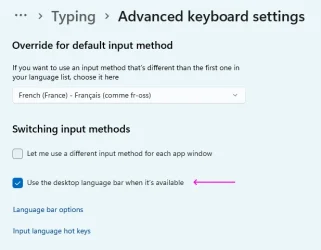
Thanks. I already had it hidden. Checking that option did the trick:

1772133752819.webp
 

My Computer

System One

  • OS
    Windows 11
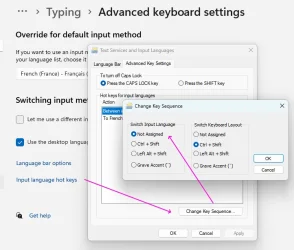
… but an extra step was required to finally prevent W11 from switching languages when hitting SHIFT+Left-ALT (source):

1772177812132.webp
 

My Computer

System One

  • OS
    Windows 11
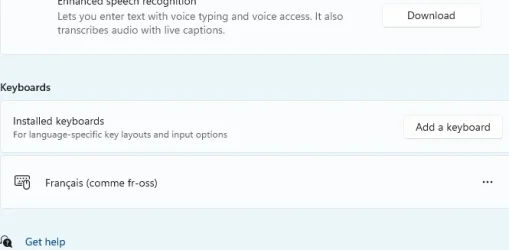
By removing the ability to see current language and switch it (if there are more than one) you solved only a part of problem. You should also look at the keyboard layouts and fix if need. To do this, go to Language and region, [Your language] (currently French), click ... on the right and select "Language options". There in the "Keyboards" section look at the list of installed keyboards and remove those which you don't use. If there is only one keyboard layout in this list and only one preferred language, the language indicator will not be shown on the desktop without any actions posted above.
 

My Computer

System One

  • OS
    Windows 11 Pro 25H2
    Computer type
    Laptop
    Manufacturer/Model
    Lenovo Legion 5-15ARH05
    CPU
    AMD Rysen 5 4600H
    Memory
    32 GB (2 x 16 GB Samsung SO-DIMM DDR4-3200)
    Graphics Card(s)
    GeForce GTX 1650 Ti, 4 GB GDDR6
    Screen Resolution
    1920x1080
    Hard Drives
    SSD M.2 512 GB SAMSUNG MZALQ512; SSD M.2 1 TB Seagate FireCuda 530
    Mouse
    Logitech M650L in Bluetooth mode
There was only one (custom keyboard)… and still, Windows would bother me with the SHIFT+ALT combo. The problem seems now fixed.

1772266637495.webp
 

My Computer

System One

  • OS
    Windows 11
Back
Top Bottom