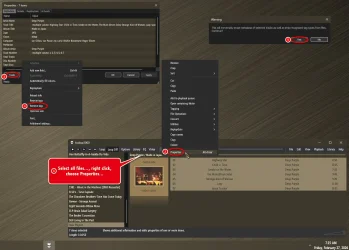
Solved Remove MP3 metadata app


JAK

Active member
Member
Local time
2:08 PM
Posts
177
OS
Windows 11
I need to Remove all MP3 metadata.

Can't find an app to do this, all I can find is online tools.

I have a folder with MP3 files, when I add the folder to my media player, it appears to remember the original albums, even though I've changed the album name in MP3 tag, assume the files / remembers the original album names. Think clearing all the meta data is the only solution.
Any suggestions

Thanks
 

My Computer

System One

  • OS
    Windows 11
    Computer type
    Laptop
    Manufacturer/Model
    Asus
    CPU
    Ryzen 7
    Memory
    8+16 total 24GB
    Other Info
    Asus Vivobook 15 M513U
Last edited:

My Computers

System One System Two

  • OS
    Windows 11 Pro
    Computer type
    PC/Desktop
    Manufacturer/Model
    ASUS ROG Strix
  • Operating System
    Windows 11 Pro
    Computer type
    Laptop
    Manufacturer/Model
    ASUS VivoBook
  • Like
Reactions: JAK
thanks going to give foobar a try, found id3remover and id3wipe, trying also

what i fail to understand is why my mp3 player innioasis G5, is creating album names for the albums of the original tracks even though I've deleted all album names in mp3tag and file explorer properties.

confusing
 

My Computer

System One

  • OS
    Windows 11
    Computer type
    Laptop
    Manufacturer/Model
    Asus
    CPU
    Ryzen 7
    Memory
    8+16 total 24GB
    Other Info
    Asus Vivobook 15 M513U
It might be one of your music apps is using Gracenote or another music database to identify your songs (regardless of ID3 tags).
 

My Computer

System One

  • OS
    Windows 7

My Computers

System One System Two

  • OS
    Windows 11 Pro 25H2
    Computer type
    PC/Desktop
    Manufacturer/Model
    Homebuilt
    CPU
    Intel Core i9 13900K
    Motherboard
    Asus ProArt Z790 Creator WiFi - Bios 3107
    Memory
    Corsair Dominator Platinum 64gb 5600MT/s DDR5 Dual Channel
    Graphics Card(s)
    Sapphire NITRO+ AMD Radeon RX 7900 XTX Vapor-X 24GB
    Sound Card
    External DAC: Cambridge Audio DACMagic200M - Headphone Amp: Topping L50
    Monitor(s) Displays
    Panasonic MX950 Mini LED 55" TV 120hz
    Screen Resolution
    3840 x 2160 120hz
    Hard Drives
    Samsung 980 Pro 2TB (OS)
    Samsung 980 Pro 1TB (Files)
    Lexar NZ790 4TB
    LaCie d2 Professional 6TB external - USB 3.1
    Seagate Expansion 16TB external - USB 3.2
    Seagate One Touch 18TB external HD - USB 3.0
    PSU
    Corsair RM1200x Shift
    Case
    Corsair RGB Smart Case 5000x (white)
    Cooling
    Corsair iCue H150i Elite Capellix XT
    Keyboard
    Incase Ergonomic USB (Microsoft clone)
    Mouse
    Logitech MX Master 3S
    Internet Speed
    Fibre 900/500 Mbps
    Browser
    Microsoft Edge Chromium
    Antivirus
    Bitdefender Total Security
    Other Info
    AMD Radeon Software & Drivers 26.1.1
    Hasleo Backup Suite
    Dashlane password manager
    Kensington Verimark fingerprint reader
    Logitech Brio 4K webcam
    Orico 10-port powered USB 3.0 hub
  • Operating System
    Windows 11 Pro 25H2
    Computer type
    Laptop
    Manufacturer/Model
    Asus Vivobook X1605VA
    CPU
    Intel® Core™ i9-13900H
    Motherboard
    Asus X1605VA bios 309
    Memory
    32GB DDR4-3200 Dual channel
    Graphics card(s)
    *Intel Iris Xᵉ Graphics G7
    Sound Card
    Realtek | Intel SST Bluetooth & USB
    Monitor(s) Displays
    16.0-inch, WUXGA 16:10 aspect ratio, IPS-level Panel
    Screen Resolution
    1920 x 1200 60hz
    Hard Drives
    512GB M.2 NVMe™ PCIe® 3.0 SSD
    Mouse
    Logitech MX Ergo Trackball
    Antivirus
    Bitdefender Total Security
    Other Info
    720p Webcam
    WiFi & USB to ethernet
  • Like
Reactions: JAK
It's not importing anything from the internet, the album names are fast, slow and misc
These are the album names I copied the files into a new folder called music quiz,
The G5 creates albums called fast, slow, misc and music quiz, the latter has almost all the tracks, the other albums s few each. The folder on the G5 is ok and shows the correct number of tracks, it's just it creates several albums.

I used a id3 tag stripper app which removed ALL tags except the filename, still the problem persists, am now formatting the SD card and factory reset the G5, if that fails then I'm at a loss

Will update soon
 

My Computer

System One

  • OS
    Windows 11
    Computer type
    Laptop
    Manufacturer/Model
    Asus
    CPU
    Ryzen 7
    Memory
    8+16 total 24GB
    Other Info
    Asus Vivobook 15 M513U
I meticulously do all my own tagging within foobar, especially so it doesn't get all dickered on my phone!
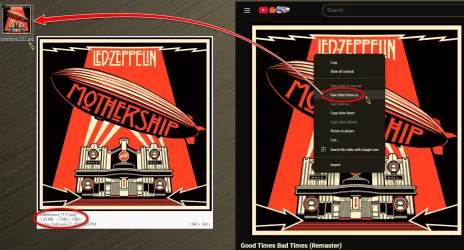
I get all my album art off YouTube.

12518.webp
 

My Computers

System One System Two

  • OS
    Windows 11 Pro
    Computer type
    PC/Desktop
    Manufacturer/Model
    ASUS ROG Strix
  • Operating System
    Windows 11 Pro
    Computer type
    Laptop
    Manufacturer/Model
    ASUS VivoBook
  • Like
Reactions: JAK
Mp3tag and albumartexchange.com
I'd still check it in foobar! :cool:
My Android player is finicky..., for instance, if I have numerous artists with Greatest Hits albums, my Android App will lump them all into one folder.
I gotta modify them anyway.
 

My Computers

System One System Two

  • OS
    Windows 11 Pro
    Computer type
    PC/Desktop
    Manufacturer/Model
    ASUS ROG Strix
  • Operating System
    Windows 11 Pro
    Computer type
    Laptop
    Manufacturer/Model
    ASUS VivoBook
  • Like
Reactions: JAK
Off topic but can't sign in on my laptop, says user unknown, email and user name, tried contacting forum via contact us, says there's an error 🤨
 

My Computer

System One

  • OS
    Windows 11
    Computer type
    Laptop
    Manufacturer/Model
    Asus
    CPU
    Ryzen 7
    Memory
    8+16 total 24GB
    Other Info
    Asus Vivobook 15 M513U
Edwin, to get several albums into a single album I name the album artists to Various, so if your albums are being grouped, may need to check if all the album artists are set to various, maybe try different words, e.g. different artists etc.
 

My Computer

System One

  • OS
    Windows 11
    Computer type
    Laptop
    Manufacturer/Model
    Asus
    CPU
    Ryzen 7
    Memory
    8+16 total 24GB
    Other Info
    Asus Vivobook 15 M513U
... you may need to check if all the album artists are set to various, maybe try different words, e.g. different artists etc.
That's sort of what I do. For instance: If I have 2 or more artists with an album titled Greatest Hits, my Android App Library lumps all songs of those album titles into one auto-generated virtual folder called Various..., so I have to change the album titles to different names, such as Best Of, or Hits, etc.
 

My Computers

System One System Two

  • OS
    Windows 11 Pro
    Computer type
    PC/Desktop
    Manufacturer/Model
    ASUS ROG Strix
  • Operating System
    Windows 11 Pro
    Computer type
    Laptop
    Manufacturer/Model
    ASUS VivoBook
  • Like
Reactions: JAK
Another thing I need to do is remove the Prefix or Definite Article 'The', cuz my Android App doesn't have a toggle to filter it.
Subconsciously, if I'm thinking about The Doobie Brothers, I'll look under D, but it's actually under T, unless I change the metadata.
Eventually I remember where they are, but, when you have over 100GB of mp3's on your phone, the library gets pretty long!
 

My Computers

System One System Two

  • OS
    Windows 11 Pro
    Computer type
    PC/Desktop
    Manufacturer/Model
    ASUS ROG Strix
  • Operating System
    Windows 11 Pro
    Computer type
    Laptop
    Manufacturer/Model
    ASUS VivoBook
  • Like
Reactions: JAK
I had numerous mp3's with e.g.
'The Beatles' and some with 'Beatles, The'

Using mp3 tag with an action, it searched for all occupancies of artist beginning with 'The' and moved 'The' to the end.

Making all entries of 'The Beatles' into 'Beatles, The'

Much better than lots of artists beginning with 'The'
Took ages to work out the script for this action, can share with you if it helps.
 

My Computer

System One

  • OS
    Windows 11
    Computer type
    Laptop
    Manufacturer/Model
    Asus
    CPU
    Ryzen 7
    Memory
    8+16 total 24GB
    Other Info
    Asus Vivobook 15 M513U
My Android Player, Musicolet, has an excellent tag editor, but, I despise performing large tasks on a phone with big fat fingers! That's why I choose to do it within foobar, and that way, my PC library matches my phone library.
 

My Computers

System One System Two

  • OS
    Windows 11 Pro
    Computer type
    PC/Desktop
    Manufacturer/Model
    ASUS ROG Strix
  • Operating System
    Windows 11 Pro
    Computer type
    Laptop
    Manufacturer/Model
    ASUS VivoBook
  • Like
Reactions: JAK
Ok, the offer is there, mp3tag on a PC is excellent, lots of power if used to it's best advantage
 

My Computer

System One

  • OS
    Windows 11
    Computer type
    Laptop
    Manufacturer/Model
    Asus
    CPU
    Ryzen 7
    Memory
    8+16 total 24GB
    Other Info
    Asus Vivobook 15 M513U
Ok, the offer is there, mp3tag on a PC is excellent, lots of power if used to it's best advantage
Appreciate it. I'll keep it in mind. (y)
 

My Computers

System One System Two

  • OS
    Windows 11 Pro
    Computer type
    PC/Desktop
    Manufacturer/Model
    ASUS ROG Strix
  • Operating System
    Windows 11 Pro
    Computer type
    Laptop
    Manufacturer/Model
    ASUS VivoBook
  • Like
Reactions: JAK
Re original post
Think the problem may have occurred, because I dragged 3 folders of music into an empty folder, then searched for MP3 and cut and pasted the search results into the folder, thenbddjeted the 3 empty ones, never fine if that way before, somehow the final folder 'remembered' the previous 3 folders, and my G5 always changes folders to album names....will not do it that way again......
 

My Computer

System One

  • OS
    Windows 11
    Computer type
    Laptop
    Manufacturer/Model
    Asus
    CPU
    Ryzen 7
    Memory
    8+16 total 24GB
    Other Info
    Asus Vivobook 15 M513U

Latest Support Threads

Back
Top Bottom