JavaScript is disabled. For a better experience, please enable JavaScript in your browser before proceeding.
You are using an out of date browser. It may not display this or other websites correctly.
You should upgrade or use an
alternative browser .
Remove sections from Search dialogue box?
Well-known member
Power User
VIP
Hello
@Brink ,
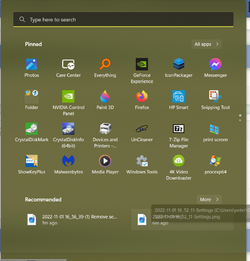
Is there a way to remove those nonsense sections from the Search dialogue box?
What a great box it would be, if:
Win 11 Enterprise Laptop
Administrator
Staff member
MVP
I haven't seen a way yet so far.
Windows 11 Pro for Workstations Intel i7-8700K 5 GHz 64 GB (4x16GB) G.SKILL TridentZ RGB DDR4 3600... ASUS ROG-STRIX-GTX1080TI-O11G-GAMING (11GB GD... Windows 11 Pro for Workstations PC/Desktop Custom self build Intel i7-8700K 5 GHz ASUS ROG Maximus XI Formula Z390 64 GB (4x16GB) G.SKILL TridentZ RGB DDR4 3600 MHz (F4-3600C18D-32GTZR) ASUS ROG-STRIX-GTX1080TI-O11G-GAMING (11GB GDDR5X) Integrated Digital Audio (S/PDIF) 2 x Samsung Odyssey G75 27" 2560x1440 1TB Samsung 990 PRO M.2, Seasonic Prime Titanium 850W Thermaltake Core P3 wall mounted Corsair Hydro H115i Amazon Basics Wired Full Keyboard MD005 Logitech MX Master 4 2 Gbps Download and 100 Mbps Upload Chrome and Edge Microsoft Defender Logitech Z625 speaker system,
Windows 11 Pro Snapdragon X Elite (12 core) 3.42 GHz 16 GB LPDDR5x-7467 MHz Windows 11 Pro Laptop Surface Laptop 7 Copilot+ PC Snapdragon X Elite (12 core) 3.42 GHz 16 GB LPDDR5x-7467 MHz 15" HDR 2496 x 1664 1 TB SSD Wi-Fi 7 and Bluetooth 5.4 Chrome and Edge Microsoft Defender
Well-known member
Power User
VIP
Thread Starter
Thanks.
Win 11 Enterprise Laptop
Well-known member
Pro User
VIP
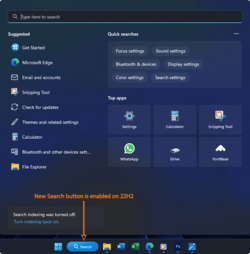
If I use the search icon on the taskbar I get this,
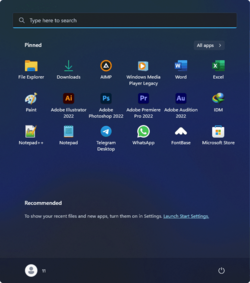
Search icon removed from taskbar I get this when just using the WinKey only,
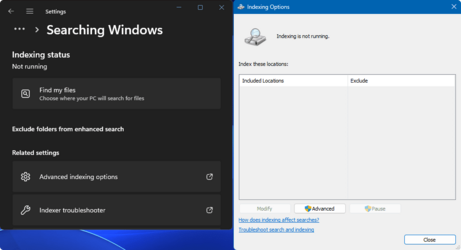
and Search settings changed in Windows settings to my liking.
Win 11 Pro AMD Ryzen™ 7 7730U 24GB Dual-Channel DDR4 @ 1596MHz (22-22-22-52) 512MB ATI AMD Radeon Graphics (ASUStek Comput... Win 11 Pro Laptop ASUS Vivobook AMD Ryzen™ 7 7730U M1605YA 24GB Dual-Channel DDR4 @ 1596MHz (22-22-22-52) 512MB ATI AMD Radeon Graphics (ASUStek Computer Inc) Generic PnP Monitor (1920x1200@60Hz) - P1 PLUS (1920x1080@59Hz) 1920 X 1200 953GB Western Digital WD 45 Watts Lenovo Bluetooth. 500 Mbps Edge Defender
Windows 11 AMD Ryzen 7 5800H / 3.2 GHz 32 GB DDR4 SDRAM 3200 MHz NVIDIA GeForce RTX 3060 6 GB GDDR6 SDRAM Windows 11 Laptop ACER NITRO AMD Ryzen 7 5800H / 3.2 GHz CZ Scala_CAS (FP6) 32 GB DDR4 SDRAM 3200 MHz NVIDIA GeForce RTX 3060 6 GB GDDR6 SDRAM Realtek Audio. NVIDIA High Definition Audio 15.6" LED backlight 1920 x 1080 (Full HD) 144 Hz 1920 x 1080 (Full HD) Samsung 970 Evo Plus 2TB NVMe M.2 180 Watt, 19.5 V Lenovo Bluetooth 500 Mbps Edge Defender
Well-known member
Power User
VIP
Thread Starter
I have added the new Search button on 22H2 (official/stable version). I used to click on the search box (in Win 10) or search by pressing WinKey+S. Either way, this one appears:
My search settings:
By pressing WinKey, this one (obviously!) appears (Start Menu/Start):
I like it in this way:
Win 11 Enterprise Laptop
Well-known member
Pro User
VIP
Would be nice just to have a search bar only but it's looking as not possible. So all I do is press the Winkey and type my search query and press enter without looking up
Win 11 Pro AMD Ryzen™ 7 7730U 24GB Dual-Channel DDR4 @ 1596MHz (22-22-22-52) 512MB ATI AMD Radeon Graphics (ASUStek Comput... Win 11 Pro Laptop ASUS Vivobook AMD Ryzen™ 7 7730U M1605YA 24GB Dual-Channel DDR4 @ 1596MHz (22-22-22-52) 512MB ATI AMD Radeon Graphics (ASUStek Computer Inc) Generic PnP Monitor (1920x1200@60Hz) - P1 PLUS (1920x1080@59Hz) 1920 X 1200 953GB Western Digital WD 45 Watts Lenovo Bluetooth. 500 Mbps Edge Defender
Windows 11 AMD Ryzen 7 5800H / 3.2 GHz 32 GB DDR4 SDRAM 3200 MHz NVIDIA GeForce RTX 3060 6 GB GDDR6 SDRAM Windows 11 Laptop ACER NITRO AMD Ryzen 7 5800H / 3.2 GHz CZ Scala_CAS (FP6) 32 GB DDR4 SDRAM 3200 MHz NVIDIA GeForce RTX 3060 6 GB GDDR6 SDRAM Realtek Audio. NVIDIA High Definition Audio 15.6" LED backlight 1920 x 1080 (Full HD) 144 Hz 1920 x 1080 (Full HD) Samsung 970 Evo Plus 2TB NVMe M.2 180 Watt, 19.5 V Lenovo Bluetooth 500 Mbps Edge Defender
Well-known member
Power User
VIP
Thread Starter
... Microsoft will never stop its addiction! They just started! Just putting their own rubbish OneDrive, Office apps, Azure and any cloud hell things they have, as ads in it as recommended section!
Win 11 Enterprise Laptop
Hello
@Brink ,
Is there a way to remove those nonsense sections from the Search dialogue box?
View attachment 43933
What a great box it would be, if:
View attachment 43934
My recommendation is the following:
Turn off the search button, it takes up unnecessary space on the taskbar.
To perform a search, press button start, and start typing what you want to search for, the search will be performed exactly the same as the search button, but without displaying unnecessary information.
Windows 11 PC/Desktop i7 920 Asus P6T Deluxe v2 18GB 1920*1080













 ... Microsoft will never stop its addiction! They just started! Just putting their own rubbish OneDrive, Office apps, Azure and any cloud hell things they have, as ads in it as recommended section!


