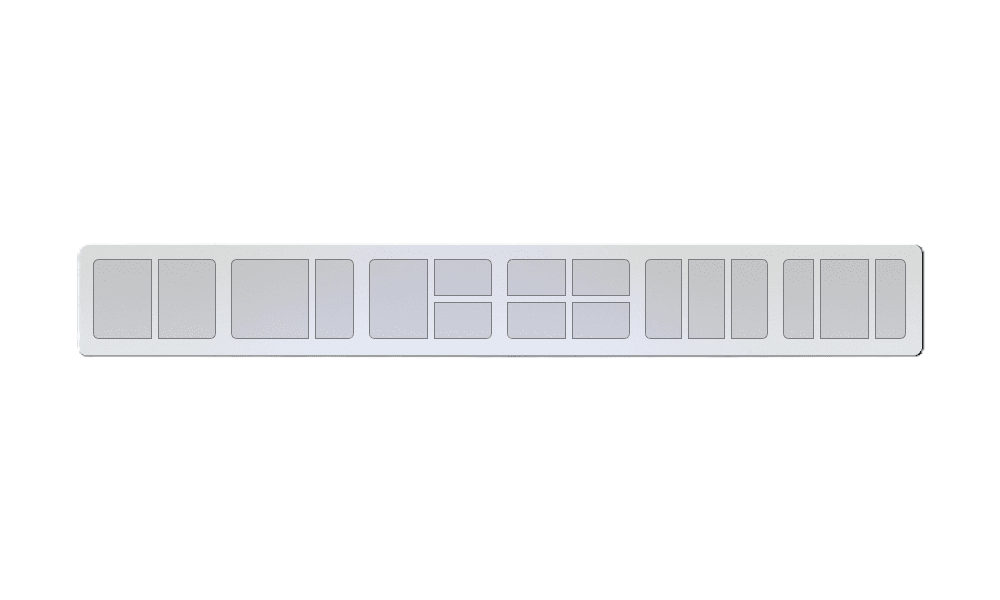
Remove the thingy at the top of the screen that maximize or arranges window layout?


Levitate11

Well-known member
Power User
VIP
Local time
9:39 AM
Posts
476
OS
Windows 11 Pro 24H2
I don't know what it's called... but is it possible to get rid of the bar that slides down frmo the top when you move windows to the top of the screen... ostensibly to maximize them or choose side by side, over-under, etc layouts for your windows?

I don't need it and it's a nuisance when I move a window to the top of the screen and it maximizes it without me asking.

Thx,
 

My Computer My Computer

At a glance

Windows 11 Pro 24H2Intel Ultra 7 155H16gbIntel Arc integrated
OS
Windows 11 Pro 24H2
Computer type
Laptop
Manufacturer/Model
HP
CPU
Intel Ultra 7 155H
Memory
16gb
Graphics Card(s)
Intel Arc integrated
Hard Drives
SSD
 

My Computers My Computers

  • At a glance

    Windows 11 2xH2 (latest update ... forever anal)Intel i5-124008GBNVIDIA GeForce GT730
    OS
    Windows 11 2xH2 (latest update ... forever anal)
    Computer type
    PC/Desktop
    Manufacturer/Model
    HP Slim S01
    CPU
    Intel i5-12400
    Memory
    8GB
    Graphics Card(s)
    NVIDIA GeForce GT730
    Sound Card
    OOBE
    Monitor(s) Displays
    Acer 32"
    Screen Resolution
    1920x1080
    Hard Drives
    512GB KIOXIA NVMe
    1TB SATA SSD
    PSU
    OOBE
    Case
    OOBE
    Cooling
    OOBE
    Keyboard
    BT
    Mouse
    BT
    Browser
    Brave FFox Chrome Opera
    Antivirus
    KIS
  • At a glance

    Windows 11 Pro 2xH2 (latest update ... 4ever ...i7-1165G7 @ 2.80GHzIntel Iris Xe Graphics
    Operating System
    Windows 11 Pro 2xH2 (latest update ... 4ever anal)
    Computer type
    Laptop
    Manufacturer/Model
    HP Pavillion 15
    CPU
    i7-1165G7 @ 2.80GHz
    Graphics card(s)
    Intel Iris Xe Graphics
    Hard Drives
    Samsung NVMe 512GB
    + numerous/multiple SSD Type C USB enclosures
    Internet Speed
    NBN FTTN 50
    Browser
    Brave
    Antivirus
    KIS

Thanks. You've made my day better. And my tomorrow.
 

My Computer My Computer

At a glance

Windows 11 Pro 24H2Intel Ultra 7 155H16gbIntel Arc integrated
OS
Windows 11 Pro 24H2
Computer type
Laptop
Manufacturer/Model
HP
CPU
Intel Ultra 7 155H
Memory
16gb
Graphics Card(s)
Intel Arc integrated
Hard Drives
SSD
I frequently ponder over these shiny baubles and trinkets that Microsoft/Windows offers to amuse the masses, how many of them get seriously used to advantage, or are they just another amongst all the bells and whistles Microsoft can claim as "enhancing the user's experience" (at the expense of annoying the cr4p outta most users)?
 

My Computers My Computers

  • At a glance

    Windows 11 2xH2 (latest update ... forever anal)Intel i5-124008GBNVIDIA GeForce GT730
    OS
    Windows 11 2xH2 (latest update ... forever anal)
    Computer type
    PC/Desktop
    Manufacturer/Model
    HP Slim S01
    CPU
    Intel i5-12400
    Memory
    8GB
    Graphics Card(s)
    NVIDIA GeForce GT730
    Sound Card
    OOBE
    Monitor(s) Displays
    Acer 32"
    Screen Resolution
    1920x1080
    Hard Drives
    512GB KIOXIA NVMe
    1TB SATA SSD
    PSU
    OOBE
    Case
    OOBE
    Cooling
    OOBE
    Keyboard
    BT
    Mouse
    BT
    Browser
    Brave FFox Chrome Opera
    Antivirus
    KIS
  • At a glance

    Windows 11 Pro 2xH2 (latest update ... 4ever ...i7-1165G7 @ 2.80GHzIntel Iris Xe Graphics
    Operating System
    Windows 11 Pro 2xH2 (latest update ... 4ever anal)
    Computer type
    Laptop
    Manufacturer/Model
    HP Pavillion 15
    CPU
    i7-1165G7 @ 2.80GHz
    Graphics card(s)
    Intel Iris Xe Graphics
    Hard Drives
    Samsung NVMe 512GB
    + numerous/multiple SSD Type C USB enclosures
    Internet Speed
    NBN FTTN 50
    Browser
    Brave
    Antivirus
    KIS
Back
Top Bottom