Hi,
A bit of a weird problem.
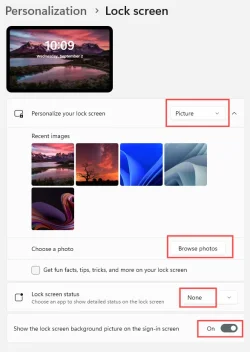
Whilst setting up my daughter's laptop I played a little prank and put a photo of my face as her lockscreen background. All fun and games, and I changed the lockscreen image into another image. But the image of my face still shows up every time the laptop is booting up and then the screen turns dark and then shows the new lock screen background image.
So now she's mortified that for her rest of her school career that she'll be stuck with my face popping up every time she restarts her computer.
So, could anybody help me find out how I can remove this image?
I've tried changing the standard background and the lock screen background but that doesn't solve it.
It's a Lenovo Thinkpad E14 Gen 5
Any help would be mightily appreciated.
A bit of a weird problem.
Whilst setting up my daughter's laptop I played a little prank and put a photo of my face as her lockscreen background. All fun and games, and I changed the lockscreen image into another image. But the image of my face still shows up every time the laptop is booting up and then the screen turns dark and then shows the new lock screen background image.
So now she's mortified that for her rest of her school career that she'll be stuck with my face popping up every time she restarts her computer.
So, could anybody help me find out how I can remove this image?
I've tried changing the standard background and the lock screen background but that doesn't solve it.
It's a Lenovo Thinkpad E14 Gen 5
Any help would be mightily appreciated.
- Windows Build/Version
- Windows 11 - 25H2
My Computer
At a glance
Windows 11
- OS
- Windows 11
- Computer type
- Laptop
- Manufacturer/Model
- Lenovo Thinkpad E14 Gen 5