

unknown12345678
New member
- Local time
- 9:04 PM
- Posts
- 3
- OS
- Windows 11 Home Single Language 64-bit(10.0,26200)
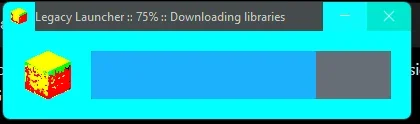
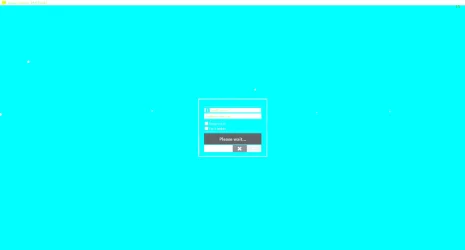
I'm experiencing a strange rendering issue with Legacy Launcher and TLauncher on Windows 11.
System:
- Windows 11 Pro/Home 24H2 (Build 26200.8875)
- Intel Core 5 210H
- Intel Graphics (Driver 32.0.101.5972)
- NVIDIA GeForce RTX 5050 Laptop GPU (Driver 581.34)
- Laptop: MSI Cyborg 15
Things I've already tried:
- DDU + reinstall Intel OEM driver
- Reinstall NVIDIA driver
- Different Java versions (Zulu Java 21.0.7)
- Java2D options (-Dsun.java2d.d3d=false, -Dsun.java2d.opengl=true, -Dsun.java2d.noddraw=true) (Chat gpt suggested)
- No improvement.
i dont really know why and how to fix but i think this kind of issue usually happen with java based app and also when i launch the client there isn`t any problem and can still get hundreds of fps
System:
- Windows 11 Pro/Home 24H2 (Build 26200.8875)
- Intel Core 5 210H
- Intel Graphics (Driver 32.0.101.5972)
- NVIDIA GeForce RTX 5050 Laptop GPU (Driver 581.34)
- Laptop: MSI Cyborg 15
Things I've already tried:
- DDU + reinstall Intel OEM driver
- Reinstall NVIDIA driver
- Different Java versions (Zulu Java 21.0.7)
- Java2D options (-Dsun.java2d.d3d=false, -Dsun.java2d.opengl=true, -Dsun.java2d.noddraw=true) (Chat gpt suggested)
- No improvement.
i dont really know why and how to fix but i think this kind of issue usually happen with java based app and also when i launch the client there isn`t any problem and can still get hundreds of fps
Attachments
My Computer
At a glance
Windows 11 Home Single Language 64-bit(10.0,2...intel core 5 210hrtx5050 , intel graphic
- OS
- Windows 11 Home Single Language 64-bit(10.0,26200)
- Computer type
- Laptop
- Manufacturer/Model
- Cyborg 15 B2RWEKG
- CPU
- intel core 5 210h
- Graphics Card(s)
- rtx5050 , intel graphic






